


The key pros and cons of Kanban are that it gives clarity, incremental change, and a reduction in workflow blocks, but with a lack of predictability and a risk of confusion in complex projects.
With that in mind, it may not be ideal for every project or team. But for the 56% of teams that use it, it can be utterly transformative to their workflows.
In this guide, we’ll explore the Kanban pros and cons, highlighting the advantages of Kanban in project management and the reasons why you might sometimes find the Kanban methodology to be a disadvantage.
You’ll leave knowing exactly how it can help you, and where it may hold you back:
Key Takeaways:
- Kanban’s key pros are that it provides:
- Task clarity
- Alignment for teams on task statuses
- Optimized team efficiency and focus
- Less risk of burnout
- The ability to set ‘work-in-progress’ limits
- Continuous workflow and improvement
- Kanban’s key cons are:
- Predictability is difficult
- It has limitations in complex projects.
- Regular updates are essential.
- It can be prone to confusion in complex projects and teams.
- All these negatives can be mitigated by using a project management tool, like Workamajig, that tracks and reflects progress in real time.
Kanban Advantages:

1. Gives Task Clarity
One of the major advantages of the Kanban system is the clarity it provides.
Using a Kanban board and Kanban cards clarifies where each task stands in a project and what your team needs to do to progress on the project.
You can go even further when using project management Kanban board tools like Workamajig. You can input a task description, subtasks (to-do list), deadline, progress status, and even conversations related to the task. This can equip team members with everything they need for individual progress.
2. Aligns Teams on Task Statuses
Kanban’s visualization of workflows ensures that everyone is aware of a task’s current status.
For example, if a Kanban card task is in ‘in progress’ or ‘in design’, then your team members don’t need to pester one another for an update. At a glance, you can see which tasks are being worked on and which ones are finished.
This can be great for cross-functional teams and remote teams, who might not be constantly communicating and cannot rapidly identify where the focus is.
Your team members will quickly know:
- What progress have we made in the project?
- What are my teammates doing?
- What am I supposed to be doing?
- What am I not supposed to be doing?
Ensuring everyone is aligned will help your team become more independent and self-initiating.
3. Improved Team Efficiency
Using Kanban also helps improve efficiency by setting clear priorities and allowing you to quickly spot bottlenecks.
These factors will help you become more effective as a team because everyone's energies will be directed to the right things at the right time.
Instead of wasting effort on confusion or misunderstandings, everyone will be on the same page.
4. Better Focus And Avoid Burnout
Time and energy are finite resources that can significantly impact the quality of work when overstretched.
High task visibility and work-in-progress limits allow your team members to increase focus and reduce multitasking.
5. You Can Set Work in Progress Limits
Work in progress limits (WIP limits) are a fundamental part of using Kanban to its full potential.
These self-set rules in each phase of a project allow you to prevent bottlenecks and blocks that ordinarily cause stalling, burnout, or a lack of focus.
For example, you can set rules so that your team can only pull work items from the backlog column once an item enters the ‘done’ column.
6. Continuous Improvements
Kanban brings gradual and continuous improvements, rather than drastic changes.
Through the movement of small tasks and sprints (instead of fixed-length commitments), it allows you to make minor yet meaningful tweaks during feedback and review rounds.
7. Continuous Workflow
At the core of Kanban is the advantage it brings to workflow. We often compare it to a conveyor belt.
If your team faces a continuous flow of work (instead of a defined start and end), Kanban will visualise and organise that flow in a clear and simple-to-manage fashion.
This makes it ideal for teams that have continuously arriving tasks, like bug fixes, updates, or support tickets.
8. Ease of Adoption
Kanban uses existing structures and roles, allowing you to relatively quickly adopt it without reinventing your entire team’s setup.
Instead, you simply create a Kanban board, Kanban cards, explain it to your team (and, if necessary, stakeholders), apply WIP limits, and get to work.
The Disadvantages of Kanban Methodology
1. Predictability is Difficult
The Kanban project management methodology is excellent because it’s so simple and flexible.
But because it lacks time frames and schedule details (unlike a Gantt chart), it might be difficult to predict when tasks are expected to be completed and when the whole project can be finished. Estimating will be challenging if your Kanban board is your only tool for tracking your projects.
This may be a big issue for teams that need a precise delivery date for stakeholders.
Solution:
- You can estimate delivery dates and timelines more realistically by measuring with metrics such as cycle time, lead time, and throughput.
- You can also add WIP limits to prioritize tasks and projects and make delivery more stable.
2. Limitations with Complex Projects
Kanban boards are effective as long as they don't become too overwhelming for the team to use. Suddenly, their work is broken down into chunks that need to be tracked, and that can be overwhelming for some.
Without proper maintenance, your Kanban board might become too complex and prove counterproductive for your team's efficiency.
Solution:
- When managing big projects, consider using swimlanes to add layers of organization to your Kanban boards.
- Consider using dependency markers to indicate the most critical parts of the workflow.
3. Updates Are Essential
For the Kanban methodology to work optimally, you should keep your boards up-to-date. This will require discipline from you and your team members.
If you miss even one update, you can cause delays, confusion, and reduce efficiency (especially if you’re limiting work in progress).
Solution:
- Use creative project management software like Workamajig, which will make updating your board easy and intuitive, reflecting it across your team in real-time.
- Explain to your team the importance of daily updates. Adding a simple rule, like “update the board as soon as work status changes,” is recommended.
4. Prone to Confusion
Flexibility and fluidity can be great for well-oiled teams that communicate well. But for teams prone to stuttering and tension, it can confuse roles and accountability.
Kanban does not put structures in place (like Scrum does), but instead uses the existing structures and roles you have set up.
For that reason, it can be wise to clarify your roles and accountability before switching to a Kanban system where people are encouraged to take initiative.
Solution:
- Keep workflow stages easy to understand and avoid too many columns.
- Define what ‘done’ means to all team members, with a note on the board if necessary.
- Clarify roles and accountability before switching to the Kanban system.
5. Large Projects Can be Hard to Split
Kanban works best when projects can be split into small tasks that move across the board. But if a task is too big or vague, it can stay ‘in progress’ for too long. This makes the board almost pointless or look ‘stuck’, making bottlenecks and progress hard to identify.
Solution:
- Split projects into small tasks or technical sub-tasks. If this isn’t possible for your projects, then it may not be for you and your team.
- Consider multiple boards for different teams if one becomes too crowded.
Pros and Cons of Kanban vs Other Project Management Methodologies
|
Methodology |
Pros |
Cons |
Best for |
|
Kanban |
|
|
|
|
Scrum |
|
|
|
|
Waterfall |
|
|
|
|
Agile Project Management Overall |
|
|
|
How Workamajig Helps Overcome The Disadvantages of Kanban
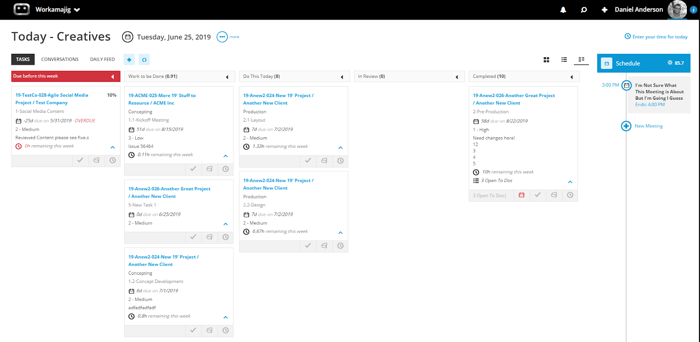
Workamajig is a project management software that helps make Kanban easy, while adapting to cover the gaps it can leave exposed.
With customizable Kanban-style visualisations amongst a range of templates and visualisations, your team can quickly switch between tools to see the full extent of your progress - beyond what Kanban displays.
For example, if you want to see your project in a calendar view, Gantt chart, or Burndown chart, you can do so in seconds.
All this is automated in real time - so your team can track task health status, resources, and timelines live.
Developed for remote teams and agencies, Workamajig brings everything from project management (from billing to communication) into one software platform.
If you’d like to learn more about how Workamajig can transform your project management, we welcome you to request a free demo with our team.
Find out how Workamajig supports winning agencies here.
FAQs on Kanban Pros and Cons
What are the main pros of Kanban?
Kanban’s main advantages are visual clarity, flexibility, continuous flow, and work-in-progress limits.
What are the main cons of Kanban?
Kanban’s main disadvantages are a lack of predictability, limitations on complex projects, the need for constant updates, and being prone to confusion.
When should you not use Kanban?
Kanban isn’t recommended for agile methodology teams that work on fixed or tight deadlines, require heavy planning, or work with very complex projects.
What are the 4 rules of Kanban?
The core principles of Kanban are to keep your existing structure, agree to incremental change, to respect current responsibilities, and to encourage leadership throughout the team.
How can you get around the downsides of Kanban?
Using a project management software, like Workamajig (which allows you to update task statuses in real time (and with automation) and helps you track metrics and calendar), is a great way to get around some of the risks of using Kanban.
You can also use ScrumBan’s hybrid approach to add some more structure to your team’s workflow.
Does Kanban work for large teams or big projects?
Yes! In fact, Kanban is a management method created by the Japanese car giant, Toyota. But it can become harder to manage as complexity grows. For that reason, big projects and large teams will benefit from using multiple separate Kanban boards, rather than one big mess!