


Kanban methodology is a highly popular agile framework that promotes incremental progress and work-in-progress limits.
Via the relatively simple Kanban board visual tool, you can see clearly defined work phases, current project status, and work capacity, all at a glance.
All it asks of your team is to update their work on the board and to follow the defined limits. Its flexibility makes it ideal for teams looking to improve efficiency in projects that face constant changes.
In this guide, we’ll explain when you should use Kanban, how it works, how to set WIP limits, and how to overcome the common challenges project managers face with it.
Key Takeaways:
- Kanban boards can be used to visualize work, track progress through stages, and limit work-in-progress.
- Kanban methodology helps improve the flow of incremental work and reduce waste and overworking.
- It’s best suited to continuous workflows, changing priorities, and preventing bottlenecks.
- Kanban is not suitable for projects that require predictability and regularly defined deadlines.
- WIP limits should be applied to prevent and expose bottlenecks.
- Metrics should be tracked to understand performance, capacity, and efficiency rates.
- Using Workamajig can improve Kanban predictability and allow teams to view them in real-time with integrated data.
What is Kanban Methodology?
Kanban methodology is an agile project management methodology used to visualize workflows and track progress through stages of completion.
Deployed via Kanban cards or Kanban boards, you can use it for constant improvement and a clear visualization of your progress and task status.
The origins of the name “Kanban“ actually come from the Japanese for “sign” (kan) and “card” (ban). It was initially devised at the Japanese auto giant, Toyota, in the 1940s by engineer Taiichi Ohno to fine-tune production processes so that output matched demand, and there wouldn't be overproduction of materials that would lead to waste.
Today, project managers use agile project management with Kanban to ensure that no resources are wasted, and quality is maintained throughout.
Kanban’s Core Principles
Kanban’s four key pillars should be understood and followed to help ensure that using a Kanban board works:
- You’ll start with your existing workflow (you’ll use Kanban to improve it, not tear it down)
- You’ll strive for incremental, continuous improvements.
- You’ll respect existing roles, responsibilities, and titles.
- You’ll encourage everyone to take the initiative.
Read our full guide on the principles of Kanban here.
How Do Kanban Boards Work?
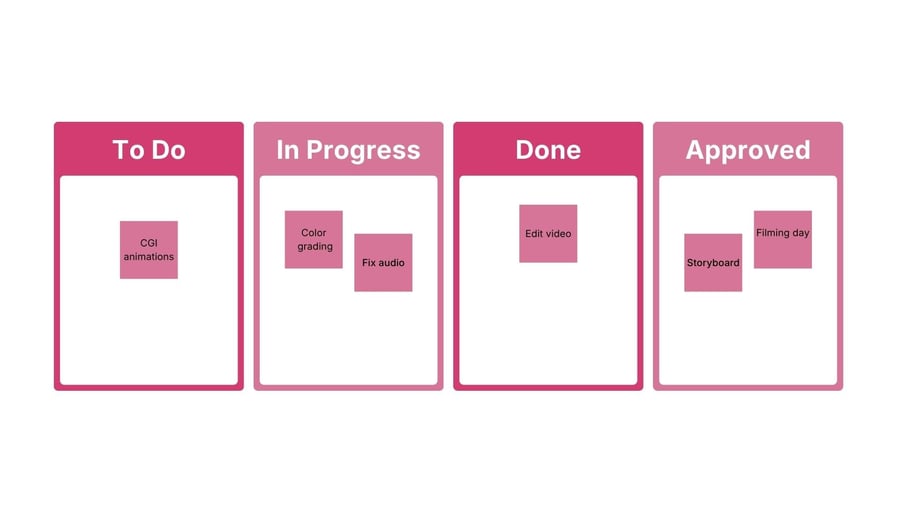
When used in agile, Kanban is a way to manage your work visually. This allows you to keep the work flowing continuously, often in short iterations or cycles, rather than limiting it to fixed sprints.
- Kanban boards work by separating stages into columns, like ‘To Do, ‘In Progress,’ and ‘Complete.
- Tasks can then be moved to the next stage when appropriate.
- With self-imposed work-in-progress limits, you can also cap how many tasks can be moved into “in progress”, to prevent bottlenecks and overstretching your team.
- You can also use flow metrics to make improved decisions over time (which we’ve covered further below).
Feel free to browse our free Kanban templates here to gain a better understanding.
When to Use Kanban Methodology in Project Management
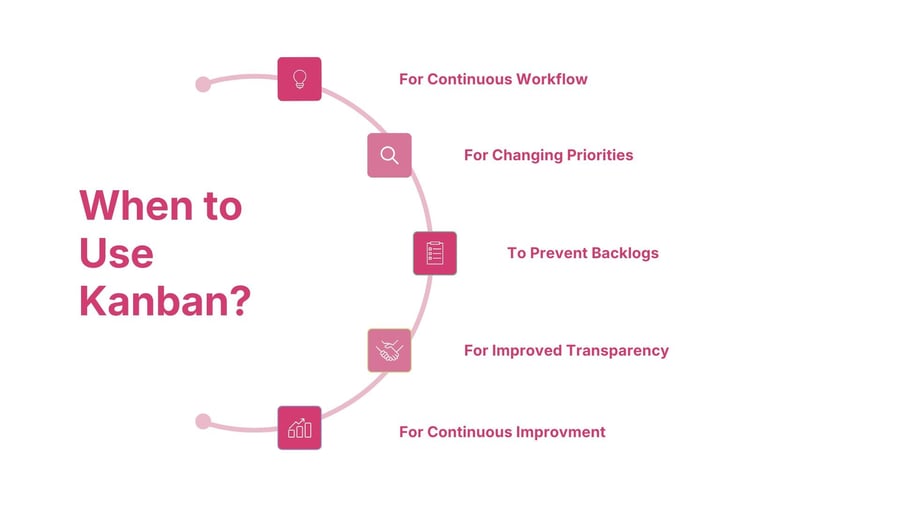
If your flow of work features unpredictability, a lack of clarity, and frequent blocks, then you’ll likely benefit from Kanban’s adaptive nature.
Here are five key reasons to consider using it:
1. You Have Continuous Workflows
Kanban is best suited to teams that face a continuous flow of tasks, rather than defined start and end dates.
In those cases, new tasks constantly arise, so it makes sense to have a clear conveyor belt.
For example, many IT teams use them when making bug fixes and support tickets. Or, a content team could use Kanban in regular publishing schedules.
2. You Have Changing Priorities
The Kanban method lets you prioritize tasks at any given time without disrupting your sprint cycle. That makes it a great fit for projects where priorities are in flux.
For example, a digital marketing team can adjust its campaign based on trends or feedback. Or, a web development team can decide which task makes sense to focus on next, if it aids the creation process.
3. You Want to Prevent Bottlenecks
If your team members are often overstretched, with too many open tasks, a common problem, then Kanban can help you clearly identify the current work-in-progress demand to prevent bottlenecks.
Self-imposed rules work wonders here. For example, you could say that the ‘in progress’ column can never have more than 3 tasks within it at the same time.
4. You Need Better Transparency
Visualizing what your team is working on becomes extremely simple via Kanban boards.
Suddenly, everyone can see the state of the project and each task. So, cross-functional teams and remote teams, who might not be constantly communicating, can rapidly identify where the focus is.
5. You Want Continuous Improvement
If you’re after gradual progress, rather than radical changes, then Kanban is the way to go. It promotes regular feedback loops and movement through small tasks and sprints, rather than fixed-length commitments.
Kanban Basics: How To Apply Kanban In Project Management
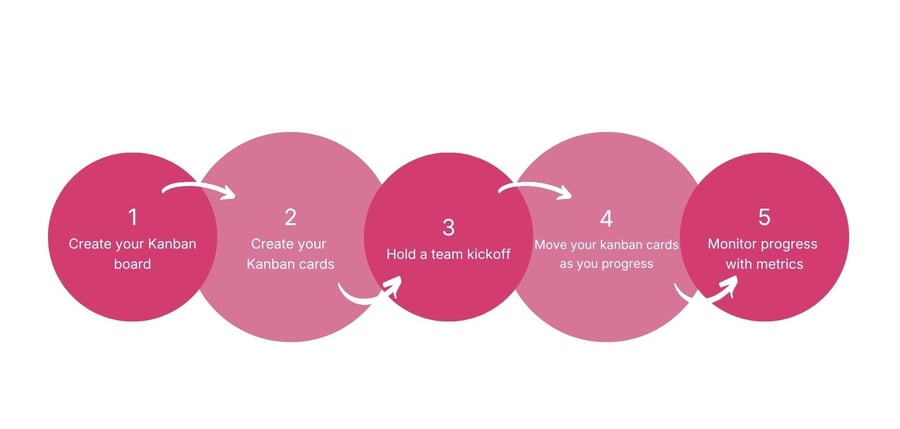
1. Create Your Kanban Board
To use Kanban, you’ll first need to create a Kanban board. This can be either physical or digital.
To start, simply divide it into at least three columns:
- To-Do (also known as backlog)
- Doing (work in progress or WIP)
- Done (completed tasks)
Of course, you can customize them to match your actual needs, such as ‘backlog’, ‘in design', 'in testing’, or ‘in review’.
2. Create Your Kanban Cards
Next, you'll need Kanban cards.
Each Kanban card represents a task that your project team needs to do. In a physical world, these would be sticky notes that you’d move on a board.
To make your Kanban cards effective, fill them in with a specific task name, a description, the person assigned to do the task, the deadline, and dependencies (if applicable).
3. Hold a Team Kickoff
Walk your team through the concept, explaining each column, any limits you’ve set for each column, and demonstrating how, when, and who should update a card’s status.
4. Move Your Kanban Cards As You Progress
All your cards (tasks) will begin under the To Do column.
As your team works on them, you'll start to move the cards along into the other columns.
Using project management software, like Workamajig, can allow changes to be reflected to every team member in real time.
5. Monitor Your Progress
While using Kanban methodology, you can take advantage of its visual clarity to help monitor for the following:
- Throughput: The number of tasks your project team finishes within a certain period
- Blockers: Factors that prevent a task from progressing. For software development, these can be major bugs. For marketing, these can be resource dependencies, approvals, etc.
- Lead Time: How long it takes for a task to travel from To Do to Done. For example, if it takes you three days to write a blog post, then the lead time for every post is three days.
The Use of Work in Progress (WIP) Limits in Kanban
You can set Work in Progress (WIP) limits to your Kanban board to prevent your team from taking on too much at once.
These limits can be of great help in revealing where bottlenecks appear, as you’ll quickly start to notice if you’re hitting the limit frequently.
For example, you may notice that you hit the limit in a ‘design’ column, suggesting that your design team is overworked.
Practical WIP Limit Tips
Determining the correct number of WIP limits has proven to be a stumbling block for many organizations, so here are some tips to help aid your decision-making:
- We recommend starting with a reasonable initial limit, based on the number of people who work in that stage (such as one primary task per person).
- Lower limits can actually improve flow, as teams can work faster as they’re not constantly switching between tasks.
- Don’t be afraid to adjust limits. For example, if you’re powering through work, then consider expanding the amount of work allowed per stage.
- You can also consider limiting work in progress on people, not just stages. For example, an individual may only be able to take on two tasks at any one time.
Using Metrics to Track Performance in Kanban
While moving a card from ‘in progress’ to ‘complete’ may seem like good performance, you’ll quickly find that Kanban lacks any depth in understanding performance.
Here are some metrics you can use to measure success while using the Kanban methodology:
- Measure lead time (the duration from start to finish of a work item) to determine the speed of your process.
- Use throughput counts (the number of items completed) over a specific time period to understand your rate of delivery and true capacity.
- Track the number of blocks you face over a period of time, so you understand the true consequences of blocks. For example, one day suggests your WIP limits aren’t too bad, while one week suggests it’s a bigger issue.
- Learn your flow efficiency by calculating the ratio of active work time to lead time. (For example, if a card takes 10 days to complete but only 2 days to involve actual work, then flow efficiency is 20%).
- Use control charts to understand the variability and trends in your work, with individual cycle times plotted over time.
The Disadvantages of Kanban Methodology
It’s just as important to know when not to use a Kanban system, so consider these potential consequences:
There’s Minimal Structure
Kanban doesn’t use strict guidelines as Scrum or waterfall do. Your team will need to define their own workflows and determine when an item can be switched between columns.
That leaves it prone to inconsistency and a lack of rhythm. So, if structure is something your team needs, it might not be for you.
The Lack of Predictability
As tasks progress from the ‘to-do’ column when there’s space, it can be difficult to forecast exact completion dates.
That can cause headaches for teams that need precise delivery dates or for stakeholders who want predictability.
It Relies on Discipline
Kanban methodology relies on team members taking responsibility. They must follow WIP limits and report their progress during stand-ups. If not, a backlog overflow or confusion can arise.
It’s Prone to Confusion
All this flexibility and customization can be very empowering. But for a team that isn’t well-oiled or open to communication, confusion can arise over roles, planning, and accountability.
Common Kanban Implementation Challenges
Realistically, some leadership may push back on a reliance on Kanban as a project management tool.
Leadership Resistance
Managers often push back on the idea of WIP limits, because they seem counterintuitive. But data showing improved focus within a few tends to resolve the debate.
A Lack of Urgency
Without scrum sprint goals and defined deadlines, some teams may lose momentum. Ultimately, you need to come back to the type of work you're handling and whether a Kanban board makes sense.
Difficulty Handling Dependencies
Coordinating dependencies across multiple teams with separate Kanban boards can be a problem. We recommend using software like Workamajig, which lets teams quickly see others' progress in real time.
The Board Becomes Decoration
Teams that don’t fully get behind the idea of Kanban methods can see it turn into decoration.
To avoid that, you may need to make a culture change that rewards autonomy and self-discipline.
Should You Use Software for Kanban Boards?
There are several Kanban tools available for you to choose from; you can use a physical board or Kanban software.
We recommend using software; otherwise, your team will be constantly updating a clunky spreadsheet or Google Doc.
The best Kanban software will allow you to customize your columns, add ample detail to your tasks, and assign them to the members of your Kanban team.
When picking a tool for your kanban-style project management, be sure to consider your specific needs. Remember, the best Kanban tool for your team isn't always the one with the most features, but the one with the specific functionality that your team needs.
How Workamajig Optimizes Kanban Use
Workamajig is a project management software that updates across all team member dashboards in real time.
With customizable Kanban-style visualizations, your team can create columns for different work stages and see project progress at a glance.
What sets it apart from the rest, though, is its integration.
Your budget, timelines, resource allocation, and task health status are all in the same system. So, visual tools like Kanbans update in real time with automation.
With a click of a button, you can also flick to Gantt charts, process flows, and calendar views, helping you avoid some of the pitfalls of Kanban frameworks.
All that is accessible with templates or deep customization.
If you’d like to learn more about how Workamajig can transform your project management, we welcome you to request a free demo with our team!
FAQs on Kanban Methodology
What is Kanban?
Kanban is an agile methodology that helps teams manage their work by visualizing flow, limiting work-in-progress, and allowing for continuous improvements.
Does Kanban use iterations or sprints?
Kanban does not require fixed iterations or sprints. Instead, it supports continuous flow. However, you can use iterations that are as short or flexible as you like.
What is Scrumban?
Scrumban is a hybrid between Scrum’s structure and roles, and Kanban’s flow and flexibility.
What is an agile framework?
An agile framework is a structured but flexible approach to project management that uses Agile’s values and principles. Kanban is a methodology that fits within it.