

Kanban and Sprint are both agile project management methodologies that share some core similarities.
But they also have considerable differences that determine whether the workflow is continuous and flexible (with Kanban) or structured and pre-defined (with Sprints).
Deciding which one is best for you will come down to your priorities and goals.
In this guide, we’ll clearly explain the differences in Kanban vs Sprint, when best to use each method, and how you can even combine them.
Key Takeaways:
- Kanban and sprint are two approaches to using agile project management.
- Kanban is a visual management tool that focuses on an incremental, continuous flow of work, with work-in-progress limits to prevent bottlenecks.
- Sprints are short, fixed periods of work that provide focus on pre-defined goals and deliverables to meet a deadline, where there is a sprint retrospective.
- You can think of Kanban as a flowing conveyor belt and a sprint as a time box.
- Kanban is best for agile teams that receive continuous and frequently changing work.
- Sprints are best for teams that need a fixed rhythm, with clear short-term goals.
- Sprints and Kanban can be used together in a ‘ScrumBan’ hybrid.
- Using a project management software, such as Workamajig, is perfect for use with real-time integration.
What Is Kanban?
Kanban methodology is a visual management tool used to optimize workflow processes efficiently and effectively.
Kanban’s principles promote continuous improvement through increments, a continuous flow of work, and visual management.
The Kanban method is visualized via ‘Kanban boards’. This tool uses columns that separate progress stages, which tasks (or ‘Kanban cards’) will move between to indicate their status.
For example, you may move tasks between: To Do (Backlog), Doing (Work In Progress), and Done (Completed).
What Is A Sprint?
Sprints are short, fixed periods of work used in Agile Scrum.
Usually lasting 1 to 4 weeks, they are concentrated work intervals where a self-organizing Scrum team tackles goals set by the Product Owner.
At the end of a sprint, the team submits their deliverables, receives feedback, and evaluates how the feedback affects the priorities for the next sprint.
You can think of sprints as a ‘time-box’, where the team plans, completes, and reviews work.
This approach helps bring focus, crucial feedback, and opportunities to improve at the end of a ‘cycle’.
Kanban vs Sprint: What’s The Difference?
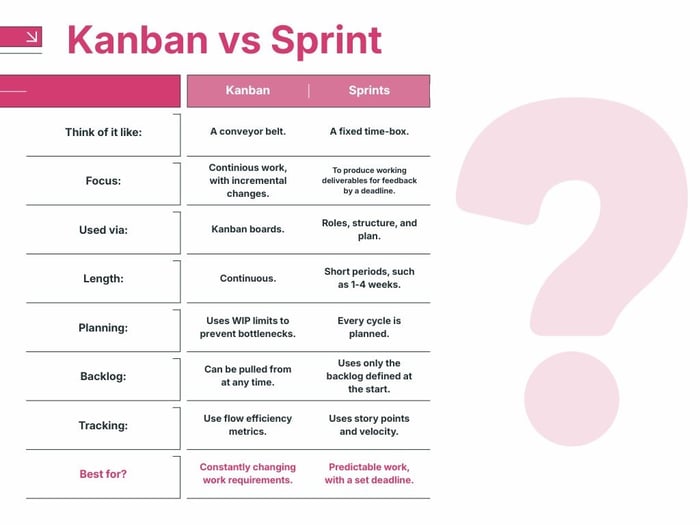
Sprints are time-boxed iterations where teams focus on getting things done. On the other hand, Kanban is the method of managing a team's project tasks using a Kanban board.
Kanban is focused on continuous improvement –the gradual decrease of lead times for tasks. However, it's not time-bound.
- Kanban: Work is started continuously (like a conveyor belt) and visualized on Kanban boards. This brings a consistent workflow, continuous improvement, and reduction in bottlenecks via work-in-progress limits (WIP limits).
- Sprints: Work is completed in time-boxed iterations. The goal is to produce working deliverables for testing and feedback at the end of each iteration cycle. This allows the team to go through multiple testing rounds and iteration cycles before making a final product.
Continuous Flow vs Timeboxing
The biggest difference between Kanban and Sprint is how work is managed.
- Kanban provides a continuous flow system. You only start new tasks or move them to the next stage when capacity allows it.
- Sprint uses fixed iterations. Work is committed upfront and has a set cycle time, which is reviewed at the end of the sprint.
Live Visibility vs Pre-Defined Visibility
- Kanban boards show a real-time visualization of how work is progressing, where it’s blocked, and what’s left to do.
- Sprints focus on the current sprint only and display tasks defined during sprint planning, which don’t change.
WIP Limits vs Sprint Planning
- Kanban can limit work in progress to prevent your team members from being overstretched. This prevents multitasking.
- Sprints enforce discipline during planning by limiting work to what fits from the sprint backlog.
An Open Backlog vs a Planned Backlog
- Kanban allows for the product backlog to be pulled from at any moment, within the WIP limits.
- Scrum pulls from the backlog during sprint planning, and doesn’t see additions until the next sprint cycle.
Flow Metrics vs Story Points
With Kanban vs Sprint, there’s also a difference in the reporting of metrics:
- Kanban uses metrics that track the flow efficiency, such as cycle time, lead time, WIP aging, and throughput.
- Sprint reporting focuses on story points and velocity, with the use of tools such as burndown charts.
Does Kanban Have Sprints?
No, the Kanban system doesn’t use sprints as its focus is on continuous flow and WIP limits, and not fixed timeboxes.
Can I use Kanban with a Sprint?
Although Kanban does not use sprints itself, you can use the two in a common hybrid approach called ‘ScrumBan’.
In ScrumBan, you use the sprint timebox approach for a short period of focus, but with Kanban’s visual board, flow, and WIP limits.
For example, if you have a four-week sprint for your Scrum team, then you could use a Kanban board to track each task’s progress from ‘To Do’ to ‘Complete’, while limiting the amount of work per stage.
Sprint vs Kanban: Which Should I Use?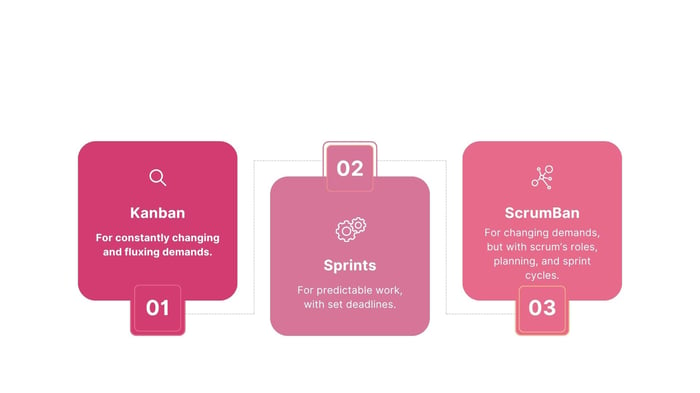
When Kanban Is Best
Kanban is ideal for agile teams that receive work continuously, face frequently changing priorities, want to avoid bottlenecks, and need a clearer visualization of their workflow.
It’s ideal if you care more about a smooth flow than fixed delivery dates.
For example, if your team’s tasks come in a flux throughout the month, such as via support tickets, bugs, or feedback, then it’ll be best for your team.
- Constantly changing work with constant reprioritizations? Go for Kanban.
When Sprint Is Best
Sprints are ideal when you need a fixed approach, with clear short-term commitments, and a more structured rhythm.
With a goal in sight at the end of every few weeks, a sprint is best for teams who will benefit from regular planning, reviews, and a stronger focus on a pre-defined scope.
- Predictable work that needs to be completed by a deadline? Go for sprints.
When Using ScrumBan is Best
Alternatively, if you won’t have a blend of both, you can use ScrumBan.
The hybrid of Scrum and Kanban makes it ideal for when you have changing demands, but still want structured planning and review points.
You’ll still benefit from Kanban’s visualization and WIP limits, but without Scrum’s full set of fixed sprint structure.
Kanban Boards vs Sprint Boards
While Kanban is famous for its visual Kanban boards, you can also visualize your sprint cycles with sprint boards.
The difference is:
- Kanban boards optimize flow through stages, while making bottlenecks clear, with WIP limits.
- Sprint boards visualize the work items already committed to a specific sprint, before resetting at the end of each cycle.
How Using Workamajig Transforms Kanban and Sprint Management
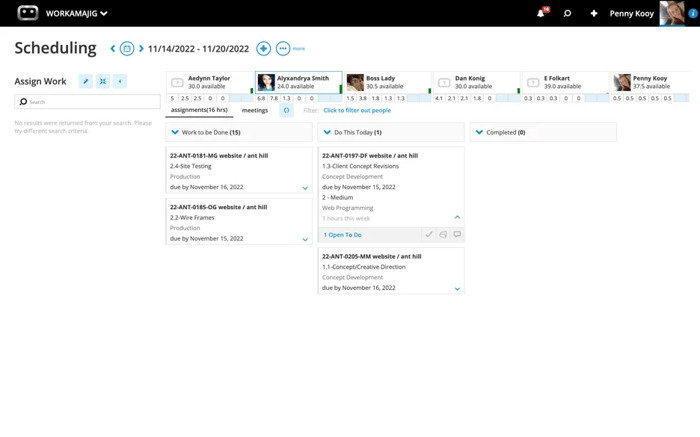
Switching between Kanban, Scrum, and hybrid workflows with ease should be an option for every project manager.
Workamajig allows that.
As a project management software built for agencies, it supports agile methodologies like Kanban, sprints, and scrums in real time.
All team members gain access to a dashboard that is fully integrated into your organization’s budgets, timelines, resources, and task status. So, when progress is made, everyone is kept up to date in seconds.
And with visual tools like Kanban boards, Gantt Charts, process flows, burndown charts, and so much more, you can visualize your work in seconds.
All that is accessible with templates or deep customization.
If you’d like to learn more about how Workamajig can transform your project management, we welcome you to request a free demo with our team!
Wrapping Up: You Can Combine Kanban and Sprint!
If you just want to visualize your tasks and use a continuous workflow, Kanban can be a great option. The Kanban cards and Kanban board are relatively straightforward to use.
Usually adopted by software developers, using Sprints can be effective if you want to subject your deliverables to many rounds of testing and feedback.
There’s also the option to use both together: Use sprints to set concrete goals within short work periods, and use Kanban to keep track of the tasks you need to complete the sprint.
Ultimately, picking the best tools to use for your team will depend on your project. Be sure to choose a flexible project management tool like Workamajig, which supports both the Kanban and sprint methods, so you’re free to adapt your techniques to your needs.
FAQs on Kanban vs Sprint:
Is Scrum the same as a sprint?
No. Scrum is a framework, within which a sprint is a core component.
What is Kanban vs. Scrum?
Scrum is a type of agile framework used by teams to solve complex problems. It defines the roles, events, and ceremonies. Work is completed in short cycles, known as sprints.
Which is better between sprints and kanban?
Neither is ‘better’. The right choice comes down to your priorities. Sprints are best for scrum teams with complex, deadline-driven projects who want a clear roadmap.
Kanban works best for continuous work projects with flexible timelines that need a clearer visualization to align team members and stakeholders.
Are there roles in Kanban and Scrum?
ScrumBan has defined roles, such as scrum master, product owner, and team members. Kanban does not prescribe roles; instead, it uses the existing structure.
Which teams use Kanban?
Kanban teams are common in areas that have continuous tasks, such as manufacturing, marketing, support teams, and operational teams.
Which teams use sprints?
Sprints are often used by software development teams, product development teams, and R&D teams.
Can I switch between sprints and Kanban?
Yes. This is quite common between projects, especially when you need a bit more flexibility.
What does Kanban mean?
Kanban is the Japanese word for ‘visual card’. It was developed by Japanese car manufacturer Toyota in the 1940s to help them improve their workflows.