

 Scrum boards and Kanban boards both visualise workflows similarly, but have some key differences that may make one more appropriate for your team than the other.
Primarily, the key difference is that Scrum boards have predefined work that must be completed by the end of a sprint, whereas Kanban boards have no defined duration and new work can be added at any time.
Kanban boards also have one main lane for all work items (or "tickets"), while Scrum boards always have multiple lanes, because tasks are separated further (such as in user stories or by team members or groups).
In this guide, we’ll explain the similarities and differences between Scrum boards and Kanban to help you make an informed choice that will help you meet your goals efficiently.
Key Takeaways:
- Scrum boards and Kanban boards are both visual tools used to track and manage tasks in projects.
- They allow you to break down the project into small chunks, which you then move between ‘work stages’ (the columns) on the boards.
- Scrum boards use fixed sprints and pre-defined work.
- Kanban board time boxes have no defined time box and can feature continuous work.
- Kanban boards can use work-in-progress limits to prevent bottlenecks.
- Scrumban is a great choice for teams who find Scrum to be too rigid, but Kanban to be too flexible.
- Kanban is better for those who need flexibility due to unpredictability.
What is Scrum?
Here’s a quick recap on Scrum, to help you understand how Scrum boards work in context:
The basic concept behind the Scrum process is to divide a project into small pieces so that teams can complete each piece in a short time. This allows teams to test and evaluate each deliverable and incrementally create the final product.
At first glance, dividing work into smaller chunks in Scrum seems quite similar to Kanban's approach. But there are some further differences:
Kanban Boards vs. Scrum Boards: The Key Differences
|
Aspect |
Scrum board |
Kanban board |
|
Work style |
|
|
|
Visualisation |
|
|
|
Time frame |
|
|
|
Board reset |
|
|
|
WIP limits |
|
|
|
Planning |
|
|
|
Roles |
|
|
|
Best for |
|
|
What Are Kanban Boards?
Kanban boards are visual tools for tracking a continuous flow of tasks. You can think of them like an organised conveyor belt of tasks.
They make task status clear via columns like To Do, In Progress, and Done. They can also use Work In Progress limits to enable control over bottlenecks and burnout.
This can be great for helping teams quickly understand what’s left to be done, where the blocks are, and to prevent burnout.
Unlike Scrum boards, Kanban boards can be infinite. Instead of a defined backlog and sprint duration, the backlog can be consistently refreshed with new tasks.
Kanban also uses the existing structure of a team, unlike Scrum’s reliance on Scrum set-ups.
What are Scrum Boards?
Scrum boards are also visual tools for tracking work and are very similar to Kanban boards.
The difference is that they are used to track work for Scrum teams during a sprint. That means the work is predefined at the start, with a sprint duration and deadline set.
Like Kanban boards, Scrum boards also display work stages (the columns). They also use swim lanes (the rows) to separate the work of different teams or team members. This way, tasks that correspond to each user story can be easily segregated.
Scrum boards can help a Scrum team align and quickly understand what tasks are being worked on, are complete, and are yet to be started.
What is Scrumban?
Alternatively, you can go for the hybrid agile approach of ‘Scrumban’. This combines the Scrum framework with Kanban’s flow-based flexibility and WIP limits.
Scrumban can be great when work arrives unpredictably and continuously, but you still want that structure that Scrum offers.
Which Should I Use: A Scrum Board or a Kanban Board?
You should use Scrum boards and Kanban boards when you want to visualise, track, and manage workflows that are iterative and help tackle bottlenecks.
Choose a Scrum Board When:
- You need structure and predictability in your planning cycles.
- Your team works best in time-boxed, fixed sprints.
- You have a planned chunk of work with a deadline.
- You want regular sprint reviews and retrospectives.
Choose Kanban When:
- Work comes in continuously, instead of fixed chunks.
- You need flexibility for the re-prioritization of tasks.
- You want to focus on bottlenecks and use work-in-progress limits.
How to Use Scrum Boards and Kanban Boards
To use Kanban and Scrum boards, you’ll need to first create a visual board. This can be either physical or digital.
The board should separate work stages into vertical columns, and feature tasks which are represented by ‘cards’. In Kanban, we call these Kanban cards. For Scrum boards, they’re just called tasks.
If you’re in a Scrum team, your scrum master will then need to determine the sprint backlog of tasks before starting, as well as the fixed sprint cycle duration.
In Kanban teams, you don’t need to worry about that, but you should determine work-in-progress limits in areas prone to bottlenecks.
For both, you must consistently update them. That simply means moving the cards along the board to ensure that their status reflects the team’s progress. Informing your agile team to do this at the beginning and completion of any task is a good rule.
Following the Kanban principles will also allow you to maximize its benefits.
Scrum and Kanban Board Examples:
A Website Launch
In the creation and launch of a site, you could use Scrum boards for a 2-week sprint, where design, copy, and service pages are created, followed by release and sprint retrospective. This would enable you to break work down into smaller chunks that move through the board, with the deadline in view.
Alternatively, you could use a Kanban board for continuously flowing ideas from your team and the client, rather than pre-defined work.
Software Development Team
Imagine you’re the product owner for software that’s already released. You need to make improvements and fixes to the software, based on client feedback and team ideas.
You could use Scrum boards to get through a defined product backlog, keeping focus stable until the end of the sprint.
Or, you could use Kanban to pull work from new tickets that come in from clients and users, allowing for a continuous delivery and flow of work, where you prioritize the most important tickets.
Marketing Team
Imagine you’re a marketing team with a campaign to finish for a big client. If it’s a sprint scenario, with clearly defined objectives such as ad creation and ad publication, then you could use a Scrum board to get through the work from point A to point B.
But if you’re likely to be getting ongoing campaign requests, then you’ll likely benefit more from Kanban as you can avoid blocks when requests come thick and fast, and prioritize what matters most.
How Using Workamajig Optimizes Scrum and Kanban
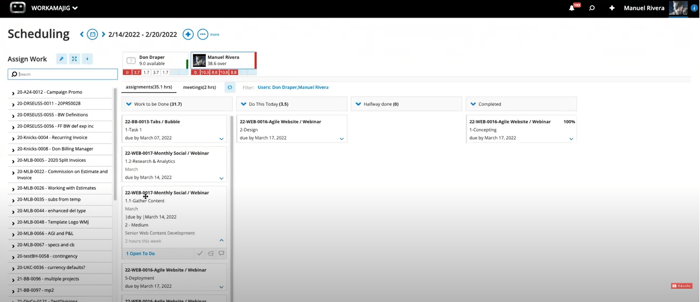
If you need to use a Scrum board or Kanban board for your team, but are concerned about the practicality of keeping it updated and the gaps it can leave, then using Workamajig can transform your project management.
Workamajig is an all-in-one project management software that provides real-time monitoring and management for you, your team, and even your clients.
With Kanban-style visualisations connected to budgets, timelines, and resources, your team can view real-time status updates at a glance.
This allows you to go far beyond Kanban’s usual capabilities. For example, your team members can log hours directly on Kanban cards, automatically updating your project budgets in real time.
You can also flick between visual tools and templates, such as Kanban and burndown charts, or Gantt charts, and calendar views.
This is just a brief look at the full capabilities of Workamajig.
If you’d like to learn more about how Workamajig can transform your project management, we welcome you to request a free demo with our team!
FAQs on Scrum vs Kanban Boards
Are Scrum boards and Kanban boards the same?
Not quite. Scrum boards are very similar to Kanban boards, but Scrum board work must be complete by the end of a sprint, while Kanban is flow-based. Both are commonly used in agile project management.
Should I use Scrum boards or Kanban boards?
Scrum is better for fixed planning cycles with clear sprint goals. Kanban is better for a self-organizing team and continuously arriving work that needs a flexible and smoother tracking system.
What are work-in-progress limits?
Work in progress (WIP) limits are rules you can set on Kanban boards to prevent bottlenecks and burnout. For example, you could create a limit that your team can only have 3 cards in the ‘in progress’ stage at any one time.
What metrics can you use to analyse Scrum and Kanban Boards?
Scrum uses metrics such as burndown charts and velocity, while Kanban board performance can be measured with WIP limits, cycle time, throughput, and lead time. You can then use these results to help improve your next sprint or Kanban project forecasting.
Recap of Kanban vs. Scrum:
Scrum boards and Kanban Boards are very similar in what they track. But remember that a Kanban board represents tasks in a project, and a Scrum board represents tasks within a sprint.
Knowing the limitations of each will help you with your sprint planning, allowing you to optimize your workflow via either continuous improvement (in Kanban) or prioritized work in fixed sprints (in Scrum).
Using a project management software like Workamajig is highly advised, particularly when using cross-functional teams and if you want to track metrics and gain a clear, adaptable visualization of your work.