

An implementation plan is a roadmap that explains how a strategy or project will be executed.
While a strategy outlines what you want to achieve, an implementation plan follows up by stating how, when, by whom, and with what resources it is completed.
You can think of it as the ‘mise en place’ of project management. By outlining your resources and action plans ahead of time, your projects will run smoothly, more safely, and with an increased focus on quality.
In this article, you’ll learn about what goes into an implementation plan, why you need one, and some pro tips on creating one that works for your project team.
Key Takeaways:
TLDR? Here’s a quick breakdown of what you’ll learn in this guide:
- An Implementation Plan is a roadmap, providing clear steps to make a project a success.
- Using one prevents confusion and misalignment.
- As a centralised document, it aids communication and decision-making.
- It should include goals, communication plans, roles, resources, a risk assessment, tasks, and milestones.
- Using the right project management software streamlines the process, making progress, issues, and solutions clear in real time.
What Goes Into an Implementation Plan?
An effective implementation plan is presented in a document and should clearly define the following:
- Tasks: The actionable steps that the project team needs to accomplish to deliver on the project.
- Timelines and key milestones: The expectations on when tasks, features, or other deliverables should be completed for project success.
- Roles and responsibilities: Identify who is involved with the project and how they are expected to contribute. This also helps inform which tasks are assigned to each team member and clarifies their skill sets.
- Resources: Resource allocation, including budget, tools, software, hardware, and staffing required.
- Dependencies and risks: A summary of the obstacles that must be first resolved and any potential risks, with mitigation strategies for each.
- Processes: A list of all the standard practices, management plans, communication plans, monitoring, and quality control that the team will use to work and communicate.
- Metrics: Stating key performance indicators (KPIs) and other acceptance criteria for tasks allows you to track progress and determine whether individual tasks, milestones, or the project as a whole is working.
Why an Implementation Plan Matters
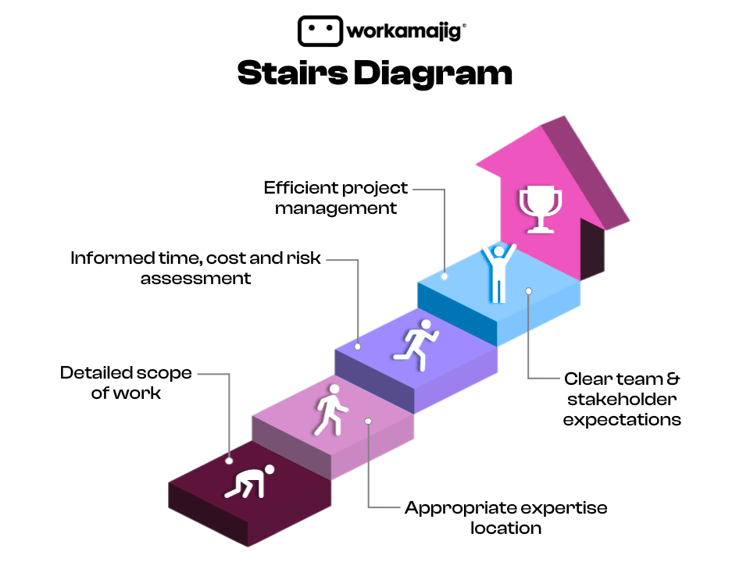
Like all project management tools, an implementation plan is designed to increase your project’s success rate. It will help create the following advantages for your team:
1. Gain clarity and direction
You can’t expect to deliver a cohesive, let alone functional, product or experience if your team is pulled in different directions.
A project implementation plan serves as a single reference, helping to align team members on shared project goals and ensuring that expectations are both set and met in the project life cycle.
2. Improved communication
When team members understand their responsibilities, check-ins are simplified, decision-making is faster, and accountability for completing tasks is strengthened. This reduces overlap in effort, helping to optimize the use of time and budget.
3. Organizes information
The implementation process also aids in making sure information can be accessed where it’s expected, by the people who need it.
When your team members have sufficient access to relevant information, they make faster, better decisions. This is especially true when using project management software.
4. Minimizes risk
Projects are composed of many moving parts, where any small change can create major problems for your team.
But when information moves freely and properly through your team, it’s easier to spot risks from further away, giving you more time and resources to either prevent them from impacting your productivity.
An implementation plan promotes efficiency by establishing a shared vision, streamlining communication, organizing information, and proactively managing risks.
A 4-Step Guide to an Effective Project Plan Implementation
Now that we understand the concept and importance of the implementation plan template, it’s time to build your own.
First, know that an implementation plan is a document. You can gain our template further down below.
To streamline the process, it’s highly recommended that you use a project management tool that allows for real-time, online collaboration. You’ll reinforce the advantage of keeping information accessible, and as a living document, which allows your team to keep the plan updated every step of the way.
Once you’ve set up a document, it’s time to add the following:
1. Goals and communication
Your implementation plan should outline specific objectives based on your overall strategy or initiative: what are we trying to achieve? What deliverables are expected from this project?
From there, goals extend into metrics, which are used to evaluate progress. Consider whether time, output, or performance-based metrics are necessary, with these questions:
- Time: When should x be accomplished?
- Output: In what format/medium should a delivery be made?
- Performance: What indicates that the delivery/output is a success?
Familiarity with setting SMART goals will be very helpful in this step.
From here, you will want to start documenting how your project team communicates. For example:
- What goes through email?
- Does your team use any real-time chat tools?
- Will feedback be coursed through there, or through your task/project management tool of choice?
Following these tips can keep all information easily accessible while working on your project.
2. Research, resources, roles, and responsibilities
After setting your project objectives, it’s time to document which resources are at your disposal.
This includes your overall timeline, your budget, and your team members who can be assigned to work on the project. Think of this step as if you’re preparing all your ingredients before you start cooking a meal.
Capacity planning and building a RACI chart are great skills to have during this stage of implementation planning.
When identifying team members for the project, it’s important to consider not just their skills, but also their availability. You will also want to consult with them as you build more of your implementation plan, as their expertise provides perspective and insight that you might lack.
3. Risk assessment and management
Once you’ve conducted an inventory of your resources, you will notice potential gaps in your capacity, whether that’s a lack of manpower or skills, specific hardware or software, budget, or time.
Factors such as PTO and holidays will directly impact your team’s capacity in certain periods, which will require you to adjust project timelines or move around resources as necessary.
If you don’t have one yet, building a risk register is a great way to support your implementation plan. A SWOT analysis is also commonly used to aid in risk management, as well as in the research stage.
One underrated step you can take is to actually address any risks that are easily solvable before you start the project. The more risk you can eliminate before the project starts, the less likely it is that things snowball at more crucial stages.
4. Tasks, milestones, and assignments
37% of projects fail due to a lack of clear goals and milestones. So this is arguably the most important step. Here you’ll build an action plan of how to execute the project.
Tasks
Tasks are most effectively defined by the experts, who are your team members. Thankfully, you’ve already gained a clear view of who is involved in the project in step 2.
Begin the action plan by mapping out tasks and assigning them to the optimal team members (based on their skills).
Gantt Charts
A Gantt chart is the best method here, as it provides an intuitive look into how tasks might or need to be scheduled.
Integration with a project management tool will make your life much easier, as it will likely already have Gantt chart functionality built in. So, you don’t need to try to recreate a Gantt chart’s features directly on the document. Instead, just export your task list in that format, or link to it in the document.
It’s also important to leave wiggle room in your implementation timeline, as it is next to impossible to fully account for every risk or change, especially for longer projects. Equally important is identifying and highlighting dependencies, which also help inform specific priorities between related tasks.
Document Updates
You now have a working version of the implementation plan that you can use to start work on the project. But the implementation planning doesn’t stop there!
Remember: an implementation plan is a living document, which means you and your team will need to update it as you learn more about the project along the way.
This is especially important when new risks or issues are identified, as well as any changes to the timeline caused by updates to the project scope or your team’s capacity.
FAQs
What’s the difference between an implementation plan and a strategic plan?
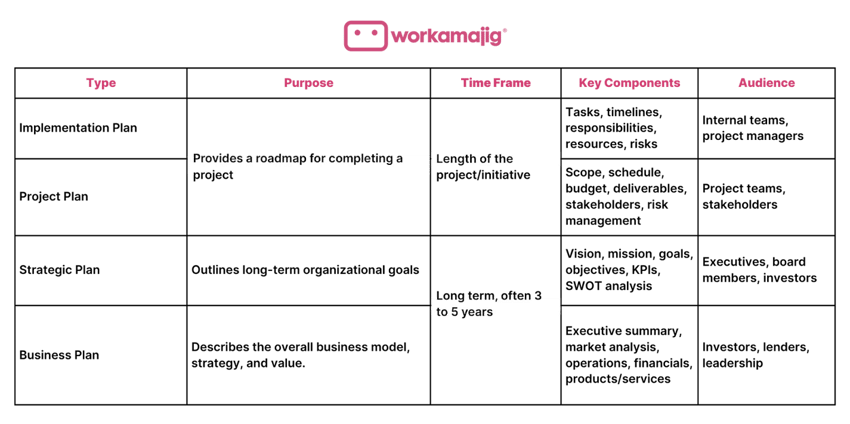 As we described above, an implementation plan acts as a building block that goes on top of a strategic plan. This makes them different in a few ways:
- Purpose and time frame: A strategic plan outlines a long-term vision, which informs a more specific set of goals and objectives for an implementation plan, often achievable in a shorter time frame. This is typically the full length of a specific project, instead of the typical quarterly or yearly window that strategic plans account for.
- Audience: A strategic plan takes a high-level approach and speaks more to people like executives and investors. An implementation plan is aimed more at project managers and teams.
Project Plan vs. Implementation Plan vs.?
While an implementation plan and a project plan are related, they are also made distinct by their audience.
An implementation plan is designed primarily for the team working directly on the project, and focuses on specific actions and decisions that enable them to deliver to the required standards.
A project plan acts as more of an overview of the project. It trades specificity for range, and speaks more to executives, customers, or other key stakeholders. The project plan is designed to give them visibility into the project, without overwhelming them with the more technical details.
Business plan vs. Implementation Plan?
Ultimately, an implementation plan shares a relationship with the business plan, but it is much more removed compared to a strategic or project plan.
A business plan will often precede all other plans, as it describes the business as a whole. Its core audience, business model, and the range of products or services it intends to offer effectively provide a case for why the business is necessary or worth investing in.
The implementation plan is a much more specific set of guidelines for how one project in the overall strategy is executed, and is designed in alignment with the business and strategy plans.
For a quick comparison between the above project management tools, refer to the table below:
What are typical risks and challenges to watch out for while building an implementation plan?
An implementation plan both relies on and informs other project management resources to work. Here are a few challenges to anticipate when building your implementation plan:
- Lack of a clear implementation strategy:
- Since an implementation plan builds on an established strategy, a poorly planned one makes for a shaky foundation.
- Consider treating strategy planning as an entirely prerequisite task to implementation planning.
- Work on that before investing in the project execution, to ensure that the team and the project align with long-term goals.
- Resistance to standards and change:
- Having a cross-functional team means you have a team with a wide range of perspectives, preferences, and working styles.
- This can make it difficult to align on a strategy, especially when it affects their day-to-day process.
- So, it’s critical to involve them in the planning stages, so you can make meaningful compromises and enforce a shared ownership of both the project and the process required to deliver quality work.
- Lack of Awareness of Project Management Tools
- One challenge that often flies under the radar is a lack of awareness of the sheer depth of options when it comes to project management tools.
- In implementation planning alone, knowing how to use tools like the Gantt chart, RACI chart, risk registers, and capacity planning tools provides a huge boost to productivity.
Our Free Implementation Plan Template
Make use of our free implementation plan template to get started. While this template covers the basics, you can streamline and automate your workflow through a project management system such as Workamajig.
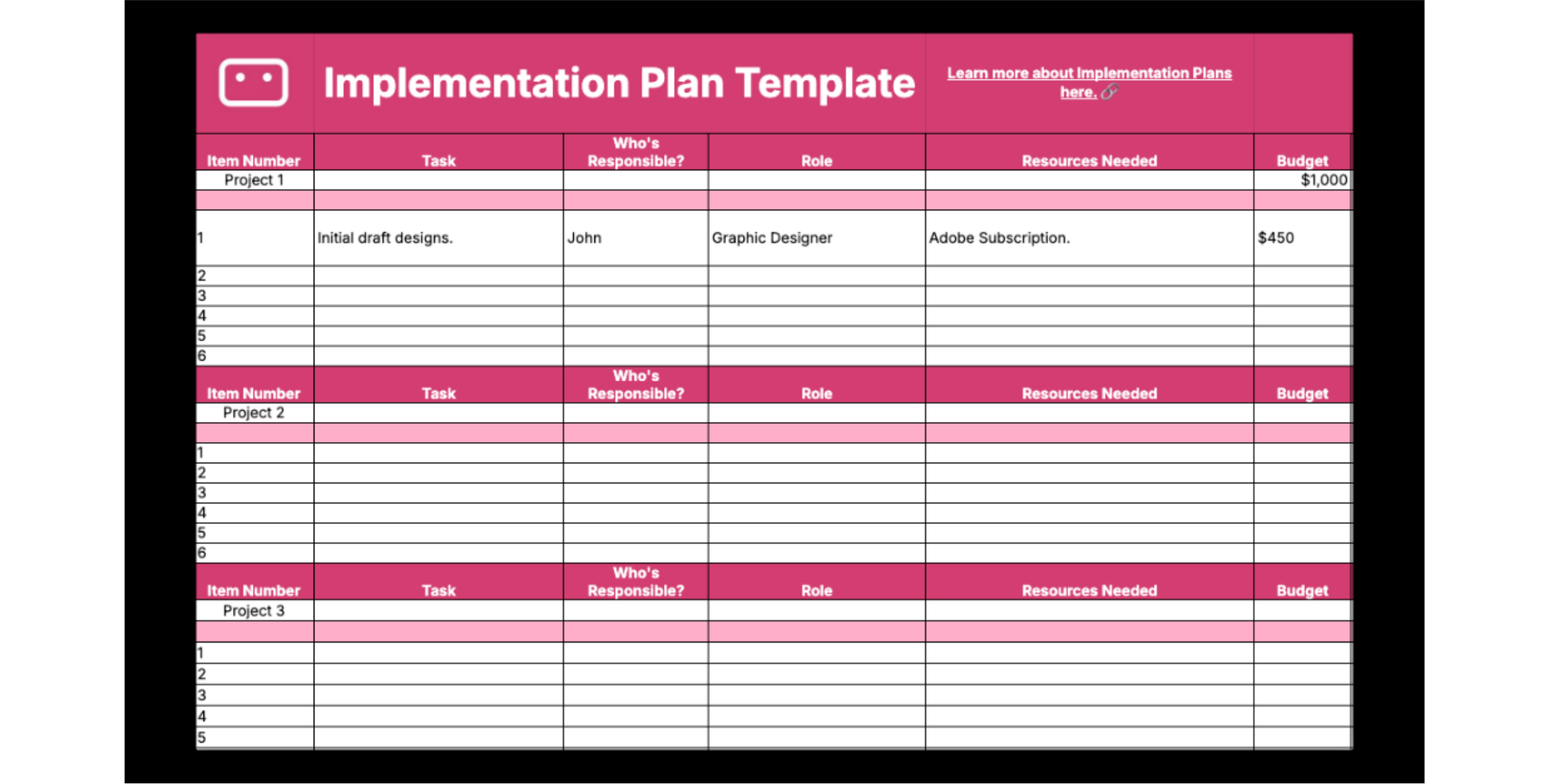
Get your free template here!
How You Can Build an Implementation Plan in Workamajig
To help with this, you can use Workamajig. As the ultimate agency management software, you have an all-in-one solution for plotting tasks, allocating work, addressing roadblocks, and seamlessly transitioning into task and resource management.
The return on investment is substantial, as you’ll gain real-time reporting on your project’s progress, without sourcing from various systems. It’s all under one roof, for everyone.
Here’s a look at how you can create an implementation plan that converts to real-time tracking in Workamajig:
Step 1: Define the Project
First, it’s time to create a new project and confirm the objectives and success criteria.
You can find this under ‘Project Manager’ and then select the plus (+) symbol over ‘Projects’.
In Workamajig, you create projects by defining:
- Who the project is for
- The project name
- The choice of a project template (we provide many, but you can even create your own).
After that, you’ve created a new project!
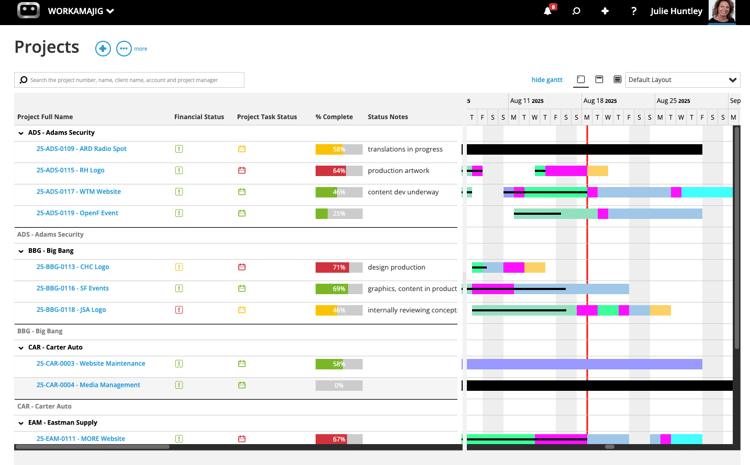
Step 2: Build the Task Schedules
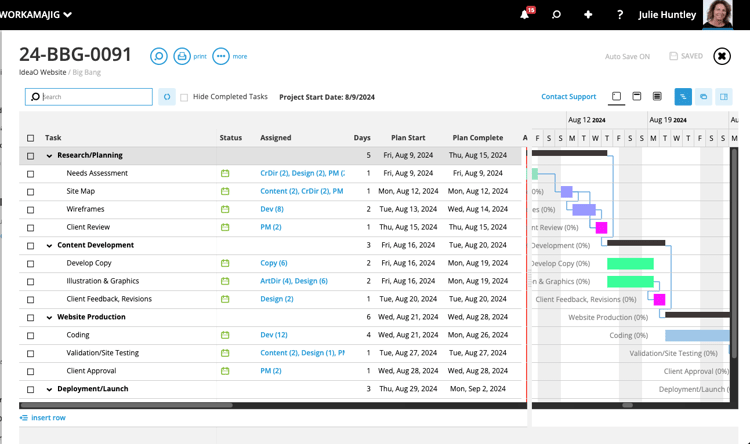
Depending on the template you’ve chosen, you’ll get an automatically generated standard working schedule for your project.
Here, you can make adjustments based on what’s unique about your project. They’re very scalable, ranging from simple ones for quick-turnaround projects to multiple levels of complexity.
You’ll see any adjusted time changes in a dynamic Gantt chart for a simple understanding. And it even skips weekends or holidays.
Step 3: Allocate Resources and Roles
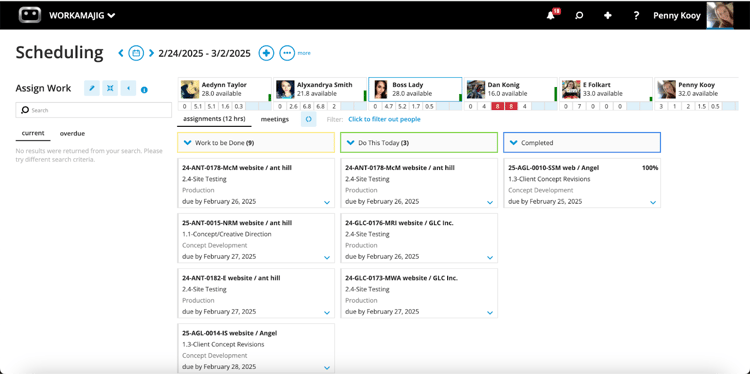
Workamajig is a real time saver when it comes to assigning roles and communicating information (especially when it comes to future projects via templates). Everyone has access to schedules, seeing the changes made in real time.
For example, you can set it so projects always begin with an initial creative development meeting. Those meetings can always be assigned to any user attached to team roles like “Account Managers”, “Art Director”, or “Graphic Designers”. So, if Sophie replaces John as the graphic designer in the future, you don’t need to go in and manually change the individual.
The ‘Resource Manager’ function in Workamajig is also ideal for filtering resources by department and role. So you can see who is available to assign tasks to.
Step 3: Automatically Create Estimates
Estimates for labor hours can be brought right into a project from a project template. But you can also manually add them. You can go task by task, pulling information in from your project schedule at the click of a button.
And when it comes to cost estimates, the values can come right in from the rate sheets of each client you’ve entered into the system. All automatically.
Expenses can also be added in, so you can track your actuals against them. And, there’s a profitability calculator that factors in rates and expenses, alongside projected information such as hourly rates.
There’s no need to go off manually creating estimated documents or invoices. This is all produced automatically, ready to print and hand off.
All good? Hit approve, and it’s on the budget!
Step 4: Establish and Assess the Budget, Real Time.
Workamajig clearly enables budget reviews, breaking down the details of each task (viewed by item, type, task, or person). This allows you to really clearly see if you’ve gone over budget and why.
Fear not - not everyone in your team will have access to this information; just those you grant clearance to.
Step 5: Set Up Milestones and Approvals
In Workamajig, all files have a place and a digital review tool for approval.
You can bring your files in directly from your file server, like a shortcut (you can also choose to store them in Workamajig. For a detailed explanation, look in our help guide at ‘file storage options’).
All your files then get a natural audit trail. You can route them how you wish, tracking how many rounds of approval are required. You can even see how many internal or client reviews are required and their current status.
For example, you can set:
- Send to everyone at once, or send to people in order.
- Set when people need to make a decision on the review.
- When should reminders be sent out by email?
The review tool is simple too, as you can leave comments, annotate, and assign follow-up tasks on the fly.
Step 6: Plan for Reporting and Monitoring
Tracking and monitoring are easy with Workamajig. Features such as a color-coded project or financial status make decisions simple.
Project managers can also track daily via the ‘Today’ dashboard. There, the system will display and monitor your items of choice, so you can overview what’s happening today - from assignment progress to project reports.
You can also distribute reports at the click of a button in various formats; all of this can be built based on your chosen fields, in seconds.
Campaign management is also possible if you’re working on larger projects with multiple project deliverables. You can break the campaign up into different projects, so each one can be managed by the appropriate people, and not all crammed into one big messy schedule.
Want to Learn More about Workamajig?
This is just a brief insight into the ways Workamajig can significantly streamline your implementation plans and creative project management.
We welcome you to a free demo, so you can see it in action.