

The best accounting software for advertising agencies isn’t the typical QuickBooks, Xero, Sage, FreshBooks, or NetSuite. Instead, agencies get much more value from an agency management system with accounting software built into its core toolset.
As we’ve highlighted in other posts, it’s really important for agencies to manage finances directly within their project and campaign workflows. This lets you track budgets in real time, monitor actuals vs. estimates, and realize project costs as they’re incurred. It also means teams can consistently measure profitability throughout the project lifecycle. Without these capabilities, profitability issues and budget overruns are inevitable.
However, the problem agencies run into here is that these types of solutions are limited. Most agency management systems include only basic accounting tools, like budget tracking and invoice automation, but not full accounting software. Workamajig, Advantage, Clients & Profits, and e-Silent Partner are the only names that offer the full thing.
We’ve put together this guide to help you compare the available systems in one place. We review the pros, cons, features, and pricing of each so you can pinpoint the right software solution for your advertising agency.
At the end, we’ll also (briefly) cover some of the other agency management systems that you might run into when searching for accounting tools — so you understand exactly what each system offers and where they fall short.
To learn more about Workamajig, keep reading or request a free demo with our team.
Workamajig
The all-in-one operating system for advertising agencies
Advertising agencies use Workamajig to manage all their moving parts from one place, consolidate their tech stack, and centralize business data. Our all-in-one agency management system combines:
- Project management — planning, monitoring, and reporting on outcomes
- Client acquisition and management
- Staff management and resource optimization
- Collaboration between all stakeholders (project teams, managers, external collaborators, clients)
- Financial management and accounting
One of the major pros of a fully integrated system is that it brings together all your financial, project, resource, and client data. This ensures that everyone across your team is looking at the same data; there’s no duplicate or double-entry to worry about; reconciliation becomes simple; and you can combine data sets to see how different things contribute to the bigger picture.
With this set up, Workamajig helps teams:
- Generate accurate estimates. Our automated estimating engine generates accurate estimates and builds budgets as your teams gather project specs and develop plans.
- Improve real-time cost management. Our system offers dedicated tools for managing all labor and non-labor expenses, so teams aren’t left jumping between their project management tool, time tracking system, and accounting software (etc.) to aggregate project costs — and hope they’re still within budget.
- Cut project billing time and easily generate accurate invoices. Workamajig automatically aggregates project expenses into billing worksheets, so accounting teams can quickly align with decision‑makers on costs and how they’re handled. The result is fewer errors, redundancies, and headaches, and a lot of saved time.
- Accurately track profitability and evaluate it from different perspectives. Workamajig offers various P&L reports and overhead allocation options so teams can gauge profitability from different perspectives — at the company, client, campaign, project, and service levels.
Our solution also includes personalized onboarding and training, so we can configure each instance of Workamajig to each agency’s unique requirements. We have over 30 years of experience working with all types of creative agencies — advertising, marketing, media, PR, and full-service agencies. The Workamajig packages can support you no matter how far you scale. (With solutions for 10 to 10k users!)
In the following sections, we’ll review our accounting software and Workamajig’s key features.
For a more in-depth walkthrough after reading, please request a demo.
Workamajig Accounting Software
Workamajig comes with full GL-ready accounting software to support all accounting processes and best practices. It serves as a complete replacement for standalone tools like QuickBooks or Xero. And it works for teams across the globe because it meets GAAP, GDPR, and HMRC compliance requirements, and offers multi-company and multi-currency support.
Our accounting software includes expected features like a chart of accounts, receipt management, vendor invoice management, and expense tracking — but it also offers advanced tools such as client invoicing, retainer management, revenue recognition, media buying integrations, and financial reporting to support project profitability and your agency’s overall financial health.
You can also access deeper operational and predictive intelligence by connecting your AI assistant (such as Claude) to Workamajig via our MCP server. Because all your agency's data already lives in one system, your assistant works with the full context it needs to generate accurate forecasts, diagnose and investigate bottlenecks, and recommend the next move.
Let’s review!
Today - Accounting Dashboard & Chart of Accounts
Every user in Workamajig gets a personalized Today dashboard to conveniently track their tasks, manage their responsibilities, and plan their week.
For accounting users, this takes the form of our Today - Accounting page, a central hub for tracking balances, transactions, invoices, recent conversations, and more. You can quickly spot items that require your attention, such as unposted transactions or open account reconciliations, and take action with just a few clicks.
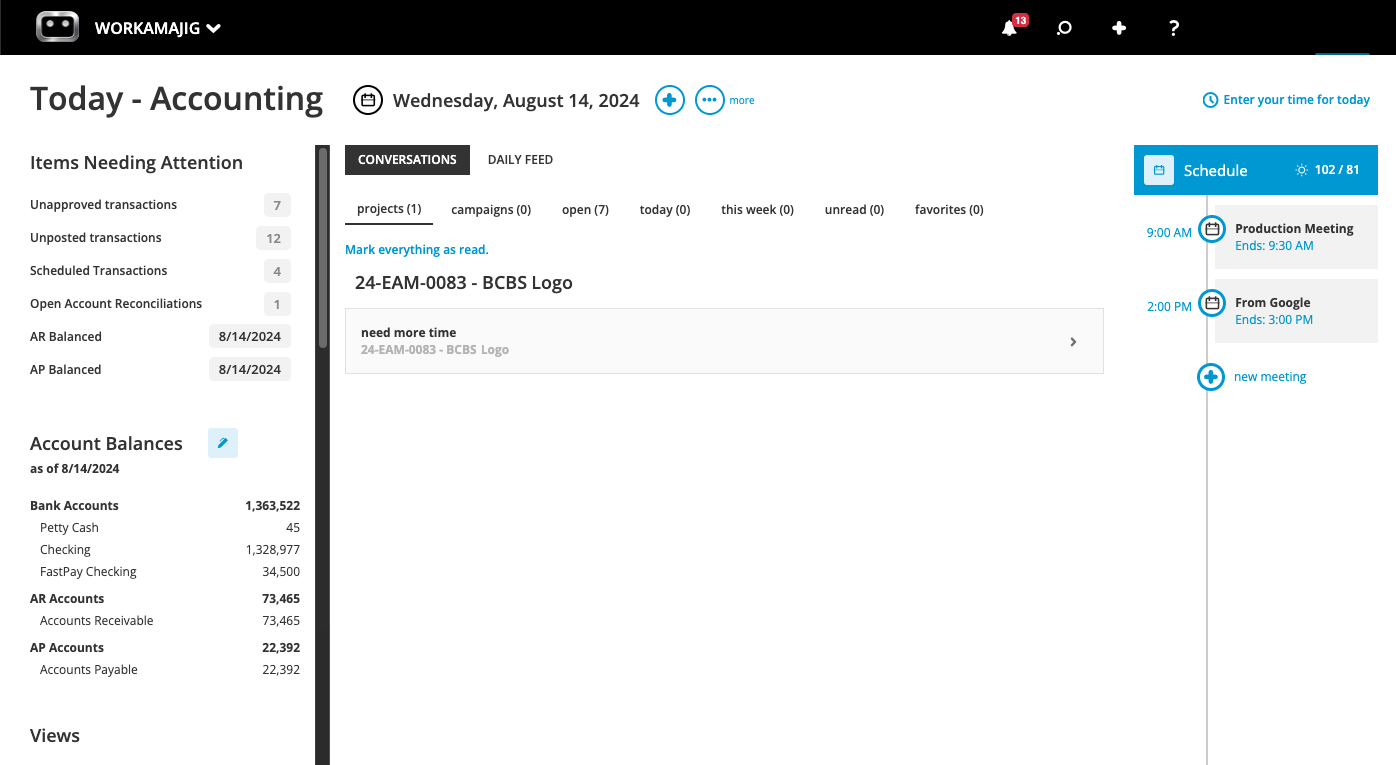
Accounting teams also have a full chart of accounts in Workamajig to record transactions and improve bookkeeping.
You can create accounts receivable (AR), accounts payable (AP), and spending accounts to track balances and cash flow in the accounting dashboard. So all income and expenses are neatly categorized in one place, offering clearer visibility into spending and tighter cost management.
Project Estimating Tool
Coming up with accurate estimates for planned work is one of the most effective things that you can do to ensure your agency’s overall profitability — it means you can confidently share pricing with customers and budget for projects accordingly.
And sure, the budget may change later as the project progresses, but having a reliable starting point makes each change easier to absorb. Workamajig offers a few handy options here for generating accurate estimates:
- Using templates. Workamajig features project and estimate templates that you can use to save all the details of your most popular project types, so you don’t have to build out new plans from scratch each time. Our templates let you save details like tasks, milestones, allocations, subtasks, vendor costs, labor costs, and more.
- Using the project schedule. If you have all the details and allocations finalized for a project, then our automated estimating tool can save you loads of time. It calculates an estimate based on the details in the schedule and updates as you make changes or pull in resources.
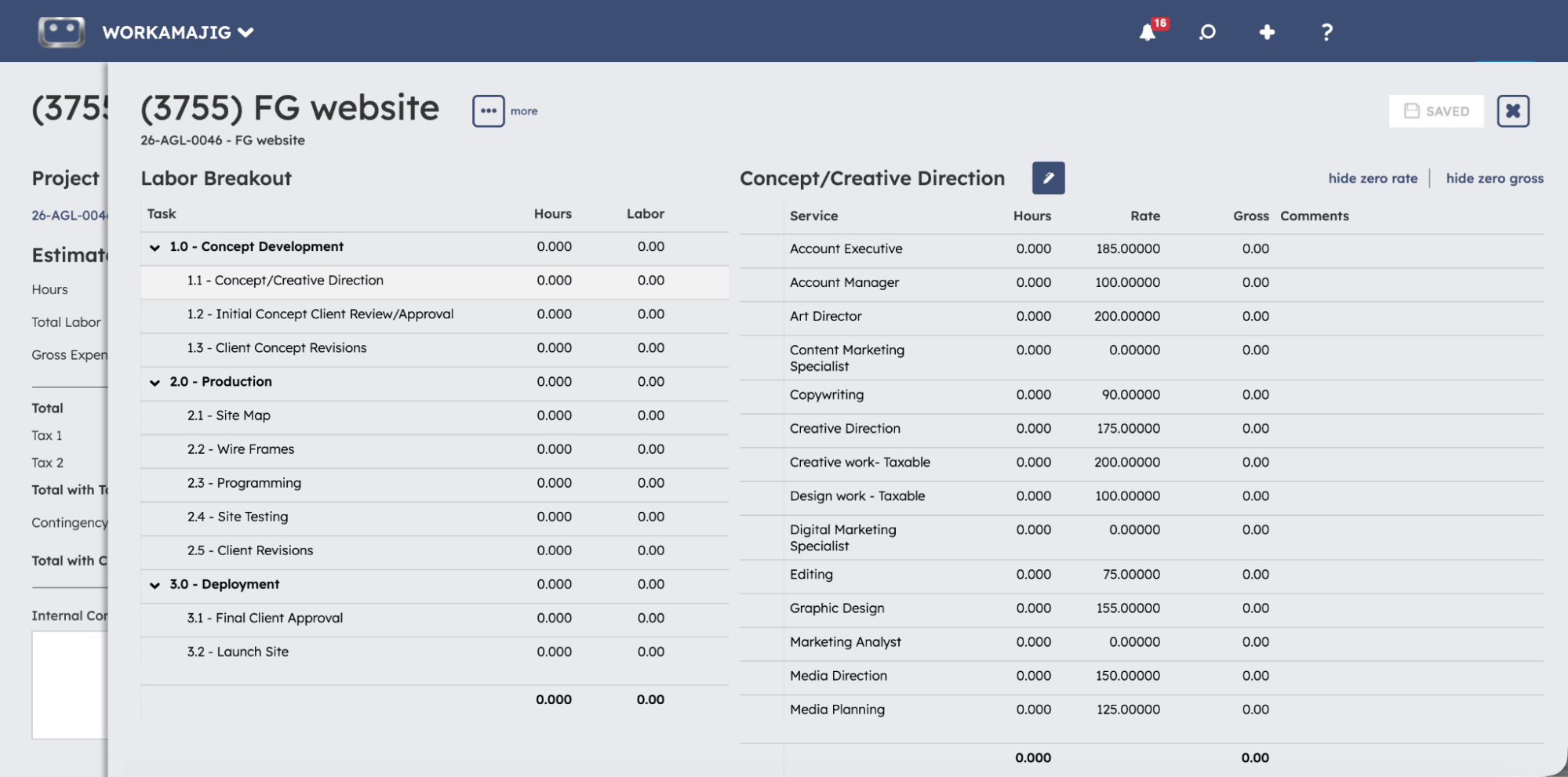
- Building them from scratch. Sometimes, it makes sense to just create a completely custom estimate (e.g., when you’re working on an entirely new project). Workamajig includes tools for both building out (i) labor estimates and (ii) non-labor estimates, such as vendor costs or media buys.
Expense Tracking & Management
After projects go live, Workamajig offers a suite of tools to capture different types of expenses. This lets you manage and organize project costs, simplify reconciliation, and ensure actuals are tracked against budgets in real time:
- Credit card connector. You can link credit card and spending accounts to Workamajig via our Plaid integration and auto-sync charges each night, so you just have to review and map the expenses.
- Receipt capture. Our accounting system lets team members upload and share receipts with finance teams, instead of carrying around paper receipts and submitting them at the end of each month (hoping not to lose them in the meantime). Users can also upload receipts for vendor payments and images of client payments to maintain electronic records in our system.
- Media buying integrations. Workamajig integrates with Strata/FreeWheel, Mediaocean, Bionic, and GaleForceMedia so you can conveniently view and bill orders and track media buy costs. Our integrations make it easy to compare budgets vs. actuals and include details of insertion orders in client invoices.
- Expense reports & reimbursements. Workamajig allows agency staff to automatically generate and send expense reports — even from mobile devices. Staff can tag charges to request reimbursements. Managers can then view these requests and easily send funds through our system.
Read more: Project Expense Tracking: Practical Steps, Tips, & Tools
Vendor Invoice Management
With Workamajig, you can do more than just add vendor invoices — our accounting system features dedicated tools for managing reconciliation, improving organization, and even dispatching vendor payments.
When vendors send their invoice in, you don’t have to chase down purchase orders across spreadsheets and email threads for reconciliation. Just enter the invoice into Workamajig and select the vendor it’s for.
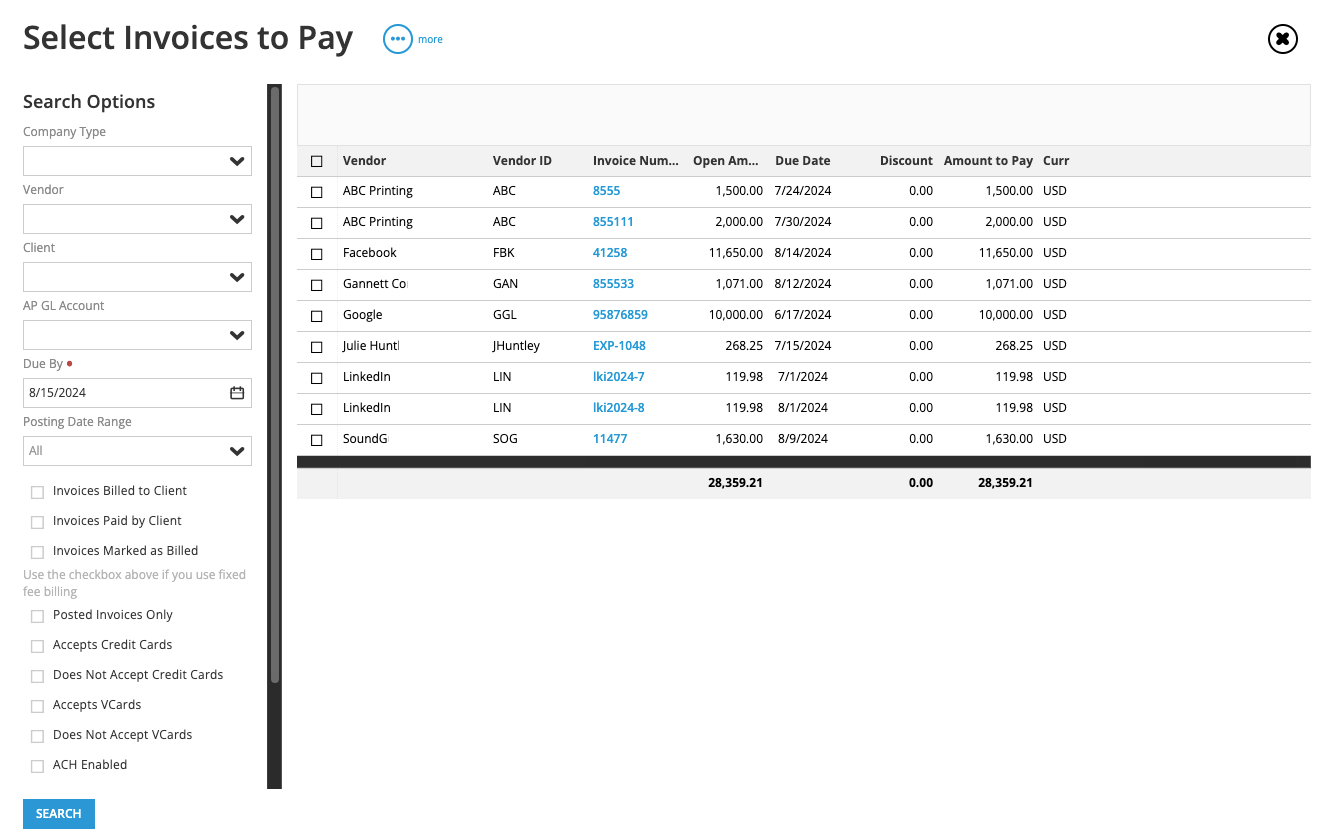
As soon as you do, Workamajig automatically pulls up any open purchase orders associated with that vendor across all projects. So if you work with a print vendor on five different jobs, you'll see all five POs in one view without digging through individual project files.
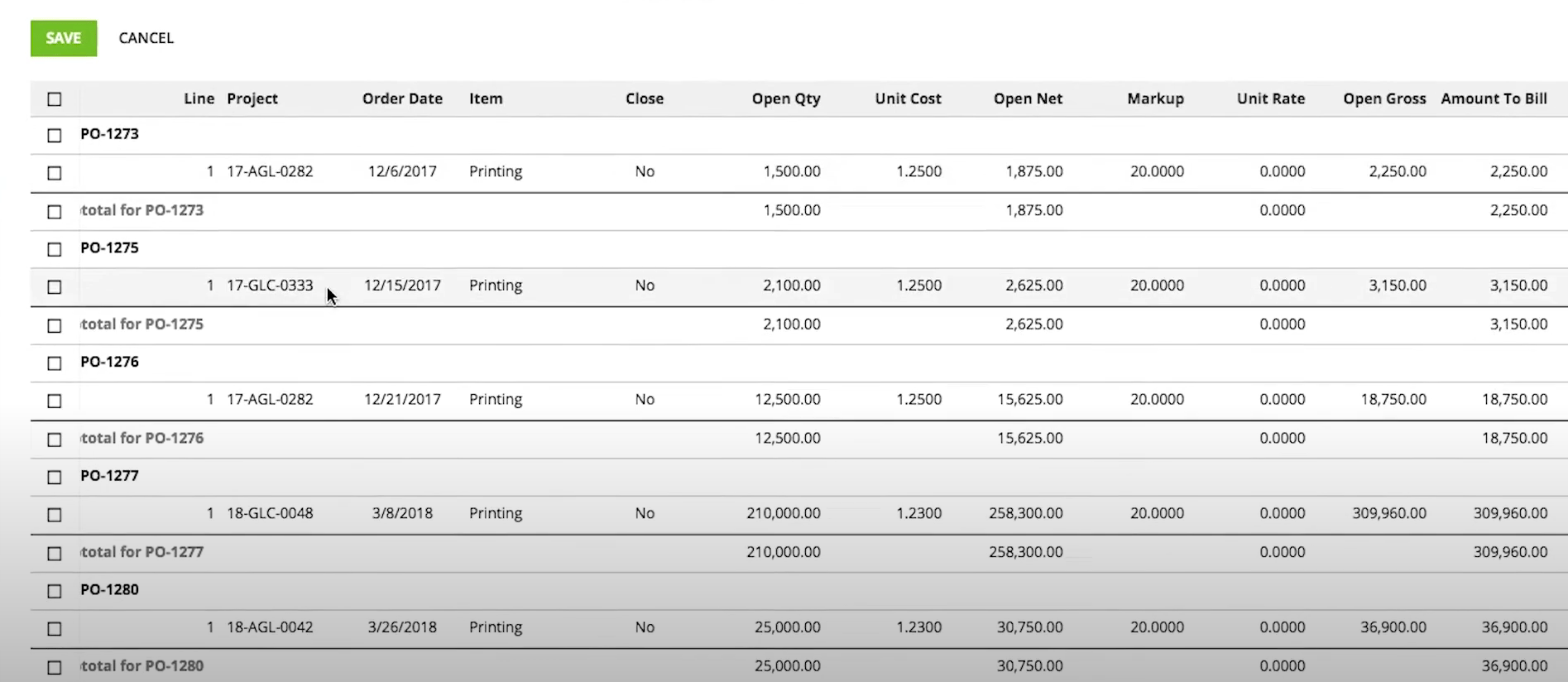
From there, you can match one or more purchase orders to the invoice, and those changes flow straight into each project's financials — updating expenses, budgets, and profitability in real time.
And when vendor invoices don't line up perfectly with the original PO, Workamajig has you covered — you can:
- Adjust the numbers in Workamajig so they line up, and everything reads correctly on the invoice before payment goes out.
- Keep the PO open if the difference is expected to show up on a future invoice.
- Recoup the cost by folding an overage into the project's billing portion (so it’s passed on to the client), or take the hit and write it off.
Then, after invoices are approved and finalized, you can send vendor payments online through Workamajig's integrations with Edenred Pay and AvidXchange.
And because Workamajig stores every vendor invoice alongside its original quote and purchase order, you’ve also got a growing record of vendor performance over time. For example, if a particular vendor's final invoices consistently come in above their quotes, that pattern becomes easy to spot, so you can look into things (and maybe reconsider the relationship) before the next project kicks off.
Real-Time Budget Monitoring
Workamajig offers real-time project monitoring with timeline and budget tracking, allowing you to compare actuals against approved estimates and stay on track.
![Workamajig dashboard: Projects and Project Status [GIF]](https://www.workamajig.com/hs-fs/hubfs/Workamajig%20-%20Projects%20and%20Project%20Status%20%5BGIF%5D.gif?width=1714&height=853&name=Workamajig%20-%20Projects%20and%20Project%20Status%20%5BGIF%5D.gif)
The visually friendly dashboard provides a snapshot of all your live projects in one place, with Gantt charts showing each project’s current phase and progress against its timeline. You can also color-code project phases so you always know how far along each one is.
On the left-hand side of the dashboard, you’ll notice various icons and numbers under columns such as “Financial Status” and “% Complete” — these indicate each project’s status and health. The color-coding indicates which projects are healthy (green), at risk of timeline or budget overruns (yellow), or have already been delayed or exceeded their budget (red).
When a project’s health turns yellow, our system automatically notifies the project manager, so they can intervene early and correct course. You can also:
- Investigate what’s contributing to these potential overruns using our budget drill-downs. These allow you to view budgets by item, type, task, or person for any project or campaign.
- Monitor expected profitability as your teams complete tasks and move through project phases, using our project profitability breakdown. It helps you manage projects and campaigns proactively and more strategically — instead of calculating costs at wrap and hoping they’re within the initial budget, you can realize expenses as they’re incurred and troubleshoot as needed to avoid more significant problems.
Read more: 8 Tips for Managing a Project Budget
Labor Costs & Billable Utilization
Of course, an integral part of project monitoring is time tracking, so we’ve got you covered there. Our time tracking tools are built directly on task cards, so logging hours becomes part of the natural workflow. Users don’t have to jump between systems or add hours in a spreadsheet. They can:
- Automatically record hours worked using timers that they can start, pause, and stop as needed.
- Enter time directly from task cards, while our system auto-populates all necessary fields.
- Pull hours in from their calendar events after integrating their work calendars with Workamajig.
- Submit time the old-fashioned way using grid-style timesheets.
![Workamajig - Today - Creatives - Tasks - New Time Entry for Projects [GIF]](https://www.workamajig.com/hs-fs/hubfs/Workamajig%20-%20Today%20-%20Creatives%20-%20Tasks%20-%20New%20Time%20Entry%20for%20Projects%20%5BGIF%5D.gif?width=1352&height=1436&name=Workamajig%20-%20Today%20-%20Creatives%20-%20Tasks%20-%20New%20Time%20Entry%20for%20Projects%20%5BGIF%5D.gif)
Then, Workamajig keeps hours flowing across the system and offers dedicated tools to manage how they’re used.
- As hours are logged, Workamajig automatically calculates labor costs (using employee service and hourly labor costs) and instantly updates the project budget and timeline.
- Managers can track and manage employee hours from centralized timesheets. They can either approve hours outright or reject them with comments (prompting users to share missing information or make any corrections).
- Approved hours and billable labor rates are pulled into our electronic billing worksheets — so managers can choose which to edit, bill, write off, or transfer before generating the client invoice.
We also offer various reports for tracking team productivity and the financial impact of where and how each resource spends their time. Our most popular reports include:
Time Productivity Analysis
The Time Productivity Analysis report offers a financial perspective on resource utilization, so you can look beyond who’s been busy and see how profitable each resource is. The report provides a snapshot of each resource’s billable vs. non-billable time, then ties those hours to the gross revenue they generated, their cost, and the gross margin.
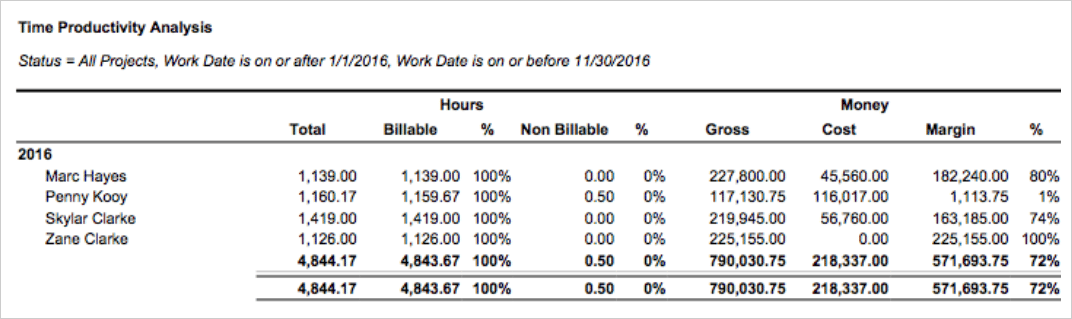
For example, Marc Hayes and Penny Kooy were both billable on essentially 100% of their hours, so judged on utilization alone, they'd look identical. But when you get into the finer details, Marc generated $227,800 in gross against a cost of $45,560, leaving an 80% margin. Meanwhile, Penny generated $117,131 against a cost of $116,017 — nearly the entire amount — for a margin of just 1%. So their bottom-line contribution is wildly different.
That's the kind of thing that you might miss by looking at a billable-hours report on its own: someone can be fully booked and still barely move the needle on profit.
Chargeability Report
Chargeable utilization offers a more accurate perspective on each resource’s contribution to your bottom line because it measures the percentage of billable hours that are actually chargeable to a client. These are the billable hours that make their way onto the client invoice after write-offs and cost transfers due to things like rework.
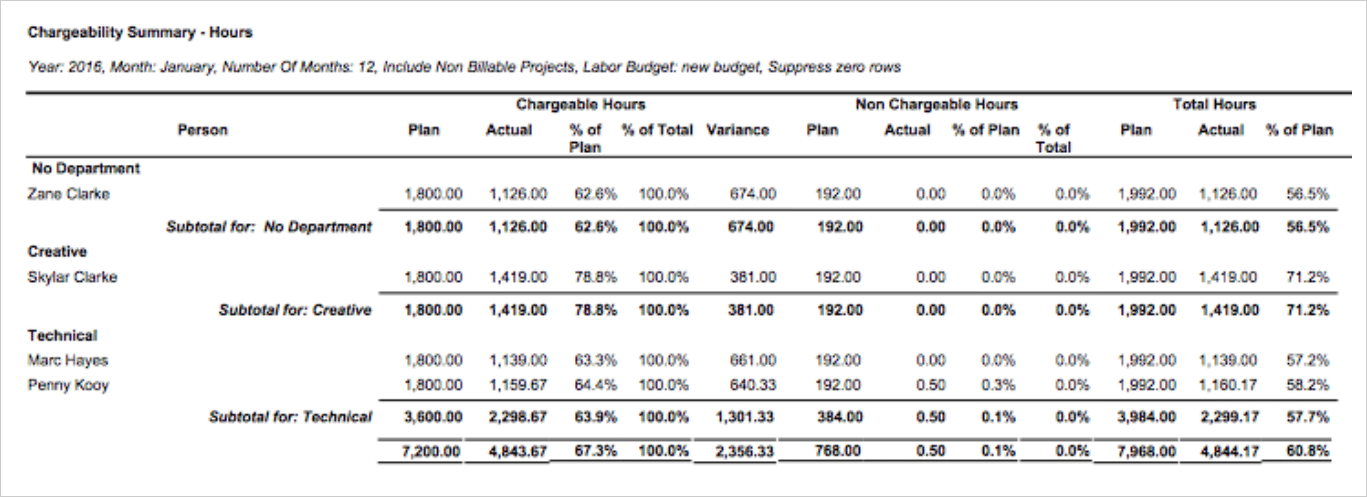
For each person, grouped by department, our chargeability report lays out chargeable and non-chargeable hours — planned vs. actual, chargeable time as a percentage of their total, and the variance against plan.
So over any period, you can see who's running close to their chargeable target, who's falling short, and how the whole agency stacks up against the capacity you budgeted for.
This is handy because monitoring chargeability for ongoing projects is otherwise challenging, since you can’t predict whether you’ll need to write off hours. So the report lets you track it over a specific period, e.g., a quarter, offering a consistent reference point.
Hourly Reports
Our hourly reports don’t directly offer financial insights — they show you where your team spends its time from different perspectives, so you can then combine those insights with our financial reports to gauge the impact on your bottom line.
Our dashboard displays year-to-date hours broken down by client, account manager, and service, along with a lookahead of what everyone's scheduled to work on in the days to come. You can slice the same data by project, department, or individual. Because the charts are built straight from the time your team logs, the data you’re viewing always reflects what’s happening on the ground.
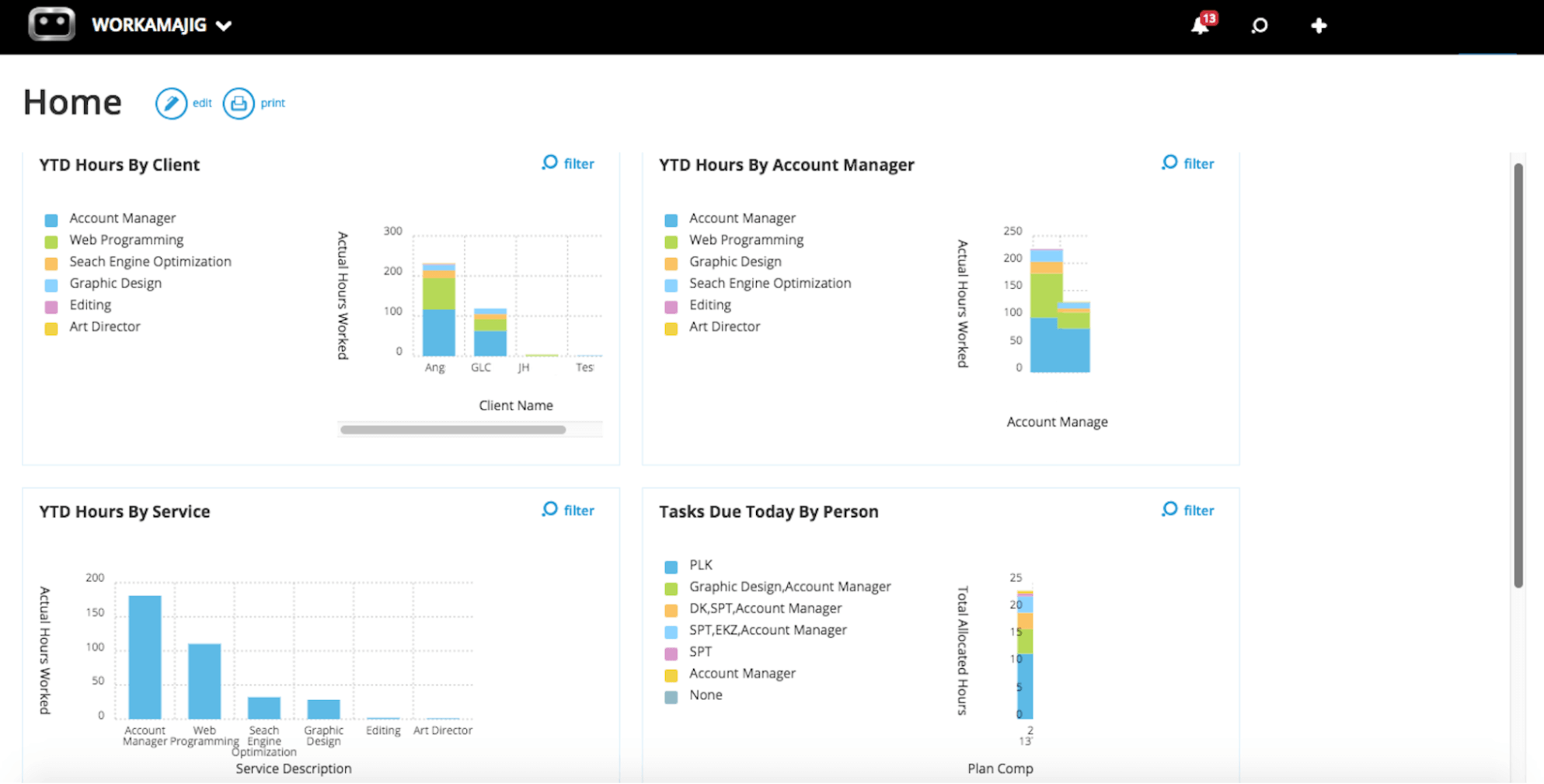
These breakdowns are useful for uncovering patterns and problem areas. For example, the YTD Hours by Service view shows that account management, web programming, search engine optimization (SEO), and graphic design account for the bulk of the team's hours, while services like editing and art direction barely re fgister.
So if a low-priced service is consuming a disproportionate share of your team's hours, that's your cue to reprice it, cut it, or redirect that talent toward higher-margin work — the kind of move that increases profitability.
Billing & Invoicing
After projects receive final sign-off, Workamajig makes it easy to generate accurate client invoices using our billing worksheets — which allow accounting teams to easily coordinate with decision-makers (such as the PM or AE) to ensure all the right details are accurately captured.
Our fully integrated system saves teams from the tedious invoice-building process, which is especially annoying when project teams have to pull together project expenses from separate systems and finance teams have to check with multiple heads to calculate all costs.
Our system supports all essential billing methods used by advertising agencies, including time-and-materials, fixed-fee, media, retainer, pre-billing, and advance billing.
Here’s how the billing process works:
- A user generates a billing worksheet that comes pre-filled with all line items and costs, and follows the selected billing method (time and materials, fixed fee, media, retainer)
- Our system routes billing worksheets to managers for review and approval. They can make changes to line items, write things off, and even transfer costs before approving the final version.
- After managers approve everything, the worksheets are routed back to the accounting or billing team, who can generate client invoices from these approved Billing Worksheets. Thanks to our integration with Avalara, Workamajig also automatically generates accurate tax rates on these invoices.
- Finally, managers can send the invoice to the client!
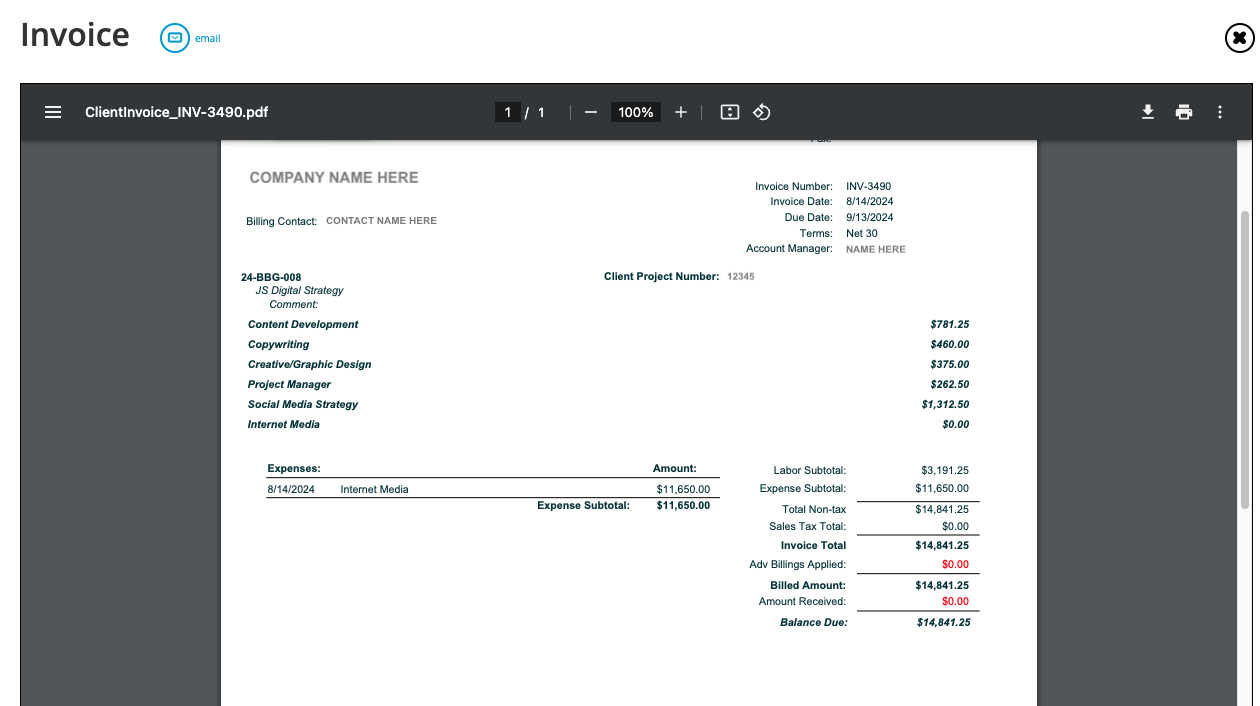
We also offer customization options to give invoices a personal touch: you can change invoice formats, add brand logos or headers, and even include notes for clients.
Then, when it’s time to collect payments, Workamajig’s accounting system makes the process easy for clients: our integration with PayFlowPro / Authorize.net allows clients to pay online through credit card or ACH with just a few clicks.
Read more: Best Creative Project Management Software with Invoicing
Retainer Management
Retainers are one of those things that can vary from agency to agency (or even client to client) — everyone’s got their own way of setting them up. The two most common types of retainers that we see are:
- Simple retainers, which are just a recurring project billing method.
- Hours-based retainers, where you commit to a fixed number of service hours over a specified period. These agreements can involve tracking those hours and (potentially) rolling any unused ones over to the next period.
Simple retainers are easily handled by Workamajig’s “retainer” billing method. For hours-based agreements or more complex retainers, we do a deep dive into how Workamajig handles them in our guide to retainer management.
Multi-Currency Accounting
If your agency works with international clients, vendors, freelancers, or offices, managing multiple currencies is one of those things that can slow everyone down. You have to go through exchange rate gymnastics whenever it’s time to pay vendors, bill clients, or manage reconciliation.
Workamajig handles all of this natively, so you can operate in any currency you do business in and still report cleanly in your home currency, so you aren’t caught off guard by any end-of-the-month surprises.
Here's how it works:
- Set your home currency once, and everything ties back to it. When you enable multi-currency, Workamajig prompts you to select a home currency for your books. From there, every screen in the system assumes home currency by default, so you only specify a currency when you're actually working in a foreign one. Behind the scenes, our system stores every transaction in both the original currency and your home currency, so your general ledger always balances on both sides.
- Exchange rates update automatically (but you stay in control). Workamajig maintains an exchange rate table by currency, GL company, and date. You can pull current rates at the push of a button (our system connects to a data provider to grab them) or enter them manually if you'd rather manage this yourself. When you enter a vendor invoice or client invoice, the right rate populates automatically based on the invoice date. And if you ever need to override it, you can. Rates are stored out to six decimal places, keeping conversions precise.
- Manage transactions in any currency. This is where native multi-currency really pays off. Workamajig handles foreign currency on vendor invoices, purchase orders, client invoices, expense reports, and bank accounts. So you can pay people in their local currency, bill clients in theirs, and keep your books clean. Receipts match the invoice currency, payments match the vendor invoice currency, and the system posts any rounding differences to a dedicated account to keep the GL balanced.
- Workamajig handles realized vs. unrealized gains and losses. Realized gains or losses are posted automatically when a payment or receipt settles at a different rate than the original invoice. Meanwhile, unrealized gains or losses are calculated on demand whenever you run reports like the balance sheet or corporate P&L, using the current rates from your table, so your financial reports reflect today's reality.
- Reporting happens in your home currency. When it's time to look at the big picture, Workamajig consolidates everything back into your home currency. Your balance sheet revalues foreign bank, AR, AP, and credit card balances at current rates, so you get an accurate, unified view of your agency's financial health.
And because all of this lives inside the same GL-ready accounting system that runs the rest of your agency, you don’t have to deal with any of the headaches that come with using a third-party tool (managing the integration, data duplication, access management, etc.).
Multi-Entity Accounting
Workamajig's GL Companies feature makes it easy to manage multiple entities, whether they’re separate legal entities by region or distinct offices that keep their own books. Each GL company is treated as a separate financial entity, with its own books and self-contained financials.
Workamajig segments every transaction posted to the general ledger by company, so each one keeps its own trial balance, P&Ls, and balance sheet — and you can report on a single entity in isolation, or look across the whole organization. You can also close the books on each company's schedule, setting a separate closing date for each GL company rather than forcing all entities onto the same calendar.
When you use GL companies, Workamajig also puts hard rules on what each entity can pay and be paid for — so you don’t risk accidentally creating a vendor invoice for one company and paying it from another's bank account.
If and when you do want to enable intercompany financials, then you can set that up by turning on intercompany mappings. That prompts you to define the "due to" and "due from" accounts between a pair of companies for AR, AP, and journal entries, and then one entity can cover the other's transactions, with both sets of books staying in balance.
What keeps all this manageable is a shared chart of accounts. Your GL accounts carry over across companies, so adding an entity doesn't mean rebuilding your account structure from scratch (though you can still restrict individual accounts to specific companies when needed). Similarly, a single bank account can be shared across companies through a "multi-company payment" option, with each company maintaining its own check numbering sequence.
And since not everyone should see every entity's numbers, the GL company lets you manage access and permissions, down to which clients and vendors a user can view.
Revenue Recognition Tools
Agencies don’t always bill in lockstep with when they actually do the work. You might collect a deposit before a project kicks off, invoice a media buy weeks ahead of the spend, or run a retainer that's paid up front and earned over months.
If you book all of that as revenue the moment it's billed, your P&L won't accurately reflect what you've actually earned — revenue lands in one period while the costs and the delivered work show up in another. That’s where our native revenue recognition tools come in — they tie revenue to the work you've earned and match costs to the same period:
- Advance billing lets you collect money before the work is done. When you post an advance bill invoice, Workamajig debits AR but parks the amount in your deferred income account instead of crediting revenue. So if you charge a client 50% up front, that 50% sits as deferred revenue rather than inflating your sales. Then, as you issue regular invoices against it, the money moves out of deferred and gets recognized as earned.
- Media prebilling applies the same matching principle to media buys, which are often invoiced to the client before actual spend. When an order is set to prebill, Workamajig automatically creates accruals and reversals as client and vendor invoices come in — recognizing revenue while accruing the related media cost in the same period, so income and its corresponding expense appear together.
- Work-in-progress (WIP) posting normalizes everything at month-end. If you haven't yet billed the labor and direct expenses on in-progress projects, posting work-in-progress moves billable time and unbilled costs onto the balance sheet as unbilled revenue and assets, with an offsetting entry against cost of sales — so your corporate P&L reflects revenue and related costs in the same financial period. The entries reverse automatically the next time you post WIP after the work is billed. You can post and un-post as many times as you need, and balances are tracked in a sub-ledger that you can break out by client and project to see how long charges have gone unbilled.
An all-in-one system like Workamajig keeps revenue recognition happening in the background as work progresses — there’s no need to pull data back and forth between systems. So you end up with accurate financial statements, revenue forecasting, and P&L reports.
Financial Reporting Dashboard & Overhead Allocation
Workamajig also has a robust financial reporting dashboard with an array of out-of-the-box and customizable reports, plus tools for allocating overhead to improve reporting accuracy.
Our system includes various P&L reports and overhead allocation options to analyze profitability from multiple perspectives. These reports pull from posted GL transactions, and you can run them by project, client, or campaign (in detail or multi-view).
You can spread overhead across clients and projects using one of four methods:
- By labor hours — overhead in proportion to each client or project's share of total approved hours (if a client uses 30% of your team's hours, they carry 30% of overhead).
- By labor cost — the same idea as above, but the report weighs the allocation by labor dollars instead of raw hours.
- By total billing — distributed in proportion to revenue.
- None — direct profitability only with no overhead applied.
No method is “better” than the other. What matters is picking one and applying it consistently, so margins stay comparable from client to client and month to month.
Some of our other popular financial reports include:
- General ledger — View what’s currently posted to each GL account and how those postings add up to the balance. You can run the report across everything or a date range, and narrow to a specific account or transaction type.
- Trial balance — A listing of every GL account balance with its debits and credits (the standard checkpoint for confirming the ledger ties out).
- Statement of cash flows — A complete cash flow picture that measures how your balance sheet accounts shifted over the period, pulling from changes in receivables, current assets, payables, and current liabilities, alongside your beginning and ending cash.
- Cash projection – drill down — A forward look at your cash position across a chosen date range. It starts from your current bank balance, adds expected client payments based on when their invoices come due, and subtracts vendor payments based on their due dates — giving you a projected balance alongside your AR, AP, and bank figures.
- General journal — A consolidated view of the agency's financial transactions that pulls together the sales journal, cash receipts journal, purchases journal, and cash disbursements journal in one place.
- WIP analysis — A detailed breakdown of work-in-progress balances across each project, with the option to focus on the aging of the unbilled amounts so you can see how long costs have been sitting before they're billed.
- Project budget analysis — Compares budget against actuals across multiple projects at once, so managers can see at a glance which jobs are tracking to plan and which are running over.
- Revenue forecasting — Workamajig generates a baseline forecast by pulling together your real pipeline and delivery data (opportunity values, project estimates, billing and project schedules, recurring invoices, retainers, and campaign budgets) and classifies each item by how likely it is to materialize.
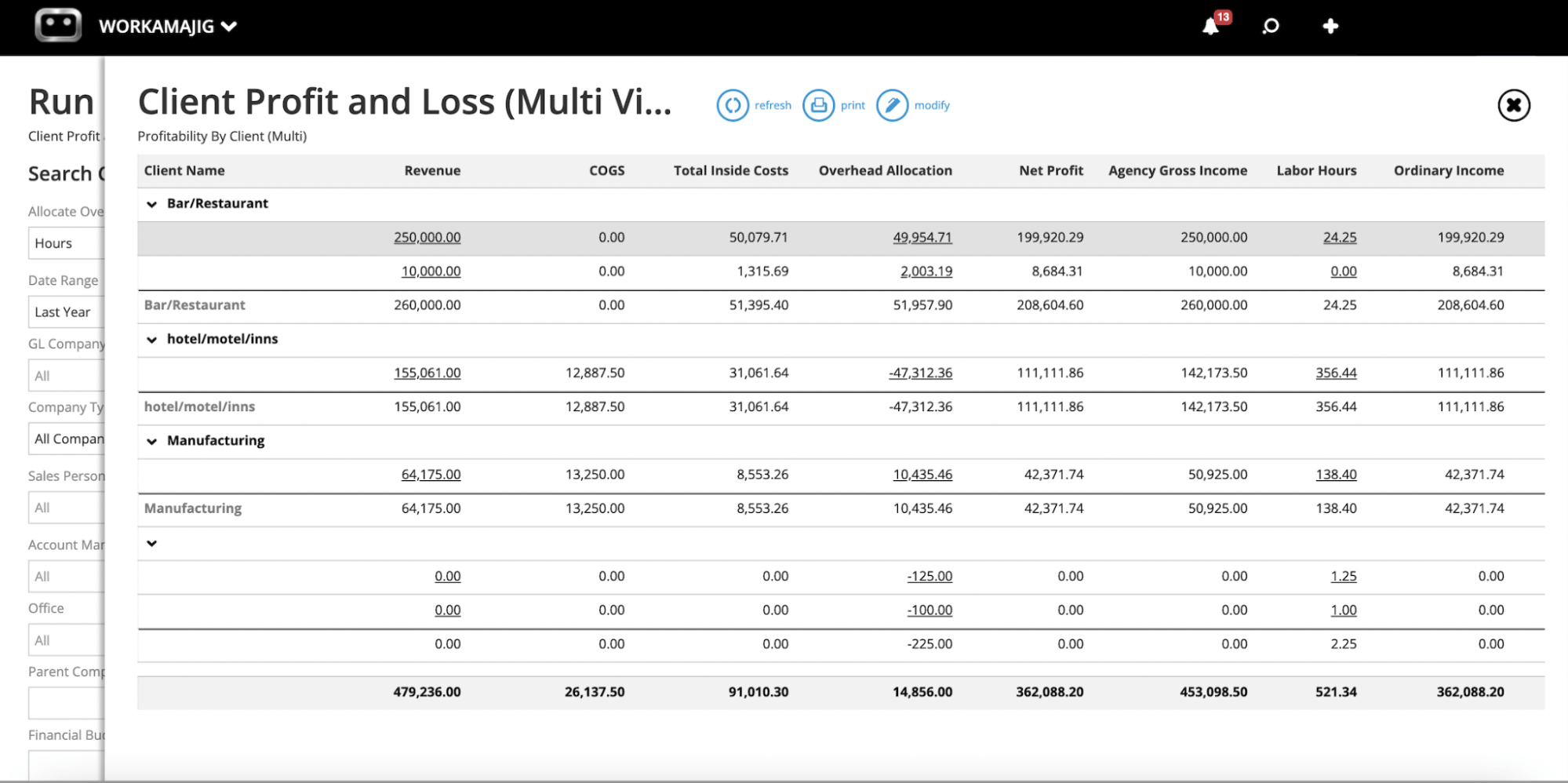
Also quite popular is our customizable Metrics Monitor, which allows you to set and track the KPIs most relevant to your agency and initiatives.
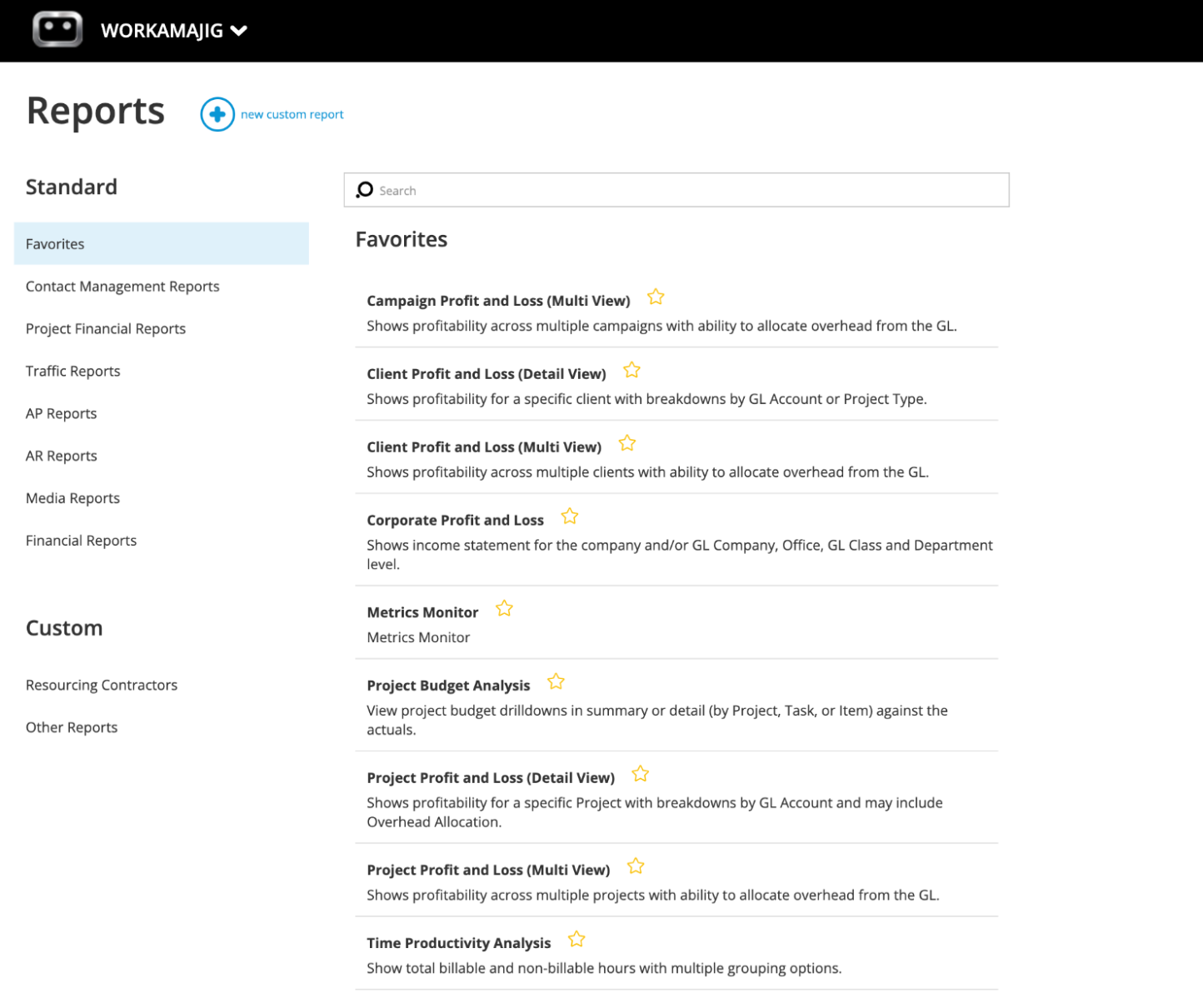
In addition, you can star reports to create a custom Favorites dashboard that lets you easily access all your commonly used reports.
Read more: Best Creative Project Management Tools with Financial Tracking
Workamajig Agency Management System
As we mentioned, Workamajig is not just agency accounting software — it’s a complete agency management system that includes project management, team collaboration, staff scheduling, time tracking, CRM, and client management.
- The Workamajig creative project management suite includes the full range of tools you see in a standalone system: project intake forms, templates, project planning tools, task management, Kanban boards, a real-time project monitoring dashboard, and various project reports to evaluate costs and profitability. Our system even includes project portfolio management, which is handy for agencies managing multiple projects per client.
- Our user-friendly collaboration tools (for internal and external project stakeholders) include project conversation threads, file sharing, commenting,internal proofing, version history, and feedback controls to manage review processes (so staff members don’t end up in endless loops with clients or exceed budgeted time allotments). Our system also includes a handy tool to compare file versions side by side, making it easier to spot changes between iterations or choose between designs.
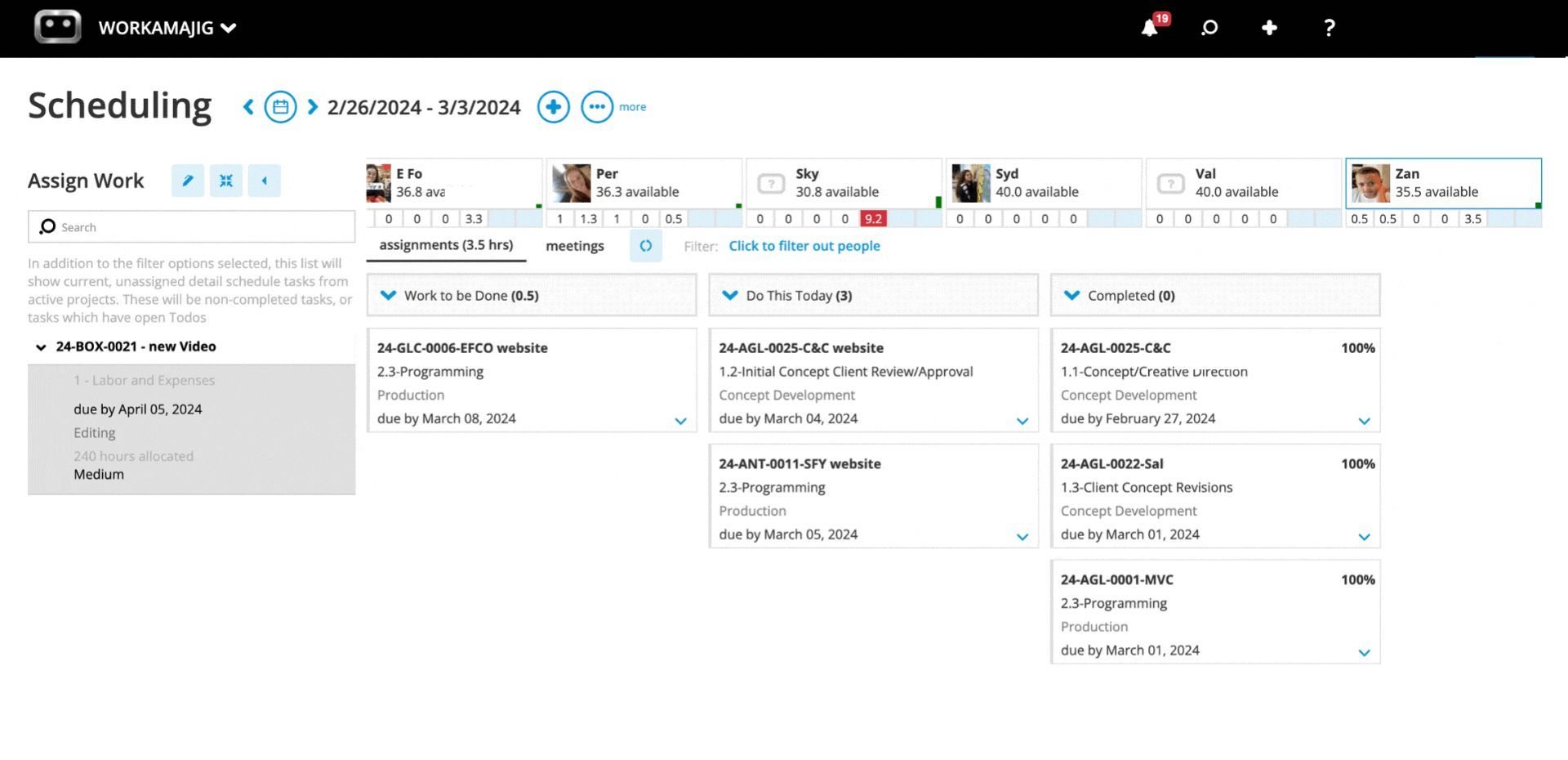
- Workamajig’s resource management module includes a staff scheduling dashboard with capacity planning and team productivity reports. These tools allow managers to monitor workloads and bandwidth, assign work to resources, review hourly reports across various categories, measure billable hours, and see where staff spend their time. These tools help agencies optimize resource utilization and keep their staff happy.
- Workamajig includes a native CRM with Kanban boards to manage your sales pipeline, see opportunities to close, and streamline the client intake process. We also provide a variety of sales reports so you can measure earned vs. lost opportunities and dig into the details. You can learn more about the types of clients or opportunities you win (and which ones you lose) and use those insights to refine your targeting techniques and sales strategies. Our CRM stores contact information for easy access to client details and work histories.
- Our client portals let you manage ongoing relationships and keep an open line of communication before, during, and after projects. Clients can use portals to request new work, join feedback discussions, access deliverables, view and pay invoices, and more. (And you can create an unlimited number of these at no extra cost.)
Check out a brief demo of Workamajig below:
For a more detailed walkthrough of Workamajig, request a free demo.
Workamajig Packages & Pricing
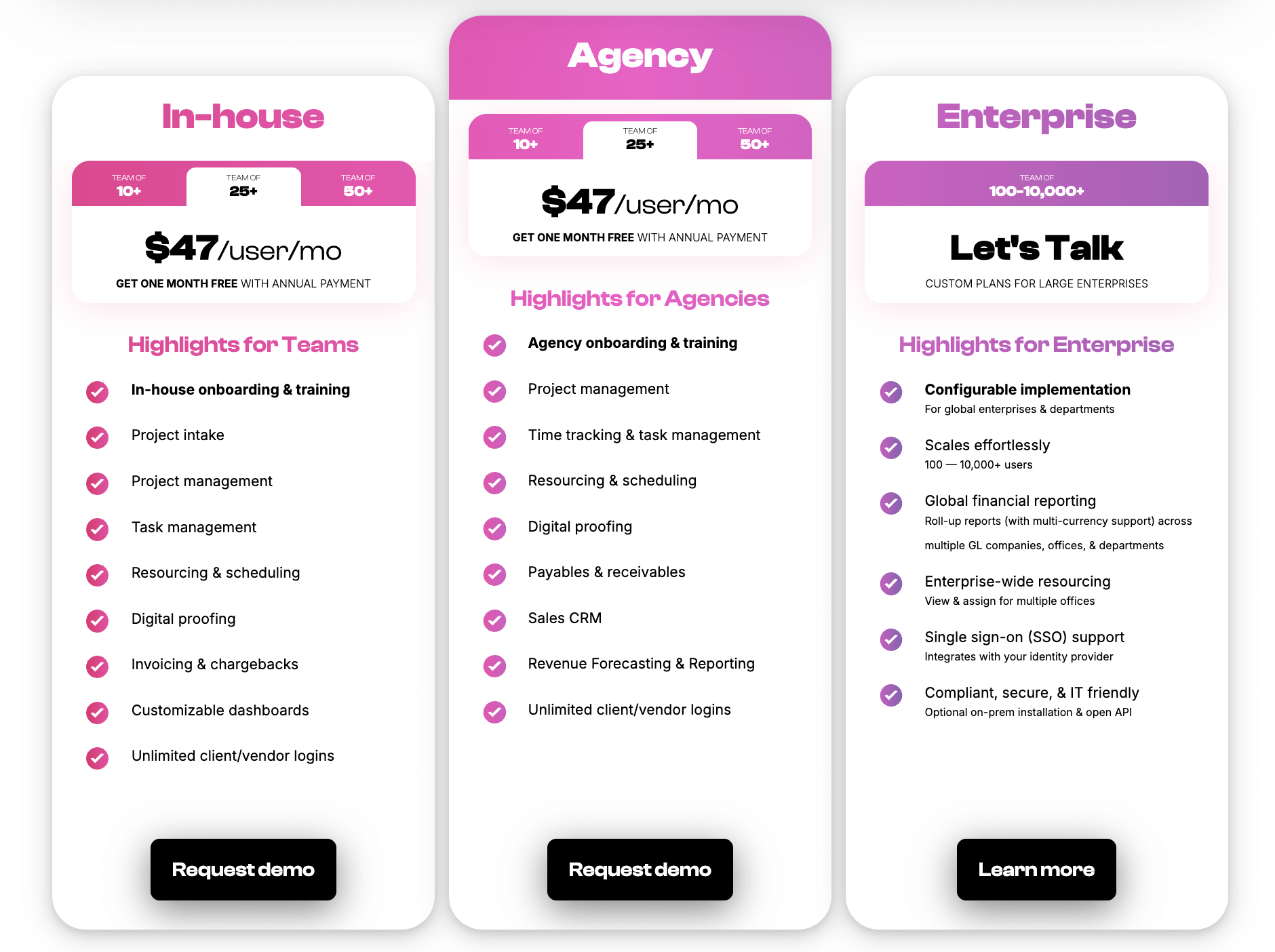
Workamajig offers simple plans for in-house teams, agencies, and enterprises. All of our packages include full access to the Workamajig platform, a dedicated account manager, and free onboarding.
Check out our packages below:
Read more: How Workamajig Solves Agencies' Quiet Profitability Problems
Alternative Advertising Agency Management Systems with Native Accounting Software
Advantage
.png?width=2000&height=878&name=Advantage%20Simpli.fi%20homepage%20(2024).png)
Advantage is a popular cloud-based agency management software that aims to connect and automate the entire agency workflow. The brand typically appeals to advertising, media, and digital marketing agencies — currently working with over 2k teams — because it offers built-in media planning and buying via Simpl.fi.
Advantage’s comprehensive feature set enhances organization, visibility, and control throughout the project lifecycle. Its accounting system stores financial data in the context of project activities, enabling easy tracking of project costs, comparison of actuals against budgets, and improved future project budgeting.
Users praise the software for its robust toolset, customizable user interface, flexible integrations, and helpful customer support. Positive reviews also commonly mention Advantage’s accounting software. They note the advanced billing and invoicing tools as time-savers and mention the helpfulness of Advantage’s budget tracking.
However, some reviews warn that Advantage’s accounting system is not the best for multi-company or multi-currency accounting. Users also note a steep learning curve with Advantage and say the navigation and functionality are not intuitive.
Read more Advantage reviews here.
Notable Features
- Media accounting software
- Billing & invoicing
- Estimates
- Budget Monitoring — track expenses and labor costs against project budgets in real-time
- Financial reporting
- Revenue forecasting
- Project management
- Resource management
- Collaborative tools like proofing & reviews
- Native tools to track time
- Media planning & buying — including broadcast buying, digital buying & media reporting
- Risk analysis & burn rate tracking
- Reporting dashboard (to analyze project performance, financials, staff hours, etc.)
- Mobile app (for Android)
Pricing
Advantage offers custom quotes based on agency requirements. (Reviews suggest it falls on the expensive side.)
Read more: Best Advantage Software Alternatives for Creative Teams
Clients & Profits

Clients & Profits (C&P) is an agency management software that allows users to manage people, projects, media, and money in one place.
The software combines project management, resource management, accounting, and financial management, and also boasts a suite of media planning tools. (Note: C&P does not offer media buying like Advantage but integrates with many media buying platforms.)
C&P’s accounting software offers several benefits — for example, it:
- Let's users view and monitor agency financial data within project and campaign workflows, which makes it easy to track project costs and see how actuals compare to budgets.
- Gives users a real-time view of agency finances. Users can track all billable work and expenses, making informed decisions about their projects and processes.
- Has features such as automated invoice creation, recurring invoices, and the ability to accept payments through various channels — streamlining the invoicing process and helping agencies get paid faster and more efficiently.
Clients & Profits offers solutions for advertising agencies, designers, and marketers, with affordable packages and pricing for agencies of all sizes. (They primarily work with small and mid-size agencies but offer custom packages to support scalability.)
The customer support team offers personalized onboarding and training to configure the software to your requirements and help you learn the ropes. They even provide consulting to guide marketing strategies, project planning, and process optimization.
It’s also worth noting that C&P is mainly on-prem software, geared toward teams that require (or prefer) self-hosted software. Though this means you’ll have to download and install the software locally and handle regular maintenance and updates. However, it’s also accessible via a web app, and you can back up your data to their cloud.
Users also report that C&P’s software can be clunky, with an outdated user interface. But you can preview the platform yourself on the Clients & Profits site, where they offer a visual tour and online demo.
Find more Clients & Profits reviews here.
Notable Features
- Media & marketing agency accounting software
- Automatic billing & invoicing
- Vendor invoice management
- Financial reporting
- Integrations with bank and credit card accounts & media planning systems
- Project request forms & project planning
- Project management & monitoring — request forms & project planning tools, such as task management
- Resource management —team management with live scheduling & time tracking
- Collaborative feedback tools for project teams & clients
- Portfolio management
- Workflow automation
- Adobe XD plugin
Pricing
Clients & Profits offers C&P Agency for advertising agencies. You pay per user, and Clients & Profits charges different rates for different roles:
- $45/user/month for project and account managers (with access to estimating tools and expense reporting).
- $25/user/month for creatives.
- $115/user/month for agency power users (C&Ps rates for studio and marcom power users are lower).
Clients & Profits also offers inexpensive rates for freelancers ($9/month) to access the platform and time-tracking tools.
Read more: Clients & Profits Software: Reviews & Alternatives
e-Silent Partner

e-Silent Partner offers both cloud-based and on-premiseagency management software for creatives — popular with advertising agencies, marketing teams, media and publishing companies, and PR firms.
This all-in-one platform combines project management, time tracking, team collaboration, media planning, customer relationship management (CRM), billing & invoicing, accounting, and business intelligence. e-Silent Partner also includes advanced automation to handle routine, low-margin tasks throughout the project life cycle, helping to create agency-wide efficiencies.
e-Silent Partner’s accounting software is multi-company, multi-office, multi-taxation, and multi-currency capable. It allows users to manage and analyze finances across various categories and provides a robust financial reporting dashboard for creating and saving custom reports. Reviewers commonly praise e-Silent Partner’s P&L reports, budgeting, and revenue forecasting.
While e-Silent Partner is noted as user-friendly and reviewers commonly mention the helpfulness of its customer support team, they also warn of an initial learning curve and longer implementation times.
Check out more e-Silent Partner reviews here.
Features
- Project management
- CRM and client management
- Resource planning and utilization reports
- Team collaboration tools, like file sharing, commenting, and version history
- Time tracking
- Budget tracking
- Media management dashboard
- Integrations with Strata media buying software
- Accounting software
- Financial management
- Billing and invoicing
- Business intelligence reporting — including key metrics, monitors, and customizable reports
- Process automation
- Mobile app (for iOS and Android)
Pricing
e-Silent Partner does not list pricing on its site; you must contact their team for a quote.
The Runner-Ups
As we mentioned above, these agency management systems don’t feature complete, native accounting systems. But they do offer some accounting and financial management tools, and they cover the remaining accounting workflows by integrating with systems like QuickBooks and Xero.
- Kantata is a professional services automation (PSA) platform used by a wide range of service businesses, especially larger organizations with complex financial needs. It offers extensive capabilities in project management, resource management, CRM (via Salesforce), and financial management.
Although Kantata relies on third-party integrations (such as QuickBooks, NetSuite, Sage, Oracle, SAP, and Workday) to support the full breadth of accounting workflows, the platform includes several native tools for financial management: project estimating, expense tracking, invoicing, PO management, revenue forecasting, multi-currency support, multi-entity support, account credits, and AR management.
Kantata is mainly geared towards larger agencies and enterprises, with custom plans with minimum-user thresholds.
Check out more Kantata reviews here.
Read more: Best Kantata Alternatives for Agencies & Creatives
- Scoro is a PSA system that generally offers a smoother client management experience than Kantata. It features native project, resource, client, and financial management capabilities in a fully integrated, intuitive system.
One of Scoro’s more impressive features is the quote estimation matrix, which helps reps and managers generate profitable quotes. They can break down deliverables by role and effort to compare costs and margins.
Scoro offers dedicated tools for project expense tracking, project billing, client invoicing, retainer management, and online payment collection (via its Stripe integration). It also supports multi-entity, multi-currency, and multi-office financial management.
One thing to watch out for, though, is that Scoro locks many advanced financial management features behind its top plan. It also sells several tools from its agency management suite as paid add-ons, so the subscription upfront price you see isn’t what you always end up paying.
Check out more Scoro reviews here.
Read more: Best Scoro Alternatives for Agencies
- Ravetree is an all-in-one agency management platform that’s packed with features and offers everything under a single, standardized subscription. All teams get access to the complete platform — the price itself depends on whether you commit to a monthly, quarterly, or annual subscription.
Ravetree’s full system features project management, resource planning, time tracking, client management, billing and invoicing, purchase order management, and expense tracking. One thing it does really well is manage retainers, with invoice automation, earned vs. unearned revenue tracking, budget management, overage management, and more. It also supports two-way integrations with QuickBooks and Xero and lets teams collect online client payments via a Stripe integration.
Ravetree’s pretty well-rounded overall on the financial management side, although on the vendor management side, it's limited to PO management. Its financial reporting is also less comprehensive than solutions like Workamajig.
Check out more Ravetree reviews here.
Read more: Best Ravetree Alternatives for Agencies & Creatives
- Productive is a popular agency management system that packs in fully integrated project management, resource planning, time tracking, CRM, client portals, and financial management tools.
Productive offers tools to generate estimates, adjust change requests against project budgets, track project budgets in real-time, split projects (and their budgets) into phases, automatically generate client invoices, and manage revenue recognition. By integrating with QuickBooks (and other popular accounting software), you can also streamline reconciliation, tracking, and financial reporting.
Many users praise Productive’s clean, intuitive interface and extensive financial reporting features. However, reviewers also mention that the platform can be glitchy at times, which disrupts their teams' workflows.
Check out more Productive reviews here.
Read more: Best Productive.io Alternatives for Agencies
- Function Point is a creative agency management system used by marketing, advertising, design, and various other creative agencies and teams.
The provider offers two packages that both include FP’s entire agency management suite — estimating tools, CRM, project management, team collaboration tools, resource management, agency financials, and business reporting. The main difference is that the higher tier includes the QuickBooks Online integration.
If you’ve got that integration set up, then Function Point has your accounting needs covered on most fronts. That said, the system’s pretty lacking on the vendor management side, with no dedicated media buying integrations, vendor portals, or invoice management.
Check out more Function Point reviews here.
Read more: Function Point Reviews & Alternatives
FAQs on Accounting Software for Advertising Agencies
Why shouldn’t I use a standalone system like QuickBooks or Xero for my advertising agency?
While QuickBooks and Xero can take care of all your accounting workflows, they don’t unify financial data with project data across your agency, which makes it difficult (and in some cases, impossible) to:
- Track project budget burn in real-time. They don’t let you compare actuals vs. estimates as they’re incurred, so you can’t catch overruns until it’s too late.
- Improve future project and resource planning. Managers can’t easily evaluate variances, performance, and utilization without stitching together scattered data.
- Generate accurate invoices on the first try. You have to build them out from scratch, manually collect all the details, coordinate with decision-makers, and more, which often leads to data entry errors, miscommunication, and wasted time.
- Capture granular insights into profitability. Tracking your agency’s overall profitability is important, but it doesn’t tell you where you’re making the most money or taking hits — i.e., which projects, clients, and services are profitable.
What's the difference between advertising agency accounting software and a regular accounting tool?
We define advertising agency accounting software as a system that lets you manage finances directly within project and campaign workflows throughout their lifecycle — from making initial estimates to creating client invoices and reporting on profitability.
These systems pack in all the essential accounting tools: automated estimating, expense management, media buying integrations, vendor invoice management, labor cost management, project budget tracking, billing and invoicing, revenue recognition, and financial reporting.
Unlike “universal” accounting tools, these systems allow you to build accurate estimates, realize project costs as they’re incurred, track cost burn in real time, manage billable utilization, generate accurate invoices, and evaluate profitability from multiple perspectives.
What features should advertising agencies look for in accounting software?
Advertising agencies should prioritize an accounting software that offers all of the following under one roof:
- Project estimating to generate accurate estimates based on historical and current data.
- Expense tracking to capture, manage, and organize various types of expenses, including media buys, labor costs, vendor costs, out-of-pocket costs, etc.
- Vendor management to generate POs, store invoices, manage reconciliation, and evaluate vendor reliability over time.
- Real-time project budget tracking, with proactive risk alerts that automatically notify PMs when projects are at risk of overruns.
- Time tracking and rate cards, so the system automatically calculates labor costs and factors them into project estimates and budgets.
- Project billing and client invoicing that pull in all relevant details and line items and allow internal teams to easily coordinate and finalize everything.
- Multi-currency and multi-entity accounting to support organizations doing business internationally and those with complex operations.
- Detailed financial reporting that lets you mix and match data sets from across the system to assess financial health and profitability from different perspectives.
What’s the best accounting software for advertising agencies?
The best solutions here are Workamajig, Advantage, Clients & Profits, and e-Silent Partner because they include full GL accounting software within the complete agency management toolkit. And the accounting software is actually tailored to creative workflows, with media planning, vendor management, WIP billing, retainer management, labor cost tracking, and integrated financial reporting. These systems let agencies manage finances, people, processes, and projects under one roof.
We bill some clients upfront before work starts. How does advertising agency accounting software manage that?
Advertising agency accounting software manages this using revenue recognition tools. The key thing to remember is that money you collect before doing the work isn't revenue yet, so booking it straight to sales would overstate your earnings and distort your P&L.
The right software uses advanced billing and tracks this money as deferred revenue. In Workamajig, when you post an advance bill, the system debits accounts receivable but credits a deferred income account (instead of revenue). Then, as the project progresses and you issue your regular invoices against that deposit, the amount moves out of deferred and gets recognized as earned.
Getting Started
Workamajig features a complete advertising agency accounting solution that fully replaces “universal” accounting systems and is specifically tailored to the creative workflow. Creative agencies use our fully integrated system to:
- Build accurate estimates using historical and current data
- Track and organize all types of expenses within project workflows
- Digitize receipts for easy tracking
- Manage reconciliation, reimbursements, and vendor payments
- Track time, create rate cards, and manage billable hours
- Generate accurate invoices based on each project’s billing type
- Support multi-currency transactions, expense management, and reporting
- Manage accounting and intercompany transactions for multiple entities
- Evaluate profitability, performance, and productivity using powerful reporting tools
Request a free demo to learn how Workamajig can support your advertising agency.
Related reads: