

There are various project management tools with integrated customer relationship management (CRM) systems that work well for agencies. When comparing solutions, we suggest looking for:
-
Lead management tools to store the contact information for new leads and track conversations, qualify leads, convert them into opportunities, and then assign these Opportunities to an owner.
-
Client intake tools to convert won opportunities into projects and easily share all relevant details with project teams.
-
Project planning tools, such as templates, task management, and automated estimating, to build out new project schedules and assign work.
-
Project monitoring tools to track timelines and budgets, and automatically alert managers about potential overruns.
-
Team collaboration tools, including file sharing, internal proofing, comments, tagging, and more, to facilitate feedback processes and keep all stakeholders aligned.
-
Reporting tools, tailored to sales and project teams, to analyze sales performance, measure profitability at various levels, and automatically aggregate insights from the CRM and project management modules.
-
Flexible packages that scale according to your agency’s evolving needs.
To make your life easier, we’ve reviewed the current software landscape and compiled details on the eight most popular CRM and project management software for agencies, so you can compare all of your options in one guide.
To learn more about Workamajig after reading, request a personalized demo.
1. Workamajig
An all-in-one system tailored to agency and creative workflows
The Workamajig agency management system offers all the key features and capabilities discussed above — with tools for client intake, project planning and execution, team collaboration, and reporting. Our CRM and project management modules work hand in hand to simplify workflows and ensure everybody across the agency can work in parallel.
-
Sales reps can refer to project data during client discussions. When working on new opportunities, they can review active projects, resources, and budgets to provide accurate estimates and timelines. With these insights, reps can make more strategic decisions and avoid common slip-ups, such as pricing projects too low or taking on more work than project teams can realistically handle.
-
Project teams don’t have to chase down sales reps during handovers. When sales teams win an opportunity, they can easily convert it to a new project. Workamajig automatically transfers all relevant information — including saved activities, schedules, conversations, shared files, and spec sheets — to the project. This way, project managers have all the context they need to kick off project planning and scheduling.
-
Teams can make more thoughtful decisions about which leads to pursue and how to manage existing client relationships. For example, they can spot patterns among the types of work clients request, how often they work with you, and which client relationships deliver the most profits to better prioritize new leads.
While integrating client intake and project management tools saves you from a lot of disorganization and headache, the fact is that agencies require more than just these modules to operate smoothly — they also need to coordinate project resources and keep track of the financial side of things.
If those elements aren’t built into your project management solution, you’re still stuck working between multiple systems, dealing with limited visibility into workflows, and data silos, so it’s (nearly) impossible to keep everybody on the same page.
That’s why Workamajig takes it a step further with a fully integrated solution that combines CRM and PM with resource management and accounting in a single platform. Our complete stack includes:
-
Resource management tools. Use these to assign staff to project tasks, track and update schedules, and measure resource utilization.
-
Native time tracking tools. Staff can automatically log their time in different ways — including on task cards, in timesheets, or by adding hours from their scheduled calendar meetings.
-
A full-GL ready accounting module. This supports all standard accounting workflows and facilitates budgeting, invoicing, billing, expense management, and profitability tracking.
-
Financial reporting dashboards. You can measure profitability at various levels to understand which clients and services deliver the most ROI (and where you’re taking losses).
-
Client and vendor management tools. These let you efficiently manage relationships with third parties and keep external stakeholders aligned.
Our end-to-end agency management system connects all areas of your workflows, with data flowing seamlessly across modules. This allows teams to capture deeper insights and manage people, projects, processes, and finances under one roof.
After switching to Workamajig, agencies report better project outcomes, time savings, improved profitability, reduced administrative work, cost savings, and the ability to respond more quickly to client needs. You can read about our client’s wins below:
- How Ten Adams Uses Workamajig to Drive Business Insights & Profitability
- Lavidge's Financial Success and Scalable Growth Fueled by Workamajig
- Mindgruve Macarta Scales Across Borders with Workamajig
Beyond centralizing everything agencies need, Workamajig simplifies operations by offering:
-
All features across all plans. We don’t lock specific features in higher tiers or sell them separately as add‑ons. Our system follows a simple, per-user pricing, so agencies only change plans when they need to add seats.
-
Guided onboarding. You’re assigned a dedicated account manager who will discuss your current workflows and tech stack to gameplan and guide you through setup.
-
Personalized training and ongoing support. Your account manager will provide training on all Workamajig modules so you can hit the ground running.
Up next, we’ll take you through Workamajig’s complete suite of project management and CRM tools. Then we’ll provide a brief overview of Workamajig’s additional modules to support your other workflows.
You can also request a personalized demo to see Workamajig’s complete system in action.
Workamajig’s Native CRM & Sales Reports
Workamajig’s CRM includes all the tools sales teams need to capture and manage leads, track deals through to close, and ensure they’re going after the most profitable opportunities.
Sales teams can automatically capture new inquiries as leads by connecting Workamajig to the agency’s website’s contact form. They can also manually add leads or import them — e.g., from a CSV file — directly into the CRM.
All these entries then appear in Workamajig’s centralized Leads Dashboard. From here, sales teams can use different filters — including company, lead owner, state, and those with planned activities — to find the leads that seem most promising.
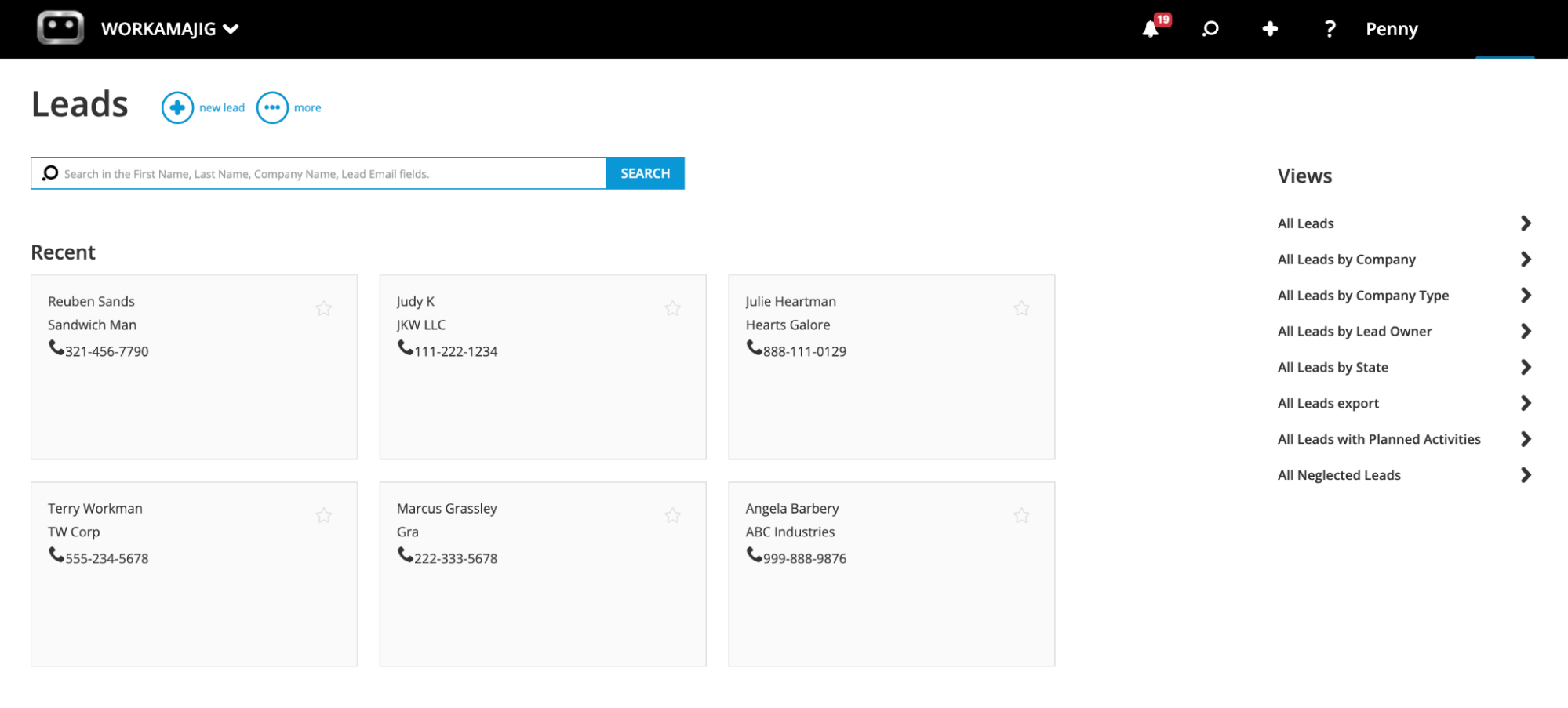
Then, sales reps can begin qualifying leads and add notes for other team members. Our system also connects with email systems to save all communications between sales teams and leads. This way, any rep can jump into a lead, see the full history, and get up to speed.
After qualification, reps can convert the leads they want to pursue into Opportunities, which automatically routes them to Workamajig’s Opportunities dashboard.
![Workamajig: Sales Dashboard and Opportunities [GIF]](https://www.workamajig.com/hs-fs/hubfs/Workamajig%20Sales%20Dashboard%20and%20Opportunities%20%5BGIF%5D.gif?width=1920&height=1050&name=Workamajig%20Sales%20Dashboard%20and%20Opportunities%20%5BGIF%5D.gif)
Our system includes several tools for managing and developing Opportunities, including:
-
Team management. Sales managers can assign Opportunities to specific reps and share detailed context with the owner.
-
Pipeline visualization. In the screenshot above, you can see how deal stages — like “Proposal Requested” — are laid out in a clear Kanban board. Sales teams can easily customize these stages and statuses to match their agency’s unique workflows, then drag and drop leads through the sales funnel to close. They can even create multiple boards to represent different pipelines, such as distinct service offerings.
-
Automated estimating. This is the same tool we mentioned earlier that helps project teams build accurate plans. Sales reps also use it to set realistic expectations with prospects and to guide pricing.
-
Opportunity overviews. Workamajig’s Opportunity cards display high-level information — such as age, timeline, and potential profits — giving reps valuable context at a glance and helping them prioritize best-fit Opportunities.
Then, after winning Opportunities, sales teams can convert them to new projects, so they appear in the project manager’s queue. As mentioned, Workamajig transfers all details and attachments from sales conversations, so project managers have the full context to begin planning.
CRM Reporting Suite
Workamajig’s various sales reports provide teams with insights into their current pipeline and past performance, so they can improve workflows and identify opportunities to boost their bottom line.
For example, sales teams can:
-
Learn more about the types of leads their agency attracts
-
Analyze earned vs. lost opportunities over different categories and timeframes, and identify similarities to understand what’s working (or not) and where they can improve
-
See where leads drop off and dig into what happened
Our reporting suite also offers snapshot reports that keep sales managers in sync with their reps’ activities and provide a clear view of the overall pipeline. Managers can see:
- Number of clients and prospects in each sales funnel stage
- Current opportunities and their projected revenue
- Team activity metrics, follow-up schedules, and response time analytics
- Resource needs (based on pipeline data)
- Comparison reports showing performance against previous periods and annual targets
Some of our most popular sales reports include:
- Win/Loss Analysis
- Quarterly Performance Comparisons
- Sales Rep Activity Summaries
Workamajig’s Project Management Module
Workamajig’s project management module supports the entire project lifecycle — from initial intake and planning through execution and monitoring. Our system helps teams develop accurate plans, keep all stakeholders in the loop, and quickly address bottlenecks before they affect timelines or budgets.
Project Planning
After collecting project details, PMs can use Workamajig’s project planning tools to define the work required to get projects over the finish line and set realistic schedules.
The easiest way to kick off projects in Workamajig is with our project templates. Project teams can store templates for all their most popular campaigns and services (we don’t impose any limits) — allowing them to quickly kick off new projects with predefined workflows, tasks, dependencies, resources, and other details. Agencies love these templates because they can standardize the intake process and kick off new projects without the guesswork.
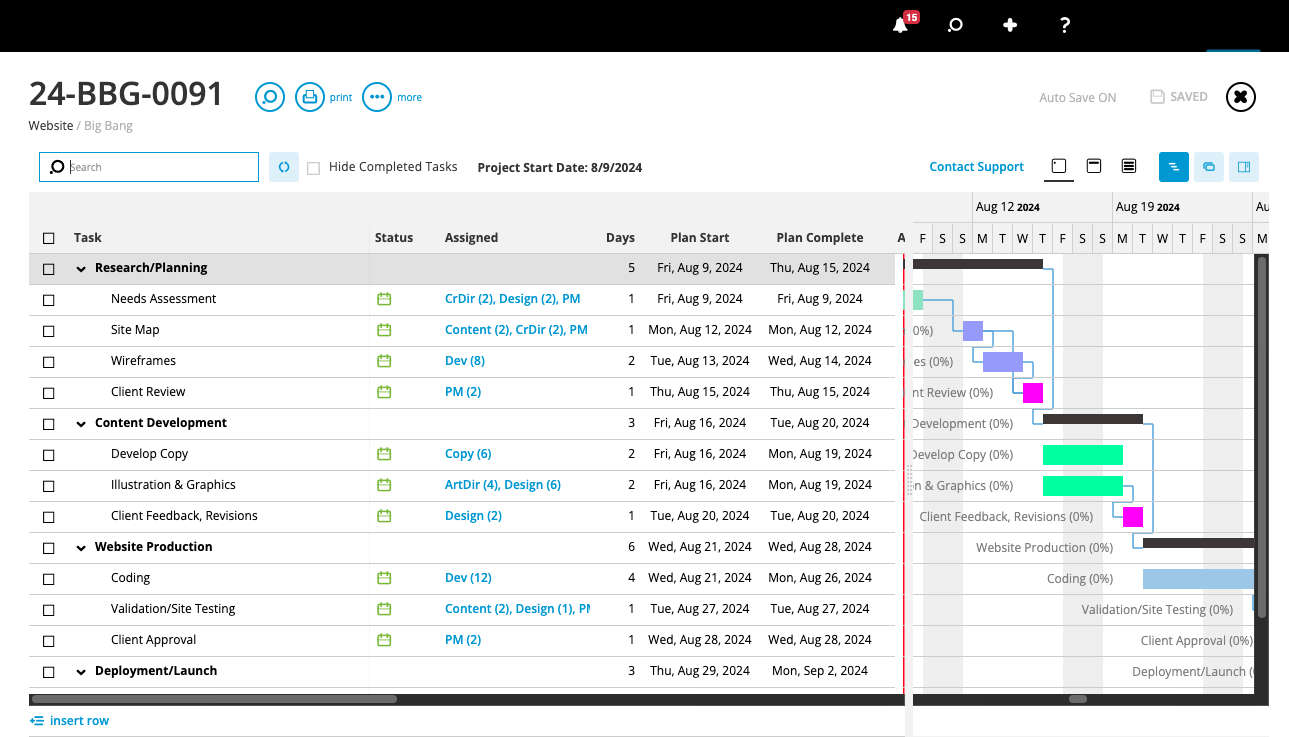
Then our task management features enable them to finalize the fine details for all project activities. They can set start and due dates, dependencies, subtasks, and time allocations, and assign the work to specific team members.
As project managers develop their plans, the automated estimating tool steps in to do the heavy lifting. It draws on both historical and current data — such as labor costs, vendor expenses, overhead, and contingencies — to ensure budgets are accurate.
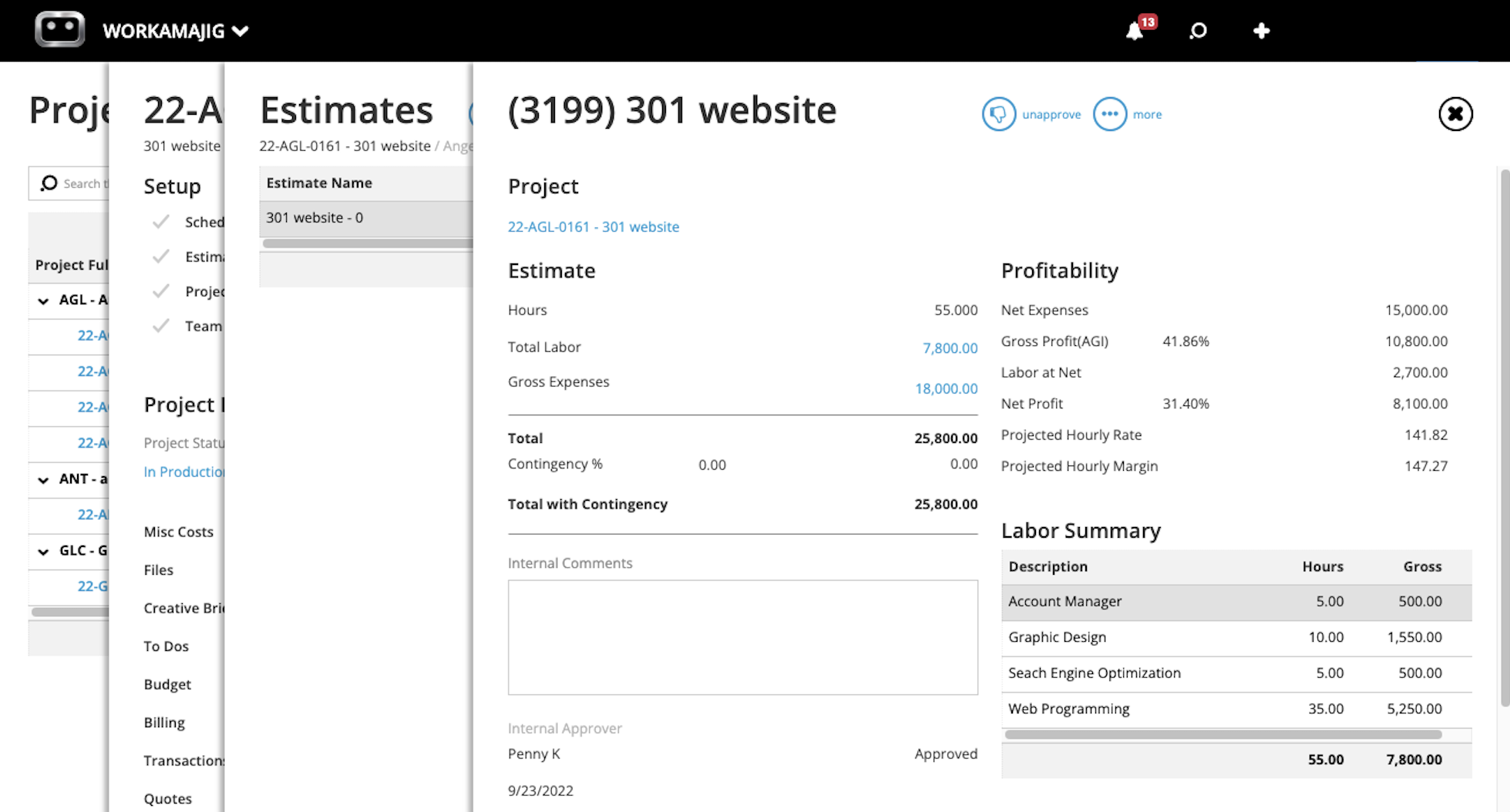
Once the plans are ready, PMs can easily share them with internal stakeholders and clients, ensuring everyone’s aligned before the team gets to work.
Note: We also offer customizable project request forms for existing clients to request new work. Project managers can design request forms for various projects or services to collect all key details upfront. They can choose from a variety of fields, or use custom fields, and set up workflows to automatically route forms to the right managers for review. This way, teams can easily compare opportunities and prioritize new work.
Team Collaboration Tools
Workamajig’s role-based Today dashboards and built-in collaboration tools help teams prioritize tasks, share context in real time, keep internal and external stakeholders aligned, and respond quickly to client feedback.
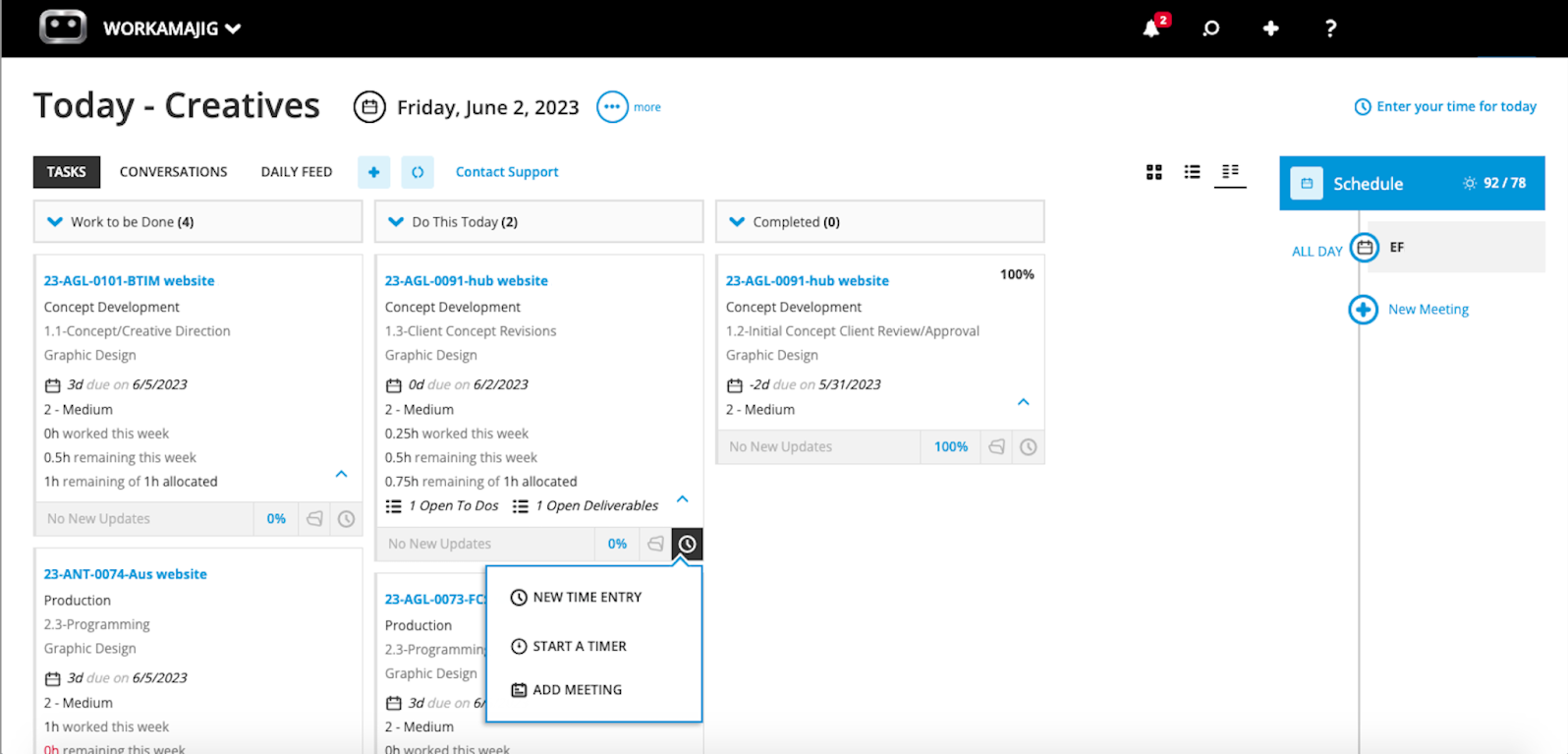
Our Today dashboards are personalized to each user’s responsibilities — whether they’re a designer, project manager, sales rep, or accountant. For example, a designer’s dashboard (shown below) displays the tasks assigned for the week, allowing them to manage their schedule effectively.
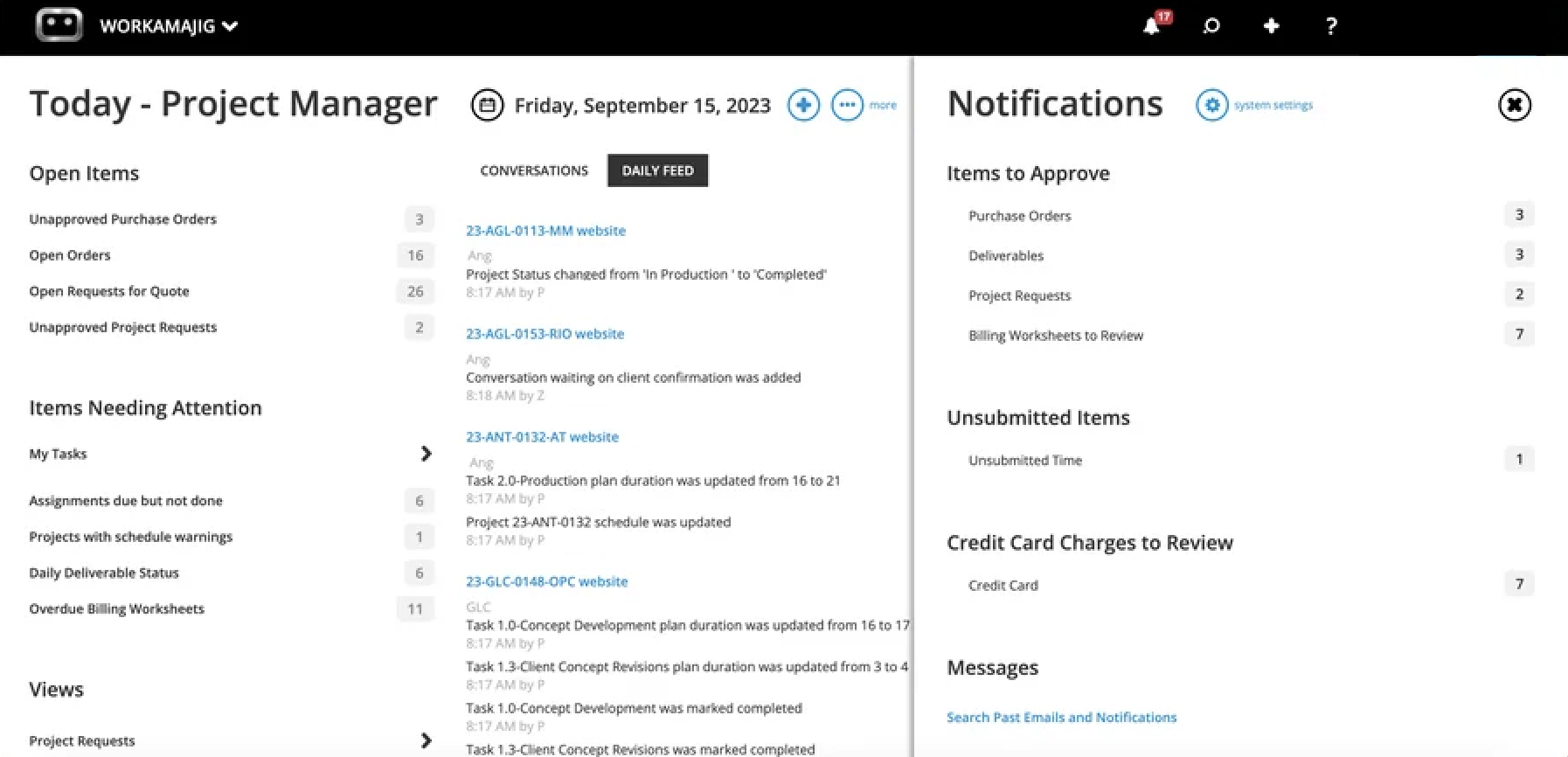
Managers’ Today dashboards include much more detail to help them stay on top of their responsibilities, such as:
-
Items requiring approval, including deliverables, purchase orders, billing worksheets, or new project requests.
-
Projects in danger of overruns, by checking for schedule warnings, incomplete assignments past their due dates, and the status of daily deliverables.
-
Conversations they’ve been tagged in so they can keep up with feedback requests and other project activities requiring their attention.
Our full suite of project collaboration tools includes:
- Commenting and tagging
- File sharing
- Internal proofing
- Side-by-side file comparisons
- Version History
- Change management
- Feedback controls — these allow managers to fix a set number of feedback rounds to keep revisions focused and avoid scope creep
Project Monitoring
Workamajig’s real-time monitoring dashboard keeps project managers informed at every stage.
Customizable Gantt charts bring the status of all active projects into a single, easy-to-navigate view. Each project and its timeline are clearly displayed, with a black progress bar indicating how far along they are. PMs can also color-code project phases to easily visualize project progress at a glance.
Next to the Gantt charts, you’ll see an overview of each project (as shown in the screenshot below) — including its name, allocated and actual hours, % completion, and timeline.
![Workamajig dashboard: Projects and Project Status [GIF]](https://www.workamajig.com/hs-fs/hubfs/Workamajig%20-%20Projects%20and%20Project%20Status%20%5BGIF%5D.gif?width=1714&height=853&name=Workamajig%20-%20Projects%20and%20Project%20Status%20%5BGIF%5D.gif)
The color-coded icons you see in the health meters correspond to each project’s status — green shows it’s on track, yellow indicates it’s at risk of overrun, and red means it’s delayed or over budget.
If a project’s status enters the yellow zone, Workamajig automatically alerts project managers so they can adapt project plans on the fly — such as by reassigning tasks or engaging contractors — and bring them back on track.
Workamajig’s Complete Agency Management System
In the following sections, we’ll show you how Workamajig’s various other modules support the PM and CRM tools above to unify all agency workflows.
Resource Scheduling & Management
Workamajig’s resource management module seamlessly integrates with our PM system, enabling project managers to plan with greater precision. For example, they can:
-
Match the right people to the right tasks — using filters to quickly find resources with best-fit skills.
-
Track resource availability in real time — so they can plan schedules that avoid conflicts and overbooking. Thanks to our calendar integrations, employees can also share when they’re unavailable, so managers don’t book them when they’re busy.
-
Distribute workloads fairly among team members — to reduce burnout and ensure every resource is fully utilized.
Managers can easily do all these things from Workamajig’s centralized staff scheduling dashboard. As shown in the screenshot below, the dashboard provides an overview of everyone’s workloads, assigned hours, remaining hours, and utilization rates in one place:
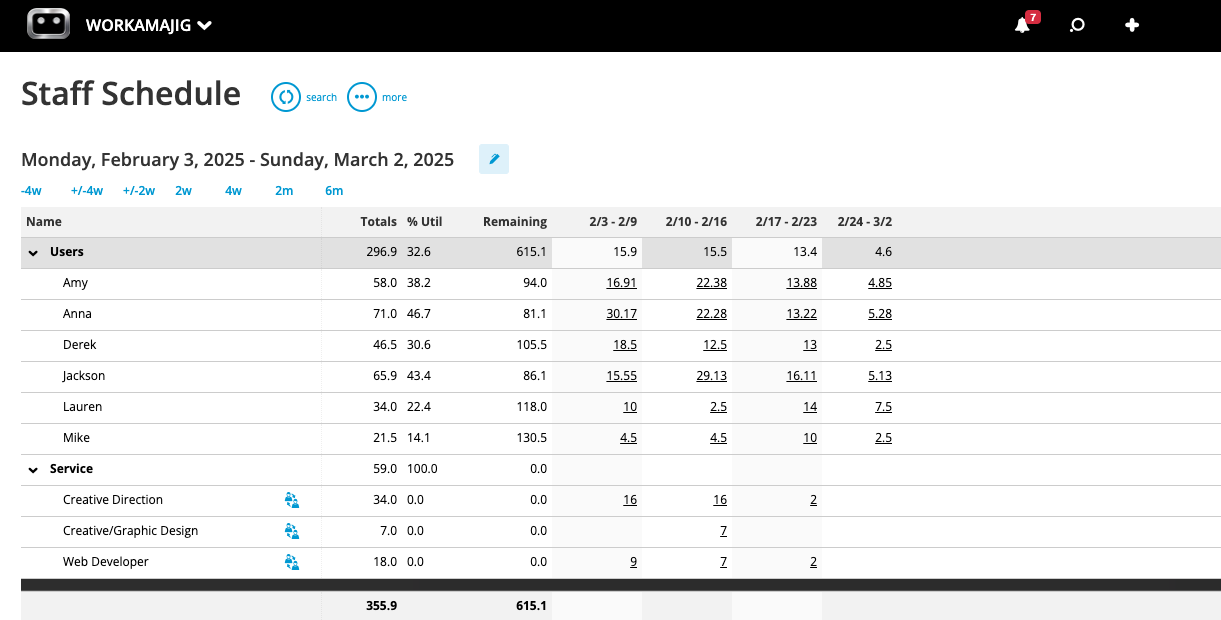
This dashboard also displays a list of all unassigned services and tasks by category — so managers can confirm all project activities are covered, and nothing that could impact project timelines slips through the cracks.
Read more: Best Agency Scheduling Software
Time Tracking & Productivity Reports
Logging the hours employees actually spend on work is critical for agencies from a profitability perspective. It means they can compare actuals vs. estimates, billable vs. non-billable hours, and individual employee productivity.
These insights help improve future planning and make the best use of available talent. But filling in timesheets every day can quickly feel like a chore, which is why many agencies struggle to get their teams on board.
To make things easier, we’ve added time tracking to task cards so teams can log their time right where they work (though we also offer timesheets). They can add hours manually, use the built‑in timer for precision — pausing, resuming, and stopping as needed, and even add hours from calendar events.
Read more: Best Agency Time Tracking Software for Creatives
As staff log their time, their actual hours flow into Workamajig’s resource and PM modules. This facilitates real-time project budget tracking by automatically calculating the actual labor costs for each project.
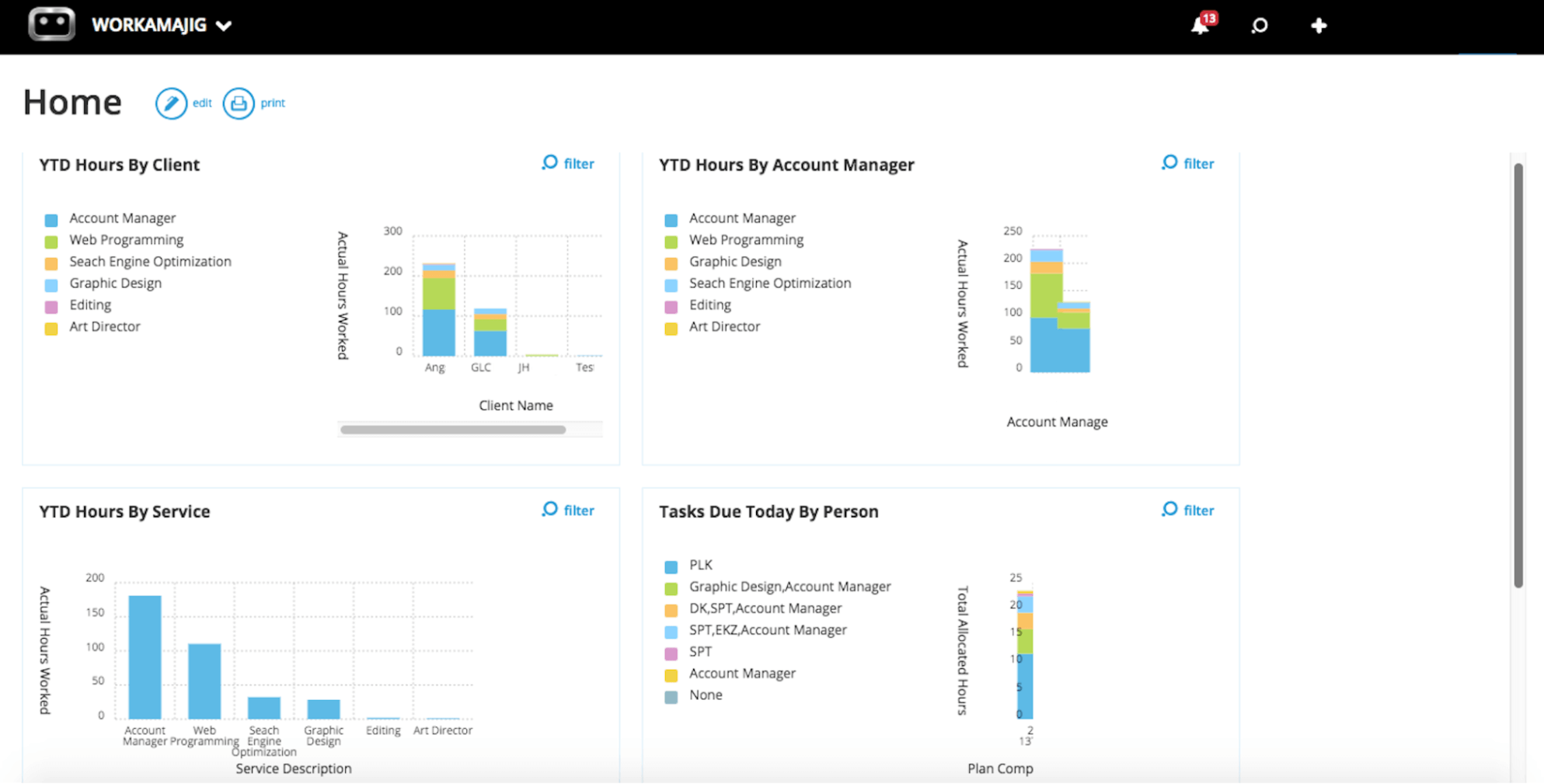
Managers can also use Workamajig’s productivity reports to see exactly how their teams are spending time and analyze utilization from multiple perspectives.
For example, they can break hours down by project, client, service, department, or date range, then compare team hours against billable time to see exactly how much effort translates into revenue.
These insights help them make more informed decisions about resource allocation and project planning — whether that means adjusting billing rates or phasing out low-margin services.
Read more: 10 Steps to Optimize Resources in Agency Project Management
Accounting Module & Financial Reporting
Workamajig features a complete, GL-ready accounting system that allows teams to manage finances directly in project workflows. It lends to the project budget tracking we discussed above, but also supports all other agency accounting needs. It’s also GAAP, GDPR, and HMRC-compliant, with built‑in multi‑currency support, making it fully capable of meeting the needs of global and enterprise teams.
Its full stack of features includes:
- Chart of accounts setup and management
- Vendor invoice processing and accounts payable
- Credit card integration to pull in expenses
- Receipt tracking
- Expense reporting
- Reimbursement workflows
- Automated billing and invoicing that pulls all costs from projects, based on billing method (time & materials, fixed fee, media, retainer)
With all their project and financial data living in one place, agencies can also move past just tracking income and cash flow — and really see where they’re making money and taking losses.
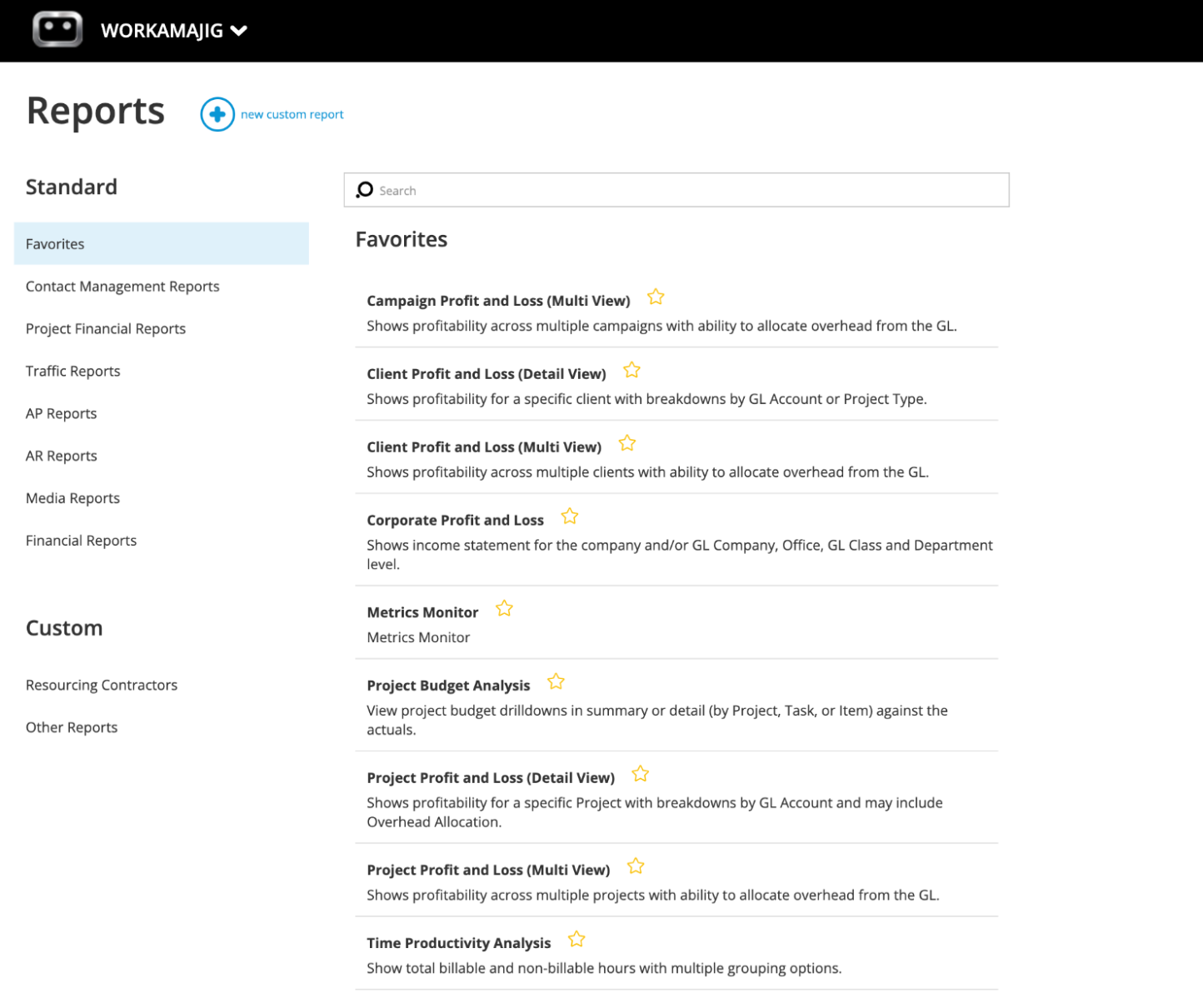
Our financial reports come in handy here — you can determine things like your most profitable clients, which services are generating losses, and how billing out specific resources affects your profit margins. Our most popular financial reports include:
- Profit & loss reports — in several categories (project, campaign, or client)
- General Ledger (GL) reports
- Cash projections
- Revenue forecasting
- Project budget drill-downs
- Billable summary reports
- Hourly realization rates
- Key metrics monitors
Read more: 10 Actionable, Practical Tips to Increase Agency Profits (+ FAQs)
Client Portals & Vendor Management Features
Workamajig offers several handy tools to streamline collaboration with all your external stakeholders — including clients, vendors, and freelancers.
You can create dedicated portals for clients, so they can collaborate with your teams directly in Workamajig. Through these portals, they can:
- Submit new project requests
- Track the progress of ongoing projects
- Share feedback with project teams
- Start new conversations and participate in project discussions visible to them
- Review invoices
- Access approved deliverables after project delivery and final sign-off
Similarly, our system lets you set up portals for vendors that store every interaction and the whole work history. When it’s time to outsource project work, you can quickly identify the best fit by reviewing the requests each vendor has fulfilled on past projects.
Using Workamajig’s various other vendor management tools, teams can:
-
Send quote requests, review and compare bids, assign work to contractors, and generate purchase orders (POs) for production vendors.
-
Store vendor invoices, reconcile them against work orders, approve them, and initiate payments.
-
Evaluate vendor reliability by comparing their original quotes to actual costs.
Getting Started with Workamajig
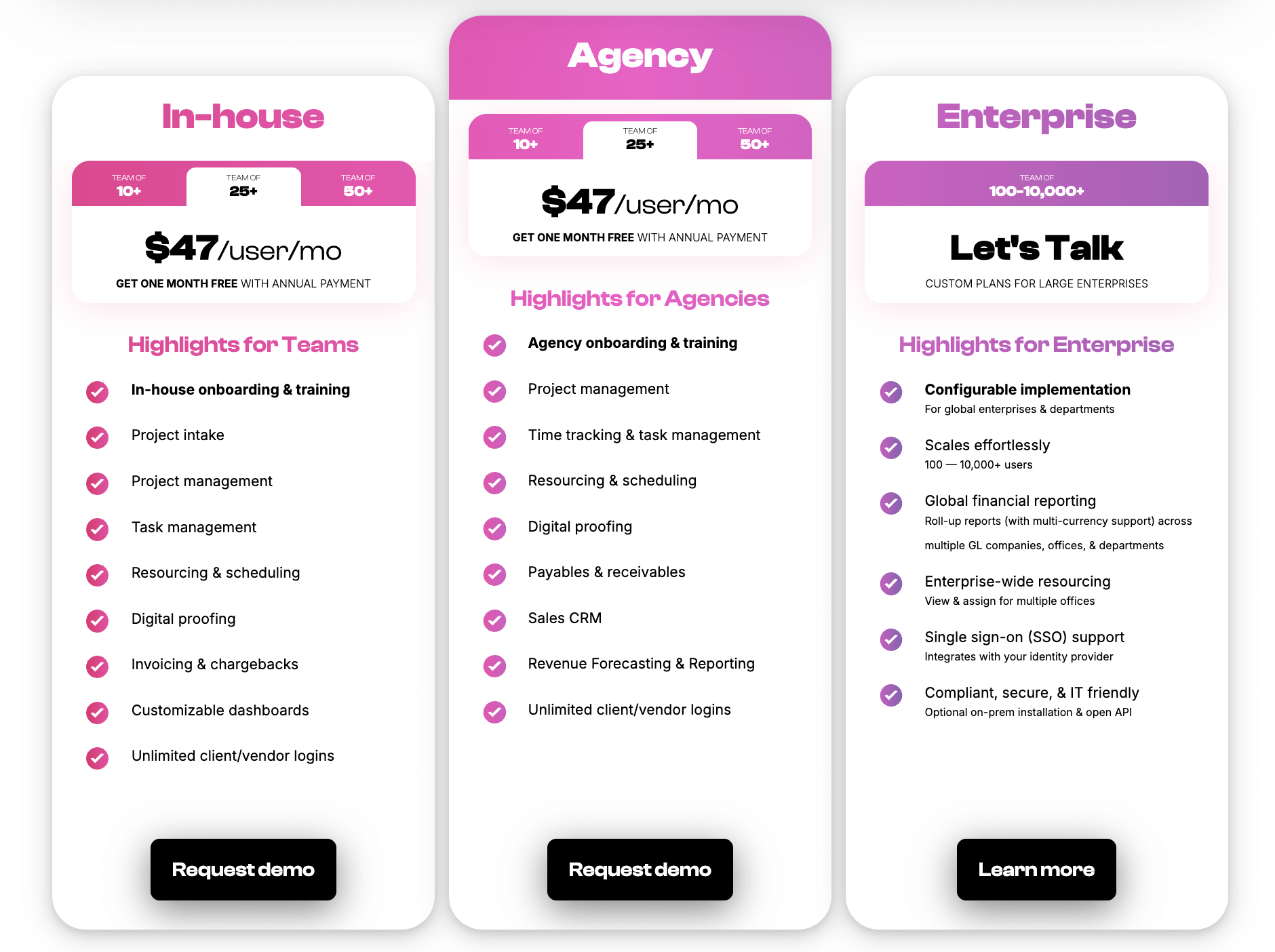
As we mentioned earlier, all Workamajig packages include our full suite of tools and integrations.
Our plans are tailored to each agency’s size, with custom quotes for enterprises (100+ users). Check out our per-user rates below:
Request a free demo with our team.
2. Monday.com
Monday offers a stack of tools to manage projects, client relationships, campaigns, internal and external service requests, and software development.
The provider’s project management and CRM products — Work Management and Monday CRM — can be fully integrated, but they’re sold separately. If you subscribe to both, you’ll have one set of login credentials and can easily navigate between the two platforms. Both of these systems receive thousands of positive reviews, with users praising their ease of use and collaboration features.
Monday is used by teams of all sizes, across industries, including major brands like Motorola and Canva.
-
The Work Management solution includes robust project, task, resource, and portfolio management features, risk assessment tools, and hundreds of project templates.
-
Monday CRM supports the entire sales pipeline, from managing lead acquisition across multiple sources to deal stages and post-sales activities.
However, the downside here is that you still have to pay for two software subscriptions and integrate systems. Negative reviews of Monday CRM also note a lack of flexibility in customizing roles and permissions, so users can go rogue in the system (for example, anybody can delete contacts), which can create chaos and security risks.
Find more Monday Work Management reviews here & Monday CRM reviews here.
Features
Monday Work Management
- Project templates
- Shareable forms
- Project management
- Task management
- Project monitoring
- Custom fields
- Customizable notifications
- Portfolio management & dashboards
- Multiple views and customizable reports
Monday CRM
- Templates for lead, contact & deal management
- Unlimited boards and customizable pipelines
- Lead management
- Centralized communication hub — view meetings, calls, emails, and notes
- Deal management — including stage, owner, interactions, and more
- Activity management — log calls, emails, etc.
- Email tracking & automations
- Lead scoring
- Sales forecasting
- Sales analytics & advanced analytics
- Account management
- Collection tracking
Pricing
Monday Work Management and CRM both have three standard paid plans, plus custom packages for enterprises. Work Management also offers a free plan with limited features, including up to 3 boards, 3 documents, and 8 column types, for up to 2 users.
Monday Work Management’s standard plans are as follows:
-
Basic ($12/user/month): This plan includes unlimited viewers and items, and 5GB of file storage. This plan lacks several essential features, including integrations, guest access, time tracking, and portfolio management.
-
Standard ($14/user/month): This tier takes users up to 20GB of file storage and unlocks Timeline, Gantt, & Calendar views, guest access, integrations, and more.
-
Pro ($24/user/month): The top-tier plan offers time tracking, board administrator roles, dependency and formula columns, and private boards/docs. It still lacks portfolio management features (they’re exclusive to Enterprise plans).
Monday CRM’s standard packages are as follows:
-
Basic ($15/user/month): This includes 1,000 active contacts & deals, one custom dashboard, and 20 quotes & invoices per month. This tier lacks many essential features, including lead and deal management tools.
-
Standard ($20/user/month): This plan unlocks lead management, deal management, and centralized communication tools. This tier has the following limits: 10,000 active contacts & deals, 3 workspaces, 5 custom dashboards, and 50 quotes & invoices per month.
-
Pro ($33/user/month): The Pro plan offers unlimited contacts & deals, 250 quotes & invoices per month, 50 custom dashboards, mass emails, email sequences, time tracking, and integrations with other CRMs (HubSpot, MailChimp, etc.).
Read more: Best Monday.com Alternatives for Agencies & Creatives
3. Insightly
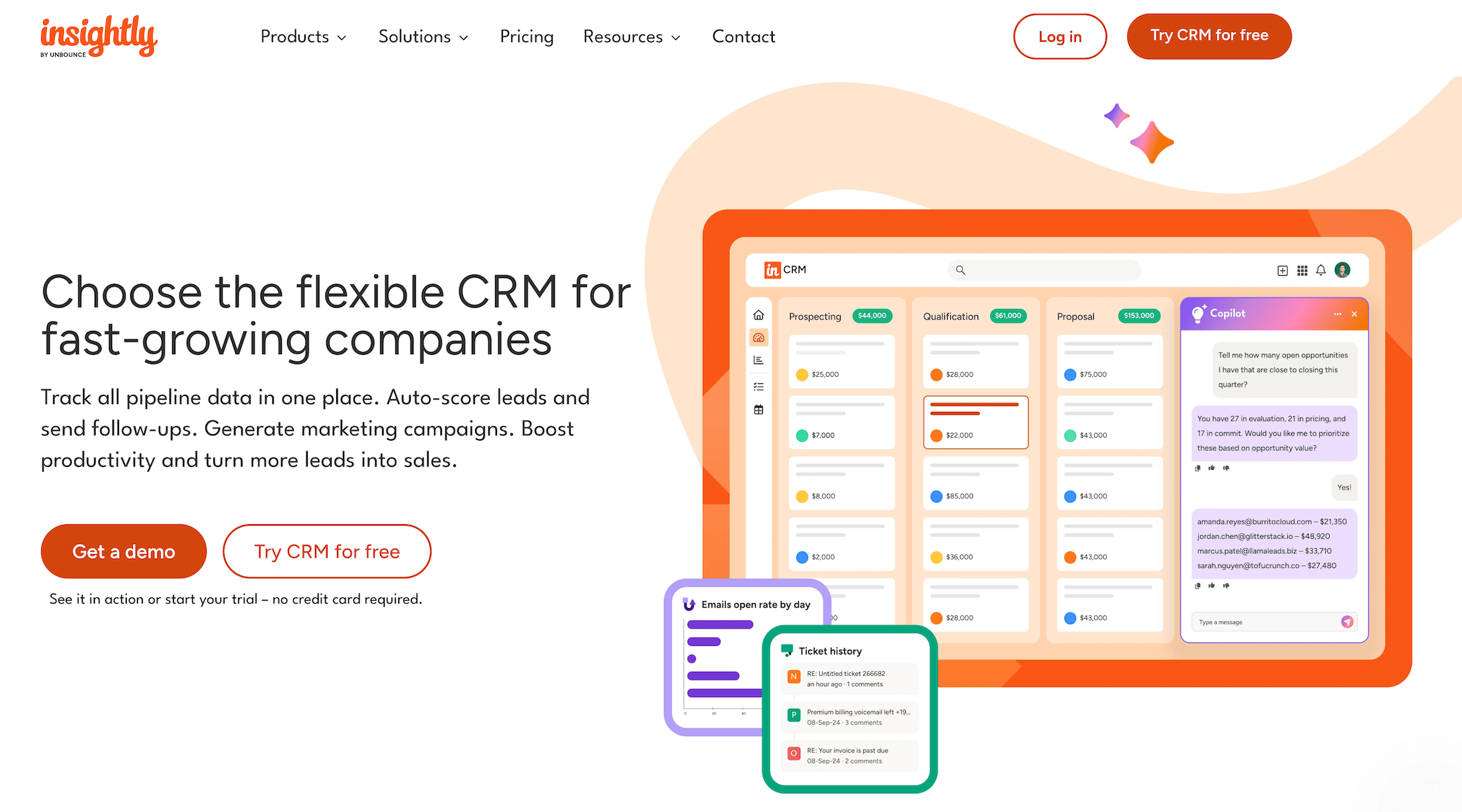
Insightly's suite of products includes Insightly CRM, Marketing Automation, AppConnect, Support & ticketing, and All-in-One. Its CRM incorporates project management features across all plans, so that’s the platform we’re focusing on.
Insightly CRM is easy to customize and includes time-saving features, such as automated follow-ups and lead auto-scoring. Users appreciate its simple UI, automation tools (although these are locked behind higher-tier plans), and helpful customer support team.
Similar to Workamajig, the CRM lets teams seamlessly convert won opportunities into projects, transferring all relevant details — including records and tasks. Project managers can then set up milestones, add timelines, assign responsibilities, and tailor projects with custom fields. Each project includes an activity dashboard that keeps everyone in the loop about recent conversations, upcoming tasks, and events.
Insightly’s “Pipelines” and “Activity Sets” tools allow users to save time by automating repetitive workflows. For example, users can set up an automated workflow that creates tasks and assigns them to team members when a project moves to the next stage.
Although Insightly offers project planning, collaboration, and workflow automation, it lacks many essential PM features you’ll find in more robust systems, including project estimating and comprehensive monitoring tools.
Read more Insightly reviews here.
Features
- Sales pipeline
- Lead management and tracking
- Lead nurturing
- Validation rules for CRM entries
- Create records of offerings
- Configure and price quotes directly from opportunity records
- Convert opportunities to projects after close
- Customizable dashboards
- Custom fields and page layouts
- Project management
- Task management
- Pipelines and pipelines — to organize project tasks and track status
- Activity sets — generate repetitive tasks and events in one step
- Customizable project dashboards — track KPIs and deliverables
Pricing
Insightly CRM offers the following packages:
-
Plus ($29/user/month, billed annually): The entry-level plan includes essential lead, contact, and project management tools.
-
Professional ($49/user/month, billed annually): This plan includes lead assignment and routing, outbound email scheduling, and unlimited user roles. It also offers higher limits for records, file storage, custom fields, and mass emails.
-
Enterprise ($99/user/month, billed annually): The top-tier plan unlocks products, pricebooks, quotes, comprehensive audit logs, and higher limits for everything we mentioned above (records, etc.).
The Plus and Professional plans also include a free 14-day trial.
4. Pipedrive
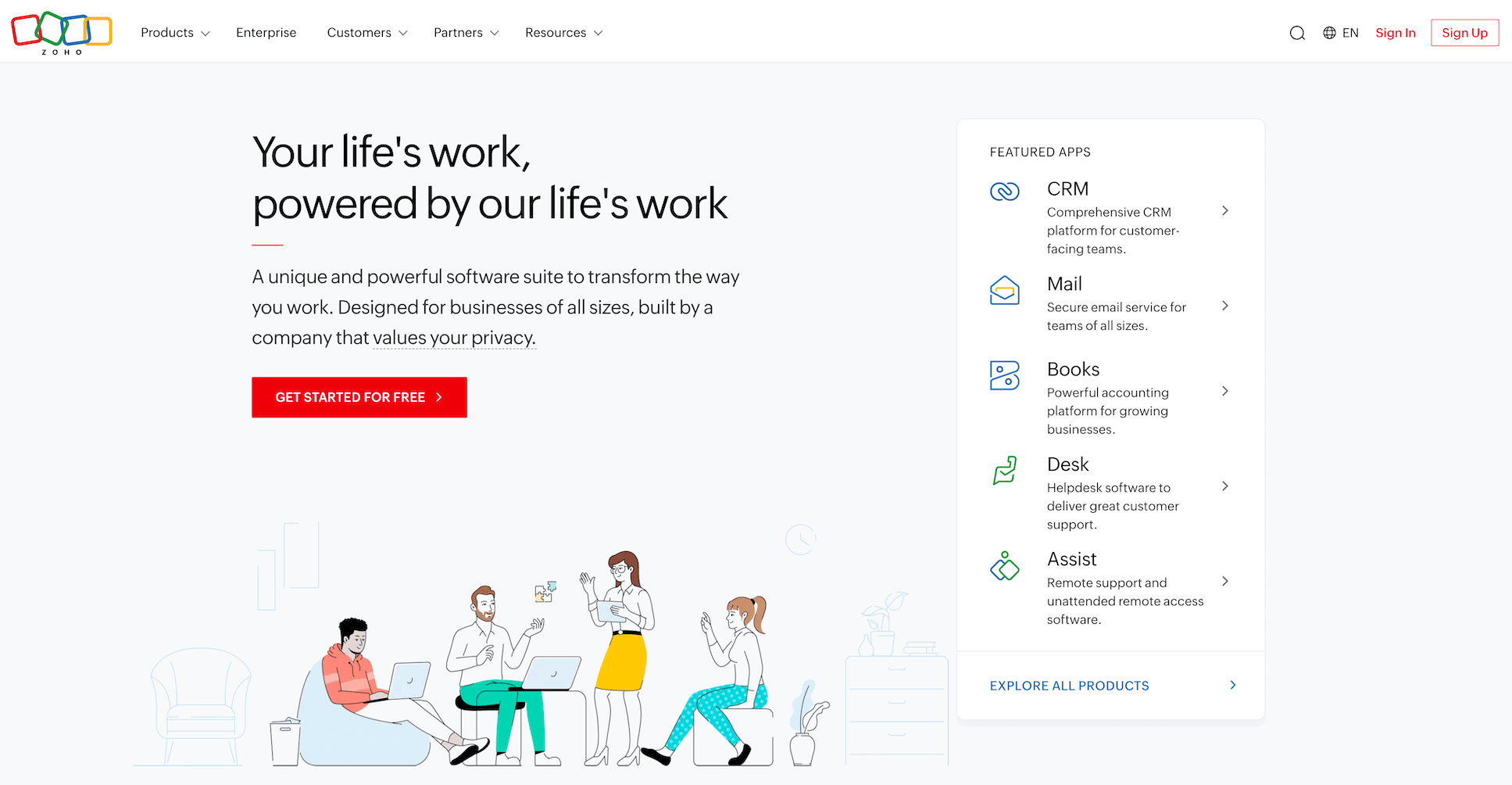
Pipedrive is a lightweight alternative to industry giants like HubSpot and Salesforce, tailored for sales teams. It positions itself as a CRM that’s “intuitive and doesn't require an IT degree,” and many sales users say it’s easy to adopt and use.
Pipedrive offers project management as a separate, paid add-on to its CRM. The two modules work together seamlessly — for example, teams can create new projects and link them to specific clients.
The CRM supports all sales workflows, and teams appreciate the straightforward setup process for automations, integrations, and dashboards. It features many sales automation tools — such as auto-assigning leads to reps, pre-qualifying leads using public data, and nurturing leads with emails.
Pipedrive’s project management add-on offers basic tools: project templates, task management, email sync, team collaboration, list views to track project statuses, and detailed project planning. However, like Insightly, it lacks comprehensive project monitoring, estimating, and portfolio management.
Check out more Pipedrive reviews here.
Features
- Leads management — including inbox, sales feed to track tasks, custom scoring, nurturing sequences, and enrichment options
- Deals management — track and manage pipeline, ownership, communications, and activity history
- Deal rotting alerts
- Products catalog — create a custom catalog of your offerings
- Fields — including custom, required, important, formula, and pipeline-specific
- Calendar sync
- Meetings scheduler
- Contracts and e-signatures
- Project templates
- Task management
- Project planning
- Project scheduling
- Project monitoring
- Email sync — track emails from the CRM and link them to relevant projects
- Collaboration tools
- File sharing
- One-click integrations with 500+ tools
Pricing
Pipedrive offers four standard plans, each with a free 14-day trial and the option to pay monthly or annually.
-
Lite ($19/seat/month): The Lite plan includes lead, calendar, and pipeline management, over 500 integrations, and personalized onboarding.
-
Growth ($34/seat/month): Growth unlocks automatons, lead nurturing sequences, subscriptions, forecast results, and meeting scheduler.
-
Premium ($64/seat/month): This plan offers more advanced features like custom scoring, company data enrichment, contracts, and e-signatures.
-
Ultimate ($89/seat/month): The most advanced plan unlocks all of Pipedrive’s features, although agencies might not need many of them. It includes email & phone data enrichment, a lead generation add-on (with chatbot, live chat, web forms, and prospector), extended phone support, and partnership discounts.
5. Flowlu
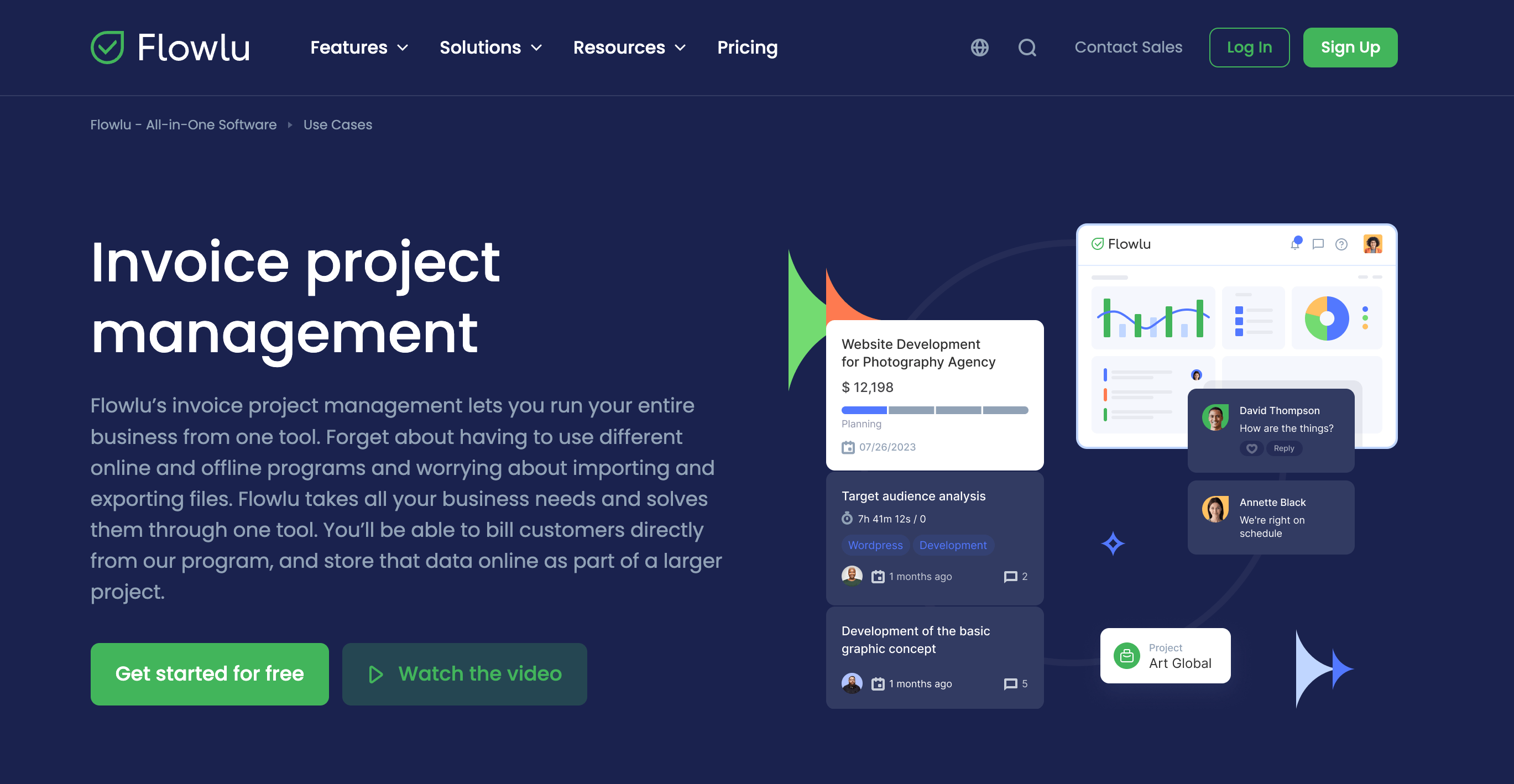
Flowlu is an all-in-one business management platform with feature-rich modules for project management, CRM, human resources, and finances. Agencies and in-house teams across several other industries, including automotive, healthcare, and financial services, use Flowlu to consolidate their tech stacks and manage all their workflows.
Choosing the right Flowlu plan can be confusing because some tiers lack entire modules — such as resource management — while others lack specific functionality, such as portfolio management or advanced CRM reports. The “Advanced” tier includes most of the essential project management, CRM, finance, and HR tools, making it suitable for smaller agencies.
However, larger teams may want to request a custom plan to access features such as project and task workflows, full white-labelling, and higher limits for external collaborators (clients, freelancers, contractors).
Although Flowlu’s reviews across sites like G2 and Capterra are generally positive, several users report dissatisfaction with the vendor’s technical support. As one user puts it: “Technical support is pretty much nonexistent (WHEN they respond, it takes days). Imports and some integrations are still buggy and won't work.”
Read more Flowlu reviews here.
Features
- Lead capture forms
- Opportunity tracking & lost opportunity reasons
- Personal email inboxes
- Email templates
- Email metrics tracking
- Project workflows — create templates with predefined stages, milestones, and tasks
- Task templates
- Task management
- Project portfolios
- Project financial planning
- Project expense & revenue tracking
- Agile & issue tracker
- Collaborative tools
- Resource planning & management
- Online invoicing
- Financial management
- Mind maps
- Document builder
- Client portals
- Knowledge base
Pricing
Flowlu offers a free plan, two standard packages, and custom plans for enterprises:
-
Free ($0 but limited to a two-user workspace): The free plan includes basic CRM features with up to 100 contacts, basic task & project management with one workflow, invoices & estimates; payment & expense tracking, and collaboration tools.
-
Essential ($12/user/month): This unlocks multiple sales pipelines, email sync, CRM reports, essential PM features (task dependencies, subtasks, etc.), basic financial & time tracking.
-
Advanced ($22/user/month): The Advanced plan includes email tracking, client portals, and advanced features for: CRM reports, project management (including portfolios), time tracking, finance, and HR.
-
Ultimate (Custom pricing): This unlocks Flowlu’s full suite of features.
The Essential and Advanced plans also include a 7-day free trial.
6. Zoho Projects and CRM
Zoho offers dozens of apps to support different business needs, with solutions for marketing and sales, legal, project management, IT, HR, and more. As with Monday, its project management and CRM software — Zoho Projects and Zoho CRM — are sold separately, though they can be integrated natively.
Many users are drawn to Zoho’s suite of products because it's a cost-effective alternative to major players such as HubSpot, Salesforce, and Microsoft. For example, businesses that use Zoho’s suite of products for project management, CRM, and accounting, report saving costs overall. It’s also easier to stick with Zoho products if your agency already uses the Zoho ecosystem.
However, using Zoho products together doesn’t guarantee smooth sailing. Some users note that the integrations between these systems aren’t entirely seamless — e.g., the CRM may not automatically update in Zoho Projects, and vice versa. Plus, while Zoho Projects’ features are pretty robust, many users find its CRM lacking in several areas. They say its UI is not intuitive, cite several bugs, and note that it’s not tailored to sales teams' workflows.
Find more Zoho Projects reviews here & Zoho CRM reviews here.
Features
Zoho Projects
- Project management
- Task management
- Project timeline visualization
- Portfolio management
- Issue management
- Custom fields and views
- Team collaboration
- Document management and sharing
- Workflow automation
- Time tracking
- Resource utilization reports
- Resource allocation charts
- Reporting & analytics
Zoho CRM
- Lead management — including capture, nurturing, and enrichment
- Deal management with pipeline tracking
- Territory management — assign leads, customers, and accounts to reps based on factors like product line or industries
- Journey orchestration — personalize customer experiences
- Omnichannel communication
- Team collaboration
- Mass email
- SalesInbox — align emails with sales pipeline
- Validation rules
- Sales forecasting
- Client scripts — custom events based on UI interactions
- Advanced reporting & analytics
Pricing
Zoho Projects and Zoho CRM both offer free plans with limited features, along with various standard packages.
Zoho Projects’ packages include:
-
Premium ($5/user/month): This plan includes unlimited projects, custom views & statuses, project budgets, time logs and timesheets, task reminders, and more.
-
Enterprise ($10/user/month): This package unlocks portfolio dashboard, advanced security features, resource management, and custom profiles, roles, & fields.
-
Ultimate ($15/user/month): The Ultimate plan includes 100 read-only user seats, 15GB storage per user, 100 resources, multi-user and multi-project timesheets, and more.
Zoho CRM’s plans are as follows:
-
Standard ($20/user/month): This includes leads, accounts, deals, mass emailing, sales forecasting, calendar booking, and reports & dashboards.
-
Professional ($35/user/month): The next plan up unlocks unlimited custom reports, higher email limits, unlimited email templates, client scripts, inventory management, and email intelligence tools.
-
Enterprise ($50/user/month): The Enterprise plan provides territory management, customer journey orchestration, multi-user portals, SalesInbox, page layouts, data enrichment, and more.
-
Ultimate ($65/user/month): This unlocks the full suite of CRM tools, including advanced data analytics, unified business insights, and advanced customizations.
7. ClickUp
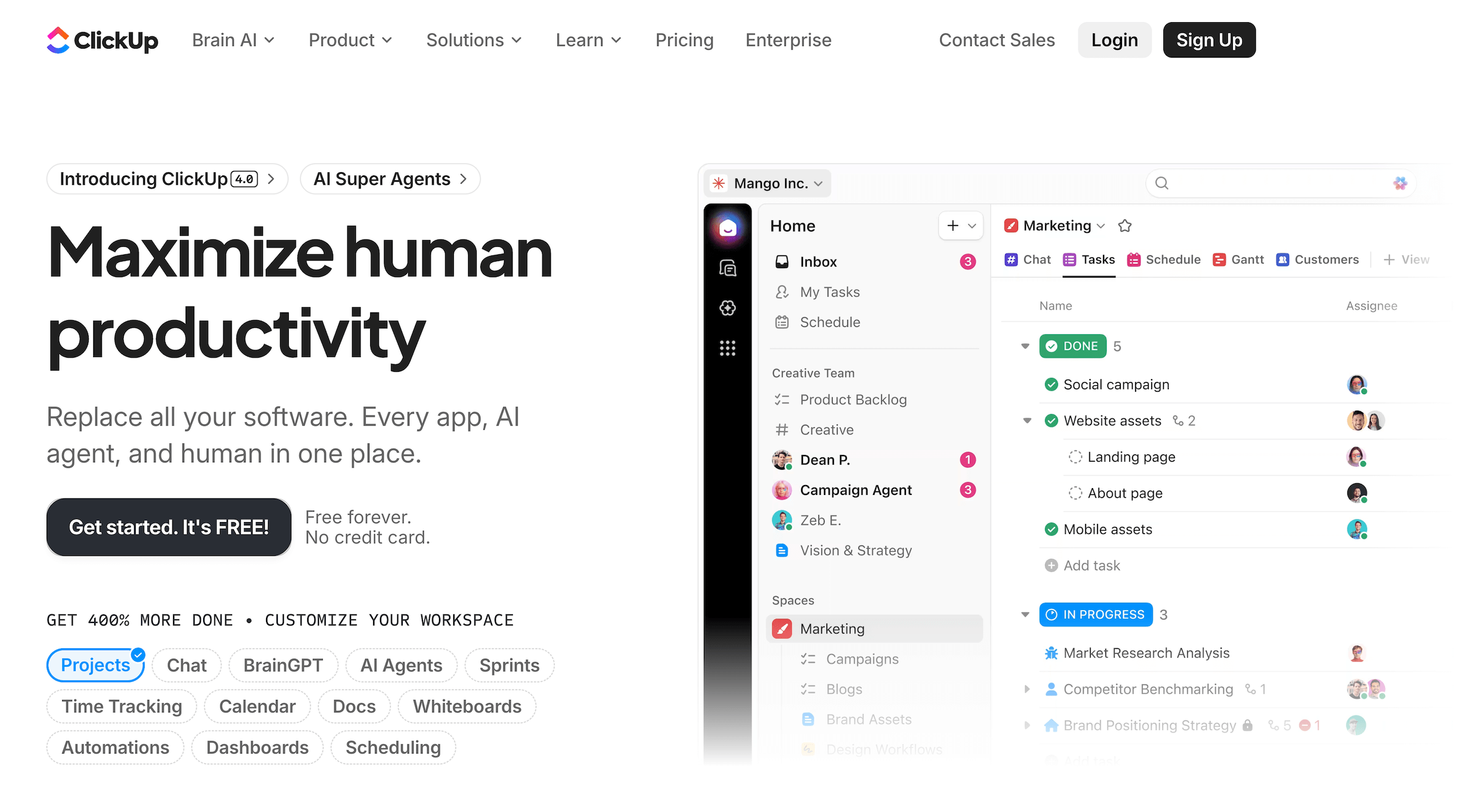
ClickUp is one of the two tools on this list (the other is Teamwork, below) that lack a built-in, dedicated CRM. It does, however, offer CRM templates and customization options to support sales workflows within ClickUp’s project and task management tools. So, for example:
-
Deals and customers can be represented as tasks, allowing users to track progress, assign reps, set priority levels, and add details.
-
Spaces and folders can be used to manage contact and account records. Users must link tasks to each other — e.g., contacts to accounts — to build a proper database.
-
You can also connect ClickUp Docs to track related documents, such as emails, notes, conversations, contracts, and proposals.
Although setting up ClickUp this way provides some CRM capabilities, it requires significant maintenance and lacks many essential features you’ll find in robust CRMs. For example:
-
ClickUp’s dashboards are all project management-focused, displaying metrics such as project health.
-
You won’t have dedicated sales reports, such as Win/Loss and Quarterly Performance.
-
Many users also note that the CRM setup doesn’t scale well — maintaining workflows becomes challenging, and things start to break down as the number of contacts grows.
While ClickUp isn’t particularly impressive in the CRM department, its project management suite is robust and flexible, including over a dozen productivity tools for tasks, communication, and knowledge management, and it integrates with over 1k third-party apps (including CRM software like HubSpot and Salesforce).
Check out more ClickUp reviews here.
Features
- Project intake forms
- Project templates
- Task management
- Multiple project views
- Sprint management
- Folders and spaces
- Custom fields
- Chat messages
- Goals & portfolios
- Dashboards
- Mind maps
- Activity views
- Whiteboards
- Native time tracking
- Resource management
- Advanced security
- 1000+ integrations
- Powerful enterprise tools
Pricing
ClickUp offers a free plan, two paid packages, and custom enterprise plans:
-
Free Forever ($0): ClickUp’s free plan includes core work management features such as unlimited tasks, 60 MB storage, unlimited free plan members, Kanban boards, calendar view, collaborative docs, sprint management, basic custom fields, one form, 24/7 support, and two-factor authentication.
-
Unlimited ($7/user/month): This tier adds unlimited limits for: storage, folders and spaces, integrations, Gantt charts, custom fields, chat messages, and forms. It also offers guest permissions, multiple teams, native time tracking, goals & portfolios, resource management, and AI compatibility.
-
Business ($12/user/month): This plan unlocks unlimited message history, unlimited mind maps, activity views, timeline views, Google single sign-on (SSO), dashboards and whiteboards, sprint points & reporting, workload management, and more.
-
Enterprise (Custom pricing): These plans offer all the Business features plus white labeling, conditional logic in forms, team sharing for spaces, custom roles, advanced permissions, enterprise API, SSO & SCIM provisioning, MSA & HIPAA options, regional data residency, live onboarding training, and a dedicated customer success manager.
8. Teamwork
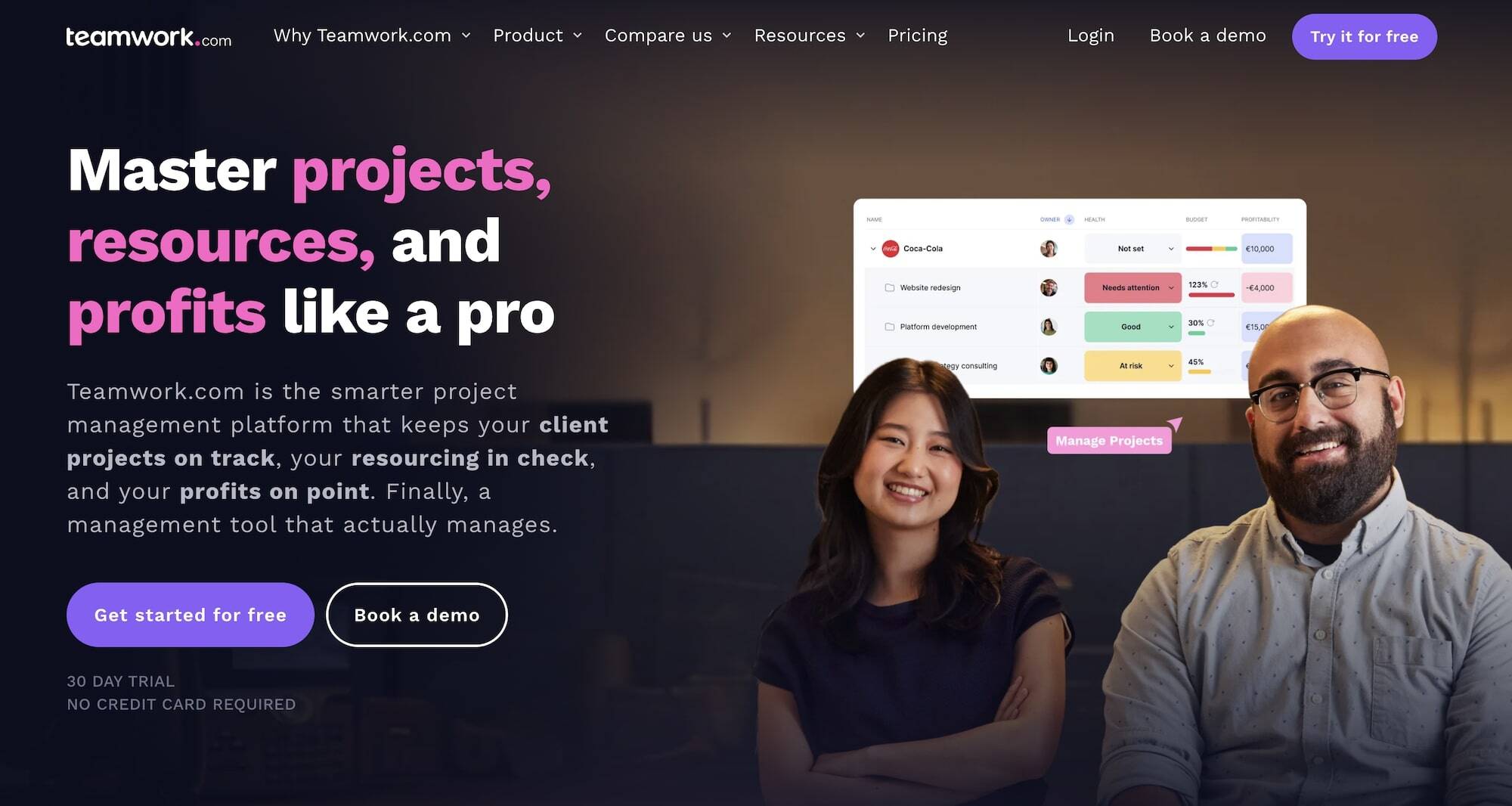
Teamwork is an app-based project management system that relies on third-party integrations to support end-to-end agency workflows (like sales and accounting processes).
The platform’s primary CRM integrations are with HubSpot and Salesforce, so users must subscribe to one of these systems separately to manage PM + CRM workflows in Teamwork. While Teamwork offers convenient integrations with these tools, many users report glitches when setting up and maintaining integrations — particularly after connecting multiple apps or when performing bulk actions in Teamwork.
On the project management side, Teamwork’s native system is feature-rich, offering essential tools like project intake forms, templates, planning, monitoring, native resource management, team collaboration, multiple project views, portfolio management, time tracking, budget tracking, and reporting. Users can also link projects to the respective clients and easily manage collaboration with all stakeholders.
Even though Teamwork is praised for its ease of use and ability to integrate with most any outside software, it’s not the best choice for teams looking for a unified CRM and project management solution. You still need two separate softwares here, and integrations may not always work smoothly.
Find more Teamwork reviews here.
Features
- Portfolio view to connect multiple campaigns into one dashboard
- Project intake forms and project planning
- Project management
- Project monitoring
- Resource and workload management
- Time tracking
- Internal proofing and collaborative tools
- Workflow automation tools
- Client management
- Expense management
- Budget tracking
- Invoicing
- Reporting
- Integrations and API
- Mobile apps (for iOS & Android)
Pricing
Teamwork offers a free plan, three standard packages, and custom enterprise plans:
-
Free ($0): This plan includes basic project management features with modest limits, built-in time tracking, up to 5 projects & 5 users, and 100 automations per month.
-
Deliver ($13.99/user/month): The first paid package includes project status & health reports, team management tools, intake forms, integrations (e.g., QuickBooks, Harvest), 20 project templates, and up to 5k automations per month.
-
Grow ($25.99/user/month): This upgraded plan grants access to budgeting, time & financial tools, workload/resource planning, advanced reporting (utilization, time spent), 50 project templates, and 2k automations per month.
-
Scale (Custom pricing): The top-tier plan includes unlimited premium features, including projects, templates, custom fields, and profitability reports. It also unlocks advanced resource scheduling, retainer management, and 1k automations per month.
All standard plans include a 30-day free trial. Teamwork also offers custom packages for enterprises that include advanced consulting and support, enterprise security & SSO, dedicated infrastructure, and tailored onboarding.
What’s the Right CRM + PM System for Your Agency?
If you’re only after CRM and project management, platforms like Monday, Zoho, Insightly, and PipeDrive are solid options. That said, Insightly and PipeDrive keep things pretty simple on the project management side, whereas Zoho and Monday offer advanced, standalone PM and CRM systems that can be integrated.
As mentioned earlier, there are several advantages to centralizing all your workflows in a single system. You’ll save on costs, avoid clunky integrations, improve collaboration, and get unified insights that help teams plan smarter and really understand the finer details of your agency’s processes and profitability.
That’s where Workamajig comes in. Every module — from CRM to accounting — is powerful and feature-rich, designed to replace standalone tools without compromise. No glitches, data siloes, or multiple subscriptions to deal with. Just one system that keeps everything running smoothly.
Request a personalized demo to see why agencies have trusted Workamajig for 30+ years.