

Tracking project hours is critical for creatives and marketers to run a profitable agency. It’s key for calculating ROI, measuring productivity, and spotting inefficiencies before they become costly problems.
But to do all these things, you need a system that tracks time, connects hours to project activities, and keeps time data flowing across your project management, resource planning, financial management, and reporting tools.
That’s why agencies seeking the most effective time-tracking solution should consider agency management solutions — this is how you ensure time-tracking data flows seamlessly into other modules, in real time. Here’s what that looks like in practice:
-
Team members can log hours directly on tasks, ensuring actual hours are tied to project activities.
-
Managers can see everyone’s total bandwidth, planned workloads, and hours worked to balance schedules and ensure no one is overloaded.
-
The system stores hourly rates for people and services, calculates labor costs, and links them to project budgets.
-
Project timelines and budgets are updated in real time as users clock their hours.
-
Billable hours flow straight into billing worksheets and invoices with no extra work.
-
Agencies can accurately calculate billable utilization, profitability, and more — with all their data in one place.
However, we get that some agencies already have a pretty established tech stack and just want something they can integrate with what they already use. While we don't totally recommend these options because integrations are error-prone and teams still have to manually move data across systems, we don't dismiss them either.
This guide covers both types of solutions — all-in-one agency management systems with built-in time tracking and standalone time tracking apps.
Use the sidebar table of contents to jump to the solutions you’re most interested in.
To learn more about Workamajig, keep reading or request a free demo with our team.
1. Workamajig
All-in-One Creative Agency Management Software with Native Time Tracking
Workamajig is an all-in-one agency management system featuring fully integrated project management, resource planning, time tracking, budget monitoring, CRM, and accounting software.
Our system offers a variety of ways for teams to track time, so employees can conveniently log hours while they work, and those hours seamlessly connect to project activities, schedules, and financial data. This real-time synchronization allows managers to:
-
Accurately monitor project progress — so they can catch issues early, control labor costs, and maintain project budgets.
-
Compare estimated vs. actual hours — to improve future planning by ensuring employees have enough time to complete their tasks.
-
Allocate resources more strategically — they can rebalance workloads to prevent burnout or shuffle schedules to better utilize billable resources.
-
Measure individual team members' productivity — they can spotlight top performers, identify those consistently falling behind, and build growth plans for all employees based on where they excel vs. where they need more help.
-
Gain deeper insights into profitability — they can go beyond higher agency-level metrics and zoom into the profitability of specific projects, clients, and services.
We built Workamajig so agencies can bring all their people, processes, and operations together — enabling teams to collaborate more effectively, make data-driven decisions, and understand how their work contributes to broader agency goals.
All Workamajig plans include our complete feature set, so teams of all sizes benefit from our full stack of tools. We also pair each customer with a dedicated account manager who will:
-
Guide the set-up process
-
Take you through Workamajig’s complete feature set and train you on all the modules
-
Provide ongoing support and ensure Workamajig is always optimized for your current processes and goals
In the following sections, we’ll take you through:
-
Time tracking in Workamajig — including the various tools for teams and managers.
-
Workamajig’s real-time project monitoring — which uses our time and expense tracking tools to monitor project timelines, track budget burn, and forecast overruns.
-
Staff scheduling — tracked hours and time off flow in here, allowing managers to refer to employee capacity, availability, and allocations when planning schedules.
-
Project billing & invoicing — Workamajig automatically pulls project details and billable hours to streamline invoice creation.
-
Reporting in Workamajig — including resource utilization, hourly reports, project profitability reports, and our various financial reports.
-
Workamajig’s complete agency management system for creatives — with an overview of all our different tools.
You can also request a free demo for a detailed walkthrough with our team.
Workamajig Time Tracking
Workamajig’s native time tracking tools make it simple for all your teams to track their work at the task level — so managers can:
-
Monitor progress in real-time. They can see if staff members have started a task, how many hours they’ve logged, and whether they’re on track or at risk of going over the budgeted time.
-
Compare hours by task, project, and resource. Managers can conveniently compare estimated vs. actual hours for tasks side by side to identify where they need to tweak future allocations and estimates.
Comparing the time employees spend on similar tasks also helps managers investigate the root cause of any delays. For example, if everyone exceeds the budgeted hours for design work, there’s a good chance that those jobs need more allocated hours. But if only specific people are falling behind, then their productivity may be the issue.
-
Control what’s billed and how profitability is evaluated. As team members enter time in Workamajig, their hours are recorded in Workamajig’s centralized timesheets. Managers can then approve or edit entries and choose which items to bill or write off.
For example, managers can pull up the hours sales reps spent developing an opportunity and closing the deal. Then they can choose whether to write those hours off or include them in the new project’s budget.
-
Compare billable and non-billable hours to identify opportunities to boost utilization. While a healthy mix of billable and non-billable work is key, knowing exactly who’s spending time on the latter (and how much) can help teams improve their profitability.
For example, senior resources with higher billing rates may be spending more time on internal admin work than on client projects. In this case, it might be worth reassigning the internal work to someone with a lower billing rate — and assigning the senior resource more billable client work.
But, of course, you can only maximize these benefits if you can get employees to clock their hours accurately and consistently — and we know that’s tricky because teams don’t love tracking their time, especially when they’re super focused on client work.
That’s why our super-easy time-tracking tools are built directly into task cards, so team members can log time as part of the natural workflow while they work. The reminder to track time is right in front of their eyes, so it’s almost impossible to forget.
![Workamajig - Today - Creatives - Tasks - New Time Entry for Projects [GIF]](https://www.workamajig.com/hs-fs/hubfs/Workamajig%20-%20Today%20-%20Creatives%20-%20Tasks%20-%20New%20Time%20Entry%20for%20Projects%20%5BGIF%5D.gif?width=650&height=690&name=Workamajig%20-%20Today%20-%20Creatives%20-%20Tasks%20-%20New%20Time%20Entry%20for%20Projects%20%5BGIF%5D.gif)
Our time tracking tools include:
-
Timesheets — users can manually enter their hours.
-
Timers — for automatically and accurately recording time. People can pause timers for breaks and toggle between tasks as needed.
-
Calendar event tracking — Workamajig automatically tracks all calendar events, so users can easily capture time from them. All they have to do is confirm that they attended an event for the hours to be logged against the project budget.
Our system does more than just keep a record of logged hours, though. It also keeps time data flowing across modules, ensuring it’s used in real time for cost, timeline, scheduling, and profitability calculations.
As employees log their hours, Workamajig:
-
Links employee hours to labor costs — so our system can calculate labor costs and budget usage as teams work on various tasks or complete project phases.
-
Updates project schedules and budgets — so managers can make sure projects are moving according to plan.
-
Pushes hours into our productivity reports — so agencies can accurately track updated hours by client, project, and service.
Staff Scheduling & Capacity Planning
Workamajig features a centralized staff scheduling dashboard that lets managers see the full roster and each employee’s:
- Total and remaining hours
- Utilization percentage
- Availability (staff can link their calendars to share when they’re unavailable for work)
- Weekly allocations
Our dashboard also offers several conveniences to help manage resource scheduling:
-
Automatic updates — as managers assign tasks and employees log their hours, the dashboard updates in real-time, so managers always have up-to-date visibility into productivity and workloads.
-
A side-by-side view of activities and assignments — managers can also toggle the dashboard to view the actual tasks each resource is assigned to, allowing them to see what everyone will be working on and how many hours they’ll spend on each task.
-
Planning tools — managers can assign tasks and tweak allocations. Our system also displays all unassigned project activities, so they know to cover them in the schedule.
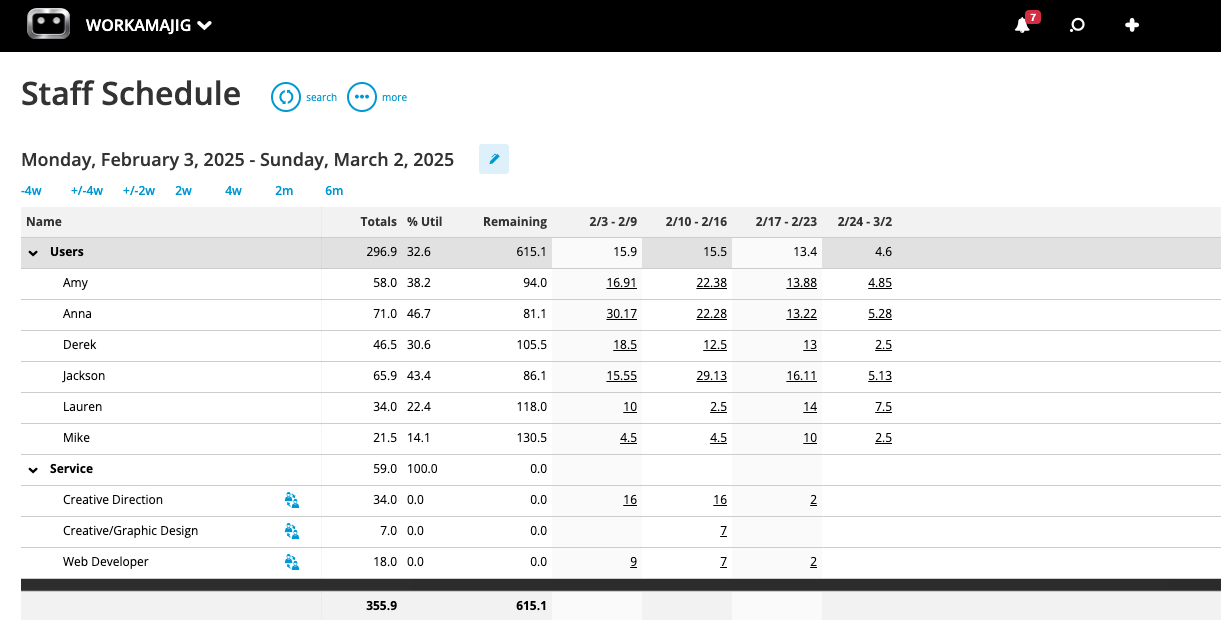
Managers can use the dashboard to match tasks to skill sets, understand how each resource is utilized, spot any workload imbalances, and prevent scheduling conflicts.
For example, say:
-
Some employees are overworked. Their weekly schedules are packed, but some colleagues with similar skill sets are sitting idle. Managers can reassign work to colleagues with more bandwidth to keep everyone busy and prevent burnout.
-
Workloads aren’t spread across the week. For example, a designer might be booked for 8 hours on Monday, Wednesday, and Thursday, but only 2 hours on Tuesday and Friday. Managers can review their schedules and spread their assignments out across the week to give them more breathing room.
-
Someone calls in sick. Managers can quickly see who’s available from the staff scheduling dashboard and reassign those tasks.
Read more: 10 Steps to Optimize Resources in Agency Project Management
Project Monitoring
Workamajig’s project monitoring tools allow teams to track updated project timelines and budgets in real time. Our system factors in both:
-
Project expenses — from vendor invoices, receipts, credit card accounts, and media buys.
Our accounting suite includes several tools to help you pull these costs into Workamajig. For example, teams can:-
Manage vendor invoices and reconcile them with work orders and purchase orders.
-
-
-
Pull in credit card expenses via our Plaid CC connector and even auto-sync charges so they update nightly. Users can then review expenses, organize them, and tag them to projects so they’re included in budgets and invoices.
-
Incorporate charges from media buys through our integrations with Strata/FreeWheel, Mediaocean, Bionic, and GaleForceMedia.
-
-
Time and labor costs — actual hours feed directly into project timelines, while labor costs are calculated against project budgets.
Managers can conveniently track the status of all ongoing projects, including their cost burn and updated timelines, from our centralized project monitoring dashboard. It displays all active projects in a visually friendly interface, with customizable Gantt charts and project health breakdowns.
![Workamajig dashboard: Projects and Project Status [GIF]](https://www.workamajig.com/hs-fs/hubfs/Workamajig%20-%20Projects%20and%20Project%20Status%20%5BGIF%5D.gif?width=1714&height=853&name=Workamajig%20-%20Projects%20and%20Project%20Status%20%5BGIF%5D.gif)
As shown in the GIF above, each project has its own:
-
Black progress bar (on the Gantt chart) — it shows how far along the project is based on actual hours.
-
Color-coded icons on the left side of the Gantt chart — these indicate the project’s health. Green means everything’s on track; yellow indicates the project is moving more slowly than anticipated or costs are approaching a warning threshold; and red signals budget or timeline overruns.
If any project enters the yellow territory, Workamajig notifies managers so they can intervene in at-risk projects and get them back on course. For example, if a project is at risk of delay, they might:
- Reduce the number of hours allocated to upcoming tasks
- Bring in more resources
- Renegotiate a new timeline with the client
Similarly, the project management dashboard also keeps managers posted about positive developments. For example, if team members finish tasks early, managers can monitor the remaining project budget (i.e., potential savings) and see the updated expected end date.
Read more: 8 Tips for Managing a Project Budget (+ Budgeting Methods)
Project Billing & Invoicing
Workamajig features a native accounting software that supports the entire project billing workflow, from pulling in project costs to securing approvals, generating accurate invoices, and collecting online payments.
While our system supports traditional billing workflows, agencies prefer our recommended approach — using billing worksheets — because it saves time, reduces back-and-forth, and ensures the first invoice is accurate.
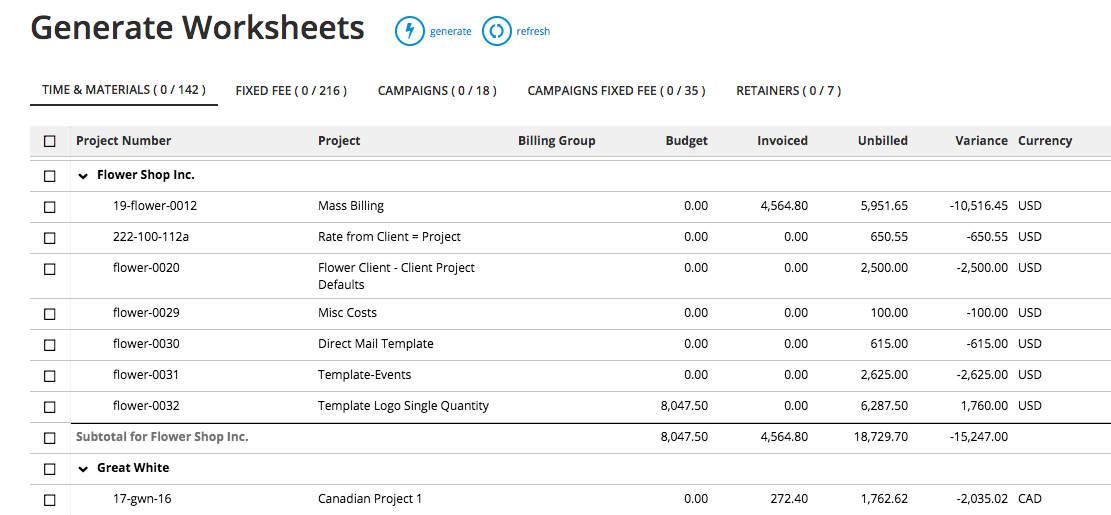
Here’s how it works:
-
Billing users can conveniently generate electronic billing worksheets — based on either the project’s budget or transactions — from the main Billing dashboard (shown in the screenshot below). Generated worksheets come pre-filled with the relevant project information, including expenses, transactions, and any prior billing.
-
Workamajig automatically routes the worksheets to the AE or PM for approval, who can double-check all line items and make any final tweaks (such as writing items off or marking them down).
-
Managers can submit finalized worksheets for approval, and Workamajig automatically routes them back to the billing team.
-
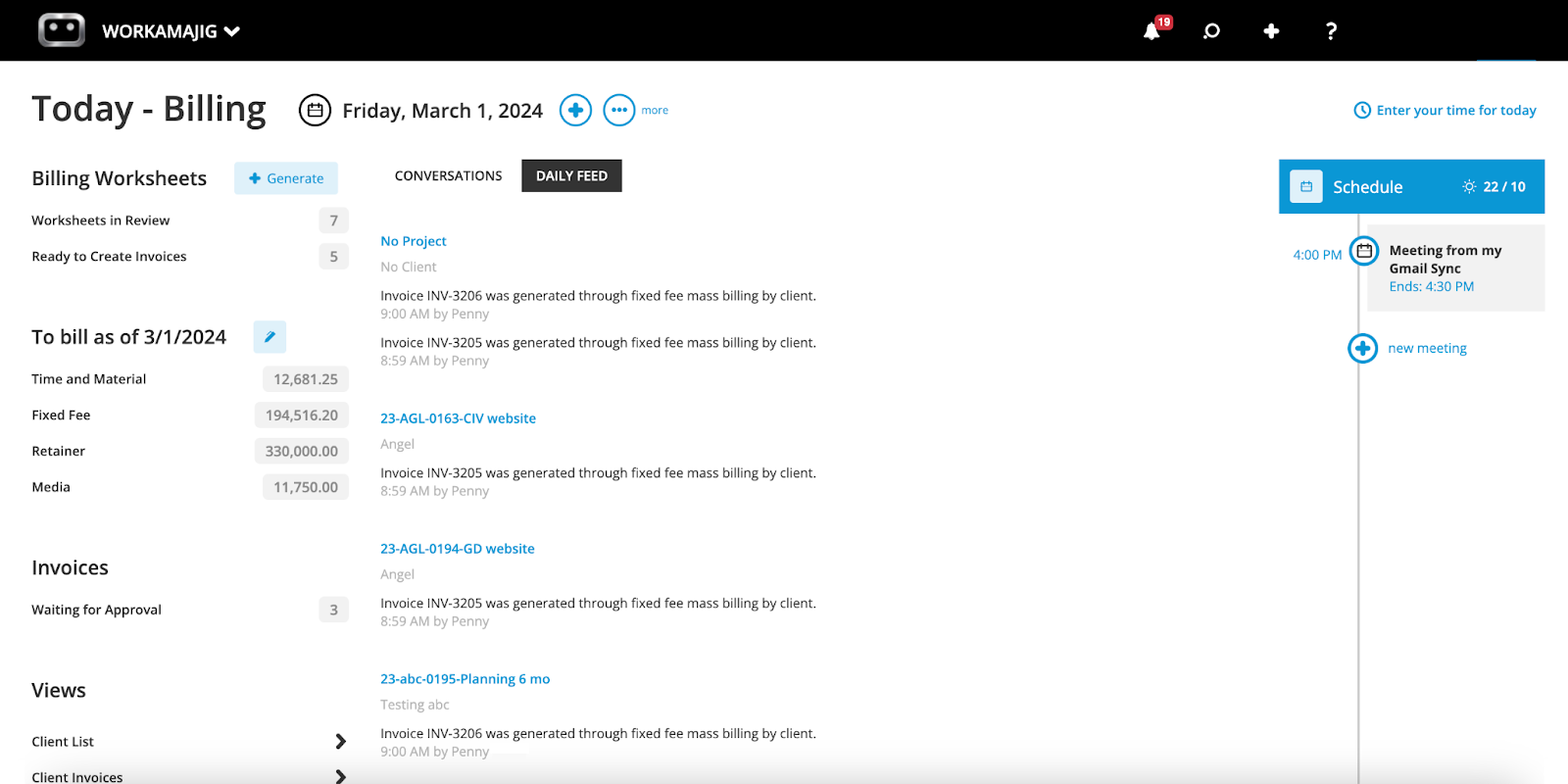
Billing users can then access worksheets from the billing dashboard under the “Ready to Create Invoices” section (as shown in the screenshot below) and do a final review.
-
Once worksheets are approved, the billing team can convert them to a final invoice and send it to clients for payment.
We also have integrations with Payflow Pro and Authorize.net that make it easy for clients to pay invoices via CC or ACH and for managers to keep a log of payments.
Read more: Best Creative Project Management Software with Invoicing
Reporting
Your time tracking data in Workamajig feeds into resource utilization, financial, and project reports. With all of this data in one system, you can easily measure team productivity and profitability at various levels.
Hourly Reports
Our productivity reports reveal how and where your teams spend their time. You can analyze hours by client, project, or service and see which departments or individuals clock the most time. You can also see what teams will be working on in the coming days.
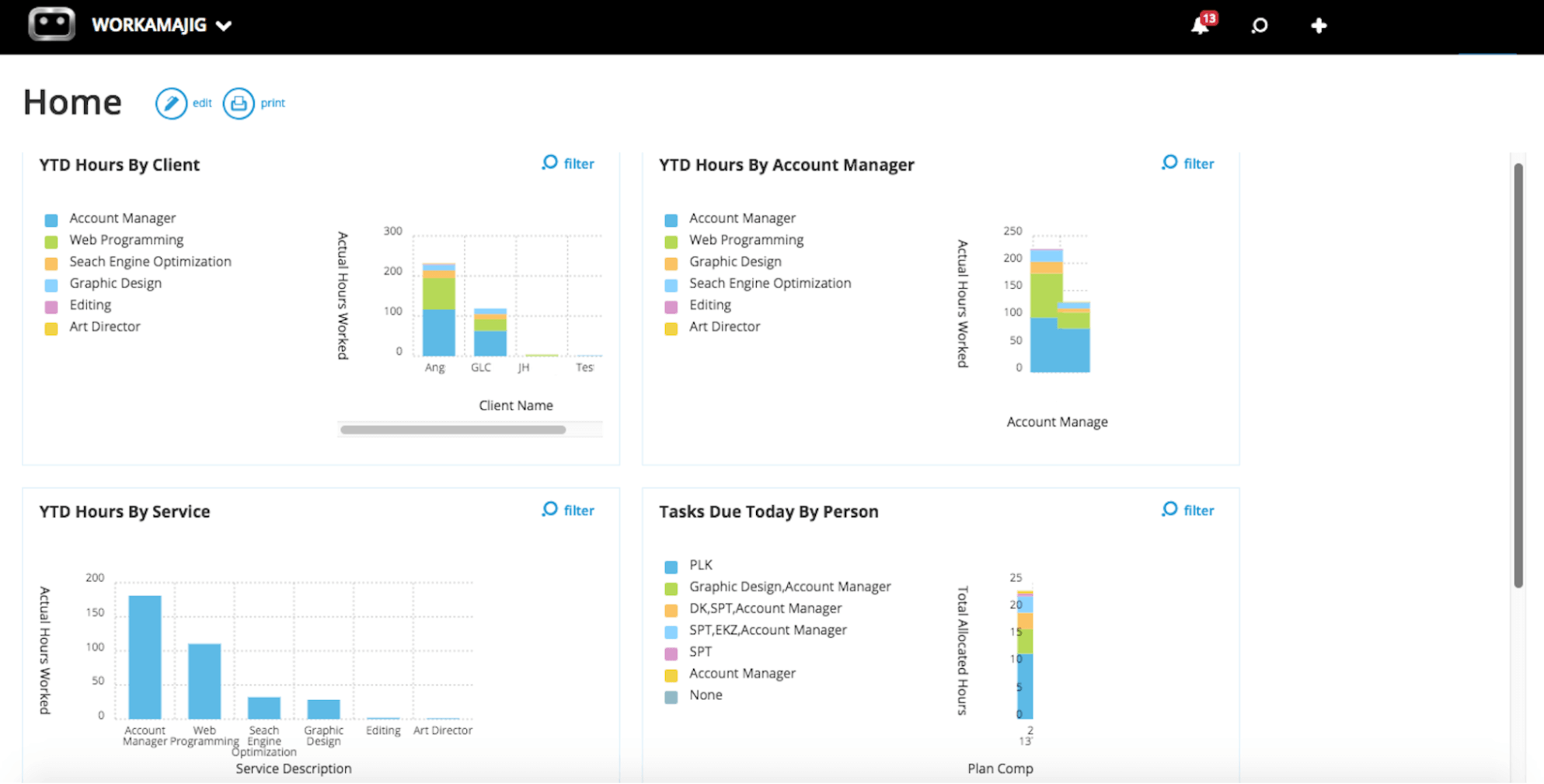
These hourly reports, combined with findings from financial reporting, provide insights into evaluating agency efficiency and determining where to make changes.
For example, if you rely on one manager more than another, you can adjust responsibilities accordingly. Or if one of your lower-priced services is taking up a lot of your team’s time, you might consider cutting it or finding alternatives to better utilize your talent and increase profitability.
Time Productivity Analysis
Workamajig’s “Time Productivity Analysis” gives you a much better idea of which of your resources are bringing in more than they cost and which are not. It links utilization rates to profitability, so you can track how each resource contributes to your bottom line.
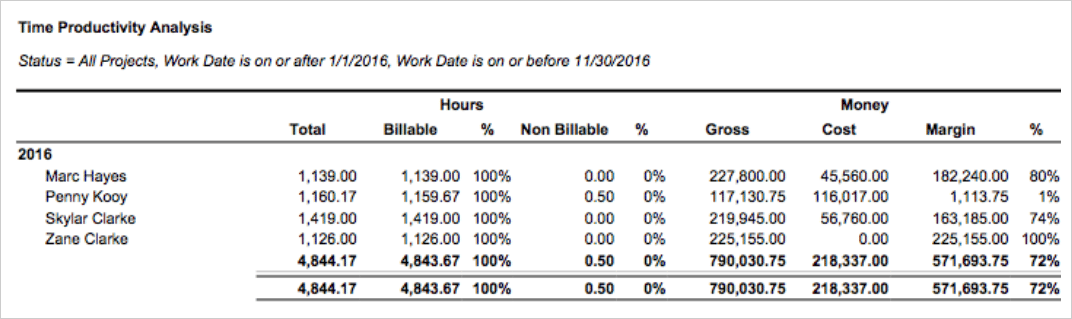
As shown in the image above, it displays the utilization and realization rates (the percentage of recorded billable hours) for each resource side by side and links these rates to their costs and generated revenue.
Chargeability Summary
It’s rare for an agency to get paid for 100% of the billable work they do for a client. Things come up that eat into your billed hours — some hours get scrubbed for inefficiencies, and at times work gets redone.
The chargeable utilization metric accounts for these discrepancies by measuring the percentage of billable hours that are actually chargeable to a client.
However, this metric is a bit tricky to monitor for ongoing projects because you can’t predict whether you’ll need to redo work later or write some hours off. Still, you can track the metric periodically — e.g., each quarter — to get a reasonable estimate of your agency’s chargeability compared to billing hours.
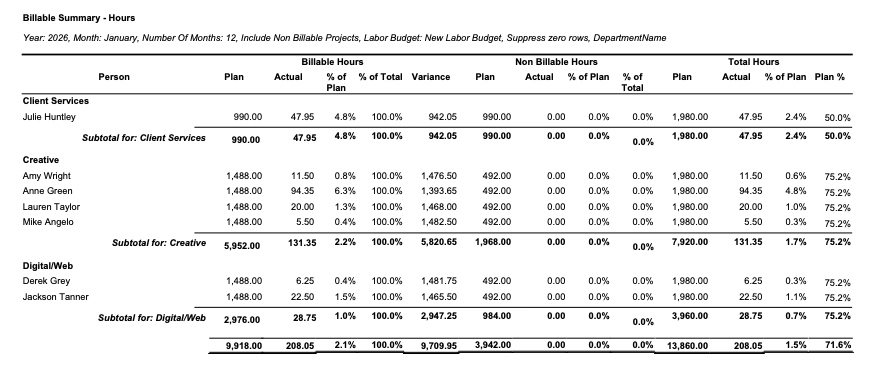
That’s where Workamajig’s Chargeability Report comes in — it makes it easy to track all this by providing an accurate snapshot of your team’s chargeability over any selected period.
The report breaks down your chargeable and non-chargeable hours for each role, as a percentage of your total hours. It also lays out how you performed vs your original plan.
Project Recap Analysis
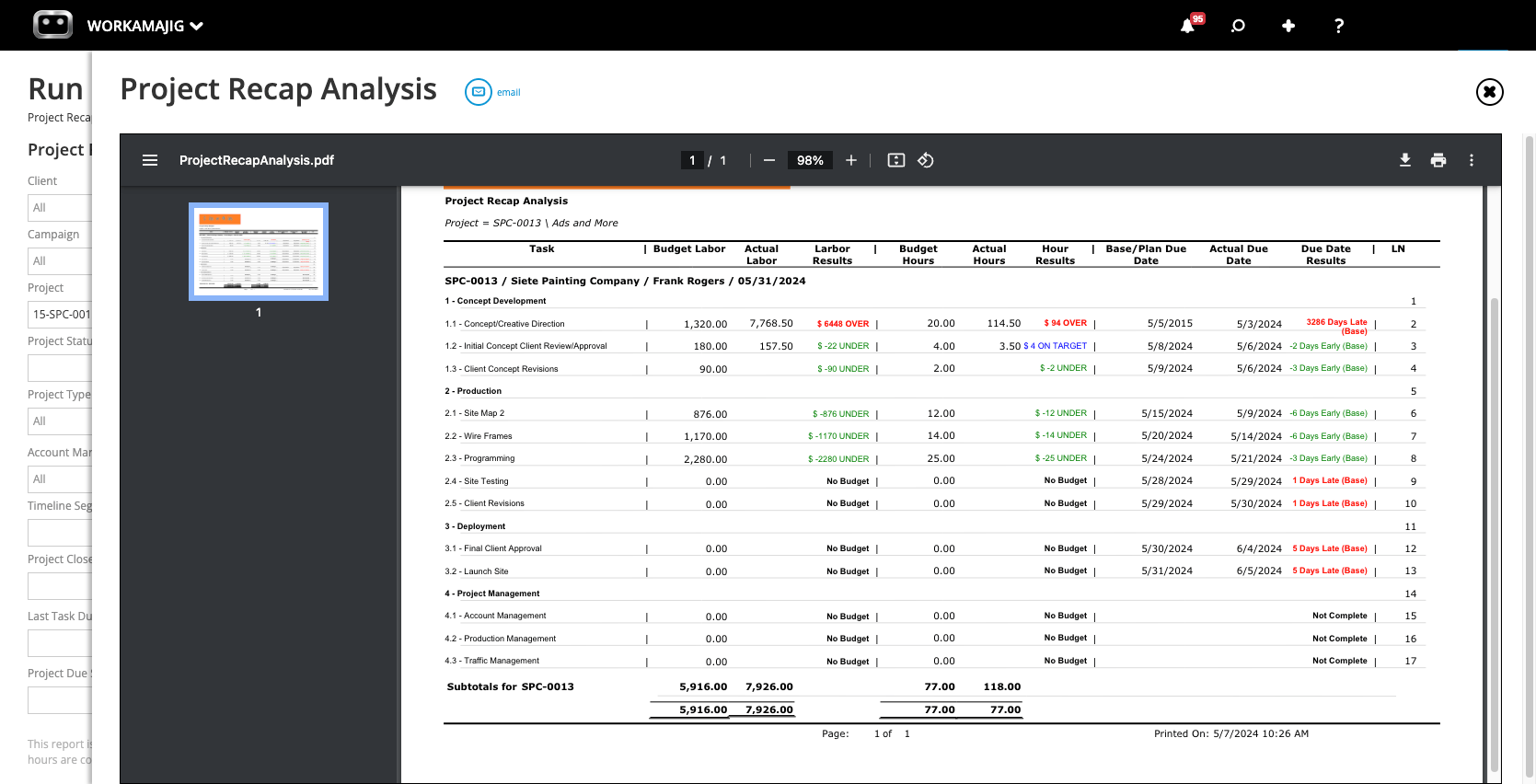
The recap analysis report offers a detailed comparison of actuals vs. estimates for labor hours, costs, and deadlines, so you can see what went as planned and where teams fell short of expectations.
This information helps pinpoint problem areas and improve future plans.
Project Budget Analysis
The project budget analysis report lets you compare project budgets to actual spending across multiple projects in a single, convenient view.
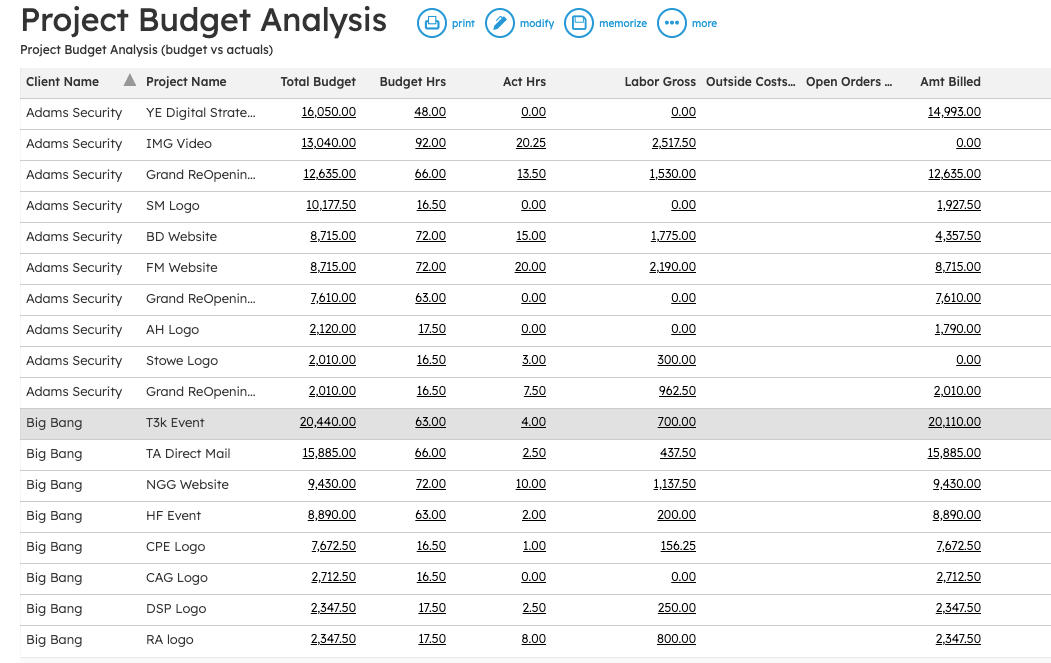
As shown in the image above, you can view actual hours, labor gross, outside costs, the net amount for any open orders, and the amount that you’ve billed the client for.
Then, you can click on a specific column to view individual transactions that make up those values:
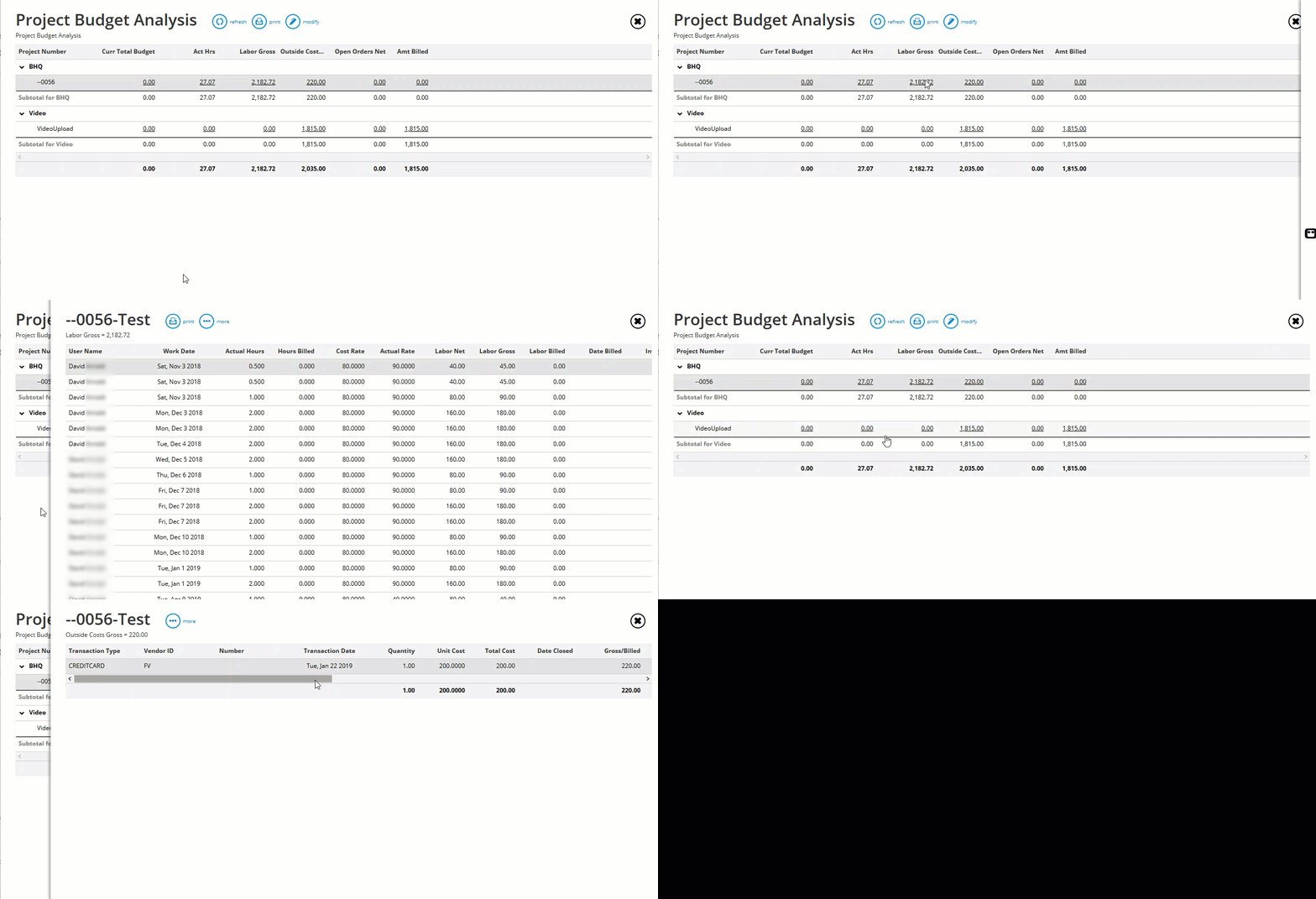
You can also:
-
Customize which columns appear and create layouts that reflect your agency’s workflows, including how you calculate gross profit, labor net, etc.
-
Filter these results by selecting a date range to show transactions for that period.
Project Profit & Loss
Workamajig’s project P&L reports provide a different perspective on profitability. While the budget analysis report calculates labor using staff hours, our P&L reports factor in overhead allocation based on the actual hours utilized for the project.
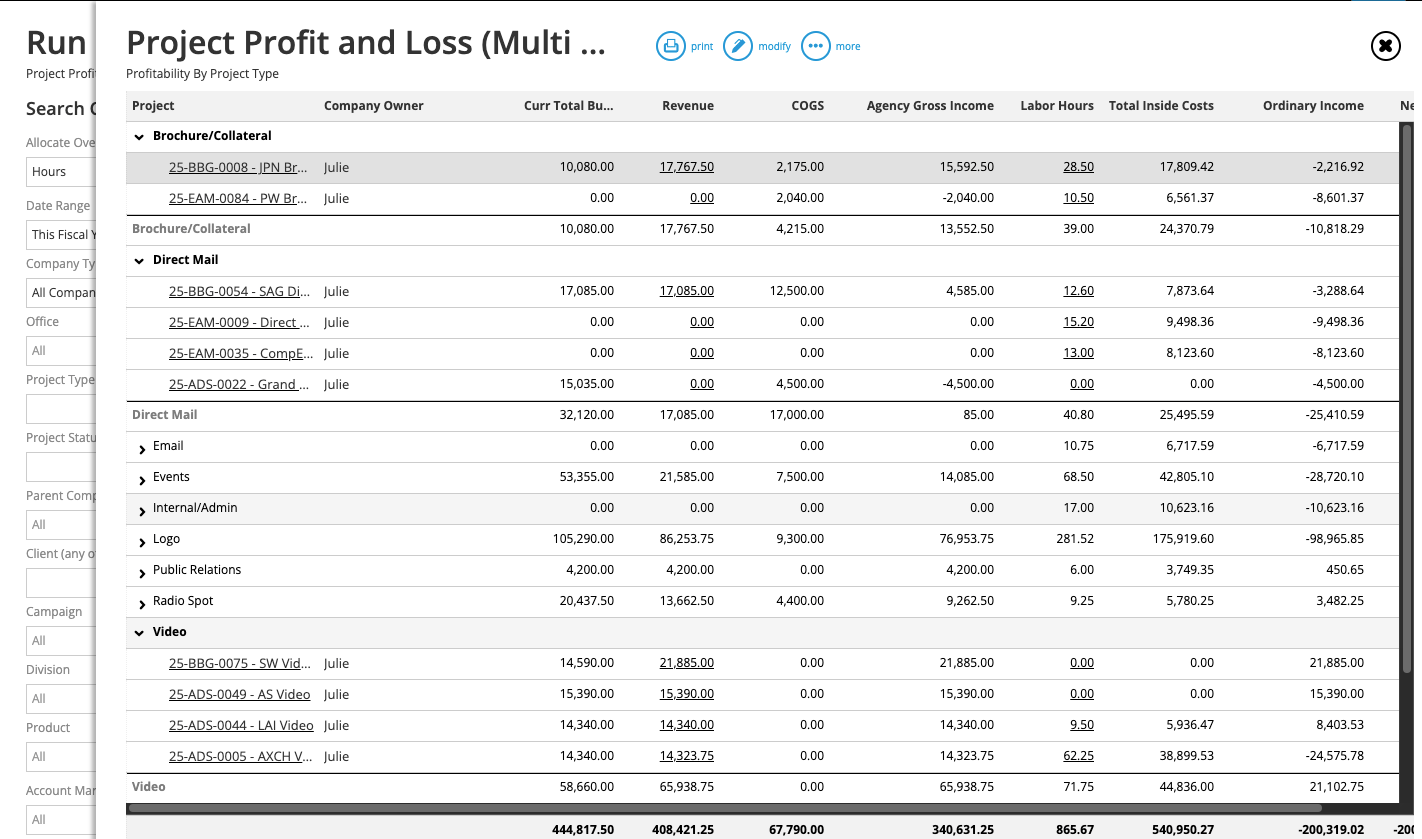
You can generate these reports in two formats:
-
Multi-views (as shown in the screenshot above) — these conveniently lay out the profitability of multiple projects in one place. Managers typically use this view when they want to (1) compare the profitability of different project types, or (2) spread overhead costs from the general ledger across them.
-
Detailed views — this provides a more detailed breakdown of a specific project’s profitability by general ledger account. For example, you can pinpoint which unexpected costs reduced a project’s margins. Did labor costs exceed the initial estimates?
Workamajig’s Complete Agency Management Software for Creatives
Workamajig offers various other tools to manage all your agency operations. In addition to time tracking, resource planning, project monitoring, billing and invoicing, and reporting, our full system also supports:
-
Customer relationship management — use our native CRM to capture and nurture leads, track your sales pipeline, develop opportunities, and analyze sales performance.
-
Project intake — save time by converting won opportunities into projects, collecting requests via project intake forms, or kicking off new projects with pre-designed templates.
-
Project planning — create tasks, subtasks, and milestones, assign work to team members, allocate hours, specify start and due dates, and define deliverables.
-
Automated estimating — create detailed estimates with all relevant project items (vendor costs, media buys, labor costs, etc.) and billable hours to ensure project profitability.
-
Project collaboration — communicate on task cards, share files for feedback, annotate content (with various internal proofing tools), see the comment history, and track file versions through iterations.
-
Campaign management — bring multiple projects under a single portfolio to simplify scheduling, team collaboration, budgeting, and monitoring.
-
Vendor management — assign work to freelancers, track outside purchases, and evaluate vendor reliability. You can also manage, reconcile, and pay vendor invoices. Our integrations with Edenred Pay (formerly CSI) and AvidXchange (formerly FastPay) support online vendor payments.
-
Client communications — set up dedicated portals for clients to submit work requests, track project progress, share feedback, and access deliverables.
-
Accounts payable and accounting workflows — use our full, GL-ready accounting software to manage accounts, vendor invoices, expenses, reimbursements, and payments, and monitor real-time cash flow. Our accounting system fully replaces standalone tools like Xero, QuickBooks, and NetSuite.
-
Financial reporting — access dozens of reports, including cash projections, revenue forecasting, billable utilization, and corporate, campaign, and client P&L reports, or create custom reports to track your agency’s financial health.
-
Integrations — connect Workamajig with media-buying systems or other software you already use to execute projects and to push data between systems.
Agencies and creative teams love Workamajig because it unifies their workflows and offers deeper insights into profitability. In the words of one of our many happy customers:
“Workamajig is a user-friendly, comprehensive software. I love the customizable reporting and how the project management, time tracking, and accounting functions are all interconnected.”
– Anna J., Director of Finance and Operations (G2)
Read more about how agencies have saved time, streamlined their operations, and increased profitability with Workamajig:
- How Ten Adams Uses Workamajig to Drive Business Insights & Profitability
- How Toolbox Creative Increased Project Profitability by 937% with Workamajig
- Ayzenberg Group’s Average Workflow Takes 25% Less Time with Workamajig
You can also check out Workamajig’s full suite in this short demo:
Pricing & Getting Started
We provide tailored packages for agencies and in-house teams, with pricing based on team size:
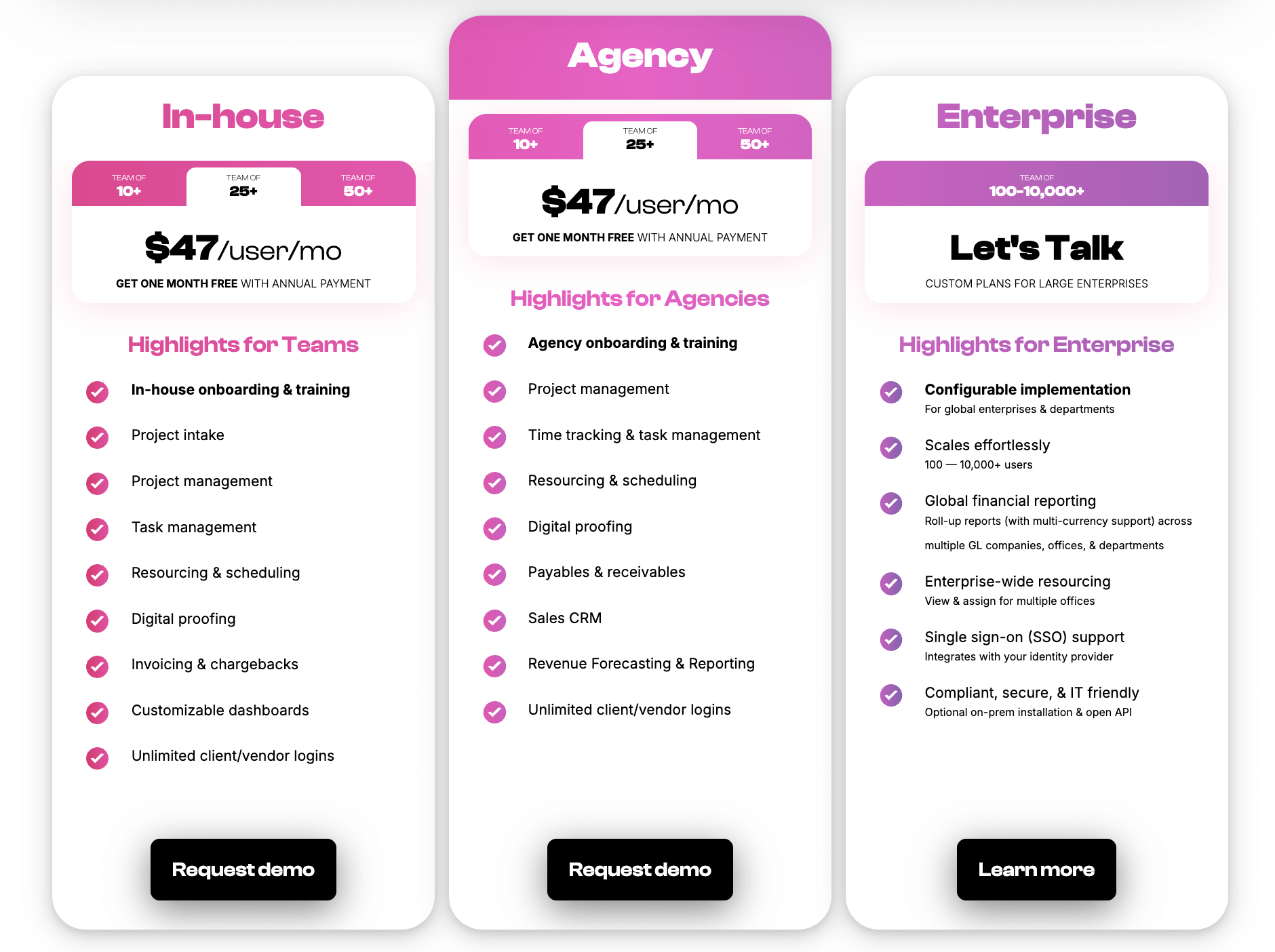
All clients receive free guided onboarding and training, plus a dedicated account manager for ongoing support and optimization as your processes and requirements evolve.
Request a free demo to see how our system connects all areas of your agency operations.
2. Advantage
.png?width=2000&height=878&name=Advantage%20Simpli.fi%20homepage%20(2024).png)
Advantage is another robust agency management solution. It’s unique from competitors because it includes native media planning and buying (via Simpli.fi) in addition to its project management and accounting suites. Teams wanting an all-in-one solution for media buying often lean toward Advantage.
Advantage’s time-tracking functionality is comparable to Workamajig: both offer stopwatches (timers) to automatically record project hours, a manual time-entry option, and integrations with calendar systems to pull in event hours. Their time-entry features are available in the desktop and mobile apps, so users can conveniently add time from any device they’re working on.
Advantage is one of the most robust solutions in our review, but it often comes with a higher price tag, and adoption can be lengthy. As a result, they usually work only with larger media planning and advertising agencies and enterprise brands.
Read more Advantage reviews here.
Notable Features
- Time tracking (manually add hours, use timers, or import calendar events)
- Project management
- Resource management
- Collaborative tools like proofing & reviews
- Media planning & buying — including broadcast buying, digital buying & media reporting
- Media accounting software
- Billing & invoicing
- Estimates
- Budget Monitoring
- Financial reporting
- Revenue forecasting
- Risk analysis & burn rate tracking
- Reporting dashboard (to analyze project performance, financials, staff hours, etc.)
Pricing
Advantage offers custom quotes to clients.
To learn more about Advantage and its pricing, contact their team for a demo.
Read more: Best Advantage Software Alternatives for Creative Teams
3. Clients & Profits

Clients & Profits is an agency management solution for creatives, featuring a comprehensive project management dashboard and accounting software. It’s designed for marketing agencies and marcoms, with pricing that accommodates teams at various growth stages.
C&P stands out from competitors with over three decades of experience working with creatives and digital agencies. Like Workamajig, they use a consultative approach, tailoring their software to specific client needs. Although it might take longer to adopt and learn, their team guides you through the process, offering a tour, demo, and other training materials on their site.
Compared with competitors, C&P has a robust time-tracking toolset. It includes smart timers, daily and weekly time cards, mobile time cards, timesheets, missing time worksheets, staff utilization reports, and productivity reports.
A notable downside of C&P is that it's a hosted solution, meaning you download and run their software on your desktop, with desktop apps available for Mac and Windows. They offer a hybrid cloud-based storage model for secure data storage, but on-premises deployment can be tricky and time-consuming. Users also note that the interface is slightly outdated.
Find more Clients & Profits reviews here.
Notable Features
- Time tracking
- Project request forms & project planning
- Project management & monitoring
- Resource management
- Team management with live scheduling
- Collaborative feedback tools for project teams & clients
- Portfolio management
- Accounting software
- Automatic billing & invoicing
- Vendor invoice management
- Financial reporting
- Integrations with bank and credit card accounts & media planning systems
- Workflow automation
- Adobe XD plugin
Pricing
Clients & Profits offers unique packages for design studios, advertising agencies, and marcoms.
Pricing is based on a per-user model:
-
Creative user seats cost $25 per month.
-
Project managers and account executives can join the platform for $45/month.
-
Power users are charged according to their package: $65/month for design studios, $85/month for marcoms, and $115/month for agencies.
-
Freelancers can access the platform on a free plan, but you can also pay an extra $9 per user per month to give them access to collaborative & time tracking tools.
Read more: Clients & Profits Software: Reviews & Alternatives
4. Productive
Productive is another top-rated agency management software, but it’s notably less robust than the solutions mentioned above, as it doesn’t include full accounting software. (Note: Neither do any of the other solutions that we’ll cover from here on.)
Productive, Teamwork, Scoro, and the other names on this list are more “app-powered” solutions — meaning they’re meant to integrate with other systems, such as your accounting software, to support workflows. While they help unify your tech stack, you’ll need to handle system integrations and ongoing maintenance to keep everything running smoothly.
Even though Productive doesn’t offer as extensive a toolset as the options above, we include it here because it offers a convenient suite of resource management tools, including time tracking and time-off management.
This time-tracking solution provides daily and weekly timesheets, calendar integrations, desktop timers, time tracking within task cards, automatic time tracking, and time reports. It also integrates with Jira for tracking time on other agency projects.
Check out more Productive reviews here.
Notable Features
- Time tracking
- Timesheets
- Project intake & sales CRM
- Project management
- Resource management
- Documents (to create shared docs & enable team collaboration)
- Financial management
- Billing & invoicing
- Budget & expense management
- Real-time profitability tracking
- Detailed reports
- Integrations with QuickBooks, Xero, Sage, SAP, Justworks, ADP, Slack, HubSpot, Google, Microsoft, and Jira
- Open API
- Mobile apps for iOS & Android
Pricing
Productive offers three packages and custom enterprise plans. While all packages include time-tracking features, advanced time tracking is available only in the Ultimate plan.
-
Essential ($12/user/month): Their entry-level plan with basic feature access.
-
Professional ($29/user/month): Their mid-level package that unlocks time approvals and billable time rounding (rounding time entries up or down per policy). However, it lacks automatic time tracking, time locking, time tracking rules, and timesheet reviews. The Professional plan also unlocks more advanced project, resource, and budget management tools.
-
Ultimate plan ($40/user/month): Productive also alternates between displaying and hiding the pricing for this plan. It was previously listed at $40/user/month, but as of this writing, it is only available on request. This top-tier package unlocks advanced time tracking, revenue forecasting, the scenario builder, overhead calculation, and more.
Read more: Best Productive Alternatives for Agencies
5. Teamwork
Teamwork's time-tracking features and toolset are comparable to Productive (listed above). It offers convenient time-tracking tools on task cards, so users can log hours as they work and complete tasks. It also reminds employees to add time if they mark a task complete without specifying work hours.
In addition, Teamwork offers a Company timesheet tool to monitor employee hours on a central dashboard, along with hourly reports to measure employee productivity.
Teamwork has experience with teams of all sizes — even household names like Disney and Netflix — and works with creatives, development agencies, IT specialists, architects, engineers, product teams, and other professional services.
While Teamwork isn’t an all-in-one solution (and notably lacks a CRM module, making it even more lightweight than other names here), it still offers many tools to support project management and integrates with other systems, such as your accounting software and CRM, to fully support team workflows.
Read more Teamwork reviews here.
Notable Features
- Time tracking
- Timesheets
- Time reminders
- Timesheet approvals
- Project intake forms & project planning
- Project management
- Project monitoring
- Resource & workload management
- Internal proofing & collaborative tools
- Workflow automation tools
- Client management
- Expense management
- Budget tracking
- Invoicing
- Reporting
- Integrations & API
- Mobile apps for iOS & Android
Pricing
Teamwork offers a free plan with very limited features, including manual time logging, task management, project views, and limits of up to 5 projects and 5 users.
The four standard packages all include basic time tracking:
-
Basics ($13.99/user/month): Includes time estimates, manual time logging, and billable vs. non-billable time tracking.
-
Accelerate ($25.99/user/month): Unlocks timesheets, time-logging reminders, utilization reports, and the option to log time against calendar events.
-
Optimize (Custom pricing): Unlocks timesheet approvals.
-
Enterprise plan: Custom packages.
Read more: Best Teamwork Alternatives for Creatives & Agencies
6. Scoro
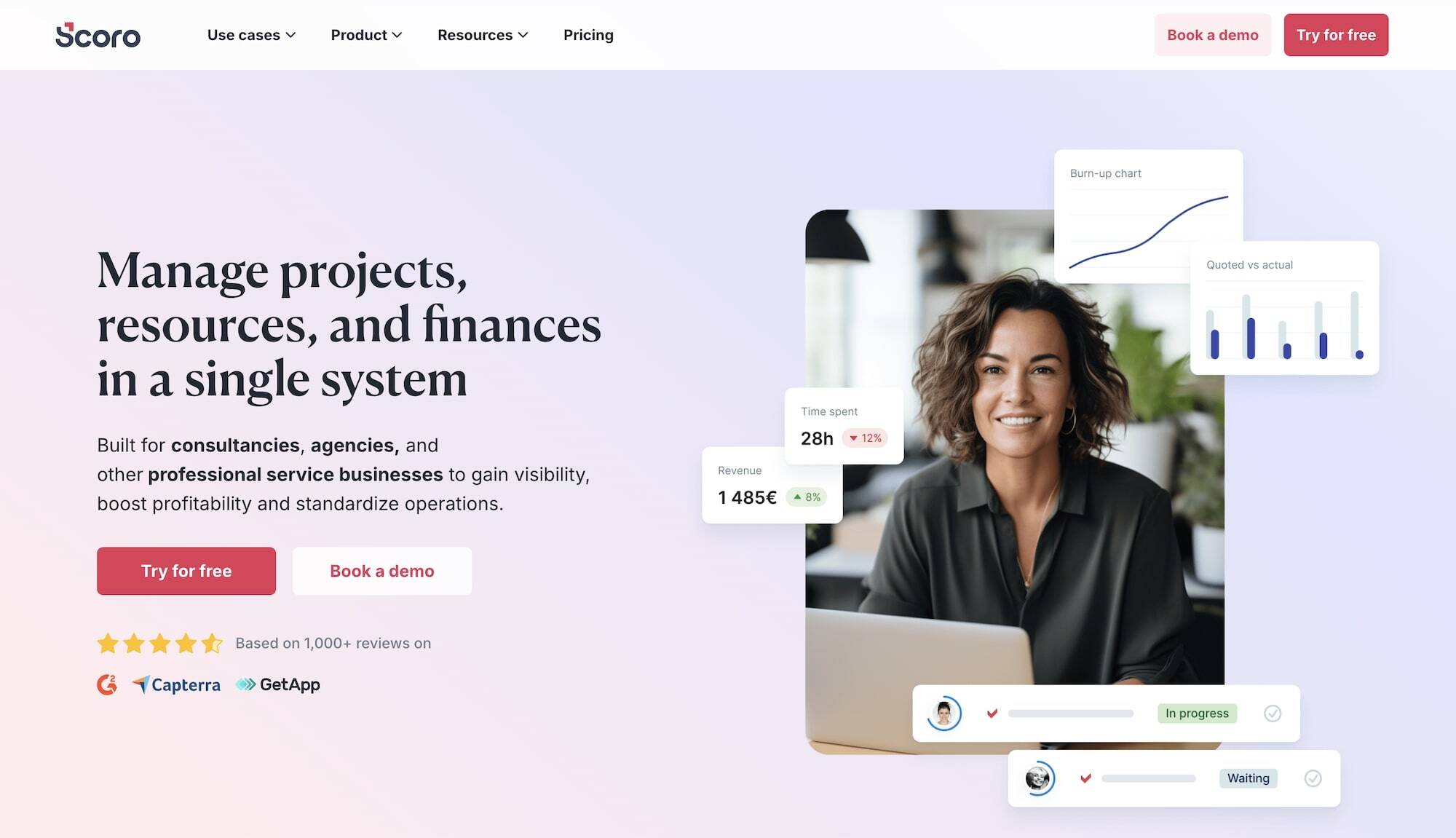
Like Teamwork, Scoro serves a wide breadth of professional services firms, including consultancies, developers, PR firms, architects, and marketing agencies. Its complete business management suite — unlocked at its highest-tier plan — offers unified project, resource, financial, and client relationship management.
Users praise Scoro’s visual, intuitive interface and its powerful automation, financial management, and time-tracking tools.
Its time-tracking features in particular are user-friendly and straightforward. Users can add time on task cards or timesheets, and managers can:
-
Monitor resource allocation and utilization, and view employees' scheduled hours (including specific tasks and due dates) to prevent task overlap, balance workloads, and avoid burnout.
-
Track billable hours and non-billable hours, and add billable time to client invoices.
-
Access hourly reports to see where employees spend their time.
The thing with Scoro is the expensive pricing. Most teams need the top-tier plan to access all the features they need. And at nearly $60 bucks per seat, Scoro can cost a pretty penny. Most all-in-one systems offer a better value for money.
Notable Features
- Time tracking
- Project management
- Resource planning
- Collaboration tools
- Quoting & budgeting tools
- Invoicing
- Cost management
- Retainers
- Sales CRM
- Reporting
Pricing
Scoro offers three standard packages and custom enterprise plans:
-
Core ($23.90/user/month): Offers basic features, including time tracking and shared resource management.
-
Growth ($38.90/user/month): Unlocks Scoro's main project, financial, and resource management features, plus role-based labor costs.
-
Performance: ($59.90/user/month): The recommended package that offers all of Scoro’s essential capabilities and unlocks timesheet views, custom split of planned time (for when multiple users collaborate on the same task), and individual labor costs.
Scoro’s enterprise plans unlock multi-account reporting, time locking, company budget & forecasts, and more advanced features.
Read more: Best Scoro Alternatives for Agencies
7. Function Point
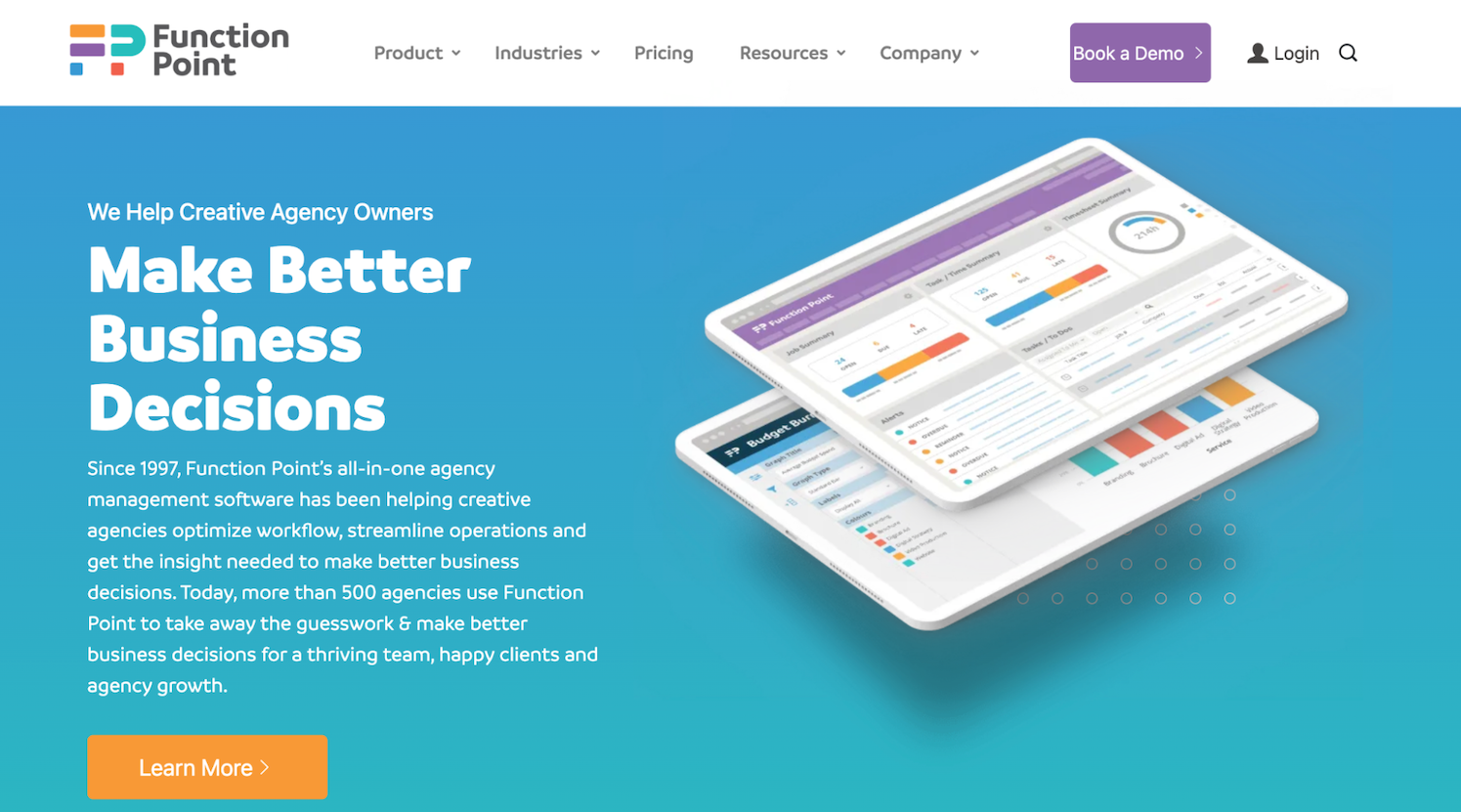
Function Point is a robust agency management system used by more than 500 organizations worldwide. It includes native project management, resource planning, time tracking, client management, and financial management tools — and also supports accounting workflows via its integration with QuickBooks Online.
Function Point’s time tracking module receives high praise for its extensive feature set. It includes all the traditional tools — manual time entry, stopwatch timers, and timesheet approvals, plus:
-
A time tracking app with mobile access. Your team can track time on the go, submit timesheets while offline (which sync once they’re back online), and even speak their time entries into the app via a microphone. Users can also connect their Apple Watch to the app, which automatically syncs their timesheet.
-
Billable vs. non-billable tracking. By segmenting utilization (time worked) and realization (time billed) based on rules you specify, Function Point lets you catch “lost” hours — i.e., the time your team spends on work that doesn’t directly bring in revenue.
All time entries in Function Point are tied directly to tasks and jobs, so teams can compare actuals to estimates and track project budgets in real time.
While Function Point is a well-rounded system overall, many users mention finding it difficult to get comfortable with the platform’s breadth of features. The vendor’s packages are also on the pricier side, costing more than solutions like Workamajig, Productive, and even Scoro.
Check out more Function Point reviews here.
Notable Features
- Time tracking
- Project templates
- Project management, with tools to manage several projects at once
- Project monitoring (choose Gantt charts or a Kanban board view)
- Invoicing tools
- Financial management, including expense tracking
- Client management tools, including estimates and proposals, CRM, email integrations, change order and revision tracking, and job request portals
- Team collaboration, including file sharing
- Resource management
- Business intelligence reports, including profitability reports and custom reporting
- Integrations with accounting systems like QuickBooks and other business applications
Pricing
Function Point offers two standard plans, both of which include all of its core features. The main difference is that the second plan — Optimize — unlocks the QuickBooks Online integration and advanced business intelligence reporting tools (custom saved reports, data visualization, report sharing).
The plans are priced as follows:
- Standardize: $58/user/month
- Optimize: $68/user/month
Read more: Function Point Reviews & Alternatives (Buyer's Guide)
8. ManyRequests
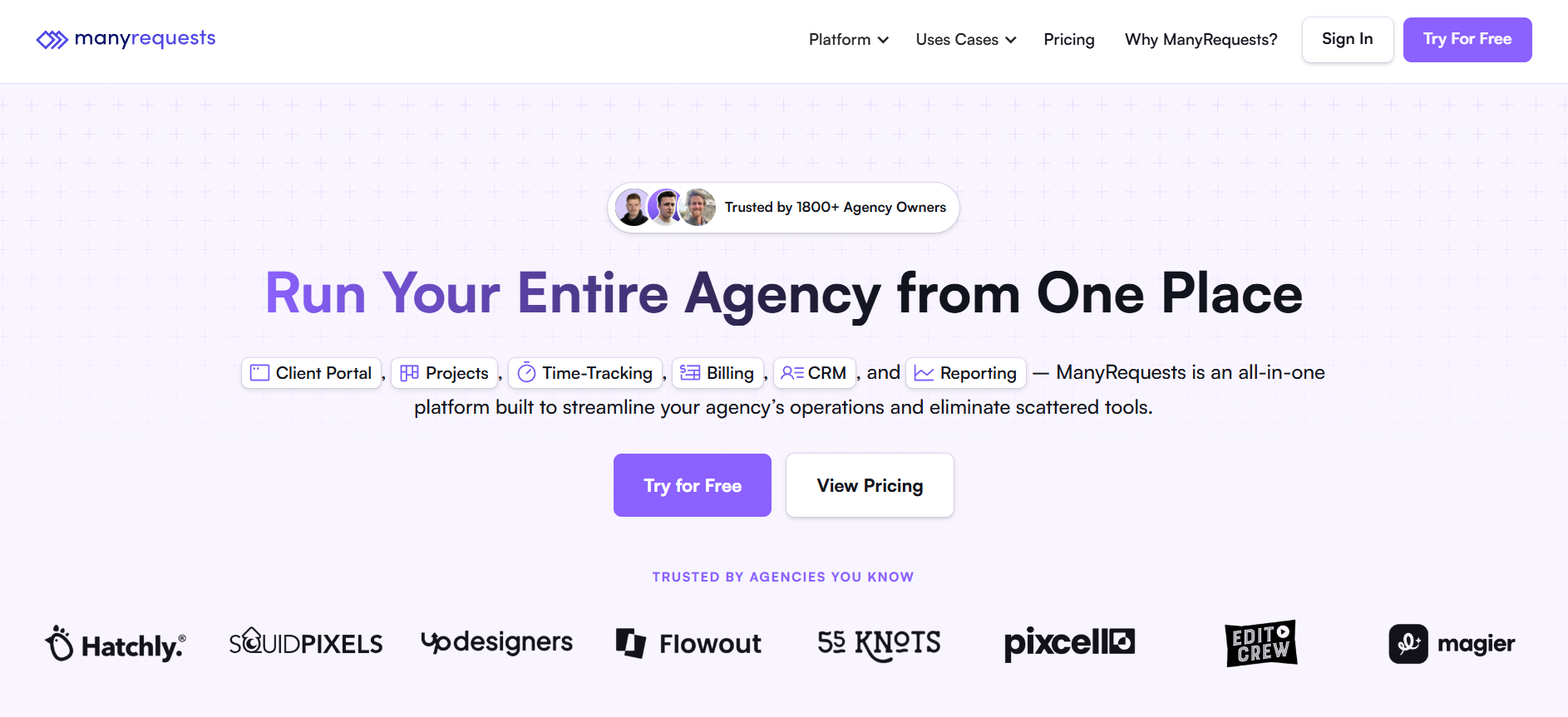
ManyRequests is an agency time-tracking, project management, and client management system, all rolled into one. It's used by over 18k agencies across various industries — including design, development, and marketing — and allows teams to manage all their client relationships through highly customizable, branded portals.
The platform’s employee time tracking toolset includes:
-
Timers and manual time logging — users can accurately track time directly on task cards and requests.
-
Time reports for productivity tracking — generate reports by client, teammate, or service to see where your team spends its time.
-
Time-based services — teams can offer service packages with a fixed number of hours per task. ManyRequests tracks the hours spent on these tasks, and clients can see real-time usage and remaining hours from their portals, making it easy to manage hours-based retainers.
-
Sync with billing and invoicing — time data (logged hours) is automatically tied to your hourly or credit-based billing model. Also, clients are automatically billed for any service packages they’ve “subscribed” to, such as retainers.
Agencies are drawn to ManyRequests for its sleek UX, powerful client management tools, and ease of use.
However, the platform lacks many features to manage essential agency workflows, despite being considerably pricier than more robust solutions on our list. It lacks dedicated accounting and resource management modules, and its “CRM” capabilities are mostly client management tools.
Read more ManyRequests reviews here.
Notable Features
- Time tracking
- Team time management via timesheets
- Project management
- Native CRM
- Branded client portals
- Billing & Invoicing
- Credit-based billing
- Stripe integration for accepting payments
Pricing
ManyRequests offers two standard plans and custom enterprise packages. All plans include time tracking. The two standard packages include:
-
Core ($59/month): This plan includes one seat by default, with each additional seat costing $20/month. The Core plan offers all essential time tracking features, including time entries, automatic time tracking, timesheets, time breakdowns, and capacity and utilization insights.
-
Pro ($99/month): This plan includes one seat by default, with each additional seat costing $30/month. This is ManyRequest’s more comprehensive plan, featuring all its key capabilities, including AI-assisted time reports, capacity planning, team workloads, and more.
Top 9 Standalone Time Tracking Apps
If you already have an established tech stack and only want to add time tracking within what you're already using to manage agency operations, you might consider some of these names below. They’re among the best time tracking software options, with extensive feature sets and integrations.
These tools don’t offer all the benefits that all-in-one systems unlock, but they’re a major step above tracking time manually in Excel spreadsheets or Google Sheets.
Plus, they integrate well with project management tools (such as Asana, Trello, and ClickUp) and accounting systems (such as QuickBooks Online), so they can support project budget tracking, invoicing, and more — though not as seamlessly as with all-in-one tools.
| Name | Standout Feature(s) | Financial Tools | Project Management Tools | Paid Plans | Reviews |
| MyHours | Project management and financial tools |
|
|
From $5 per user a month | Read reviews here. |
| Timely | AI timesheets – auto-completed with one-click approvals |
|
|
From $11 per user a month | Read reviews here. |
| Clockify | Kiosk time tracking — clock in and out |
|
|
From $6.99 per user a month | Read reviews here. |
| TickSpot | Affordable and integrates with Basecamp |
|
|
From $19 per month for 10 users | Read reviews here. |
| Toggl Track | Auto-track app and browser activity |
|
|
From $10 per user a month | Read them here. |
| TimeCamp | Powerful AI time tracking tools |
|
|
From $3.49 per user a month | Read reviews here. |
| Harvest | Automatic invoicing and payment integrations |
|
|
From $11 per user a month | Read reviews here. |
| TMetric | More extensive project & team management tools |
|
|
From $7 per user a month | Read reviews here. |
| TrackingTime | AI time tracking — turns activity into time logs |
|
|
From $5 per user a month | Read reviews here. |
Frequently Asked Questions: Creative Agency Time Tracking Software
What is time tracking software for agencies?
Agency time tracking software combines native time tracking with project management, resource planning, and financial management under one roof. These fully integrated systems support agency needs by allowing teams to:
- Conveniently log their time where they work
- Monitor project timelines and budgets in real-time
- Easily compare actuals to estimates
- Strategically adjust staff schedules to maximize productivity and billable utilization
- Generate accurate invoices by pulling in labor costs and expenses
- Bill clients and collect payments online
- Evaluate productivity and profitability from different perspectives
How does automated agency time tracking work?
Automated agency time tracking embeds time tracking tools directly into project workflows, allowing teams to capture hours at the task level with minimal effort. These systems offer at least one of the following tools to automate time tracking:
-
Timers — users can start, stop, and pause timers while working, ensuring precise tracking of active task time.
-
AI-powered timesheets with activity monitoring — these systems automatically log hours by tracking the time spent on work activities. They analyze contextual signals such as task activity, application usage, browser sessions, and calendar events.
How does agency time-tracking software help with resource allocation?
Agency time tracking software helps with resource allocation by allowing managers to:
-
Compare actual vs. estimated time spent on tasks to ensure resources are allocated the right amount of time for future work
-
Track workloads and availability in real-time, so they can plan schedules and ensure work is fairly distributed
-
Monitor real-time project cost burn by incorporating labor costs as employees log their hours
-
Compare billable and non-billable utilization to make informed decisions that boost profitability
-
Measure productivity from different perspectives, such as by team, department, or individual
What features should I look for in a time-tracking tool for creative agencies?
Creative agencies should prioritize the following features:
- Native time tracking tools that integrate with project workflows
- Expense tracking
- Project and task management
- Resource and capacity planning
- Project budget and timeline monitoring
- Invoicing and billing
- Productivity reports
What are the best practices for implementing time tracking in a creative agency?
The best practices for implementing time tracking in a creative agency include:
- Make sure you track time at the task level
- Categorize billable and non-billable hours and track both separately
- Compare actuals to estimates over time to refine allocations and spot issues
- Make it easy for employees to track hours within their everyday workflows
- Regularly evaluate schedules and team utilization to ensure resources are using their time effectively
With the right agency time tracking software, you can easily implement all of these best practices.
How can time tracking improve productivity in a creative agency?
Time tracking improves productivity in creative agencies in several ways:
-
Strategic resource allocation. Managers can see where time is being spent and redistribute tasks to avoid overloading certain team members while others remain underutilized.
-
Improved forecasting and estimates. Comparing actual hours against estimates helps managers pinpoint the root cause of any cost or timeline overruns. For example, maybe (i) managers aren’t allocating enough time for specific tasks, (ii) some resources are less productive, or (iii) the feedback loops with some clients are too long?
-
Less admin work and fewer operational headaches. Teams can easily log hours within their workflows, while time automatically flows into the project monitoring and resource management modules. Managers can easily view all time entries, staff schedules, and updated project status in one system.
Get Started with Workamajig
Workamajig is an all-in-one agency management system that’s specifically tailored to the creative workflow. Our fully integrated system brings all your people, processes, and finances under one roof — so you can easily track productivity, performance, and profitability.
Request a free demo with our team to see how Workamajig streamlines operations, simplifies agency tech stacks, and boosts profitability. We’ll show you Workamajig’s time trackers and other features in more detail, and explain how we can tailor our software to support your specific requirements and goals.
Read more: