

Creative project management is about balancing structure with flexibility — ensuring deadlines are met while giving your team enough room to flex their creative muscles.
Managing creative projects requires an entirely different skill set from traditional projects because the lifecycle of creative work is shaped by iteration, overlapping stages, and proactive changes:
-
The nature of work. Creative projects usually involve various categories of work — marketing, design, sales collateral, social media, video, etc. — in which outcomes are subjective, evolving, and shaped by creative input. Teams are often working with in-progress assets and various media types.
-
Stakeholder involvement. These projects typically have several internal and external stakeholders, including graphic designers, managers, freelancers, and clients who are engaged in continuous feedback loops.
-
Multiple iterations across different feedback loops. Teams often test different versions of content, tracking file versions as they go. Seeing how content evolves through revisions can be crucial to strategizing for future projects and streamlining processes.
-
Project plans usually require on-the-fly changes. This is due to the reasons we’ve covered — different perspectives, subjective outcomes, long feedback processes, and multiple iterations of work. It’s important to leave breathing room so you can adjust project plans and resource schedules as work progresses.
-
Project resources and costs need to be accurately tracked. You need to be able to see where resources are spending their time, where money’s coming in and going out, and accurately track profitability.
So, creative teams need processes and tools that match the way they actually work — flexible enough to handle evolving ideas, but structured enough to keep projects, people, content, and costs under control.
In this guide, we’ll walk through the creative project management lifecycle, highlight the common challenges teams face, and share best practices to overcome them.
We’ll also show you how to refine and streamline your workflows with Workamajig — our all‑in‑one creative project management system that’s been trusted by agencies and marketers for over twenty years.
Request a personalized demo to learn more about how Workamajig supports creative project management.
|
Key Takeaways
|
How to Manage the Creative Project Management Lifecycle
The traditional project management lifecycle involves five key stages: initiation, planning, execution, control, and closure. Similar to an assembly line it follows a rigid approach where projects move from one stage to the next with little overlap.
While that works well for predictable or repeatable tasks, creative projects rarely fit the same mold and require more adaptability.
Creative projects rely on roles like designers, copywriters, and developers whose workflows don’t follow a straight, predictable path. For example, you can’t reliably assume that if one design takes four hours, three designs will take twelve. Each deliverable requires fresh thinking, collaboration, and iteration, which makes rigid planning a poor fit.
That’s why creative teams thrive under a professional services project lifecycle — because it accounts for multiple feedback loops, subjective outcomes, and the need to keep clients and resources aligned throughout the project.
Instead of sticking to rigid structures, teams can move back and forth between the following five phases, adjusting as ideas evolve and client input shapes the work.
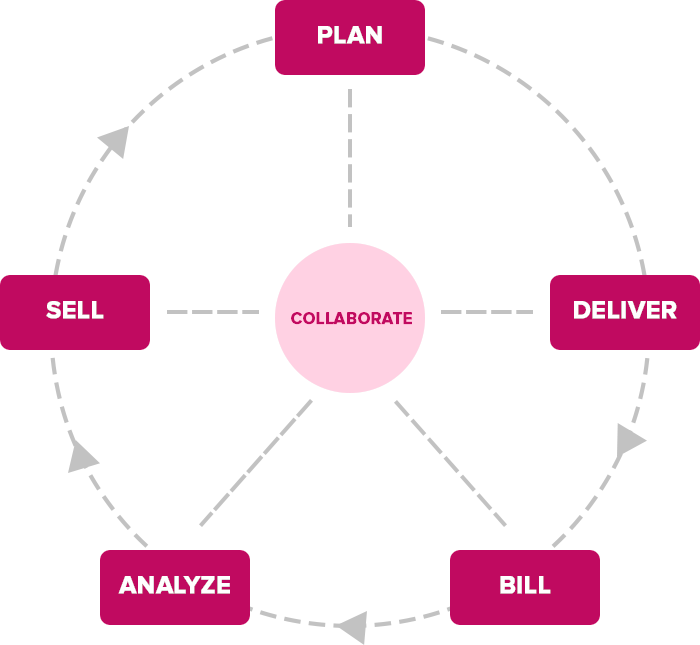
Here’s everything you need to know about each stage.
1. Selling/Pre-Planning
The pre-planning phase is key to ensuring you take on profitable projects that your team can actually deliver. At this stage, creative project managers work with the sales team to analyze upcoming projects, including their:
-
Expected requirements. This includes all campaign deliverables, timelines, strategic objectives, and planned outcomes. Sales teams get this information from the client and feed it back to the project manager.
-
Feasibility. After confirming all project requirements, project managers check schedules to ensure the right resources are available at the right time. They’ll also consult historical data to ensure you can deliver the work on time.
When you’ve understood the project’s requirements and are confident that it’s feasible to take on, the next step is to formalize everything by developing a project charter.
This document includes all the information necessary to get the project started and keep it on course. It keeps stakeholders on the same page, clarifies expectations, and minimizes the risk of project failure by planning for potential problems.
A project charter typically includes:
-
Goals. What are the project’s strategic objectives? For example, the goal of a PR campaign may be to increase trust and familiarity with your target audience.
-
Resources. What skill sets and roles does the project demand? Who do you already have available, and what talent or outside resources will you need to recruit? How much time do you need to allocate to various aspects of the project? Does the project require any physical materials?
-
Stakeholders. List all the project stakeholders and any notes about them, such as who is responsible for approvals, how involved each stakeholder wants to be in the project, and who to update about what.
-
Risks. If you can think up any risk scenarios that seem plausible, see if you can put a plan together to deal with them if they arise, or ideally, prevent them altogether.
-
Constraints. Outlining the project’s constraints helps you plan around them to make sure everything stays on track throughout its lifecycle. Make sure you specify the project’s:
-
Scope. What is included in the project? And just as importantly, what is NOT included in the project? (This will help you identify scope creep if it comes up during the project.)
-
Timeline. Plot your project’s start and end dates and when major milestones should be completed.
-
Budget: Estimate your overall budget based on the required resources and divide it into individual costs.
-
-
Communication plan. What will you communicate with various stakeholders, how will you share updates and request approvals, and at what intervals will you communicate (e.g., at key milestones)?
-
Signatures. Authorize your project charter by obtaining final approval from key stakeholders.
2. Planning
After you’ve drafted the project charter and all the stakeholders have signed off on it, it’s time to actually build out your project plan, which includes all the work that needs to be done, who’s going to do it, timelines, milestones, feedback processes, and more.
Here’s what this entails:
-
Breaking down the core deliverables outlined in your project charter into project tasks and milestones.
Rather than relying on a one final deadline, it’s best to split projects into milestones, each with its own timeline. This makes it easier to track progress, manage feedback loops, and make sure everything’s on schedule.
For each task, you should specify the estimated effort in hours, any dependencies, and the required skill level (junior, mid‑level, or senior). -
Setting regular feedback checkpoints. For example, you might engage relevant stakeholders after each milestone is completed. Fixing feedback checkpoints ensures that internal and external stakeholders are kept in the loop throughout the project lifecycle and that final deliverables align with their expectations.
-
Mapping out all types of resource requirements. This means identifying not just who you need — designers, developers, copywriters, strategists, and QA specialists — but also what you need, such as tools, licenses, and supporting systems.
-
Making sure people are available at the right times and have the bandwidth for their assigned tasks. Without factoring these considerations in, you risk scheduling conflicts or overloading team members.
With this information, you can build a comprehensive resource schedule that specifies assignments, weekly allocations, and timelines to keep the project on track.
We discuss how to build out project resource schedules, track capacity and availability, and ensure resources are fully utilized in this complete guide to project resource scheduling.
3. Delivering
Once the planning is complete and everyone knows what they have to do and when, it’s time to start delivering. This stage is made up of two phases:
I. Execution and Iteration
After the project kicks off, creative project managers are responsible for keeping it on course by tracking deliverables, budgets, tasks, and timelines.
Because creative work is subjective and must satisfy multiple stakeholders, PMs often loop in clients to gather feedback as deliverables take shape. This keeps the project aligned at every stage, surfaces potential issues early, and allows for timely adjustments — preventing a flood of last‑minute revisions at the finish line.
As the project moves forward, several factors can also contribute to timeline and/or budget overruns, including change requests, shifting priorities, and tasks taking longer than expected. So project managers need to monitor both the big picture — like weekly progress and project burn — and more nuanced aspects — like whether expenses are being tracked at the project level, or if any one resource is consistently falling behind on their tasks.
II. Project Sign-off and Final Delivery
When the project’s tasks all hit 100% completion, the last deliverable is sent in, and all the feedback requests are closed, it’s time to wrap things up — but you can’t officially close the project just yet.
You’ll still need all stakeholders to sign off on the project, confirming that they’ve received all the deliverables, that the project’s requirements were met, and that they’ve approved its closure. This is key to meeting your contractual obligations and liabilities. Project signoff is usually done using a sign-off sheet — a document that specifies:
- The project’s intended objectives — and whether or not they were met.
- The project’s key deliverables — and whether they were delivered.
- Comments and observations — if any.
- The project’s start and end dates.
Complex projects can have sign-off sheets spanning dozens or even hundreds of pages, and their exact format depends on the legal and contractual obligations. But the document’s core purpose always remains the same: to confirm that all stakeholders agree to close the project.
When you’re wrapping up the project, you’d send the sheet to all stakeholders for their signatures. At this point, they can document any reservations or complaints in the “comments” section — but signing the document confirms that they’ve agreed the project team’s liabilities are officially over.
Read more: Project Sign-Off Sheets: Where, When, and How to Use Them (+ Free Template)
4. Accounting and Billing
After project completion, managers can develop and send client invoices to receive payment for their work. When building invoices, you should:
-
Double-check that all costs are captured. This includes labor (both internal team time and freelancers), vendor invoices, materials, travel, and any other project-related expenses.
-
Account for scope changes. If the client requested additional revisions or deliverables beyond the original scope, make sure those hours and costs are reflected.
-
Factor in overhead. Apply your agency's overhead rate to ensure you're covering operational costs.
Before finalizing invoices, there's an important reconciliation step: comparing your estimated costs (what you originally budgeted) against what you actually spent. If you notice significant variances, you should dig into those causes, whether that's inaccurate estimates, scope creep, or process inefficiencies.
Common billing challenges at this stage include unbilled hours (time logged but not captured on the invoice), vendor invoices that haven't been processed yet, and out-of-scope work that wasn't properly documented.
This reconciliation process isn't just about getting paid accurately — it creates the foundation for the analysis phase, where you'll use this financial data to improve future project planning and profitability.
5. Analysis and Continuous Improvement
Collecting data and tracking key metrics throughout the project’s lifecycle gives you the insights to improve future planning and avoid repeating the same mistakes. There are two critical elements here:
-
Tracking project financials throughout the entire project lifecycle to catch potential overruns early and determine whether the project is profitable at each stage.
We recommend tracking all costs and expenses at the project level because it lets you measure profitability beyond “is the agency making money?” You can actually identify which projects, clients, or services are most profitable (and where you’re taking losses). These insights help with pricing future work, negotiating rates with clients, and deciding where to invest your team’s time.
-
Analyzing resource utilization across projects to identify patterns that throw projects off schedule or over budget. You should look at both:
-
Individual staff members. Do some people consistently go over the allocated time per task? If so, you’ll want to investigate the cause — is it a skills gap, a time‑management issue, or are the task estimates unrealistic?
-
Services. Does a specific type of campaign or project repeatedly suffer from overruns? What can you do to remedy this?
In cases where projects repeatedly experience overruns, it is also essential to investigate whether and how clients contribute to these issues. Are clients causing scope creep or making feedback cycles much longer than anticipated?
Analyzing these trends creates a feedback loop that strengthens your processes, improves resource utilization, and equips your team to deliver more profitable projects.
Creative Project Managers: What They Do and Why They’re Important
Creative project managers have the same core responsibilities as traditional project managers — guiding work from pre‑planning through execution and wrap‑up — but their roles require additional skills and qualities.
They need to understand the nuances of creative processes and concepts like design thinking, ideation, brainstorming, storytelling, and aesthetics. And beyond managing timelines and budgets, their role is to translate creative vision into structured, achievable plans.
A creative PM’s responsibilities typically fall into three interconnected areas:
-
Planning and organization. Creative project managers take abstract ideas, client expectations, and deliverables, then shape them into detailed project roadmaps. This means setting clear project goals, building out tasks, defining milestones, and scheduling resources. Beyond daily coordination and task management, they ensure that every task aligns with the project’s broader strategic objectives — keeping teams motivated without limiting their creativity.
-
Communication. Creative projects involve working with people with diverse personalities and opinions. Creative PMs negotiate, mediate, and keep conversations productive, ensuring that collaboration fuels creativity rather than derails it.
-
Monitoring. A project manager’s job isn’t over when the project goes live. They continue to play a supportive role, monitoring the status of active tasks and looking out for any bottlenecks or potential overruns. Someone in this role should know how to consider all their options and apply strong problem-solving skills to correct course when necessary.
Creative leaders often describe project managers as the unsung heroes of campaigns. They’re valued not just for keeping projects on track but also for energizing creative teams, protecting the integrity of the vision, and ensuring that every initiative contributes to the organization’s broader strategy.
Common Challenges in Managing Creative Projects
Because creative projects differ from traditional ones, they present unique challenges. While various factors can contribute to these challenges, ranging from difficult clients to broken internal processes, the main culprit is often the technology stack.
Teams plan schedules and tasks in one project management tool, store creative assets in another, and rely on email or Slack to keep clients and freelancers in the loop. Hours get logged in a time‑tracking app, invoices and billing live in accounting software, and accurately tracking ROI remains a distant goal.
None of these tools talk to each other. Teams have to hop across platforms and piece together updates. There is no good way for creative managers to pull accurate, comprehensive data and get a real‑time view of what’s happening.
The results of using disparate tools to manage operations = a lack of visibility in project workflows. This leads to problems like:
🚫 Budget and timeline overruns. In our experience working with agency leaders, we've found that overruns are among their most significant challenges. Inaccurate project estimates, unexpected expenses, long feedback processes, and out-of-scope requests are the top culprits.
🚫 Long feedback processes. Teams have to email files for feedback and track feedback in email threads, which hinders collaboration and causes delays.
🚫 Difficulty in monitoring file versions and changes. Many teams use different systems for sharing files and lack well-defined workflows for managing file versions. Consequently, teams struggle to track how feedback shaped the next version, and they’re stuck scrolling through endless threads and files to find what they need.
🚫 Challenges in tracking and invoicing for labor hours. Teams might log their hours in a time‑tracking app, but that information rarely connects back to the actual project work. Managers are left guessing how much time individual project activities, iterations, and feedback cycles actually take, making it difficult to accurately invoice for billable hours and improve future processes.
🚫 Scheduling issues. When project managers are juggling multiple calendars, or they lack visibility into staff members’ calendars, they’re more or less scheduling blindly — assigning work when somebody may be tied up in other tasks or out of the office entirely. They can’t double-check resources are actually available, or easily make sure that they’re distributing work evenly across staff.
🚫 Double work and delays. When project details are scattered across disparate communications, team members can’t double-check each other or coordinate their workflows.
🚫 Limited insights into profitability. Without real‑time visibility into expenses and budgets, teams are flying blind. They don’t know if a project is profitable until it’s over — and by then, it’s too late to course correct and avoid losses.
This is why creative project management requires connected workflows that give managers visibility into schedules, resources, communications, and financials in one place. When everything is integrated, teams can balance creativity with accountability, avoid costly surprises, and focus on delivering work that satisfies clients while keeping projects profitable.
The Best Practices for Creative Project Management
Bringing all your creative workflows and resources under one roof is one of the most impactful changes you can make to improve project management and consistently deliver successful projects. The benefits compound and reinforce other best practices, such as:
✅ Providing everyone with visibility into project workflows. Managers can track progress without having to dig through endless emails or Slack threads, and clients can check in at any time without the need for numerous back-and-forths. This keeps everyone focused on moving the work forward, rather than chasing updates, whether it's a design project, marketing campaign, or multi-phase creative initiative.
✅ Building flexible review cycles that balance creativity with client needs. Creatives can upload their work, clients can share feedback in real time, and final deliverables are accessible in one place — keeping all stakeholders aligned. Instead of rigid approval processes, you can set up feedback checkpoints with clear boundaries (e.g., two rounds of revisions) to keep projects moving while maintaining high-quality deliverables.
✅ Using real-time insights to make smart resource schedules. A unified system lets managers see people’s availability, bandwidth, existing assignments, skill sets, and past performance when assigning tasks and distributing work. This prevents scheduling conflicts and ensures workloads are balanced.
✅ Monitoring projects in real-time. When creative projects are managed in the same place, managers can easily track schedules, timelines, and budgets. This helps them proactively spot potential overruns and adjust plans on the fly to prevent budgets or timelines from slipping.
✅ Improving portfolio management. Having a single system that stores all historical data from past projects and engagements, including true profitability by project or client, enables more accurate project analysis and lets you make informed decisions about which services to prioritize and how to price or package them.
✅ Automating workflows. Most creative workflow management systems include built-in automation tools to streamline repetitive tasks, such as invoicing, handover from sales to project teams, progress tracking, conflict detection, financial reporting, and more.
In the following sections, we’ll show you how to implement these practices and overcome common challenges using Workamajig, our dedicated creative project management software.
Workamajig’s Creative Project Management Software
Workamajig is an all-in-one creative project management platform that supports the unique workflows of agencies and in-house creatives, allowing you to lay strong foundations and maintain a fluid project lifecycle.
Our solution supports all core agency operations and brings your processes in one place by entirely replacing:
- Project management systems
- Staff scheduling software
- CRMs
- Time tracking apps
- Accounting software (like QuickBooks, Xero, and Sage)
All features in Workamajig’s system communicate with one another, and all data is tied back to project activities. For example, creative managers can use current and historical data — such as labor costs, actual hours spent on tasks, and vendor rates — to improve future project planning.
Up next, we’ll show you how to manage the entire creative project management lifecycle with Workamajig by:
-
Streamlining project intake and ensuring smooth handover from sales to project teams
-
Planning projects using accurate estimates
-
Creating resource schedules that match the right people to the right tasks and ensure work is distributed fairly
-
Monitoring real-time project progress
-
Keeping track of work, prioritizing tasks to avoid bottlenecks, and collaborating with all stakeholders
-
Automatically generating accurate invoices
-
Analyzing past performance with financial and productivity reporting
You can also check out Workamajig’s full system in the short demo below or request a personalized demo for a complete walkthrough.
Streamline Project Requests & Project Intake
Workamajig supports teams during the project pre-planning phase by making it easy to collect all the necessary information to draft the project charter. Teams can collect these details in two ways:
-
During sales conversations. When sales teams close a deal, they can seamlessly convert an earned opportunity in the Workamajig CRM into a new project or campaign, with all relevant details from sales conversations (saved activities, shared files, spec sheets, and more). Project managers can then dive straight into planning without chasing down information from sales.
-
Customizable project intake forms tailored to each client or service type — e.g., logo design — that standardize the information collected during initial conversations. These are most commonly used among in-house teams, though agencies also use them to kick off new work with established clients.
Accurately Plan Projects & Schedule Resources
Earned opportunities and approved projects appear as new projects in Workamajig’s project dashboard. Then, our project planning tools make it easy to build out tasks, assign work, and develop accurate estimates to inform project plans.
Our project templates are the most convenient tool here. Project managers can create these for all of the most popular projects and services, pre-defining tasks, dependencies, milestones, workflows, timelines, and required resources.
Managers can use these templates to streamline planning and quickly finalize project and task details, specifying start/due dates and time allotments to keep projects on schedule.
They can also assign team members to tasks and match jobs to skill sets using Workamajig’s resource management module.
Note: Project managers can also reference current project schedules, available resources, budgets, and financial data throughout the planning process — which allows them to provide more accurate timelines and estimates.
After building out staff schedules, managers can double-check resource allocations and track workloads from the staff scheduling dashboard — this provides a visual overview of each staff member's task assignments, total bandwidth, utilization rates, and remaining hours available together in one place.
Staff can also connect their calendars to this dashboard to share when they’re OOO or otherwise unavailable for work so managers can avoid scheduling conflicts.
![Workamajig: Staff Schedule and Scheduling [GIF]](https://www.workamajig.com/hs-fs/hubfs/Workamajig%20Staff%20Scheduling%20Dashboard%20%5BGIF%5D.gif?width=1920&height=930&name=Workamajig%20Staff%20Scheduling%20Dashboard%20%5BGIF%5D.gif)
Monitor Performance & Catch Issues Quickly
Workamajig automates project monitoring and alerts project managers about potential overruns, ensuring nothing slips through the cracks and they have ample time to correct course before projects derail.
The Projects dashboard provides a clear, visual overview of all active projects. Customizable Gantt charts let managers break projects into phases, assign colors to each stage, and instantly see progress at a glance.
![Workamajig Projects Overview Status [V1]](https://www.workamajig.com/hs-fs/hubfs/Workamajig%20Projects%20Overview%20Status%20%5BV1%5D.png?width=1995&height=918&name=Workamajig%20Projects%20Overview%20Status%20%5BV1%5D.png)
The dashboard also highlights potential timeline or budget overruns, so PMs can quickly address any bottlenecks. Yellow warnings appear in key columns — Finance, Project Timeline, or % Complete — whenever a project is at risk of going off track. If costs or deadlines are actually breached, those warnings turn red, signaling that immediate action is needed.
Simplify Collaboration & Manage Feedback Loops
Workamajig offers several tools to help teams prioritize work, fuel collaboration, and collect feedback from internal and external stakeholders.
Each user has a role-based “Today” dashboard that shows their tasks for the day and week, along with priorities, timelines, and expectations. Managers get an even broader view with dashboards that surface project requests, vendor invoices, projects requiring immediate attention, and any pending tasks.
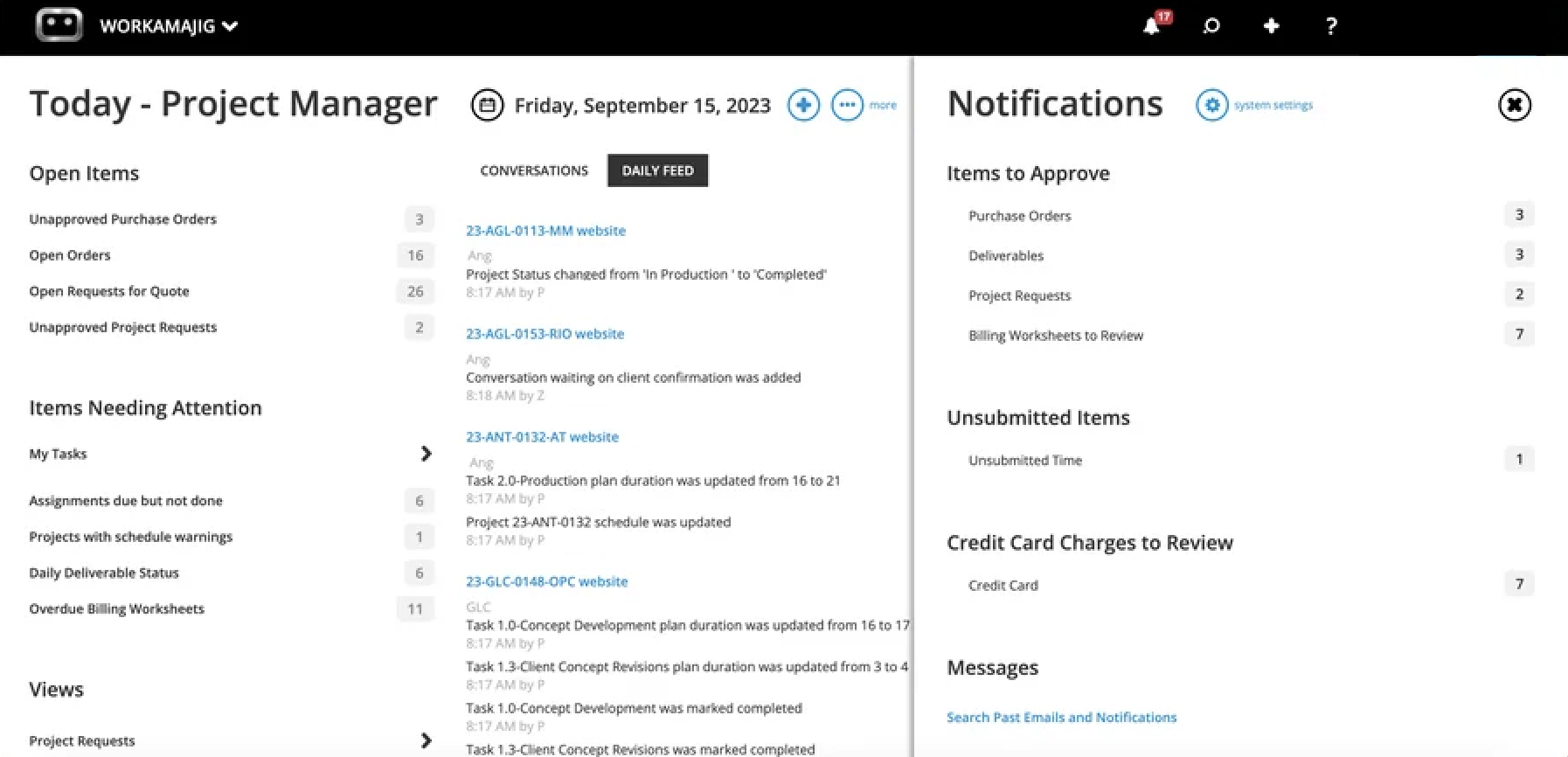
Creative collaboration happens directly on project task cards, where teams can access all the details from initial conversations and task-related expectations.
Users can upload content here (images, videos, PDFs, website links, etc.) and tag managers or clients for feedback. Project teams can also organize content into folders, making it easy to keep projects structured and accessible.
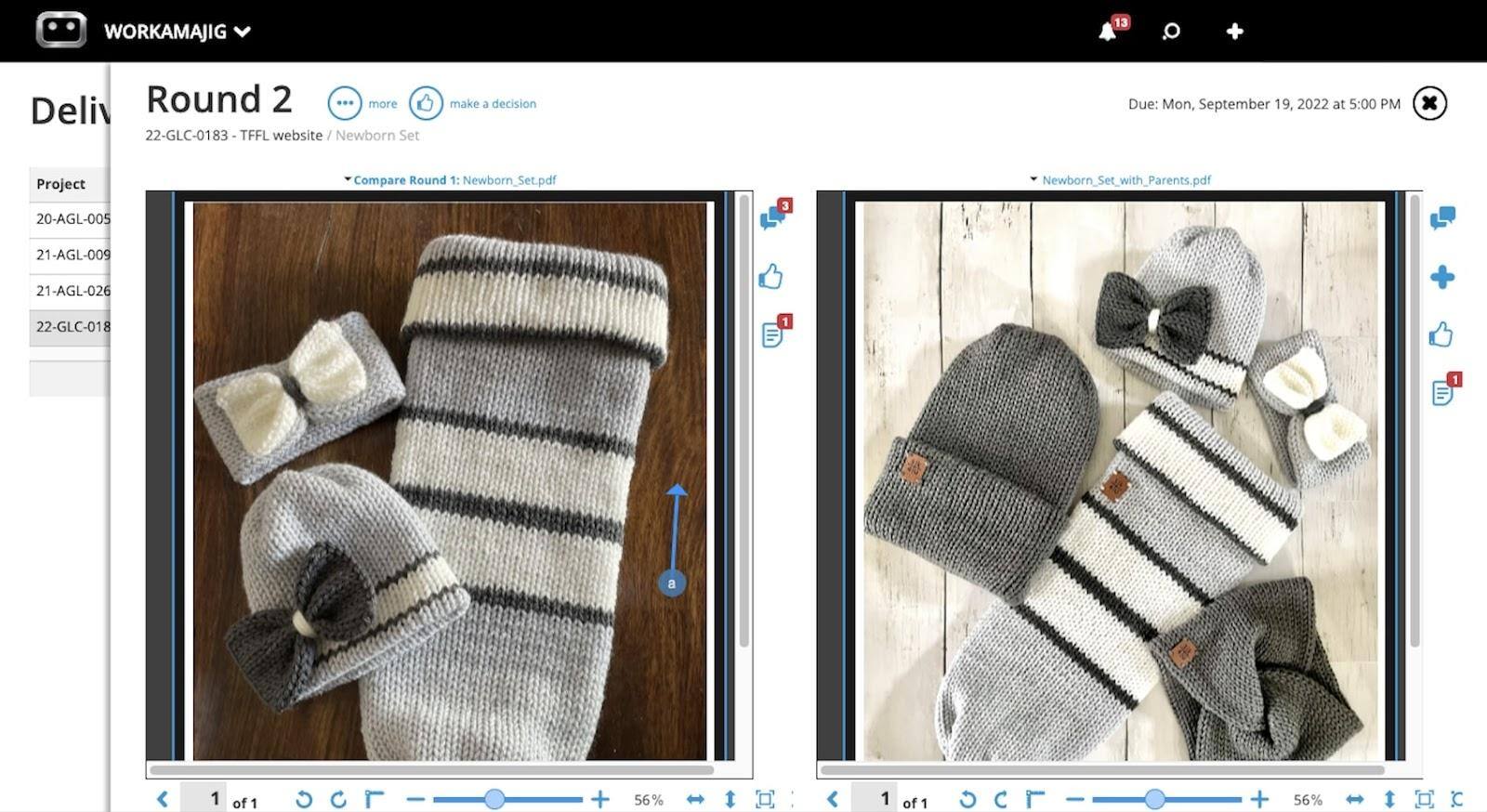
Workamajig lets teams build out an iterative review process that keeps all stakeholders in the loop at the right times. Team members can use our built-in proofing tools to annotate files, collaborate on revisions, and upload new versions for review.
Our system automatically tracks version history and even allows side‑by‑side comparisons, so everybody can keep track of exactly what’s changed at each iteration.
Once the feedback cycle is complete, tasks can be marked as finished and the final deliverables sent to clients.
Workamajig keeps clients in the loop throughout feedback processes — automatically emailing them whenever they’re tagged in a project or when deliverables are shared with them.
Submit Deliverables, Finalize Approvals, & Secure Project Sign-off
When all the tasks are complete, it’s time to wrap up the project. The Today dashboard also comes in handy here, allowing project managers to confirm that all project activities are complete and deliverables are sent before they begin the sign-off process.
Then, managers can send out the sign-off sheet to all stakeholders and close the project after securing approvals.
Automate and Centralize Accounting & Billing
Workamajig’s native accounting system includes an automated invoicing tool to streamline invoice creation and improve accuracy, so no costs are missed. Here’s how it works:
-
It pulls all line items and project costs into a billing worksheet, applying the project’s specified billing method (time and materials, retainer, fixed fee, or media).
-
Workamajig automatically routes the billing worksheet to managers for approval. Managers can edit line items, adjust costs, add project-related charges, and make any other necessary final changes before giving invoices the green light.
-
The billing team can then convert the billing worksheet to a final invoice that’s ready to be shared with clients.
Workamajig also simplifies the payment process for clients by integrating with PayFlowPro and Authorize.net. This lets clients pay directly from the invoice via CC or ACH in just a few clicks.
Aside from this convenient invoicing tool, our native accounting software includes everything teams need to handle all standard accounting processes. We’ve also optimized our system for creative workflows, including features like work-in-progress (WIP) billing and retainer management that generic accounting systems like QuickBooks and Xero don't offer.
We include a complete GL accounting system (that’s GAAP, GDPR, and HMRC compliant) not only as a convenience, but as a necessary method to accurately manage project finances within project workflows, in real-time.
Our system includes:
- Chart of accounts setup and management
- Vendor invoice processing and accounts payable
- Credit card integration to pull in expenses
- Receipt tracking
- Expense reporting
- Reimbursement workflows
You can read more about our accounting module’s extensive features for managing expenses, receipts, vendor invoices, and media buys in this guide.
Analyze Finances and Performance to Improve Future Planning
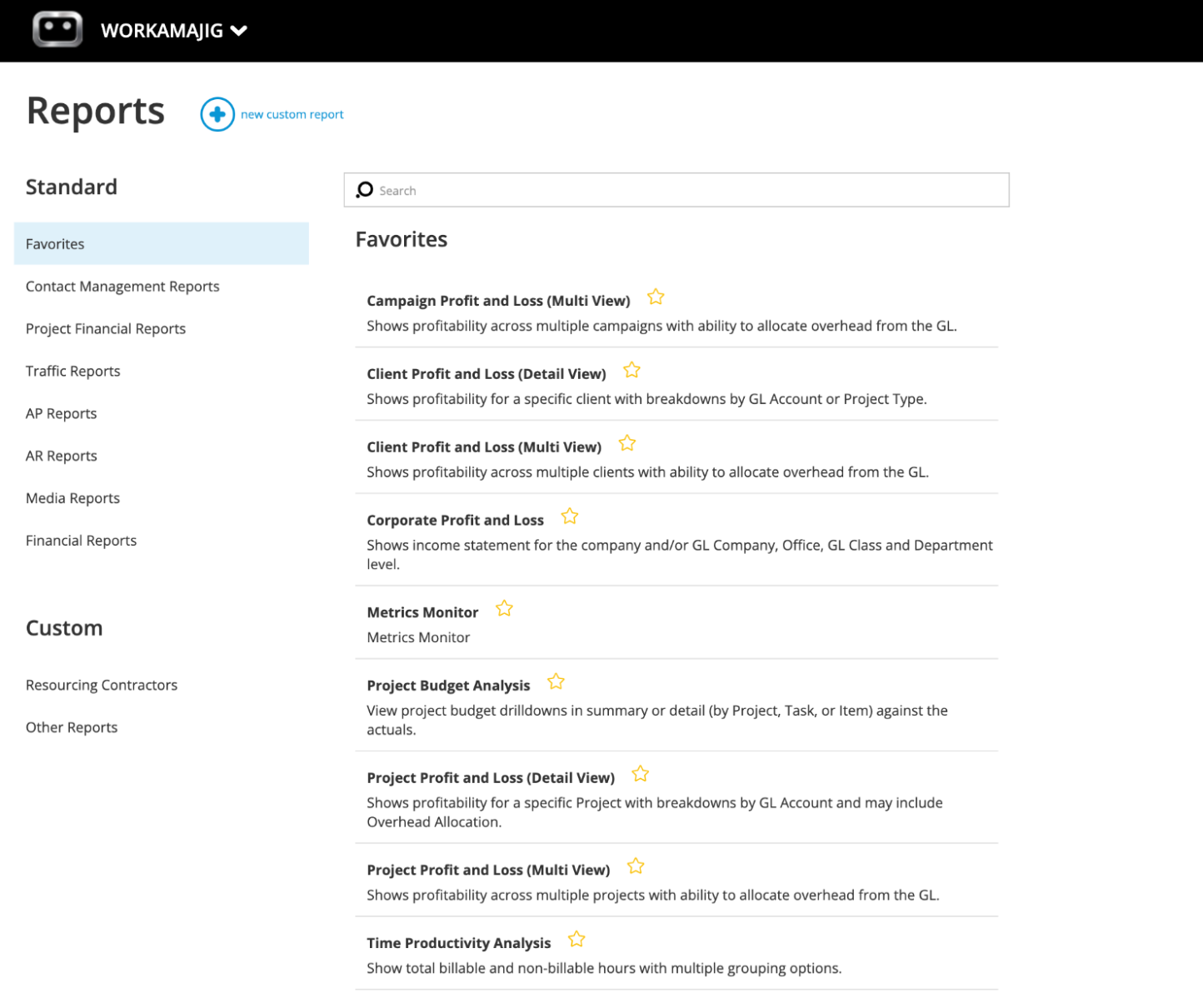
Workamajig includes robust reporting tools to analyze project performance at various levels and gather the necessary insights to make smarter decisions on pricing, resource management, and the clients you take on. Our system offers:
-
Hourly reports for analyzing resource utilization — such as campaigns or clients that consume the most resources, or which team members clock the most hours.
-
Various financial reports — including profit and loss (P&L) reports by project, service, client, campaign & more, cash projections, and a revenue forecasting tool.
-
Project-level profitability breakdowns — that let you compare actuals to estimates so that you can improve your projections for future projects.
Getting Started with Workamajig
We have tailored packages for agencies and in-house teams, with pricing based on team size and user seats. Check our rates out below:
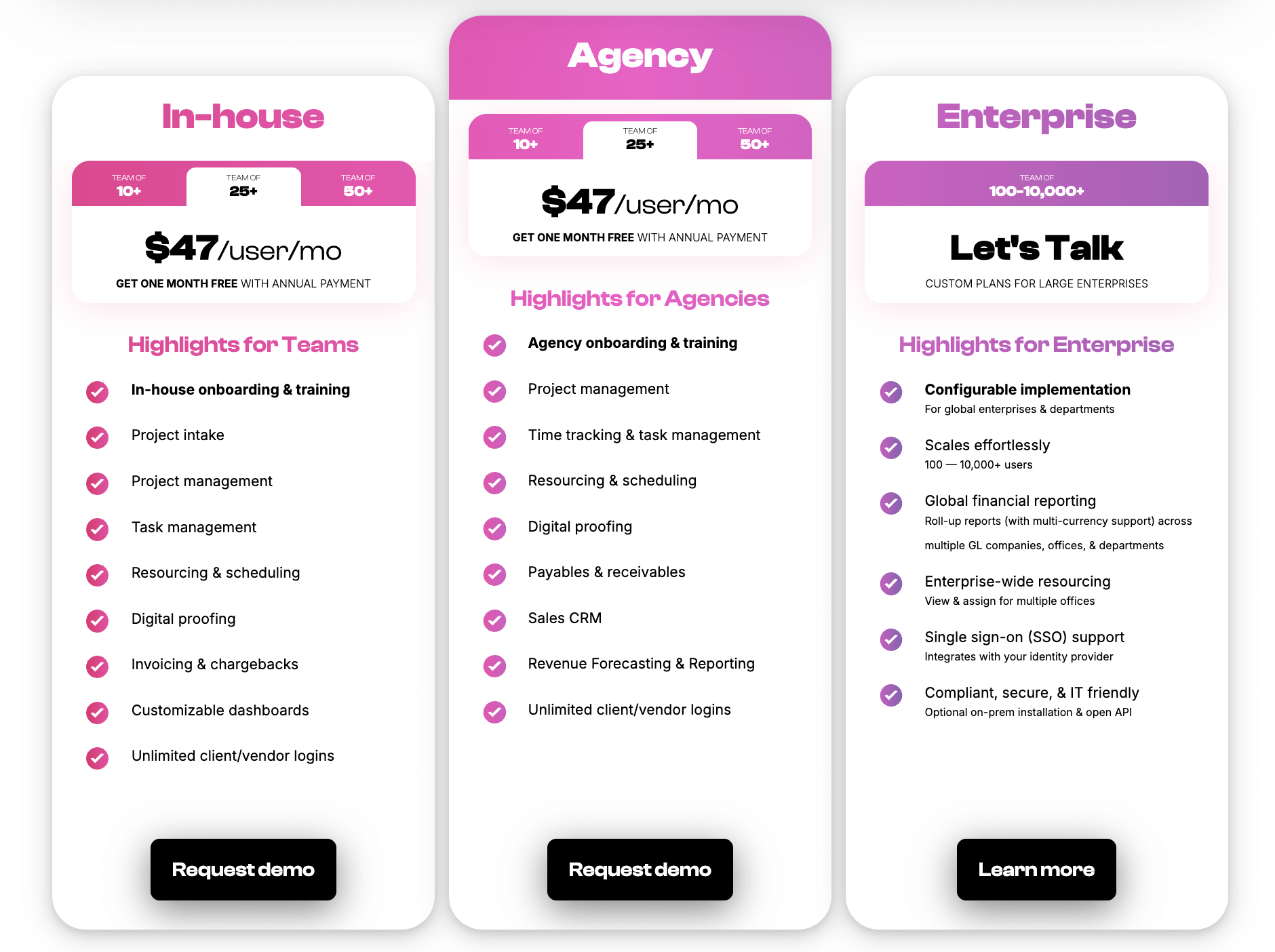
Workamajig is one of the top-rated creative project management platforms, designed specifically for agencies and in‑house teams. It supports all the unique workflows of creative teams — from project planning and resource management to collaboration and reporting.
With guided onboarding and personalized one‑on‑one training, Workamajig makes it easy to roll out across your entire team, ensuring everyone gets up to speed quickly.
Read more: 10 Best Project Management Tools for Creative Agencies
Creative Project Management FAQs
You’ll find answers to some of the most commonly asked questions about creative project management below.
1. What's the difference between a PM & creative PM?
Both traditional and creative project managers (PMs) plan, organize, and oversee projects while applying the proper project management methodologies. Creative PMs have specific expertise in creative environments, where deliverables are often subjective, shaped by client feedback, and refined through multiple iterations.
2. What are the 5 C's of project management?
The five Cs of project management provide a foundation for effectively evaluating and managing projects. They are:
-
Complexity — complex projects require detailed planning and closer monitoring, and sometimes more on-the-fly adjustments.
-
Criticality — a measure of the project’s importance that helps you prioritize some projects over others. High‑criticality projects demand more attention, resources, and risk management.
-
Compliance — to ensure the project adheres to legal, regulatory, and organizational standards. Compliance is essential in highly regulated industries such as healthcare and finance.
-
Culture — factoring your organization’s norms, values, and way of working is important when you’re setting goals and making plans.
-
Compassion — which means accounting for the human side of projects, like keeping morale up, balancing workloads to reduce stress, and cultivating empathy across teams.
3. What creative project management tools are available to help streamline processes?
There are dozens of creative project management tools to help streamline processes, manage resources, and keep clients in the loop — including Workamajig, Teamwork, Productive, Scoro, Function Point, Advantage, Clients & Profits, and more.
4. Who uses creative project management software?
Creative agencies and in-house teams use creative project management software to manage collaborative projects, such as advertising and PR campaigns and their creative outputs. These teams are made up of professionals from the creative industry, including designers, video editors, content creators, marketers, strategists, creative directors, and creative project managers.
5. Are there any free project management tools for creative teams?
There aren’t many free project management tools available on the market. You might find general systems like Trello or Asana offering free entry-level plans, but these are pretty limited in terms of features and usage and aren’t designed for creative workflows. Instead, most project management brands offer free demos so you can see how their system would work for your specific projects and requirements.
From Chaos to Clarity: Getting Creative Project Management Right
Creative projects always carry a level of unpredictability — shifting client expectations, subjective deliverables, and multiple rounds of feedback are simply part of the process. But unpredictability doesn’t have to mean chaos. With the right systems, workflows, and tools in place, agencies can transform that complexity into clarity.
Workamajig was designed to help agencies achieve exactly that balance. By centralizing project intake, planning, collaboration, monitoring, billing, and analysis, it eliminates the silos and inefficiencies that often derail creative work. Managers and teams gain real‑time visibility into every aspect of the project lifecycle.
The result is more profitable projects, stronger client relationships, and creative teams that can focus on producing great work. Request a personalized demo today to see how Workamajig can support all your creative projects.
Read more: