

Tracking project budgets isn't just best practice; it's crucial to keep your organization profitable and operational. We've worked with teams navigating a variety of growing pains, helping them conquer these learning curves and achieve continued growth.
This guide covers everything we’ve learned about managing project expenses and profitability over the years. It takes you through all the specifics of project expense and budget tracking, including:
- What to keep in mind when categorizing project expenses
- How to track project expenses and budgets throughout the project lifecycle
- Our best practices for mastering project expense tracking
- Common expense tracking challenges and how to overcome them
- Tools for managing project expenses and budgets, such as:
We've built Workamajig with powerful cost management and budget-tracking tools designed for real-world project workflows, so you can conveniently manage the full lifecycle, from intake to billing, in one place.
To learn more about Workamajig’s project expense tracking tools, request a free demo.
Types of Project Expenses & How to Categorize Them
Categorizing project expenses isn’t just about keeping your accounting department happy. Without clear categorization, your budget reports just tell you if you're over or under — not why
Teams that consistently sort their expenses find themselves in a stronger position to:
- Catch issues early. When your project’s cost thresholds are at risk, you need to know exactly where you’re running over so you can course-correct.
- Improve estimates and forecasting. Keeping precise records of costs for past projects helps build estimates for future ones.
- Hold the right people accountable. Are vendors charging more than they quoted you for? Are labor costs overshooting because some team members are less productive than others? Tracking overruns to the source helps you investigate the root cause, hold people accountable, and bring things back on track.
- Stay compliant. Accurate expense tracking streamlines financial reporting, audit trails, and tax compliance.
The exact expense categories that you set depend on a few things, like what business you’re in, how you track project budgets, and what the accounting team needs.
But here are the different ways that teams generally sort their expenses:
Direct costs
Direct costs are any expenses that you can tie to the project. In other words, if the project didn’t exist, they wouldn’t either. The main direct costs for creative projects are:
- Labor. Internal team effort is usually the largest cost line on any creative project. These costs are typically tracked by logging staff hours and calculating them against staff hourly or service rates.
- Vendor and freelancer costs. Think outside production, contractors, print vendors, and so on. These require receipt and invoice tracking, reconciliation against purchase orders (POs) or work orders, and a clean trail back to the project.
- Media buys. Like ad placements, sponsored content, programmatic spend, and other paid media that are tied to a specific campaign. These often run through dedicated media buying platforms and need to flow back into the project budget so you can reconcile insertion orders against actual spend and bill clients accurately. Media buys can dwarf every other line item on a campaign, so even small reconciliation gaps add up fast.
- Out-of-pocket expenses. Travel for a client pitch, props and wardrobe for a photo shoot, courier fees for delivering physical samples — you name it. Make sure these get tagged to the right project before they disappear into a generic "misc" bucket.
Indirect (overhead) costs
These costs support delivery and your daily operations, but aren't tied to any single project — software subscriptions, utilities, office rent, shared tools, management time. They're generally spread across projects using a defined model (per-head, revenue-weighted, or per-hour).
If you don't bake a fair share of overhead into project costs, every project looks more profitable than it actually is. That's how agencies end up with healthy-looking project P&Ls and a not-so-healthy bottom line.
Fixed vs. variable costs
You can further classify the expenses above as:
- Fixed costs. These are predictable, so they stay the same regardless of project volume (rent, salaried staff, core software), so you can precisely factor them into project budgets.
- Variable costs. They vary from project to project as they scale with the work (freelancers, materials, print runs, media buys). That’s why it’s important to make estimates based on relevant historical data and to maintain a contingency reserve.
Billable vs. non-billable costs
Some costs you'll pass through to the client (printing, media buys, certain freelancers); others you absorb (internal labor on fixed-fee work, overhead, tools). Tagging expenses as either billable or non-billable is important so you can calculate billable utilization — the percentage of your team's tracked time that’s actually billable — which is a big indicator of your agency’s financial health.
How to Track Project Expenses & Budgets
The teams that track project budgets well tend to follow a similar rhythm: lock in a baseline before kickoff, capture costs at the source as work happens, and review variance often enough to catch problems while there's still time to act.
Here's the playbook we recommend.
1. Accurately calculate budgets & set a baseline before kicking off
Before your project begins, establish a clear baseline budget that serves as your reference for all future tracking. Your baseline should include:
- Scheduled start and end dates (for all phases and completion dates)
- Planned efforts and resource requirements
- Comprehensive cost projections (including internal labor costs, freelancers, vendors, and materials)
- Expected revenue and profitability
This baseline is the foundation for making meaningful comparisons between what you planned and what is actually happening. With an accurate reference point, you can calculate ROI and track performance through the entire project lifecycle.
Note: If you run similar engagements regularly, it’s worth saving your final baseline as a project template. They cut down planning time on the next round and give you an estimate to work with off the bat.
Read more: The Creative Agency Guide to Creating a Project Budget
2. Use a dedicated system for managing project expenses
The two most popular options for tracking project expenses and budgets are spreadsheets and project management systems.
Spreadsheets can work when you're just starting out or only juggling one or two projects at a time. They’re free, familiar, and pretty easy to use. That said, setting them up is a pain — you need to define expense categories, build in time tracking, set formulas for things like budget burn and variance, and create a reporting layer on top.
So to save you that headache, we've created two workbooks (for Excel and Google Sheets) that include everything you need.
The first one’s for agencies and professional services teams and includes:
- Pre-built expense categories are aligned to direct, indirect, fixed, and variable costs
- A time-tracking sheet that calculates labor cost from hours and rate cards
- Budget vs. actuals tracking with variance flags
- A project P&L summary tab that pulls everything together
The second one’s a lighter version without the labor and time tracking portions, suitable for in-house creatives, small businesses, and other teams that don’t need to track labor costs.
You can download them here:
However, as your needs and project complexities evolve, tracking project costs in spreadsheet systems becomes less effective.
There isn’t a lot of scalability with spreadsheets because they still rely heavily on manual input. People have to step away from their natural workflows to log hours or add expenses, and reconciliation requires a lot of back-and-forth. Not to mention, there’s no real-time visibility here — you don’t know what’s going on with your projects until spreadsheets are updated.
It’s no surprise that growing teams eventually switch over to more advanced project management tools that track costs within workflows in real time.
These systems let you:
- Create accurate estimates and track actual costs as they’re incurred
- Aggregate project-related expenses (labor, vendors, credit cards, receipts) for a single, comprehensive view of costs
- Automate data entry to eliminate human error and double entry
- Access budget information from anywhere — office, home, or on the road
- Free up time for billable work instead of spending time on manual reconciliation
3. Make time tracking easy and intentional
If your team isn't logging hours consistently, accurately, and in a way that ties back to specific project activities, every downstream metric — labor costs, project margins, utilization, profitability — is built on shaky ground.
But you know how it goes: most teams aren't exactly thrilled about tracking time, especially when they're heads-down on work, and the timesheet feels like one more thing to remember on Friday afternoon.
The good news is that getting time tracking right doesn't require a heavy hand or micromanaging people. In our experience, there are a few simple principles that make all the difference:
- Bring time tracking to everyday workflows. If logging time means switching tools, opening a spreadsheet, or remembering to do it at the end of the day, consistency and accuracy usually suffer. Time tracking that doesn’t disrupt people’s natural workflows — task cards in their PM system, calendars, timers that record in the background — ensures hours are logged with less pushback.
- Encourage daily logging. The shorter the gap between doing the work and logging it, the better the data because there’s less guesswork involved.
- Give managers the tools to easily review and act on hours. Managers should be able to see tracked hours in one place, approve or edit them quickly, write off entries that shouldn't be billed, and decide what gets invoiced.
4. Set cost thresholds and alerts
Cost thresholds are specific spending limits that trigger actions when reached. Think of them as financial alarm systems for your project that tell you when to intervene before overruns occur.
Agencies and creative teams often set thresholds for:
- Different project types (marketing strategy, print campaigns)
- Specific project elements (design, copywriting, development)
- Resource categories (internal labor, contractors, materials)
For example, if you've allocated $5,000 for video production on a marketing campaign, you might set these thresholds:
- $3,750 spent (75%): Review remaining production tasks and timeline.
- $4,500 spent (90%): Immediate production team meeting to assess completion status.
- $5,000 spent (100%): Manager intervention and possible scope adjustment.
These predetermined limits are crucial because they:
- Provide early warning signals before budgets run into the red
- Establish clear response plans for each threshold level
- Eliminate confusion about when and how to address budget concerns
Planning these thresholds during project setup allows you to adjust plans on the fly and maintain project profitability.
5. Make people accountable for the right things
Even with great systems, you need a designated person to monitor the budget and be accountable for it. This is usually the project manager, though larger teams may designate another member.
This team member should be responsible for:
- Monitoring costs as projects progress
- Comparing actual expenses to budgets
- Addressing potential issues before they become actual problems
While project management software can automate most budget-tracking best practices, having an assigned budget owner ensures that nothing falls through the cracks.
6. Continually re-forecast budgets & resources
Accurate budget management requires consistent re-forecasting throughout the project. Remember that project costs and project budgets are two different things:
- Your budget is your original spending plan
- Your costs are what you're actually spending
Regular cost reviews prevent minor issues from becoming major problems. We suggest:
- Weekly check-ins to compare planned vs. actual spending
- Regular risk assessments to identify potential budget threats
- Updates to forecasts based on current project status and remaining work
And of course, resource management deserves equal attention — your team’s efforts have a direct and significant impact on costs.
Review resource allocations weekly to ensure all project activities are covered and to optimize utilization. Ongoing assessments help maintain an accurate picture of your schedule and budget status.
Best Practices for Project Expense Tracking
Our best practices can help you improve the accuracy of your estimates, keep projects within budgets, and get deeper insights into what’s affecting project profitability.
Track project costs & schedules in real-time
Arguably, the most important advice we can give is to track project costs in real-time. That means:
- Integrating time tracking into project workflows to record hours and calculate labor costs as teams complete project tasks and phases. Logging time against the work people are actually doing gives managers a clear view of where effort is going, where labor overruns are coming from, and how productive the team is overall.
- Monitoring project-related spending across all accounts and spend cards. Connect credit card and spending accounts to pull in expenses as they’re incurred, and incorporate those into budgets. Make sure any out-of-pocket expenses are also documented and tagged as they come in.
- Recording vendor costs as soon as you receive invoices. You should also compare invoices to purchase/work orders to assess vendor quality and reliability. Are they delivering on their promise, or are you paying more in the end? It helps to use purchase orders (POs) with third-party vendors as often as possible to lock in rates and avoid unexpected costs.
Have a plan to manage scope creep
Scope creep (gradual changes or uncontrolled growth in the project scope) is one of the hardest budgeting challenges to grapple with and the biggest threat to profitability. That’s why you absolutely must have a plan to manage scope creep.
Think of those small “one more thing” requests — they often add up quickly, especially when stakeholders feel like they can send them in with no pushback.
Scope creep commonly occurs when projects aren’t clearly defined or regularly monitored. So many of our best practices above can help you nip this in the bud. In addition, we suggest:
- Starting with a crystal-clear project plan and ensuring all stakeholders are on the same page
- Understanding priorities and outlining budgets, constraints, timelines, deliverables, and satisfaction metrics
- Defining deliverables with specific, measurable criteria
- Mapping resources to critical project paths
- Developing a change management plan to evaluate and incorporate new requests
Remember that effective scope management isn't about denying changes — it's about evaluating them and adjusting project plans and budgets accordingly.
Document learnings and refine plans
If you capture the right information, every closed project has actionable data you can use to make the next one more profitable. So after project wrap, it’s really important to take the time to:
- Compare actuals vs. estimates — at the project, task, and resource level — and drill into where things went unexpectedly. Which phases ran over and by how much? Which services hit the estimate cleanly? Which resources logged hours that lined up with what was budgeted, and which didn't?
- Figure out why something went over. A creative phase running 30% over could mean different things: you under-budgeted the work, the right people weren’t on the job, the brief wasn’t tight enough, or the change requests weren’t managed well. All these issues require different fixes, so it’s important to get into the weeds.
- Look at patterns across projects. Comparing estimates of similar projects can help you refine them for future plans. It’s also worth checking the post-mortem reports to catch recurring issues. For example, if revisions consistently take twice as long as estimated on a particular client, it’s probably time to revisit that initial estimate. Similarly, if your rebranding projects aren’t turning a profit, it may be time to reconsider that service line.
The patterns you find can help you adjust plans to prevent future budget overruns and profitability issues. You can update estimates, rate cards, change management processes, or make more serious calls depending on what you learn. - Get the learnings to the people who need them. Your teams should know things like which clients tend to push scope, which project types are reliably profitable, and which services can’t afford loads of changes. Managers can make more informed decisions when they have insights into which combinations of people and project types deliver on budget and which tend to slip.
Further reading: 8 Tips for Managing a Project Budget (+ Budgeting Methods)
Common Expense Tracking Challenges & How to Overcome Them
Even with a solid process, certain expense-tracking problems can keep showing up. Here are the ones we see most:
🚫 Missing documentation. Lost receipts and untracked invoices can be a real pain for tracking profitability. Say a team member pays for a client lunch, never submits the receipt, and the cost either gets absorbed into overhead (margin loss) or shows up six weeks later when no one remembers the context.
🚫 Manual data entry (and double entry in particular). It’s the repeat offender for expense tracking errors: someone types the wrong project code, miscategorizes a vendor, fat-fingers an amount, or doesn’t hit save after logging a charge.
🚫 Multi-currency expense tracking. If you work with international clients, vendors, or remote contractors, you're going to deal with multi-currency expenses. Without good tooling, this becomes a manual conversion mess and a constant source of minor reporting errors.
🚫 Multi-entity expense tracking. Teams with multiple offices, legal entities, or business units often struggle to roll project costs up cleanly. Expenses might originate in one entity but be billed through another, and overhead allocation can get especially tangled.
🚫 Scattered data. This is the main culprit that fuels the other problems we’ve covered. When your project data is in one tool, time tracking in another, vendor invoices in a third, and the GL in a fourth, you can't actually answer the question "how is this project doing right now?" without a half-day reconciliation exercise.
These challenges all share similar root causes and a similar fix. Most of them stem from data living in too many places, with too many manual touchpoints between them.
So if you get your systems and software right, most of these problems either disappear or become way easier to manage. Here's what things look like when you’ve got the right tools in place:
✅ Capture documentation digitally. Snap a photo of a receipt from your phone, attach it to a project on the spot, and submit it through the same system that handles approvals and reimbursements. You can also set hard rules to ensure things are properly recorded — e.g., no expense is reimbursed without a project tag and supporting documentation attached.
✅ Pull data into the same system right from each source. Cut down data entry errors by using the same system to manage vendor invoices, media buys, credit card spending, time tracking, etc. And since these systems let you track expenses against the project's budget as they come in, your budgets stay as accurate as possible
✅ Native multi-currency support. Use a system that supports foreign-currency transactions out of the box — recording the original currency and the converted amount, with exchange rates pulled automatically from the date of the transaction. Pick a consistent reporting currency per project (usually the client's billing currency) and stick with it so comparisons and rollups remain clean.
✅ Set the rules for multi-entity accounting, then let the system enforce them. Establish your intercompany rules upfront — who bills whom, at what rate, for what kind of work — and tag every expense with both the project and the entity that incurred it. Use a system that supports consolidated reporting across entities, so you can see project profitability at the agency level and entity-level financials when finance asks for either.
✅ Standardize everything in one system. This is the big one because the other fixes only really work when your data is in one place. Be sure to standardize project codes, expense categories, and rate cards across the board so the same data means the same thing everywhere.
Workamajig’s Complete Project Expense Tracking Solution
Workamajig is a complete agency management system that combines project management, native time-tracking software, and a full accounting system under one roof. We integrate cost tracking and budget management into every component of our solution to save you from patching data together across tools.
Our all-in-one approach makes it easy to follow our best practices and side-step the challenges we've covered above. Expenses are digitized and organized; reconciliation doesn't require back-and-forth or switching between systems; time tracking sits inside everyday workflows; and managers get complete control over costs and full visibility into where money's going and what's actually profitable.
Up next, we’ll take you through how Workamajig supports the entire project expense-tracking process in detail, with our:
- Automated estimating tools — effortlessly build out accurate estimates for labor and non-labor expenses using current and historical data.
- Complete project expense tracker — capture project expenses right from the source using our complete toolkit.
- Automated project budget tracking — managers can access real-time budgets for all active projects from the centralized monitoring dashboard. Our automated alerts warn managers if a project’s budget or timeline is at risk.
- Change management tools — keep scope creep in check, ensure requests go through the right approvals, and ensure changes are captured in the project’s budget.
- Project billing and client invoicing tools — our billing worksheets pull all project expenses in a single view, so managers can make any changes and sign off on everything before the final invoice is generated.
- Project budget and profitability reports — for allocating overhead and analyzing costs, profitability, and resource utilization from different perspectives.
Project estimating tools
Workamajig offers a few different ways to kick off estimates:
-
Option A is to use project templates. Our project templates include an estimate section, so you can save all project details along with expected expenses for similar projects and service lines. Then, you can pull the relevant template out each time you launch a new project. From there, you adjust the details — editing line items, marking things up or down, adding expenses or services — and finalize it.
-
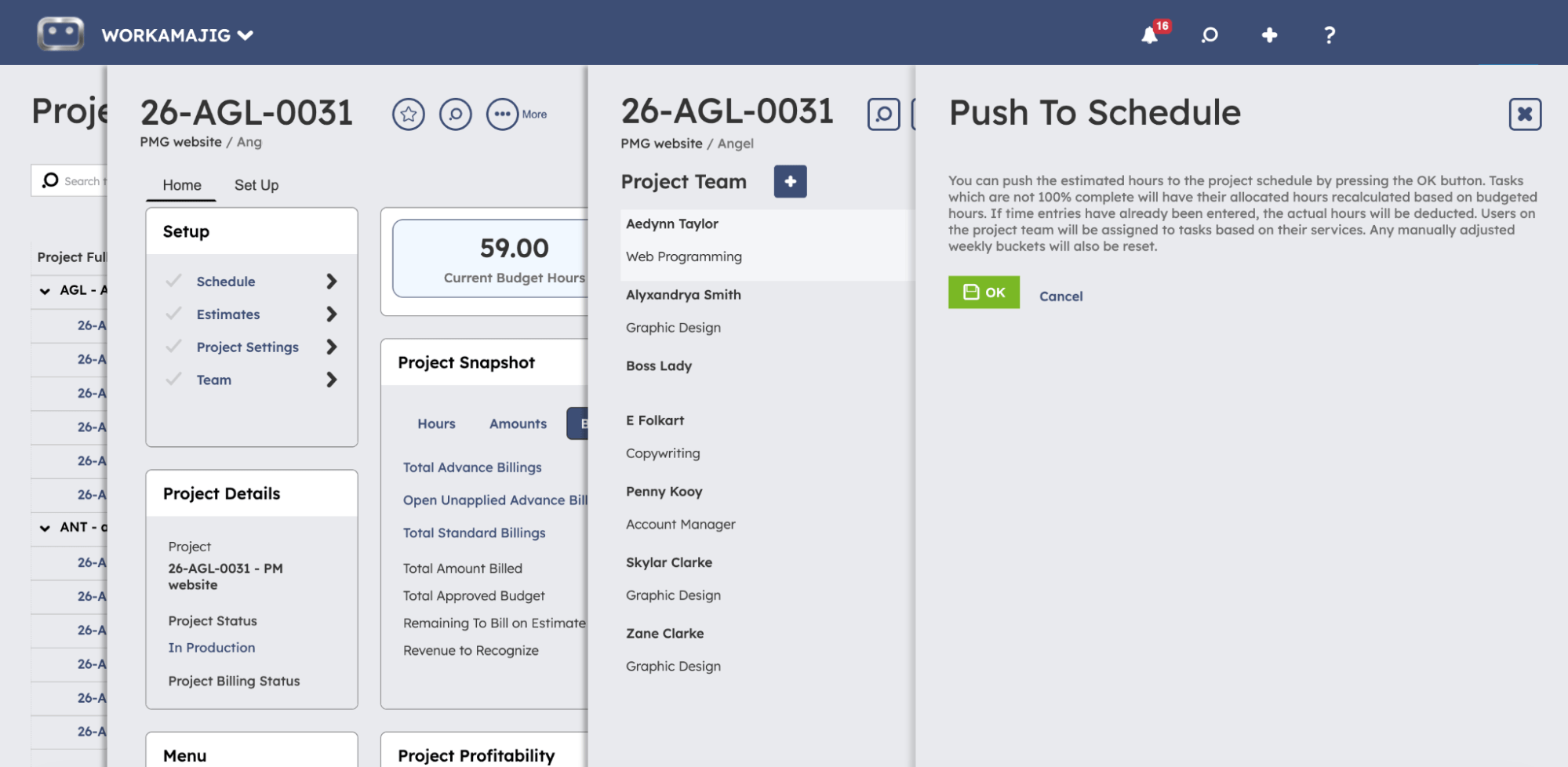
Option B is to create estimates using the project’s schedule. If your project schedule already has tasks and allocations finalized, Workamajig's estimating tool can pull all the details straight in and build an accurate labor estimate for you. Any adjustments you make to the estimate — like adding hours to the production phase — can be pushed back into the schedule, so the two stay in sync.
-
Option C is to build an estimate from scratch. If you prefer this option, our automated estimating tools have you covered, too. They split estimates into two sections — labor and non-labor — then bring everything together for a final project-level estimate. The estimating screen brings your workflow and services into a single view, so you can go task by task and choose which services to include and how many hours each activity requires.
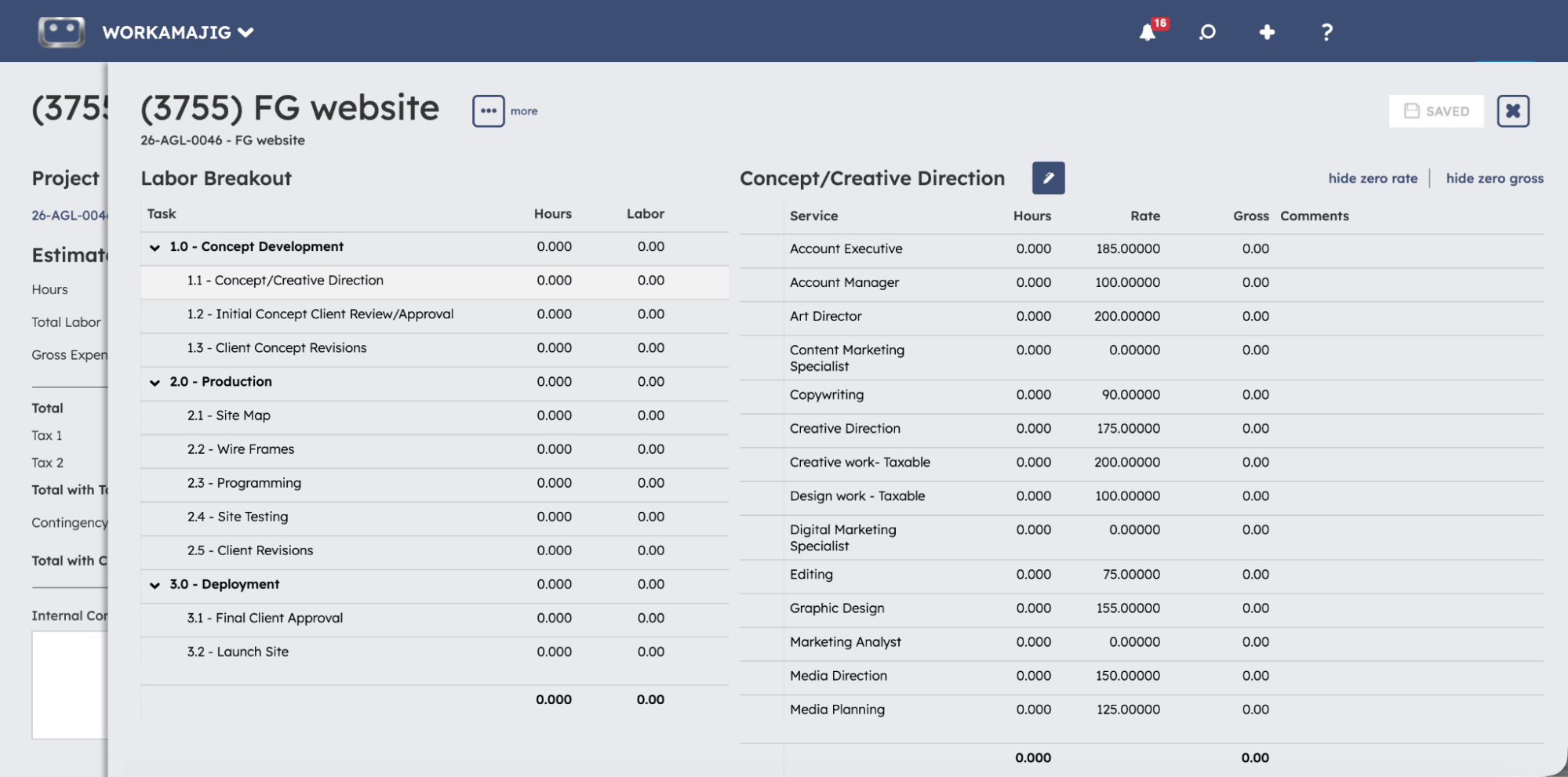
Whatever option you choose — template, schedule, or manual entry — Workamajig calculates the labor costs in the background. It pulls hourly rates from your rate cards (with support for multiple variations; by default, the system uses the rates on the client record), so you don't have to remember which rate applies to which client or service.
Workamajig offers a separate tool for managing non-labor expenses and outside costs. You can tag expenses to specific tasks or projects, assign a vendor, specify quantities, and apply markup — all from one screen.
For example, say you're estimating print costs for a campaign. You can add the print run as a line item, link it to the production phase, assign your usual print vendor, enter the quantity (say, 5,000 brochures), and apply your standard markup.
You can even send out RFQs to multiple vendors directly from Workamajig, and then compare bids as they come in. After you choose a vendor, the estimate updates automatically depending on their quote.
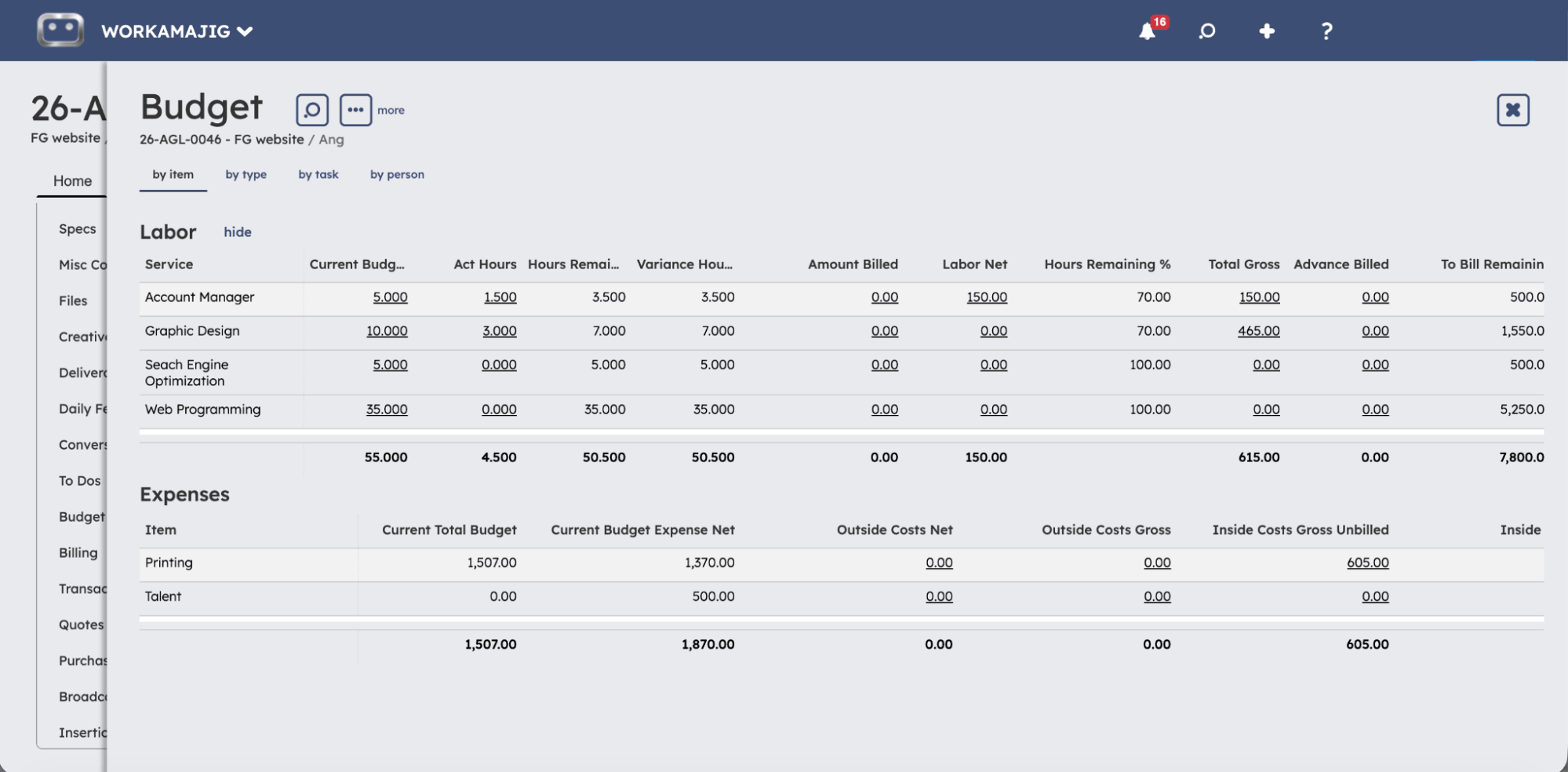
Then, once the project kicks off, Workamajig keeps the estimate-to-actual comparison up to date as work progresses.
Project expense tracker
Workamajig comes packed with dedicated tools for tracking and managing labor and non-labor expenses, giving you complete visibility into costs and control over what gets billed.
Labor costs: time tracking and rate cards
We built Workamajig's native time tracking tools to make logging hours easy for the people doing the work — while giving managers control over how labor hours affect the project budget.
Team members can submit time directly from task cards, so nothing pulls them away from their natural workflows. They don’t have to switch tools or open a separate timesheet. And there are a few ways to log hours:
- Timers for accurate, real-time tracking. Users can pause for breaks and toggle between tasks throughout the day.
- Manual timesheet entry for people who prefer entering time the old-fashioned way.
- Calendar event tracking (via our calendar integrations). Workamajig captures calendar events — meetings, internal reviews, client calls — users just confirm attendance to log the hours against the right project.
Each entry can also include a comment, which comes in handy later when managers review variances, such as a task taking 4 hours longer than budgeted.
![Workamajig - Today - Creatives - Tasks - New Time Entry for Projects [GIF]](https://www.workamajig.com/hs-fs/hubfs/Workamajig%20-%20Today%20-%20Creatives%20-%20Tasks%20-%20New%20Time%20Entry%20for%20Projects%20%5BGIF%5D.gif?width=600&height=637&name=Workamajig%20-%20Today%20-%20Creatives%20-%20Tasks%20-%20New%20Time%20Entry%20for%20Projects%20%5BGIF%5D.gif)
Tracking employee time at the task level means labor hours are tied to specific project activities, ensuring costs and productivity are captured accurately. Managers can see exactly where time was spent.
In addition, all logged hours feed directly into a centralized timesheet, giving managers a high-level view of project hours. They can then control what gets billed before any of this hits an invoice by approving, editing, transferring, or writing off hours.
Approved hours then flow across our system:
- Labor costs are calculated automatically and tracked against project budgets.
- Project schedules and budgets are updated to give PMs real-time visibility and help them catch issues early.
- Labor hours flow into time and productivity reports, so managers can analyze hours by client, service, project, or team without waiting on a manual rollup.
Tracking other expenses
Workamajig's built-in accounting comes with dedicated tools for handling all kinds of project expenses, ensuring all costs are accounted for as they come up.
These tools solve all the traditional challenges we highlighted above — missing documentation, manual reconciliation, complex multi-currency or multi-entity costs, and scattered data — making your accounting team's life easier and giving the whole agency a single, real-time view of project health and profitability.
Here’s what’s included in our toolkit:
- Receipt management and expense reporting. No more hunting down crumpled receipts at month-end or trying to figure out who to reimburse and how much. Team members can tag out-of-pocket expenditures to projects by attaching and storing receipts directly in Workamajig (including via mobile). They can also submit expense reports for managers to review.
- Credit card charges and spending account management. Pull charges into Workamajig automatically via our Plaid connector, or set up nightly auto-sync to keep balances and project tags up to date without anyone having to key them in.
- Vendor invoice management. Workamajig's vendor management suite lets teams add copies of vendor invoices and reconcile them with purchase orders, work orders, and receipts. Managers and accounting teams can also pay vendors online via integrations with Edenred Pay (formerly CSI) or AvidXchange (formerly FastPay).
- Media buying integrations. Creative, media, and marketing teams love this feature. Pull media buys directly into Workamajig through our integrations with Strata/FreeWheel, Mediaocean, Bionic, and GaleForceMedia, so media orders and actual spend reconcile cleanly against project budgets.
- Multi-currency expense management. Workamajig supports transactions, vendor invoices, POs, client invoices, expense reports, and bank accounts in any currency you work in. You can reimburse employees in their local currency, bill clients in theirs, and still report everything in your home currency — with exchange rates managed automatically, and realized vs. unrealized FX gains and losses tracked separately. Our system is also GAAP-, GDPR-, and HMRC-compliant, supporting teams operating across borders or working with international clients and vendors.
Real-time project budget tracking
Workamajig features an interactive project monitoring system with real-time budget tracking. It provides a holistic view of each project’s progress and health, and its visually friendly design helps you easily identify what needs attention. Check it out below:
![Workamajig dashboard: Projects and Project Status [GIF]](https://www.workamajig.com/hs-fs/hubfs/Workamajig%20-%20Projects%20and%20Project%20Status%20%5BGIF%5D.gif?width=1714&height=853&name=Workamajig%20-%20Projects%20and%20Project%20Status%20%5BGIF%5D.gif)
On the right-hand side, you see color-coded Gantt charts showing each project’s current phase and status. You can customize these Gantt charts and even change the dashboard’s view to best support your projects.
On the left-hand side, you see status breakdowns by project, with columns for: Financial Status, Project Timeline Status, Status, Allocated Hours, Actual Hours, and % Complete.
Within those columns, you see green, yellow, or red icons, along with details about each project. These attention-grabbing icons instantly tell you whether projects are on track (green), at risk of overruns (yellow), or have already exceeded their timelines or budgets (red).
And when a project enters the yellow territory, our system sends automated alerts, so you can intervene before projects run late or you overspend.
Change management
If scope creep is something that’s consistently threatening your projects’ budgets, our change management tools are here to help.
They reduce the chances of those problems showing up by helping you put a formal system in place to manage change requests. So when a client asks for "one more round of revisions," your team has a structured way to capture the request, evaluate the cost impact, obtain the necessary approvals, and ensure it's formally budgeted.
Our system features two sets of change management tools: the first handles the requests themselves, while the second takes care of the financial side.
Managing change requests
Here’s our complete toolkit for keeping scope creep in check:
- Change request forms. These capture the right information up front with custom fields and spec sheets, so requesters have to describe exactly what they need rather than the usual vague "can we also" requests. You can create as many change request forms as you need, for different clients, departments, project types, or even types of changes.
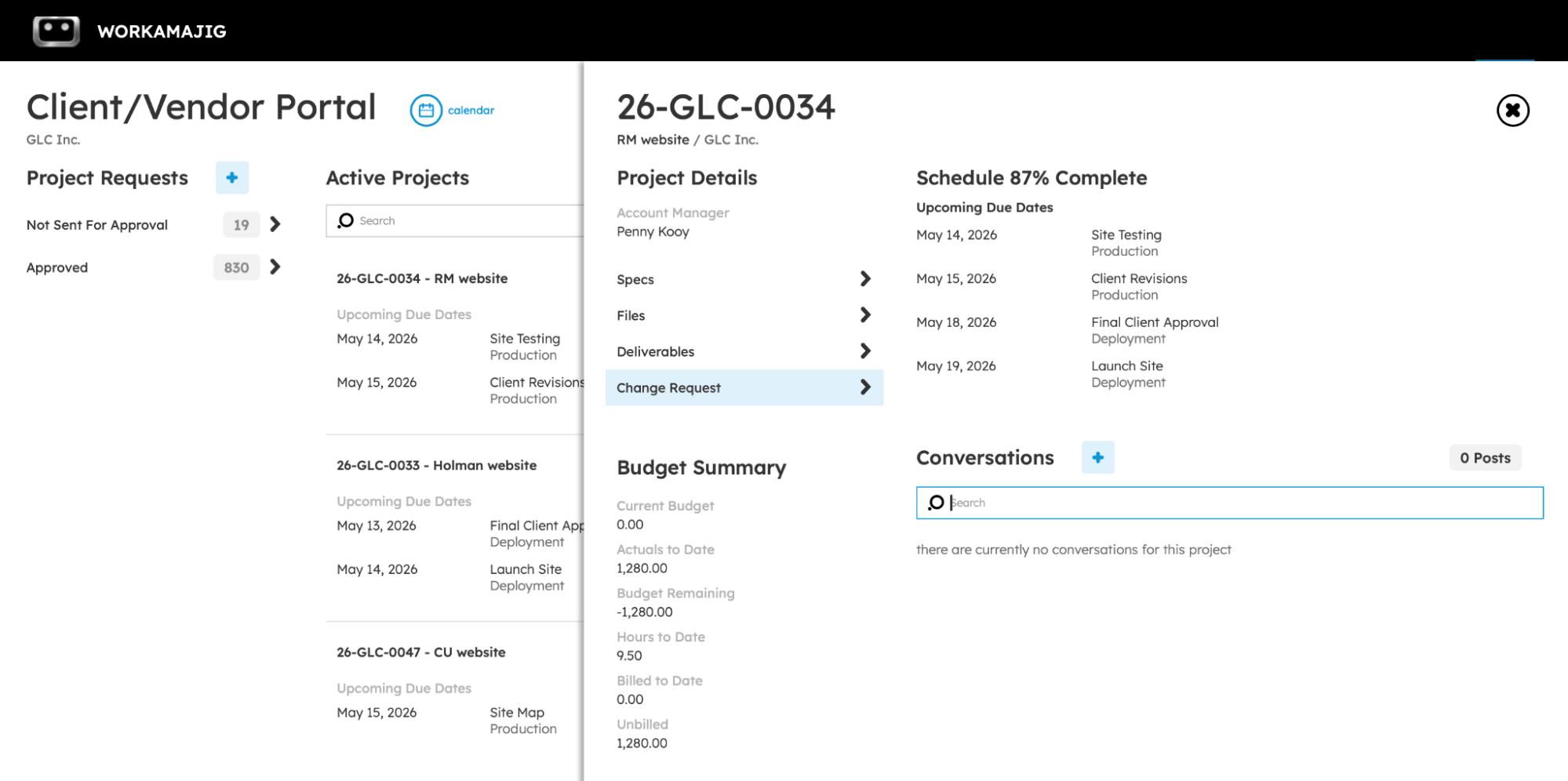
- Request management for all stakeholders. Clients can submit through the client portal, where their request is automatically tied to the right project. Internal team members can send their requests from the project dashboard.
- Request routing and custom approval workflows. You can:
- Require approvals from specific people or key project roles
- Set due dates for each step
- Route requests to multiple approvers in sequence or in parallel
- Specify whether everyone needs to approve or if the first approval is sufficient
Approvers can also add steps mid-flow if a request needs extra eyes.
- Full version history tracking. Once a change is approved, the updated project details and deliverable specs become the new default — but Workamajig hangs onto every prior version of any spec sheet that changed, so you've got a clean audit trail of what was asked for, when, and by whom.
Only one change request can be active on a project at a time, which keeps the workflow clean and prevents competing changes from bogging your team down.
Change order estimates
When a change request has budget implications — added hours, new vendor work, expanded deliverables — Workamajig links the workflow to our estimating tools via change-order estimates.
A change order estimate is built the same way as the original estimate, but it includes only the additions or subtractions (hours, services, expenses) resulting from the change. After these get approved, Workamajig automatically updates the project’s current budget.
From there, you can track the original budget (the original approved estimate), budgeted change orders (any approved estimates designated as CO), and the current budget (the sum of all approved estimates).
This gives you a clearer view of how project changes impact budgets over time. For example:
- Reports always reflect the latest agreed-upon budget, with the original and change order amounts tracked separately. You can see exactly how much budget has been added or removed by changes over the life of the project.
- You can pull adjustments straight from the schedule. If you've already updated allocated time on the schedule to reflect the change, Workamajig pulls those adjustments into the change order estimate for you.
- You can keep rogue requests in check. Change estimates roll into the project budget only after they've been approved.
Project billing & client invoicing
When projects are complete and have received final sign-off, Workamajig helps you account for all costs in project invoices through automated invoicing. Our system supports a variety of billing methods (time & materials, fixed fee, media, retainer) so you can choose the appropriate approach for each project.
Workamajig generates billing worksheets that aggregate all project details and costs, then routes them for review. After worksheets are reviewed (with any suggested changes) and approved, accounting or billing users can convert them to final invoices and share them with clients.
Our billing worksheet workflows reduce headaches for everyone involved by minimizing back-and-forths and rework. The approval workflow ensures all the right details are captured before the invoice is generated, so it comes out right on the first try.
Read more:
- Best Creative Project Management Software with Invoicing
- How 2 Fish Company, LLC Decreased Time Spent on Billing by 80% with Workamajig
Project budget & profitability reporting
Once costs are flowing accurately into projects and invoices are going out the door, the last piece is closing the loop with reporting — so you can analyze how things went and improve future plans.
Workamajig's project reporting suite pulls from every corner of the system — time entries, expenses, project plans, vendor invoices, and the GL — to give you a true picture of how each project and your overall portfolio is performing.
Our various time and productivity reports also show you the finer details of where effort is spent and how resources are utilized relative to the revenue they generate.
Here are the reports agencies lean on most for budget tracking, profitability analysis, and evaluating productivity from different perspectives.
Project Recap Analysis
The Project Recap Analysis offers a post-mortem view of how the project actually went and where your estimates were off. It brings labor cost, hours worked, and timeline into a single view, with entries organized by the project’s phase.
For each task, you can see the budgeted vs. actual labor dollars, budgeted vs. actual hours, and the baseline due date vs. actual completion date.
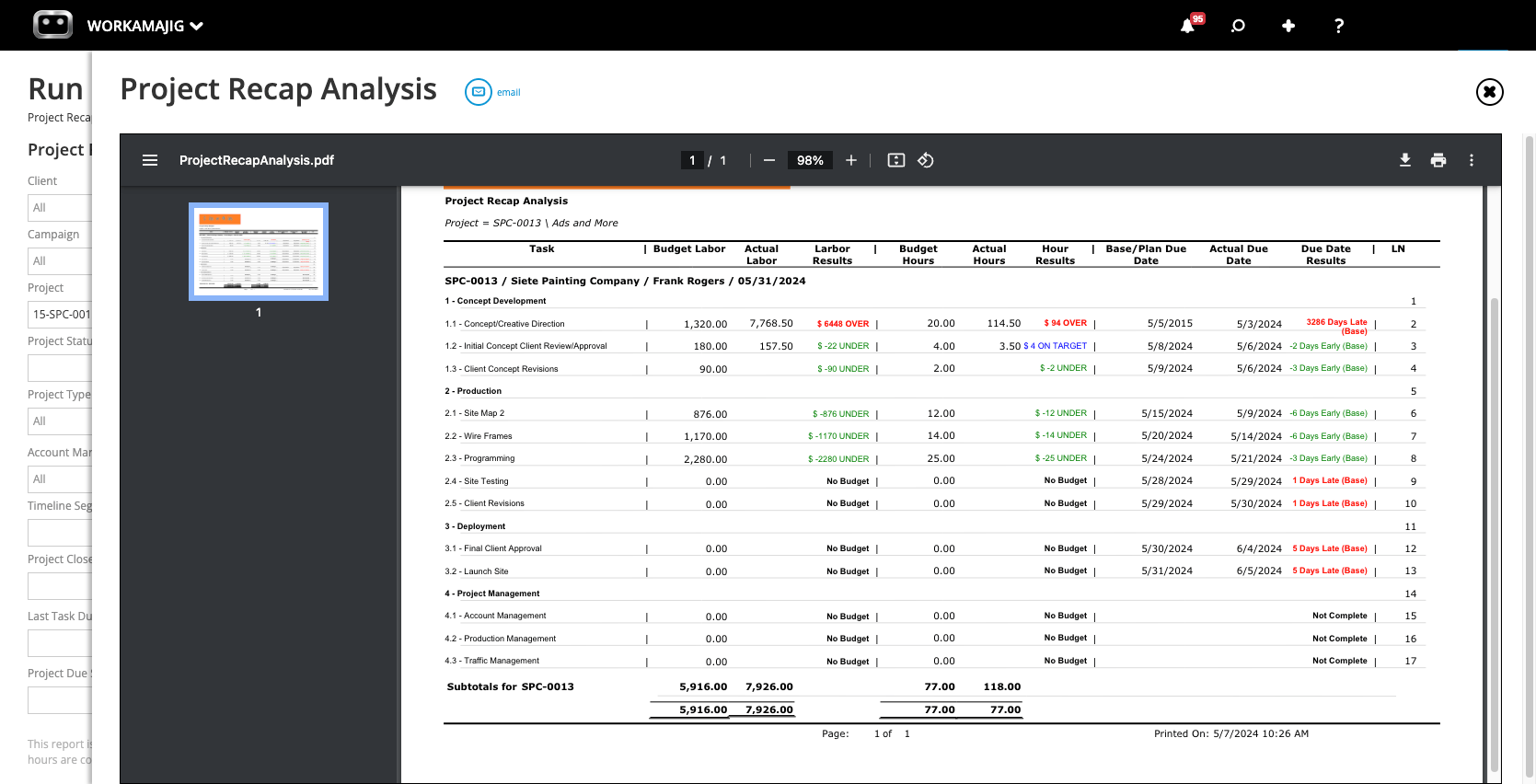
The variance column (labor results) highlights which estimates went over or under. The variances are color-coded for your convenience: a quick scan lets you pick up where to focus your attention, with red indicating over budget, blue indicating on target, and green indicating under budget.
Take the example in the screenshot. Concept Development’s actuals were a fair bit higher than the estimates, mainly due to the Concept/Creative Direction task. Production, on the other hand, came in well under across the board, with every task finishing below its allocated hours.
Project Budget Analysis
The Project Budget Analysis offers a higher-level view than the recap analysis: it brings together budgets, actuals, labor gross, outside costs, open orders, and amounts billed for all your projects in a single view.
By default, it groups projects under the client they belong to — with collapsible client headers, subtotal rows that roll up each client's portfolio, and project-level rows underneath that managers can drill into for the full transaction history.
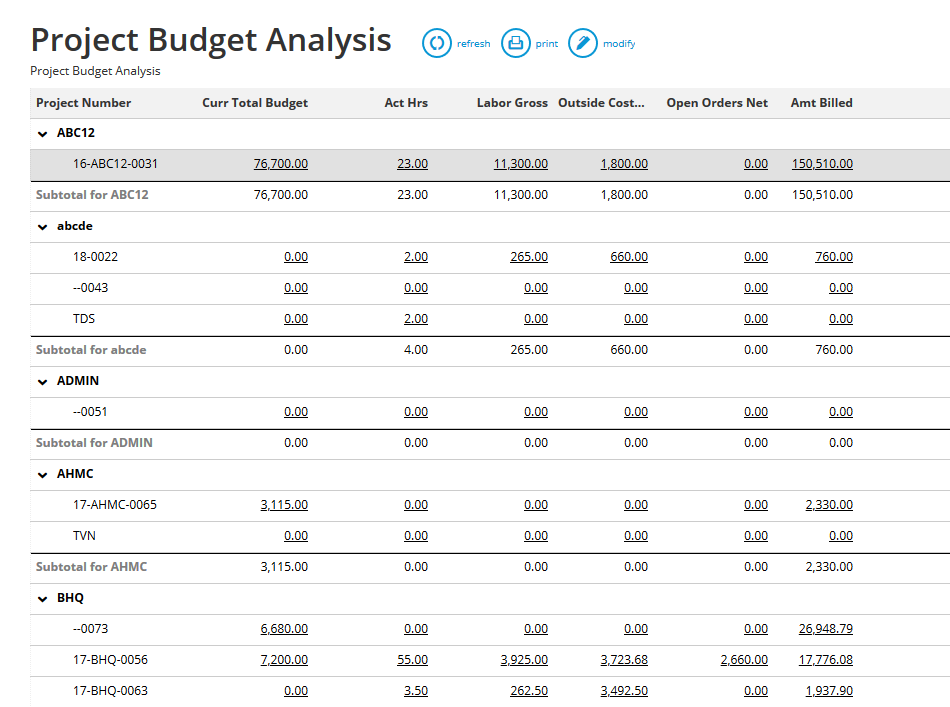
The report is super convenient if you’re looking to do a quick scan of what needs your attention. When you catch something that seems out of place — like labor gross overruns or higher-than-expected outside costs — then you can click the value to pull up all the related transactions. Then you can trace back to the time entry, vendor invoice, or expense line that created it, all without leaving the report.
You can also filter the results by date range, run the report against a specific client or project type, or — most conveniently — flip on the "Project Has Budget Warning" filter, which narrows the results down to projects where actuals have crossed 80% of their budget.
P&L Reports
Workamajig's P&L reports pull from posted GL transactions rather than just actuals, so they offer a more complete picture of profitability across projects, clients, campaigns, and service lines once everything (including overhead) is accounted for.
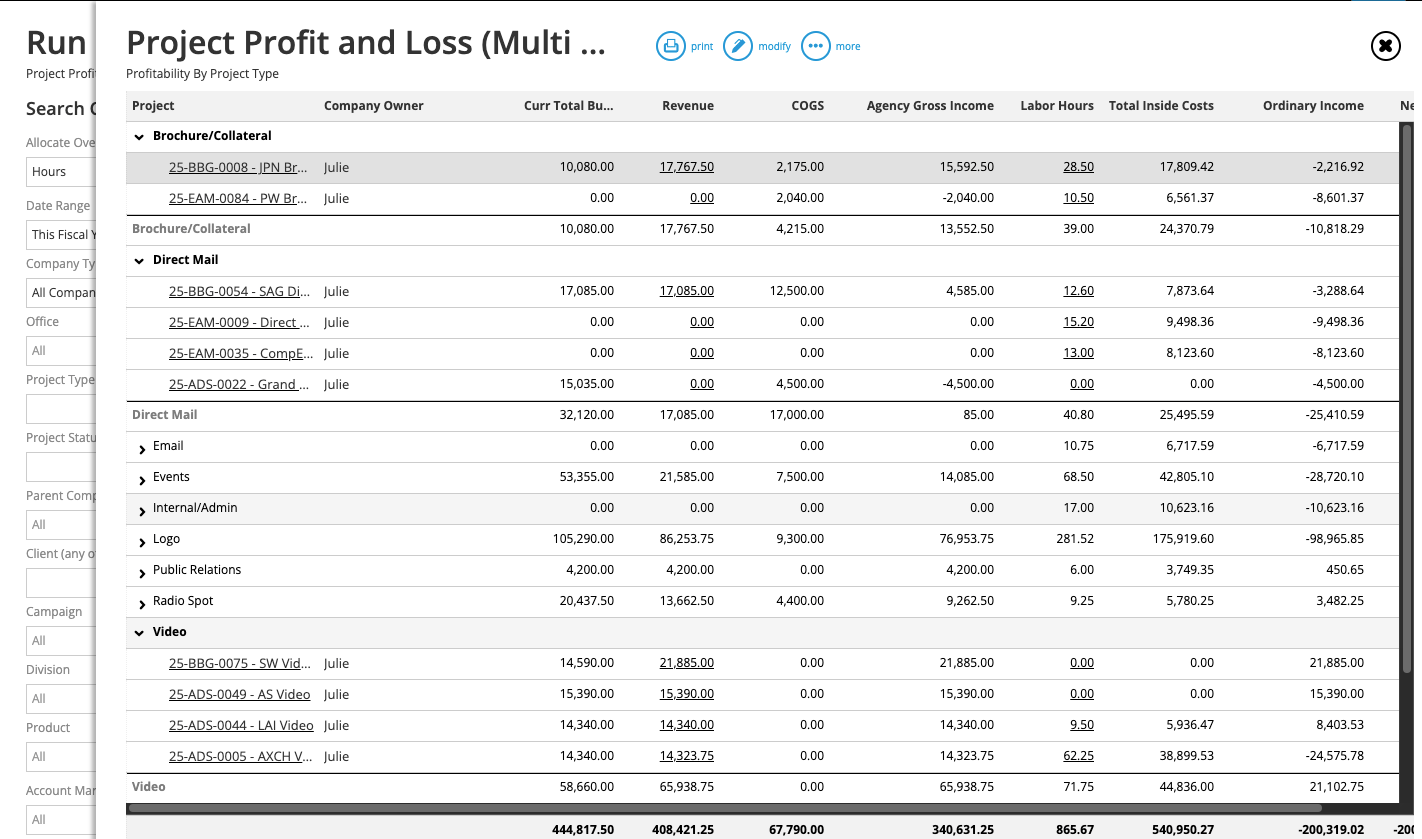
Our main P&L reports include:
- Project P&L (Detail View). This view zooms in on a single project and breaks down profitability by GL account — revenue, COGS, agency gross income, expenses, and allocated overhead. Useful for diagnosing why a specific project’s margin came in thin even though it tracked to budget on paper.
- Project P&L (Multi-View). The multi-view displays profitability across multiple projects on a single screen and allows grouping by project type, client, account manager, or status. This is the view for spotting patterns, such as which kinds of work consistently carry a margin and where you’re losing money.
- Campaign P&L (Multi-View). This report sits between the detailed and multi-view reports; it rolls up profitability across all projects tied to a campaign (aka a portfolio).
- Client P&L (Detail and Multi-View). This does the same thing as the project P&L but at the client level, which is useful for renewal conversations, account reviews, and determining which clients are actually worth keeping at their current rate.
When you run any of these reports, you can choose how overhead gets allocated across projects, clients, or campaigns, with options to allocate by:
- Labor hours. Overhead gets distributed proportionally by the total approved hours on time sheets charged to the client or project, divided by the total approved hours for the date range (e.g., if a client or project is using 20% of your resources, they will be assigned 20% of your overhead).
- Labor cost. It’s distributed proportionally to total labor dollars.
- Total billing. Overhead is distributed proportionally to revenue, so larger projects/clients are weighted more heavily.
- None. Skip the overhead allocation and review it separately.
Each method gives you different numbers, and there's no universal "right" answer, but staying consistent is important for your overall reporting. So it’s best to pick the method that matches your organization’s specific needs and apply it across the board.
Time & Productivity Reports
A big part of project profitability is how your team's time gets used, so Workamajig's productivity reports work alongside the project profitability reports above to round out the full picture:
- Time Productivity Analysis. It breaks down each resource's hours and financial contribution side by side — utilization rate, realization rate, total cost, and revenue generated. You can see which resources are bringing in more than they cost (and which aren't).
- Chargeable Utilization Report. This report measures the percentage of billable hours that are actually chargeable to a client — after write-offs, redos, and scrubbed time. It's almost always lower than billable utilization, and the gap between the two is where profit margins take hits.
- Project Hourly Realization Rate. This report compares what you actually realize per hour against your standard rate card, offering a fast read on whether write-offs, redos, and other challenges are hurting your margins.
Our detailed guide on the best agency time tracking software walks you through all these reports in more detail.
Workamajig’s Complete Accounting Solution
So far, we’ve covered a broad range of Workamajig’s accounting features, mainly on the project expense tracking and reporting side. It’s worth mentioning that our complete general ledger (GL) accounting software supports all accounting and financial workflows — fully replacing solutions like QuickBooks, Xero, and NetSuite.
In addition to the features we’ve covered so far, Workamajig’s accounting software also includes:
- A complete Chart of Accounts
- Online client payment collection through PayFlowPro / Authorize.net
- Personalized dashboards for accounting and billing users — these dashboards help users track daily tasks, recent activities, approval requests, project finances, and more in one place
- Support for all AR and AP workflows
- Reimbursement management
- Complete multi-currency and multi-entity accounting support
- An extensive financial reporting suite
Workamajig’s financial management dashboard comes with dozens of out-of-the-box reports, but you can also build your own with our drag-and-drop report builder to track the metrics most important to your projects and initiatives.
Our reporting features also let you blend project, CRM, time, and financial data to create unified custom reports. So if you want to track something specific — like profitability by service line per account manager — you can build the report once and save it.
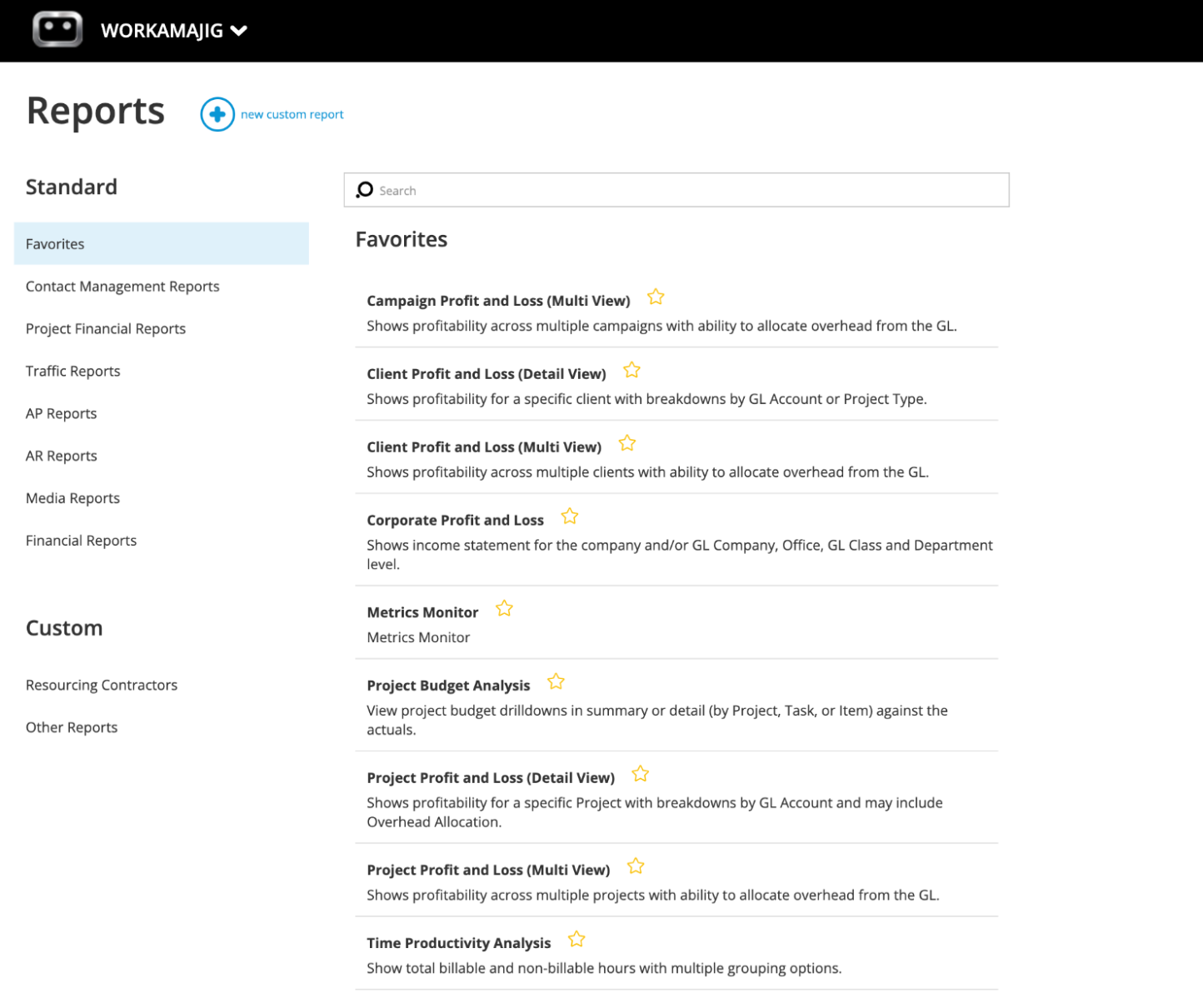
You can also star your most-used reports as Favorites and access them from a personalized dashboard, so the metrics you need to track are always a click away.
Some of our most popular reports include:
- Profit & loss reports (across multiple categories — by project, campaign, client, etc.)
- General Ledger (GL) reports
- Revenue and cash flow forecasting
- Project budget drill-downs
- Billable summary reports
- Hourly realization rates
- Key metrics monitor
Learn More About the Workamajig Way
Workamajig offers an all-in-one solution for successfully managing projects and their moving parts. Our system combines:
- Project management software, supporting the full project lifecycle from intake to delivery.
- Resource planning & utilization reports to strategically optimize your available talent.
- Time tracking to calculate real-time labor costs and tie hours to specific project activities.
- CRM to manage incoming opportunities and convert awarded opportunities to new projects.
- Client and vendor management to grant external access and manage those relationships.
- User-friendly collaboration tools to facilitate seamless teamwork and keep projects moving.
- Advanced project monitoring with timeline and budget tracking.
- Real-time risk notifications so you have opportunities to course-correct.
- Complete accounting software to support standard processes and agency best practices.
- Financial reporting to measure project success and profitability across various categories and timeframes, and hone in on improvement areas.
On top of it all, we pair all our customers with a dedicated account manager to make sure Workamajig works best for them. Your account manager will learn more about your processes and pains so they can guide setup, onboarding, and training. And they’re always around to answer questions or help out as you go.
Request a free demo of Workamajig to learn more about our system and take the first step toward more profitable projects.
FAQs on project expense tracking
Why is real-time project budget tracking essential?
Real-time project budget tracking is essential because it helps managers catch issues early and adapt their plans to bring things back on track. Early intervention can make the difference between a project that stays profitable all the way through and one that closes in the red.
What expense tracking KPIs are important?
The KPIs that matter most for project expense tracking include:
- Budget variance — actual vs. planned cost, at the project, phase, and category level. It’s a foundational tracking metric. Without it, you can't say a project is "over budget," only that it's spending money.
- Cost performance index (CPI) — earned value vs. actual cost. A CPI below 1 means you're spending faster than you're earning value, and the metric is a strong early predictor of where the project will land at completion.
- Estimate at completion (EAC) — total projected cost at project end, updated as work progresses. EAC tells you where the project is headed so you can intervene while there's still time to change the outcome.
- Budget utilization rate — the percentage of the approved budget that has been consumed, compared to the percentage of project completion. If you've burned 70% of the budget but you're only 50% complete, that’s a warning sign.
- Burn rate — the pace at which the budget is being consumed relative to project progress. This helps you spot when spending is accelerating faster than the work justifies.
- Billable utilization — what percentage of your team's hours are eligible to be billed (logged against billable projects rather than internal work, admin, or PTO). The leading indicator of how much of your team's capacity is theoretically generating revenue.
- Chargeable utilization — the percentage of billable hours that make it to the
client invoice after write-offs, lost time, and rework. It’s always lower than billable utilization and should be tracked at a regular cadence. - Hourly realization rate — what you actually realize per hour vs. your standard rate card. Tells you whether your rate card holds up in practice or if discounts and write-offs are eroding it.
- Project margin — gross margin per project. The bottom-line metric that ultimately determines whether the work is worth doing.
What is project expense forecasting?
Project expense forecasting is the process of using historical project actuals and current estimates to predict the project’s total cost at wrap-up.
Unlike a static baseline budget, a forecast updates as the project progresses, based on the actual hours, logged expenses, and changes.
How do you track project expenses in Excel?
You can track project expenses in Excel by setting up a workbook with separate sheets for the budget baseline, time tracking, vendor and out-of-pocket expenses, and a summary that calculates actuals vs. budget.
We've put together free project expense tracking templates (for agencies and creative teams) you can use as a starting point. It’s worth noting that growing teams often move away from spreadsheets once they're juggling more than a handful of complex projects, since dedicated software handles most of the busywork and doesn’t break down when things get complicated.
How can you automate project expense tracking?
You can partially automate expense tracking with a spreadsheet built on a bunch of formula rules (like the one we've shared above). For example, as people log their hours, the workbook calculates labor costs from their rates and rolls them into the project budget.
But spreadsheets only get you so far.
To fully automate the process, you need dedicated software that combines project management, time tracking, and accounting. These systems calculate labor costs as hours are logged, pull project expenses (such as media buys and vendor costs) from the source, automate documentation (such as receipt management and expense reporting), and tie every expense directly to the right project.
They also handle the trickier stuff that spreadsheets and disconnected systems tend to break on, like reconciling invoices against POs, managing multi-currency expenses and transactions, and flagging projects approaching their budget thresholds. The result is fewer errors, way less admin, and a real-time view of project financial health.
What is the best project expense tracking software?
The best project expense-tracking software combines project delivery, time tracking, and accounting into a fully integrated system. Here's why a unified system makes such a big difference:
- Every cost automatically ties back to a project. Logged hours, vendor invoices, credit card charges, receipts, media buys — they all get tagged to the right project so they can be tracked against the budget.
- Budgets update in real time. As soon as a timesheet is approved or a vendor invoice is logged, the project budget reflects the actuals, so PMs always see the most accurate information.
- Managers see the full impact of their decisions. When a manager writes off some hours, swaps in a different resource, or approves a change order, they can see how it ripples through to project margin, billable utilization, and overall profitability.
- Forecasts you can actually trust. Cash projections, revenue forecasts, and budget-at-completion views all draw from actuals.
- Faster, more accurate invoicing. When delivery teams and accountants can seamlessly collaborate, invoices go out faster and with fewer errors.
- Scope changes get evaluated against real numbers. When change requests, budgets, and actuals all live in the same system, managers can see the impact of incoming requests on the budget.
- One system to manage everything. Project management, time tracking, expense management, invoicing, and financial reporting can be spread across anywhere from two to five different systems. A unified platform replaces all of them, reducing admin work and often tech costs as well.
What features are essential in a project expense tracking solution?
The key features include:
- Time tracking at the task level, so hours can easily be tied back to project activities.
- Rate cards so the system can automatically calculate labor costs as people log their hours.
- End-to-end time management so PMs can edit hours, write them off, and choose what to bill.
- Automated time and cost estimation tools that account for labor and non-labor expenses and allow managers to save estimates as templates.
- Real-time budget tracking with project health indicators and automated alerts when thresholds are exceeded.
- Non-labor expense tracking tools to capture, organize, and manage expenses like freelancer fees, material costs, travel expenses, etc.
- Change management tools to manage scope changes through structured workflows and to update project budgets via change order estimates, so unapproved requests don’t go rogue.
- Reports that compare actuals vs. estimates, enabling managers to investigate bottlenecks and improve decision-making in future projects.
- Integrated billing and invoicing so all costs flow into client invoices.
- Profitability reporting at the project, client, and portfolio level.
- Multi-currency and multi-entity support for teams with international and complex operations.
We built Workamajig from the ground up as a fully integrated system that brings all these moving parts in one place, giving agencies and creatives complete visibility into each project’s progress, budget, and profitability throughout the project lifecycle.
Related reads: