

When you’re searching for the best creative agency accounting software, the main names that you’ll see are QuickBooks Online, Xero, FreshBooks, Sage Intacct, and Oracle NetSuite. And while these solutions are hugely popular across a ton of industries, they’re not the best choice for agencies because they manage financial data separately from project data. That means you can’t track project budgets or billable utilization in real time, and ultimately, linking the work you delivered to financial impact remains a big challenge.
Agencies quite literally can’t afford to work this way because projects are their revenue drivers. If they can’t track things like who their most profitable resources and accounts are, which variances contributed to budget overruns, and which estimates closely matched the actuals on a project, consistently achieving profitability remains elusive.
That’s where all-in-one agency management solutions with native accounting software come in — these systems (like Workamajig) combine project and financial data, so agencies can easily generate accurate estimates, track actuals vs. estimates in real-time, log expenses as they’re incurred, automate invoicing, and accurately measure the financial impact of each project, client, service, resource, and team on their bottom line.
Our guide is specifically focused on these agency management systems, including:
For a live walkthrough of Workamajig’s agency management system, request a personalized demo.
1. Workamajig
The all-in-one agency accounting & operations management system
Workamajig is an all-in-one agency management system that offers project management, resource planning, team collaboration, time tracking, expense management, accounting, and financial reporting solutions under one roof.
While our system offers a broad range of features, it doesn’t compromise depth for breadth. Our accounting software is full, GL-ready, and matches standalone systems such as QuickBooks, Xero, and Sage Intacct feature-for-feature.
Workamajig is also one of the only systems that natively integrates project management and accounting software, so agencies can manage all of the following in one place:
- The general ledger. Our accounting software supports true double-entry accounting, including accounts receivable, accounts payable, reconciliation, and true profit and loss (P&L) reporting, with multiple overhead allocation options.
- Project finances. Workamajig provides dedicated tools for tracking and managing all expenses (labor and non-labor) at the task and project levels, so you can compare actuals vs. estimates in real-time, capture the financial impact of every hour worked, and accurately evaluate the profitability of each engagement.
- The complete project billing and invoicing workflow. The entire process of pulling in project details and expenses, verifying everything with the right decision-makers, managing reconciliation, and generating a client-ready invoice can be a real-time drain. A system that automatically pushes costs to invoices and streamlines coordination can save the accounts receivable team hours every week.
- Cash flow and capacity planning. What does cash flow look like after a selected number of months, given current engagements, expected pipeline, and team costs? As a true all-in-one system, Workamajig lets you pull all your business data and select which sets to include — what’s in the sales pipeline, projects, retainers, and team costs — providing an accurate forecast that’s relevant to your business needs.
We’ve served creative agencies for over 35 years and have specifically tailored our system to solve their quiet profitability problems, helping them pin down the true cost of their employees and the profitability of each project, account, and service line.
After switching to Workamajig, agencies report streamlined financial workflows, greater visibility and control over project finances, far less manual work, and increased profitability. Hear it first from some of our customers:
“I compared our first five years with Workamajig to our most recent five years. In that time, revenue increased 18% — nice steady growth. But what’s amazing is that profitability increased 937%. It tells me that we weren’t very profitable at first and now we’re using our time more efficiently.
If you want to have a system that’s built by designers for designers, where you can build out project estimates, track time, budgets, and profitability in one place — Workamajig is the platform I recommend.”
– Tom Campbell, CFO and Creative Director at Toolbox Creative, a creative and lead gen agency that builds brands for innovative technologists.
Read the full case study to learn how Workamajig helped Toolbox Creative identify and overcome its profitability challenges.
“With the click of a button, I now know exactly how profitable a client or project is. We used to have all these different systems that forced us to spend tons of time — hundreds of hours — manually merging data and plugging it into spreadsheets to figure it out.
Workamajig is saving us tons of hours. Our twice-a-month billing cycle used to take multiple people a combined 20 hours of work. This last cycle, it took four hours… not because we don’t have as many clients, but because we’re getting more efficient.”
– Scott Millen, Managing Partner and Creative Principal at 2Fish Company, LLC, an award-winning creative marketing agency.
Discover how 2Fish Company reduced its time spent on billing by 80%.
“Our old system was basically just for accounting; it was not a project management system. We had a clerk who keypunched timesheets into our system for billing and accounts payable. And, at billing time, correcting hours or expenses from one job to another meant physical folders, handwritten notes, and more accounting time.
Workamajig was fast. We set the system up, added information on all of our accounts, decided whether to import/export our other systems like vendors and clients, and also determined how to set up our tasks and items — all the different pieces to it.
It’s made a huge difference in our efficiency, in broader access to information, and in account management staff’s understanding of that same information.”
– Lisa King, CFO/VP at Spawn Ideas, a leading creative advertising agency based in Alaska.
Read the full case study here.
Request a free demo to see Workamajig’s full suite of accounting tools in action.
Workamajig Accounting Software
Today - Accounting Dashboard & Chart of Accounts
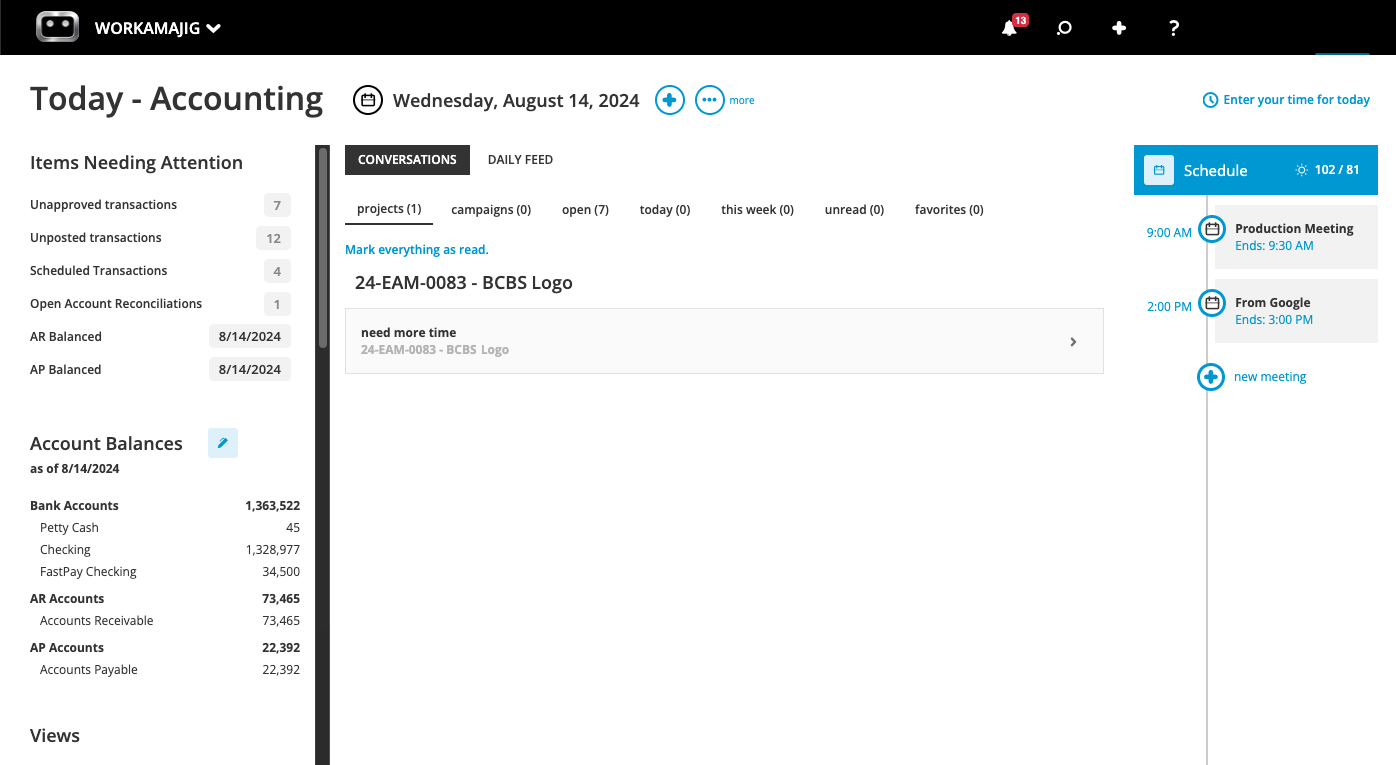
Workamajig comes with a full chart of accounts for recording transactions and improving bookkeeping. It also gives each user a personalized Today page for tracking their work, managing responsibilities, and planning their week ahead.
For example, our Today - Accounting page lets you manage all things accounting-related, including balances, transactions, invoices, and more. You can:
- See a snapshot of everything that requires your immediate attention, including unapproved transactions, scheduled transactions, and open account reconciliations.
- View a breakdown of all account balances, organized by type, including checking, petty cash, AR, AP, and more. Our system lets you connect these accounts to conveniently track balances and cash flow in one place.
- Navigate to specific listing screens in just a click — e.g., pull up all transactions, invoices, billing worksheets, and more.
- Schedule events and view all your recent conversations.
Project Estimating Tool
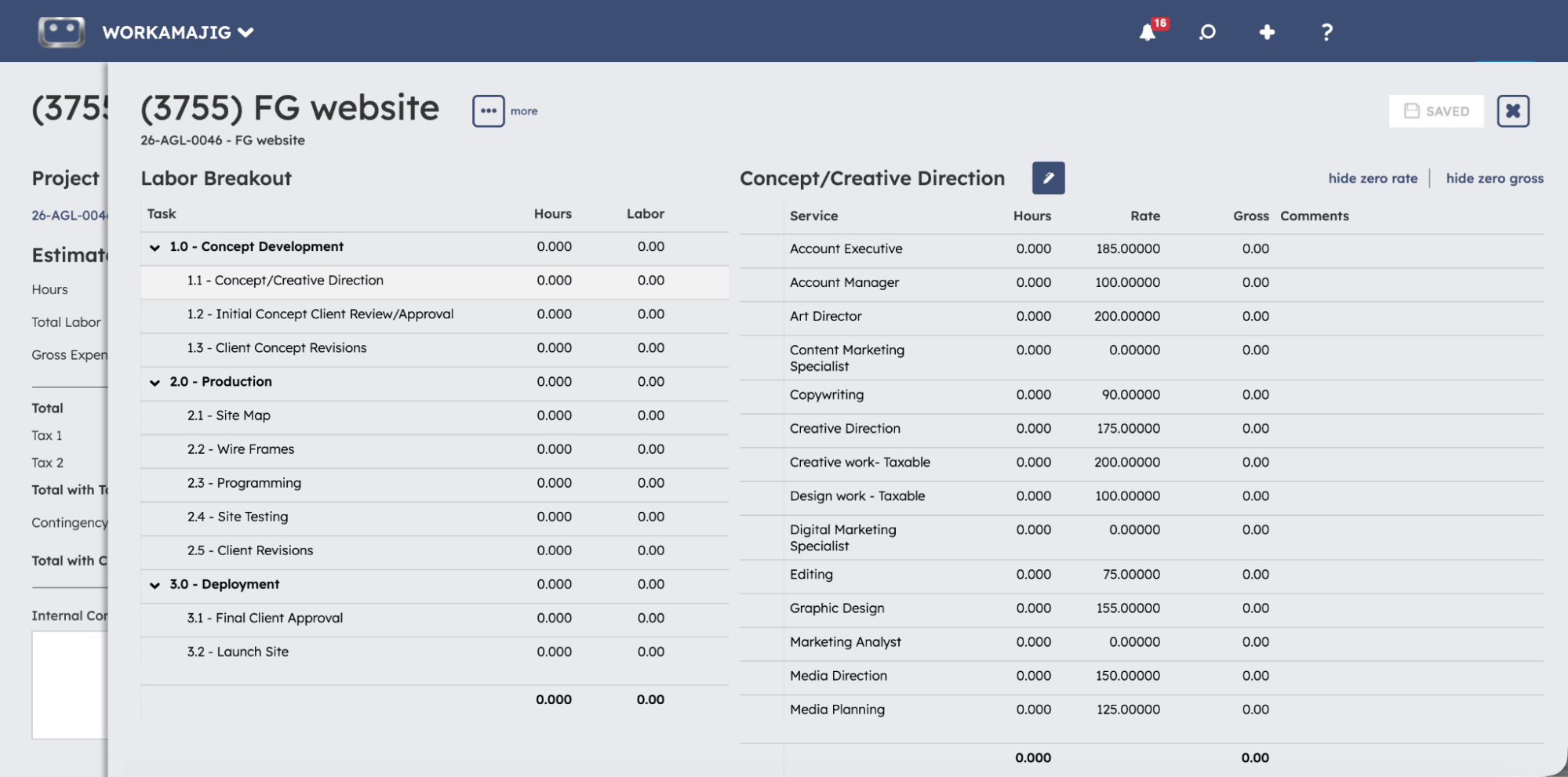
Generating accurate estimates from the get-go is one of the most important things an agency can do to improve its profitability. It means you can quote clients with confidence and set a project budget that's actually grounded in reality (reflecting employee rates, vendor costs, historical and expected media spend, etc.).
So Workamajig offers three convenient options for building estimates, to prioritize accuracy and make the best use of the information you already have.
- From a template. Project and estimate templates let you save the full structure of your most common project types — tasks, milestones, allocations, subtasks, labor, and vendor costs — so recurring project types don't require rebuilding things from scratch each time.
- From the schedule. If a project's staffing and timeline are already mapped out, then you can automatically generate an estimate based on the schedule. Our automated estimating engine updates the numbers as allocations or resourcing change.
- From scratch. For new project types where you’re flying blind, Workamajig offers dedicated tools to build out both the labor side (hours by role and task) and the non-labor side (vendor costs, media buys, other outside expenses) using the information you have available — such as vendor costs, employee hourly rates, and estimated hours by service.
Whichever path you take, an approved estimate becomes the project budget automatically. Any change orders that come through later are tracked as their own distinct estimate type. So if scope shifts mid-project, you can see exactly what changed and by how much.
Expense Tracking & Management
Workamajig gives you several ways to capture costs as they’re incurred, against the projects they’re linked to. Our system includes:
- A credit card connector. Company cards can be linked through our Plaid connector, with the option to auto-sync transactions so staff just review and log them against the right project instead of manually re-entering every charge.
- Receipt management. Staff can upload receipts against expense lines and vendor payments as they're incurred, keeping an electronic record tied to the transaction.
- Media buying integrations. Workamajig makes it easy to manage paid media through integrations with Strata/FreeWheel, Mediaocean, Bionic, and GaleForceMedia. They pull media orders in so buys can be viewed and billed inside the same system, budgets vs. actuals can be compared directly, and insertion order detail can be included on client invoices without re-keying it.
- Expense reports & reimbursements. Staff can submit expense reports (including from their mobile device, which is handy on the go) and tag individual charges for reimbursement. Managers can review and approve these requests and choose how to handle them — an expense report can convert straight into a vendor invoice for payment through your normal AP cycle, or get marked paid through payroll.
Every tracked expense is logged against the specific client and project it belongs to, so the project’s budget always reflects what’s happening, and you don’t have to wait for someone to reconcile everything at wrap.
Read more: Project Expense Tracking: Practical Steps, Tips, & Tools
Real-Time Project Timeline & Budget Monitoring
Workamajig’s centralized monitoring dashboard brings all live projects into a single view, visually displaying the progress of each one and allowing project managers to easily compare actuals vs. estimates. Check it out below:
![Workamajig dashboard: Projects and Project Status [GIF]](https://www.workamajig.com/hs-fs/hubfs/Workamajig%20-%20Projects%20and%20Project%20Status%20%5BGIF%5D.gif?width=1714&height=853&name=Workamajig%20-%20Projects%20and%20Project%20Status%20%5BGIF%5D.gif)
On the left-hand side, you’ll notice a breakdown of each project alongside various columns (such as “Financial Status” and “% Complete”) with numbers, icons, and color-coding. The color-coding tells you each project’s health at a glance — green indicates that things are going well, yellow signals they’re at risk of delays or budget overruns, and red means the project has been delayed or exceeded its budget.
For example, the “TE Website” project’s “Financial Status” column and “% Complete” bar show yellow warnings, which means the project is at risk of overshooting its budget.
When a project enters this yellow territory, Workamajig automatically notifies the project manager, so they have time to investigate, adjust plans, and correct course. When these issues surface, managers can also use various tools to investigate them further:
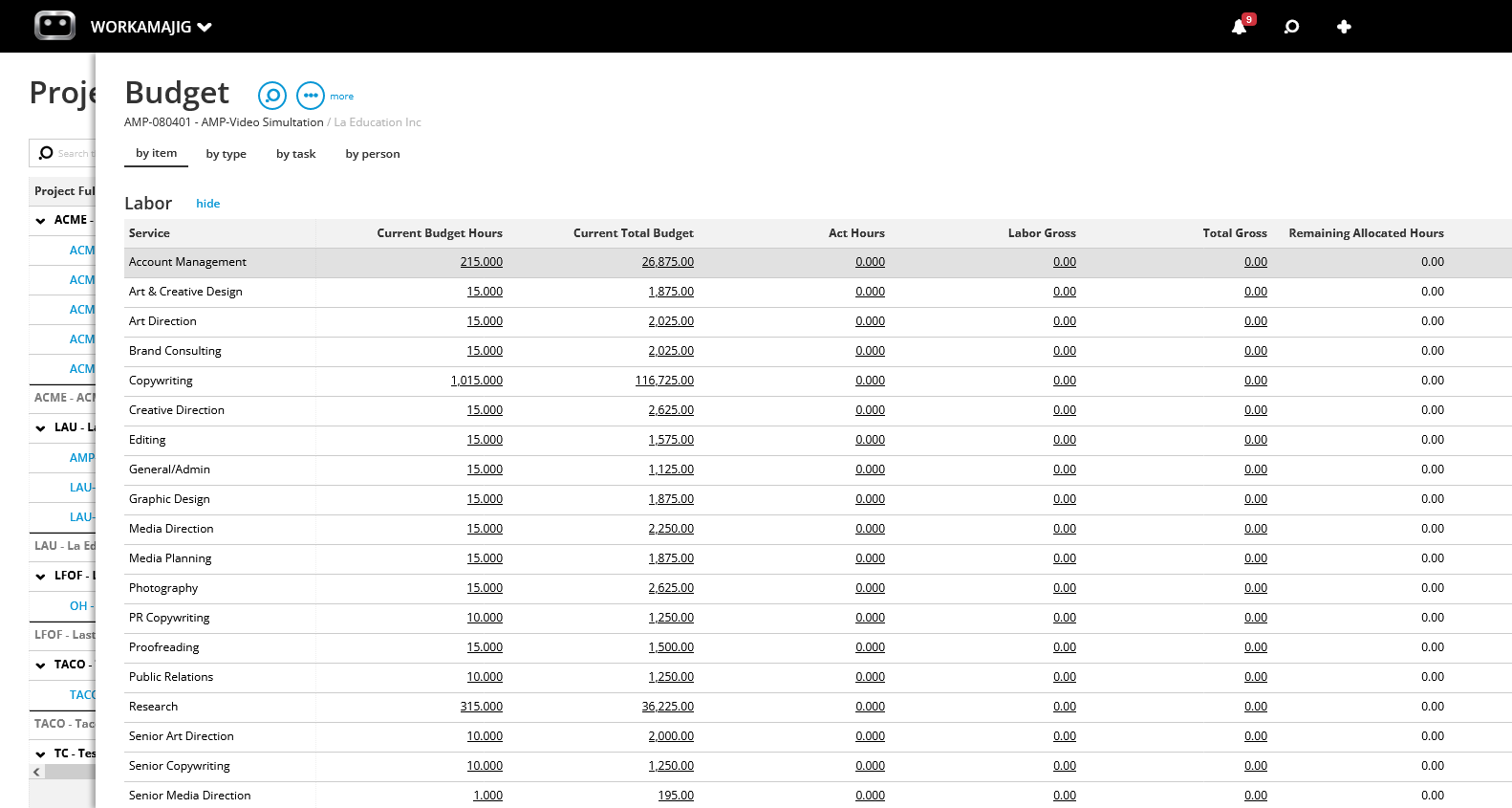
- Our budget drill-downs break down budgets by item, type, task, or person for any project or campaign, so PMs can see which expenses, tasks, or resources are contributing to a project’s budget overrun. You can click on the financial status icon for any project to pull up its budget page.
- Our project profitability breakdown displays expected profitability as teams complete tasks and move through project phases, so PMs can realize expenses as they’re incurred, troubleshoot, and correct course before things snowball and doom the project to the “red” health zone.
Read more: Project Expense Tracking: Practical Steps, Tips, & Tools
Labor Costs & Billable Utilization
Logging time is one of the hardest things to get your team to do properly and consistently, which is a big part of why agencies struggle to accurately pin down the cost of each resource. But for tracking and improving profitability, it’s absolutely essential, so you need a system that gets everyone on the same page.
Workamajig helps agencies solve the time tracking problem once and for all with tools that live inside daily workflows. Employees can conveniently enter time as they work directly on task cards, and our system auto-populates all the necessary fields. They can also:
- Use automated timers. Users can start, pause, and stop timers as they work to accurately capture the time they spend on tasks.
- Import hours from calendar events. Staff can connect their work calendars to our system and pull in hours directly from calendar events.
- Add hours in timesheets. The old-fashioned way that takes a bit more manual effort.
![Workamajig - Today - Creatives - Tasks - New Time Entry for Projects [GIF]](https://www.workamajig.com/hs-fs/hubfs/Workamajig%20-%20Today%20-%20Creatives%20-%20Tasks%20-%20New%20Time%20Entry%20for%20Projects%20%5BGIF%5D.gif?width=650&height=691&name=Workamajig%20-%20Today%20-%20Creatives%20-%20Tasks%20-%20New%20Time%20Entry%20for%20Projects%20%5BGIF%5D.gif)
As employees log their hours, Workamajig pushes them through to other parts of our system so they can be captured for project monitoring, invoicing, and reporting.
- The project monitoring dashboard instantly updates (using logged hours, employee service rates, and hourly labor costs) to reflect the new timeline and budget.
- Our centralized timesheets bring each resource’s project hours together in one place for managers to review. They can either approve hours outright or reject them with comments (which prompts the user to make corrections or share any missing information before resubmitting their time).
- Our electronic billing worksheets capture approved hours and calculate them against billable rates. Managers can then make any edits and choose which hours to bill, write off, or transfer before generating the client invoice.
We also offer time-based reports to help you evaluate team productivity, utilization, and the financial impact of each resource on your bottom line.
Time Productivity Analysis
The Time Productivity Analysis report exists precisely because "fully booked" and "profitable" aren't the same thing. It breaks down each person's billable and non-billable hours, then layers in the money side — what they billed out (gross), what they cost the agency, and what's left over as margin — so you can see who's actually driving profit, not just who's staying busy.
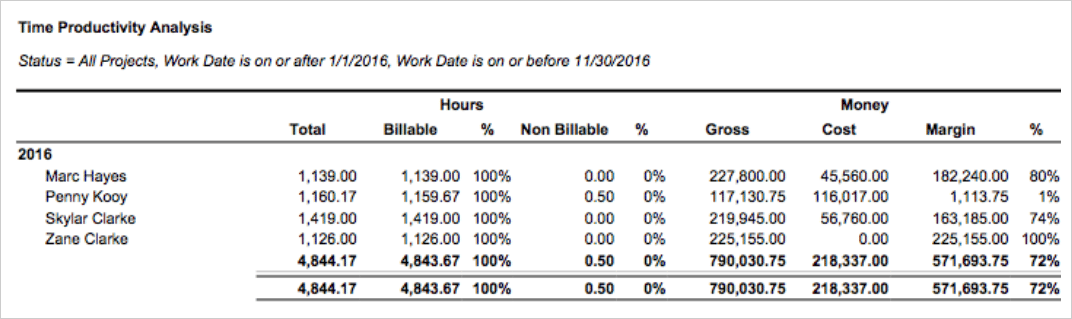
Look at the four resources above: all of them are billing out essentially 100% of their time, so a straight utilization report would rank them as equally productive, but the margin column tells a different story. Zane Clarke logged 1,126 hours at zero recorded cost, generating $225,155 in gross — a 100% margin. Marc Hayes isn't far behind at 80%. Skylar Clarke, despite putting in the most hours of the group (1,419), lands at a solid 74% margin. Penny Kooy is the outlier: 1,160 hours billed, $117,131 in gross — but a cost of $116,017 wipes out almost all of it, leaving just a 1% margin.
So there’s a roughly $181,000 profitability gap between Marc and Penny, who have nearly identical 100% billable rates.
Chargeability Report
The Chargeability Summary report shows what percentage of a person's time actually converts into billable revenue, after accounting for write-offs, rework, and other adjustments that never make it onto a client invoice. So it offers a more accurate view of each resource’s contribution to your bottom line than billable utilization.
The report groups people by department and lines up planned vs. actual hours across three buckets — chargeable, non-chargeable, and total — along with the variance against planned hours.
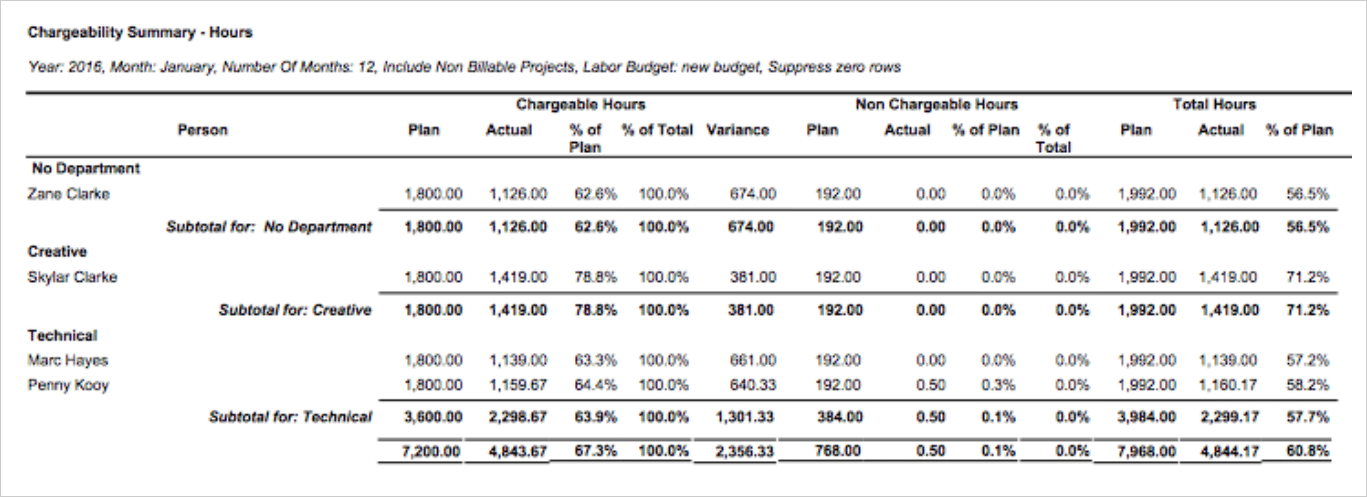
Because you can't know in advance which hours will eventually get written off, chargeability is hard to gauge in real time on an active project — you only really see the full picture once time is logged, reviewed, and billed. That’s why running this report over a fixed window (a month, a quarter) is the best practice, so you can compare people, departments, and the agency as a whole against what was actually planned.
Hourly Reports
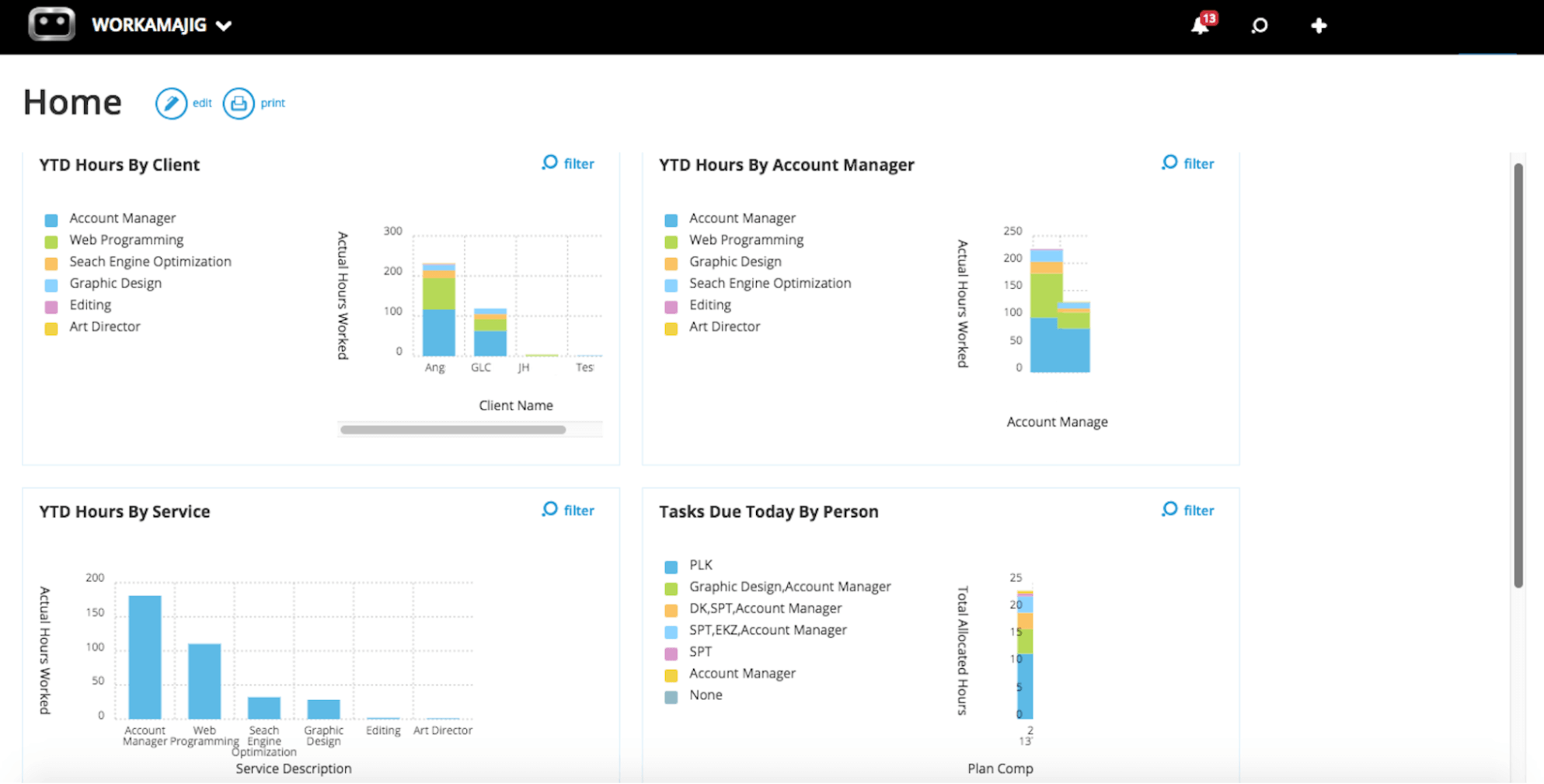
Unlike the reports covered above, our hourly reports don’t get into the financial side of things on their own. What they do is give you a real-time map of where your team's time is actually going, cut by client, account manager, or service, so you can match these insights to financial reports and see where to make strategic changes. And because the dashboard pulls straight from logged time entries, it's always current.
The YTD Hours by Service panel is a good example of how you can catch issues. Account management and web programming are clearly absorbing the largest share of hours, search engine optimization and graphic design trail behind at a similar, smaller scale, and editing and art direction barely register at all.
If you cross-reference these insights against a report like Project P&L or Chargeable Utilization, you can evaluate whether the services soaking up outsized hours generate enough profit to justify the effort.
Vendor & Purchase Order Management
While many agency management systems offer purchase order management tools, Workamajig offers a far more comprehensive setup — with dedicated tools for requesting quotes, comparing bids, generating purchase and work orders, managing reconciliation, improving organization, even paying vendors online.
First, you can set up a dedicated portal for each vendor, so they can easily respond to work requests and correspond with project stakeholders.
Then, when a vendor sends an invoice in, you can enter it into our system and reconcile it with purchase orders, work orders, and receipts. All you have to do is specify which vendor the invoice is for, and Workamajig pulls up everything associated with them across all projects.
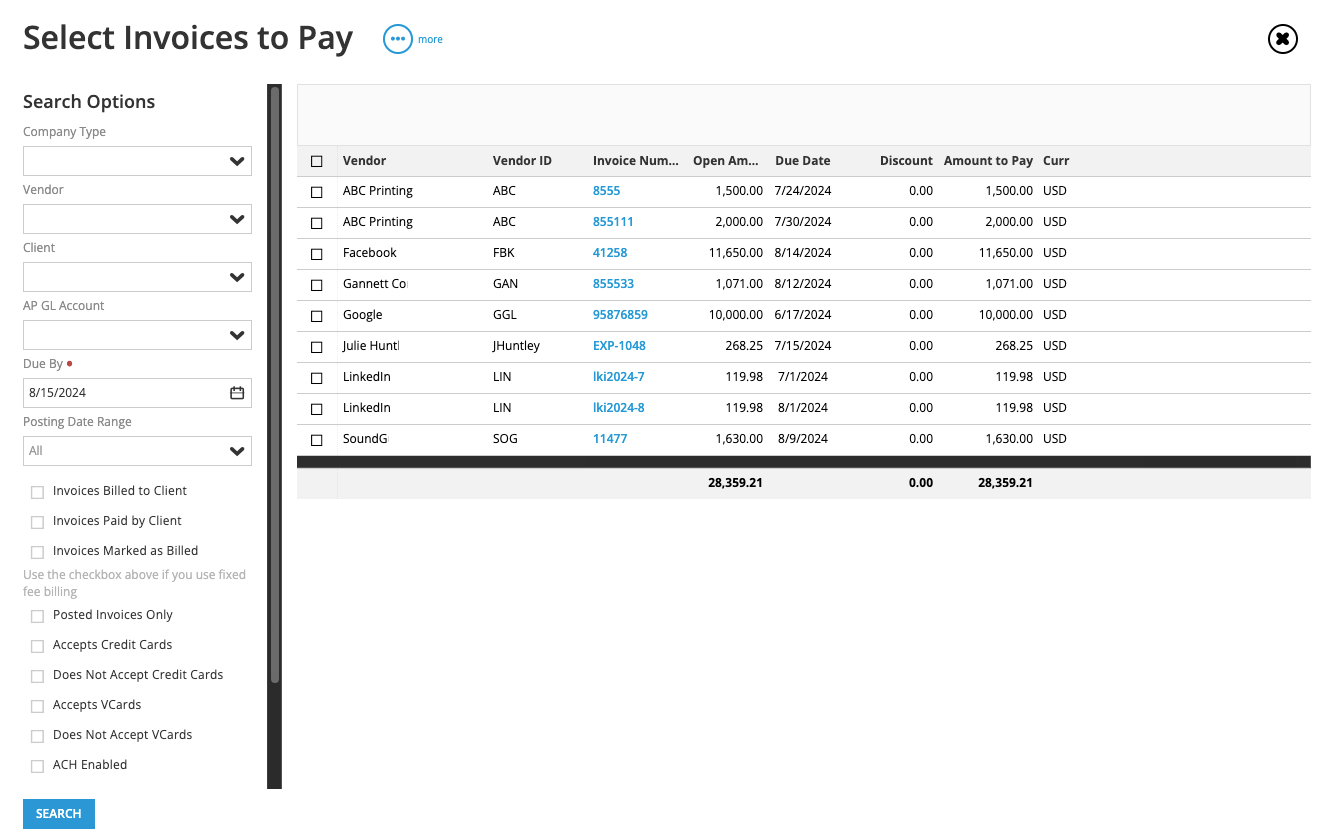
From here, you can choose one or more purchase or work orders to match to the invoice, while Workamajig proceeds to update the project’s financials — expenses, budgets, and profitability — in the background.
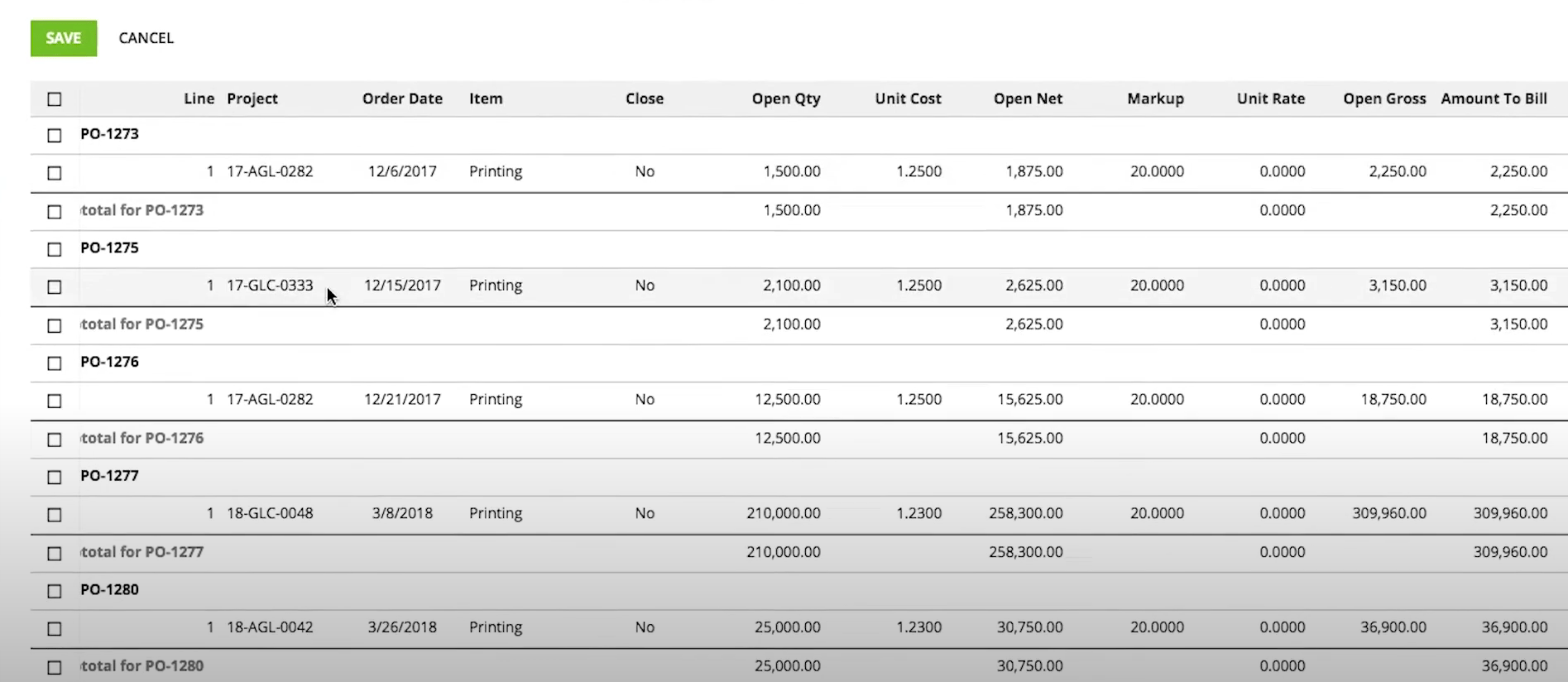
Workamajig also offers dedicated tools to ensure you can accurately close purchase orders and capture any billing opportunities when things aren’t straightforward. For example, if the numbers on the invoice don’t perfectly line up with the purchase order(s), then you can:
- Edit the numbers directly in our system so they match.
- Leave the PO open if you expect the shortage or overage to be reflected in a later invoice.
- Handle overages in one of two ways: (1) by capturing it in client billing or (2) writing it off so it isn’t passed along.
Then, after all the details are finalized, you can conveniently pay vendors online thanks to our Edenred Pay and AvidXchange integrations.
Project Billing & Client Invoicing
Workamajig’s accounting suite is packed full of dedicated tools to support every type of engagement, streamline the billing workflow, and save all stakeholders time. It features:
- Support for all agency project billing methods, including fixed-fee, time-and-materials, retainer, and media.
- Extensive retainer management, ranging from our recurring billing option to more sophisticated tools for managing engagements like service-specific retainers.
- Electronic billing worksheets, which aggregate time and expense data for each project and allow accounting teams to review the details, secure approvals from decision-makers, finalize what’s billable, and finally generate accurate, client-ready invoices.
- Partial (progress) invoicing, allowing users complete control over what gets billed at respective project stages. Through our electronic billing worksheets, users can specify a percentage of the actual amount to bill on any transaction line, while the remainder stays unbilled in the system for a future invoice.
- Split billing, to divide shared project costs across multiple client entities. Workamajig automatically generates a parent tracking invoice (holding the total amount billed) plus a set of split individual invoices (one per paying entity).
- Mass billing, saving AR teams hours every month. They can generate a batch of invoices for various projects, retainers, or media orders at once.
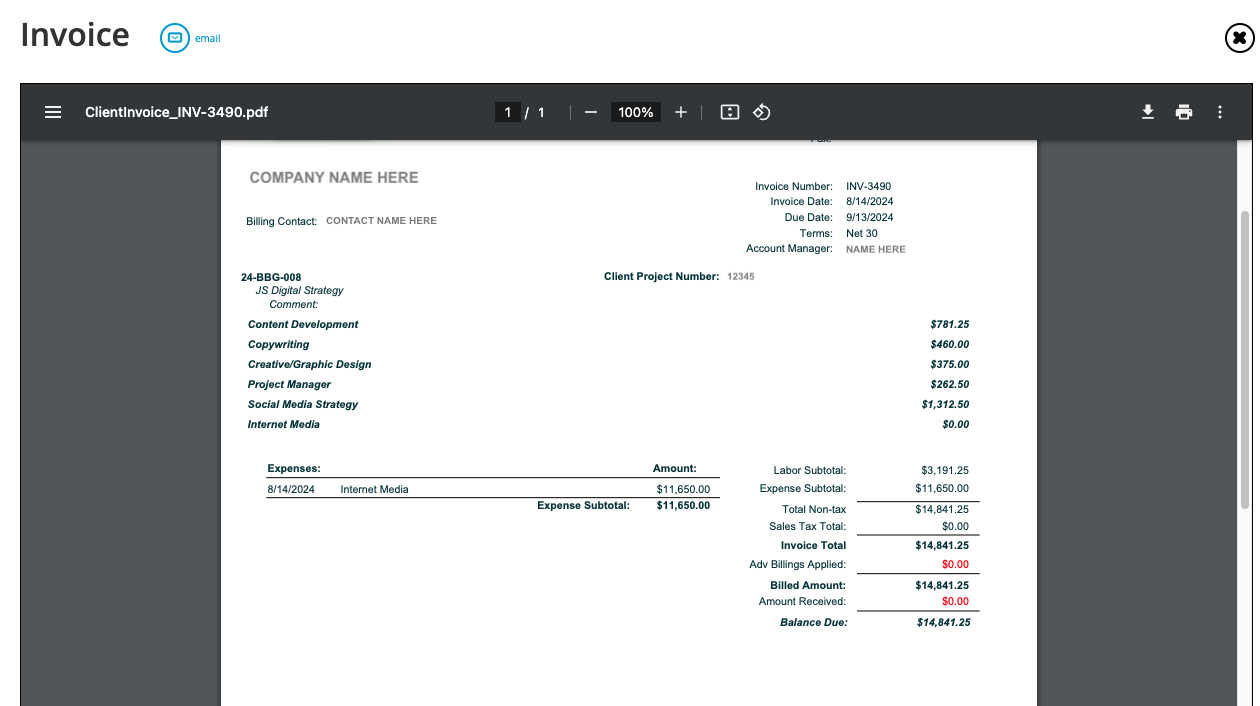
- Customizable invoice templates, so teams can customize client invoices and the details in them. Users can tweak logo placement, line-item grouping (by person, service, or budget task), labor hour and comment visibility, sales tax display, and other layout details.
- Revenue recognition tools, to record income at the right time under agreement types like milestone billing and retainers, so revenue lands in the correct period, keeping reporting accurate and audit-ready.
- Online payment collection, thanks to our PayFlowPro / Authorize.net integrations, which allow clients to make payments via CC or ACH.
Users can easily keep track of and manage all things accounting-related from their Today - Billing page — a more focused version of the Today - Accounting dashboard. For example, they can:
- View billing worksheets and their status (e.g., in review, ready to create invoices), and navigate over to a dedicated listing screen in one click.
- Pull up what's billable as of any given date — and navigate to listing screens by billing type (time and material, fixed fee, retainer, media).
- Track invoices that are in approval or queued for print and email. Our system also displays a complete history of invoices, receipts, deposits, worksheets, and transactions for every project.
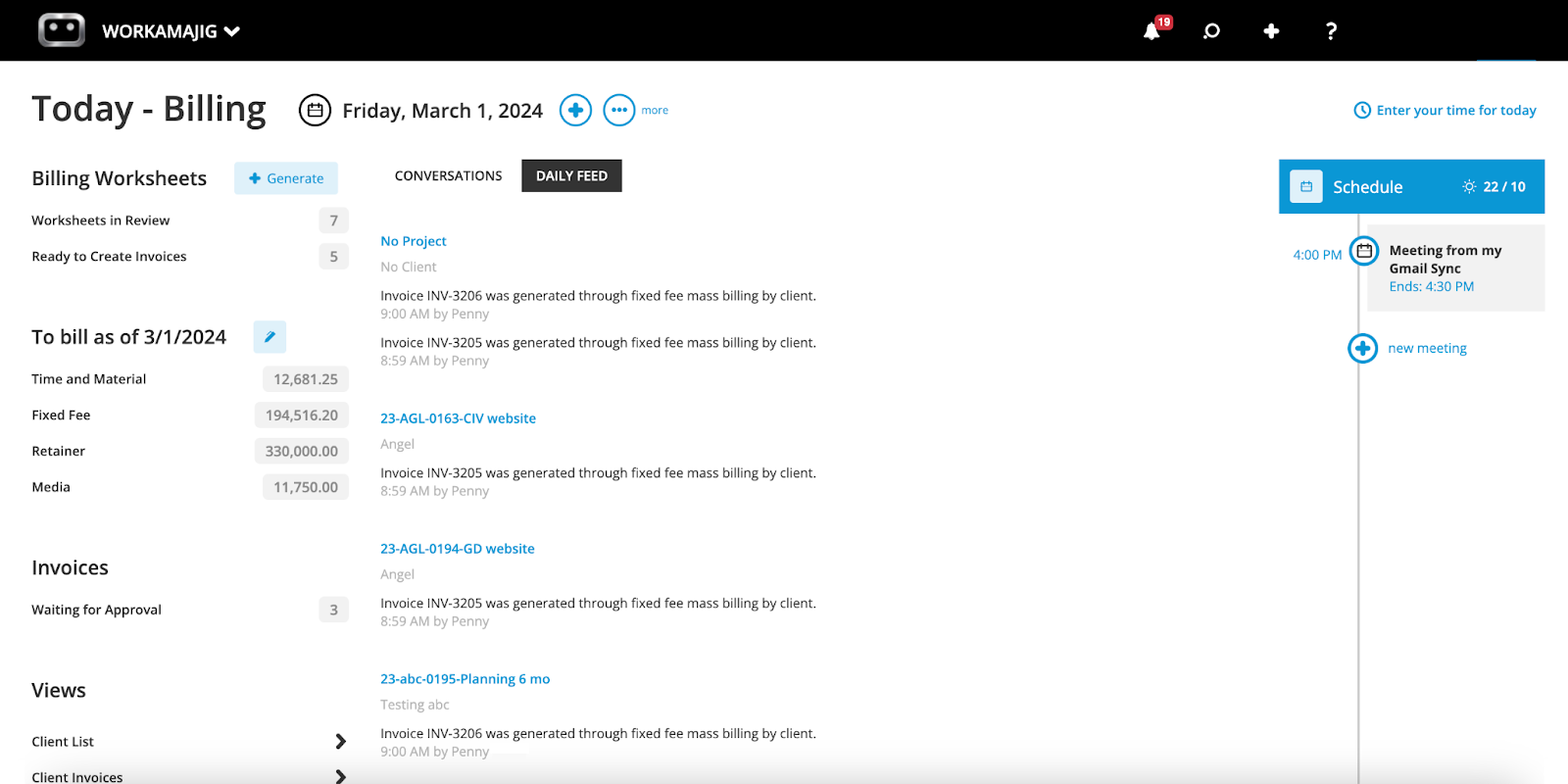
Then, users can also take quick actions from their dashboard by selecting the “⊕” icon. For example, they can generate an electronic billing worksheet when the billing cycle approaches, which comes pre-populated with the relevant project details and line items.
Workamajig then streamlines the whole billing cycle:
- First, our system automatically sends billing worksheets over to managers for review. They can edit line items, mark things up or down, write items off, and give their final approval.
- After approval, the worksheet is sent back to the billing team, which they can conveniently track and pull up from their Today page. The team can proceed to generate the final client invoice from the approved billing worksheet, while Workamajig calculates and applies the correct tax rate via Avalara.
- Users can then send the invoice off to the client, which they can conveniently access from their dedicated portals. Clients can also pay the invoice online.
Read more: Best Creative Project Management Software with Invoicing
Multi-Currency Accounting
Running an agency with international clients, vendors, freelancers, or offices means your accounting team is constantly doing exchange-rate math — converting a freelancer invoice in euros, billing a client in pounds, then trying to reconcile everything and tie it all back to a single home-currency P&L at month-end. Getting things wrong leads to an unbalanced GL that throws reporting off (inaccurate cash flow projections and profitability reporting, etc.).
Workamajig keeps things simple for your team by handling all the conversion work in the background, so you can operate in whatever currencies your business runs in without any headaches. Here’s how it works:
- Everything ties back to your home currency. Pick your reporting currency when you turn on multi-currency, making it the default everywhere. Every transaction is stored in both its original currency and your home currency simultaneously, so the ledger stays balanced from both directions at all times.
- An exchange rate table takes care of the heavy lifting. Organized by currency, entity, and date, the table can pull live rates automatically from a connected data provider, or you can alternatively key them in by hand. Either way, the correct rate is applied automatically based on invoice date, with manual override always available, and rates carry six decimal places of precision.
- Every document type works in foreign currency natively. Vendor bills, POs, client invoices, expense reports, bank accounts — all of it can run in the currency it's happening in. Pay a contractor in their local currency, invoice a client in theirs, and let the system reconcile rounding differences into a dedicated account automatically rather than leaving loose ends in the GL.
- Currency gains and losses are tracked without extra work. Realized gains and losses post automatically the moment a payment settles at a different rate than the original invoice. Unrealized gains and losses are recalculated live whenever a report is pulled — balance sheet, corporate P&L — using current-day rates, so what you're looking at reflects today.
- It all rolls up to one home-currency view. Foreign bank, AR, AP, and credit card balances get revalued at current rates and consolidated automatically, giving you a single accurate read on the agency's financial position — no manual reconciliation across currencies required.
Because this is built into the same GL that runs the rest of your agency's books, none of it requires bolting on a third-party FX tool — so you don’t have to maintain integrations or manage another set of data and user access.
Multi-Entity Accounting
Once an agency operates as more than one legal entity — separate regional offices, sister agencies under one holding company, whatever the structure — bookkeeping gets a lot messier. You need each entity's numbers to stand on their own for compliance and reporting, but you also don't want five disconnected systems that someone has to manually stitch together every time leadership wants a consolidated view.
Workamajig's GL Companies feature is built to handle this without forcing a tradeoff between entity-level independence and org-wide visibility.
- Each entity gets its own clean set of books. Every GL Company operates as a self-contained financial entity — its own trial balance, P&L, and balance sheet — with every transaction posted to the general ledger segmented by company. That means you can pull a single entity's financials in isolation, or roll everything up for an organization-wide view, without extra manual work either way.
- Entities don't have to run on the same calendar. Each GL Company can be closed out on its own schedule, so a regional office with different reporting deadlines isn't forced to close its books in lockstep with the rest of the organization.
- Cross-entity payment mistakes are structurally prevented. Our system enforces hard boundaries on what each entity can pay and be paid for — you can't create a vendor invoice under one company and settle it from another entity's bank account by accident.
When entities do need to transact with each other, then you can manage that in a structured way by enabling intercompany mappings. These let you define "due to" and "due from" accounts between any pair of companies for AR, AP, journal entries, and cash sweep activity. So one entity can cover another's transaction while both sets of books stay balanced and auditable. - Adding a new entity doesn't mean starting your chart of accounts over. GL accounts are shared across all companies by default, so a new entity inherits the existing account structure rather than requiring a rebuild — while still giving you the option to lock specific accounts to specific companies. Bank accounts work the same way: a single account can be shared across multiple companies via a "multi-company payment" setup, with each entity still keeping its own check numbering.
- You can manage who sees what. Access and permissions can be scoped down to the GL Company level — including which specific clients and vendors a given user can see.
Revenue Recognition Tools
Many agency engagements put revenue and delivered work on different timelines. In these cases, booking revenue the moment it's billed won't match when the work happens — income lands in one period, costs and delivered work in another, and the P&L stops reflecting what was actually earned.
Workamajig's revenue recognition tools handle each case, tying revenue to work performed and matching it to the same period as the related cost.
- Advance billing separates money collected from revenue earned. An advance bill invoice debits AR like any other invoice, but credits a deferred income account instead of revenue. So if you collect 40% up front, the amount sits as a liability until it's earned. As regular invoices are issued against the deposit, the balance moves out of deferred income and converts to recognized revenue.
- Media prebilling matches cost to revenue automatically. Media buys often get billed to the client before the agency pays vendors. When an order is flagged for prebilling, the system posts matching accrual entries on both sides — revenue and its associated cost land in the same period, rather than the cost showing up weeks later when the vendor invoice arrives.
- WIP posting catches everything else at month-end. Unbilled labor and direct expenses on active projects move to the balance sheet as assets, offset against cost of sales — so revenue and its related costs sit in the same period even before the client is invoiced. Once billed, the entry reverses the next time WIP posts automatically, so nothing double-counts. WIP can be posted and unposted as needed, and balances live in a sub-ledger you can break down by client and project to see how long charges have gone unbilled.
Since Workamajig hosts all your project and financial data, revenue recognition happens naturally as work moves forward. This means that everything downstream — financial statements, revenue forecasts, and P&L reports — reflects what's actually been earned.
Financial Reporting Dashboard & Overhead Allocation
Workamajig’s financial reporting suite aggregates all your project, resource, financial, and client data from across the system, so you can mix and match data sets and evaluate productivity, profitability, and performance.
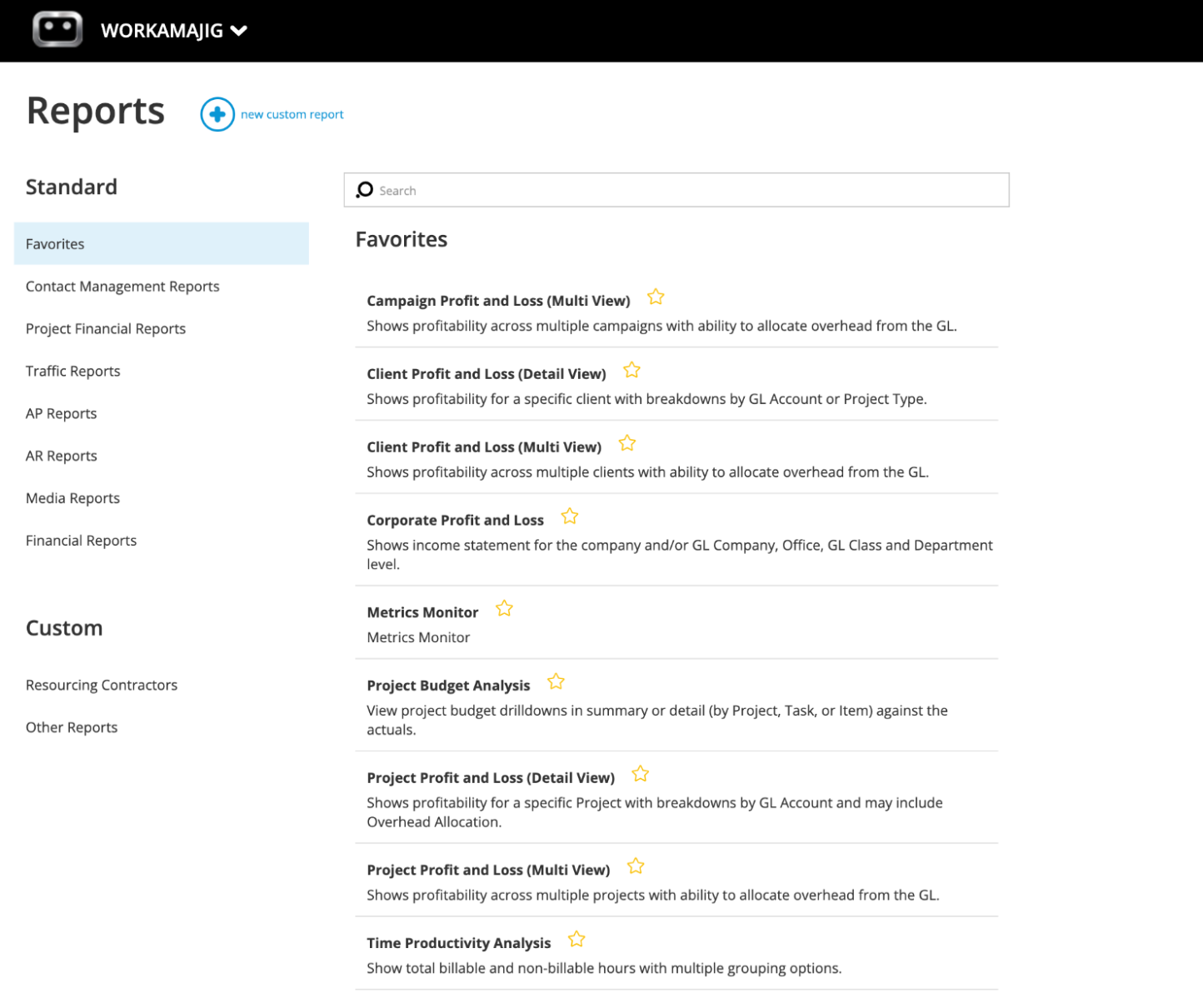
Our reporting suite also comes with several out-of-the-box and customizable reports, covering everything from day-to-day bookkeeping to forward-looking forecasts:
- General ledger. A running record of everything posted to each GL account, along with how those entries roll up into the account balance. Filter by date range, a specific account, or transaction type to narrow the view.
- Trial balance. Lists every GL account with its debit and credit totals — the standard checkpoint accountants use to confirm the books are in balance before closing a period.
- Statement of cash flows. Shows how cash moved over a period by tracking the shifts in your balance sheet accounts — receivables, current assets, payables, and current liabilities — bridging your beginning and ending cash position.
- Cash projection (drill down). Projects your cash position forward from today's bank balance, layering in expected client payments (based on invoice due dates) and upcoming vendor obligations (based on when bills are due), so you get a forward-looking balance alongside AR, AP, and cash on hand.
- General journal. Combines the sales journal, cash receipts journal, purchases journal, and cash disbursements journal into a single consolidated transaction log.
- WIP analysis. Breaks down unbilled work-in-progress by project and category, and it can flag how long unbilled amounts have been aging. Transactions drop out of WIP once they're billed, marked as billed, written off, or transferred to another project — so this report is really a live picture of what hasn't cleared any of those paths yet.
- Project budget analysis. Lines budget up against actuals across a batch of projects simultaneously, making it easy to spot which jobs are tracking to plan and which are drifting.
- Revenue forecasting. Builds a baseline forecast from pipeline and delivery data — opportunities, project estimates, billing schedules, recurring invoices, retainers, and campaign budgets — and weights each item by its probability of closing (pulled from the opportunity's sales stage). Once generated, account managers can adjust and approve their own forecast line items, and the result can feed directly into a financial budget.
- Key Metrics Monitor. A fully customizable dashboard that lets you set and track the KPIs most relevant to your business.
- Profit & Loss reports. Workamajig goes beyond corporate P&Ls, providing profitability analysis at the project, campaign, account, and service levels. Our system also offers several options for allocating overhead:
-
By labor hours. The overhead pool is divided up in proportion to each client's share of total approved agency hours. A client that accounts for 30% of hours logged gets allocated 30% of the overhead pool.
-
By labor cost. Same mechanics as hours, but the overhead pool is divided based on labor dollars instead of hours — approved hours multiplied by each employee's standard hourly cost — so clients staffed with higher-cost people get allocated a larger share of overhead.
-
By total billing. The overhead pool is split according to each client's share of total agency billings for the period.
-
-
- None. Skips the allocation step entirely, showing raw profitability with no overhead applied. (You can still pull the allocation numbers separately from the overhead allocation detail report if you need them later.)
There's also a setting to strip out labor and misc. costs from the overhead pool before it's divided up, if you'd rather allocate overhead independent of those costs. None of the methods is inherently better than the others, but it’s best to lock in one standard approach and apply it consistently.
Note: You can “star” reports to save them in your custom “Favorites” dashboard, so you can easily access them as needed.
Read more: Best Creative Project Management Tools with Financial Tracking
Workamajig Agency Management System
Just like Workamajig’s accounting software fully replaces standalone systems like QuickBooks, Xero, and NetSuite, our complete agency management suite replaces standalone project management, resource planning, time and expense tracking, and agency CRM systems.
Project Management Suite
Workamajig's project management suite includes all the expected tools to manage projects from kickoff to completion, including:
- Project intake tools, including project templates, request forms, and a tool that automatically converts opportunities in the CRM to new projects. Our intake tools ensure project managers have all the details and context they need to finalize plans and kick off new projects with confidence.
- Project planning tools, including task management, automated estimating, vendor management, and resource planning. When new projects come in, managers can use these tools to review, tweak, and finalize project plans — e.g., allocating resources or vendors, adding new tasks or milestones — while our system automatically updates the estimate.
- Project expense management & real-time monitoring, using the tools that we covered above.
- Change management tools, with custom intake forms, configurable approval processes, and change order estimates that update project budgets after changes are approved.
- Project portfolio management, allowing teams to bring project schedules, budgets, files, deliverables, and reporting under the same umbrella.
- Various project reports, including budget analyses, P&Ls, and utilization reports.
Staff Scheduling & Capacity Planning
While our utilization reports offer a retrospective view into where your team is spending its time, the staff scheduling dashboard provides real-time insights so managers can take action today.
It pulls all staff allocations and tracked time from across our system and brings it into a central view, so managers can conveniently see each resource’s total available, percentage utilization, available hours, and current workload. If your team has their calendars connected to Workamajig, then our dashboard also displays when they’re available and out of office.
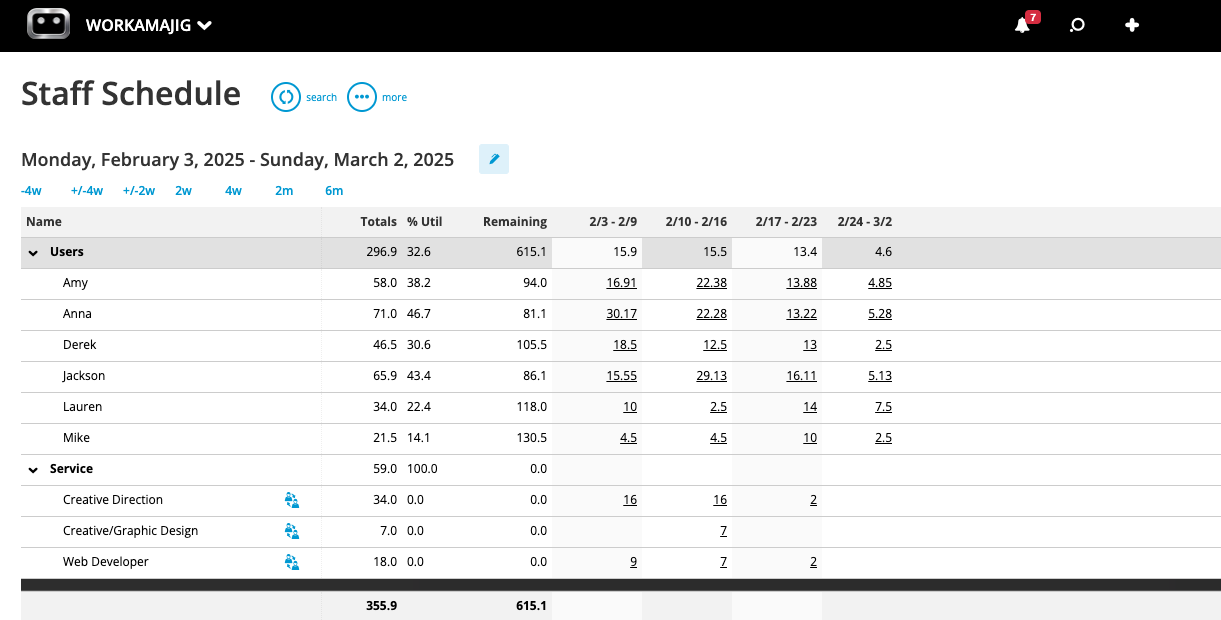
Managers can also toggle our dashboard to pull up staff assignments alongside their schedules, so they can balance workloads and see who’s available for new tasks. Our handy “Services” section lists all the assignments that have yet to be handed out so you can make sure they’re covered before kickoff.
Read more:
- Best Agency Scheduling Software
- Project Resource Scheduling for Agencies & Creatives
- 10 Steps to Optimize Resources in Agency Project Management
Creative Collaboration Tools
Workamajig’s project collaboration toolkit offers everything that internal and external (clients, vendors, freelancers) stakeholders need to manage feedback, get on the same page, and ensure deliverables match what’s expected.
We’ve already covered the Today - Accounting and Today - Billing pages, but, as mentioned, each user’s Today dashboard reflects their responsibilities and work — so project managers and creatives also get their own versions. Check out the Today - Project Manager dashboard below:
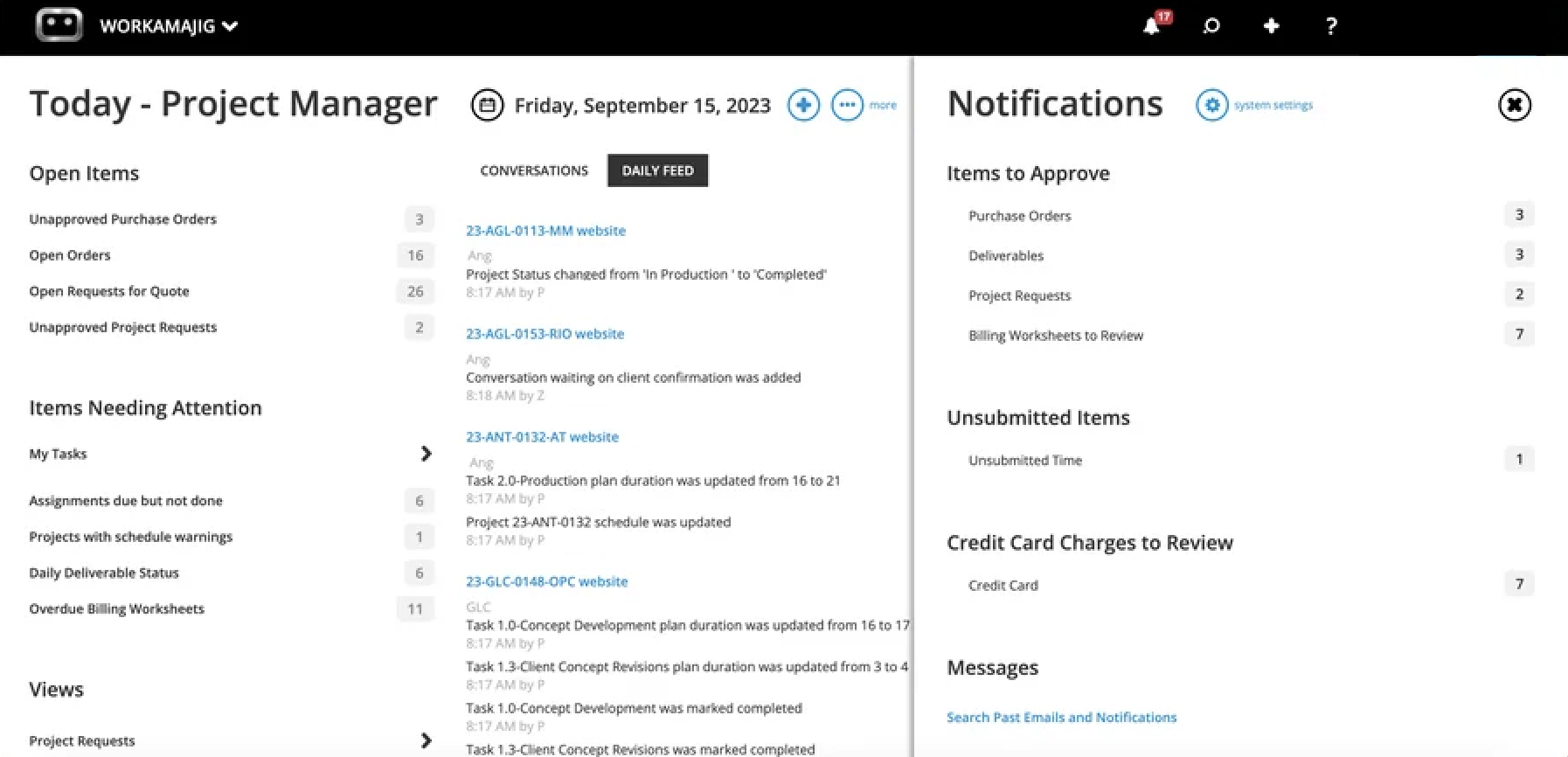
Managers will also see an activity feed to keep up with projects and administrative tasks, including project requests, purchase orders, and invoices.
The Today - Creatives dashboard outlines all tasks, time allocations, and due dates for the day and the week ahead, so team members know their schedules and how to prioritize their work. This is not only convenient for users, but it also helps avoid bottlenecks in creative workflows.
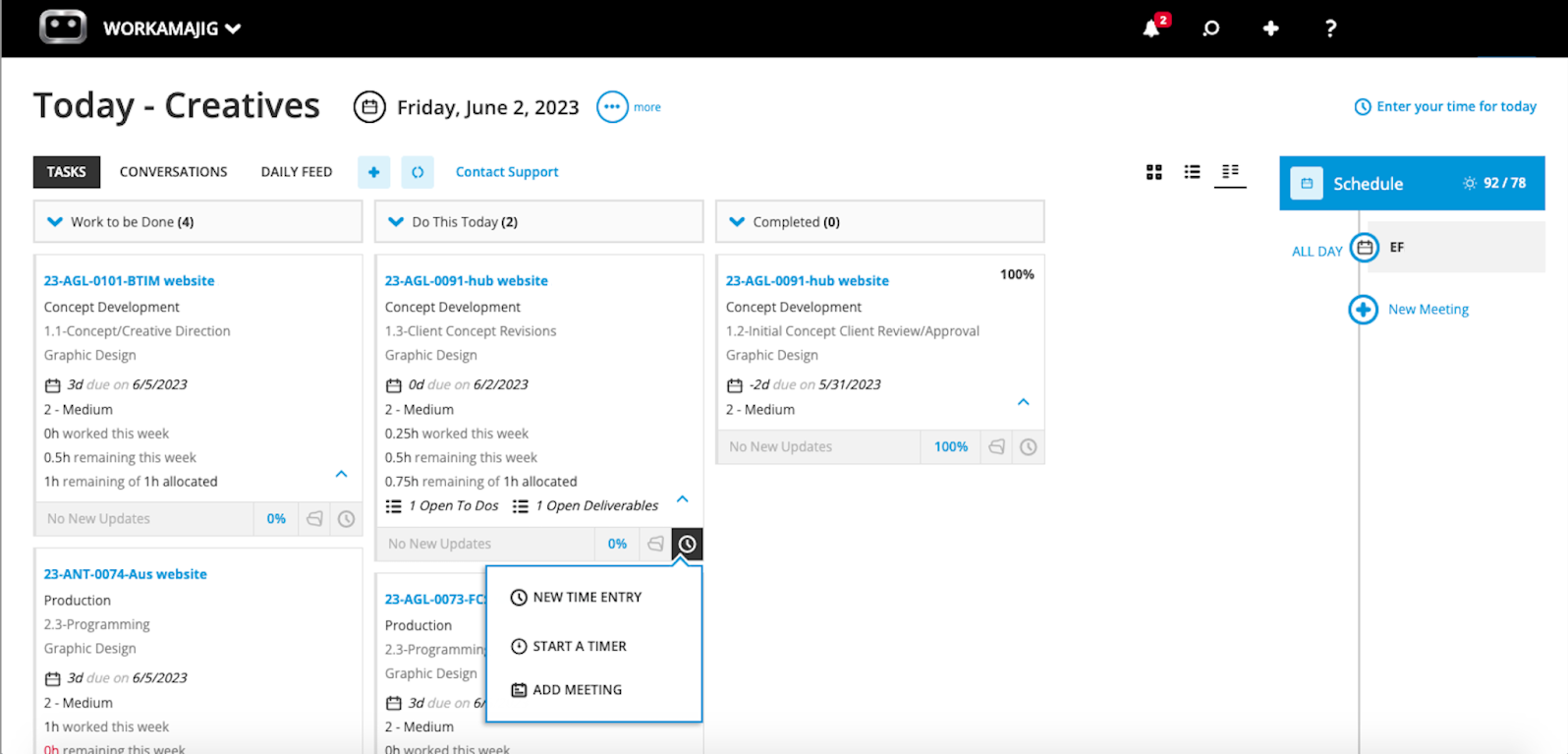
Then, users can access our various creative collaboration tools right from task cards, so they don’t have to navigate across our system to respond to feedback, share files, or collaborate with other users. It also means that anyone can pull up the full collaboration history by referencing the task card.
Our collaboration toolkit includes:
- Fields on task cards. Managers can use these to share details about each work item, including priority, due dates, allocations, the nature of work, and more.
- Project conversations. Teams can start conversation threads and share notes that all project stakeholders can see and participate in.
- Commenting. Project stakeholders can comment on task cards and tag each other when they need to share information or request additional context.
- File sharing. Users can share marketing collateral, brand assets, and other creatives in various formats — including images, video, audio, design files, documents, PDFs, HTML, and more. Our system also lets teams create shared repositories at the project or portfolio level, so everyone can easily find what they need.
- Version history. As users edit files and upload new versions, Workamajig tracks the full history of changes and allows creatives to easily reference or revert to past versions.
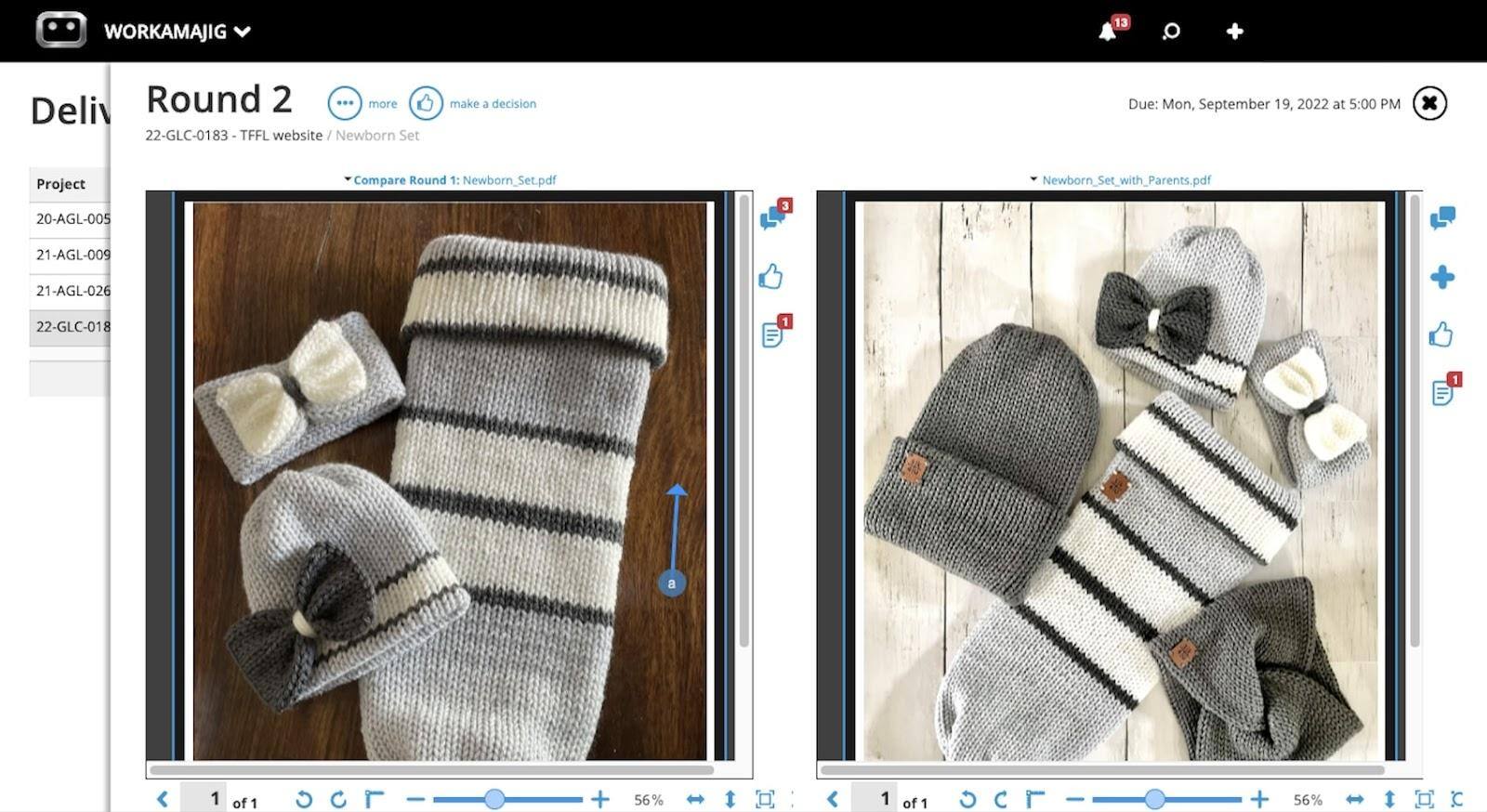
- Internal proofing. Creatives can preview content in Workamajig, compare files side by side, and annotate them with dedicated tools.
- Feedback controls. Managers can nip scope creep in the bud by capping the number of feedback rounds, keeping revisions focused and avoiding endless loops.
Agency CRM
![Workamajig Sales Dashboard and Opps [GIF]](https://www.workamajig.com/hs-fs/hubfs/Workamajig%20Sales%20Dashboard%20and%20Opps%20%5BGIF%5D.jpg?width=1105&height=575&name=Workamajig%20Sales%20Dashboard%20and%20Opps%20%5BGIF%5D.jpg)
Workamajig’s native agency CRM brings your contacts and entire sales pipeline into the same system you use to manage projects and financials. This streamlines workflows, improves handover from sales to delivery teams, empowers reps with access to project data, and feeds into cash flow and revenue forecasting.
Our complete CRM features:
- Lead capture and management. Our system offers several options to capture leads — teams can pull inquiries in as leads directly from their website contact form, upload lead lists as .csv files, import leads from other systems, or manually add new entries to Workamajig. All leads feed into our centralized lead dashboard, where users can store and track details like their source, contact information, conversations, and more.
- Visual pipeline management. Workamajig offers a Kanban-style view of your entire sales pipeline, with each opportunity sorted under its respective phase. Managers can customize pipeline stages, and users can drag-and-drop opportunities across phases as they progress.
- Team management. Managers can conveniently track which accounts or contacts their reps are working on, assign new opportunities, share details on opportunity cards, and compare the performance of their reps.
- Tools to develop opportunities. Sales reps get a dedicated suite of tools to help them develop new opportunities, including access to our automated estimating tool, resource forecasting, opportunity overviews (that display big-picture details at a glance, so they can prioritize their efforts), and conversations (to track engagements).
- Sales dashboards. Our dedicated sales dashboards help teams track what’s in the pipeline, compare performance across months and quarters, catch opportunities slipping by, and gameplan where to focus their efforts.
- CRM reporting suite. Workamajig offers several out-of-the-box CRM reports to evaluate sales performance, including win/loss analysis, quarterly performance reports, and more.
Client Portals
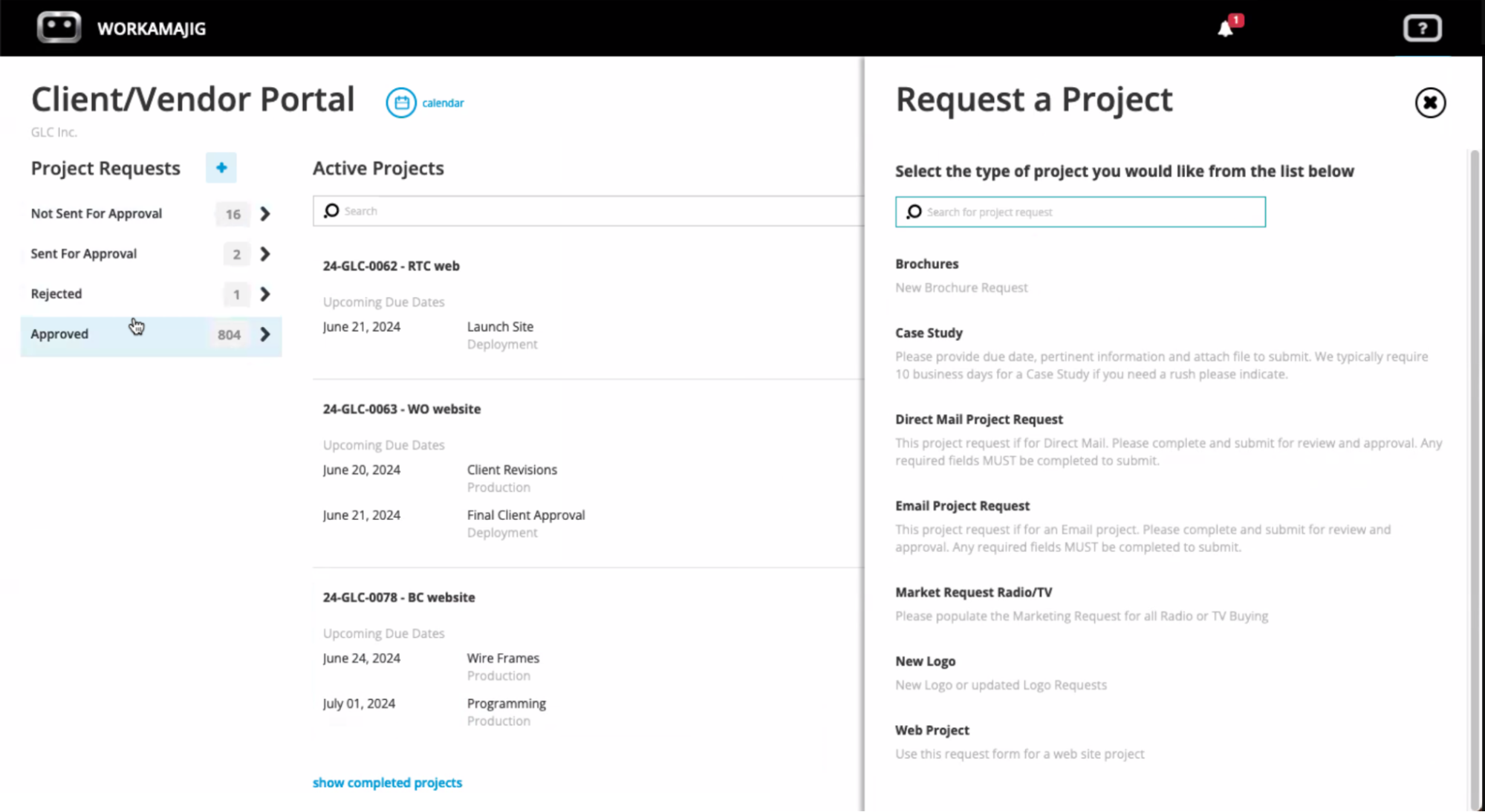
After closing deals and winning clients, Workamajig offers dedicated client portals so you can continue managing those relationships. You can create as many portals as you want (at no extra cost), and clients can use them to:
- Submit new project requests.
- View project progress and receive status updates.
- Share feedback and approve deliverables.
- Access deliverables (no more email back-and-forths or clunky file sharing!).
- View project budgets— including how much has been billed and how much remains based on progress.
Read more: Best Creative Agency Client Management Software
Workamajig Packages & Pricing
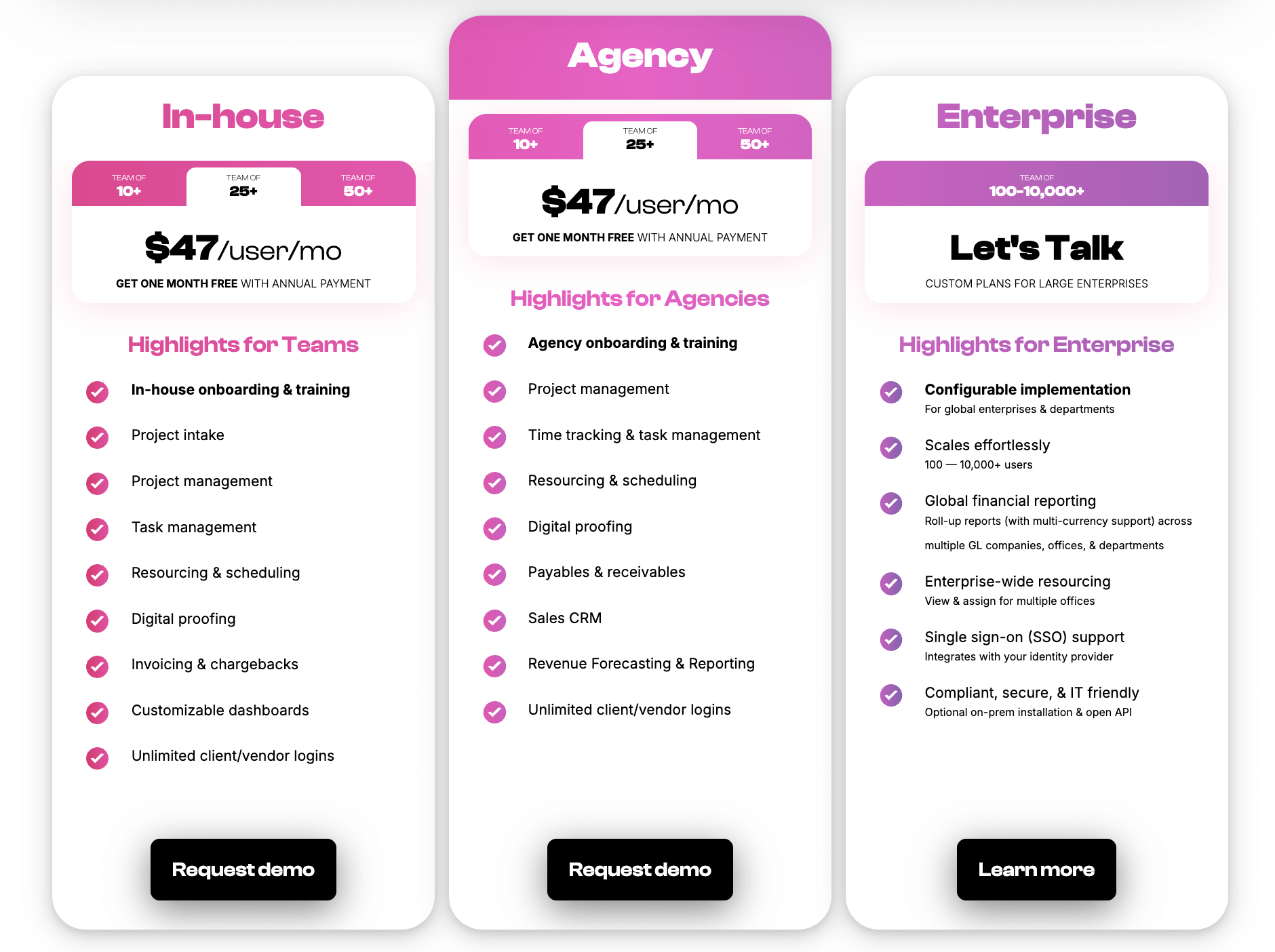
Workamajig’s straightforward plans for agencies, in-house teams, and enterprise users provide everything you need in a single subscription, including:
- Full platform access. We don’t lock features behind confusing pricing tiers or sell them separately as add-ons.
- Personalized onboarding. Your dedicated account manager works with you to understand your needs, tailor Workamajig to your workflows, and train you on our system.
- Ongoing support. Reach out to our team whenever you need more help!
Check out our packages below:
Request a free demo for a full walkthrough of our agency accounting software.
Alternative Agency Management Systems with Native Accounting Software
2. Advantage
.png?width=2000&height=878&name=Advantage%20Simpli.fi%20homepage%20(2024).png)
Advantage is an all-in-one agency management system that combines native accounting, project management, resource planning, time tracking, client management, and reporting tools. Through its native integration with Simpl.fi, Advantage is also one of the most comprehensive media planning and buying toolkits available — making it especially appealing to advertising, marketing, and creative agencies.
Advantage’s suite of project financial management and accounting tools includes:
- Estimating. The system uses project history and average realized costs to generate accurate estimates. Users can build estimates directly from existing schedules with no extra data entry and generate multiple quote versions for comparison before approval. Finalized estimates automatically flow into purchase orders and, ultimately, client billing.
- Purchase order management. Users can automatically convert approved estimates into POs, routing them through spend-based approval rules and showing real-time open-balance visibility as costs land elsewhere in the system.
- Financial status tracking. Teams can compare what a client was quoted with what's actually been committed, spent, and invoiced — with drill-down detail and direct access to the client-facing invoices.
- Expense management. Employees can submit expenses from a browser or mobile device and tag them to a project, so approved costs post to payables and update that project's budget status without manual follow-up.
- Budgeting and forecasting tools. These are linked to job plans and project forecasts, allowing multiple budget scenarios per client to model expected revenue and staffing needs in advance.
- Centralized billing. Advantage combines production and media billables into a single interface. Rates and rules can be set per client, employee, or work type (so, for example, a nonprofit account or a specific staff member bills differently by default), account managers can review and comment on billing batches online before anything is sent, and media can be billed either ahead of or after the fact with accruals handled either way automatically.
- Invoice customization. Users can format invoices by client, division, or office, attach backup documentation, and split costs shared across multiple clients into separate invoices automatically.
- Streamlined payables and receivables. The system supports real-time transaction processing, automated invoice approvals with attached electronic backup, PO and insertion-order matching to reconcile media costs, automated bank reconciliation, and an integrated payments option (AdvantagePay) that replaces manual check-writing with electronic supplier payments.
- Dedicated media accounting. Teams can maintain a full audit trail from media planning through billing and reconciliation. The system can auto-generate AP invoices for approved orders where no vendor invoice is expected, reconcile media orders against actual costs to keep liability accurate, and allow users to approve orders for billing online.
- General ledger and financial reporting. With GAAP-compliant standard reports alongside the ability to build custom ones, and a choice between an agency-specific quick-start chart of accounts or a fully custom one built to the agency's own structure.
- Executive dashboards (AQUA). Giving leadership fast, at-a-glance snapshots of account, media, and financial data to support faster, better-informed decisions.
Although Advantage is a super comprehensive solution overall, it comes with a couple of drawbacks. First off, users highlight limitations with its support for multiple currencies and entities. Second, the platform is “modular” — i.e., different features aren’t interconnected — which means navigating across the system isn’t intuitive and adds to the steep learning curve.
Read more Advantage reviews here.
Notable Features
- Media accounting software
- Billing & invoicing
- Estimates
- Budget Monitoring — track expenses and labor costs against project budgets in real-time
- Financial reporting
- Revenue forecasting
- Project management
- Resource management
- Collaborative tools like proofing & reviews
- Native tools to track time
- Media planning & buying — including broadcast buying, digital buying & media reporting
- Risk analysis & burn rate tracking
- Reporting dashboard (to analyze project performance, financials, staff hours, etc.)
- Mobile app (for Android)
Pricing
Advantage doesn’t have standardized packages with publicly listed prices. Interested teams have to contact them for a custom quote.
Read more: Best Advantage Software Alternatives for Creative Teams
3. Clients & Profits

Clients & Profits is another comprehensive creative agency management system that supports project, resource, financial, and client management. It comes with its own set of media planning and buying tools and offers a native, GL-ready accounting system that supports accrual-based, double-entry bookkeeping. Its accounting toolkit includes:
- Connected accounts payable. The system ties AP directly to vendor records, jobs, tasks, and the ledger, so posting a vendor bill updates several things at once — the vendor's running balance, that job's cost totals, and the matching debit or credit entries — with purchase orders integrated into the same flow.
- Integrated time tracking. C&P offers time cards and timesheets for entering hours. The details on these entries — job, task, hours, cost, and billing rate — feed straight into job costing and billing.
- Check writing and reconciliation. The system maintains a running register for every bank account, automatically numbers checks as they’re cut, offers separate numbering sequences for each account, and provides a one-click tool to settle all outstanding vendor bills in one pass.
- Expense tracking. C&P lets agencies conveniently track all costs, including in-house expenses, staff expense reports, and internal charges. Agencies running their own production or output equipment can maintain a rate list for those internal services, so usage gets logged against a job and task by quantity, and shows up on cost reports and, later, the client's bill.
- Media planning and buying tools. Media teams can organize campaigns into shared briefs that feed downstream into estimates, broadcast plans, and orders. It also features a shared calendar tracking space and material deadlines across the department, post-buy and spend-analysis reporting, and an import connector that pulls orders and invoices directly from external buying platforms such as SmartPlus, Strata, and Tapscan.
- Billing tied to job data. Any client charge — an estimate, an advance, a retainer, a fee, or a job's finished costs — becomes an invoice pulled directly from the underlying job and cost records, so billing requires little to no manual work.
- Client payment entry. C&P offers a single point where incoming payments, adjustments, and write-offs are logged, updating client balances, open invoices, and the ledger. This is how most cash coming into the agency gets recorded.
Overall, C&P fully replaces standalone accounting software for creative agencies while seamlessly connecting project and financial data. However, some teams may find it’s not the best option because:
- It’s mainly an on-premises solution (though it includes some hybrid and cloud elements), so agencies are largely responsible for setup, software maintenance, and updates. It also limits usability because teams can’t access the platform on the go via an internet browser or a mobile app.
- Users describe its interface as dated and unintuitive. You can draw your own conclusions here by taking C&P’s visual tour.
Find more Clients & Profits reviews here.
Notable Features
- Media & marketing agency accounting software
- Automatic billing & invoicing
- Vendor invoice management
- Financial reporting
- Integrations with bank and credit card accounts & media planning systems
- Project request forms & project planning
- Project management & monitoring — request forms & project planning tools, such as task management
- Resource management —team management with live scheduling & time tracking
- Collaborative feedback tools for project teams & clients
- Portfolio management
- Workflow automation
- Adobe XD plugin
Pricing
Clients & Profits offers three main packages — Studio, Marcom, and Agency — with per-user pricing that depends on the role. The Agency packages have the highest price tag because they unlock features that aren’t available in the Studio plan, including media planning, media buying, media billing, retainer billing, advance billing, and online approvals.
- $25/user/month for creatives.
- $45/user/month for project managers and account executives. These users get access to estimates, change orders, project management, purchase orders, job requests, and client pipeline management.
- $115/user/month for agency power users. You’ll need to purchase these seats for accounting users because the other tiers lack core accounting features.
Clients & Profits also offers a reduced rate for freelancers ($9/month) to access the platform and time-tracking tools.
Read more: Clients & Profits Software: Reviews & Alternatives
4. e-Silent Partner

e-Silent Partner offers the full set of agency management tools — including native accounting, project management, team collaboration, time tracking, expense management, file sharing, business intelligence and analytics in an integrated system. But unlike C&P, it’s available both on-prem and on the cloud.
Overall, the platform checks all the boxes on the accounting and financial management side with:
- Reliable estimating that feeds directly into project and resource planning. Comparative estimates can be built and evaluated side by side before committing resources, then staffing and scheduling decisions are made against that same estimate data.
- Real-time budget monitoring against actuals. The system tracks job costs as they're incurred relative to original estimates, so overruns surface before it's too late for PMs to intervene and course-correct.
- An end-to-end billing and invoicing workflow. The system generates purchase orders from vendors and job specs. Then, it offers several pricing structures to support how a job is meant to be billed (set schedules, flat fees, estimate-driven, upfront/advance charges, or hourly), plus an eBilling capability, as well as payables and receivables integrations that handle reconciliation and invoice generation.
- Rate structuring. The system supports multiple tiers of billing rates, so costs and billing rates can vary by role, client, or engagement type as needed.
- A dedicated media planning and buying module. Buyers work through a STRATA-connected pre-buy interface, so buy data, revisions, and vendor invoices are automatically pulled in, and finished orders go out by email straight from the platform. Media can be billed gross or net — with or without a markup or commission layered on top — or passed through as a straight vendor-to-client charge.
- Multi-entity, multi-currency infrastructure underlying all of the above. The system runs across multiple companies, offices, and tax jurisdictions, with financials viewable by company, office, department, or on a consolidated basis. It’s well-suited to agencies with international operations or several legal entities.
- A financial reporting dashboard with custom, saveable report formats. The P&L reporting, budgeting, and revenue forecasting tools are the platform’s more robust capabilities.
Many users praise e-Silent Partner’s helpful and responsive customer support team, although they note that the provider doesn’t offer personalized onboarding (it’s mostly a self-serve model). Some users also highlight limitations on the reporting side: they mention only having access to financial statements for up to the previous year and say that graphic and AR-specific reporting aren’t fleshed out enough.
Check out more e-Silent Partner reviews here.
Features
- Project management
- CRM and client management
- Resource planning and utilization reports
- Team collaboration tools, like file sharing, commenting, and version history
- Time tracking
- Budget tracking
- Media management dashboard
- Integrations with Strata media buying software
- Accounting software
- Financial management
- Billing and invoicing
- Business intelligence reporting — including key metrics, monitors, and customizable reports
- Process automation
- Mobile app (for iOS and Android)
Pricing
e-Silent Partner provides custom quotes upon request. Unlike Workamajig and Advantage, it doesn’t offer plans that include personalized onboarding.
FAQs on Agency Accounting Software
What are the essential features of accounting software for creative agencies?
The right accounting software for creative agencies should enable them to manage finances within project workflows, accurately assess profitability, and streamline time-consuming accounting processes. It should include the following essential features:
- Automated estimating tools that generate accurate estimates based on historical and current data.
- Expense tracking with dedicated tools to manage different expense types, including spend from credit card accounts, vendor costs, media buys, labor costs, and out-of-pocket expenses.
- Receipt capture to store digital copies and tag them against specific projects.
- Real-time project monitoring to track updated budgets and timelines as actuals are logged in the system.
- Native time tracking with tools to log time, review hours, approve them, manage billable hours, and track utilization.
- A vendor management system to generate purchase and work orders, upload copies of vendor invoices, manage reconciliation, and evaluate vendor reliability over time.
- Project billing and client invoicing tools that support all agency billing types, approval workflows, invoice customizations, and payment collection.
- Revenue recognition tools tailored to the needs of creative agencies, with advance billing, media pre-billing, and WIP posting.
- Tools to support international businesses, which include multi-currency, multi-entity, and multi-office support, plus sales tax automation and adherence to regional compliance requirements.
What are some project-based accounting systems for agencies?
Workamajig, Advantage, Clients & Profits, and e-Silent Partner are the main project-based accounting systems for agencies. These systems are different from universal project management systems like Asana, Monday, ClickUp, etc., because they:
- Offer fully integrated, native accounting and project management software — so agencies can manage finances within project workflows and accurately measure utilization and profitability.
- Support collaborative project workflows — where clients and other third parties (production vendors, freelancers, contractors) are engaged throughout the project lifecycle for feedback, support, and approvals.
You might also come across names like Productive, Scoro, Kantata, and Function Point. While these systems can support project-based accounting, they’re more limited than the four names we’ve covered above. They do offer some native accounting tools, but they rely on third-party integrations (e.g., with QuickBooks) to support many essential workflows.
How much does specialized agency accounting software typically cost?
Many specialized agency accounting software systems don’t publicly disclose their pricing, so you’ll have to contact them directly for a quote.
At the time of writing, Workamajig’s specialized agency accounting and management solution is available for $47/user/month (with discounts on annual subscriptions), while Clients & Profits charges $115 per seat for access to its full suite of accounting features. Advantage and e-Silent Partner provide custom quotes upon request.
What’s the best accounting software for agencies paying overseas contractors?
Agency-specific accounting software like Workamajig and e-Silent Partner are the best options here. They both support foreign-currency vendor bills natively — meaning a contractor invoice can be recorded and paid in its local currency, with exchange rates and FX gains and losses handled automatically, all within the same job-costing and GL workflow as the rest of the agency's books.
However, you’ll often need a payout tool like Wise Business, Tipalti, or Deel for the actual transfer and compliance paperwork — including forms like the W-8BEN, used for foreign contractors instead of a domestic 1099-NEC. Given what's at stake compliance-wise, it's worth confirming the right forms with an accountant.
Getting Started with Workamajig
Workamajig is one of the only accounting systems specifically designed for agencies, allowing them to manage finances within project workflows, monitor budgets in real-time, prevent overruns, accurately forecast cash flow, and evaluate the true financial impact of their work.
Our complete agency management system offers everything you need to manage your people, processes, and finances under a single subscription. Reduce software costs, improve stakeholder collaboration, and unify all your data with Workamajig.
Request your personalized demo and take the first step towards boosting your agency’s profitability.
Read more: