

The best agency client management software manages both:
- The full client relationship — every interaction from first inquiry through renewal: capturing the lead, scoping the work, keeping clients in the loop, collecting feedback, and giving them an easy way to see what's happening. Done well, first projects turn into long-term retainers.
- The work behind the scenes — keeping projects on schedule and on budget, routing approvals, catching problems early, and ensuring final deliverables match client expectations. Because the smoothest client experience in the world doesn't mean much if projects are slipping past deadlines, blowing through budgets, or getting stuck in approval limbo.
So when you’re comparing systems, prioritize features that cover all the right bases:
- Client portals — so clients can submit requests, share feedback, track progress, and access deliverables in one self-service hub.
- A native agency CRM — for capturing leads, nurturing them, developing opportunities, managing your sales pipeline, streamlining client intake, and evaluating sales performance to uncover opportunities that can boost revenue.
- Automated estimating tools — so you can share accurate quotes with both prospects and existing clients to set the right expectations upfront and avoid surprises down the line.
- Project intake tools — that capture the right details upfront and ensure key information isn’t lost in the mix.
- Project monitoring tools — that proactively flag delays, budget overruns, and other risks early, so PMs can course-correct and give clients a heads-up before deadlines slip. Clients almost always understand and forgive delays when they hear about them in advance; it's the surprise delays that can create tension and throw other initiatives off.
- Change management — to ensure requests go through proper reviews and approvals, and are factored into project budgets and timelines.
- Project portfolios — to organize all the work you do for each client and centralize schedules, budgets, deliverables, billing, and reporting in one view.
- Billing and invoicing tools — to accommodate different billing methods and ensure all invoices are accurate to avoid confusion like accidental over (or under) charges. It’s also a perk if the system offers integrations for collecting client payments online, so the final touchpoint of every project is as smooth as the first.
- A complete reporting suite — including client P&Ls and agency insights, so you can see which accounts are eating up the most effort and how that stacks up against the revenue they bring in.
The trouble is, most tools you'll come across during your search only cover part of this list. Some focus heavily on the client-facing layer — portals, onboarding, communication — but lack the operational depth to actually run delivery. Others are project management platforms that offer workarounds for managing clients, but aren’t purpose-built to support those relationships.
Agencies that settle for partial solutions end up stitching together multiple tools, paying for overlapping subscriptions, and reconciling scattered data across systems.
So to make your search easier, we’ve put this guide together, covering 10 popular systems in the agency client management category. We explain exactly which bases each one covers to give you the full lay of the land.
To learn more about Workamajig after reading, request a demo with our team.
1. Workamajig
All-in-one Agency Client Management Software for the Full Client Lifecycle
Workamajig is an all-in-one agency management software built specifically for creatives and marketers to manage their work — the kind where the effort required isn't always easy to predict or measure, multiple rounds of subjective client feedback shape deliverables, and getting projects across the finish line often means coordinating with outside collaborators.
What sets Workamajig apart from most "client management" platforms is the depth of what's under the hood — and how it's specifically tuned to creative workflows.
Our platform includes all the features that we covered above and brings every part of the client lifecycle, from first touch in the sales pipeline through final invoice, into a single system, so agencies can deliver a polished client experience without duct-taping together five different tools.
Workamajig offers:
- A native agency CRM for managing the entire sales pipeline. Sales teams can pull in leads from different sources, qualify them, convert them to opportunities, and then manage those opportunities all the way through to close with dedicated tools to help them out at each stage.
- Seamless sales-to-delivery handover. Every conversation, file, estimate, and detail captured while pursuing the opportunity transfers to the delivery team the moment a deal closes. PMs walk into kickoff already up to speed; clients shouldn’t ever have to repeat themselves; and nothing promised during negotiations gets lost in the mix.
- One system for everyone. Everyone touching a client account — sales, account managers, PMs, finance, creatives, freelancers — works in the same system, looking at the same data: no silos, no duplicate entry, and no lost context.
- Full client lifecycle engagement, from kickoff through the final deliverable. Dedicated portals, collaboration tools, structured feedback rounds, and approval workflows keep clients in the loop at every stage of the work. Final deliverables actually reflect what they had in mind because they've been weighing in along the way and shaped the outcome.
- Real-time visibility into project costs and timelines, including the impact of any changes. Because labor hours and (all) project expenses (media, out-of-pocket, vendor, etc.) all feed into the same system, PMs can see exactly where project budgets stand at any moment. They can also forecast the impact of a client's change request before committing — how much extra it'll cost, how the timeline will shift, what resources it'll pull from — so they can set the right expectations upfront.
- Unified business data that fuels strategic decisions. Because everything runs in one system, agencies get reporting that goes far beyond an org-wide P&L. Track things like profitability by client, hours spent per account, productivity by service line, win rates by lead source — and feed those insights back into the business. Sales teams know which account types to prioritize. PMs know which services consistently run over and need to be re-priced. Leadership knows which clients are draining agency profit margins.
Every Workamajig plan also includes personalized onboarding, training, and ongoing support from a dedicated account manager who configures the system to your agency's workflows and walks you through the steps to get up and running smoothly.
Our customers say that switching to Workamajig’s all-in-one system helps them serve clients better, boost productivity, reduce friction, save on tech costs, and increase profitability.
|
"It's hard to name one single big benefit of working with Workamajig because there are so many. It really is kind of our all-in-one solution for everything in the agency." See how Mindgruve Macarta leveraged Workamajig to accelerate agency growth. |
In the sections below, we'll walk through each of these client management capabilities in more detail. If you'd prefer a guided walkthrough, request a personalized demo with our team.
Agency CRM: Winning and Onboarding New Clients
Workamajig's CRM consolidates every contact, lead, and opportunity into a single platform, so sales teams can qualify prospects, develop deals, and track pipeline health from one place — and everything they capture stays with the account record long after the deal closes.
Each account record stores essential details — names, titles, emails, phone numbers, source, owner, and custom fields — along with the full history of every interaction, file, note, and conversation.
In the next three sections, we'll cover:
- The core CRM features — including tools for lead capture, contact management, opportunity development, and pipeline visualization.
- The estimating and resource-forecasting tools — sales reps (and account managers handling repeat-client work) use these during project discussions to provide accurate quotes and estimates.
- The intake workflow — including CRM-to-project conversion, project request forms, and templates — that gets new work into the system without losing essential information at handoff.
Leads Intake & Management
Workamajig makes it easy to consolidate leads from every source. Teams can:
- Connect our CRM to their website's contact form to automatically pull in new inquiries.
- Integrate Workamajig with external CRMs (HubSpot, Salesforce, Zoho, Pipedrive, etc.) or marketing automation tools via APIs or Zapier to capture qualified leads.
- Import lead lists from .csv files, which is handy for event attendees, list buys, or other batch imports.
- Add leads manually, such as when a referral comes in, or a rep meets someone at a conference.
All captured leads feed into our centralized Leads Dashboard, where reps can filter by source, owner, state, status, or any custom field to find the leads they're working on. For example, the “Neglected leads” view brings up leads that haven’t had any activity within a specified date range — so reps can check in and make sure they don’t get lost in the mix.
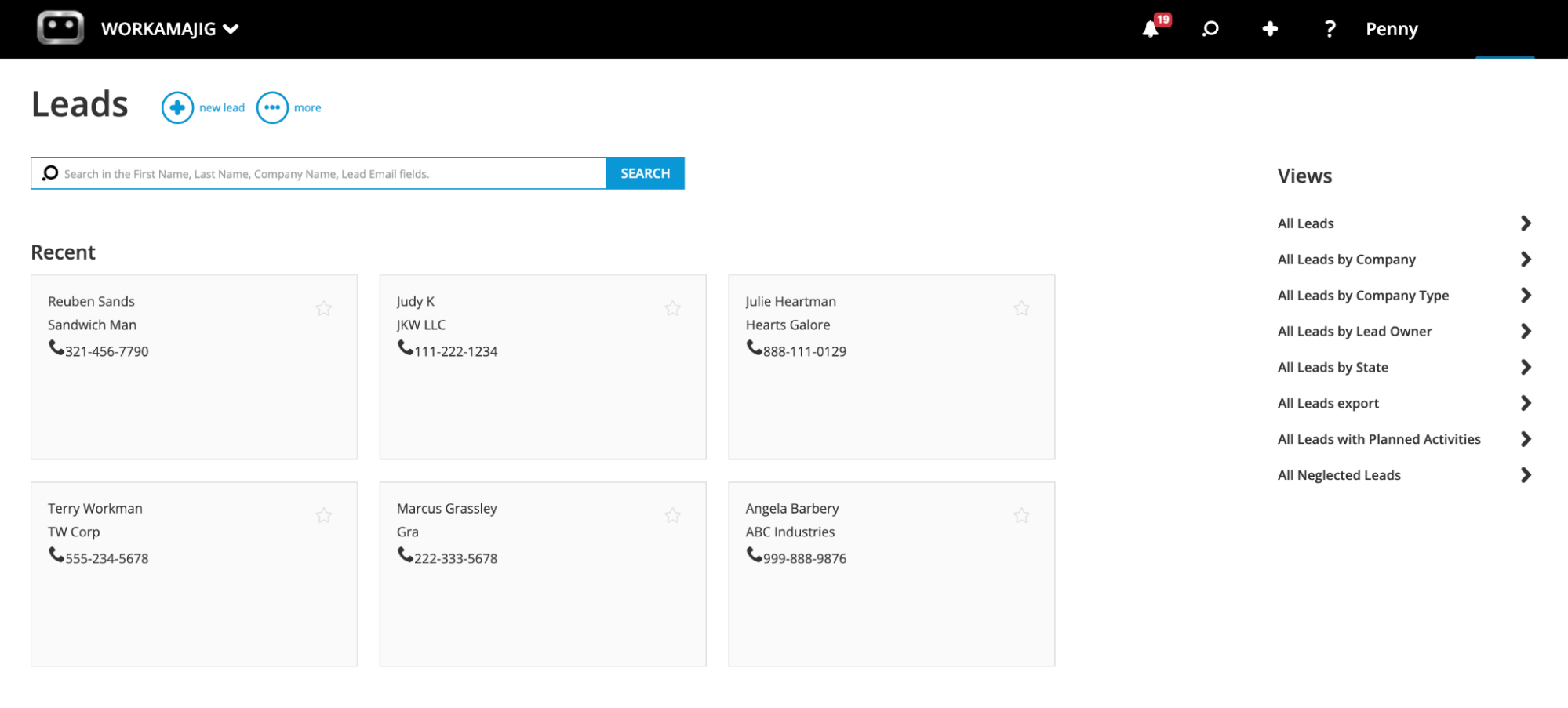
From the Leads Dashboard, reps engage leads and log every touchpoint using Conversations — Workamajig's tool for tracking phone calls, emails, meetings, resources sent, and follow-ups. Conversations are saved automatically, and our integrations with Gmail and Outlook also pull email threads, so users can quickly reference past interactions without digging through inboxes.
Once a lead is qualified, a click converts it into an opportunity and moves it to the Opportunities Dashboard, where reps can develop it further and track the overall pipeline.
Managing Opportunities & Tracking Pipeline
This dashboard offers a visual, Kanban-style pipeline view to track pipeline status and store context.
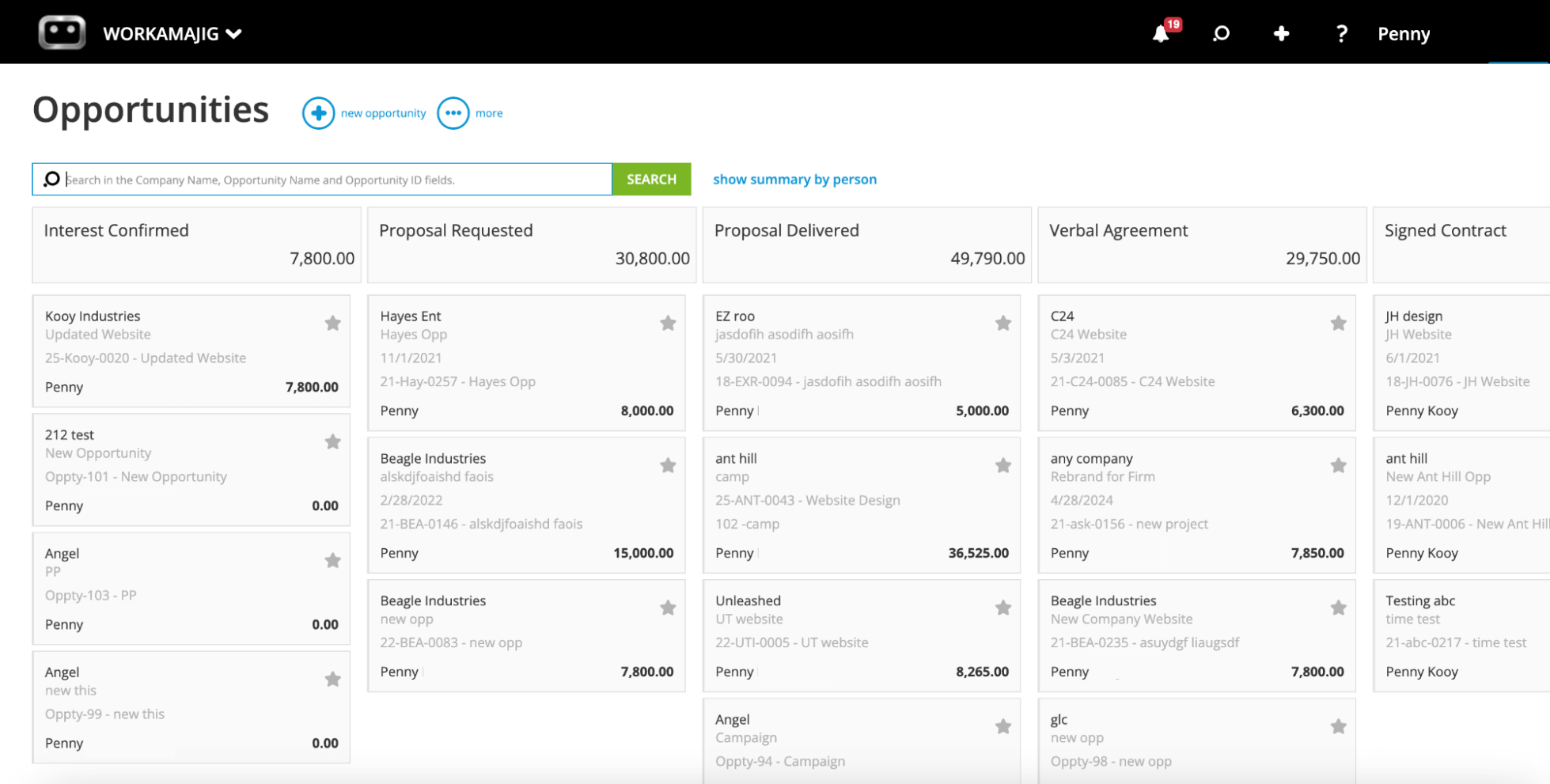
Each opportunity sits as a card in a column representing its current stage — "Proposal Requested," "Signed Contract," whatever your process calls for — and teams can drag-and-drop cards between stages as deals move forward.
Our dashboard makes life easier for sales teams with:
- Fully customizable pipeline stages. Workamajig lets managers customize pipeline stages to match their agency’s unique sales process — e.g., the pipeline shown above includes phases marked as “Proposal Requested” and “Verbal Agreement.”
- Team management tools. Managers can assign opportunities to specific reps, add notes or context for the deal owner, and set appropriate stages and statuses.
- Opportunity overviews. Each overview displays big-picture details — such as age, timeline, and projected revenue — so reps can make strategic calls about which deals to prioritize.
As reps engage an opportunity, they can track developments and specs by populating the fields on our Opportunity Cards — which include:
- Probability — how likely the deal is to close
- Projected revenue — the expected amount if it converts
- Production and media costs — including margins
- Forecasted close date
- Months to bill — how long you expect to bill off the work if the deal closes
- Outcome — Awarded, Lost, or Canceled (with the option to specify a reason)
All of these feed into Workamajig's sales reporting suite, so teams can forecast revenue and see exactly what's driving wins and losses in the pipeline.
Sales conversations live right inside the opportunity card too, so reps can see the full nurturing history — including anything from when the contact was still a lead — and plan the next move accordingly.
When the deal closes, a few clicks convert the opportunity into a project or campaign, with every conversation, file, estimate, and detail transferring automatically. (More on that in the intake section.)
Estimates & Resource Forecasting
One of the trickier aspects of the negotiation process is giving numbers (quotes, timeline estimates, delivery goals) that you’re confident in. Without the right reference data, teams can end up underpricing services, over-servicing clients, or committing to deadlines they can’t reasonably meet.
That’s why Workamajig's automated estimating and resource forecasting tools help sales reps pressure-test commitments before they're made and develop quotes based on real data.
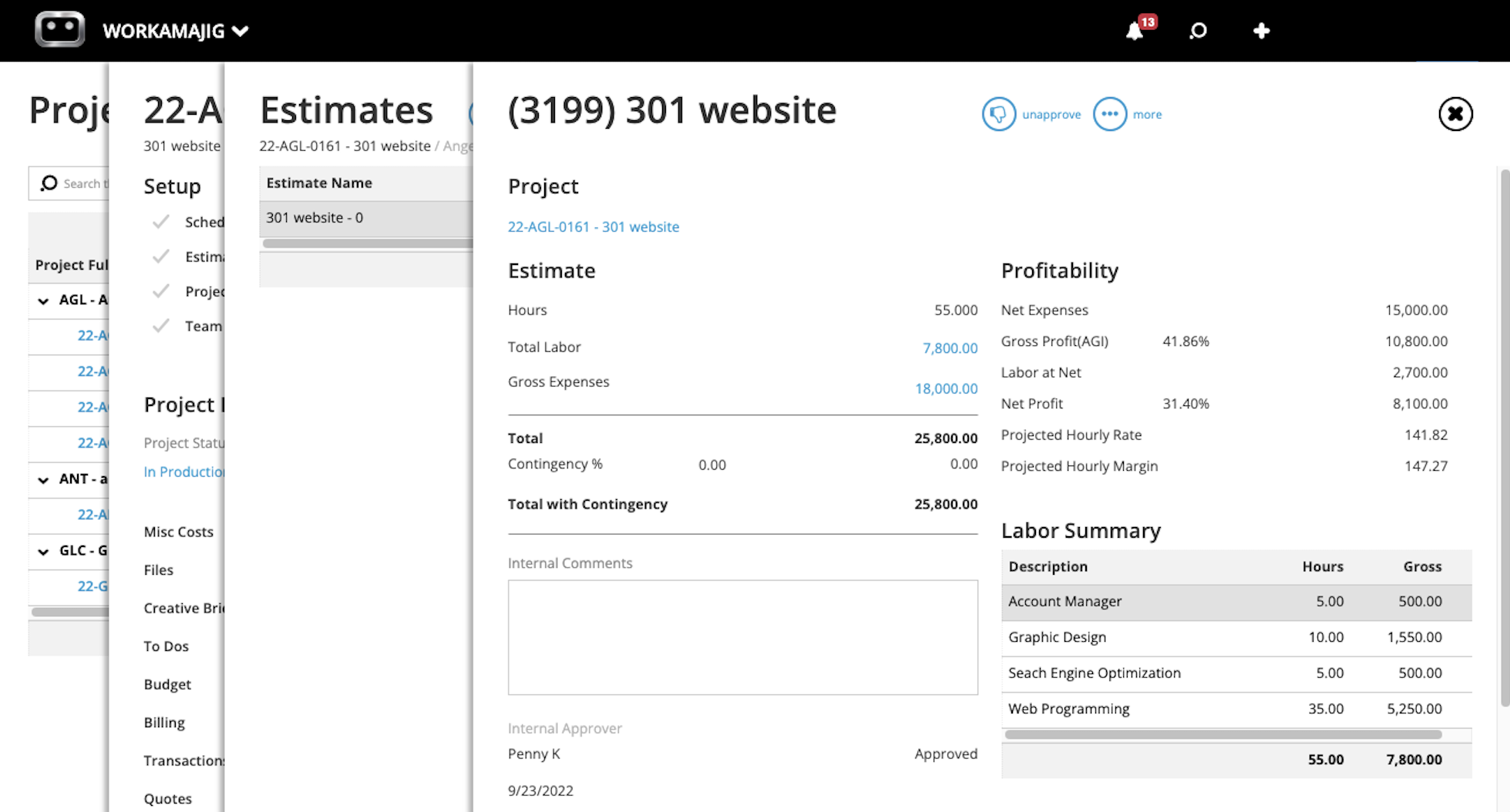
Reps can build accurate estimates from saved service rates, historical data on similar past projects, indirect costs (overhead, contingency, profit margins), and any third-party expenses the work will involve. They can also loop in project managers to help out in putting together the full plan.
Then, reps can compare projected resource needs with the live staffing schedule and flag in advance whether the project is staffable on the dates the client is requesting. At kickoff, PMs can do the same — verifying that nothing has shifted between the deal closing and the work starting.
And for existing clients requesting additional work, account managers get the same visibility, so they can set realistic expectations and steer clear of over-commitments.
Closing the Loop with Client Intake Tools
Workamajig offers several intake tools to ensure the project initiation process is smooth for everyone involved — reps managing handover, PMs finalizing the plans, and clients waiting for things to kick off.
- CRM-to-project transfer. For newly won opportunities, this is the most convenient way to hand things over to the delivery team. Reps can convert the awarded opportunity into a project or campaign with a few clicks, and all the details — conversations, files, estimates, specs, etc. — tied to the opportunity automatically transfer over.
- Project request forms. You can allow existing clients to submit future requests by completing project request forms through their dedicated portals. Submitted requests are routed to the right team member for review and, once approved, converted into projects with all captured details already populated.
- Project templates. Save repeatable project templates with predefined tasks, estimates, resource allocations, timelines, and budgets. Unlike systems that cap templates by tier, Workamajig lets you build unlimited templates — so you can have a different one for every service line. They’re especially convenient if you have project types that are requested often.
Client Portals
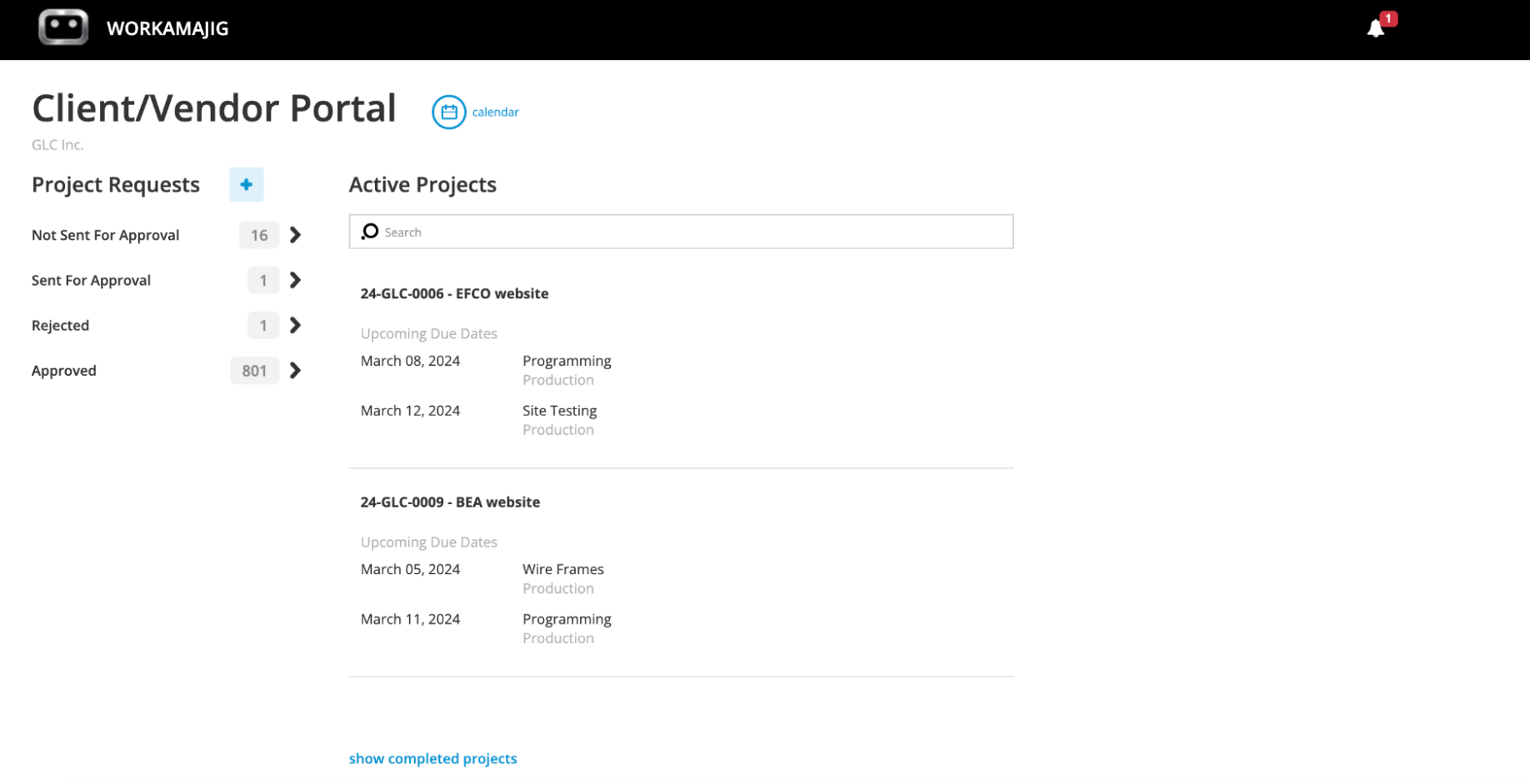
Workamajig gives each client their own dedicated portal — at no extra cost and with no user limit on the number of client contacts you can invite.
From their portal, clients can:
- Submit work requests using the project request forms covered above.
- Track project progress across all active engagements with your agency, with real-time status updates and progress visibility.
- Share feedback and communicate with your team by participating in project Conversations, responding to comments on deliverables, and starting their own threads when they have questions.
- View invoices and pay them online, keeping things simple for their finance team.
- Access files and final deliverables from one central place, instead of digging through email threads.
Our system also includes granular permissions management so you can decide exactly what each client sees.
Delivery Suite: Managing Work and the Client Experience
Workamajig's delivery suite is built to support the entire project lifecycle while keeping clients in the loop throughout.
We cover our complete toolkit below that gives PMs the visibility to manage resources, curveballs, change requests, scope creep, feedback loops, and cross-team coordination.
Project Planning Tools
After project intake, Workamajig's planning suite helps PMs tweak and finalize project plans, ensure estimates align with budgets, assign resources, and account for any third-party involvement.
First, our task management tools let them edit the specifics captured during intake — tasks and subtasks, dependencies, allocations, milestones, and more. Then, after the project kick-off, every user can see their assigned tasks (including due dates) in Workamajig and they’re automatically notified when new ones are added.
After all these details are finalized, managers can move on to building a resource schedule that matches people to the right jobs based on their skill sets, availability, and capacity. We offer two main tools here — a resource management module for your internal staff, and a vendor management module for managing contractors and outside help.
Resource Planning
A big reason managers love our staff scheduling dashboard is its convenience: it displays the full staff roster, with each team member's scheduled hours, percent of time utilized, and remaining hours to schedule for any window (week, month, quarter), all in a single view.
![Workamajig: Staff Schedule and Scheduling [GIF]](https://www.workamajig.com/hs-fs/hubfs/Workamajig%20Staff%20Scheduling%20Dashboard%20%5BGIF%5D.gif?width=1920&height=930&name=Workamajig%20Staff%20Scheduling%20Dashboard%20%5BGIF%5D.gif)
From here, managers can also:
- View and manage work assignments. Managers can toggle the staff scheduling dashboard to view each resource’s assignments alongside their schedule and even assign jobs without navigating to another part of the system.
- Track real-time availability. Team members can connect their calendars (Google Calendar, iCal, Outlook) so that time off and other commitments flow into the scheduling view. PMs don’t have to worry about accidentally assigning work to someone who's out on PTO or busy with other work.
- Compare workloads. Are some designers booked solid, while others with similar skill sets sit at 60% utilization? PMs can rebalance the work directly from the dashboard — keeping things fair and fending off burnout.
- Pull up unassigned jobs. The bottom of the staff scheduling dashboard features an overview of all unassigned work, so managers can match jobs to the right people and ensure nothing gets overlooked.
Vendor Management
When projects require outside support — freelance creatives, production vendors, print shops — Workamajig’s vendor management module streamlines the entire process of bringing stakeholders on board, managing communication, tracking their contributions, and paying them at the end.
Managers can:
- Request quotes, compare vendors, and evaluate reliability based on history.
- Generate purchase orders and work orders directly from the project, locking in a reference point with vendors before work begins.
- Track third-party costs and incorporate them into project estimates, so the project budget reflects the full cost of delivery.
- Coordinate vendor communication through the dedicated vendor portals. Freelancers can also jump into project threads and directly collaborate with internal teams.
- Reconcile vendor invoices against POs upon receipt, flagging discrepancies for review.
- Pay vendors online through our integrations with Edenred Pay (formerly CSI) and AvidXchange (formerly FastPay).
Time & Expense Tracking
Accurately tracking time and expenses tells you more than just whether a project is profitable or not; Workamajig links those insights to the client relationship, so you know what every client costs vs. what they bring in, how much effort your team spends on each account, and where your margins are taking a hit.
Workamajig time tracking
One of the biggest reasons agencies struggle to track time accurately is that their teams don't love doing it. When they’re focused on client work and delivery, pulling away from their work and tracking how much time they spend on each task quickly becomes a chore.
So, to save everyone involved from weekly headaches (employees having to record everything, managers chasing people up), we’ve built Workamajig’s native time-tracking tools directly into the task cards people already use, so that logging hours happens within their natural workflow.
![Workamajig - Today - Creatives - Tasks - New Time Entry for Projects [GIF]](https://www.workamajig.com/hs-fs/hubfs/Workamajig%20-%20Today%20-%20Creatives%20-%20Tasks%20-%20New%20Time%20Entry%20for%20Projects%20%5BGIF%5D.gif?width=650&height=690&name=Workamajig%20-%20Today%20-%20Creatives%20-%20Tasks%20-%20New%20Time%20Entry%20for%20Projects%20%5BGIF%5D.gif)
Every team member can use whichever method they prefer:
- Timers that automatically record hours in real time as someone works on a task.
- Direct time entry from task cards that auto-populates all necessary fields.
- Hours pulled from calendar events. After connecting their professional calendar to our system, users can make a time entry directly from a scheduled meeting on their Workamajig calendar.
- Traditional timesheets for users who prefer to submit their hours manually.
As employees enter time into our system, Workamajig ties submitted hours to employee service rates, automatically calculates labor costs, and updates the project’s budget in real-time.
Then, managers (or whoever holds approval rights) can view timesheets and either (i) approve them, or (ii) reject them with comments, as a bounce back to make corrections if there’s incomplete or missing information.
After approval, the hours and labor costs are pushed downstream into our billing worksheets — ensuring billable hours are captured in the client invoice.
Project expense tracking
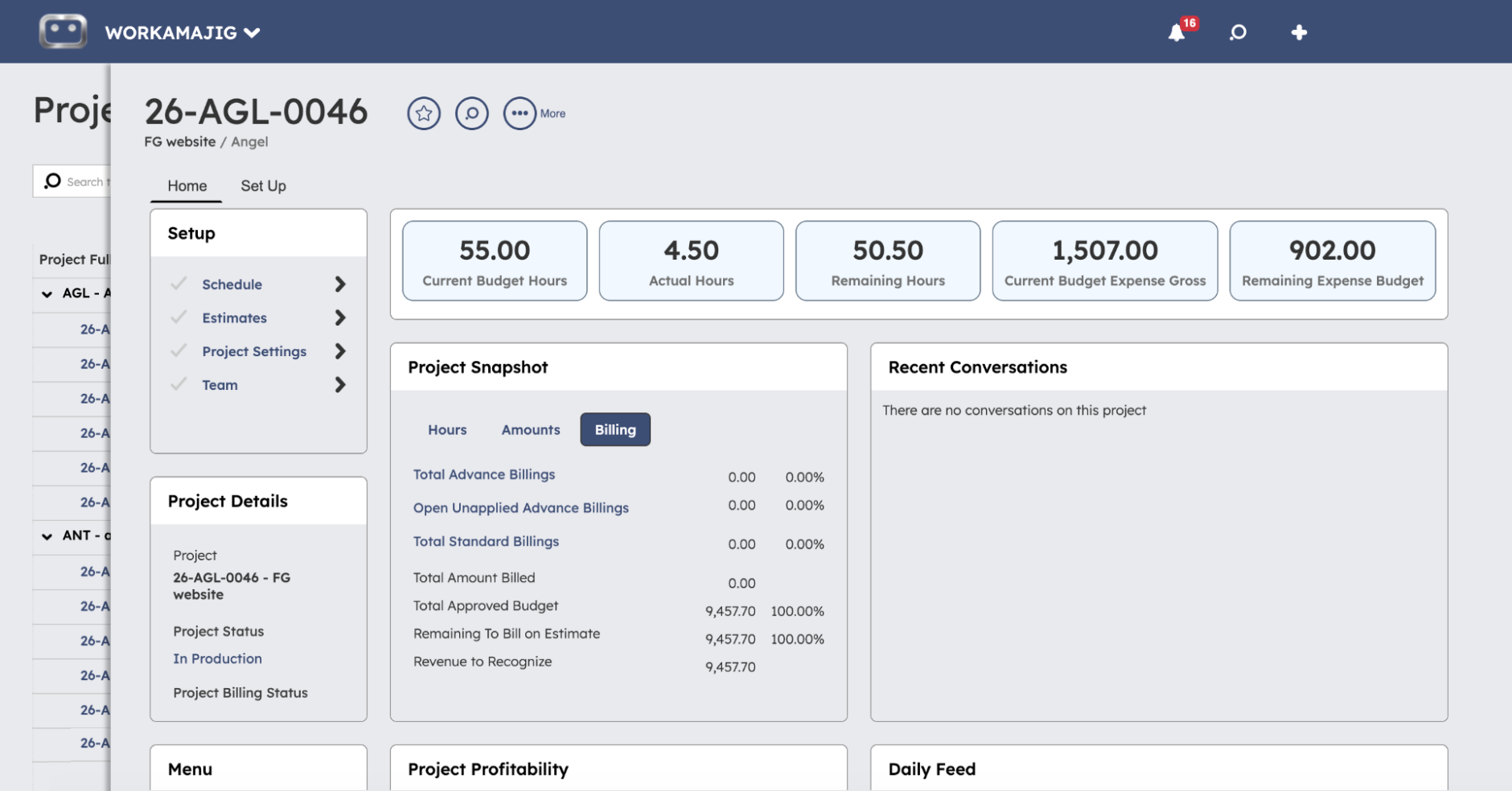
Our project expense tracking solution is a great example of why our native accounting capability is so useful: instead of having finance, operations, and delivery teams track and manage expenses across different systems, Workamajig brings everything together into a single workflow.
In our guide to project expense tracking, we get into why it’s so important to categorize each expense and apply those same categories across all projects. For example, it’s majorly beneficial on the reporting side because when you look back at P&L or budget reports, you can spot costs that consistently feed overruns across similar projects — and improve future planning.
Workamajig offers dedicated tools to implement these best practices and manage every type of agency expense:
- Vendor costs. As covered above, managers can generate POs and manage vendor invoices. They can also tag these costs to projects so they’re reflected in the budget.
- Mobile receipt capture. So a designer paying for stock photography or a rep covering travel costs can snap a receipt from their phone and tag it to the project on the spot.
- Expense reports and reimbursement workflows. With submissions and approvals managed entirely within the system.
- Credit card charges. These can be pulled into Workamajig through our Plaid connector.
- Media buys. Pull in insertion orders and track them against project budgets through integrations with Strata/FreeWheel, Mediaocean, Bionic, andGaleForceMedia.
- Multi-currency expense management. For agencies with international team members or that do business abroad, Workamajig supports multi-currency transactions, expense tracking, reimbursements, and invoicing with automated exchange rates.
And because all costs feed into the same project record in real time, you don't have to wait until end-of-the-month reconciliation to find out something's gone sideways.
Project Monitoring with Proactive Risk Alerts
Workamajig’s project monitoring dashboard helps PMs track the progress of all their projects in one place and surface issues early, so they can correct course and, if necessary, game-plan how to manage things on the client side (e.g., invoicing them for unexpected costs or setting expectations around timeline shifts).
![Workamajig dashboard: Projects and Project Status [GIF]](https://www.workamajig.com/hs-fs/hubfs/Workamajig%20-%20Projects%20and%20Project%20Status%20%5BGIF%5D.gif?width=1714&height=853&name=Workamajig%20-%20Projects%20and%20Project%20Status%20%5BGIF%5D.gif)
Our visual monitoring dashboard provides a snapshot of the health of every active project across the PM’s portfolio.
- On the right-hand side, Gantt charts show each project's current phase and progress against the timeline. PMs can reference the black progress bars to see how far along each project is, and color-code project phases to capture even more visual context. The Gantt view itself is super flexible: PMs can zoom in to a day-by-day view, zoom out to a quarterly view, and filter by client or campaign.
- On the left-hand side, a status breakdown by project uses icons and numbers to indicate progress and health. It includes columns for Financial Status, Project Timeline Status, Overall Status, Allocated Hours, Actual Hours, and % Complete. Each row shows one project status icon next to the financial and timeline indicators, so PMs can immediately tell which projects are healthy (green), at risk of timeline or budget overruns (yellow), or have already gone over budget or been delayed (red).
Workamajig continuously compares actual labor costs and expenses against the projected budget, calculates real-time profit margins, and updates the project's financial status icon as the numbers shift.
When something starts to drift — a task running long, hours burning faster than budgeted — our risk alerts don’t just show up in the monitoring dashboard; they also flow straight into the PM's personalized Today – Project Manager dashboard and even notify them over email.
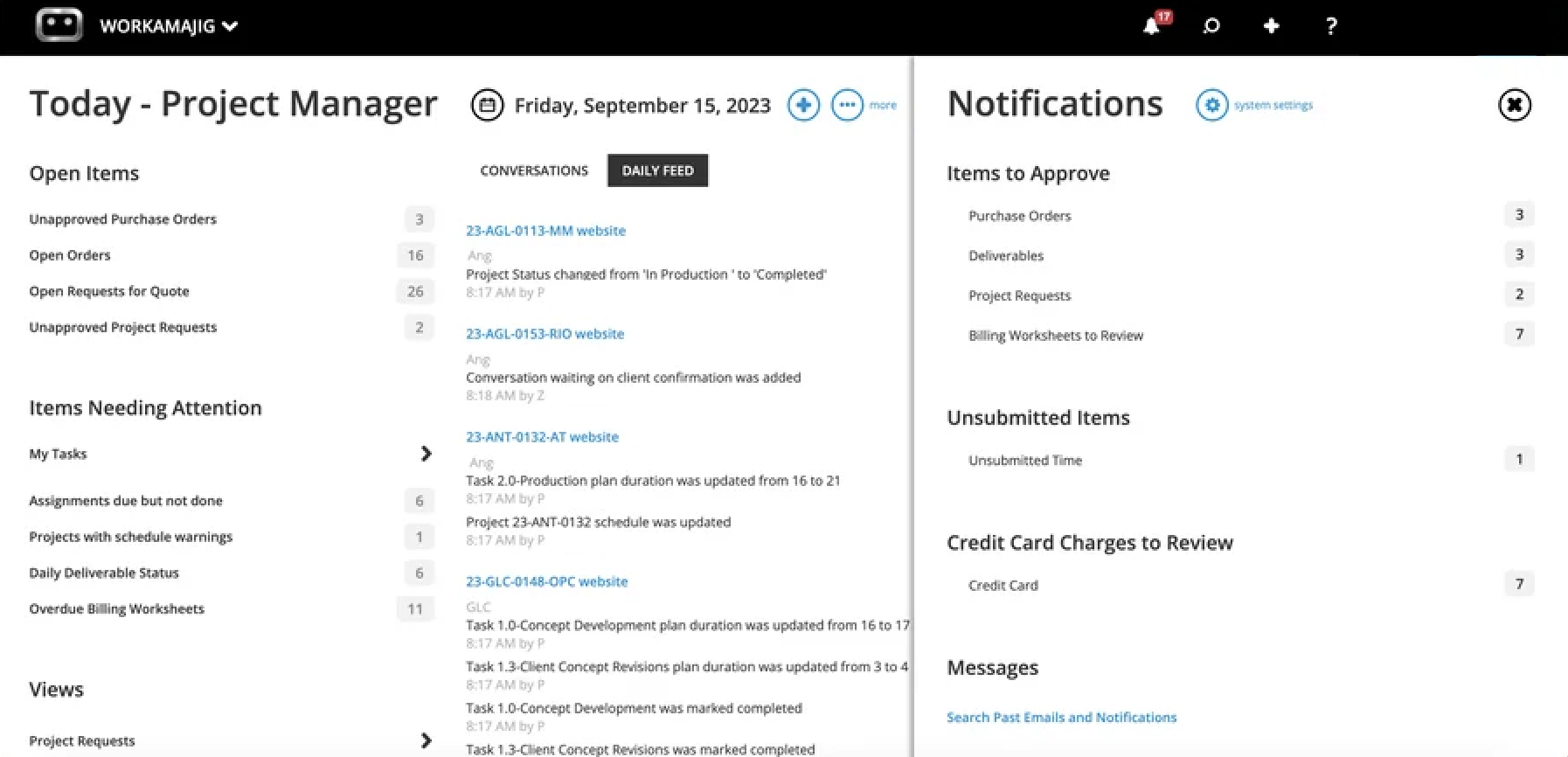
The dashboard includes everything else PMs need to track their work: items awaiting their approval, projects with schedule warnings, deliverables awaiting review, conversations they've been tagged in, and the day's task list. They can also conveniently take any quick actions (e.g., review a project request, approve a billing worksheet, reassign a task, or enter time).
Read more: 8 Tips for Managing a Project Budget (+ Budgeting Methods)
Change Management
The goal of a good change management process isn't to say no to incoming requests — it's to ensure they're managed in a structured way and reflected in budgets and timelines, while keeping all stakeholders aligned.
Workamajig's change management tools are built around these needs:
- Change request forms standardize how new requests are submitted — whether from clients via the portal or from internal teams — prompting users to share their requirements, expectations, and context in a structured way.
- Approval workflows route requests to the right decision-makers (PMs, account managers, or whoever owns the call) for review. These workflows can be heavily customized to suit your workflow.
- Forecasting tools let PMs see the cost and timeline impact of accommodating the request before committing — how much extra labor it'll need, what it'll do to the deadline, and which other work it may pull resources away from.
- Change order estimates enable teams to manage change requests with budget implications in mind.
- Project budget and timelines are updated only after a change order is approved, so the project record always reflects the current agreed-upon scope.
Managers also love how Workamajig’s system keeps a record of all these changes, so they can track how they shape the project’s scope, timeline, and budget over time. Our system records both:
- Budget changes, by separately recording the original budget (based on the initial estimate), the budgeted change order (based on approved estimates designated as CO), and the current budget (the sum of all approved estimates).
- Full version history of any spec sheet that changed, so managers can track who submitted the request, when it came through, and what it asked for.
Creative Collaboration Tools
Workamajig’s project collaboration toolkit is specifically tailored to creative workflows, with customizable approval workflows, proofing tools, file management, and built-in in-project communication.
First, every team member starts their day on a personalized Today dashboard (like the one for PMs we covered above) that shows their assigned tasks sorted by priority, conversations they've been tagged in, what's due today, and what's ahead for the week. They can log time and respond to feedback without leaving the page.
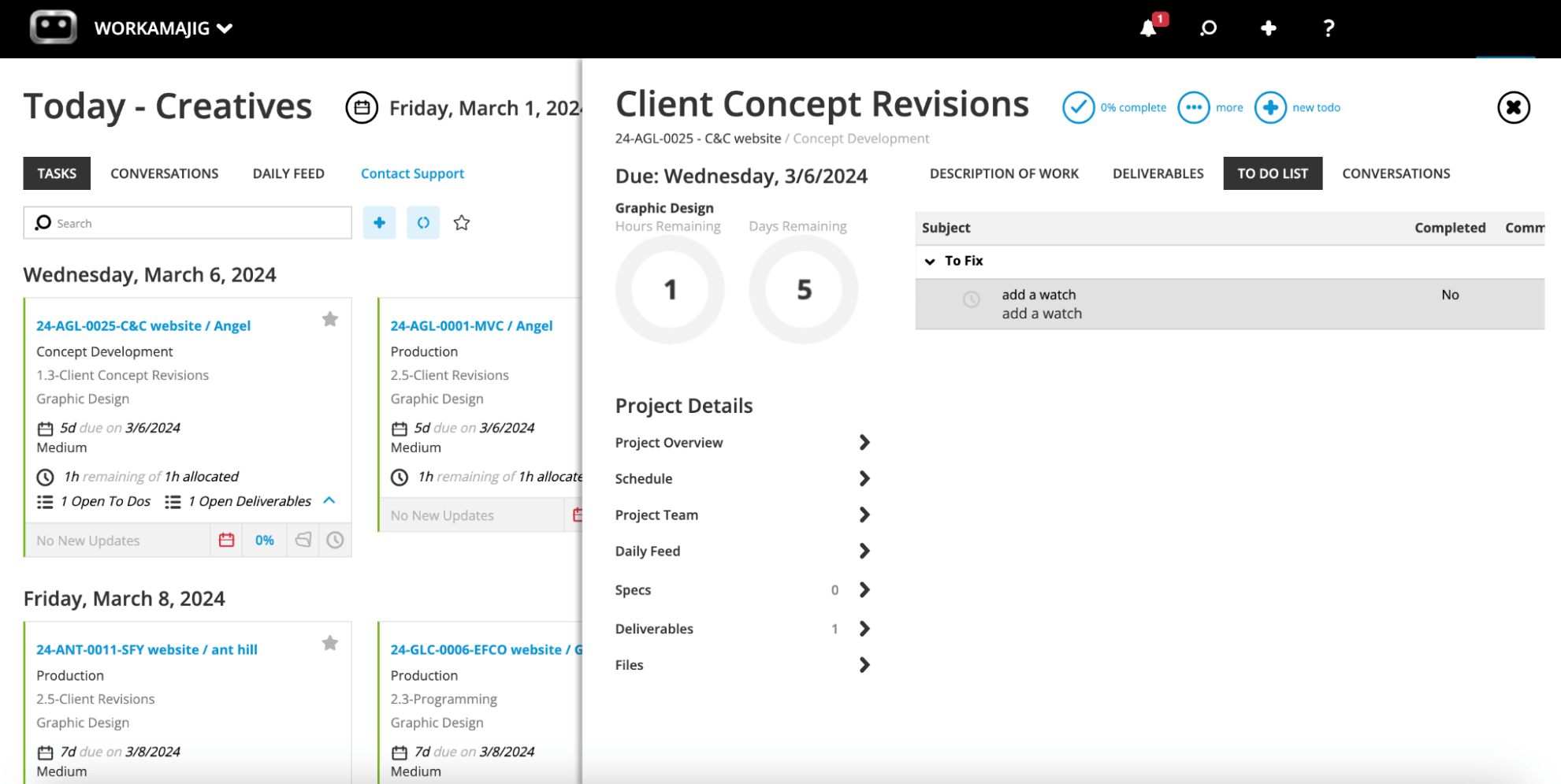
Then, from task cards, team members can:
- Share files of any creative format — images, video, audio, design files, PDFs, HTML, and more — with full version history.
- Tag colleagues for feedback or context, with email notifications so people respond promptly.
- Create project conversations that everyone tagged on the project can participate in (including clients, when necessary).
- Comment on tasks and deliverables, and save the full thread for later reference.
- Review files, compare versions side by side, and leave annotated markup directly on the asset with our internal proofing tools.
Our feedback controls also allow managers to cap the number of revision rounds per deliverable, to keep scope creep in check.
Clients can be looped into the workflows that involve them — leaving feedback on deliverables, participating in review rounds, approving final assets, and downloading finished work.
Project Portfolios for Organizing Client Work
When you’re running more than one project for a client, managing each project separately comes with a few drawbacks: context gets scattered across different projects, there’s double work that could be merged, and you don’t get a central view of how things are going with a particular account (especially in terms of budgets, overall deliverables, and timelines).
For these reasons and more, consolidating each client’s projects into a dedicated portfolio is a far more convenient way to manage. That’s where Workamajig’s Campaigns feature comes in — it lets you link multiple projects under a single portfolio.
Each campaign brings together all the tasks, schedules, estimates, files, expenses, and reporting from every linked project. Then, you can:
- Centralize file sharing and management — create a single repository that teams across the entire portfolio can use.
- Track all deliverables across the portfolio — including what’s been submitted and what’s being worked on.
- Manage the full portfolio’s schedule in one place — with the option to update tasks across linked projects from a fully centralized campaign view.
- Build a centralized campaign budget — either by rolling up linked project budgets or by building an independent campaign budget based on services and committed hours (handy when not all projects in the portfolio are fully scoped yet).
- Monitor real-time budget burn across the entire portfolio — with the option to still drill down into individual project budgets.
- Centralize billing — by looping multiple projects onto a single client invoice or using mass billing to generate individual invoices in one click.
- Evaluate campaign profitability at the portfolio level — so you can evaluate the overall client engagement.
Learn more about campaigns in Workamajig here: Best Campaign Management Software for Agencies & Creatives
Accounting Software: Billing, Getting Paid, & More
Most client management platforms only support budget tracking and invoicing. The actual accounting work — reconciling vendor bills, tracking expenses, managing payments, closing the books — gets pushed off to QuickBooks, Xero, or whatever their finance team runs in parallel.
The trouble with that setup is that project and client data live on one system, financial data lives in another, and someone (usually from accounting) spends hours every week reconciling the two.
Workamajig is built differently. Our complete accounting system sits inside the same platform as your CRM, project management, and client portals — so financial, project, and client data all live in the same place, updated in real time. That changes a few things:
- Reconciliation gets way simpler. There's no export-import back-and-forth between your project tool and your accounting tool because everything from vendor invoices to media buys already lives in the same place.
- Billing teams see the full picture inside the project record. When it's time to generate an invoice, billing users can see what was estimated, what was spent, what's already been billed in prior rounds, and what's still pending.
- Internal teams can easily coordinate to ensure the first invoice is accurate. Workamajig's billing worksheets let users with appropriate rights review every project transaction, expense, and labor charge together, so that by the time an invoice is generated, the details are already worked out.
Our complete accounting system includes:
- Complete GL accounting — with a full chart of accounts, journal entries, and financial statements.
- Vendor invoice management — with tools to reconcile vendor bills against purchase orders, work orders, and receipts (as covered earlier).
- Support for all project billing methods — including time and materials, retainer, media, fixed fee, prebilling, work-in-progress (WIP) billing, and advance billing.
- Multi-currency and multi-entity accounting — for agencies serving international clients or operating across multiple offices and legal entities.
- Sales tax automation via Avalara — which generates accurate tax rates on client invoices.
- Cash flow projections, revenue forecasting, and a full suite of P&L reports — so leaders aren't waiting on a separate accounting system to know where the agency stands.
The result is that the back-office side of agency operations runs in the same system as the client-facing side.
Below, we'll cover Workamajig’s project billing and invoicing workflow in more detail.
Billing & invoicing
Workamajig supports every billing method agencies typically use — fixed fee, time and materials, retainer, advance, prebilling, work-in-progress (WIP), and media — so however you've structured a client engagement, the system can bill against it accurately.
Before any invoice goes out, users can generate a billing worksheet based on transactions or as a percentage of the project budget, which comes pre-populated with all the relevant project details and line items.
The worksheet is then routed to the right decision-maker — typically the account executive or PM — for review. They can:
- Verify everything that should be on the invoice is there.
- Write off items that shouldn't be billed (overruns the agency is absorbing, courtesy adjustments, etc.).
- Transfer costs between projects or campaigns when something landed in the wrong place.
- Round entries up or down to match what was negotiated with the client.
Once the worksheet is approved, it routes back to the billing team for final invoice generation. Then, the final invoice goes out with links for the client to pay online by credit card or ACH.
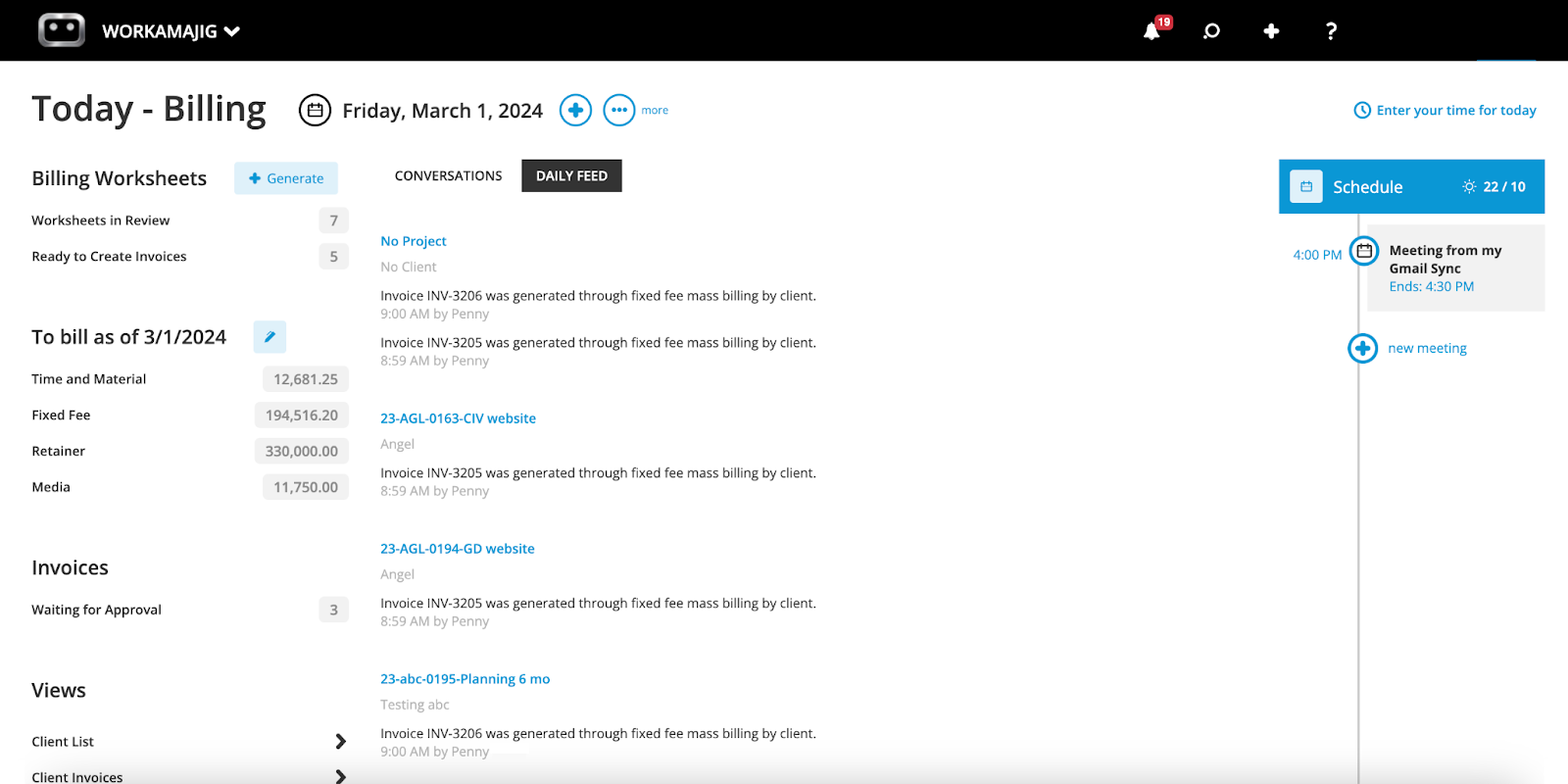
Billing team members can generate billing worksheets, track the status of existing ones, and manage their other day-to-day responsibilities from their personalized Today - Billing page. They can also send invoices, log payments, and follow up on outstanding receivables — with all the context they need already in view.
Reporting Suite: Spot the Profit & Drag Inside Your Agency
Because every Workamajig module feeds into the same data layer — CRM, projects, time tracking, expenses, accounting — your reporting reflects the whole agency, not just one piece of the pie. You can see which clients drive profit, which services consistently run over, which lead sources convert best, and which accounts are eating margin.
Client & Project Profitability Reports
Workamajig offers various pre-designed reports for viewing profitability from different perspectives — such as at the project, client, and campaign levels, or calculated using actuals only vs. the GL.
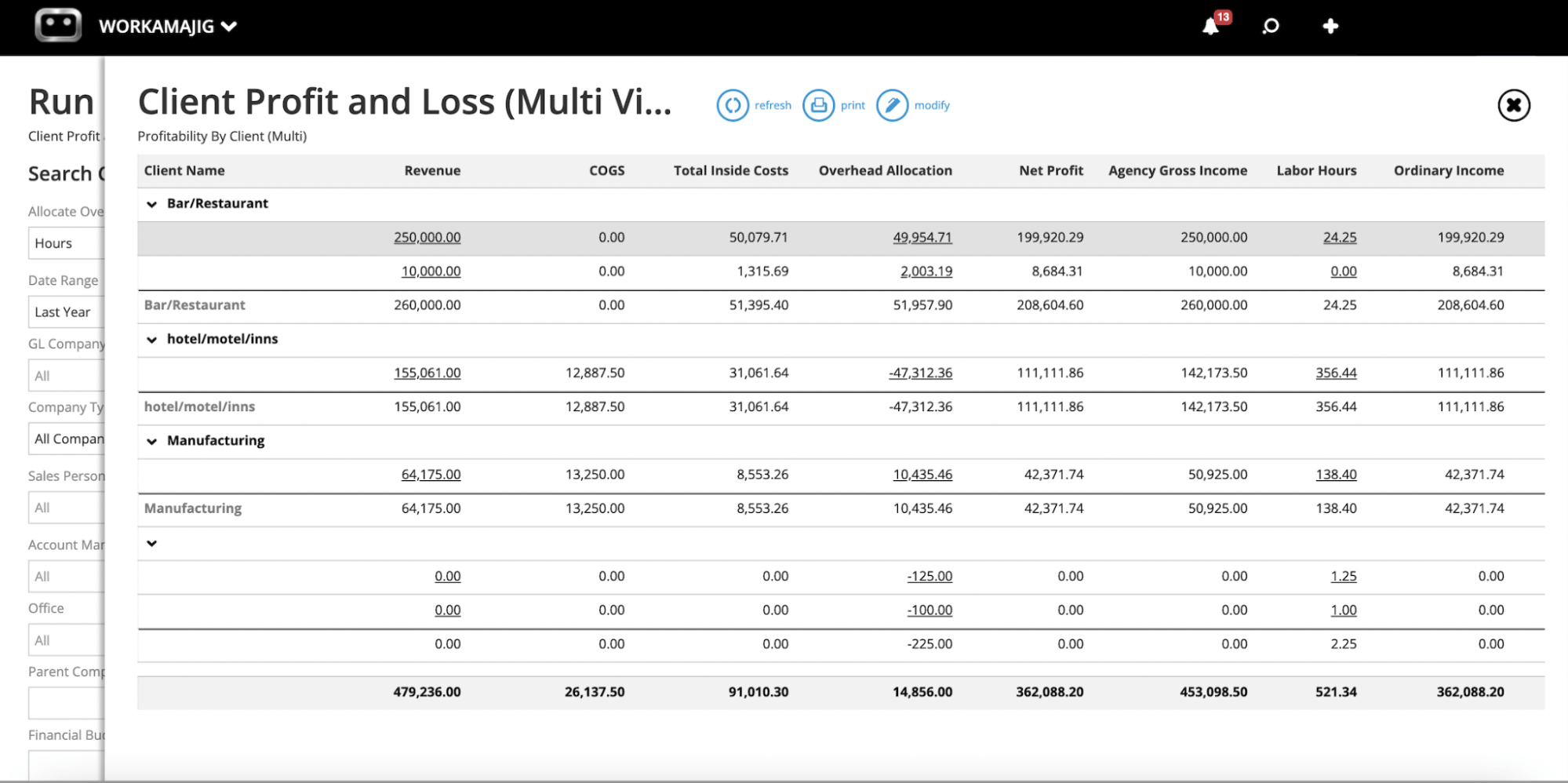
Some of our main profitability and budget tracking reports include:
- Client P&L. The Client Profit and Loss report shows you exactly what each client is worth to your agency, with breakdowns that show revenue, gross income, net profit, labor hours, COGS, total inside costs, and overhead allocation breakdowns.
- Project budget analysis. This report compares estimated and actual costs across all active projects — and, by default, groups projects by client for convenience.
- Campaign and service profitability. For agencies running multi-project portfolios, campaign-level P&Ls offer a convenient breakdown of costs and profitability. And you can zoom in on profitability by service line — e.g., design, copywriting, paid media, strategy — to see which offerings bring in the real money and which ones might be hurting profit margins.
- Project recap analysis. After a project wraps, the recap report breaks down the full financial picture: what was estimated, what was spent, where overruns occurred, and the final margin. You can use it to refine future estimates and inform pricing conversations on the next round of work.
Workamajig’s P&Ls differ from our budget and recap analysis reports because they’re based on GL transactions (rather than just actuals), providing a more comprehensive picture of profitability.
You can choose how to allocate overhead when generating these reports, but it’s important to stay consistent everywhere (otherwise, accurately tracking agency-wide profitability becomes tricky). Our overhead allocation options include:
- Labor cost. Overhead is distributed proportionately to total labor dollars, so projects with higher labor spend absorb a larger share of indirect expenses.
- Total billing. Overhead is distributed proportionally to revenue, so projects that generate more income are assigned a larger share of overhead.
- Labor hours. Overhead is assigned based on the approved hours logged on timesheets for a client or project, relative to the total approved hours for the selected period. For example, if a client consumes 40% of agency resources, they’ll be assigned 40% of your overhead.
- None. The P&L is generated without any overhead allocation, showing only direct costs and revenues.
Agency Insights & Resource Utilization
Workamajig's Agency Insights dashboard shows where your team's time actually goes — so you can improve future plans and make strategic calls about the engagements you have with clients.
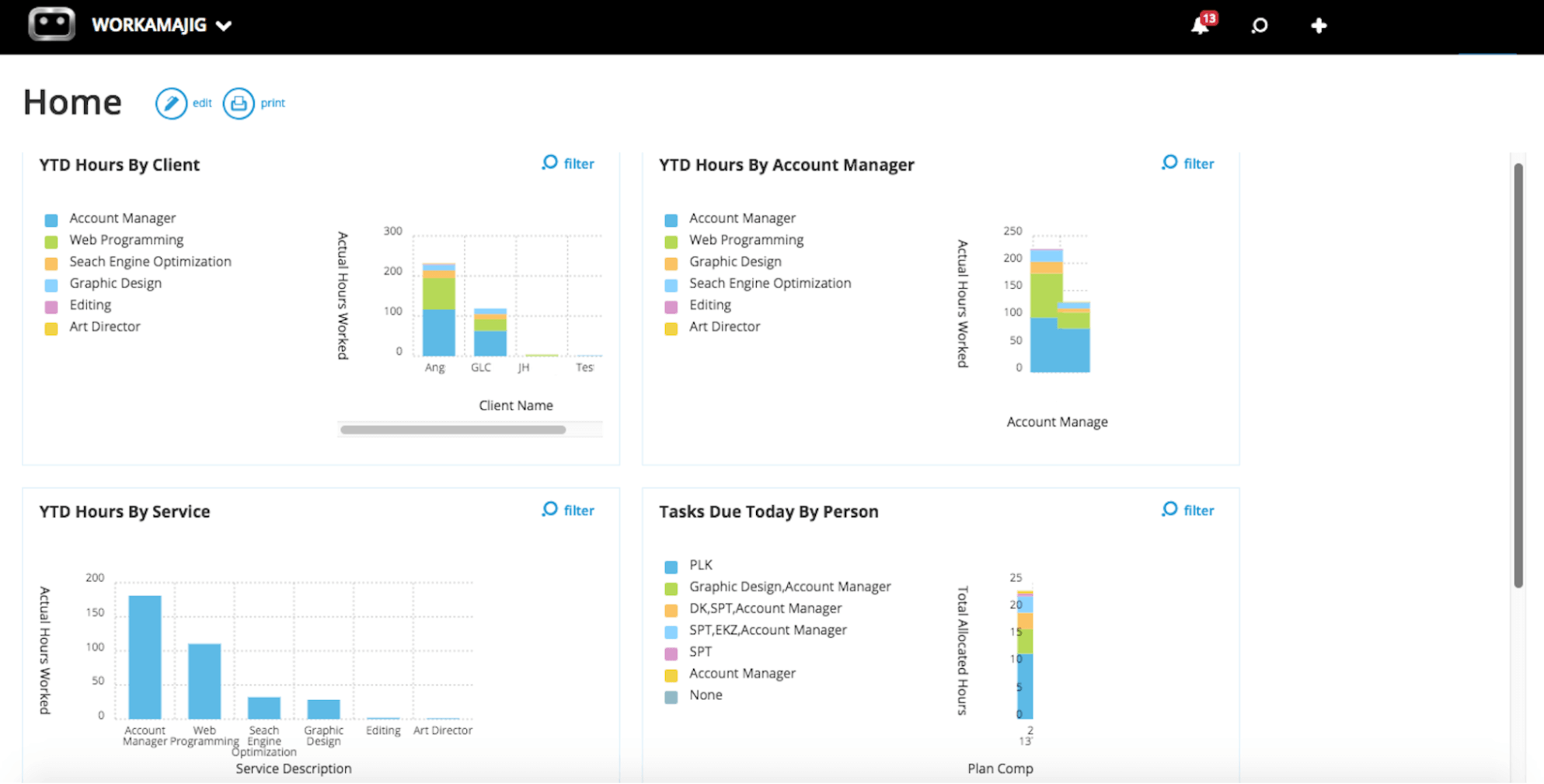
You can break hours down by:
- Client — so you can compare how much effort is being spent across accounts. Cross-referencing these insights with the Client P&L can help you quickly spot accounts where effort and revenue don’t really match.
- Service — catch any service lines that are eating more hours than their price tag justifies. Useful for identifying the offerings that need to be re-scoped or priced higher.
Measure What Matters
While Workamajig’s reporting suite features several out-of-the-box (like the ones covered above), it’s also very customizable. You can adjust filters, slice data by dimensions, and customize the look and feel of reports — and even create new ones from scratch by mixing and matching different data sources.
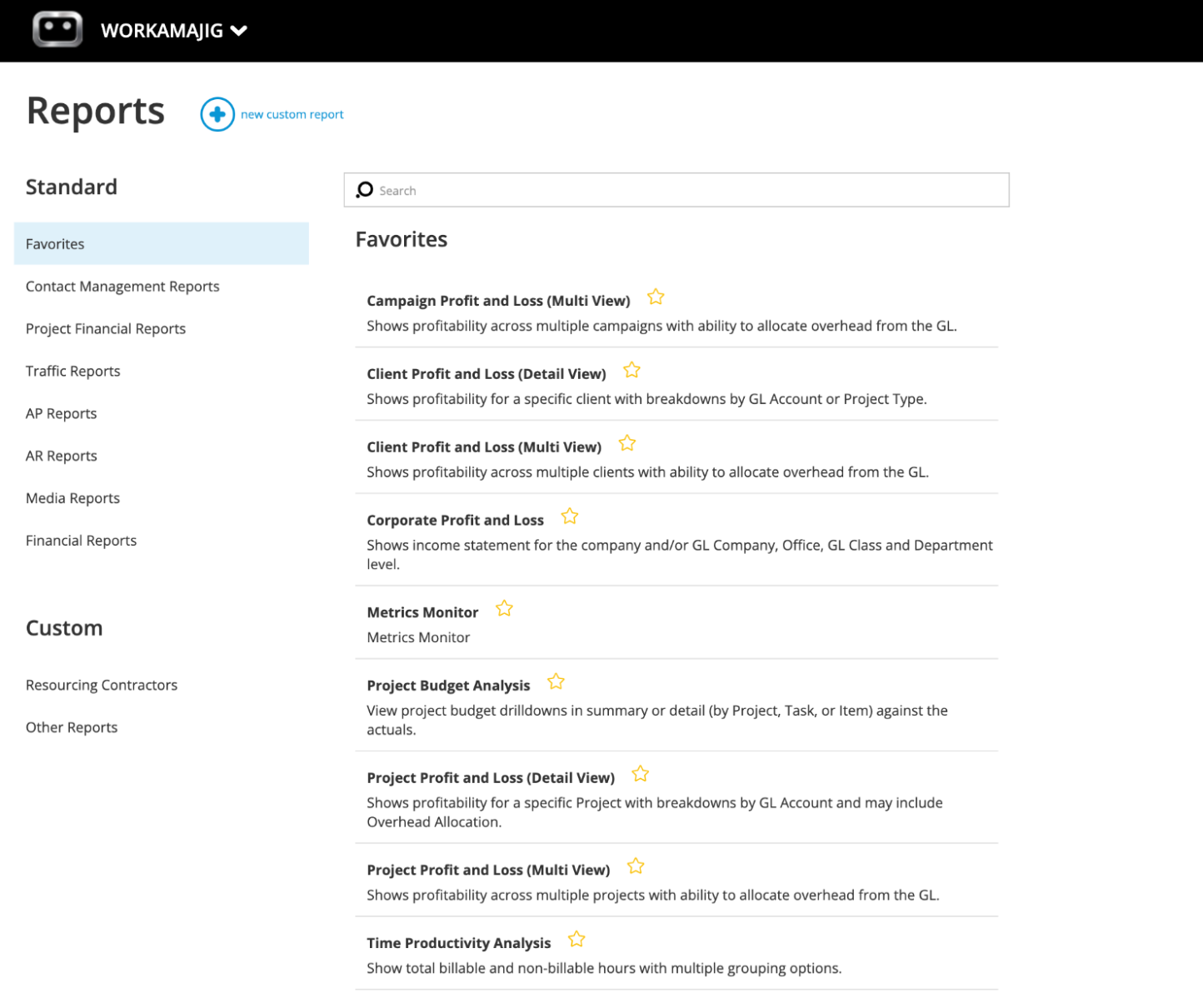
You can even save all your most-used reports — whether custom or pre-designed — as favorites for quick access from your personalized dashboard:
Our reporting suite also features a Key Metrics Monitor that lets you track the numbers that matter most to your business over time. Your Workamajig account manager can work with you here to configure the right KPIs for your agency, set up the reports and dashboards that surface them, and revisit those choices as your business evolves.
Pricing and Getting Started
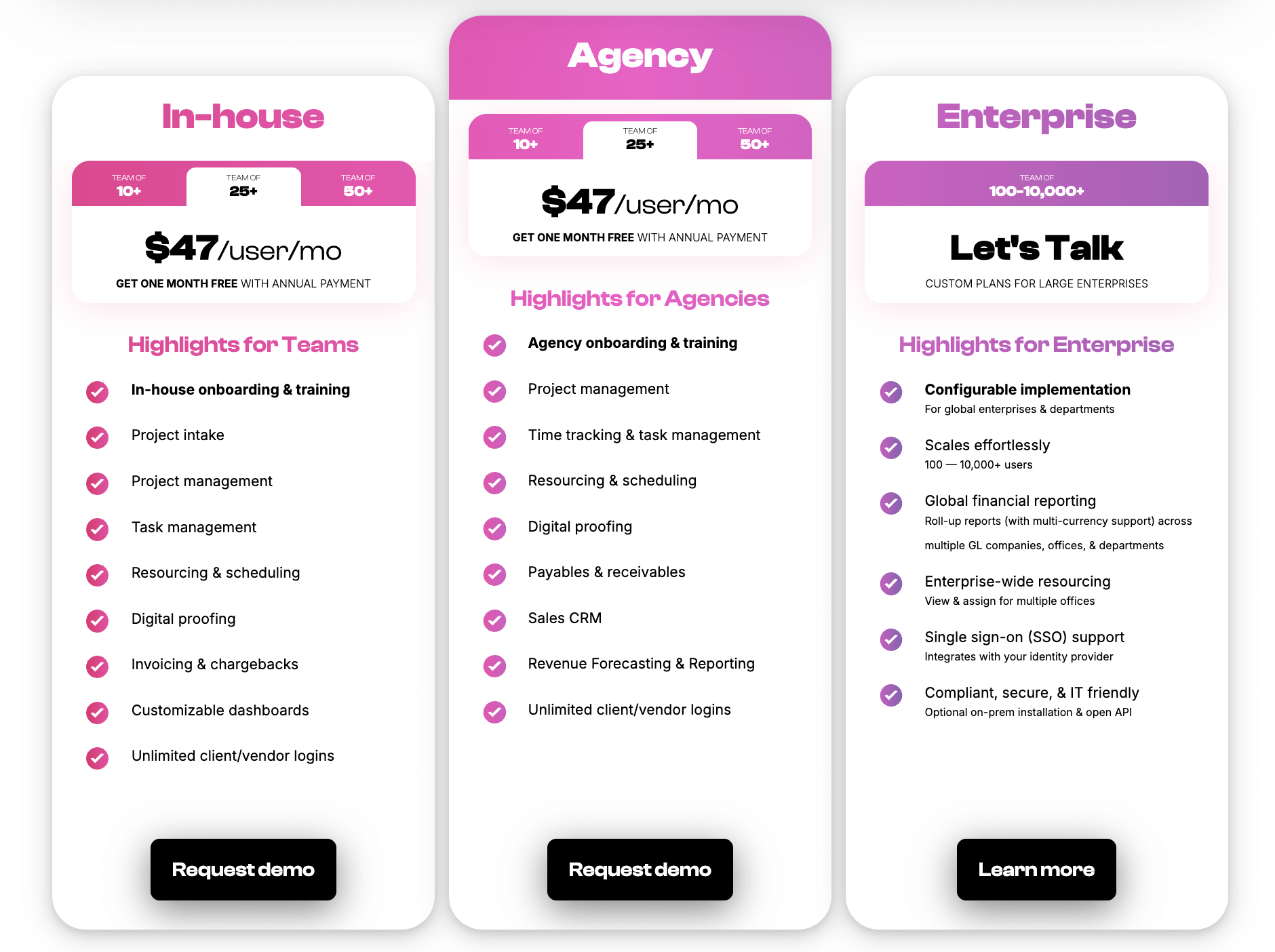
Workamajig is priced as a single, all-inclusive package. Every plan includes the full system (CRM, project management, accounting, client portals, reporting, the works), unlimited client and vendor portals, and a dedicated account manager who provides personalized onboarding and stays with your account for the life of the subscription.
Pricing scales by team size:
To see how Workamajig can support your unique workflows, request a personalized demo for a live walkthrough.
2. Function Point
Founded in 1997, Function Point is a scalable agency management system used by over 500 agencies worldwide. It positions itself as an all-in-one for creative teams and bundles six modules: CRM & Estimating, Project Management, Resource Management, Team Collaboration, Agency Financials, and Business Reporting into one system.
FP does a thorough job of supporting the entire client and project lifecycle. The CRM supports estimates, proposals, sales pipeline tracking, revenue forecasting, and project intake (through job request portals). It also offers a handy dual-estimate capability. Teams can generate two versions of every estimate from the same underlying data: a detailed internal version with all the line items and labor breakdowns, and a simplified client-facing variant.
Function Point keeps clients engaged in project workflows through client portals, collaboration tools, and communication tracking. After project wrap, teams can use the billing tool to generate invoices.
Function Point's customers praise its responsive customer support and the ease of having pipeline, project management, and financials in one place. The platform is a strong fit for design-focused and PR shops that don't need media tooling and are comfortable pairing it with QuickBooks.
But it's priced on the higher end, and the per-user cost climbs once you factor in the separate accounting subscription, so the total tech spend isn't always cheaper than more integrated alternatives.
Find more Function Point reviews here.
Key Features
- Client management tools, including estimates, proposals, change orders, revision tracking, and job request portals
- CRM and email integrations
- Project templates
- Project management dashboards
- Project tracking and monitoring
- Team collaboration, including file sharing and commenting
- Resource management
- Time tracking
- Financial management, including expense tracking
- Billing and invoicing
- Business intelligence reports, including profitability reports and custom reporting
- Integrations with accounting systems like QuickBooks and other business applications
Pricing
Like Workamajig, Function Point provides complete platform access across both of its plans. The main difference is that the higher tier includes its QuickBooks integration. The packages are priced as follows:
- Standardize: $58/user/month
- Optimize: $68/user/month
Read more: Function Point Reviews & Alternatives
3. Productive
Productive is one of the more popular agency management platforms among small- to mid-sized agencies and other professional services businesses (including consultancies, IT services, accounting firms, architecture and engineering practices, and more).
Its native sales CRM features Kanban-style pipeline views, multiple customizable pipelines, deal-stage tracking, and the ability to convert won deals directly into projects (with the option to transfer hours logged during opportunity development into the live project). It also ties into Productive's broader system, so estimates, rate cards, and resource forecasts can be pulled into the sales process for more accurate quoting.
Productive’s delivery suite helps managers chart the most profitable way forward and continue to track profitability in real-time as projects progress. The Scenario Builder lets them simulate different project outcomes by tweaking details like the assigned resources, service rates, and timelines.
Then, once a project kicks off, time entries, expenses, and vendor costs all feed into a live margin dashboard, so teams can see exactly how each engagement is performing without waiting for month-end. The "Profit Margin by Client" report helps leaders dig deeper into which accounts are driving (or holding back) agency financials.
Users often report bugs and issues that disrupt their workflows.
Check out more Productive reviews here.
Key Features
- Project management
- Resource planning
- Budgeting
- Billing
- Sales CRM
- Time tracking
- Reporting
- Documents (to create shared docs & collaborate with teammates)
- Open API (to integrate with outside systems)
- Mobile apps for iOS & Android
Pricing
Productive offers four pricing tiers, billed per user:
- Essential ($12/user/month): Core project management, time tracking, budgeting, expense management, and a single-pipeline sales CRM.
- Professional ($29/user/month): Adds rate cards, recurring budgets, retainer management, advanced reports, billable time and expense approvals, invoicing integrations, and three CRM pipelines. Productive provides custom quotes on this plan for teams requiring over 49 seats.
- Ultimate (custom): Adds revenue forecasting, scenario planning, multi-subsidiary support, HubSpot integration, advanced time tracking, and five CRM pipelines.
- Enterprise (custom pricing, 50+ users): Adds volume discounts, a dedicated account manager, on-premise onboarding, SCIM provisioning, and enforced SSO.
All plans require a 3-seat minimum. Productive also offers a 14-day free trial plus free client logins (clients can be added to projects without taking up paid seats).
Read more: Best Productive.io Alternatives for Agencies
4. Scoro
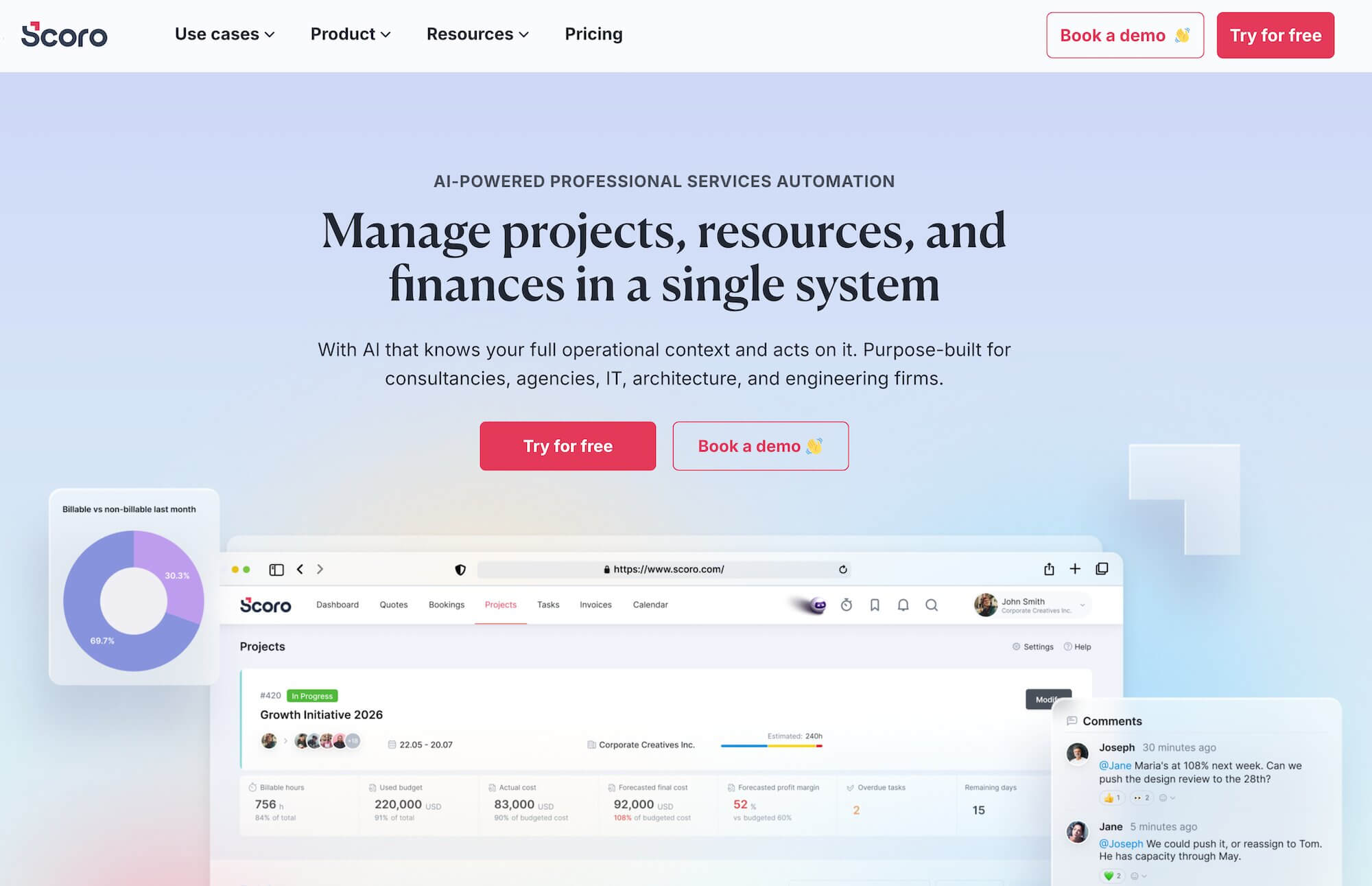
Scoro offers a complete work management system with native project management, resource planning, time tracking, client management, financial management, and business reporting tools.
Scoro’s native CRM packs in everything agencies need to manage their sales pipeline, develop opportunities, and ensure smooth client intake — with pipeline management, estimating, proposal creation, sales forecasting, sales target tracking, and automated project handover.
Users especially love the quotation estimation matrix feature because it lets them create client-facing quotes while breaking down costs, roles, and hours internally for accurate profitability tracking.
For managing clients, Scoro also offers:
- Dedicated client profiles. You can create a record for each client that consolidates all their data in one place — including files, activity reminders, invoices, quotes, etc — so sales and delivery teams always have the right context on hand.
- Customer portals. Agencies can create a secure space where customers can log in, view project progress, access documents (quotes, invoices, contracts), and collaborate directly.
However, it’s worth noting that Scoro’s packages can be a bit restrictive, and costs extend beyond the subscription price. First off, only the most expensive standard package unlocks Scoro’s agency CRM. And secondly, the customer portal feature is sold separately as an add-on (the additional payment gets you access with support for up to 100 users).
Key Features
- Project management
- Resource planning
- Time tracking
- Collaboration tools
- Quoting and budgeting tools
- Invoicing
- Cost management
- Retainers
- Sales CRM
- Reporting
Pricing
Scoro offers four standard packages plus custom enterprise plans, billed per user:
- Core ($23.90/user/month): Offers basic project and task management, Gantt charts, calendars, contacts, quotes, invoices, receipts, dashboards, and detailed work reports.
- Growth ($38.90/user/month): Unlocks project budgets and templates, retainer management, recurring tasks, quoted vs. actual reporting, automation triggers, utilization reports, and detailed financial reports.
- Performance ($59.90/user/month): Unlocks the sales pipeline (Scoro's CRM), the planner, timesheets, quote estimation matrix, price lists, cost and profit forecasting, revenue recognition, and supplier management.
- Enterprise (custom pricing): Adds company-wide budgets and forecasts, time locking, approval flows, WIP reporting, multi-account reporting, SSO, and user provisioning.
All plans require a minimum of 5 users and come with a 14-day free trial.
Read more: Best Scoro Alternatives for Agencies
5. Advantage
.png?width=2000&height=878&name=Advantage%20Simpli.fi%20homepage%20(2024).png)
Advantage is a creative agency client management system that’s almost as comprehensive as Workamajig, with project management, resource planning, time tracking, client management, accounting, and financial reporting tools in one place. Its native integration with Simpli.fi is one of the main draws for creative teams, as it lets them manage both media plans and media buys in the same place.
However, Advantage is further down on our list because it lacks a native agency CRM, so it falls short for pre-sales client management — e.g., lead capture, opportunity development, pipeline management, and the CRM-to-project handover. So agencies using Advantage have to pay for a whole separate CRM system (like HubSpot or Salesforce) and integrate it.
Users praise Advantage for being a feature-rich solution that integrates their workflows, brings stakeholders together, and ultimately boosts productivity. But they also report a steep learning curve and mention that navigation can be confusing — as Advantage’s core features live in separate interfaces that users have to switch between.
Read more Advantage reviews here.
Key Features
- Project management
- Resource management
- Collaborative tools like proofing & reviews
- Media planning & buying — including broadcast buying, digital buying & media reporting
- Time tracking
- Risk analysis & burn rate tracking
- Financial reporting
- Budget monitoring
- Revenue forecasting
- Billing
- Invoicing
- Media Accounting
- Reporting dashboard (to monitor projects, financials, and other behind-the-scenes operations)
Pricing
Advantage provides custom quotes upon request. Its pricing is reportedly on the higher end, since it's mainly geared towards larger agencies and enterprises.
Read more:
- From Advantage to Workamajig: Why 5Points Creative Made the Switch
- Best Advantage Software Alternatives for Creative Teams
6. RoboHead

RoboHead is a project management platform built specifically for marketing and creative teams (in-house and agencies), with deep capabilities around intake, creative review, and stakeholder collaboration. Its advanced integration with the Adobe Creative Cloud is one of the main reasons why it appeals to creatives.
RoboHead organizes projects and campaigns by client, with client-level dashboards showing activity metrics, project status across the account, summary expense data, and a communication history capturing every note associated with that account. External stakeholders (including vendors and clients) are managed as "Contact" users — separate from your internal team but able to submit project requests, participate in reviews, sign off on approvals, and access shared files and folders through configurable permissions.
RoboHead also features customizable project request forms to streamline intake. Approved requests convert into projects, and the platform sends automated status emails to requesters at key stages.
While RoboHead’s creative project management and collaboration tools are pretty robust, the system lacks the broader capabilities that the other systems we’ve covered do — notably a native CRM, media-buying integrations, billing and invoicing, and accounting tools.
Find more RoboHead reviews here.
Key Features
- Project request forms
- Project planning with templates
- Task management
- Project management & monitoring
- Team management with staff scheduling
- Time tracking
- Collaborative tools to support feedback discussions & revisioning
- Portfolio management
- Workflow automation tools
- Financial reports
- Integrations
- Adobe XD plugin
Pricing
RoboHead provides custom quotes.
Read more: Best RoboHead Alternatives for Creatives & Marketers
7. ActiveCollab
ActiveCollab is an affordable agency work management system for small- to medium-sized agencies and service businesses. Founded in 2007, it now supports more than 50,000 teams worldwide.
The platform features a dedicated Client Management module with a client address book for storing company and contact information, unlimited free client user accounts, and granular permission controls so you can hide internal tasks, discussions, and notes from clients while still letting them collaborate on the work that involves them. There's also a Client+ role for clients who need more collaborative access — they can leave feedback, upload files, and approve deliverables.
While ActiveCollab lacks a native agency CRM, it lets users generate estimates, track their status (sent, won, lost), and even convert them into projects or invoices.
The platform is pretty comprehensive on the financial management side, featuring native invoicing (with online payments via PayPal and Stripe), expense tracking, project budgeting, multi-currency support, billable vs. non-billable time tracking, and project profitability reports. However, its financial reporting isn’t as advanced as the more robust systems on our list, and you’ll need to integrate it with QuickBooks to support accounting workflows.
Users generally praise ActiveCollab for being easy to use and quick to implement. Overall, its affordable plans make it a good fit for smaller agencies that are comfortable trading some depth for affordability and simplicity.
One thing to keep in mind is that the base plans only really offer project management capabilities; you’ll need to subscribe to the highest tier to access workload management, capacity planning, integrated invoicing, project budgeting, profitability reports, and online payments.
Check out more ActiveCollab reviews here.
Key Features
- Task management
- Project templates
- Project collaboration tools
- File sharing
- Client collaboration with feedback and approvals
- Time tracking
- Billable hours management for invoicing
- Team scheduling and workload balancing for optimal resource use
- Dashboard overview of all projects
- Expense management and budget tracking
- Native billing & invoicing
- Profitability reports
- Third‑party integrations with Slack, Google Drive, and Dropbox
- Mobile apps for iOS and Android
- API access for custom workflows
- Custom reports tailored to needs
Pricing
ActiveCollab offers three standard packages:
- Plus ($15/month flat rate for up to 3 seats): The starter plan for small teams, covering unlimited projects and tasks, unlimited clients, integrated time tracking with a stopwatch, editable time entries, personal timesheets, project templates, unlimited discussions and notes, an integrated chat app, 10GB storage, and integrations with Google Workspace and Dropbox.
- Pro ($11/user/month): The mid‑tier plan for teams that need visibility into expenses and reporting. It includes everything in Plus, plus unlimited members, 125GB of upgradeable storage, time reporting, expense tracking and reporting, advanced reporting, and integrations with Zapier, Slack, and webhooks.
- Pro+ ($17/user/month): The most comprehensive standard plan, designed to run everything from intake to invoice. It adds on workload management, capacity planning, time‑off tracking, profitability reporting, integrated invoicing, and payment gateways (Stripe, PayPal).
The platform also offers custom enterprise packages with advanced features such as priority support, custom seat management, and migration assistance, designed for agencies with 100+ seats or specialized compliance needs.
8. FunctionFox
FunctionFox is a cloud-based agency management platform built specifically for creative teams, including advertising agencies, graphic design firms, in-house marketing teams, and PR shops. Its focus is on keeping things simple and affordable for small- to medium-sized agencies that need to run client work end-to-end.
FunctionFox supports unlimited clients and projects on every plan, plus the basics agencies need to keep client work organized: client and project records, project estimates (fixed-fee and hourly), quoting and invoicing, retainer management (so retainer balances and hours used stay visible to the team), and reports that can be shared with clients to demonstrate progress, time spent, and budget status.
The platform's higher tier (In-House) adds on FunctionFox’s client intake workflow: custom job intake forms, a request portal, unlimited custom job fields, and email alerts on new requests — useful for agencies and in-house teams that want to move away from ad hoc email requests.
A standout feature of FunctionFox, CEO Dashboard, pulls timelines, estimates, and actual costs for every active project into a single view, so agency leaders can see the status of all clients and projects at a glance without running a single report. Users mention that they use these reports to justify rate increases, demonstrate effort relative to retainers, and back up renewal conversations with hard numbers.
The downside of FunctionFox is that the system isn’t the best value for money; only the highest-standard package unlocks its full suite of agency client management software, which still lacks a dedicated agency CRM. Workamajig, Scoro, and FunctionPoint fall into similar price territory while offering more comprehensive features.
Read more FunctionFox reviews here.
Key Features
- Project management
- Task management with to-do lists
- Time tracking with timers & timesheets
- Project estimates
- Budget tracking & monitoring
- Retainer tracking
- Resource scheduling)
- Gantt charts & project schedules
- Internal communications blog
- Reporting & custom report builder
- Email alerts for project updates & new requests
- Custom job intake forms (for in-house teams)
Pricing
FunctionFox offers three plans, with both annual and monthly billing options. Each plan has a minimum user requirement and a 30-day money-back guarantee:
- Classic ($12.76/user/month): 3 user minimum. Includes timesheets with stopwatch timer, unlimited clients and projects, estimate and budget tracking, retainer tracking, and reporting.
- Premier ($19.25/user/month): 3 user minimum. Adds the actionable to-do list, Gantt charts and schedules, availability and traffic reports, and an internal communication blog.
- In-House ($44/user/month): 5 user minimum. Unlocks custom job intake forms, advanced report builder, unlimited custom job fields, and email alerts for new requests.
9. Teamwork
Teamwork is a popular project management software purpose-built for agencies and other service providers. It features native project management, resource planning, time tracking, billing and invoicing, and financial management tools.
Teamwork bundles several tools for managing the client lifecycle in one system: unlimited free client users with role-based permissions, client communication and collaboration tools, invoicing, and integrated proofing. Clients can be added to projects to review work, comment on tasks, and approve deliverables, enabling them to collaborate directly with project teams.
Time budget management is one of Teamwork's more-cited strengths for agencies. You can set budgets directly within projects (in hours or dollars), track usage against them in real time, and surface alerts when usage approaches limits. Combined with native time tracking that auto-feeds those budgets, this gives account managers a clear view of where they stand against contracted hours — useful for renewal conversations and avoiding over-servicing.
The reporting and operational capabilities are also stronger than those of most generic PM tools at Teamwork's price point. Project budget tracking, billable hour reports, time and expense reports, capacity and utilization, and (on the Optimize plan) profitability forecasting and multi-currency budget tracking.
There are a few limitations to keep in mind with Teamwork:
- Teamwork is an “app-based” solution that points agencies towards third-party integrations (e.g., with a CRM or accounting software) to manage essential workflows.
- Some users report that Teamwork can feel cluttered when managing large and complex projects. They also report occasional glitches and downtime that disrupts workflows.
- Essential resource and financial management tools are locked behind its highest-tier plan (Optimize).
On the plus side, many users note that Teamwork’s interface is user-friendly and intuitive, making onboarding relatively smooth. They also praise its ability to streamline client projects, with clear visibility into timelines, budgets, and deliverables.
Find more Teamwork reviews here.
Key Features
- Project management & customizable project monitoring dashboards
- Project intake forms
- Project templates & automation tools
- Resource & workload management
- Client management
- Expense management
- Budgets
- Invoicing
- Retainers
- Time tracking
- Collaborative tools for teams, including proofs, annotations & file sharing
- Reporting dashboards
- Integrations (including with martech tools)
- Mobile apps for iOS & Android
Pricing
Teamwork.com offers four standard packages, but only the Optimize plan is suitable for agencies that want to manage the full client lifecycle:
- Free: Includes project basics for up to 5 users and 5 projects, with task views, time logging, and client organization, but no automations beyond 100 per month.
- Basics ($13.99/user/month): Unlocks a 300-project limit, intake forms, client collaboration, basic invoicing, project templates, and 5,000 automations.
- Accelerate ($29.99/user/month): Adds capacity and utilization planning, time-based retainer management, smart intake routing, financial budgets at the time level, AI utilization insights, and HubSpot and QuickBooks integrations.
- Optimize (Custom): Unlocks resource forecasting with scheduling placeholders, full financial and multi-currency budgets, profitability tracking, client-ready quotes, the ability to turn a CRM pipeline into projects, and Salesforce and NetSuite integrations.
- Enterprise (Custom): Adds SSO, advanced security policies, dedicated infrastructure, custom branding, a dedicated success manager, priority support, and 10 hours of technical implementation services.
All paid plans come with a 30-day free trial and unlimited free client and collaborator users on every project.
Read more: Best Teamwork Alternatives for Creatives & Agencies
10. ManyRequests
ManyRequests is an agency management platform aimed primarily at productized service agencies — design subscription services, Webflow shops, video editing studios, 3D rendering firms, and similar businesses delivering recurring or fixed-scope work to clients.
The full system includes project management, resource planning, time tracking, client management (client profiles, activity history, internal notes, client health insights), and basic reporting (revenue insights, time and usage reports, capacity tracking).
What sets ManyRequests apart is the combination of subscription/retainer billing and the client portal experience described above. Agencies running monthly retainer or "unlimited design" service models can set up service catalogs, generate checkout pages, manage credit-based or hourly billing models, and have clients self-serve through onboarding, request submission, and approvals.
The platform also includes design and video proofing with annotated comments (with website proofing rolling out), AI-assisted briefs and comments, and a request queue model that fits productized service workflows well. Overall, ManyRequests can be a good fit for agencies running productized or subscription-based services.
However, there are a few downsides to choosing ManyRequests. Firstly, its project management tools are lightweight and fall short for more complex needs. Secondly, it lacks a native agency CRM — what it calls a CRM is actually just basic client management tools. And lastly, ManyRequests packages can be confusing because their workspace and per-user costs are different.
Check out more ManyRequests reviews here.
Key Features
- Time tracking
- Team time management via timesheets
- Project management
- Native CRM
- Branded client portals
- Billing & Invoicing
- Credit-based billing
- Stripe integration for accepting payments
Pricing
ManyRequests offers three pricing tiers, with base per-workspace billing:
- Core ($59/month): Offers the full client portal, request and project management, time tracking, billing and subscriptions, CRM (client profiles), reporting, custom domain, and design/video proofing. Includes 1 team seat ($20/month per additional seat) and 1TB of storage.
- Pro ($99/month): Unlocks workload and capacity management, full white-labeling (remove "Powered by ManyRequests"), customizable email notifications, the Slack integration, webhooks, additional integrations like Rewardful, AI-assisted reports, and capacity/client-health reporting. Includes 1 team seat ($30/month per additional seat) and 2TB of storage.
- Enterprise (Custom pricing, starting at $1,000/month): Adds API access, a branded mobile app, concierge onboarding, a dedicated account manager, and custom per-seat pricing.
All plans include unlimited clients (no per-client charges), a 14-day free trial, and free migration support.
FAQs Agency Client Management Software
How can agency client management software improve client relationships?
Agency client management software can improve client relationships by:
- Streamlining client intake — so nothing important gets lost between sales and delivery, and the client doesn't have to re-brief the team on what they've already covered.
- Giving every team member full context on the relationship — so whoever the client talks to (sales rep, PM, account manager) already knows their complete engagement history.
- Keeping clients engaged throughout the project lifecycle — ensuring deliverables match their expectations and internal teams can tag them in for feedback or context.
- Structuring change requests — so requests are fairly evaluated and properly incorporated into the project's scope, timeline, and budget.
- Proactively alerting PMs to risks — so they can course-correct, update clients, and make strategic calls with real data.
- Making billing accurate and frictionless — so invoices reflect what was agreed, arrive on time, and clients can pay online without back-and-forth.
What are the key features to look for in client management tools for agencies?
The main features to look for in agency client management tools are:
- Client portals — a dedicated space where clients can submit requests, follow project progress, review deliverables, access files, and pay invoices.
- A native agency CRM — with tools to capture leads, develop opportunities, visualize the sales pipeline, and streamline handover with project teams.
- Automated estimating tools — so reps, account managers, and PMs can build accurate estimates to set client expectations and project budgets.
- Intake tools — customizable request forms, templates, and a clean way to convert a won opportunity to a new project, so kickoffs start with the full brief.
- Project monitoring tools — to track real-time project budgets, timelines, and health in one view, so PMs catch issues early and course-correct.
- Change management — to avoid scope creep by handling mid-project requests, forecasting their impact on cost and timeline before anything gets committed.
- Project portfolios — to group related projects together (e.g., for the same client) and manage all their moving parts in one place.
- Billing and invoicing tools — with support for the billing methods agencies actually use (retainer, fixed fee, time and materials, media, advance, WIP), tied to project data so invoices are accurate.
- Reporting tools — including project, resource, financial, and pipeline reports that pull from every part of your business data, so leaders can evaluate performance, productivity, and profitability from different perspectives.
What software helps agencies manage client work?
An end-to-end agency management software is the best solution for agencies that want to manage client work. While some providers offer more features than others, the most comprehensive software includes project management, resource management, time tracking, project expense management, budget tracking, accounting, and reporting tools in a fully integrated system.
These all-in-one systems can simplify your agency tech stack, reduce costs, improve collaboration between clients and teams, and unify your business data.
How long does it take to implement an agency client management system?
It depends on various factors, including the system's complexity, whether the vendor offers guided support, your workflows, and how many users (especially cross-team) adopt it. But the general timeline is around 90 days.
Is agency client management software different from an agency CRM?
It depends on who you ask; vendors define these things differently.
Our definition for agency client management software is a system that lets you manage client relationships and all aspects of client work and collaboration in one place. So an agency CRM is one part of that, but then the system should also include client portals, quoting and estimating, resource planning, time tracking, financial management, billing and invoicing, and reporting tools.
Simply put, an agency CRM is only one (very important) part of an agency client management software solution.
What is the best CRM for agencies?
It depends on factors like the scale of your sales and marketing operations, pipeline complexity, the systems you already have, and your budget.
Many agencies prefer to use a native CRM within their agency management software to improve cross-team collaboration, empower sales teams with project data to create accurate estimates and forecast resource needs, and ensure pipeline data stays connected to delivery outcomes.
However, others may already be using standalone systems (such as HubSpot or Salesforce) or prefer them for their more advanced features.
Check out our guide for a detailed comparison of the best standalone vs. all-in-one agency CRMs.
Getting Started with Workamajig
Workamajig is an all-in-one agency management software that brings all your clients, people, processes, and finances under one roof. Our fully integrated system lets you manage the full client and project lifecycle, simplify your tech stack, reduce costs, and unlock insights that boost your bottom line.
Request a personalized demo to see how Workamajig can streamline operations, improve profitability, and unify your agency workflows.
Read more: