

Productive is an all-in-one agency management software that integrates project, team, client, and financial management in a unified platform. It’s a top-rated system on review sites (4.6 stars on Capterra and 4.7 on G2), and users specifically praise its comprehensive functionality and responsive customer support.
While Productive earns dozens of positive reviews, user feedback indicates a few reasons why agencies switch away from the system:
-
Although Productive markets itself as an “all-in-one” solution, it relies on integrations to support pre- and post-project workflows. Users also note that the features are somewhat limited and that the CRM is pretty basic. So agencies using Productive still have to pay for multiple software systems and go through the hassle of integrating software.
-
The platform is tricky to set up and requires a longer learning curve. Plus, Productive’s integration-heavy setup presents ongoing troubles and requires periodic maintenance.
-
Productive’s platform and website are very glitchy. Users report recurring bugs and fatal flaws with the system.
As a recognized leader in agency management software — and a preferred Productive alternative — we've partnered with numerous agencies that have left Productive’s platform (for one reason or another). Drawing from these experiences, we've developed this guide to discuss our solution, Workamajig, and review other top-rated Productive alternatives.
After reading, see Workamajig in action by requesting a personalized demo with our team.
A Quick Comparison Chart of Our Productive Alternatives
Below is a quick overview of each platform’s standout features and the cost to unlock its core capabilities.
All the systems on this list include project, resource, and at least basic financial management tools. Some lack native CRM and accounting features, so we’ve highlighted whether each platform includes them.
| Solution | CRM | Accounting Software | Standout Features | Pricing Tier for All Features |
| Workamajig | Yes | Yes | All-in-one system with robust project, sales, financial, and agency reporting | $47 per user/month |
| Advantage | Yes | Yes | Native media buying via Simpli.fi | Custom pricing |
| Function Point | Yes | No | Business intelligence tools | $68 per user/month |
| Scoro | Yes | No | Proactive data monitoring with custom alerts | $59.90 per user/month |
| Kantata | Via Salesforce integration | No | Enterprise-grade portfolio and resource management capabilities | Custom pricing |
| BigTime | No | No | BI reporting and native payments solutions | Plans start at $20 per user/month |
| Agency Handy | No | No | Highly customizable client portals | $99/month for 10 users |
| RoboHead | No | No | AI workflows | Custom pricing |
| Teamwork | No | No | Help desk for ticket management | Custom pricing |
| SmartTask | Yes | No | Collaboration tools with native chat | $16 per user/month |
| Flowlu | Yes | No | Workflow automation and document builder | $22 per user/month |
| OneSuite | Yes | No | Affordable plans | $59/month for 12 users |
1. Workamajig
All-in-One Agency Management System to Streamline Operations & Boost Profitability
Workamajig is a top Productive alternative that’s purpose-built for creatives and agencies, offering a more comprehensive feature set and dedicated customer support. Our system includes native, full-featured CRM and accounting software in all plans — so you don’t have to pay for and integrate with these systems separately.
Over our (30!) years of working with creative professionals, we've optimized Workamajig to support agency-specific workflows and manage every aspect of operations. Our platform combines:
-
Client management: Our system includes a full-featured agency CRM, a range of sales reports, and client portals.
-
Project management: With tools to manage everything from intake through execution, monitoring, project completion, billing, and reporting.
-
Resource management: Including staff scheduling dashboards, capacity planning tools, and utilization reports to optimize allocations.
-
Vendor management: With tools to source freelancers, generate POs for production vendors, manage third-party communication, and incorporate vendor costs into project plans.
-
Time tracking: With timesheets, timers, and calendar integrations to accurately capture time at the task level so you can analyze working hours and productivity.
-
Financial management: Including full GL accounting software, project expense tracking, real-time budget tracking, and a financial reporting dashboard to manage accounting processes, report on profitability, and identify areas to improve margins.
Workamajig enables complete visibility across your entire agency. Our end-to-end approach allows agencies to bring all project activities, people, processes, and business data under one roof, eliminating data silos and enabling all team members to collaborate effectively in the same place. And it lets you shave software costs in the process.
The Workamajig solution includes more than just access to our platform. As briefly mentioned, we provide personalized onboarding and training for all agencies.
During onboarding, you’re paired with an account manager who will guide your setup and train you on the software features so you can get up and running without feeling lost. They also provide ongoing support to help maximize the benefits of our system.
Whether you're a small boutique agency or a large multi-office operation, Workamajig scales to meet your needs — while maintaining the specialized focus on creative and digital workflows that platforms like Productive simply can't match.
If you’d like to learn more about how Workamajig can support your agency, please request a free demo with us here. We’ll also dive deeper into Workamajig’s core features in the sections below.
Workamajig CRM & Sales Reports
Workamajig includes a native CRM to manage leads, ensure smooth handovers across different teams, and streamline client intake.
Marketing teams can conveniently pull in all their MQLs from different sources so sales can qualify and nurture them. Then, sales reps can convert their awarded opportunities to new projects so delivery teams can kick things off immediately.
Unlike Productive’s basic CRM, Workamajig features a whole stack of tools to support the entire sales pipeline. Our system includes:
-
Lead capture tools and a centralized dashboard for tracking all leads in one place.
-
Tools to track interactions, convert leads to opportunities, and assign opportunities to reps.
-
Tools to manage active opportunities through the sales funnel to close. Our system displays opportunity details and projected profitability, enabling teams to prioritize high-margin work.
-
Sales performance reports, where sales teams can learn more about won vs. lost opportunities and use insights to guide their acquisition strategies.
Next, we explain these features in detail.
Lead Management and Engagement
Workamajig’s lead-capture tools make it easy to consolidate leads from multiple sources into our CRM. Teams can:
-
Connect our CRM to their website’s contact form to pull in new inquiries.
-
Integrate Workamajig with another system (e.g., a CRM or marketing automation platform such as HubSpot, MailChimp, ActiveCampaign, or PipeDrive).
-
Import leads from .csv files (e.g., attendee lists from an event or an email list).
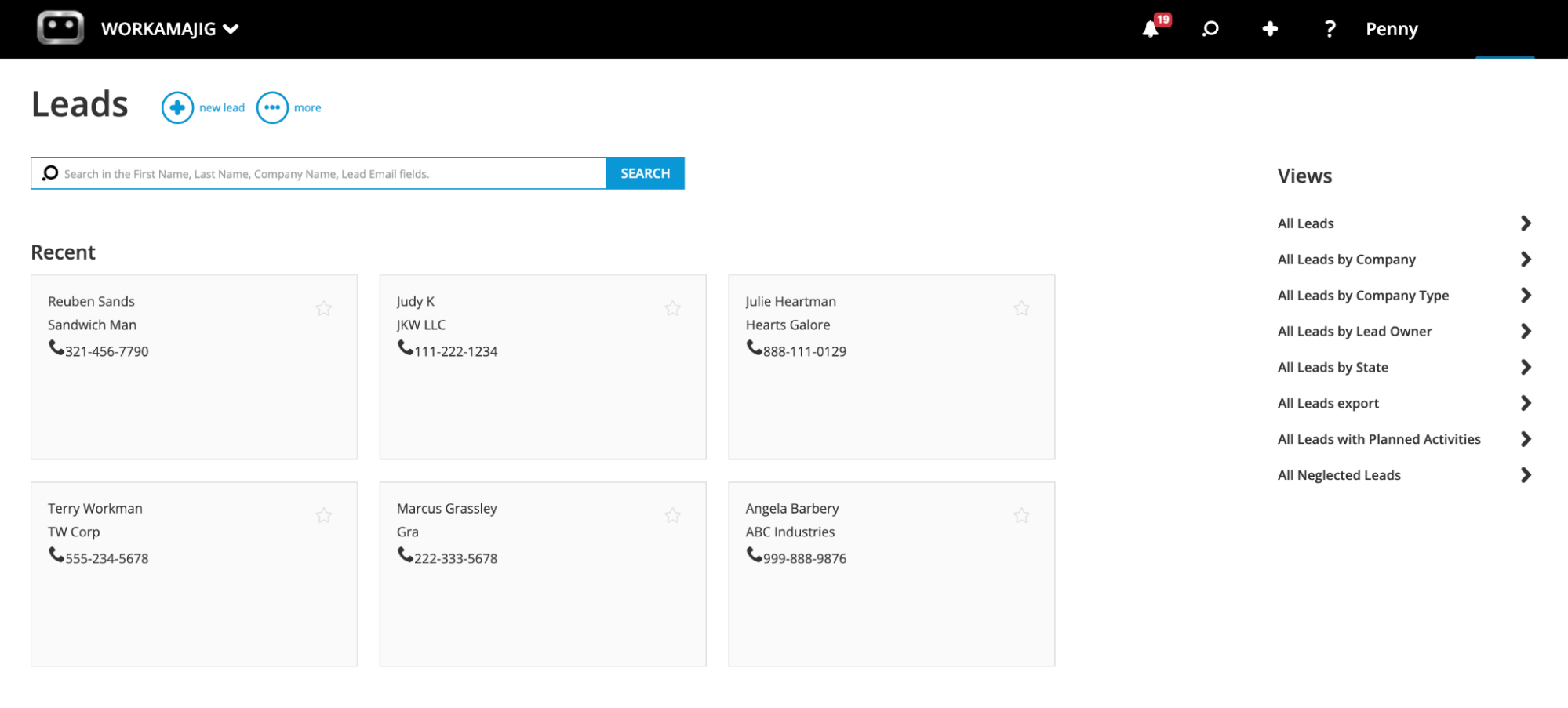
Then, Workamajig’s Leads Dashboard (shown below) consolidates all leads from across these sources into a single, intuitive view. From here, users can easily add new leads and apply different filters — such as source, lead owner, or status — to pull up tailored lead lists.
Reps engage existing leads and track all interactions using Workamajig’s powerful conversations feature. Conversations are used to share notes or track specific interactions at key touchpoints, e.g., phone calls held or emails sent.
Agencies can standardize these conversations to more easily track their lead-nurturing efforts. For example, reps can see which leads have been sent resources or engaged at an in-person event. They can also pull up the entire interaction history for any chosen lead.
Our leads dashboard also includes a handy “Neglected Leads” view, which allows you to filter by leads that haven’t been engaged for a while.
When reps have successfully qualified a lead, they can convert it to an opportunity, which automatically transfers all conversations and details over.
Opportunity Development and Pipeline Management
![Workamajig: Sales Dashboard and Opportunities [GIF]](https://www.workamajig.com/hs-fs/hubfs/Workamajig%20Sales%20Dashboard%20and%20Opportunities%20%5BGIF%5D.gif?width=1920&height=1050&name=Workamajig%20Sales%20Dashboard%20and%20Opportunities%20%5BGIF%5D.gif)
Workamajig’s Opportunities dashboard is designed differently from the Leads dashboard because it also tracks opportunity phases.
It brings all opportunities, categorized by deal stage, in a visual, Kanban-style view (as shown in the GIF above). From here, sales leaders can manage their teams in one place, track all sales pipelines, and plan ahead. They can:
-
Create unlimited sales pipelines and customize pipeline stages to their agency’s processes and workflows.
-
Set appropriate stages and statuses for each opportunity, and add any additional context to opportunity cards so reps can see it.
-
Forecast future revenue and resource requirements based on what’s already in the pipeline.
Then, reps can develop their assigned opportunities using our suite of handy tools, which include:
-
Opportunity cards. Reps can conveniently store all the information they collect on these cards for easy reference. They include fields for projected revenue, estimated costs, forecasted close date, the probability of closure, the number of months expected to bill off the opportunity, and the outcome (awarded, lost to a competitor, or canceled).
Our sales reports also pull in insights from these fields during analysis. For example, opportunity outcomes feed into our Win/Loss reports. -
Automated estimating. Reps can easily share accurate budget and timeline estimates with potential clients by referencing project data in Workamajig.
-
Opportunity overviews. These overviews bring together big-picture details, such as age, timeline, and potential profit, in a single, unified view. Reps can view this information alongside previous nurturing efforts (through conversations) to make strategic decisions about which opportunities to prioritize.
As reps develop opportunities, they can conveniently drag and drop their cards across the dashboard to update deal stages. Keeping these stages up to date ensures sales managers always have real-time insights into the sales pipeline.
After winning opportunities, reps can conveniently hand them over to project teams by converting them to a project or campaign. All details and attachments from sales conversations automatically transfer to projects, so managers have everything they need to pick up where sales teams leave off.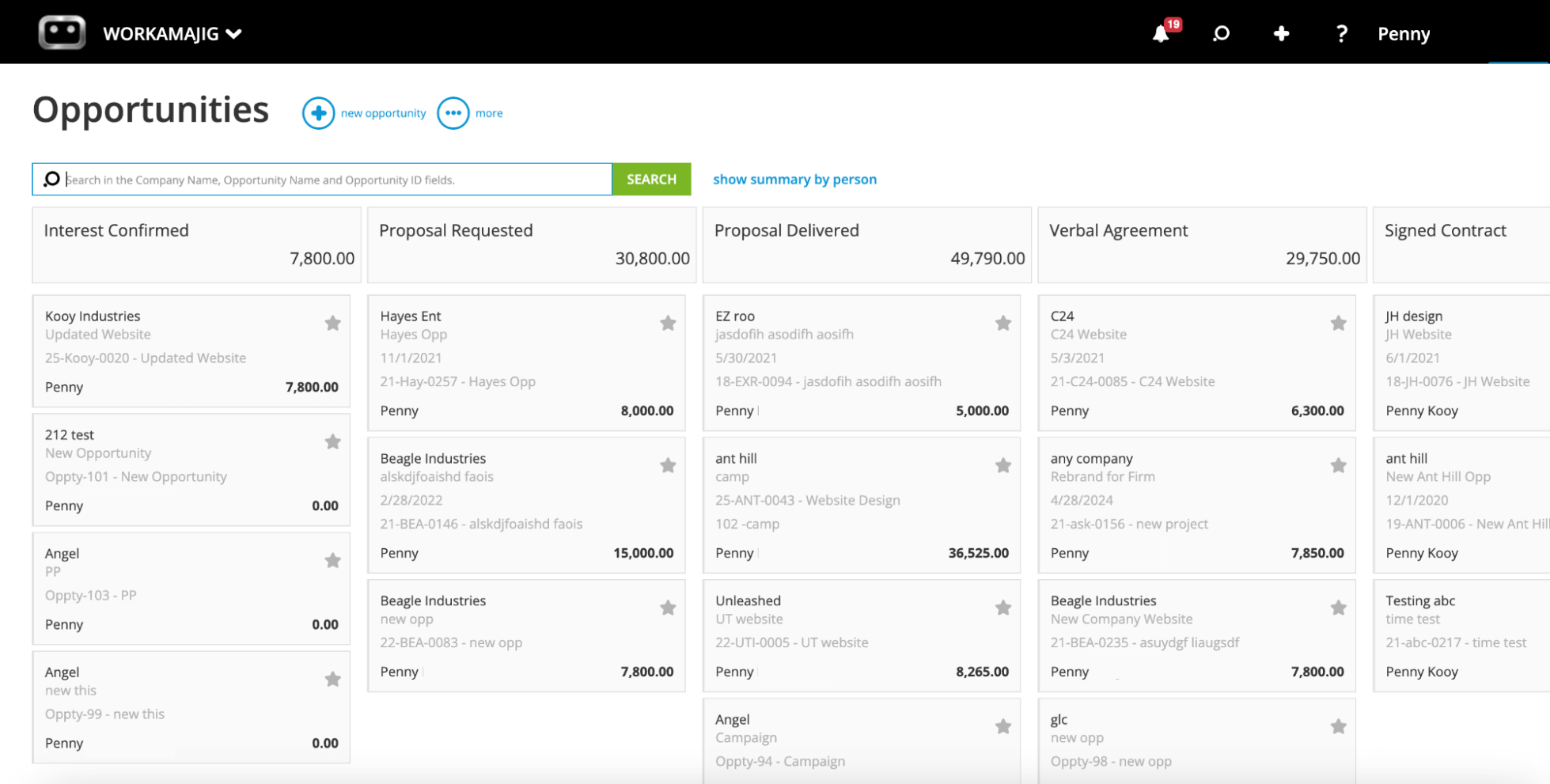
Sales Dashboards
Workamajig includes two centralized sales dashboards that enable teams to track their engagements, access the context they need, and strategically plan their future efforts.
First, we offer a dedicated Sales Dashboard to track sales performance and generate sales reports. Teams love this dashboard because it displays the results of all their sales activities in a simple, visual view.
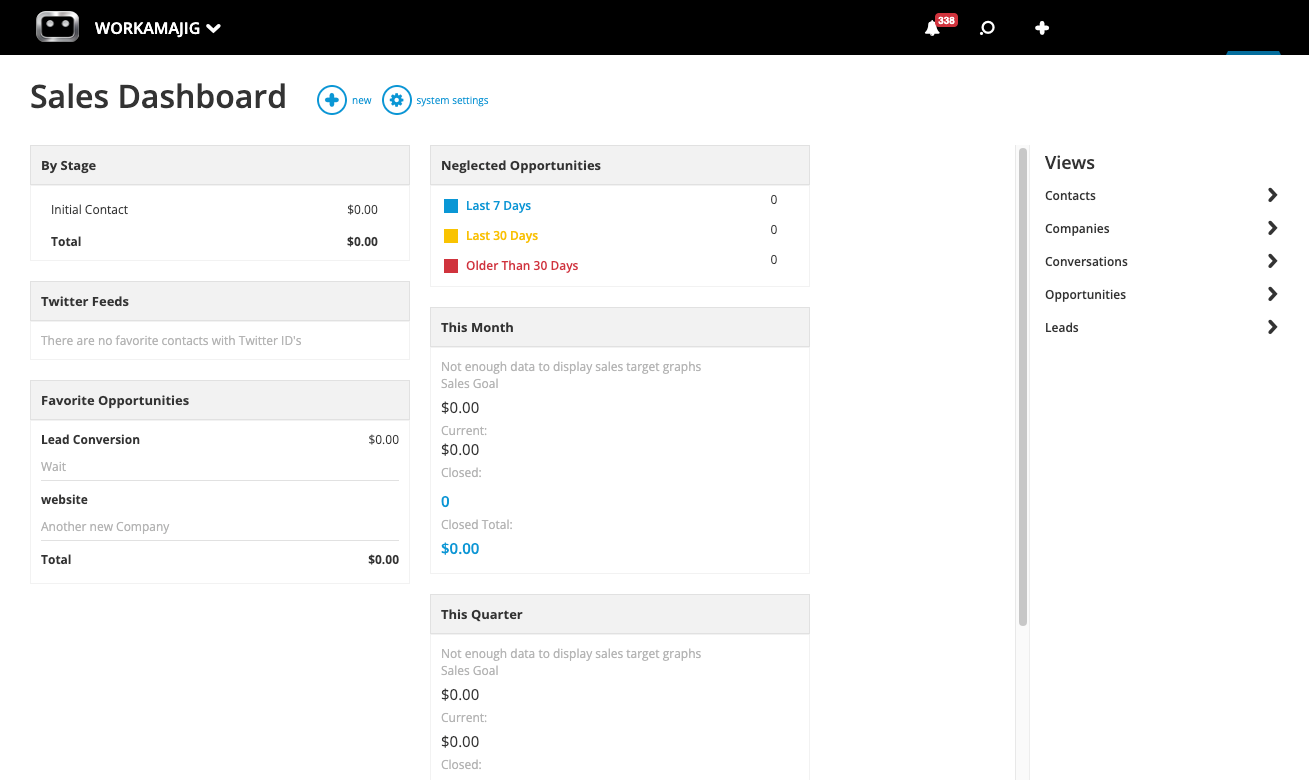
As shown in the screenshot above, sales teams can easily reference:
-
All active opportunities in the system and their respective deal stages, so teams can keep track of what’s in the pipeline.
-
Neglected opportunities, with a breakdown of when they were last engaged, so reps can prioritize them before they’re lost.
-
Sales performance for the month, quarter, and year, including how much revenue has been closed so far.
-
Any items (opportunities, Conversations, etc.) that the user has saved as Favorites.
From here, users can select any item, such as Favorites or a specific deal stage (e.g., “Signed Contract”), to view an overview of related details and drill down into specifics.
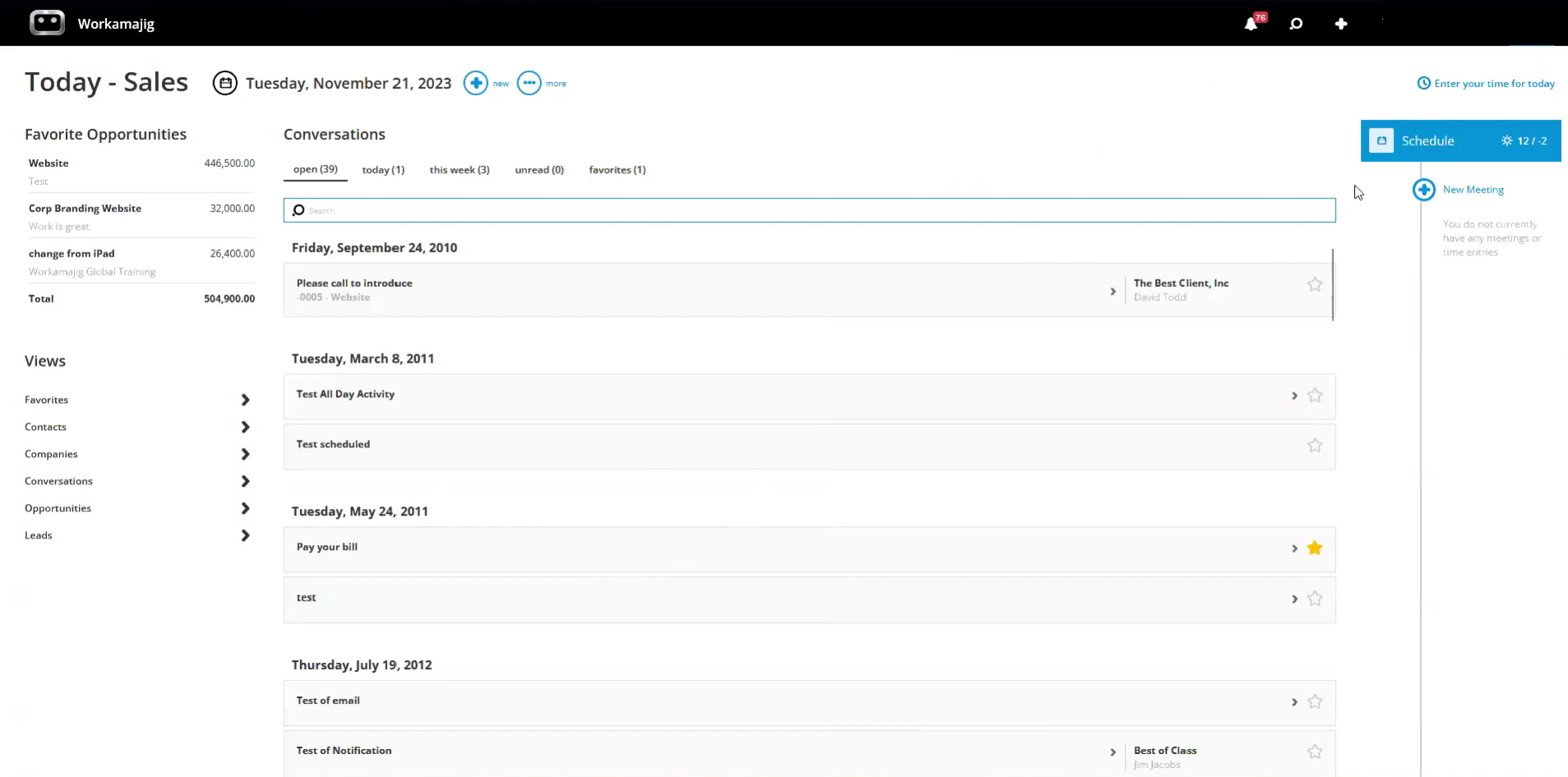
Our second sales dashboard - the Today - Sales page - is a more general hub tailored to each user’s tasks and responsibilities. Users can:
-
View any open and recent conversations.
-
Track meetings, schedule new ones, and access their full calendars.
-
Enter time against tasks, projects, or services — so the hours they spend nurturing leads and engaging opportunities can be factored into the project budgets for closed deals.
-
See all their favorite items, including leads, opportunities, and Conversations.
-
Navigate to the listing screens for contacts, leads, companies, conversations, and opportunities from the Views section. Each listing screen also includes search filters (e.g., All, Neglected, and Owner) to organize the results.
Sales Reporting Suite
Workamajig features a robust CRM reporting suite that pulls in all the information that lives within the CRM — deal statuses, opportunity outcomes, closed dates, and more — and converts it into actionable sales performance reports.
Some of our most popular sales reports include:
-
Win/Loss Analysis: Teams can compare earned vs. lost opportunities over a variety of timeframes and categories.
-
Quarterly Performance Comparisons: Compare performance against previous periods and targets.
-
Sales Rep Activity Summaries: Understand where (and how) reps spend their time and compare these insights to sales outcomes.
Teams can also utilize CRM datasets to create their own custom reports using our intuitive drag-and-drop builder.
Project Management Module
Workamajig’s project management module includes a wide range of tools to help agencies work more strategically, preserve project profitability, and deliver on client expectations — in even the most complex projects.
Project Initiation
Workamajig offers a few paths to launch new client projects:
-
Converting awarded opportunities to new projects. As mentioned above, when sales reps convert won opportunities into new projects or campaigns, Workamajig automatically transfers all associated details, communications, and attachments — eliminating redundant data entry and ensuring nothing gets lost in transition.
-
Creating comprehensive templates for your recurring project types, whether quarterly campaigns, website builds, or product launches. Customize templates with predefined tasks and workflows, resource allocations, timelines, and budgets. Unlike restrictive systems, Workamajig lets you create unlimited templates to match your agency's diverse offerings.
-
Collecting requests from existing clients, with customizable project request forms, accessible through Workamajig’s client portals. While especially useful for in-house teams, our project intake module is increasingly used by agencies to standardize incoming work requests and capture critical project requirements upfront.
Project Planning
Workamajig’s project intake tools ensure delivery teams have the essential information they need to kick off new projects, and our system equips PMs with powerful tools to refine and finalize project plans and assign the right resources.
-
Workamajig’s flexible task management tools allow PMs to double-check project details and make any necessary changes. They can tweak tasks, add subtasks or dependencies, edit time allocations, set new milestones, and more.
-
Workamajig’s automated estimating engine calculates projected costs and budgets as PMs develop their project plans. It can even factor in agency overhead, contingency buffers, and profit margins to ensure accurate client estimates that protect your bottom line. Workamajig also flags potential profitability concerns during the planning stage, before resources are committed, so managers can make adjustments.
-
Workamajig includes a vendor and purchasing management dashboard that enables managers to work with external partners and purchase project materials or services within our system. Managers can assign work to freelancers, generate purchase orders, and incorporate third-party expenses into project estimates. This module tracks project elements such as media buys, paid promotions, and outsourced production, enabling PMs to account for all project costs during planning.
Project Monitoring
Workamajig’s interactive project monitoring dashboard receives a lot of love from our users because it lets them easily track the status of all active projects across their portfolios.
Also, since our system consolidates all relevant business data — task hours, labor costs, and expenses from various sources — project teams can be confident that the insights they see reflect the real work happening.
![Workamajig dashboard: Projects and Project Status [GIF]](https://www.workamajig.com/hs-fs/hubfs/Workamajig%20-%20Projects%20and%20Project%20Status%20%5BGIF%5D.gif?width=1714&height=853&name=Workamajig%20-%20Projects%20and%20Project%20Status%20%5BGIF%5D.gif)
Our dashboard offers a whole host of features to help managers focus on the right projects and keep all active projects on course:
-
Customizable Gantt charts: PMs can color-code project phases and visualize progress with black bars, enabling them to track project status and catch bottlenecks before they snowball.
-
Real-time budget tracking: Our system continuously compares actual costs against projected budgets, calculates real-time profit margins, and alerts managers to potential overruns before they become critical and impact profitability.
-
Real-time timeline monitoring: Project teams can manage client expectations and communicate on project delivery dates when plans go awry. For example, if a particular task takes a few days longer than predicted, our system can recalibrate expected completion dates, so project managers can course-correct with confidence (rather than guessing and hoping for the best).
-
Project health indicators: Our dashboard provides several straightforward ways to gauge project health, including visual health indicators, budget-to-actual comparisons, and completion percentages. These metrics give a nuanced understanding of project status, so there’s no confusion about where projects stand or where intervention is needed.
-
Early warning alerts and notifications: Workamajig notifies PMs of at-risk projects and shares details of potential problems. These early warnings enable proactive, strategic intervention to prevent minor issues from escalating.
Our system supports multiple project management methodologies so you can choose your preferred approach — whether you operate with Agile sprints, traditional Waterfall processes, or hybrid methods.
Read more: 17 Killer Project Management Best Practices for Managers
Team Collaboration Tools
Workamajig creates a unified workspace where all project stakeholders — internal agency teams and external users — can collaborate seamlessly throughout the project. And we don’t charge extra fees to collaborate with external users.
First, Workamajig’s convenient, role-based Today dashboard tells all project team members what to work on and provides updates on all agency initiatives they’re involved in. Here’s what this looks like for creative team members:
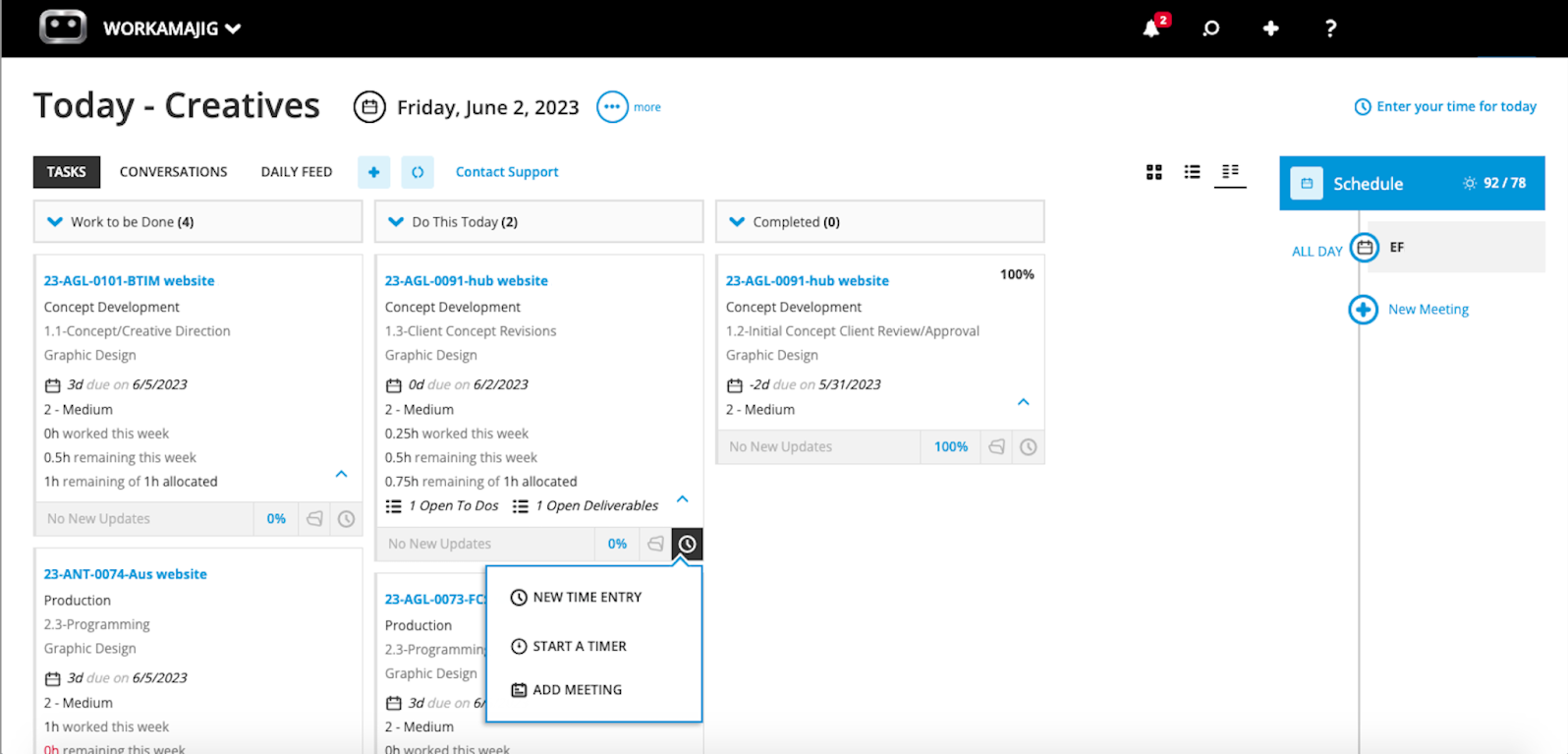
From here, users can toggle between the Daily Feed, Conversations, and Task Lists to get up to speed and plan their day. Our Task Lists also conveniently display their assigned tasks in order of priority, with columns highlighting what’s due today and what’s ahead for the week, so users can jump right into their assigned work.
Then, within task cards, team members can communicate about work, share files, tag others for feedback, and more. Workamajig sends email notifications to both internal users and clients when they’re tagged on projects, so they can jump in as needed. This ensures timely responses to keep projects moving forward.
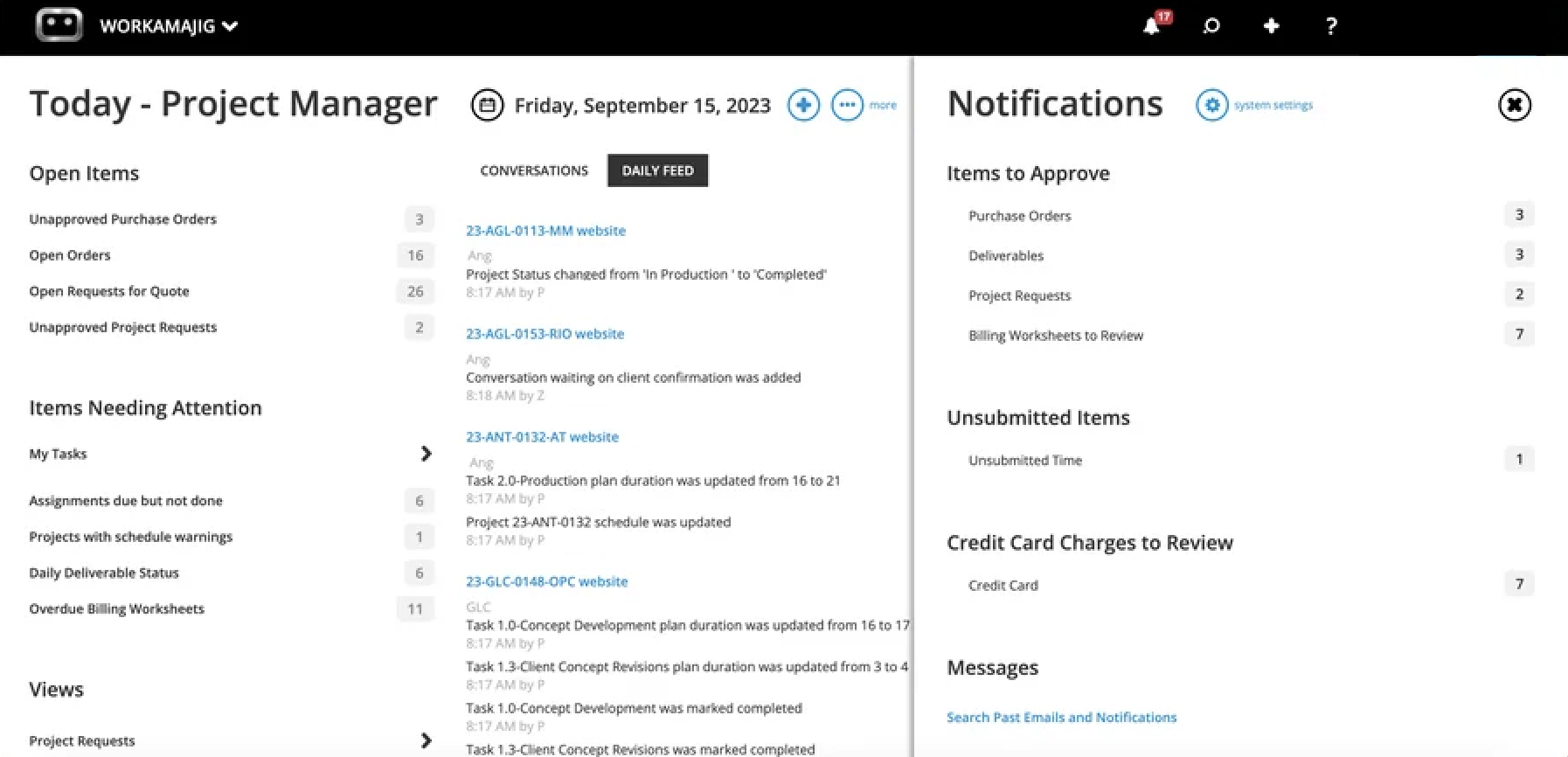
Managers’ Today dashboards reflect their broader responsibilities, so they look a bit different from those of regular users. For example, as shown in the screenshot above, PMs can see items that require their approval, projects with schedule warnings, and the status of all their project team’s daily deliverables.
Clicking any of these fields takes them to a dedicated listing screen, where they can see all the details and take action.
Our complete project collaboration suite includes lots of other handy tools, many of which are easily accessible from task cards. These include:
-
Project conversations: Teams can share notes and start discussions that all project stakeholders — external and internal — can participate in. We also store all these conversations so teams don’t lose any important context.
-
Commenting: Users can leave comments on task cards and tag others for context or feedback.
-
File sharing: Teams can create project file repositories for individual projects or entire portfolios, and our system supports all the file types commonly used by creative teams — including images, video, audio, design files, documents, PDFs, HTML, and more.
-
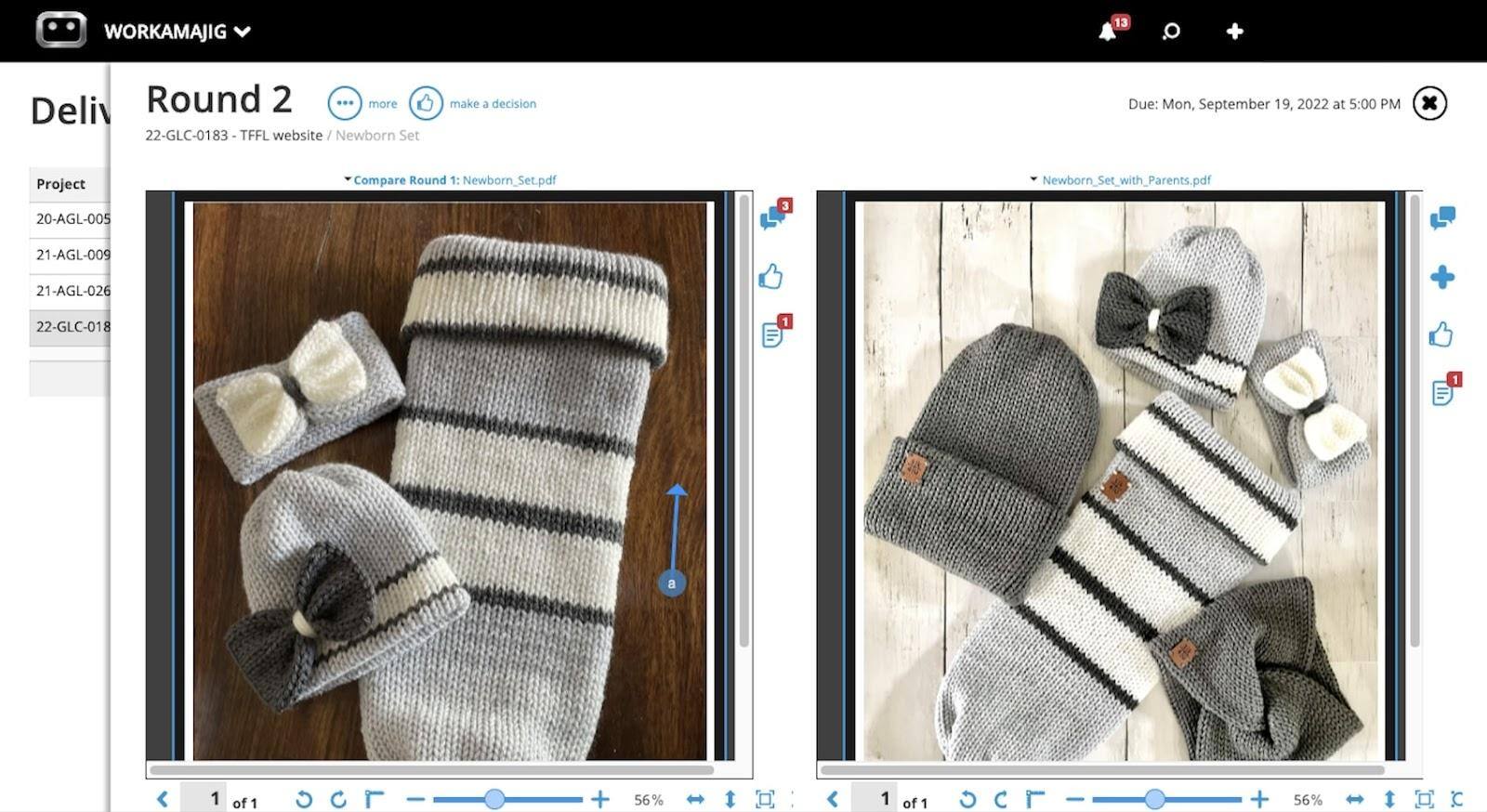
Internal proofing tool: Users can preview content in Workamajig, compare files side by side, and annotate them using various tools. Then, editors can review the feedback and upload new versions as they make changes.
-
Version history: Our system stores version history for all files, so users can quickly reference past content and see edits between versions.
-
Feedback controls: Managers can set clear limits on the number of revision rounds for each deliverable, helping teams stay focused on reaching final approval more efficiently (and avoiding the endless feedback loops that can eat into project profitability).
-
Change management tools: Our system includes change request forms and approval workflows — so project managers can update project plans to account for out-of-scope requests and maintain scope integrity.
-
Client portals: Just like for vendors, Workamajig also lets teams create unlimited client portals. Clients can use their dedicated portal to request work, track project progress, share feedback, communicate with project teams, view invoices, and access deliverables.
Read more: 5 Types of Creative Collaboration Tools for All Agency Needs
Portfolio and Campaign Management
Workamajig’s “campaigns” feature lets you conveniently manage multiple projects within a single portfolio. It brings each linked project’s tasks, schedules, estimates, shared files, expenses, and more in one place, so you can easily:
- Track all deliverables and streamline project collaboration
- Monitor progress and adjust the campaign schedule as needed
- Build a centralized campaign budget and monitor real-time budget burn
- Manage portfolio billing
- Evaluate campaign profitability
Our centralized campaign dashboard pulls all your portfolio’s details into a single view, where you can easily access deliverables, recent conversations, daily activities, and any custom fields. Then, you can pull up project files, specs, transactions, etc., and even the portfolio’s burn chart.
You can also navigate to the project scheduling dashboard (shown below), which centralizes all tasks from your linked projects (and their progress) into a clean, visual interface. From here, you can:
-
Edit tasks across the entire portfolio.
-
Zoom in on a specific project's details.
-
Track how linked projects contribute to the broader campaign schedule through a simple Gantt chart.
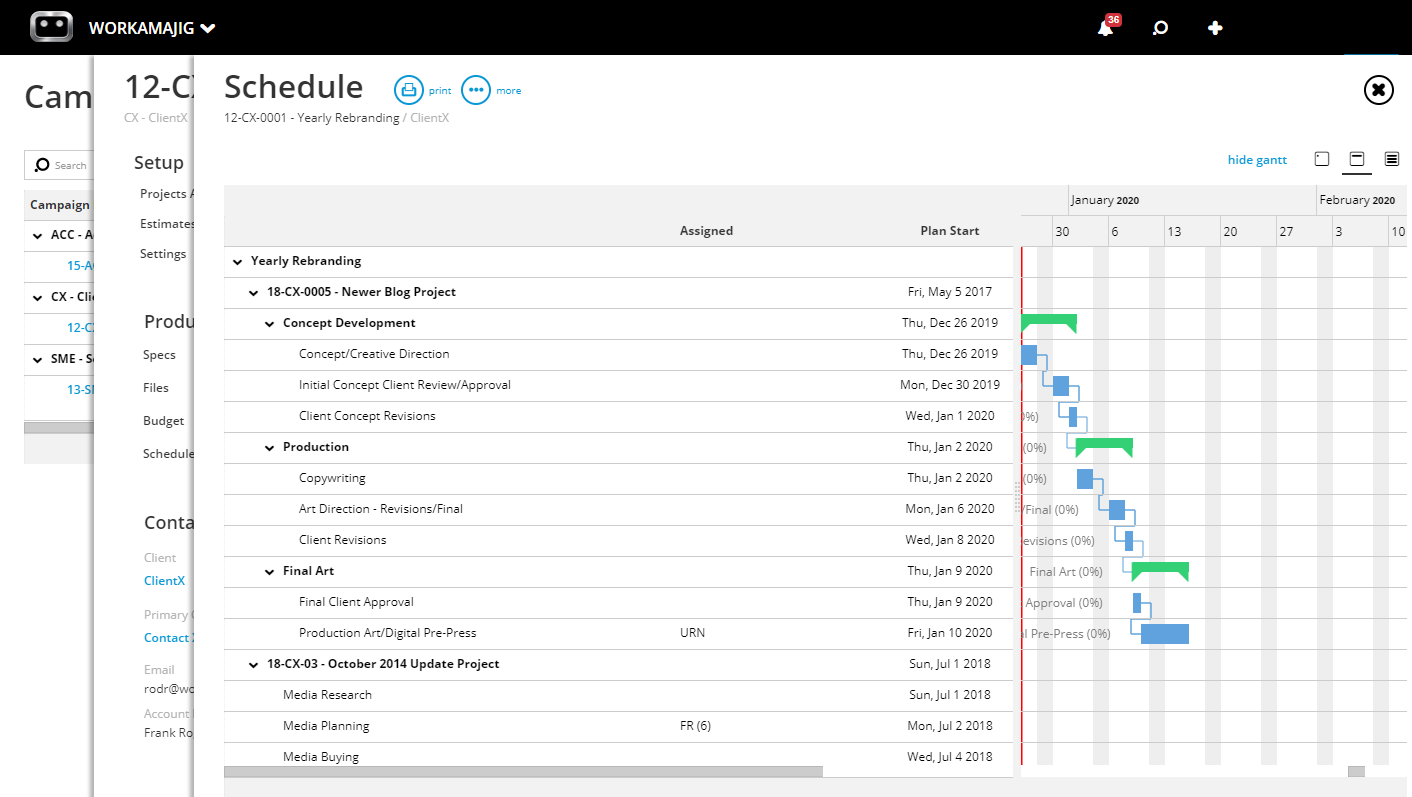
As shown above, the schedule is further broken down into segments — such as “Production” and “Final Art” — each with its own drop-down. These segments are fully customizable and help you organize the overall schedule. For example, some teams create segments for each financial quarter.
Budgeting Your Portfolio’s Budget
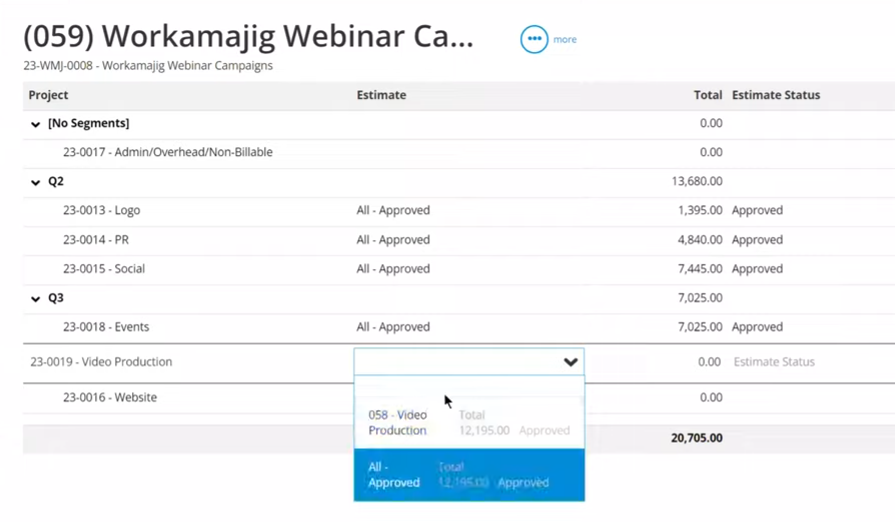
Workamajig offers two main options for building out your campaign’s budget.
Option (a) is to build a central budget based on each linked project’s budget. This option is best when you have accurate estimates and finalized plans for all the projects in the campaign.
Option (b) is to build out an independent campaign budget based on services and committed hours. Sometimes you may not have reliable estimates for certain linked projects, or even have finalized all the projects that’ll be included in the portfolio.
In these scenarios, option (b) is super helpful because it still gives you a budget — based on real data — to refer to.
For example, say you’ve planned for 100 hours of copywriting work, 80 hours of art direction, 120 hours of web design, and 60 hours of graphic design for the entire campaign. But you haven’t spread these hours out across all the projects in the portfolio yet.
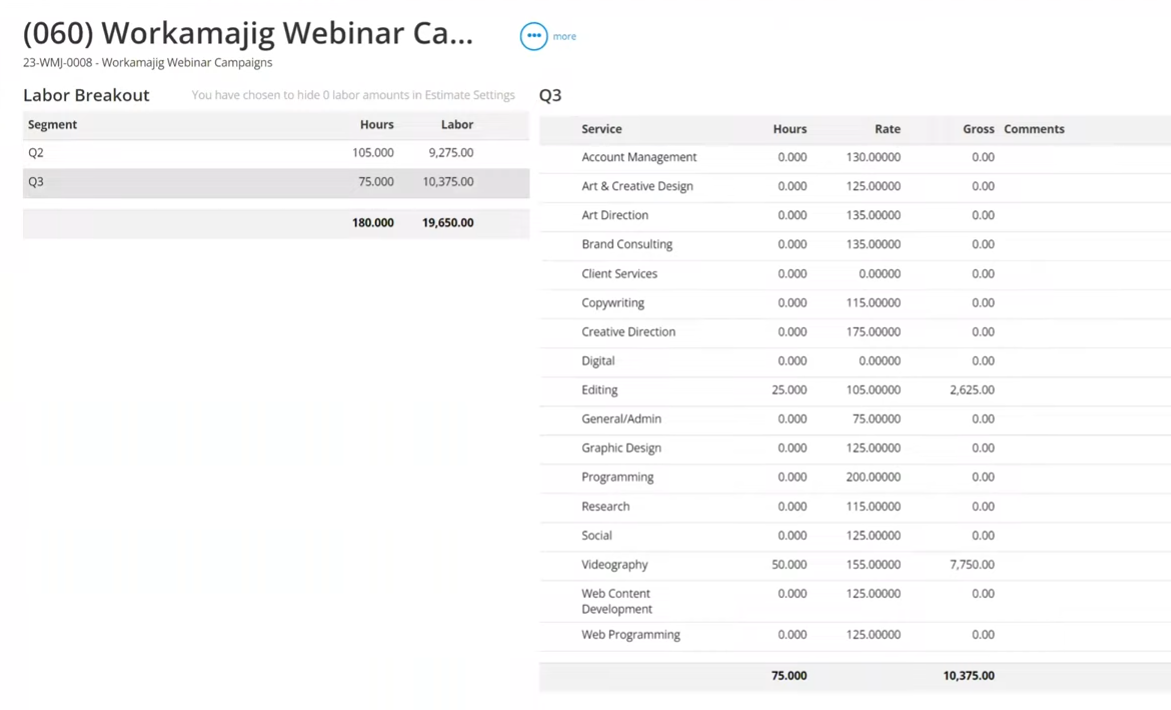
After choosing the option to build your budget “by service,” Workamajig will display all the services offered by your agency, along with their billable hourly rates, in a single view (as shown above). From here, you can add hours for each service, while Workamajig automatically calculates the labor rates.
Then, our system builds a centralized campaign budget based on the total gross labor across all selected services.
Read more: Best Campaign Management Software for Agencies & Creatives
Staff Scheduling & Resource Optimization Dashboard
Workamajig’s resource management module improves staff scheduling and optimizes resource allocation by allowing you to get a bird’s-eye view of everyone’s schedules, balance team workloads, and make the best use of your available talent.
Take a look at the staff scheduling dashboard below:
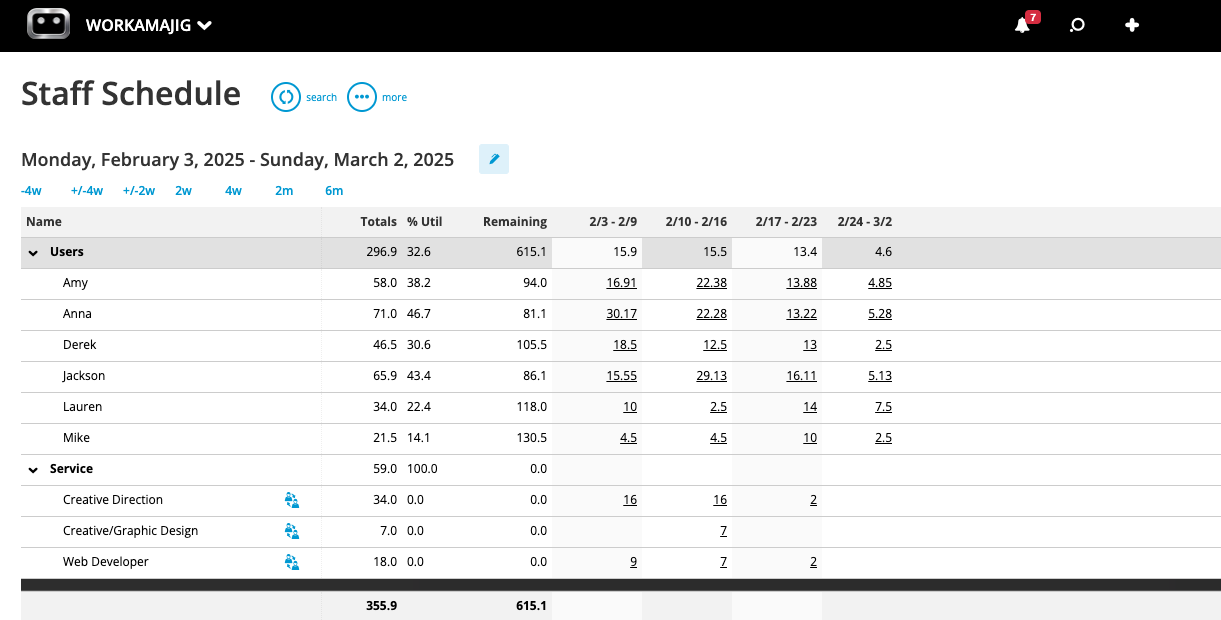
You can quickly double-check assignments, workloads, and refine schedules by viewing:
- Your staff roster
- Total scheduled hours
- Percentage of time utilized
- Total remaining hours left to schedule
- Availability. Users can connect their calendars (Google Calendar, iCal, Outlook) and share their availability when they’re scheduled for meetings or out of the office, preventing scheduling conflicts.
You can easily toggle the dashboard to pull up each team member’s assignments as well.
Our dashboard always displays the most recent information because it automatically updates as you assign employees tasks and they log their hours.
Then, you can shift assignments to ensure nobody is bogged down or underutilized. For example, you can:
-
Compare employees’ weekly schedules to spot workload imbalances. Do some people have packed schedules while their colleagues with similar skill sets sit idle? If so, you can reassign work to people with more bandwidth to keep things fair and prevent burnout.
-
Pull up unassigned services and strategically assign those project activities. Our dashboard lets you easily match work to skill sets and prioritize employees with the most bandwidth.
Read more: Best Agency Scheduling Software
Time Tracking & Productivity Reports
Workamajig’s native time tracking lets project teams easily log actual working hours as they complete tasks.
Meanwhile, managers can not only monitor labor hours but also tie hours back to specific project activities, so they can:
-
Track time and progress as people work. Managers can see whether staff members have started a task, how many hours they’ve logged, and whether they’re on track or at risk of exceeding the budgeted time.
-
Compare budgeted, allocated, and actual hours. These comparisons help managers spot potential issues, such as unproductive team members or projects suffering from too many change requests. They can also improve their future plans by ensuring resources have the right number of hours to complete their work.
-
View project hours from different perspectives, such as by task, project, resource, and client. Comparing the time employees spend on similar tasks also helps managers investigate the root cause of any delays. For example, if everyone exceeds the budgeted hours for design work, there’s a good chance that those jobs need more allocated hours. But if only specific people are falling behind, then their productivity or skill level may be the issue.
-
Edit entries and choose what gets billed. Employee hours flow into Workamajig’s centralized timesheets as they’re logged. Then, managers can decide which hours are approved, what gets written off, and whether to round up (or round down) any entries.
For example, our system lets sales reps log the hours they spend on developing and closing opportunities. Managers can then choose whether to include those hours in the new project’s budget — or write them off.
-
Improve billable utilization. Workamajig includes various tools and reports that help managers: (1) compare the time that specific resources spent on billable and non-billable activities, and (2) analyze billable utilization from different perspectives, so they can uncover opportunities to increase profitability.
However, managers can only accurately track and evaluate all these things if employees consistently enter their project hours — and that’s something teams really don’t enjoy doing. That’s why Workamajig bakes time tracking into people’s daily workflows and lets them choose their preferred way to enter time.
Our time-tracking tools are built directly into task cards, so team members can clock their hours as they work and never forget. Workamajig provides four ways to log project hours:
- Use timers to record hours as you work.
- Enter hours from task cards to input the total time worked.
- Input hours from project-related calendar events to ensure all relevant time is accounted for.
- Add time entries in a timesheet.
![Workamajig - Today - Creatives - Tasks - New Time Entry for Projects [GIF]](https://www.workamajig.com/hs-fs/hubfs/Workamajig%20-%20Today%20-%20Creatives%20-%20Tasks%20-%20New%20Time%20Entry%20for%20Projects%20%5BGIF%5D.gif?width=650&height=690&name=Workamajig%20-%20Today%20-%20Creatives%20-%20Tasks%20-%20New%20Time%20Entry%20for%20Projects%20%5BGIF%5D.gif)
As employees log their hours, Workamajig calculates labor costs using the actual employee record and pushes both time and labor cost data through the system. These data sets are used for project budget tracking, project timeline monitoring, resource scheduling, and reporting.
We also back our time-tracking module with an Agency Insights dashboard, where you can access a range of productivity reports. These break down employee hours by client, service type, project, and more, so you can dig into resource requirements and understand where your project teams spend their time.
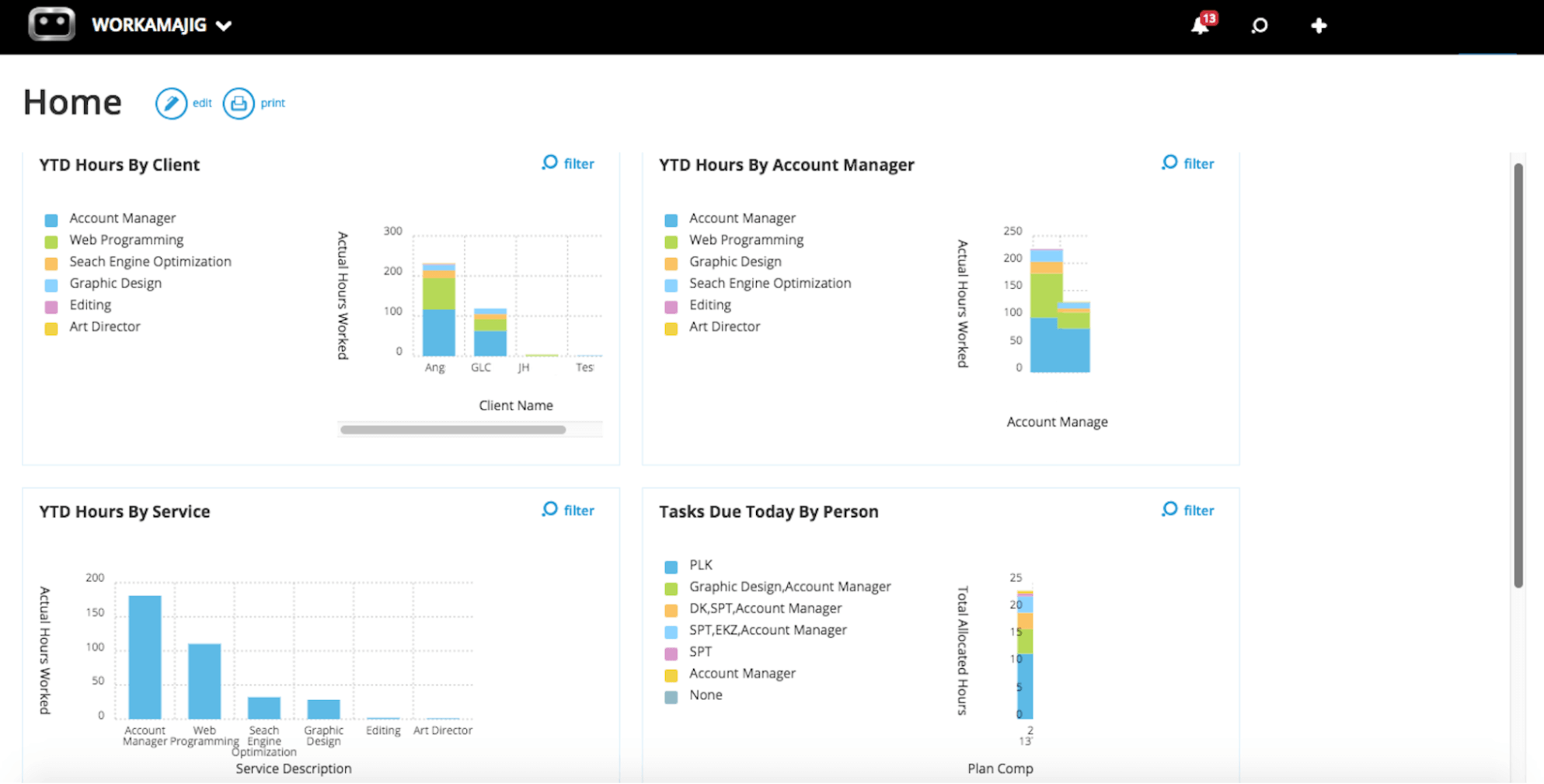
These insights can guide various business decisions, such as:
- Identifying resource-heavy services to optimize processes.
- Refining offerings by cutting underperforming services and doubling down on strengths.
- Flagging problem clients and addressing issues to save time on future projects.
Read more: Best Agency Time Tracking Software for Creatives
Workamajig Accounting Software
What really sets Workamajig apart from Productive and other agency management software is the inclusion of full accounting software.
Most tools include some financial reporting, budget tracking, and invoicing functionality — but they all integrate with outside accounting systems to close out project processes. Workamajig saves you from paying for QuickBooks, Xero, or NetSuite by offering a competitive alternative.
Our accounting software supports all standard processes and is compliant with GAAP, GDPR, and HMRC. Its toolset includes:
-
Project billing: Workamajig supports all standard agency billing methods that Productive does, including fixed-fee, time-and-materials, retainer, and advance. However, unlike Productive, our system also supports prebilling, work-in-progress (WIP), and media billing types.
-
Mass billing: Our billing worksheets allow teams to easily generate separate invoices for each project or loop multiple projects together on a single invoice.
-
Project expense tracking: As mentioned earlier, Workamajig embeds cost management directly within project workflows through the full lifecycle. Teams can monitor labor costs as employees submit hours, realize vendor costs as they’re incurred, and continuously compare actuals to budgets until projects wrap.
-
Integrations to pull in expenses: Our Plaid connector lets teams track expenses from credit card spending accounts, and they can manage media buys via our integrations with Strata/FreeWheel, Mediaocean, Bionic, and GaleForceMedia.
-
Multi-currency and multi-entity accounting: With foreign currency exchange rate tracking and transaction processing.
-
Online payment collection: Make it easy for clients to pay on time via credit card and ACH with our Payflow Pro or Authorize.net integrations.
-
Vendor invoice management: Billing teams can pull in vendor invoices, reconcile them, and pay vendors through Workamajig. Our integrations with AvidXchange and Edenred Pay facilitate online payments to vendors.
-
Receipt management: Conveniently track out-of-pocket expenses as they’re incurred by attaching and storing receipts in our system.
-
Expense reporting and reimbursements: Team members can create expense reports (even on mobile devices), send them for approval, and tag out-of-pocket charges to request reimbursements. Managers can then review and approve these requests.
-
Financial reporting: Teams can automate tracking of key metrics and use a range of out-of-the-box and custom reports to evaluate financial performance and profitability.
In the following sections, we’ll take you through:
-
How accounting teams can easily manage their day-to-day work with their personalized dashboards.
-
How Workamajig facilitates the entire project billing workflow.
-
Our robust financial reporting suite.
Today - Accounting Dashboard
Just like sales reps have their own Today - Sales page and PMs have the Today – Project Manager page, accounting users also get their own, role-based dashboard.
The Today - Accounting page helps them stay on top of urgent tasks (such as approvals), navigate to listing screens, and take quick actions. As shown in the screenshot below, the dashboard displays:
-
A Daily Feed: This section displays all interactions and task progress within the specified date range (users can click the calendar icon to set the range).
-
Items Needing Attention: Here, they’ll find any accounting items that require some action, such as review or approval. For example, unposted transactions and open reconciliations appear here.
-
A breakdown of account balances: Our system further categorizes balances by each account’s type, such as bank accounts, credit card accounts, AR, and AP.
-
A views section: Users can easily navigate to dedicated listing screens to plan ahead, take further action, and identify bottlenecks. For example, they can pull up all client invoices and filter for pending ones. Or, they can view all vendor invoices and see which ones need to be paid.
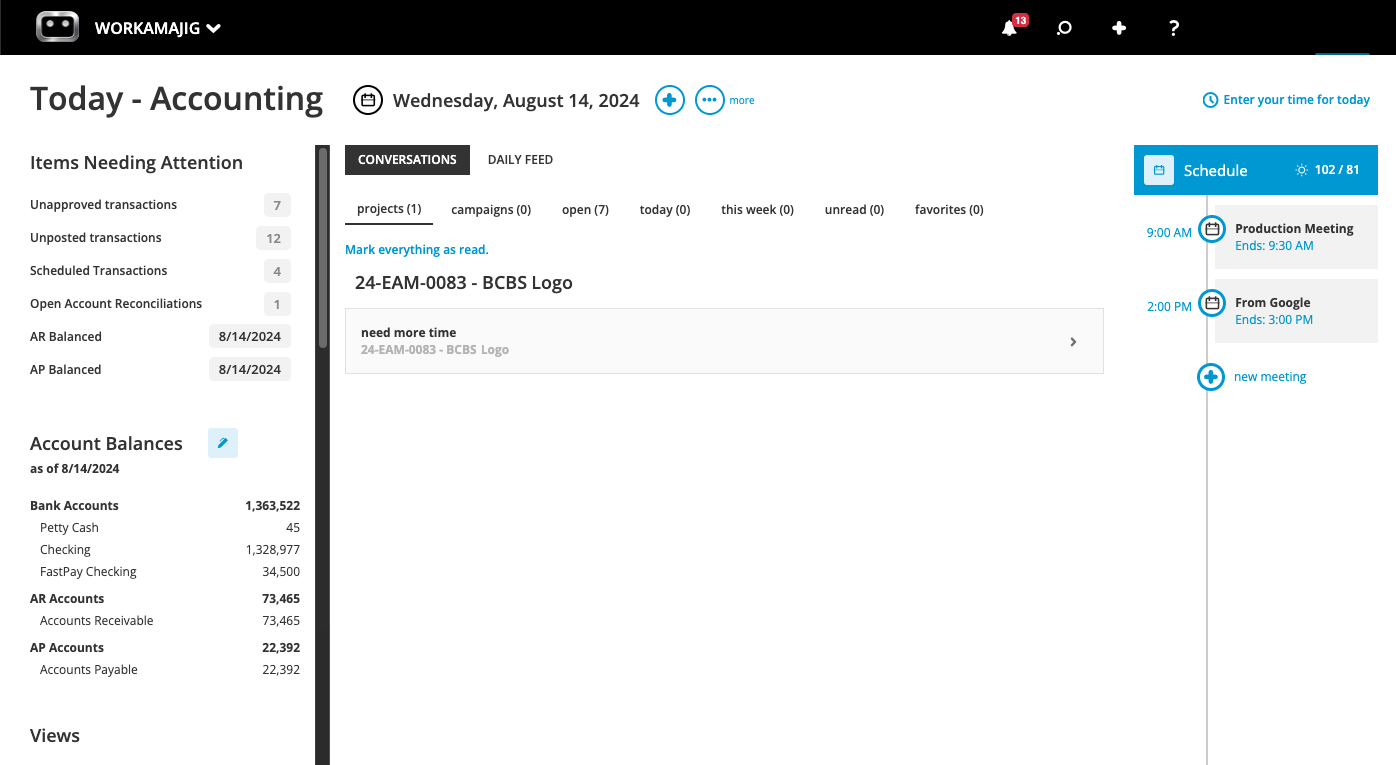
Then users can click the “+” icon to easily take any desired action — such as entering time, generating a billing worksheet, uploading a receipt, making a vendor payment, and more.
Billing and Invoicing in Workamajig
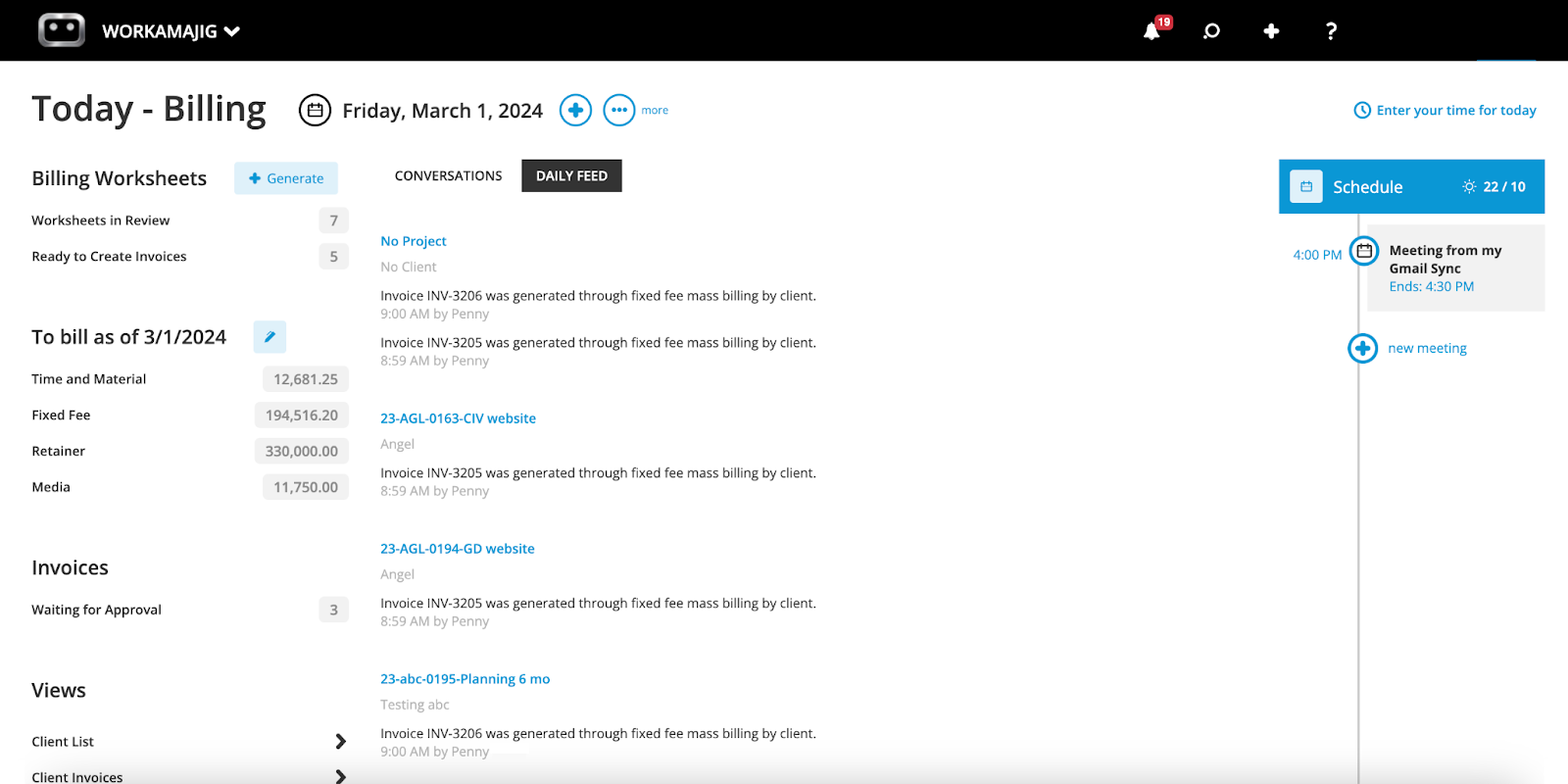
Workamajig’s billing worksheets make it easy to tally and finalize all billing details for a project before generating the client invoice. Here’s how it works:
-
First, a user generates an electronic billing sheet from their Today - Accounting or Today - Billing page (this dashboard — shown in the image above — is more personalized to billing activities).
-
Our system generates a billing sheet against the project’s budget or transactions, depending on the user’s selection. All worksheets come pre-filled with relevant project information and line items — including expenses, transactions, and prior billings.
-
The generated worksheet is automatically routed to the relevant decision-maker — usually an AE or PM — so they can check all the details. They can also make any changes right in Workamajig, such as writing off items or transferring costs.
-
After finalizing the worksheet, AEs and PMs can submit it for approval through Workamajig. Our system then automatically sends it back to the billing user.
Then, the billing team can generate a final invoice from the approved worksheet, send it over to clients, and request payment.
Read more: Best Creative Project Management Software with Invoicing
Financial Reporting
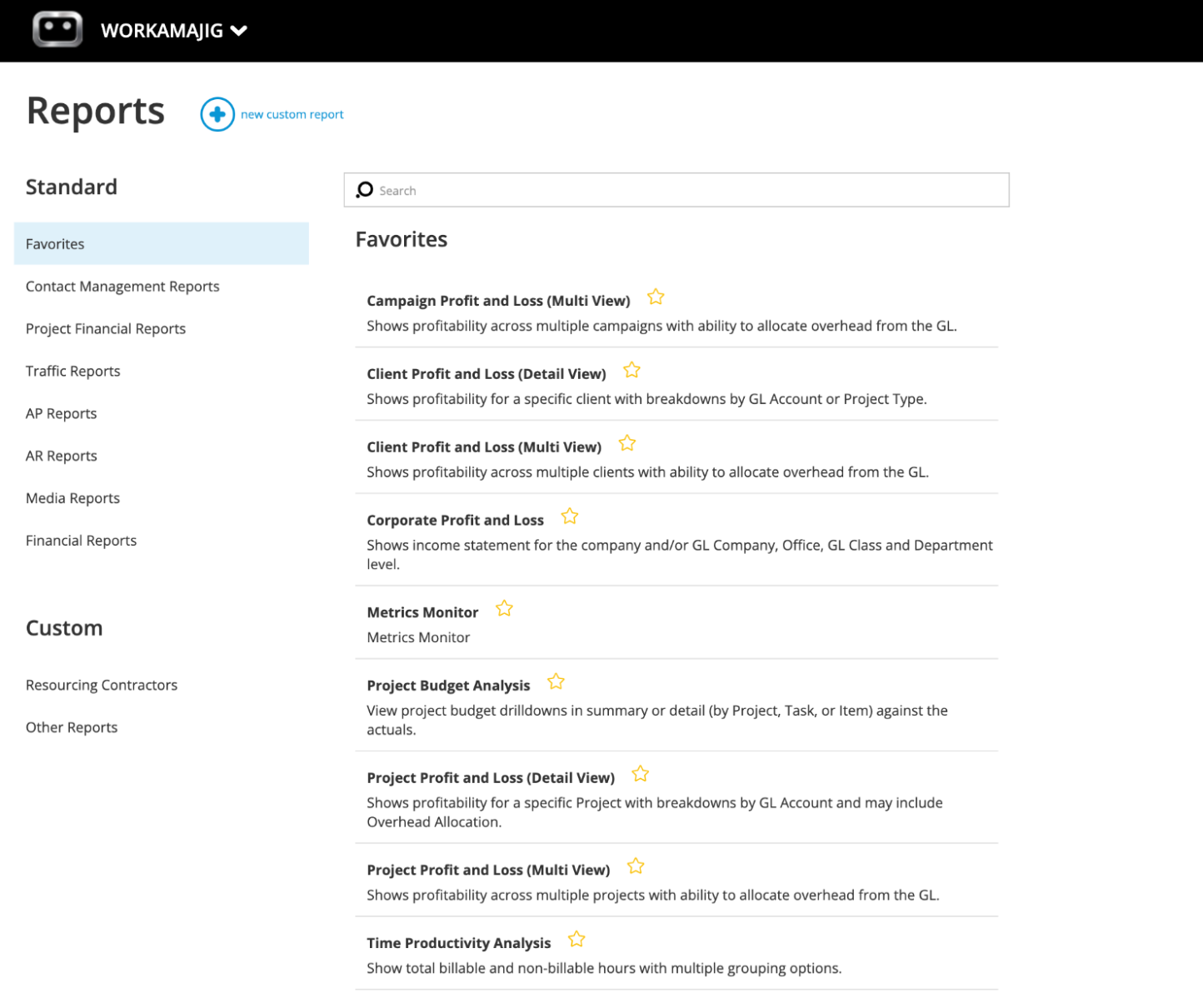
Workamajig’s robust financial reporting system includes dozens of custom and out-of-the-box reports, along with a Favorites dashboard for easy access to the data most important to your agency.
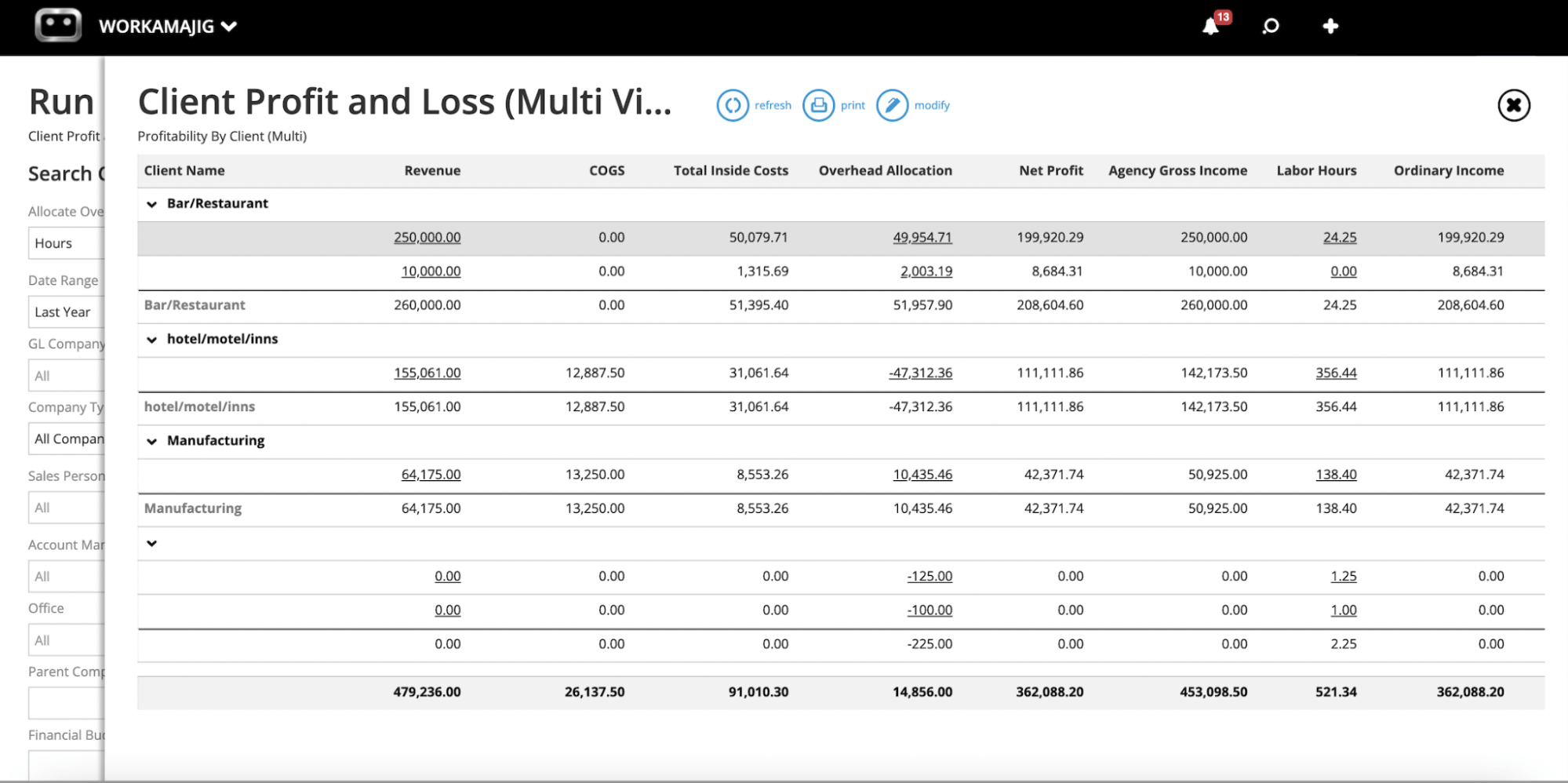
Some of our most commonly used reports include:
- Profit & loss reports (by project, campaign, client, and services)
- General Ledger (GL) reports
- Cash projections
- Revenue forecasting
- Project budget drill-downs
- Billable hours summary reports
- Hourly realization rates
- Key metrics monitors
To see the reports other agencies use, here’s an example of a Favorites dashboard:
Read more: Best Creative Project Management Tools with Financial Tracking
Getting Started with Workamajig
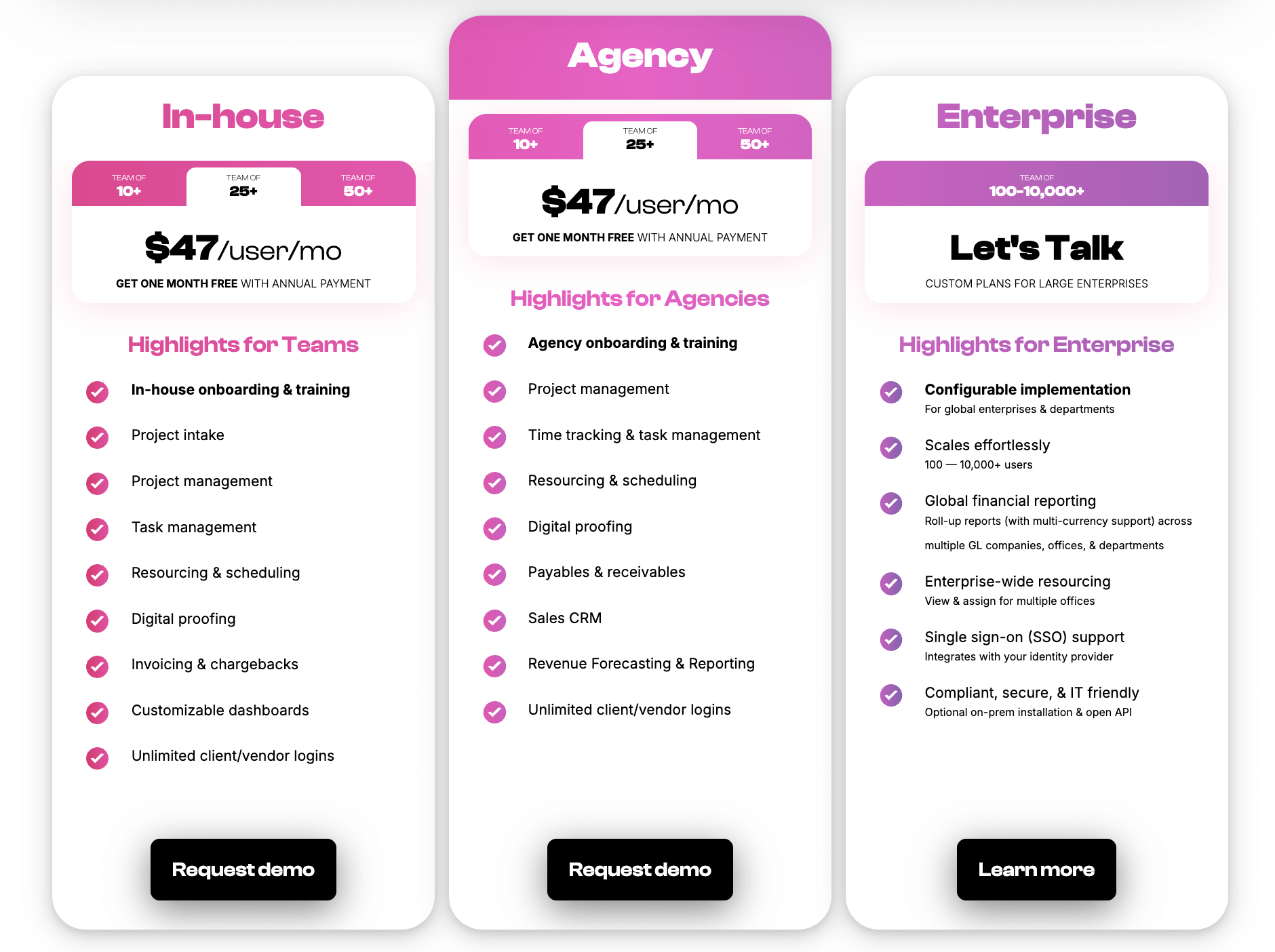
We provide tailored solutions for agencies and in-house creatives (packages are by team size) so you can easily identify and choose the package that best suits you.
All Workamajig customers have access to our full range of features and integrations. Unlike Productive, we don’t divvy features across tiered packages and force upgrades every time you need a new feature or integration.
Subscription costs also include guided setup, personalized training, and ongoing support. Our team ensures successful implementation and is available afterward to answer questions and optimize Workamajig's setup to meet your agency’s specific needs.
We also offer custom enterprise packages that accommodate hundreds (even thousands) of users — so Workamajig scales with you no matter how far you grow.
Request a free demo with our team to learn more.
2. Advantage
.png?width=2000&height=878&name=Advantage%20Simpli.fi%20homepage%20(2024).png)
Advantage is one of the most comprehensive agency management solutions on our list, designed for enterprises. It offers an extensive toolset of agency-specific features. The platform can even accommodate specialized workflows for different agency types, including advertising, PR, and digital marketing teams.
Advantage stands out from Productive and other competitors with:
-
Native accounting software and strong financial management tools. Users consistently praise Advantage’s accounting module and tools to ensure project profitability.
-
Native media buying via Simpli.fi. Advantage primarily appeals to media, advertising, and full-service agencies for this reason. Users can plan, execute, and invoice for media buys without leaving Advantage’s system.
-
Enterprise-grade scalability that supports large agency operations and multi-office setups. While Productive can accommodate growing agencies, Advantage is built for enterprise-level requirements with more advanced permissions, workflow controls, and reporting capabilities.
However, the platform's comprehensive feature set comes with a steeper learning curve and higher price point than Productive. Advantage typically requires a more substantial implementation process and investment, but its team offers onboarding support to guide set-up and training.
Find more Advantage software reviews here.
Features
- Project management features
- Task management
- Project tracking (budgets, timelines)
- Resource management
- Collaborative tools like proofing and reviews
- Time tracking
- Media planning and buying, including broadcast buying, digital buying, and media reporting
- Risk analysis and burn rate tracking
- Media accounting software
- Billing and invoicing
- Estimates
- Budget monitoring
- Financial reporting
- Revenue forecasting
- CRM
- Client management
- Reporting dashboard (to analyze project performance, financials, staff hours, etc.)
- Mobile app for Android
Pricing
Advantage offers custom quotes per agency. Pricing is typically expensive, more appropriate for enterprises.
Read more: Best Advantage Software Alternatives for Creative Teams
3. Function Point
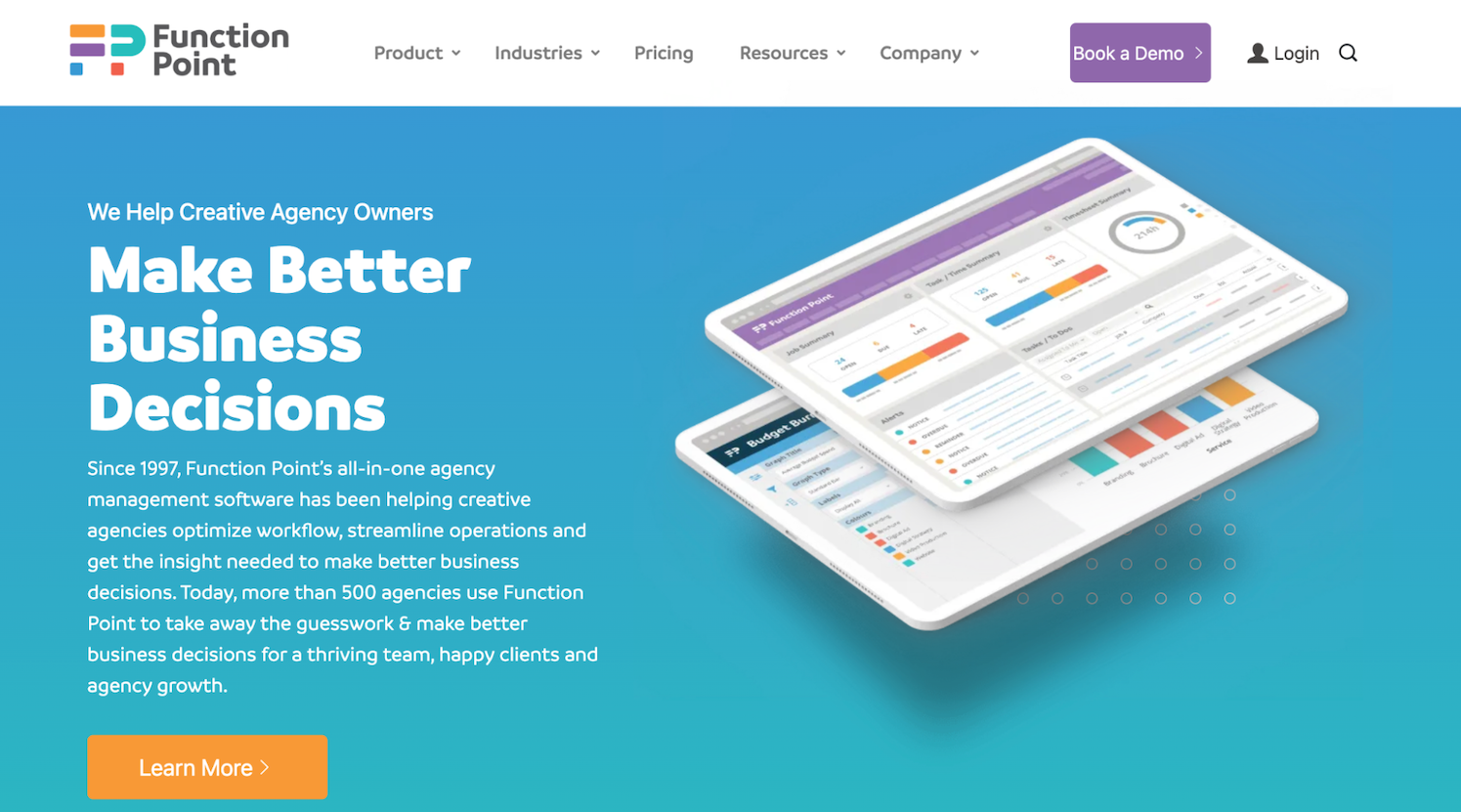
Function Point, like Workamajig, boasts 30 years of experience serving creative teams in the agency management software space.
Founded in Vancouver, the brand has built a strong reputation, particularly among Canadian-based agencies that want local support, and serves 500+ agencies worldwide. Throughout its long industry history, Function Point has refined its platform and features based on agency feedback, resulting in workflows that align with how creative teams actually operate.
Function Point offers a comprehensive toolset quite similar to Productive. It combines project management, resource planning, time tracking, and financial tools in one system, designed specifically for creatives.
Agencies considering Productive alternatives typically find Function Point checks all their boxes. It strikes a nice balance between comprehensive features and usability, and pricing is reasonable. That said, some users report that the interface feels somewhat dated compared to newer options.
The key distinction between Function Point and Productive is that Function Point primarily serves smaller and mid-sized agencies. At the same time, Productive offers a broader range of packages, including scalable, enterprise-level solutions for larger organizations.
Read more Function Point reviews here.
Features
- Client management tools, including estimates, proposals, change orders, revision tracking, and job request portals
- CRM and email integrations
- Project templates
- Project management dashboards
- Project monitoring (choose Gantt charts or a Kanban board view)
- Team collaboration, including file sharing and commenting
- Resource management
- Time tracking
- Financial management, including expense tracking
- Billing and invoicing
- Business intelligence reports, including profitability reports and custom reporting
- Integrations with accounting systems like QuickBooks and other business applications
Pricing
Function Point offers two plans:
-
Standardize ($58/user/month): Provides access to all of FP’s core modules, including project management, resource planning, CRM, time management, financial management, and basic agency reporting.
-
Optimize ($68/user/month): Everything in Standardize plus QuickBooks Online integration and advanced business intelligence tools (such as data visualization and custom saved reports).
Read more: Function Point Reviews & Alternatives
4. Scoro
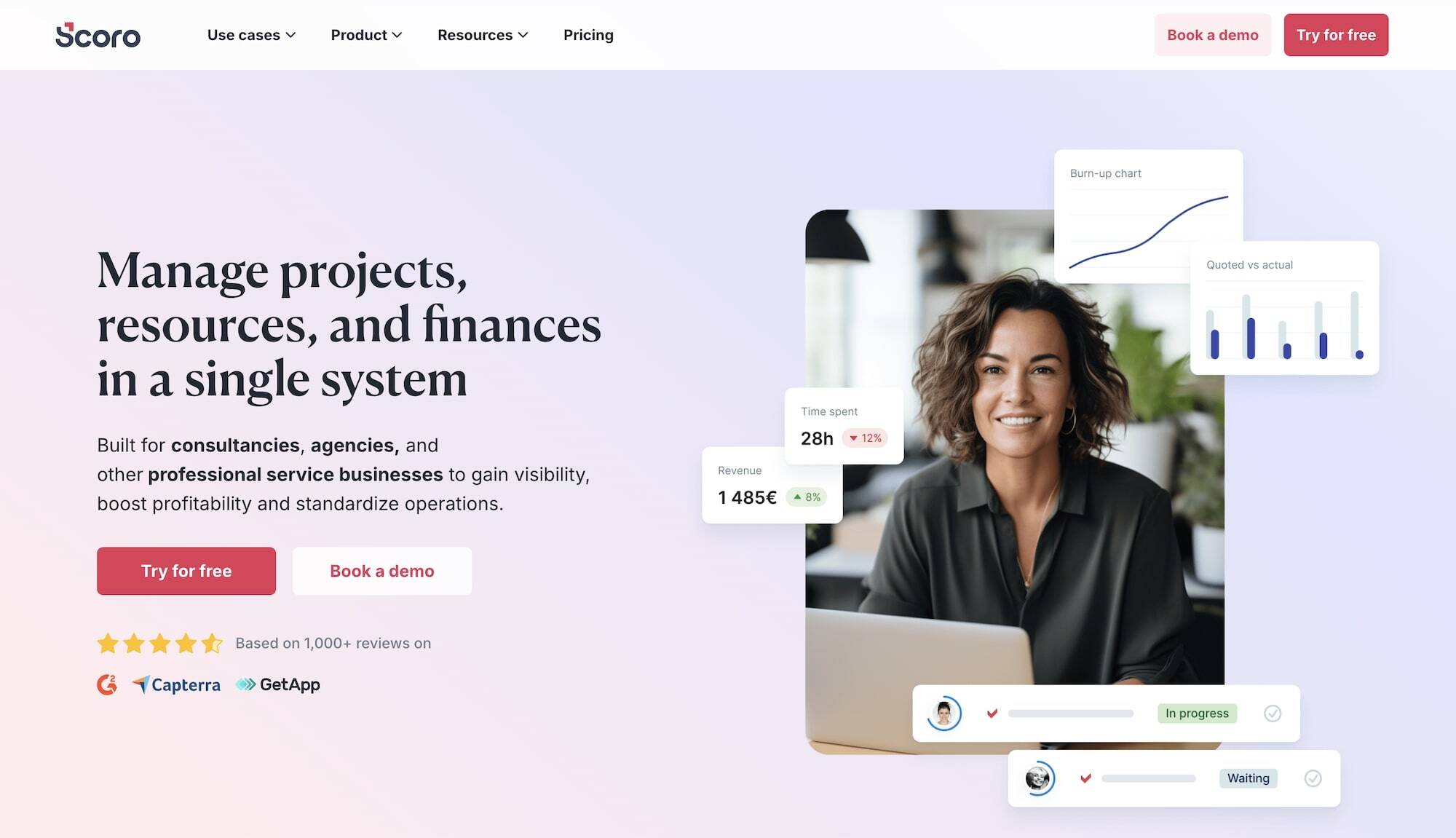
Scoro provides an end-to-end work management platform for professional service businesses and agencies. In addition to creatives, the brand also works with software developers, IT teams, architects, event managers, consultants, law firms, and more.
While Scoro offers a comprehensive suite of features similar to Productive — combining project management, resource planning, CRM, and financial features in a single platform — it distinguishes itself with strong(er) financial management tools and more detailed reporting capabilities.
You may prefer Scoro vs. Productive if improving your agency's financial performance is a top priority.
Despite Scoro’s benefits, many users say it isn't the easiest system to learn or set up. Some users report that the interface feels less intuitive than other options, which may slow adoption among project stakeholders (especially remote users and clients).
It’s also worth noting that Scoro’s platform is priced higher than many other agency management tools, including Productive, without necessarily delivering proportionate value.
Check out more Scoro reviews here.
Features
- Project management
- Resource planning
- Time tracking
- Collaboration tools
- Quoting & budgeting tools
- Invoicing
- Cost management
- Retainers
- Sales CRM
- Advanced reporting
- Automated workflows
Pricing
Scoro offers three packages and custom enterprise solutions:
-
Core ($23.90/user/month): This entry-level plan lacks too many essential features (like subtasks, time locking, and expense tracking) for us to recommend.
-
Growth ($38.90/user/month): While this plan unlocks Scoro’s core project, resource, and financial management tools, it still doesn’t meet most agencies' needs. It offers only contact management in the CRM and lacks essential project and financial management tools.
-
Performance: ($59.90/user/month): This is the only Scoro package we suggest. It provides enough tools to support all business areas (project management, staff scheduling, time tracking, budget monitoring, and reporting).
Read more: Best Scoro Alternatives for Agencies
5. Kantata
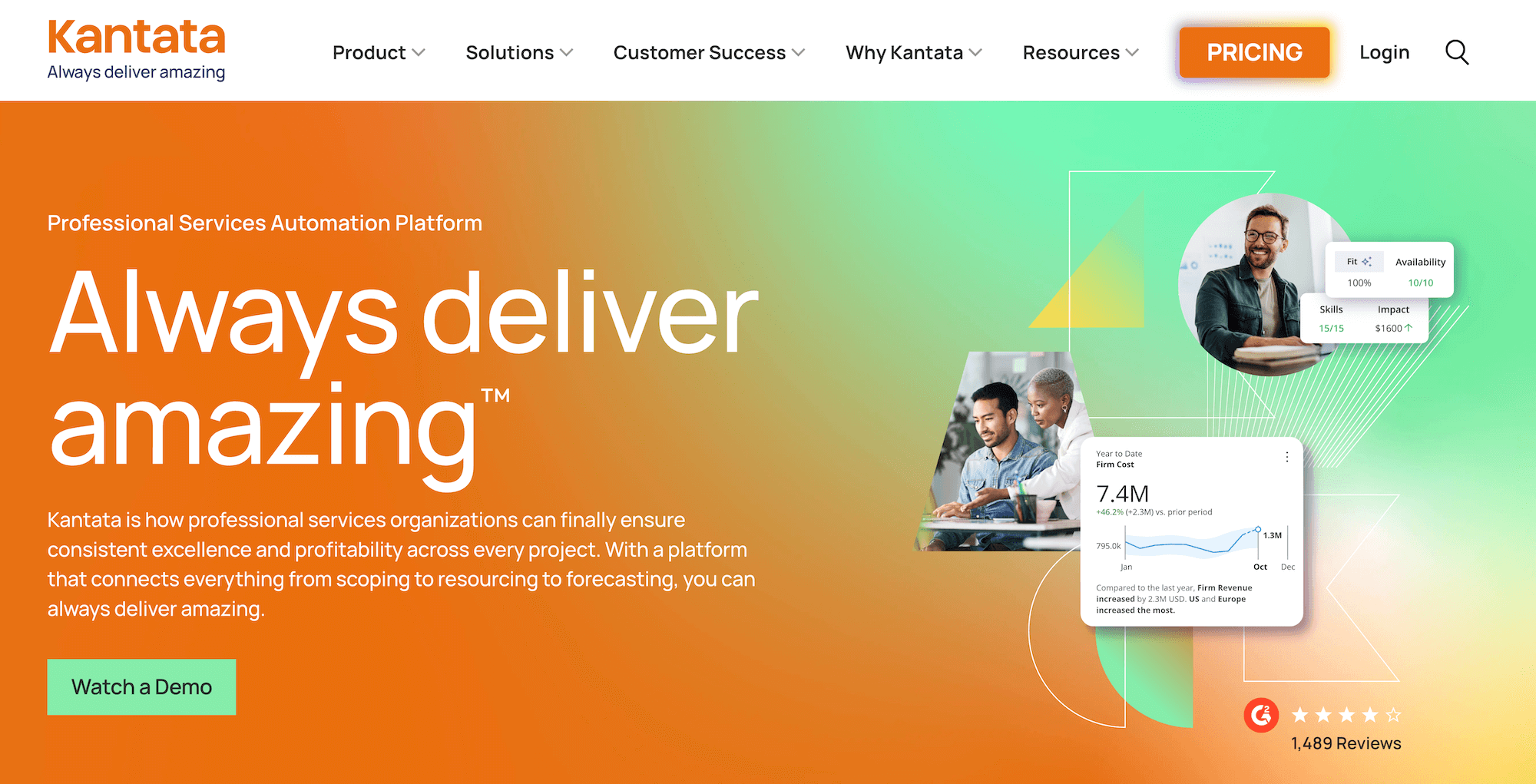
Kantata is a more universal project management platform (advertised as a professional services automation platform) for all service-based businesses. While Kantata works with creatives and agencies, it also markets its system to consulting firms, IT teams, product and software developers, law firms, accountants, and more.
Kantata is an enterprise-focused solution typically popular among larger agencies and multi-location businesses that need to manage employees across different teams and projects. (Smaller agencies might find Kantata's extensive feature set overwhelming and unnecessary for their day-to-day operations.)
Kantata provides the full range of project management tools, with portfolio features that outshine Productive — they come with support for project hierarchies and complex organizational structures. It also features more advanced resource management and financial planning capabilities — with an emphasis on resource optimization and profitability tracking — that appeal to larger organizations with complex operational needs.
However, while Kantata’s modules are all feature-rich, the system notably lacks a CRM — although it integrates natively with Salesforce.
As you might expect with an enterprise-level solution, Kantata users report a bit of a learning curve and recommend setting aside time for training. You should also expect longer training times when adding remote users or clients.
Despite Kantata’s comprehensive toolset and complexity, users say pricing is generally reasonable. However, the vendor requires users to purchase at least 50 licenses to access the platform, so again, it’s not the best option for a smaller team.
Find more Kantata reviews here.
Features
- Project planning tools, including project estimation and forecasting
- Project monitoring
- Automated project management insights to guide next steps and prevent overruns
- Portfolio management
- Resource scheduling
- Resource forecasting and capacity planning
- Resource management tools, including skills inventory and vendor management, to source the best talent for projects
- Time tracking
- Budget tracking
- Project accounting to track costs, monitor burn, and set financial goals
- Automated invoicing
- Revenue forecasting
- Feedback surveys for project teams and clients to report on satisfaction and overall project success
- Team collaboration and feedback tools, including file sharing and commenting
- Business intelligence reports, with 60+ service-centric reports
- Integrations
Pricing
Kantata does not share packages or pricing on its site. It provides a tool to share details about your agency and see a custom quote.
6. BigTime
BigTime is a robust professional services automation system that combines project portfolio management, resource management, invoicing and payments, time and expense tracking, and business intelligence under one roof.
BigTime offers two solutions to accommodate organizations of all sizes and needs:
-
BigTime PSA — which caters to single-entity businesses and fulfills most agency needs.
-
BigTime Enterprise — designed for larger enterprises with complex workflows and international or global footprints. It features deeper customizations, powerful BI reporting, and multi-entity, multi-currency capabilities.
Users love BigTime’s modern, intuitive interface and robust features. BigTime PSA is also easy to set up, with shorter implementation times than Productive. The platform also offers a few capabilities that Productive lacks, including:
-
A unified talent management hub. The hub brings together all employees' skills, experience, and certifications, so managers can easily reference this information when assigning work.
-
BI reporting tools (exclusive to BigTime Enterprise). These tools unify project, client, and financial data — and allow businesses to pull in insights from Power BI, Tableau, and their internal data warehouse. Then, teams can move quotes to cash by syncing with CPQ, CRM, and data visualization tools.
-
BigTime Payments. The vendor’s proprietary payment processing tool allows clients to securely pay invoices online via credit card, ACH, or wire transfer, either directly from the invoice email or the client portal. Teams can also reconcile invoices made via BigTime Payments in their accounting software (provided they’ve integrated it with BigTime)
However, BigTime does have some notable drawbacks to keep in mind:
-
It lacks CRM and accounting software. So, users must integrate BigTime with tools such as HubSpot, Salesforce, QuickBooks, or Sage Intacct to support those workflows.
-
It's a “modular” platform. Standard packages don’t provide full platform access — only core project management, invoicing, and expense management tools. The resource, quote, and data management modules are sold separately as upgrades.
-
Like Productive, many users note that BigTime can be buggy, especially when integrations (such as with accounting software) are involved. Users also say that BigTime can be very slow to address these issues, with support tickets left unresolved for months.
Read more BigTime reviews here.
Features
- Scoping & quoting
- Invoicing & payments
- Time & expense tracking
- Resource planning
- Project management
- Portfolio management
- Reporting & analytics
- BI reporting & data visualizations
- Customizable dashboards
- BigTime AI assistant
Pricing
BigTime doesn’t publicly list the pricing for any of its plans. However, the vendor states that the lowest tier for BigTime PSA starts at $20/user/month.
BigTime PSA has three standard packages:
-
Essentials: Includes BigTime delivery (the project management suite), time tracking, invoicing, expense management, payments, automatic reconciliation, a QuickBooks integration, and an AI-powered assistant.
-
Advanced: Everything in Essentials plus project templates, custom invoice templates, multi-currency expense management, and custom reporting.
-
Premier: Unlocks project budgeting, multi-level approvals, multi-currency invoicing, and custom cost and rate management.
BigTime Enterprise comes with standard packages — interested users can contact the vendor for more details.
7. Agency Handy
Agency Handy is a project management platform for advertising and digital marketing agencies. The brand primarily works with small and mid-sized agencies with a simple, user-friendly solution that’s easy to learn and implement. User reviews suggest Agency Handy prioritizes ease of use and quick implementation over extensive, in-depth features.
Unlike more comprehensive agency management systems such as Workamajig, Productive, or even Scoro, Agency Handy focuses primarily on streamlining project workflows (rather than resource planning or financial management).
The platform strives to offer a simpler, more targeted approach to agency project management. It helps agencies organize their work, manage client relationships, and track projects — all in one place.
While Agency Handy lacks the all-in-one capabilities of other tools on this list, some agencies may appreciate its marketing-specific focus and simple design. Pricing is also relatively affordable.
Check out more Agency Handy reviews here.
Features
- Website widgets to list services & rates
- Customizable intake forms
- Project templates
- Estimating
- Task management
- Project monitoring
- Client management tools
- Client accounts & portals
- Team collaboration tools
- File storage & sharing
- Time tracking
- Invoicing
- Customer service center to create tickets & address client concerns
- Reporting
Pricing
Agency Handy offers three standard packages for teams of different sizes and needs. All packages include Agency Handy’s core modules (project management, CRM, time tracking, invoicing, client portals), but limits and additional capabilities vary by package.
The three plans include:
-
Freelancer ($29/month): Supports up to 1 user, 1 workspace, and 100 leads.
-
Team Starter ($99/month): Supports up to 10 users in a single workspace and 3000 leads. This plan unlocks a custom domain and email, app embeds, API access, Slack integration, webhook, and priority support.
-
Business Pro ($199/month): Supports up to 30 users, 5 workspaces, and 10,000 leads. Business Pro users are also paired with a dedicated account manager.
8. RoboHead

RoboHead is a project management tool designed specifically for creatives in both agency and in-house settings, but it’s primarily popular with in-house marketing teams and creative departments.
RoboHead offers a straightforward approach to managing marketing projects and campaigns and structuring workflows. The platform contains a robust toolset to help teams organize incoming requests (from other departments or existing clients), manage projects throughout their lifecycle, standardize workflows, track creative assets, and streamline review processes.
While it lacks some agency-specific features that Productive offers (such as CRM, client management, and resource planning), RoboHead excels at improving request intake and optimizing creative workflows. Agencies interested in a solution for managing new opportunities and client acquisition should skip RoboHead and choose another option on our list.
Find more RoboHead reviews here.
Features
- Project request forms
- Project planning with templates
- Task management
- Project management & monitoring
- Team management with staff scheduling
- Time tracking
- Collaborative tools to support feedback discussions & revisioning
- Portfolio management
- Workflow automation tools
- Financial reports
- Integrations
- Adobe XD plugin
Pricing
RoboHead doesn’t list pricing on its website; you must request a demo for a quote.
Reviews suggest pricing typically depends on the number of users and starts in the mid-range compared to other solutions.
Read more: Best RoboHead Alternatives for Creatives & Marketers
9. Teamwork
Next on our list is Teamwork — a Productive alternative that goes toe-to-toe regarding key features and benefits. The most significant differences between the two platforms are:
-
Productive offers a built-in CRM, while Teamwork only offers client management tools (though the functionality is very similar).
-
Teamwork's subscription costs nearly twice as much as Productive's for similar features.
Given that Teamwork costs about twice as much as Productive but doesn't offer many extra features or benefits, it's hard to recommend Teamwork over Productive. You simply get more for your money with Productive. However, we include Teamwork in our guide because you’re bound to run into it while comparison shopping.
Read more Teamwork reviews here.
Features
- Project intake forms and project planning
- Project management
- Project monitoring
- Resource and workload management
- Time tracking
- Internal proofing and collaborative tools
- Workflow automation tools
- Client management
- Expense management
- Budget tracking
- Invoicing
- Reporting
- Integrations and API
- Mobile apps (for iOS & Android)
Pricing
Teamwork currently offers three standard packages, a free plan, and custom enterprise packages. It’s worth noting that the vendor’s plans change frequently.
Teamwork’s standard packages include:
-
Basics ($13.99/user/month): Offers project intake request forms, project management, project monitoring, and team collaboration tools. This tier doesn’t support agency workflows because it lacks a resource planning module and offers only basic financial management tools.
-
Accelerate ($29.99/user/month): Unlocks basic invoices, retainer, resource management, time tracking against project budgets, and more.
-
Optimize (Custom pricing): Teamwork’s recommended plan that includes its full suite of essential agency management features.
Teamwork also offers custom enterprise packages that include a dedicated account manager, expert tech implementation, advanced security features, and more.
Read more: Best Teamwork Alternatives for Creatives & Agencies
10. SmartTask
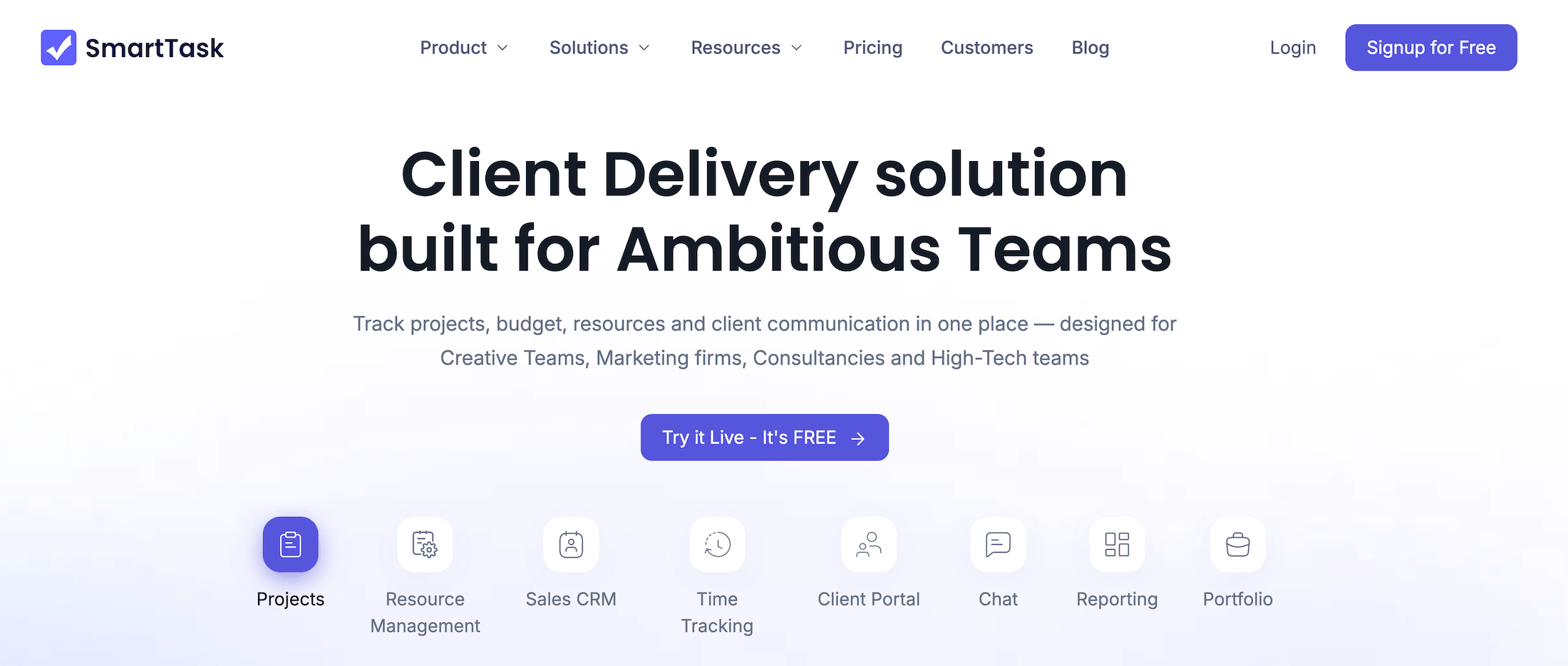
SmartTask is a Productive alternative specifically designed for small and medium-sized agencies and businesses. It includes project management, resource management, time tracking, client portals, sales CRM, expense tracking, and budgeting tools.
SmartTask also offers some nifty features that Productive lacks, including two-way email sync, call recordings in the CRM, proofing tools, and a native chat. However, the platform’s financial management tools are quite basic — e.g., it lacks invoicing, billing, and estimating tools. Plus, its reporting features are also pretty limited.
It’s also worth noting that SmartTask supports very few direct integrations — Slack, Google Workspace products, Dropbox, and MailChimp are among the notable ones. But to integrate it with an accounting software, users have to rely on its integrations with Make, Zapier, or Pabbly.
Users praise SmartTask’s ease of use, simple interface, and generous free plan (which includes basic access to all modules plus unlimited projects, users, tasks, contacts, and guests). Smaller teams with modest budgets prefer SmartTask over Productive because it offers affordable packages that include all the platform’s essentials.
Check out more SmartTask reviews here.
Features
- Project management
- Task management
- Multi-homing tasks across projects
- Project portfolios
- Critical path analysis
- Time tracking
- Time off management
- AI-assisted resource scheduling
- Sales CRM
- Branded client portals
- Custom domains and email domains
Pricing
SmartTask offers two standard packages that include everything from its free plan (all modules plus unlimited limits for projects, tasks, contacts, users, and guests), plus some more advanced capabilities:
-
Premium ($12/user/month): Unlocks custom fields, milestones, reminders, forms, and private groups.
-
Business ($16/user/month): Everything in Premium plus timeline views, dashboards, portfolios, time tracking, budgeting, and the call-recording integration. Users can also pay extra for custom branding. We recommend this tier for agencies because it includes all the essential features and limits they need.
SmartTask also offers:
-
Custom enterprise packages that include single sign-on (SSO), whitelabeling, enterprise API access, a dedicated customer success manager, and access to the vendor’s managed services. Interested users can contact them for a custom quote.
-
Discounts and/or credits for early-stage startups and non-profits.
11. Flowlu
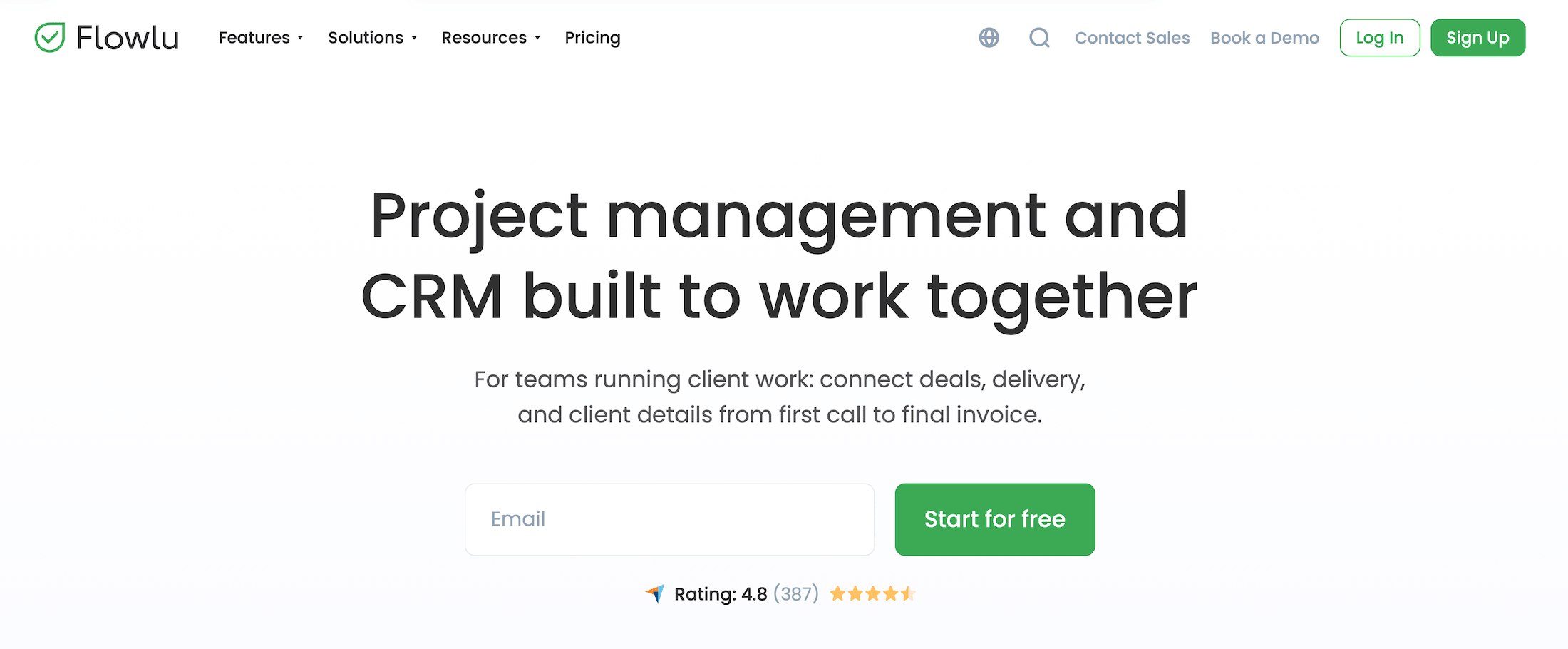
Flowlu is an all-in-one business management platform used by businesses of all sizes, kinds, and industries — from marketing agencies to accounting firms, consultancies, healthcare providers, financial services providers, and even automotive organizations. The platform offers fully integrated project management, CRM, human resource management, and financial management software.
Flowlu stands out as one of the most feature-rich solutions on our list. In addition to the core agency management tools that Productive offers, Flowlu also includes:
-
A document builder with templates and automated tools. Teams can conveniently build any type of document they need, from proposals and invoices to contracts and SLAs.
-
Mind maps. Users can visualize their projects, workflows, and ideas with a mindmap maker that features icons, priority markers, and progress trackers. People can also work together to co-create mind maps for collaborative projects or tasks.
-
A workflow automation builder. Users can automate workflows across Flowlu’s suite of tools by designing standard sequences with multiple stages. They can specify automated actions, set triggers, and add custom fields for specific details.
Flowlu’s CRM is also more robust than Productive’s, featuring the full works — sales pipeline, lead capture forms, Kanban and list views, product and service catalogs, lost-opportunity analysis, email templates, email metrics tracking (opens, clicks), automations, and more.
However, one of the biggest drawbacks of Flowlu is that it lacks a native accounting system and doesn’t support integrations with third-party accounting software. This seriously limits its financial management capabilities and forces teams to manually transfer data between Flowlu and their accounting system.
Additionally, while Flowlu’s business management suite is feature-rich overall, its lower-tier plans can be limiting for growing teams. Some tiers lack entire modules — such as resource management — while others lack functionality such as portfolio management. Also, users must upgrade to a custom plan to unlock full white-labeling and higher limits for external collaborators (clients, vendors, freelancers).
Find more Flowlu reviews here.
Features
- Lead capture forms
- Opportunity tracking & lost opportunity reasons
- Personal email inboxes
- Email templates
- Email metrics tracking
- Project workflows — create templates with predefined stages, milestones, and tasks
- Task templates
- Task management
- Project portfolios
- Project financial planning
- Project expense & revenue tracking
- Agile & issue tracker
- Collaborative tools
- Resource planning & management
- Online invoicing
- Financial management
- Mind maps
- Document builder
- Client portals
- Knowledge base
Pricing
Flowlu offers two standard packages, a free plan, and custom enterprise plans:
-
Free ($0, limited to 2 users): Includes basic project and task management, simple CRM with up to 100 contacts, invoices and estimates, expense tracking, collaboration tools, and a knowledge base — best for freelancers or very small teams testing Flowlu.
-
Essential ($12/user/month): Unlocks multiple sales pipelines, email sync, CRM reports, task dependencies and subtasks, Gantt charts, sprints, online payments, and basic financial and time tracking. Suitable for small teams but not great for growing agencies.
-
Advanced ($22/user/month): Adds email tracking, client portals, advanced CRM reports, project portfolios, expanded time tracking, finance tools, and HR features. The minimum recommended tier for agencies.
-
Ultimate (Custom pricing): Provides Flowlu’s full suite of features across CRM, project management, finance, HR, and collaboration. Tailored for enterprises requiring scalable, customizable solutions.
Note: The Essential and Advanced plans both include a 7-day free trial.
12. OneSuite
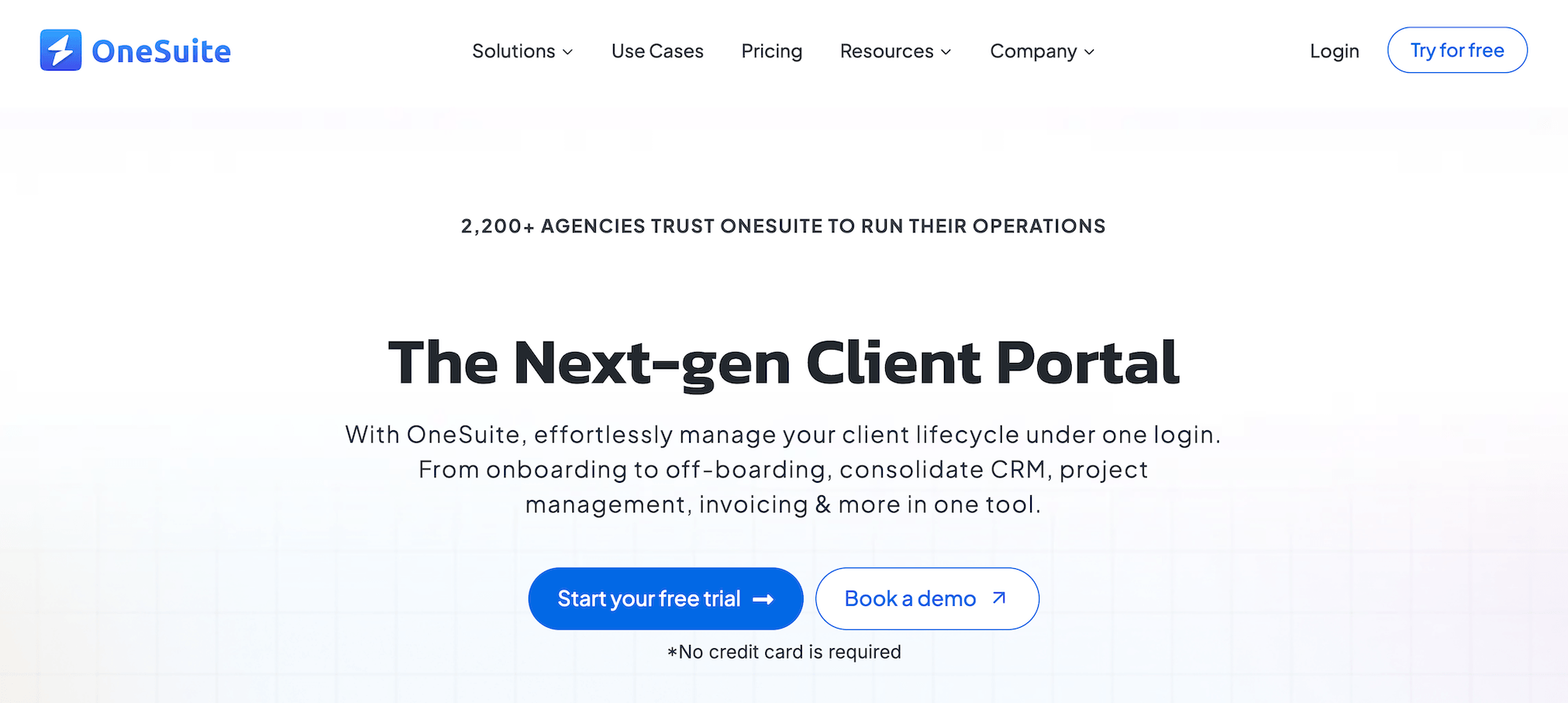
OneSuite is a lightweight agency management system featuring project management software, client portals, a CRM, team management tools, invoicing tools, and a proposal builder. It's less robust than many other solutions on our list, and OneSuite’s website describes the platform as being in the “early stage” of development.
As in SmartTask’s case, the main reason to consider OneSuite over Productive is its plans, which are even more affordable than SmartTask’s. Several users praise the platform’s clean, intuitive interface and say it’s easy to implement and adopt. As one user puts it: “I like how easy and intuitive it is, as you don't need to explain to your employees where to find their assignments and documents. It is very functional.”
However, the trade-off is that you’re getting a significantly less robust solution that needs a fair bit more development. It lacks workload planning, capacity planning, expense tracking, and project monitoring tools — and its financial management tools are pretty limited.
Read more OneSuite reviews here.
Features
- Project and task management
- Team management
- Time tracking and timesheets
- Billing & invoicing
- Sales CRM
- Client portals
- Proposal builder
- Multi-lingual support
Pricing
OneSuite has three standard packages that all include the platform’s core features, but vary in their user and feature limits:
-
Freelancer ($29/month for five users): Includes client portals, up to 3000 leads, 10GB file storage, priority support, and unlimited projects, clients, invoices, and documents.
-
Soloentrepreneur ($59/month for 12 users): Everything in Freelancer plus up to 10,000 leads and 30GB file storage.
-
Growing agency ($149/month for 35 users): Unlocks unlimited leads and 60GB file storage.
The vendor also offers custom, self-hosted plans for large teams and enterprises.
How to Choose the Right Productive.io Alternative
When you’re comparing Productive providers, the main things that you should consider are:
-
All-in-one vs. app-based systems. Fully integrated solutions like Workamajig and Advantage provide everything you need under one roof, whereas other systems require one or more platform integrations to support core agency workflows.
For example, Teamwork relies on third-party apps to support CRM and accounting workflows. Most agency management systems lack native accounting software and instead rely on integrations with QuickBooks, Xero, NetSuite, Sage Intacct, and the like. -
Total and long-term costs. Comparing vendors on a subscription-to-subscription basis doesn’t reveal the full picture about how much you’ll spend overall. Make sure you consider both:
-
The overall impact on your tech budget. The more tools that an agency management system replaces, the more you save in tech costs overall. Plus, keep in mind that even integrating your agency management system with other software (e.g., accounting) can cost extra if you also have to pay for a third-party integration tool, like Zapier.
-
How each provider’s plans scale. Many systems are increasingly expensive per user as your needs evolve, due to upgrade costs and paid add-ons.
-
-
Ease of use and adoption. Check out the platform’s typical onboarding times and what reviews have to say about its ease of use.
-
Support with onboarding and implementation. Since more feature-rich solutions typically come with a longer learning and adoption curve, be sure to prioritize vendors that support your team at every step. Compare the support that they offer across different plans and make sure they’ve got your needs covered.
-
Platform reliability. You should (1) look into how long each system has been around, and (2) read user reviews to gauge each platform’s day-to-day performance. You can typically do (1) by checking the platform’s website or doing a simple Google search. With (2), you should carefully comb through reviews to see if users report glitches and bugs in their workflows. For example, users may note facing difficulties when dealing with large data sets, mass exports, and/or integrations.
Ultimately, there isn’t a universal “best” Productive.io alternative. It really depends on your budget, your growth stage, and the specific workflows that you’re looking to manage.
Note: In your research, you may also come across universal project management systems such as ClickUp, Asana, Monday.com, and Trello. These systems haven’t made our list because they don’t cover the full range of agency-specific workflows that Productive supports.
Getting Started with Workamajig
Workamajig offers everything agencies need in one platform — project management, CRM, resource planning, accounting, and financial management — without the hefty price tag of other enterprise solutions.
With 30 years in the agency space, we’ve got tons of experience supporting their unique workflows. Our platform combines power and simplicity — robust enough to handle complex projects but straightforward enough that your team will actually use it.
Request a demo with our team to see how Workamajig can transform your agency operations.
Related reads: