

Asana is a household name in project management, used by thousands of businesses of all sizes across various industries. Teams praise its ease of use, intuitive interface, and various customization options.
The platform offers features that support core project workflows, including native resource planning, time tracking, and project budget tracking. It also integrates with over 300 apps — including CRMs, creative apps, marketing automation tools, and more — to support other essential marketing agency workflows.
However, Asana isn’t the best choice for marketing and creative agencies because:
-
It doesn’t intuitively support how agencies manage project workflows. Asana lacks client management tools, freelancer/vendor management tools, and a clear system for organizing projects by client.
So agencies are left customizing Asana’s building blocks — projects, teams, and portfolios — to support their specific workflows. However, these setups vary and lead to extra admin work, challenges in organizing work, and scattered or duplicate data.
Plus, these setups don’t scale with your agency. As your needs evolve — e.g., maybe you go from delivering one project/service per client to multiple — you’ll usually need to customize Asana all over again and move data around to support the new workflow. -
Its financial management tools are pretty limited. While Asana offers a “timesheets and budgets” add-on for time and project budget tracking, the tool is fairly basic. It accounts only for labor costs and doesn’t include media buys, vendor costs, and other expenses such as travel.
-
It only supports project workflows. Asana lacks native features to support other essential agency workflows — as mentioned above, it doesn’t include vendor management, client management, accounting, financial reporting, and agency reporting.
-
Essential features are locked behind pricing tiers and paid add-ons. For example, only Asana’s most expensive package includes proofing tools, approvals, and native time-tracking tools. And its capacity planning tool, various admin controls, and custom branding are all restricted to enterprise plans.
While marketing and creative agencies try to overcome most of these limitations by integrating Asana with third-party apps, this approach has its own drawbacks. It drives up tech expenses, scatters data across systems, reduces visibility into day-to-day operations, and creates friction when teams need to collaborate across functions.
That’s why marketing agencies and creative teams benefit more from agency-specific project management software (like Workamajig).
These solutions are built for creative workflows and replace multiple tools — not just project management. They also incorporate native resource planning, time tracking, client management, vendor management, financial management, and reporting to support the full range of agency and creative workflows.
So to help you find the right solution for your needs, we’ve put this guide together that covers 8 of the best Asana alternatives for marketing agencies and creatives — including:
Keep reading to see how Workamajig compares, or request a personalized demo.
1. Workamajig
Asana Alternative Optimized for Marketing & Creative Agencies
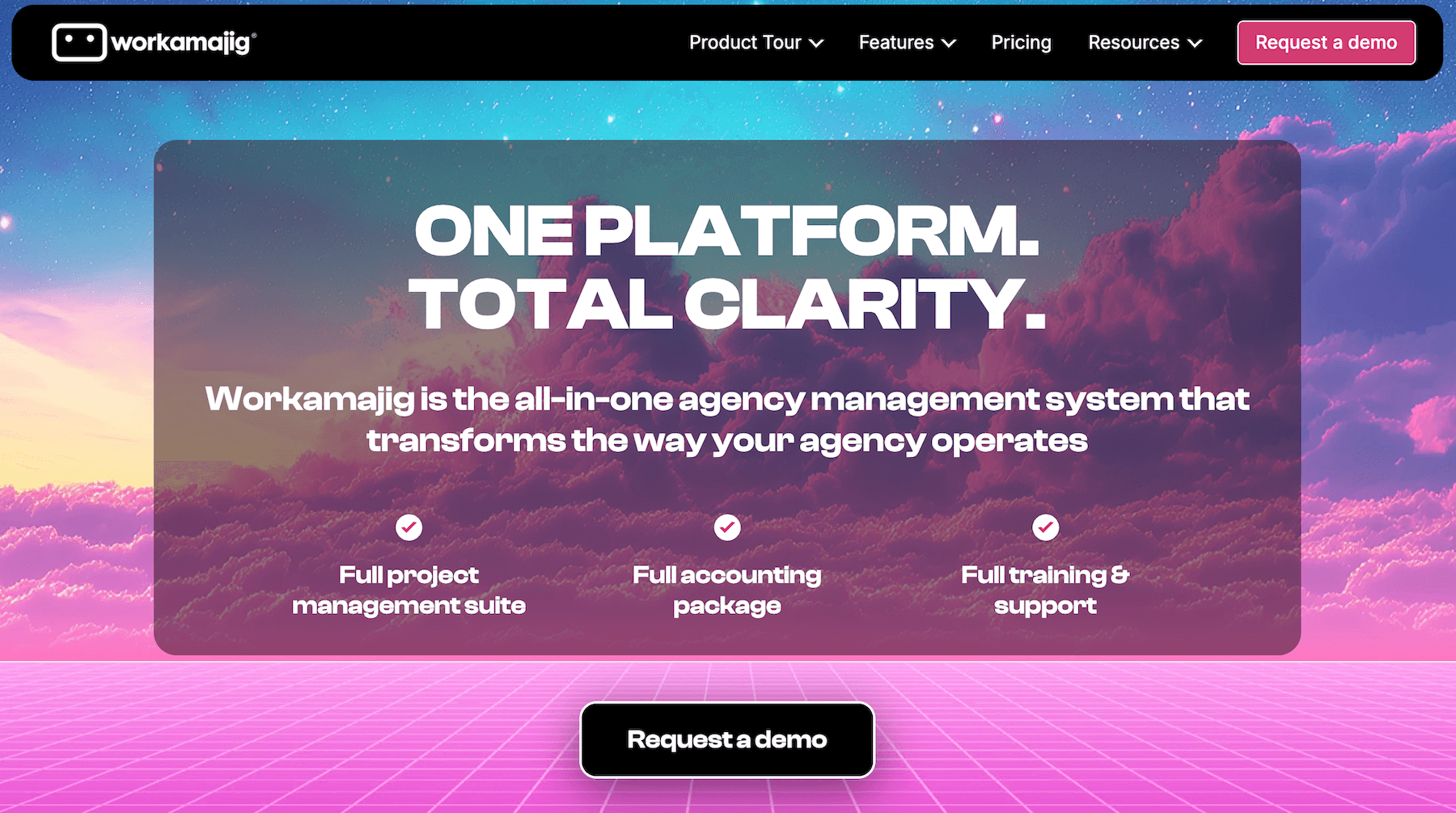
Workamajig is an all-in-one agency management system designed for marketing and creative teams. It replaces general-purpose PM software like Asana and includes native accounting, client management, and CRM — delivering stronger financial controls, smoother collaboration, cost savings, and deeper reporting.
Agencies prefer Workamajig to universal project management software for the following reasons:
-
It’s purpose-built for the way they work. With Workamajig, agencies can manage all their day-to-day operations in one system. Our system is tailored to agency workflows that involve multiple stakeholders, complex approvals, and require managers to make the best use of their resources across various projects.
-
Teams can easily organize their client work and manage external relationships. Users can store clients as contacts, link projects or campaigns to specific clients, add freelancers to projects, and manage all client communication and collaboration through dedicated portals.
-
Its expense-tracking and financial-management tools are more robust. Workamajig’s native accounting system provides tools to pull in and manage expenses from different sources — vendor accounts, CC account charges, media buys, etc. Teams can also track cost burn in real-time, manage the entire project billing workflow, reconcile vendor invoices, tag out-of-pocket expenses, and more.
-
All teams work together in one place. With your sales, accounting, and delivery teams all on the same system, teams can collaborate more effectively and tap into shared data. For example, sales reps can reference historical project data to share accurate client estimates, while billing users can coordinate with PMs to develop accurate invoices.
-
Workamajig goes beyond project-level reporting. Workamajig also offers a range of financial, sales, and agency-wide reports to evaluate performance, profitability, and productivity.
And unlike Asana, all Workamajig features are included in every plan. So you don’t need to worry about expensive upgrades or paid add-ons to access essential features and manage all areas of your agency operations.
We also pair each customer up with a dedicated accounting manager, who provides personalized onboarding and ongoing support to ensure Workamajig is always tailored to their current needs.
After switching to Workamajig, marketing and creative agencies see improved team collaboration, streamlined operations, lower tech costs, and higher profitability. Here’s what one of our customers had to say:
“Workamajig really streamlines everything for us and helps us keep everything in line when there are so many projects and moving parts with so many different people and departments. It really keeps everything on the right track and all the communication in the same place.”
- Sheila Bizzel, Senior Project Manager at Red Letter Communication
You can check out some of our other client stories below to see how marketing teams benefit from Workamajig:
- Ryan Marketing Achieves Quicker Results with Workamajig
- Mariner Marketing Achieves Seamless Collaboration and Clarity with Workamajig
- Parallel Path Unlocks Deeper Agency Financial Insight With Workamajig
Next, we’ll take you through all of Workamajig’s features that support the full scope of agency operations. For a more detailed walkthrough, request a demo with our team.
Native CRM Software
Workamajig offers a full-featured, native CRM that marketing and creative agencies use to:
- Consolidate leads from all their different sources.
- Nurture leads and develop opportunities through to close.
- Visualize their sales pipeline and forecast revenue.
- Improve coordination between sales and delivery teams.
- Evaluate sales performance so they can improve efficiencies and uncover opportunities to boost their pipeline.
This guide explores our agency CRM in detail, but we provide a brief overview of its core features below.
Lead Capture and Management
Workamajig’s lead capture tools make it easy to pull in leads directly into our system:
-
Contact form connector. Our most popular lead capture tool — connecting Workamajig to your website’s contact form ensures all new inquiries are stored in the system as leads.
-
APIs and Zapier integrations. Easily extract leads from your CRM and marketing automation solutions, such as HubSpot, Zoho, Salesforce, MailChimp, Pipedrive, and more.
-
List imports. Upload event attendees, email lists, leads from prospecting tools, and any other sources via .csv files. Reps can also manually add new leads.
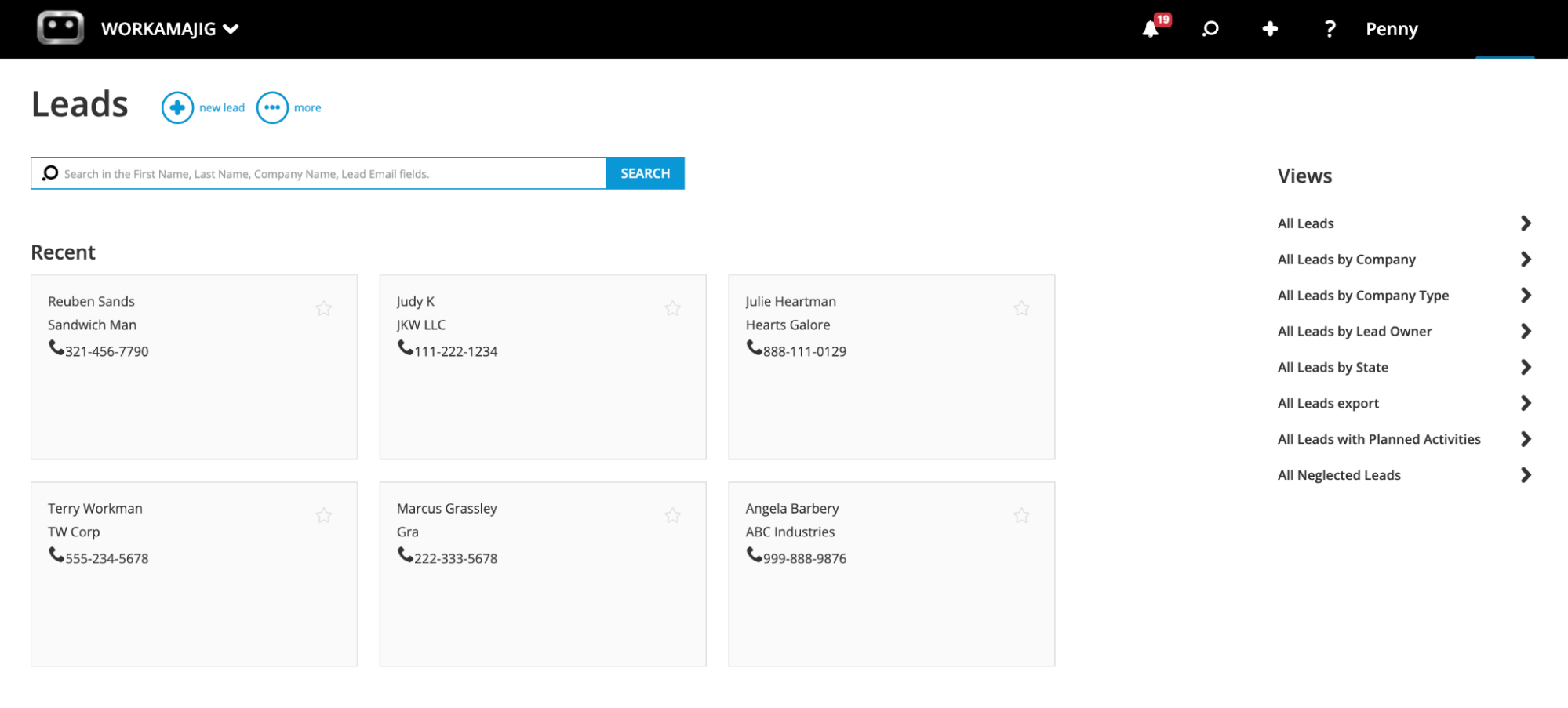
Sales reps can conveniently track and manage all leads from our centralized Leads Dashboard (shown in the screenshot below). Our system includes handy tools to:
-
Tag leads by their source.
-
Filter lead lists by different Views, such as company, lead owner, or status.
-
Track neglected leads (i.e., ones that haven’t been engaged in a specific period of time — like 30 days).
-
Track interactions and touchpoints. Our Conversations feature lets reps keep a record of all the steps they’ve taken to nurture leads — such as sending an email, having a phone call, meeting them at an event, or sending collateral.
-
Convert qualified leads to opportunities.
Developing Opportunities and Tracking Pipeline
When reps convert qualified leads into opportunities, our system automatically moves them to the Opportunities Dashboard and transfers all relevant information, including conversations.
The dashboard includes simple tools to help sales reps develop these opportunities and store key information:
-
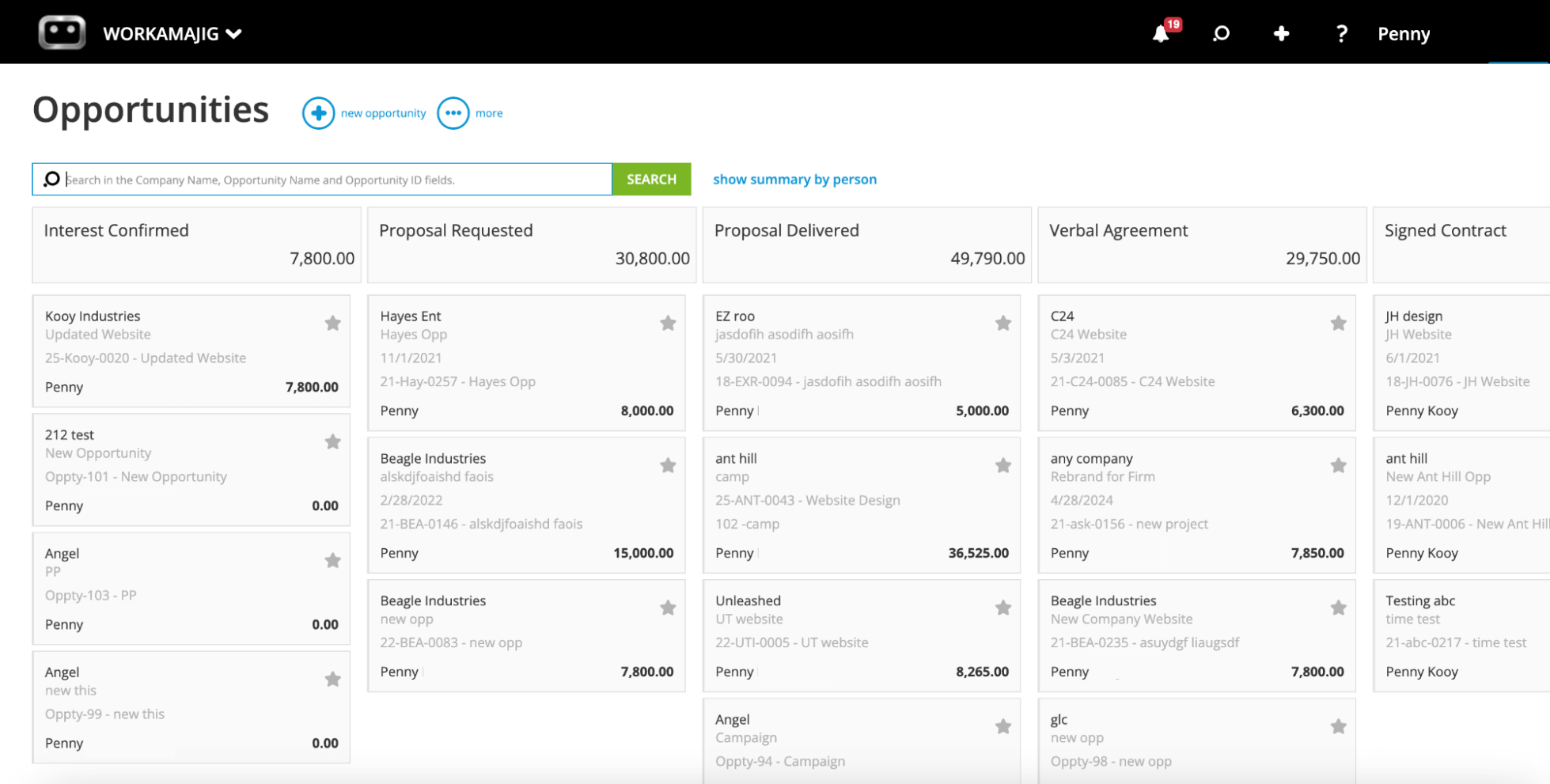
Opportunity cards. As reps gather more specs and details, they can conveniently record the information on these cards. Opportunity cards include fields for projected revenue, estimated costs, forecasted close date, the probability of closure, the number of months expected to bill off the opportunity, and the outcome (awarded, lost to a competitor, or cancelled).
-
Automated estimating. As sales reps develop new opportunities, they can reference project data in Workamajig — including resources and budgets — to share accurate estimates and realistic timelines.
-
Opportunity overviews. These overviews provide big-picture details at a glance — such as age, timeline, and potential profit. Reps can view this information alongside previous conversations to make strategic decisions about which opportunities to prioritize.
Sales managers also have specific controls to customize the sales pipeline, manage their reps, and plan ahead. They can:
-
Customize pipeline stages to reflect their agency’s processes and workflows. Our dashboard organizes all opportunities by these stages in a visual, Kanban-style view, providing a real-time snapshot of what’s in the pipeline.
-
Set appropriate stages and statuses for each opportunity, and add any additional context to Opportunity cards so reps can see it.
-
Forecast future revenue and resource requirements based on what’s already in the pipeline.
And after winning opportunities, reps can hand them over to internal teams by converting them to a new project or campaign.
Project Intake & Project Planning
Workamajig comes packed with several tools to manage project intake and ensure delivery teams have all the details they need to kick off new projects. They can:
-
Convert won opportunities into projects or campaigns right from the CRM (as mentioned above). Marketing agencies love this option because it automatically transfers all relevant information — including specs, estimates, client conversations, and more — to the new project, saving internal teams time and effort.
-
Create project templates for similar project types. For example, they can customize templates for standardized services or repeat clients. Managers can specify tasks, subtasks, dependencies, milestones, estimates, and more.
-
Use project request forms. While in-house teams primarily use these forms to manage project intake from different departments, some agencies also use them to accept requests from repeat clients.
Then, when new projects come in, managers can use our project planning toolkit to finalize plans and assign work. First, they can finalize project details with our:
-
Task management tools. Managers can double-check, tweak, and finalize task details — such as their dependencies, time allotments, due dates, and resources.
-
Automated estimating tool. As PMs finalize projects and assign resources, our tool updates budgets and estimates to reflect labor, vendor, contingency, and overhead costs.
Then, they can assign work to resources using our resource scheduling and vendor management modules.
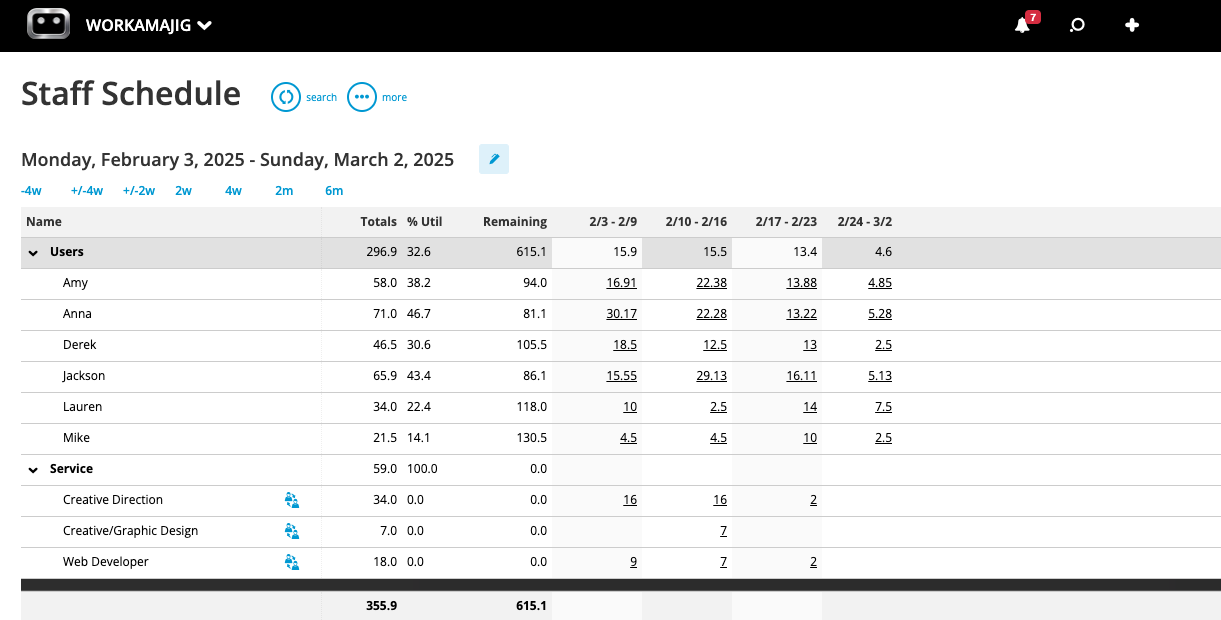
Our staff scheduling dashboard (shown in the screenshot below) brings each staff member’s availability, capacity, weekly allocations, utilization, and availability together in a single view. Managers can also toggle the dashboard to display the actual tasks each resource is assigned to, along with their allocations.
So when assigning new work, managers can reference bandwidth, skill sets, and the work team members they are already engaged with to:
-
Match resources with the right skill sets to the right job.
-
Prevent scheduling conflicts.
-
Ensure workloads are fairly distributed. For example, managers can check whether certain resources are overworked. Then, they can either reschedule tasks from busier days to other days of the week or reassign some tasks to colleagues with more bandwidth.
This dashboard also shows any unassigned services, so managers can double-check all project activities are covered before kick-off.
Most agencies rely on outside vendors to help them deliver projects — whether that means getting prints from a production vendor, looping in contractors with niche skill sets, or calling in some extra help when you’re short on hands.
With Workamajig’s vendor management module:
-
PMs can easily source the right freelancers. Managers can request quotes, receive and compare bids, evaluate past vendors' reliability, and assign work. Then they can incorporate freelancer costs into project estimates to ensure accurate budget tracking.
-
Freelancers can access all the details they need. Workamajig offers personalized dashboards for vendors that show all the active projects they’re assigned to, along with daily to-do lists and task details.
-
Teams can manage vendor invoices and send payments. Workamajig includes a complete accounting system that lets billing teams reconcile vendor invoices, handle overages, and pay vendors online. (More on this later.)
Read more: 10 Steps to Optimize Resources in Agency Project Management
Project Collaboration Tools
Workamajig is packed with user-friendly project collaboration tools to help teams plan their work, coordinate with peers, manage client feedback, and ensure final deliverables align with expectations.
First, our Today dashboards bring each user’s activities and conversations together in one place. These dashboards are personalized for each role — such as sales reps, creatives, and project managers — and enable users to take quick action.
For example, the Today – Creatives dashboard shown below provides an overview of the user’s tasks, categorized by status and urgency. Each card also displays details like the allocations, remaining time, open items, and due dates.
Users can also:
- Mark tasks as complete
- Submit deliverables
- Enter time on task cards
- Pull up recent Project Conversations or start new ones
- See their meetings for the day and schedule new ones
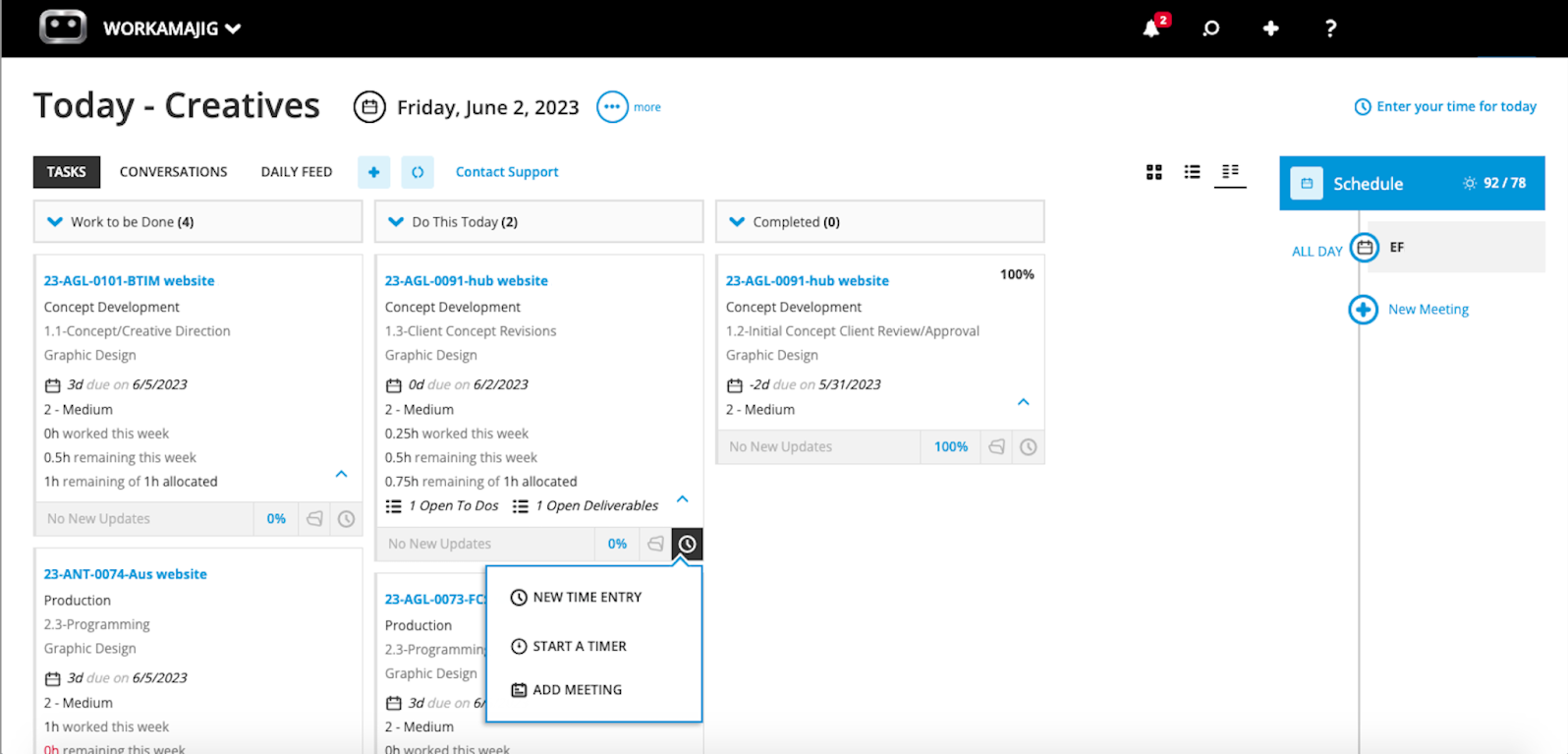
This also saves managers time by eliminating the need to constantly share new context with team members and freelancers. Everybody can instantly see what they need to work on, how much time to spend on each task, what’s in the backlog, and when each task is due.
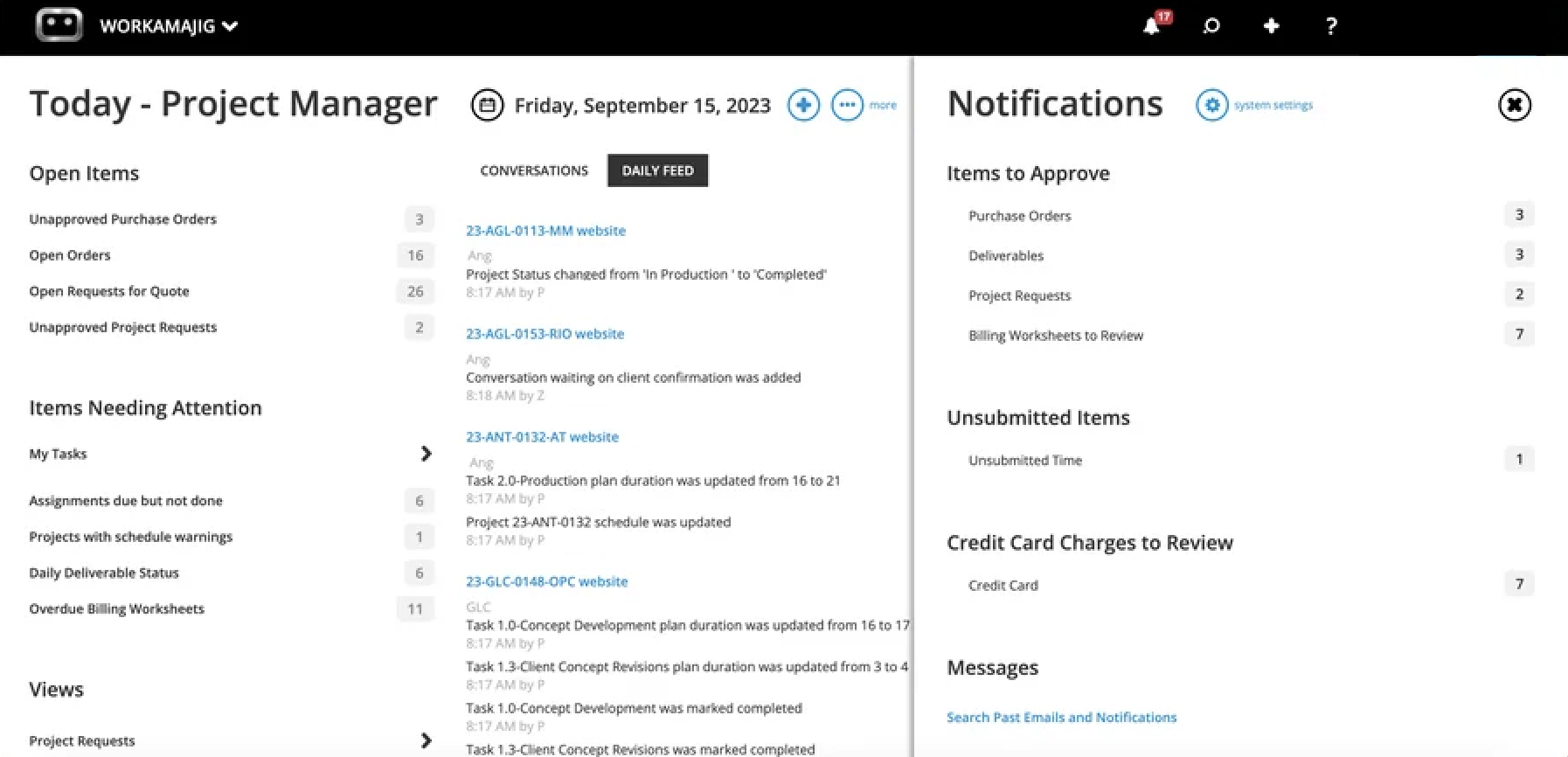
Similarly, the Today – Project Manager dashboard reflects PM’s broader responsibilities. It displays:
-
Open items — such as unapproved POs or project requests.
-
Items that require their approval — such as project requests, billing worksheets in review, and project deliverables.
-
Items needing attention — which includes both their personal tasks and any alerts specific to the projects they’re assigned to. For example, assignments that weren’t submitted on time and projects that experienced overruns both show up here.
Like creative users, PMs can also take quick actions from their Today page.
As mentioned above, Workamajig offers many collaboration tools to streamline day-to-day collaboration. These include:
-
Project conversations. Similar to conversations in the CRM module, project conversations are customizable and all tracked at the project level for easy reference. Users can leave notes for all project stakeholders — clients, vendors, and staff — to address and participate in.
-
Commenting. Users can leave comments on task cards and tag stakeholders for support or feedback.
-
File sharing. Workamajig lets teams create file repositories for individual projects or entire project portfolios, so all stakeholders can easily access what they need. Our system supports all the file types used by marketing and creative teams — including images, video, audio, design files, documents, PDFs, HTML, and more.
-
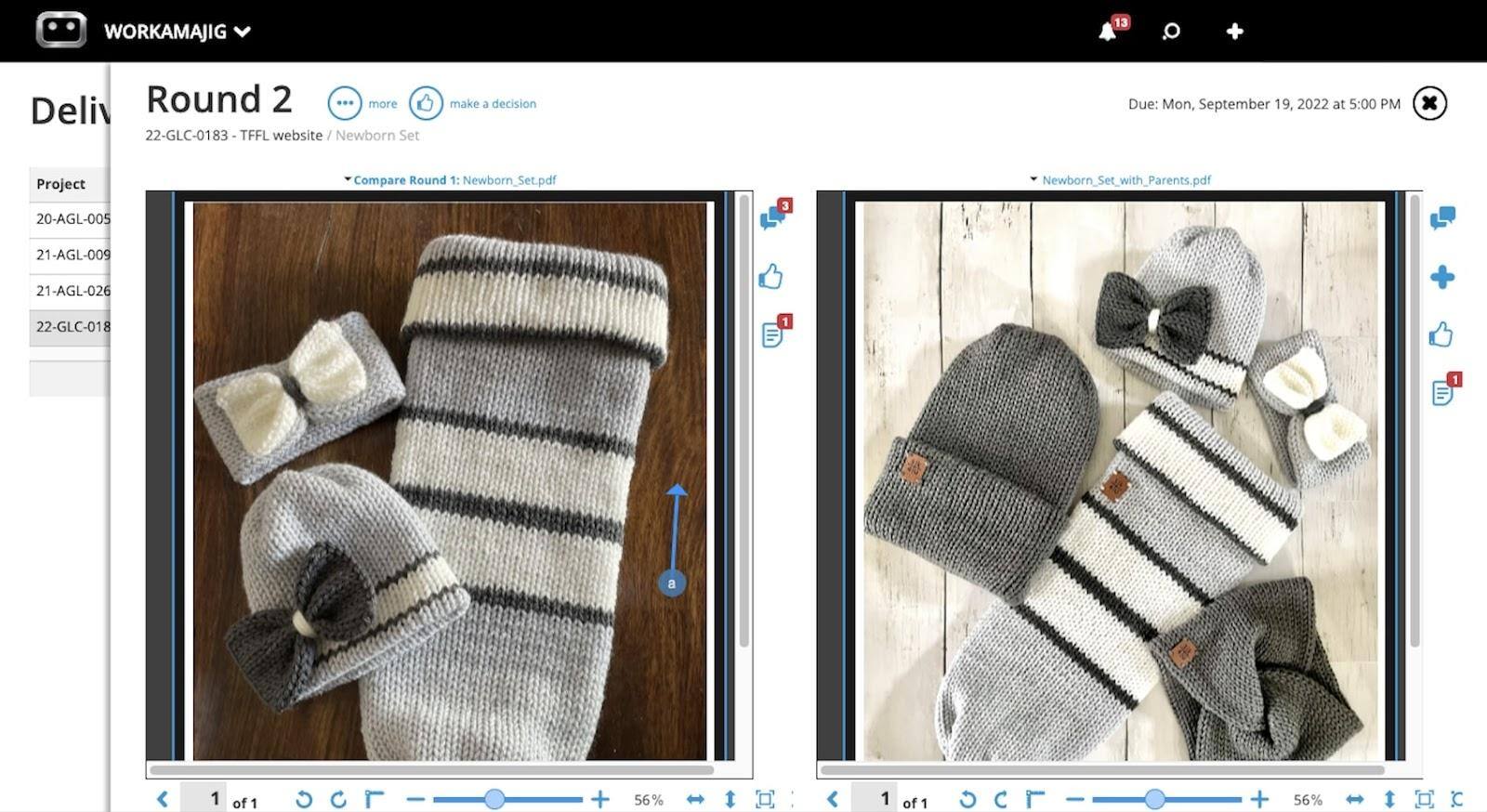
Internal proofing. Creative users can easily preview content, compare files side by side, and annotate them with our toolkit. Then, editors can review the feedback and upload new versions as they make changes.
-
Version history. Our system stores version history for all files, so users can quickly reference past content and see edits between versions.
-
Feedback controls. Managers can set limits on the number of feedback rounds to keep revisions focused and avoid scope creep.
-
Client portals. While Asana leaves teams debating over whether to store clients as “Projects” or “Teams,” Workamajig keeps things simple with dedicated client portals. Agencies can create unlimited portals for their clients to request work, track project progress, share feedback, communicate with project teams, view invoices, and access deliverables.
Time & Expense Tracking
Workamajig’s powerful time and expense-tracking tools are included across all our plans at no extra charge.
Project Expense Tracking
Our system offers several tools to pull expenses in and tag them to specific projects.
First, Workamajig factors in initial labor costs based on project estimates. Then, as employees log their actual hours, the updated labor costs are factored into the project budget.
Then, our system offers handy tools to manage expenses from different sources, including:
-
Credit card and spending accounts. Pull these charges into Workamajig via our Plaid connector or auto-sync charges so they update nightly.
-
Vendor invoices. Workamajig’s extensive vendor management suite lets billing and AP teams attach copies of vendor invoices and reconcile them with purchase orders, work orders, and receipts. They can pay vendors online via integrations with Edenred Pay (formerly CSI) and AvidXchange (formerly FastPay).
-
Media buys. Easily track these expenses in Workamajig via our integrations with Strata/FreeWheel, Mediaocean, Bionic, and GaleForceMedia.
-
Receipts. Team members can tag out-of-pocket expenses to projects by attaching and storing receipts in our system.
Time Tracking
Tracking time is one of those things that teams generally find annoying — especially marketing agency teams that are always occupied with client work. But knowing exactly how much time your team spends on specific activities is really important for measuring productivity, profitability, and performance. So it’s not something agencies can afford to overlook.
We’ve made time tracking in Workamajig as frictionless as possible by incorporating simple tools into your team's natural workflows. Whether you’ve got a sales rep pursuing opportunities in the CRM or a designer collaborating in the project management suite, our time tracking tools are just a few clicks away.
![Workamajig - Today - Creatives - Tasks - New Time Entry for Projects [GIF]](https://www.workamajig.com/hs-fs/hubfs/Workamajig%20-%20Today%20-%20Creatives%20-%20Tasks%20-%20New%20Time%20Entry%20for%20Projects%20%5BGIF%5D.gif?width=1352&height=1436&name=Workamajig%20-%20Today%20-%20Creatives%20-%20Tasks%20-%20New%20Time%20Entry%20for%20Projects%20%5BGIF%5D.gif)
As we covered earlier, users can access them directly from task cards and from their personalized Today dashboards. Then, they can enter time in the following ways:
-
Manually — by filling in and submitting timesheets.
-
Automatically — by recording it through Workamajig’s timers. Users can turn timers on when they start working and pause them when they need to toggle between tasks or take a break.
-
From calendar events — teams can use our calendar integrations to add meeting hours and tie them to specific projects. Our system automatically pulls in all scheduled meetings — users only need to confirm they attended, and Workamajig will record the hours.
Managers can review all logged hours in centralized timesheets, where they can edit and approve entries and choose which to bill (or write off).
Then, all approved hours flow into our staff scheduling and project monitoring dashboards, ensuring they accurately represent employee capacity, updated project schedules, and updated labor costs.
Read more: How to Track Creative Project Management Hours
Project Monitoring
Workamajig’s project monitoring dashboard offers a visually friendly snapshot of all active projects, including their status, timelines, and budgets. It supports various project management methodologies (Agile, Critical Path, Waterfall, etc.), so teams can choose the workflow that best fits their needs.
The dashboard is automatically updated as expenses are incurred and employees log their hours, ensuring project managers always have access to real-time insights.
![Workamajig dashboard: Projects and Project Status [GIF]](https://www.workamajig.com/hs-fs/hubfs/Workamajig%20-%20Projects%20and%20Project%20Status%20%5BGIF%5D.gif?width=1714&height=853&name=Workamajig%20-%20Projects%20and%20Project%20Status%20%5BGIF%5D.gif)
From here, they can view how far along projects are by referencing their black progress bars (on the right-hand side) and color-code project phases to reflect their agency’s unique workflows.
Then, as projects progress, PMs can track developments and proactively catch issues with our project health indicators. These color-coded icons (on the left-hand side of the Gantt chart) display each project’s status at a glance.
Green means the project’s on track; yellow indicates things are moving slowly or costs are approaching a warning percentage threshold; and red warns PMs about cost or timeline overruns.
For example, the SF website project above shows red highlights in the Project Timeline and % Complete columns, indicating it has passed its original deadlines and may not finish on time.
Workamajig doesn’t wait around for projects to run over, though. As soon as they enter the yellow territory, our system sends proactive risk alerts to managers so that they can correct course. For example, they might assign more resources or hire freelancers to bring a slow-moving project back on track.
Read more: 8 Tips for Managing a Project Budget (+ Budgeting Methods)
Project Portfolios for Managing Campaigns
Workamajig’s project portfolio management feature — called campaigns — is especially popular amongst marketing agencies for organizing multiple projects under the same client.
There’s no hard-and-fast rule for which projects you should link to a campaign, though — it’s completely up to you. The example of multiple projects per client is simply a logical process for many agencies.
The intake process for campaigns is quite similar to that for projects — reps can convert won opportunities into campaigns directly in the CRM, and managers can either use templates or build them from the ground up.
A campaign pulls each linked project’s tasks, schedules, estimates, shared files, and more in one place. Then, teams can easily track all deliverables, conversations, task progress, budget burn, transactions, and more right from Workamajig’s campaigns dashboard.
Note: As shown in the image below, you can customize the dashboard's appearance and the information it displays.

Managers can also navigate to the project scheduling dashboard (shown below) to easily track progress, edit tasks across the portfolio, or zoom in on a specific project's details.
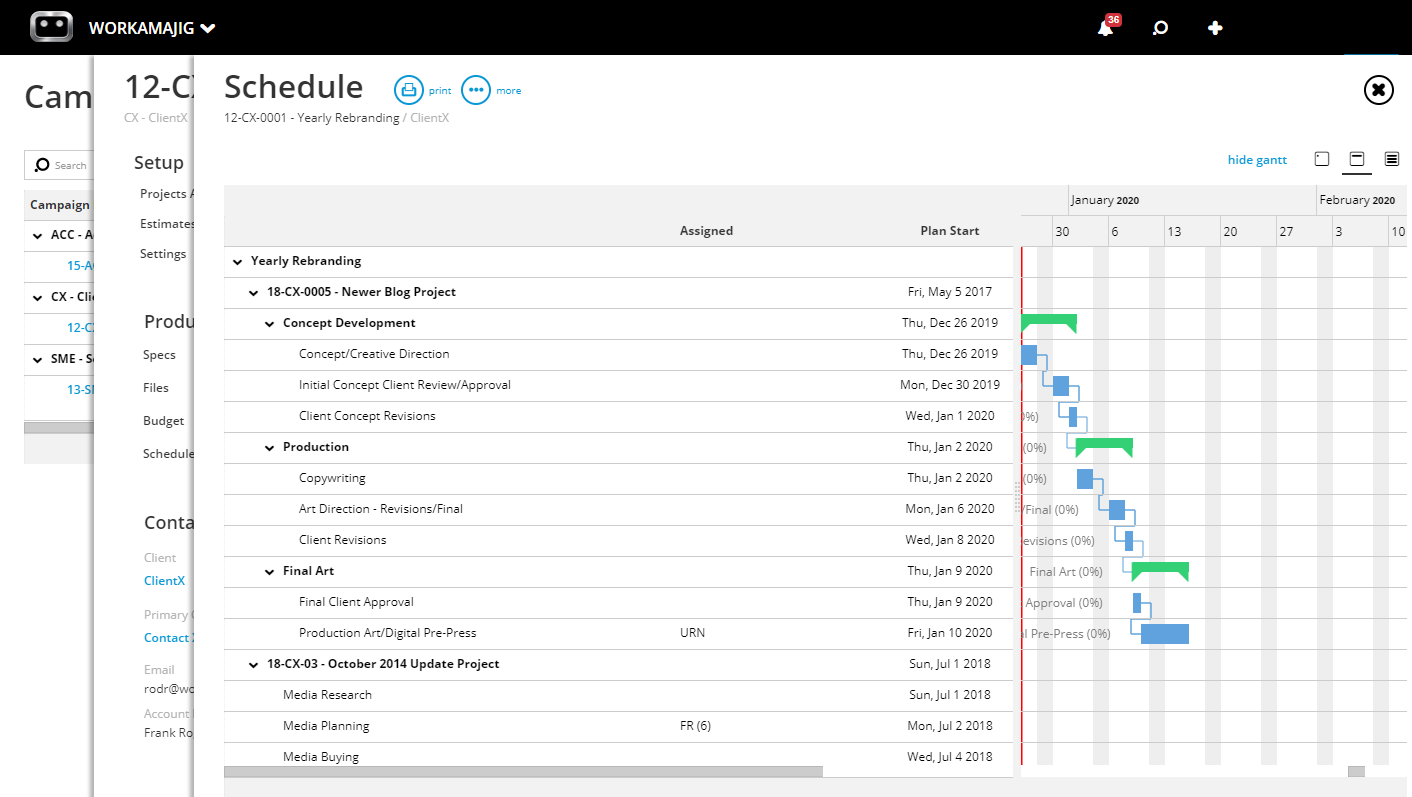
As shown in the image above, the Gantt-style view illustrates how all linked projects contribute to the broader campaign schedule. You can also see that the schedule is broken down into segments — such as “Production” and “Final Art” — each with its own drop-down. These segments can be customized to your liking — e.g., some teams may add segments for each financial quarter.
Read more: Best Campaign Management Software for Agencies & Creatives
Building and Tracking Portfolio Budgets
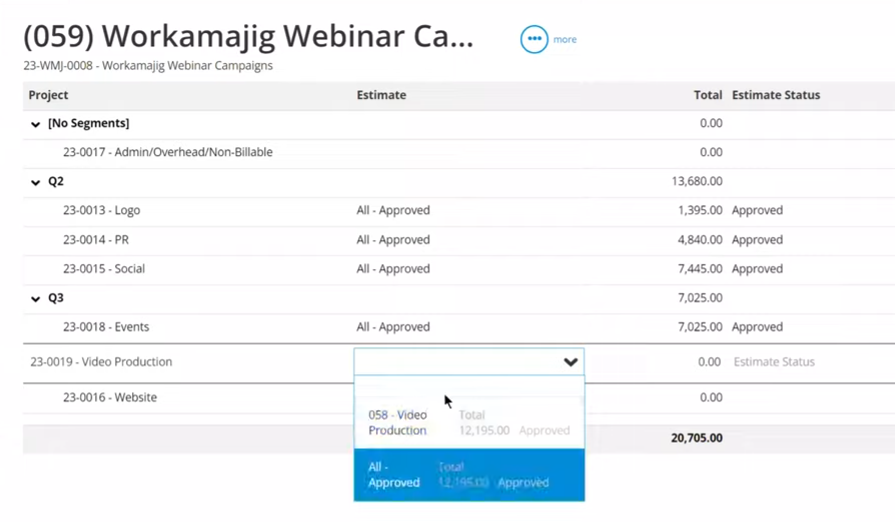
Workamajig lets managers build campaign budgets in one of two ways, depending on how they’d like to manage reporting and the information they have available:
-
Option A: By Project Budget
If all project plans and estimates for the campaign are finalized, PMs can build a centralized campaign budget using individual project estimates (as shown above).
If you have all the necessary project information for Option A, it’s usually the way to go, as it reflects the real work happening across the campaign.
-
Option B: By Service Budget
Managers don’t always have estimates for each project in a campaign, and sometimes they haven’t even finalized all the projects to include. Has the client signed off on PR work?
In such cases, they can build a budget sufficient to get started, using data from the services included in the campaign.
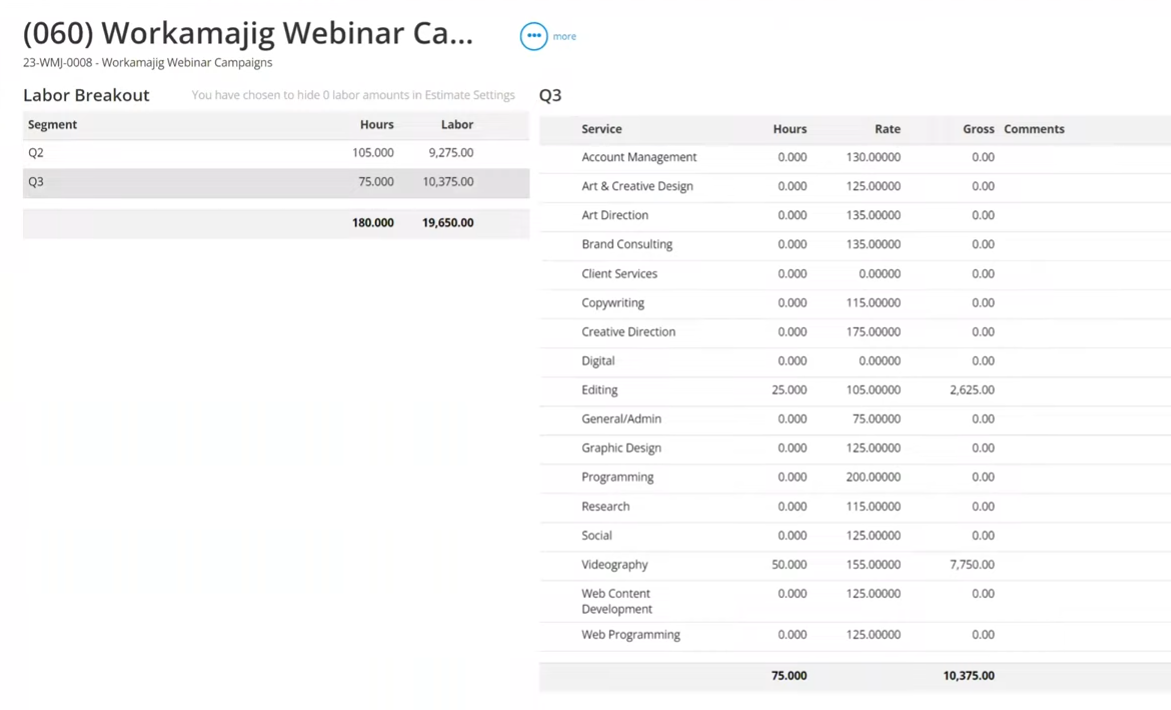
For example, maybe they’ve budgeted 40 hours for art direction, 100 hours of copywriting, 200 hours of web design, and 150 hours for video editing. But they don’t know exactly how these hours will be allocated across projects such as PPC, SEO, or social media.
Workamajig pulls up all the services offered by the agency, along with average hourly rates and any campaign segments displayed on the right-hand side.
As managers add hours for each service, Workamajig automatically calculates the labor rates by multiplying the hours by the average hourly rate. Then our system uses the total gross labor across all services to build a centralized campaign budget.
Workamajig Complete Accounting Software
Workamajig is one of the select few Asana alternatives that features a full, GL-ready accounting system — so it offers a level of financial control and reporting that most solutions just can’t match.
It completely replaces standalone accounting systems like QuickBooks or Xero, reducing your tech costs and eliminating the need to manually move financial data across systems.
For example, as we covered above, Workamajig features a full stack of tools to consolidate expenses from various sources — so teams can accurately track project cost burn in real-time.
Our system also offers several handy tools to support all your billing and accounting workflows, including:
-
Project billing: Manage the entire project billing workflow with collaborative billing worksheets that consolidate costs and save billing teams from chasing down other folks for information. Our solution supports all traditional billing methods used by marketing agencies, including fixed-fee, time-and-materials, retainer, advance, prebilling, work-in-progress (WIP), and media.
-
Mass billing: Teams can either (1) generate separate invoices for each project, or (2) create one invoice for several projects.
-
Retainers: Automatically manage standard retainer agreements.
-
Multi-currency and multi-entity accounting: Track foreign currency exchange rates, process foreign transactions, and manage financial records for multiple entities.
-
Online payment collection: Collect client payments in a variety of ways, including through CC via our Payflow Pro or Authorize.net integrations.
-
Expenses and reimbursements: Team members can create expense reports (even on mobile devices) and tag out-of-pocket charges to request reimbursements. Managers can then review submitted reports and requests and approve them.
-
Financial reporting: Teams can use our various reports to evaluate profitability, performance, and productivity. They can also automate the tracking of key metrics.
Workamajig also offers personalized Today dashboards for billing and accounting roles, allowing users to track urgent tasks and approvals, take quick actions, view recent conversations, submit time, and more.
For example, the Today – Billing page (shown in the screenshot below) includes:
-
A snapshot of the status of billing worksheets, such as “in review” or “ready to create invoices.” Users can click these fields to navigate to the relevant listing screen.
-
The amount to bill for projects, categorized by each type of billing method.
-
The status of invoices, such as those requiring approval.
-
“Views” to easily navigate to their desired listing screens, such as billing worksheets, client invoices, scheduled transactions, and more.
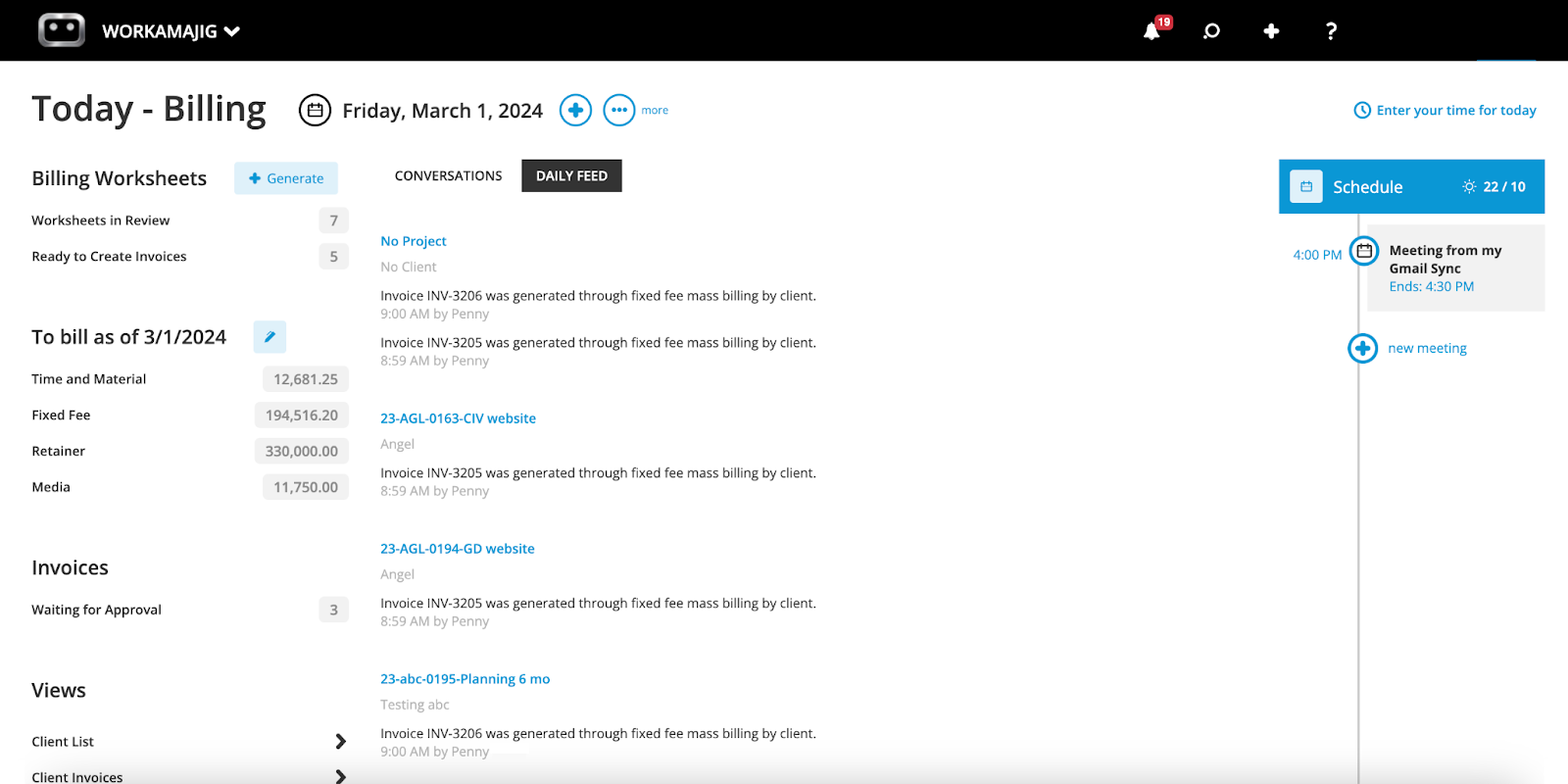
Users can also take quick actions right from the dashboard by pressing the + icon located next to the date range selector. For example, they can store a receipt, submit a new time entry, schedule a transaction, or generate a billing worksheet.
Billing users like our worksheets because they make the invoicing process smoother and more efficient. The usual billing workflows we see aren’t particularly efficient and involve a lot of back-and-forth, changes, and deletions before invoices are finalized.
Our billing worksheets reduce these headaches by enabling billing teams to coordinate with the right decision-makers — whether AEs or PMs — to finalize the specifics before the first invoice is generated. Here’s how it works:
-
An AE generates a billing worksheet that outlines all the project’s information, including expenses, transactions, and prior billing. These worksheets can be generated based on the project’s budget or transactions.
-
The worksheet is automatically routed to the relevant AE or PM, so they can double-check the details and make any tweaks. For example, they can mark items up or down, transfer costs, or write off items.
-
After finalizing the worksheet, they can submit it for approval. Workamajig then automatically routes it back to the billing team.
Then, the billing team can generate a final invoice from the approved worksheet, send it over to clients, and request payment.
Read more: 5 Best Media Accounting Software
Workamajig Reporting Tools
While Asana’s reporting capabilities are mostly limited to the project level, Workamajig offers detailed project, sales, agency, and financial reports for evaluating performance, productivity, and profitability.
Project Reporting Suite
While Workamajig’s project monitoring dashboard provides real-time insights into ongoing projects, our various project reports help PMs evaluate profitability and performance after project wrap.
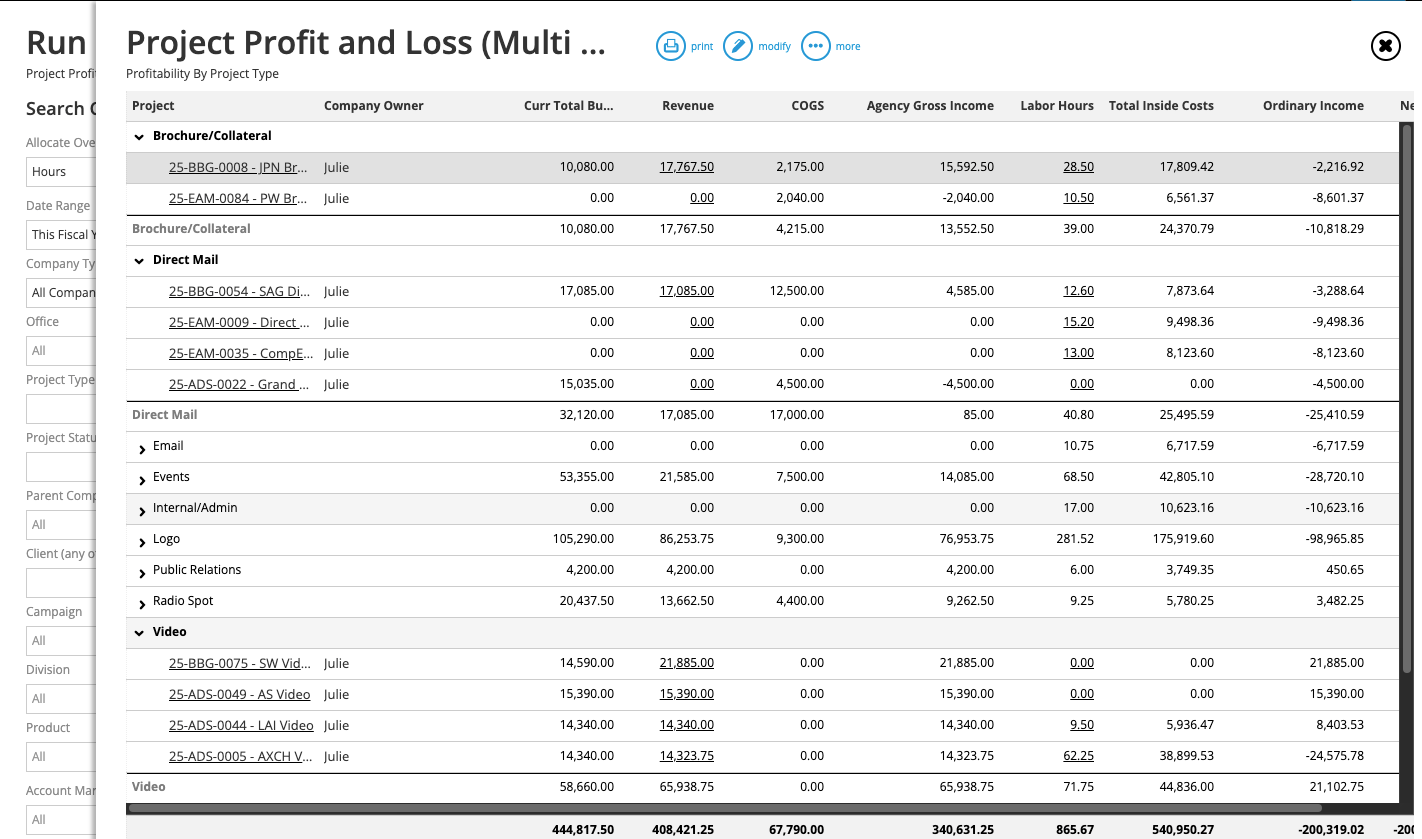
Managers frequently use three main types of project reports:
-
Project Recap Analysis. The recap analysis report lays out how actual labor hours, costs, and deadlines compare with initial estimates, highlighting where work exceeded or fell short of expectations.
-
Project Budget Analysis. This report details how the budgets compare to actual spending across multiple projects. Managers can view each project’s complete transaction history, pull up details about specific transactions, and filter by date range.
-
Project Profit & Loss (P&L). These reports are available in two formats:
-
Multi-view — offering a snapshot of the profitability of multiple projects and allowing managers to easily spread overhead costs from the general ledger across them.
-
-
-
Detailed views — providing detailed insights into a specific project’s profitability with breakdowns by general ledger account, so managers can see where money is being spent and catch overruns.
-
CRM & Sales Reports
Workamajig’s CRM reporting suites include detailed reports to help teams evaluate sales performance and make strategic decisions about where to focus their efforts. Teams can:
-
Learn more about the types of leads they attract
-
Analyze earned vs. lost opportunities (over a variety of categories and timeframes)
-
See where leads drop off and dig into what happened
-
Identify commonalities between earned (and lost) opportunities to understand where they’re successful and where their efforts can be improved
-
Compare performance against previous periods and annual targets
We provide a range of Contact and Opportunity reports, including our popular Win/Loss Analysis, Quarterly Performance Comparisons, and Sales Rep Activity Summaries. Teams can also use our intuitive drag-and-drop builder to design custom reports that tap into their CRM data sets.
Agency Insights
Workamajig’s Agency Insights Reports give creative teams a powerful way to track performance, compare estimates against actuals, and uncover inefficiencies in project workflows.
This dashboard displays hours by client, service, and department — so managers can see where their staff and freelancers spend most of their time and spot recurring issues (e.g., certain tasks consistently taking longer on average). They can also see which teams they utilize the most often and which team members clock the most hours.
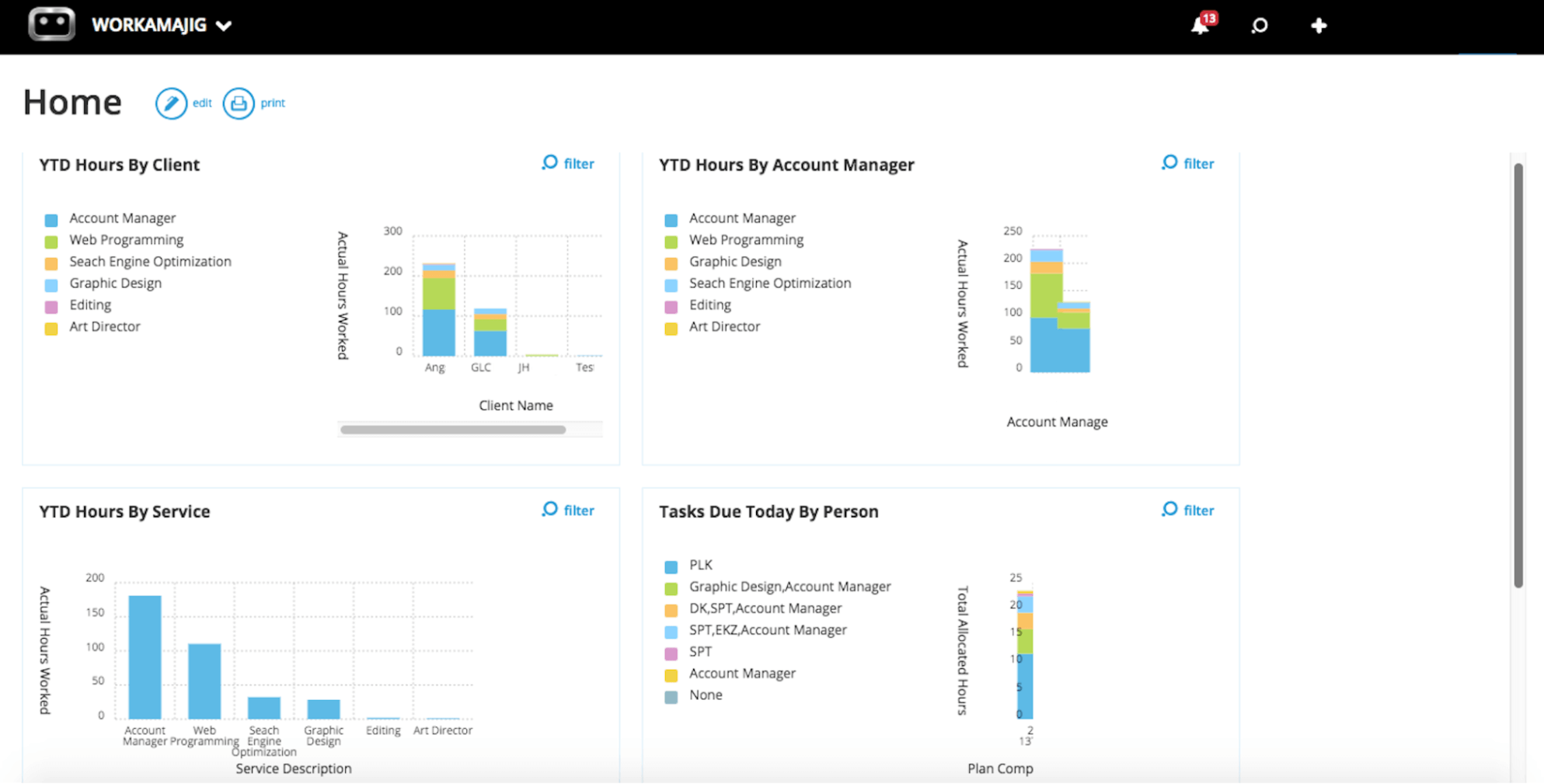
Agency Insights helps managers:
-
See which clients they’re spending too much time on and chart a course for troubleshooting.
-
Identify resource-intensive services. Then they can reference our profitability reports to review the profit margins for these services and determine whether they need to make changes (e.g., by finding a more efficient way to manage tasks).
-
Track billable vs. non-billable hours, implement labor budgets, and optimize resource allocation.
Financial Reports
Workamajig offers over a dozen out-of-the-box and customizable financial reports — managers can save their most-used ones as Favorites for easy access. Our most popular reports include:
- General Ledger (GL) reports for complete financial oversight
- Cash projections and revenue forecasting to assist with future planning
- Budgeted vs. allocated vs. actual costs
- Other P&L reports — including corporate, campaign, and client
- Client and campaign profit and losses — offering different perspectives into agency profitability
- Billable summary reports to compare billable vs. non-billable hours
- Hourly realization rates to help you evaluate productivity from a financial perspective
- Key metrics monitor to track the metrics that drive your business
Packages & Getting Started
Workamajig offers dedicated solutions with full-feature access for agencies and in-house creatives. Pricing is per-user and by team size:
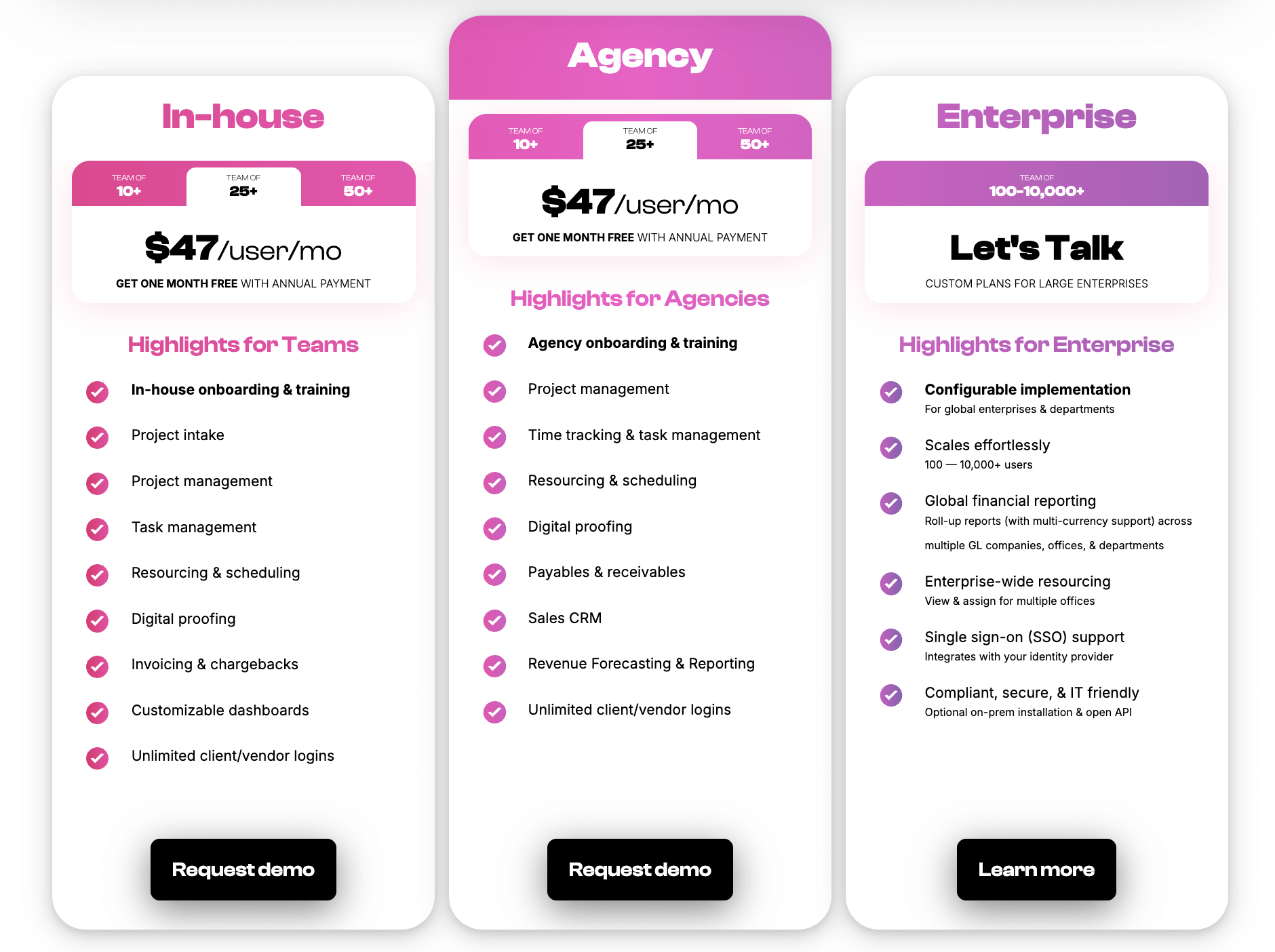
Our enterprise packages accommodate thousands of user seats.
Every customer also receives personalized onboarding and ongoing support from their dedicated account manager.
Request a free demo to see how Workamajig can support your agency operations!
2. Advantage
.png?width=2000&height=878&name=Advantage%20Simpli.fi%20homepage%20(2024).png)
Advantage is another all-in-one agency management system that’s specifically designed for marketing agencies and creative teams. Like Workamajig, it offers everything teams need to manage the creative workflow and agency operations — including native project management, resource planning, time tracking, CRM, and accounting software.
Advantage’s native integration with Simpli.fi makes it particularly appealing to advertising and media agencies. Through this integration, Advantage provides the following media tools:
-
Media planning. Teams can execute all types of media buys, including digital, print, and out-of-home, all from one system.
-
Broadcast buying and management. The broadcast research tool pulls in any subscribed data from Nielsen or Comscore directly into Advantage. Teams can also create billing orders, manage broadcast traffic, and track vendor communications.
-
Digital buying and management. These tools automate the entire process of monitoring, adjusting, and actualizing digital/non-broadcast campaigns.
-
Media reports and dashboards. Report on any media type with out-of-the-box and custom reports.
Advantage has served creative agencies for more than four decades and is widely praised for its robust toolset, powerful reporting tools, flexible integrations, and helpful customer support team. However, it comes with a couple of notable downsides:
-
Many users warn that Advantage has a steep learning curve and an unintuitive interface.
-
Advantage is one of the most expensive solutions on our list, and the company only shares pricing upon request.
Read more Advantage reviews here.
Features
- Project management features, including project intake and project monitoring
- Task management
- Resource management
- Collaborative tools like proofing & reviews
- Time tracking
- Media planning & buying, including broadcast buying, digital buying & media reporting
- Risk analysis & burn rate tracking
- Media accounting software
- Billing & invoicing
- Estimates
- Budget monitoring
- Financial reporting
- Revenue forecasting
- CRM
- Client management
- Reporting dashboard (to analyze project performance, financials, staff hours, etc.)
- Mobile app (for Android)
Pricing
Advantage doesn’t publicly list its pricing. Agencies must contact their team for a quote.
Read more: Best Advantage Software Alternatives for Creative Teams
3. Clients & Profits

Clients & Profits is a powerful Asana alternative that’s specifically designed for creative teams — including design studios, marketing agencies, and marcom teams.
It was designed to help marketers manage all their people, projects, media, and money in one place — with native project management, resource management, time tracking, accounting, and financial reporting tools. And although C&P doesn’t offer a complete media-buying system like Advantage, it does offer media-planning tools to prepare marketing campaigns.
Marketing agencies prefer C&P to systems like Asana because it offers:
-
Support for agency and creative workflows. C&P’s team customizes the platform to each agency's unique use cases and shows them how to adjust the system as those needs evolve.
-
Marketing consulting services. C&P is the only provider on our list that also guides teams on their marketing strategies and initiatives and helps them find ways to grow their pipeline.
-
Robust client management tools. The platform offers feature-rich client web portals, with client daily job status reports, job requests, approvals, job ratings, production calendars, real-time status insights, and powerful collaboration tools.
However, many users complain about C&P’s UI, describing it as dated and unfriendly. You can see it for yourself in C&P’s visual tour.
Another potential downside of C&P is that it's self-hosted. While it does offer cloud storage with a hybrid on-prem/cloud model, users report that downloading the software, managing general maintenance, and staying on top of updates can be a real hassle.
Find more Clients & Profits reviews here.
Features
- Project request forms & tools to calculate estimates
- Project planning & task management
- Project management & monitoring
- Team management with live scheduling
- Time tracking
- Vendor management
- Collaborative tools to gather feedback from team members & clients
- Portfolio management
- Workflow automation tools
- Financial reporting
- Full accounting system with automatic billing & invoicing tools
- Integrations with media planning systems
- Adobe XD plugin
Pricing
Clients & Profits plans are tailored to the type of organization and user role:
-
All creative users are billed at $25 per month.
-
Seats for project managers and account executives cost $45/month.
-
Rates for power users depend on their package: $65/month for design studios, $85/month for marcoms, and $115/month for agencies. The marcoms tier unlocks online approvals and media planning/buying, while the agency plan also offers advanced and retainer billing.
C&P also offers free user seats for freelancers. However, to unlock collaboration and time tracking tools, agencies must pay $9 per user.
Read more: Clients & Profits Software: Reviews & Alternatives
4. RoboHead

RoboHead is another Asana alternative that’s better suited for marketing and creative agencies. It supports the entire creative workflow, brings external and internal stakeholders on the same page, and features powerful collaboration tools.
RoboHead seamlessly integrates with the entire Adobe Creative Cloud, so teams can review their creative briefs, collect feedback, address changes, update statuses, and export the latest file versions to the platform. The platform offers dedicated plugins to connect with Adobe InDesign, Illustrator, Photoshop, and XD.
Unlike the tools we’ve reviewed so far, RoboHead lacks both native CRM and accounting software — and all the tools we review from now on lack accounting software. However, it still offers powerful financial management tools, including detailed expense and budget tracking, labor cost calculation, and profitability reporting. Though it lacks invoicing capabilities.
While RoboHead supports agencies of all sizes, the platform is sold in a very custom way: tailored to each organization with custom plans. However, the vendor provides custom onboarding to help teams quickly get up to speed and get the most value from the system.
Check out more RoboHead reviews here.
Features
- Project request forms
- Project planning with templates
- Task management
- Project management & monitoring
- Team management with staff scheduling
- Time tracking
- Collaborative tools to support feedback discussions & revisioning
- Portfolio management
- Workflow automation features
- Financial reports
- Integrations
- Adobe XD plugin
Pricing
RoboHead doesn’t publicly disclose its pricing due to the complexity of its plans. Interested teams can contact them for a custom quote. All packages include personalized onboarding.
Read more: Best RoboHead Alternatives for Creatives & Marketers
5. Function Point
Function Point was founded in Vancouver over two decades ago and now serves creative agencies worldwide. Its creative agency management software features project, resource, client relationship, and financial management tools.
Function Point’s financial tools and various reporting capabilities are considerably more robust than Asana’s. The platform offers:
-
A batch invoicing tool. You can quickly pull all the relevant information in from FP, generate invoices, and send them to clients.
-
Automated estimating. FP supports various customizations to help you generate accurate estimates. For example, you can tailor estimates to service types, blend rates, or even charge by the staff member. The system also lets you generate separate internal and client-facing invoices with varying levels of detail.
-
Real-time revenue forecasting. See when new projects are expected to kick off and what your projected revenue is ahead of time with the CRM’s native forecasting tools.
-
Expense tracking. Easily log project costs — such as print orders, image purchases, and even raw materials — as they’re incurred. You can also fold them with your overhead expenses after the project wrap.
-
28 out-of-the-box reports. Use these to measure and evaluate profitability, staff efficiency, and sales pipeline. These reports are presented in visually-friendly interfaces, and you can customize them to your needs.
Function Point receives a lot of praise for its visual UI and extensive feature set. Also, unlike Asana, FP offers simple plans that pack all its essential features — including project management, resource planning, time tracking, expense management, budget tracking, CRM, and financial reporting.
However, users also note that its functionality isn’t seamless. For example, its search functionality and collaboration tools are limited compared to more robust competitors (such as Workamajig or C&P). FP is also priced on the high end. Once you add the separate cost of an accounting system, the total expense isn’t budget-friendly.
Read more Function Point reviews here.
Features
- Client management tools, including estimates and proposals, custom fields for contacts, CRM, email integrations, change order and revision tracking, and job request portals
- Project templates
- Project management, with tools to manage multiple projects at once
- Task lists and task tracking
- Project tracking and monitoring (Gantt charts or Kanban board view)
- Team collaboration, including file sharing
- Resource management
- Time tracking
- Financial management, including expense tracking
- Business intelligence with advanced reporting
- Integrations with accounting systems like QuickBooks and other business applications (including project management tools like Asana)
Pricing
Function Point offers two standard packages that include all of its core features:
-
Standardize ($58/user/month): Includes all core features, including project management, resource planning, CRM, time management, financial management, and basic agency reporting.
-
Optimize ($68/user/month): Unlocks advanced business intelligence tools (such as data visualization and custom saved reports) and FP’s QuickBooks Online integration.
Read more: Function Point Reviews & Alternatives
6. Productive
Productive is another work management system for agencies and professional services providers — bringing together project management, resource management, time tracking, expense management, budget tracking, invoicing, and reporting. Some of its standout features include:
-
A scenario builder. PMs can create multiple project scenarios by adjusting resources, start dates, and cost estimates. Then, they can choose the most logical pathway forward.
-
Expense management. Teams can generate purchase orders for third-party services, approve expenses submitted by colleagues, and monitor supplier costs directly in the system.
-
Flexible budget management. Managers create custom budgets with flexible pricing models — fixed price, hourly, or time & materials — and manage both one-off projects and long-term retainers. They can also split budgets into different phases for complex projects and tailor rate cards to each client. As time and expenses are logged, the platform automatically tracks spend, profit, and amounts left for invoicing, ensuring managers always know where money is going.
-
Time off management. Managers can receive and approve leave requests in Productive, and employee time off feeds into the system’s capacity planning tool.
Marketing teams prefer Productive to Asana because of its wide breadth of features that support their various workflows — including its financial controls and extensive reporting tools. Its affordable lower-tier plans also appeal to smaller teams with modest tech budgets.
However, some reviewers highlight the following downsides:
-
Limited flexibility. Especially when it comes to customizing reports or project templates.
-
Different modules aren’t seamlessly integrated. While Productive’s tools all talk to each other, it has specific gaps that can disrupt workflows. For example, one user notes that the CRM's task management is disconnected from the PM suite.
-
The platform can be buggy. Especially with new updates or integrations. Some users specifically highlight glitches when using accounting integrations (e.g., with Sage).
Find more Productive reviews here.
Features
- Project intake & sales CRM
- Project management
- Resource management
- Time tracking & timesheets
- Documents (for shared docs and team collaboration)
- Financial management
- Billing & invoicing
- Budget & expense management
- Real-time profitability tracking
- Reporting
- Integrations with QuickBooks, Xero, Sage, SAP, Justworks, ADP, Slack, HubSpot, Google, Microsoft, and Jira
- Open API
- Mobile apps for iOS & Android
Pricing
Productive offers three main packages, but it only publicly lists pricing for two of them (although the vendor sometimes lists pricing for the third tier — it fluctuates):
-
Essential ($12/user/month): Offers access to basic features, including project management, resource planning, CRM, and limited time-tracking and financial-management tools. Suitable for small businesses and small agencies.
-
Professional ($29/user/month): Unlocks more advanced features, such as task dependencies, repeating tasks, time approvals, billable time rounding, retainer management, expense approvals, and more.
-
Ultimate ($40/user/month): Offers access to Productive’s complete work management suite and all integrations.
Productive also offers custom enterprise plans.
Read more: Best Productive Alternatives for Agencies
7. Scoro
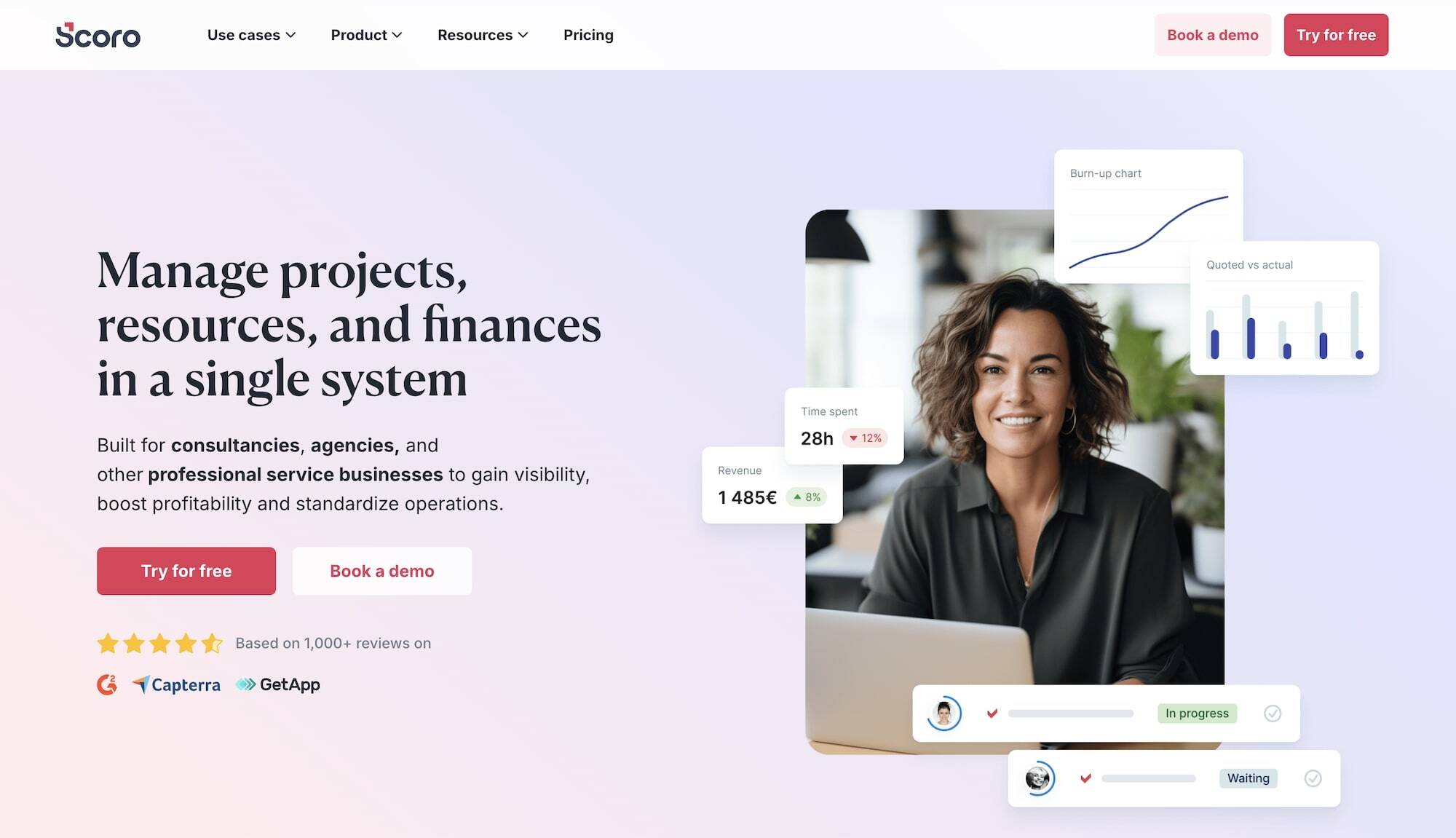
Scoro is a work management system for agencies and professional services providers, used by marketing agencies, software development teams, construction firms, architects, and even engineering firms. Its complete business management suite features project management, resource planning, invoicing, time tracking, quoting, budgeting, sales CRM, cost management, and reporting tools.
Marketing teams specifically appreciate Scoro’s robust cost management features, which are more robust than Asana’s. These allow teams to easily manage outside costs, and help prevent overspending and overservicing. Users can:
-
Set hourly labor cost for roles or individuals. Then, as staff log time, managers can: (1) track costs to understand how much time their team spends on delivery, (2) pinpoint their most profitable projects, and (3) evaluate the cost to serve each client.
-
Monitor project cost burn and project likely profit for ongoing projects, based on real-time insights. Scoro tracks bills, purchase orders, and labor costs to provide complete visibility of all project costs.
-
Track all expenses in one place. They can issue purchase orders for supplier agreements, see what they’ve already ordered, account for travel and out-of-pocket expenses, and more. Scoro’s integration with Expensify also allows users to sync expense data with relevant projects automatically.
However, many users complain about Scoro’s confusing and restrictive packages — much like Asana’s — with multiple features sold separately as add-ons.
Teams must subscribe to the most expensive plan (or custom enterprise packages) to unlock all features. The lower tiers lack essential capabilities such as time locking, timesheet views, timeline views for portfolios, individual-based labor costs, and more. The sales pipeline is also not included in these plans and must be purchased as an add-on.
Also, even the highest-tier standard package — the Performance plan — requires teams to purchase several features separately. The following features are all sold as add-ons: orders and contracts, scheduled billing and invoicing, customer portals, and time and bill allocation to invoices.
Check out more Scoro reviews here.
Features
- Project management
- Automation of repetitive tasks
- Resource planning
- Time tracking
- Collaboration features
- Quoting & budgeting tools
- Invoicing
- Cost management
- Custom workflows
- File sharing and Google Drive integration
- Retainers
- Sales CRM
- Reporting
Pricing
Scoro offers three standard packages, but only the top tier — which Scoro recommends — features its full business management suite. Its plans include:
-
Core ($23.90/user/month): Offers basic access but lacks many essential features, including subtasks, recurring tasks, time locking, expense tracking, financial reporting, and more.
-
Growth ($38.90/user/month): Unlocks Scoro’s core project, resource, and financial management tools. However, it offers limited access to the CRM (contacts only) and lacks essential project and financial management tools, such as timesheet views, invoice scheduling, cost and profit forecasting, and more.
-
Performance: ($59.90/user/month): Includes Scoro’s entire business management suite.
Scoro’s enterprise plans unlock multi-account reporting, time locking, company budget & forecasts, and more advanced features.
Read more: Best Scoro Alternatives for Agencies
8. Teamwork
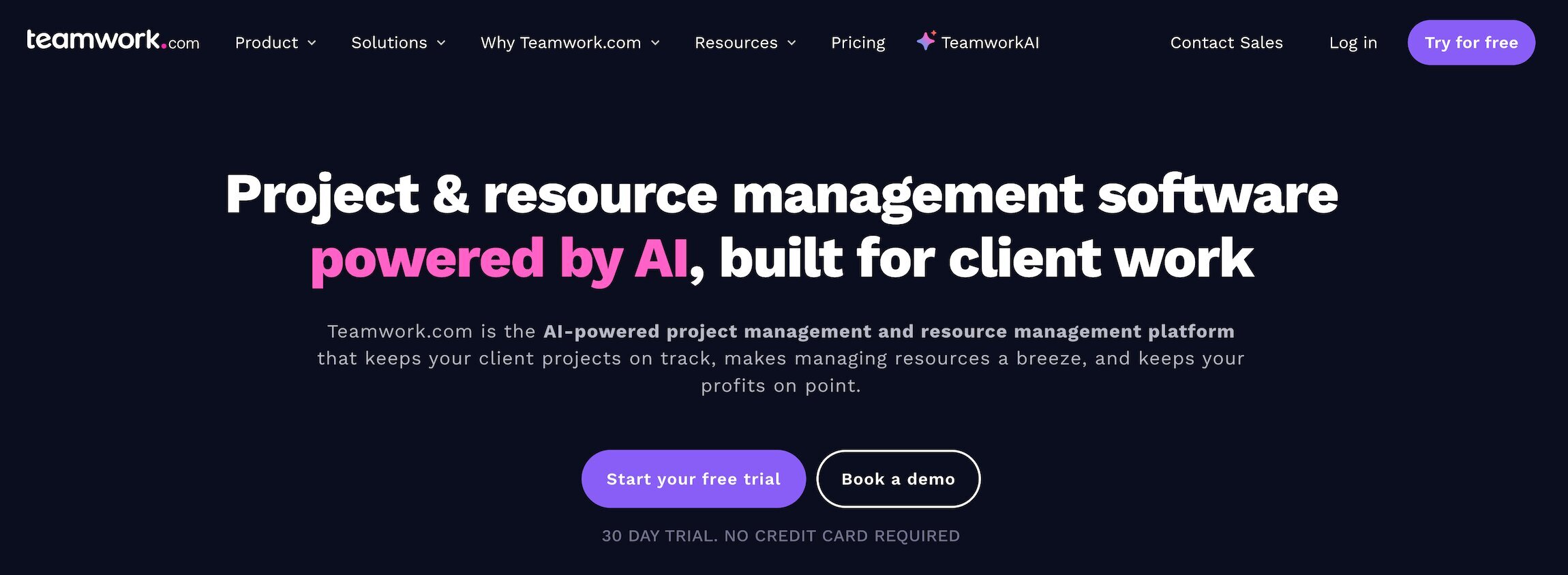
Teamwork is last on our list because it’s considerably less feature-rich than the other solutions on our list, and it shares some of Asana’s drawbacks, namely:
-
It relies on integrations to support CRM and accounting workflows. And unlike RoboHead, it doesn’t offer standout creative features to compensate for the lack of these native tools.
-
Its financial management and reporting tools are quite basic.
-
It locks essential features behind higher-tier plans. For example, expense tracking and more robust resource planning tools are limited to the top standard package and enterprise plans.
Despite these drawbacks, we included Teamwork in our guide because: (1) there’s a good chance that you’ll come across it in your research, and (2) it’s more tailored to agency needs than Asana.
Unlike Asana, Teamwork offers extensive client management tools and even includes comprehensive help desk capabilities. You can add unlimited clients to projects at no extra cost, and customize their access permissions and what they can see. Teamwork also lets you connect multiple projects — so you can organize all the work you do for each client — and visualize their status with Kanban-style portfolio boards.
Teamwork receives a lot of praise for its sleek, modern interface and ease of use. Marketing users find it easy to get started with Teamwork without extensive training. However, in addition to its limited feature set, the platform is pretty glitchy — multiple users cite bugs, challenges with data imports, and the system lagging.
Read more Teamwork reviews here.
Features
- Project intake forms and project planning
- Project management
- Project monitoring
- Project portfolio management
- Calendar views
- Campaign management
- Resource and workload management
- Time tracking
- Internal proofing and collaborative tools
- Workflow automation tools
- Client management
- Expense management
- Budget tracking
- Invoicing
- Reporting
- Integrations and API
- Mobile apps (for iOS & Android)
Pricing
Teamwork’s pricing and plans change now and again — at the time of writing, it offers three standard packages, a free plan, and custom enterprise packages.
-
Free: Supports up to five users and five projects. It offers super basic features, such as time logging, task management, some project views, and the option to organize projects by client.
-
Basics ($13.99/user/month): Includes some essential project management features such as project monitoring, intake request forms, and team collaboration. However, it lacks Teamwork’s resource planning module and only offers basic access to financial management tools.
-
Accelerate ($25.99/user/month): Unlocks workload planning, utilization reports, time tracking against project budgets, basic invoices, retainers, and more.
-
Optimize (Custom pricing): Unlocks Teamwork’s full suite of essential agency management features.
-
Enterprise plan: Custom packages that include a dedicated account manager, advanced security, expert tech implementation, and more.
Read more: Best Teamwork Alternatives for Creatives & Agencies
Frequently Asked Questions
Below, we answer the most common questions about Asana alternatives.
Why should marketing agencies consider an alternative to Asana?
Marketing agencies should consider alternatives to Asana because it's a general-purpose project management system that isn’t tailored to creative agency workflows. These teams face several limitations when using Asana:
-
They have to rely on workarounds to organize projects by client and manage client relationships.
-
They have to pay separately for features like resource planning, time tracking, and project budget tracking — and the latter two are very basic.
-
They have to use other systems and integrations to manage their other agency workflows, such as vendor management, client relationship management, project billing, financial reporting, and agency reporting.
The best alternatives to Asana for marketing agencies bring all their people, processes, finances, and business data under one roof and are specifically tailored to the creative workflow.
Who are Asana’s competitors?
Asana’s direct competitors include other universal project management solutions, such as Monday.com, ClickUp, Trello, Jira, BaseCamp, and Airtable.
However, these systems all share the underlying limitations that we’ve discussed above — and they’re not tailored to the creative workflow. That said, they do serve businesses of all sizes — from small teams to large enterprises — and sport robust feature sets overall.
You can read more about these systems, including their strengths, limitations, and the most cost-effective options, in our broader guide to the best project management software.
What features should marketing agencies look for in an Asana alternative?
Marketing agencies should prioritize the following key features in Asana alternatives:
- Robust expense and time tracking tools
- Vendor and client management features
- Resource management with automatic labor cost calculation
- Native CRM
- Powerful financial management tools — ideally, a complete accounting software
- A reporting suite that includes project, financial, productivity, sales, and agency reports
How do Asana alternatives for marketing teams compare in pricing?
Lining up Asana’s pricing against its marketing-focused alternatives isn’t a fair apples-to-apples comparison. That’s because these tools replace not just your project management platform but also your CRM, time-tracking, and (depending on the solution) accounting software — offering greater overall savings.
So, although the pricing of tools like Workamajig, Productive, Scoro, and Function Point can be higher than Asana’s at a glance, these solutions can significantly reduce your tech costs overall.
How to choose the best Asana alternative for your marketing team
When comparing Asana alternatives for your marketing team, it’s important to consider:
-
Core feature sets. Asana and other standalone PM systems lack many essential features that marketing agencies need to manage their daily workflows and their relationships with third parties. Prioritize systems with tools to:
-
Intuitively organize client projects and manage client relationships
-
-
-
Manage project expenses
-
-
-
Accurately track real-time project budgets and timelines
-
-
-
Streamline project invoicing and billing
-
-
-
Support creative workflows — this includes internal proofing tools, media buying integrations, file sharing, change management, and customizable approval processes
-
Report on more than just project-level insights — look for reporting features that cover agency productivity, client profitability, revenue forecasting, and more
-
-
Pricing and plans. Many providers spread essential agency features across confusing packages or even sell them as add-ons. Look for a system that gives you everything you need at a reasonable, transparent price — so your tech costs scale predictably as your team grows.
-
Onboarding and ongoing support. Even the most user-friendly agency management systems often require significant customization and training to align with each agency’s unique workflows and to ensure the entire team feels confident using them. Prioritize vendors that don’t leave you in the dark and provide essential support every step of the way.
Getting Started with Workamajig
Marketing and creative agencies use Workamajig’s all-in-one system to consolidate their tech stack by replacing standalone project management, time tracking, CRM, accounting, and financial management systems.
Workamajig replaces general-purpose PM tools like Asana and offers more robust expense tracking, project cost controls, profitability reporting, and financial insights. Agencies love Workamajig because it brings all their people, processes, finances, and data together in one place — improving collaboration, streamlining workflows, and boosting profitability.
Request a personalized demo to see how Workamajig can support your agency.
Read more: