

When searching for billing software to support your creative or advertising agency, you’ll come across a broad range of standalone tools that support different workflows. Some do time and expense tracking well, others work for invoicing, and then you’ve got systems for revenue recognition, payments collection, and reporting.
The problem is that most of these tools only support one part of the billing workflow, not the entire thing — from tracking costs and choosing what to bill to managing write-offs, generating invoices, collecting payments, and handling reconciliation.
An agency management system with native accounting software (like Workamajig!) is the one type of tool that supports everything in one place, combining:
- Expense management. These systems offer dedicated tools for tracking agency expenses, including vendor costs, media buys, credit card spending, and more.
- Time tracking. They eliminate one of the biggest barriers agencies face when tracking time – friction. Agency management systems bring time tracking to your team’s everyday workflows, so they can log hours as they work without forgetting or feeling inconvenienced.
- Billable utilization management. Managers get complete control over which hours are billed and which are written off or transferred. They can also pull up various reports to view the billable utilization of individual resources side-by-side and ensure everyone’s time is being used optimally.
- Support for different project billing methods. These tools make it easy to manage all your client engagements with fixed-fee, time-and-materials, media, and retainer billing types.
- Client invoicing. Agency management systems streamline the billing process in their own way. For example, Workamajig offers electronic billing worksheets that make it easy to confirm all project details and line items are accurate before the first invoice is generated.
- Invoice and transaction scheduling. These tools let you automate predictable transactions and payments — e.g., paying for recurring subscriptions, sending retainer invoices to clients, and paying freelancers on retainer.
- Multi-currency support. Platforms like Workamajig support multi-currency accounting from end-to-end, with automated exchange rate tracking, separate tracking of realized vs. unrealized FX gains and losses, and reporting tied back to your home currency.
- Revenue recognition. Ensure your P&Ls reflect the ground reality with revenue recognition tools, including advance billing, media pre-billing, and work-in-progress (WIP) postings.
- Online payment handling. Give clients convenient options to pay online and send vendor payments the same way.
In this guide, we discuss the different types of agency billing systems available.
We start with our top recommendation — agency management software (including our system, Workamajig) — then review the other types of systems so you can see exactly what each one offers. Specifically, we cover:
- Agency management systems with native accounting software, including Workamajig, Advantage, Clients & Profits, and e-Silent Partner.
- Agency management systems with native billing tools that integrate with third-party accounting software (QuickBooks, Xero, and NetSuite), including Kantata, BigTime, Ravetree, Function Point, Productive, and Bonsai.
- Standalone billing and accounting systems, including TMetric, Ignition, and Zoho Invoice.
Read on to learn more about Workamajig or request a free demo for a live walkthrough.
Agency Management Systems with Native Accounting Software
1. Workamajig
All-in-one agency management and accounting software
Workamajig is an all-in-one agency management system used by creative agencies to manage all their people, processes, and finances in one place.
We’ve been working with creative agencies — including media, marketing, PR, and advertising — for over 35 years, and we've used everything we've learned along the way to tailor Workamajig around what agencies actually need to run their day-to-day.
It fully replaces scattered agency tech stacks, where you have multiple systems cobbled together that don’t really talk to each other, by bringing everything together under one roof: project management, resource planning, time tracking, expense management, media buying integrations, client invoicing, CRM, client portals, and accounting software in a fully integrated system.
All your business data lives in one place, which not only makes life easier but also gives you deeper insights and lets everyone work from the same shared data. For example:
- Sales reps can reference project data to generate estimates for potential work, enabling them to share accurate quotes with prospects. This helps set the right expectations up front and reduces the risk of underpricing work, protecting your bottom line.
- Billing teams can generate billing worksheets that automatically pull in all of the labor and non-labor costs from the project. They can then review costs, coordinate with internal decision-makers for approvals, generate the final invoice, and send it forward to clients — all in Workamajig.
- Managers can combine resource utilization and financial reports to analyze profitability from different perspectives and evaluate the relationship between team efforts and the bottom line.
After switching to Workamajig, agencies see all the problems that come with scattered systems disappear — duplicate work, data entry errors, access management headaches, and maintenance tasks — so they can focus on scaling operations and increasing profitability. We’ve helped clients reduce the time they spend on billing by 80% and boost their profitability by 900+%.
Request a live demo today to see how you can achieve those kinds of results with Workamajig.
Workamajig Agency Billing Tools
Workamajig offers one of the most comprehensive agency billing toolkits in the industry, streamlining every aspect of the billing workflow while providing the flexibility and controls you need to manage diverse client relationships. Our system offers:
- Support for all agency project billing methods, including fixed-fee, time-and-materials, retainer, and media.
- Customizable retainer management tools, from recurring billing to specialized features for managing more complex engagements, such as hours-based retainers.
- Electronic billing worksheets, for billing or accounting users to easily coordinate with decision-makers, finalize the specifics of billable work, and accurately generate invoices on the first try.
- Partial (progress) invoicing, handled through our electronic billing worksheets. Users can enter a percentage of the actual amount to bill on any transaction line, with the remainder staying unbilled in the system for a future invoice — so they have total control over what gets billed at each stage of a project.
- Split billing, for projects where costs are shared across multiple client entities. Our system automatically generates a parent tracking invoice and individual invoices tied to each payer's accounts receivable, so each entity's share is tracked and aged separately.
- Mass billing, for generating batch invoices across many projects, retainers, or media orders at once. This option is super convenient for agencies running a high volume of accounts through the same billing cycle.
- Customizable invoice templates, giving billing teams control over how client invoices look and what they include. Users can tweak logo placement, line-item grouping (by person, service, or budget task), labor hour and comment visibility, sales tax display, and other layout details.
- Revenue recognition tools to ensure revenue from agreements, such as milestone-based projects, is recognized accurately for compliance and reporting purposes.
- Online payment collection, allowing clients to easily pay via credit card or ACH through our PayFlowPro / Authorize.net integrations.
When it’s time to bill a project, users can generate an electronic billing worksheet from their centralized dashboard. Thanks to our system’s tight integration, these worksheets come pre-populated with all relevant project details and line items, so teams don’t have to hunt for billable hours or project expenses.
Workamajig automatically routes them over to managers, who can review all the details, make any changes (e.g., editing line items or writing things off), and give their final approval.
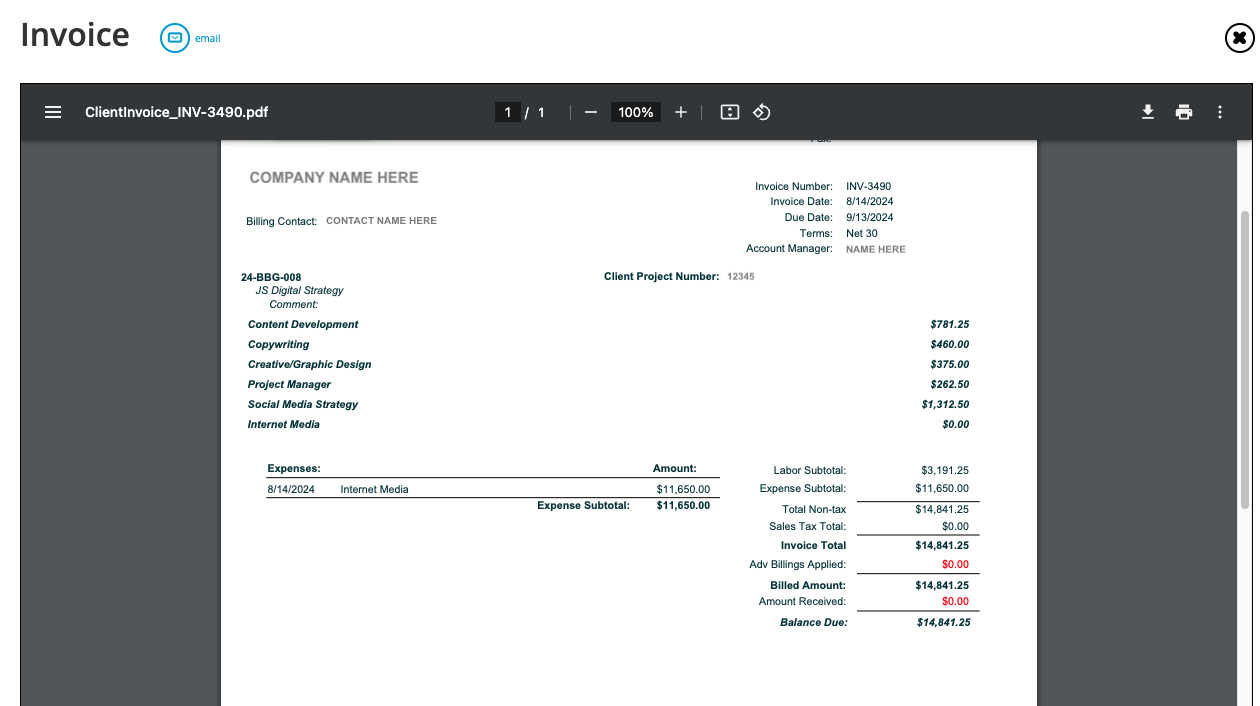
Then, Workamajig routes the approved worksheets back to the billing or accounting team and alerts them. Users can give a last look and then generate the final client invoice from the approved billing worksheets —while Workamajig calculates and applies the correct tax rate via our Avalara integration.
Today - Billing Dashboard
Workamajig offers personalized dashboards — known as “Today” dashboards or pages — for each user. These dashboards are tailored to their respective roles and responsibilities, helping them plan out work for the week ahead, take quick actions, and immediately see what requires their attention.
For example, our Today - Billing page serves as a one-stop shop for all billing-related tasks. From a single screen, billing users can see which worksheets are awaiting their review, pull up what's billable as of any given date, and track invoices that are in approval or queued for print and email. It also surfaces a complete history of invoices, receipts, deposits, worksheets, and transactions for every project.
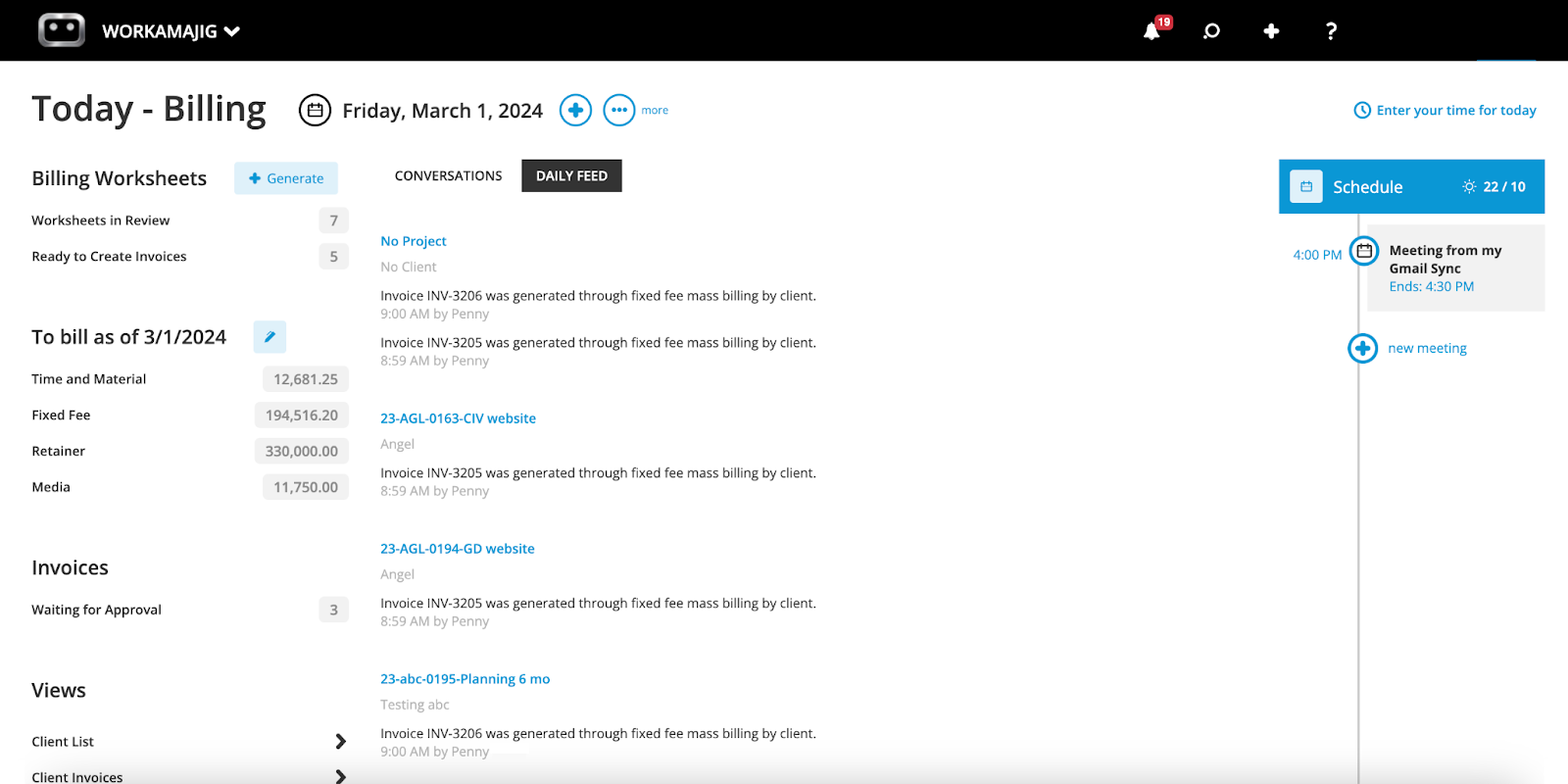
Beyond the numbers, the page pulls in the day's conversations and feeds, and lets users take actions such as generating a new billing worksheet, submitting a time entry, reviewing a transaction, and even scheduling a calendar event.
Multi-Currency Support
Workamajig’s multi-currency support goes beyond just letting you generate invoices in a different currency — it’s got you covered from end-to-end on the accounting side, with automatic
exchange rate calculations, seamless reconciliation, realized vs. unrealized gains handling, and consistent financial reporting.
So whether you’re working with international clients, vendors, freelancers, or offices, our system handles everything natively without slowing down your day-to-day operations.
Here's how it works:
- One home currency anchors everything. Turning on multi-currency prompts you to designate a home currency for your books. From that point forward, every screen defaults to the home currency, so you only need to flag foreign transactions. Under the hood, each transaction is recorded twice — once in its original currency, once converted to home currency — keeping your general ledger balanced on both sides at all times.
- Rates update themselves, but you can always step in. An exchange rate table tracks rates by currency, GL company, and date. You can fetch current rates automatically from a connected data provider, or enter them yourself if you prefer manual control. Whichever way you go, invoice dates automatically pull the matching rate — and you can override it when needed. Rates carry six decimal places of precision to avoid rounding drift.
- Foreign currency is handled across the whole system. Vendor invoices, purchase orders, client invoices, expense reports, and bank accounts can all run in a foreign currency — so you can pay a vendor in euros and bill a client in yen without breaking your books. Receipts align with the invoice currency, payments align with the vendor invoice currency, and any leftover rounding is swept into a dedicated account so the GL never falls out of balance.
- Gains and losses are tracked automatically. Realized gains and losses post the moment a payment or receipt settles at a different rate than the original invoice used. Unrealized gains and losses, on the other hand, are calculated live — every time you pull a balance sheet or P&L, the system recalculates using current rates, so those reports always reflect present-day exchange conditions rather than stale figures.
- Everything rolls up into home currency for reporting. At the reporting level, Workamajig converts all activity back into your home currency, revaluing foreign-denominated bank, AR, AP, and credit card balances at current rates — giving you one consolidated, apples-to-apples view of the agency's financial position.
Because this all runs within the same GL-integrated accounting engine that powers the rest of your billing and finance workflows, there’s no integration to maintain, no duplicated data, and no extra access controls to manage.
Revenue Recognition Tools
Agencies don’t always bill for work as it's completed because of how their different engagements might be set up. For example, a retainer may be paid up front, while a media buy might be invoiced to the client weeks before the actual spend occurs, and a project may kick off with a 50% deposit before any work has started.
If you recognize all of that as revenue the moment you bill it, your P&L doesn’t really reflect reality —revenue shows up in one period while the costs and delivered work land in another, and your finances become unreliable for things like cash flow planning or evaluating profitability.
Workamajig's revenue recognition tools solve this by tying revenue to the work you've actually earned and matching it to the same period as the related cost:
- Advance billing lets you collect money before work starts without it inflating your revenue. When you post an advance bill invoice, Workamajig debits AR like a normal invoice (so it still shows up on your aging reports) but credits a deferred income account instead of sales. So a 50% deposit sits as a liability until you bill actual work against it — at which point it gets recognized as earned.
- Media prebilling applies the same logic to media buys, which agencies often have to invoice before the spend actually happens. When an order is flagged for prebilling, Workamajig auto-generates matching accrual and reversal entries as client and vendor invoices come in — crediting revenue on the client invoice while simultaneously accruing the cost, then reversing that accrual once the vendor invoice reconciles. The net effect is that income and its corresponding expense always fall within the same period.
- Work-in-progress (WIP) posting cleans up everything else at month-end. Any labor or direct expenses that haven't been billed yet get posted as unbilled revenue and assets on the balance sheet, with an offsetting entry against cost of sales. So your P&L still reflects revenue and costs together, even for work you haven't invoiced yet. The entries automatically reverse once that work is billed. You can post and un-post as many times as needed, and everything's tracked in a sub-ledger broken out by client and project, so you can see exactly how long charges have gone unbilled.
Because this all runs natively inside Workamajig, revenue recognition happens automatically as work progresses — you're not exporting time and billing data to a separate accounting system and reconciling it by hand.
Workamajig’s Full GL Accounting Software
As we briefly discussed earlier, agency management systems like Workamajig go beyond billing and support all AR, AP, and financial workflows thanks to their native agency accounting software.
Our system is GDPR-, HMRC-, and GAAP-compliant and supports multi-currency and multi-entity accounting, ensuring international and global teams have everything they need to manage their financials.
Here’s more about our complete toolkit, which supports everything from maintaining a book of record to managing project financials and multiple legal entities.
Today - Accounting & Chart of Accounts
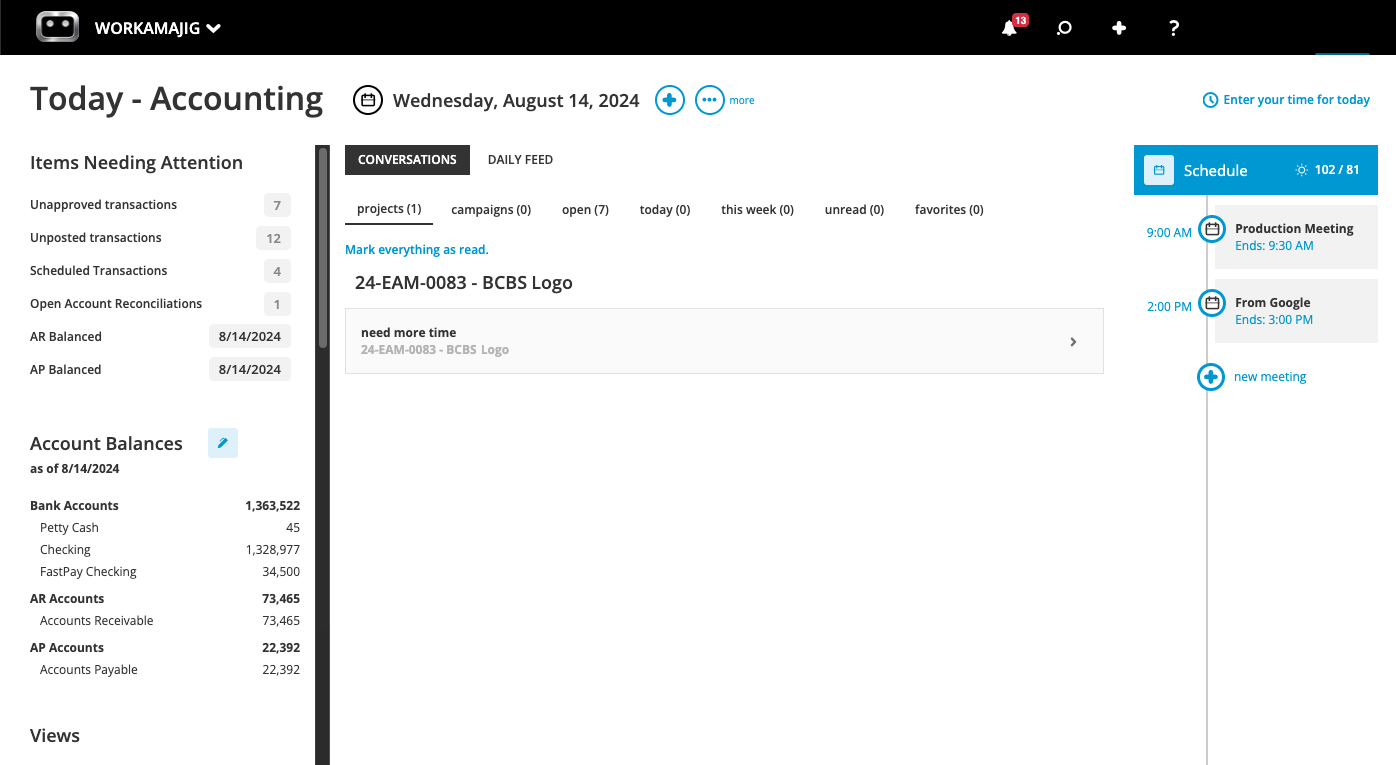
Workamajig supports proper double-entry accounting, featuring a complete general ledger with accounts receivable, accounts payable, transactions, bank and CC account reconciliation,balance sheets, P&Ls, and more.
Users can keep track of the full chart of accounts on their personalized Today - Accounting page, which displays transactions, balances, income, expenses, invoices, recent conversations, and more. It's a broader version of our Today - Billing page.
You can quickly spot items that require your attention, such as unposted transactions or open account reconciliations, and take action with just a few clicks.
Estimating Tools
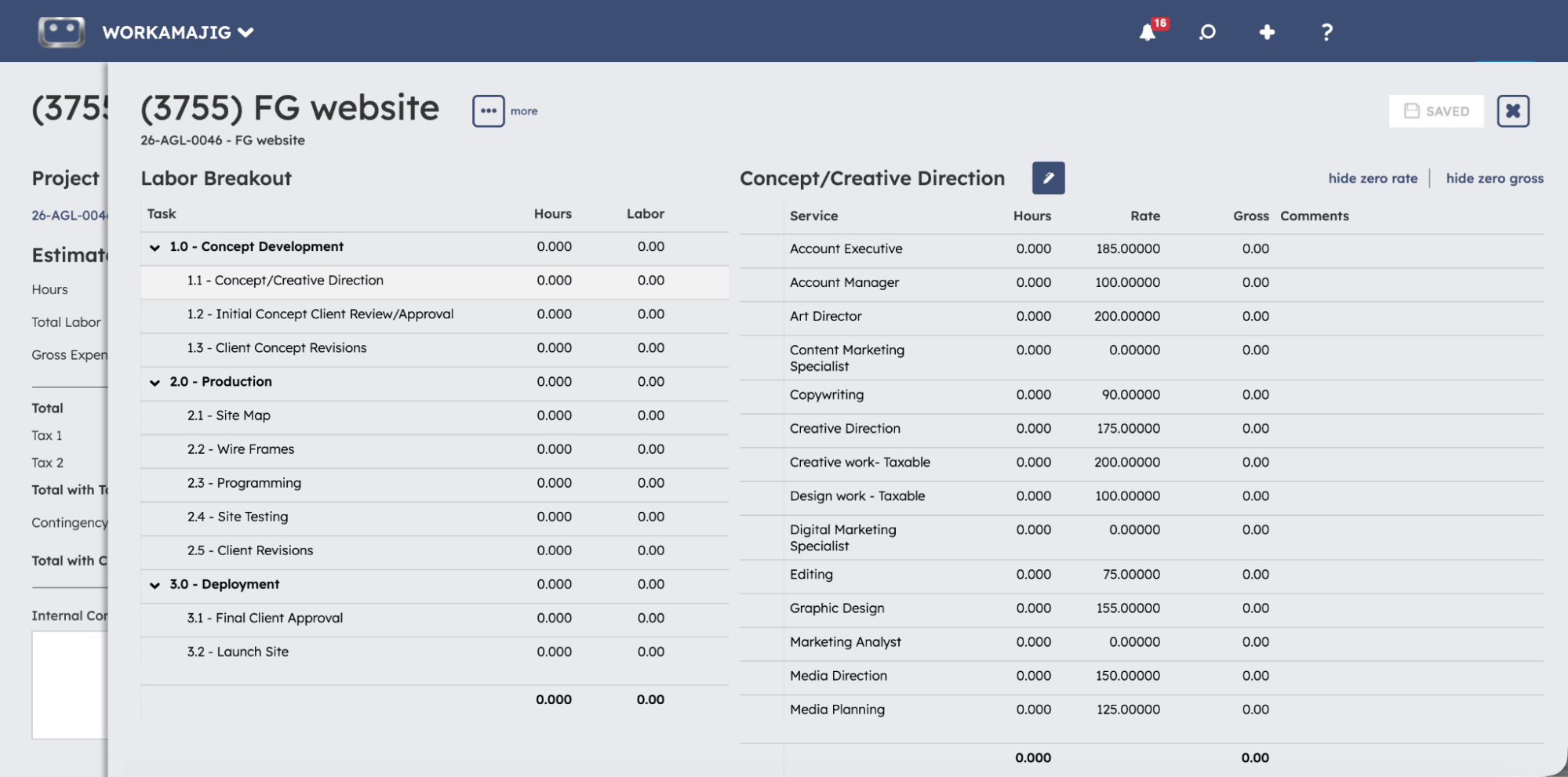
Workamajig’s estimating tool is available to various users across our system — sales teams, project managers, and accounting users — helping them plan costs at each stage to keep the project profitable.
For example, sales reps can automatically generate estimates during the negotiation phase, providing accurate quotes to clients — reducing the risk of underpricing projects. Then, when PMs finalize the project’s details, they can see the financial impact of any tweaks they make (e.g., adding more tasks or swapping out resources) in real-time.
Workamajig offers several convenient options for building out these estimates:
- Estimate templates. Workamajig includes project templates for storing the details of your most popular project types, saving managers from having to build plans out from scratch every time. Our templates let you save estimates and other details, such as tasks, project milestones, allocations, subtasks, vendor costs, labor costs, and more.
- Automated estimating tool. If you’ve got all the details and resource allocations finalized for a project, then Workamajig lets you conveniently generate an estimate from the project schedule using our automated estimating tool. The tool continues to update the estimate as you make changes—e.g., switching up allocations or adding new tasks.
- Building them from scratch. Sometimes, it’s best to get more hands-on when building your estimate — that’s often the case when tackling a new type of project that isn’t similar to any past work. In such cases, you can create a completely custom estimate using our dedicated tools for building out (i) labor estimates and (ii) non-labor estimates, such as vendor costs or media buys.
Project Expense Tracking
Earlier, we mentioned how expense data is tightly integrated with the billing workflow — with all project expenses automatically transferred over to billing worksheets as they’re generated. The process here is painless because Workamajig offers dedicated tools to capture and manage all types of agency expenses as they’re incurred.
Our system lets teams easily track:
- Credit card changes. Thanks to our Plaid CC Connector, users can pull these charges or even auto-sync them each night, so they just have to be reviewed and tagged to projects.
- Receipts. Users can upload and share receipts with finance teams inside our system, maintaining a digital record so no one has to hunt for physical copies to submit at month’s end.
- Media buys. Our system supports integrations with Strata/FreeWheel, Mediaocean, Bionic, and GaleForceMedia, allowing users to (i) view and bill orders, (ii) pull in costs from media buys, and (iii) include details of insertion orders in client invoices.
- Out-of-pocket expenses. As team members incur on-the-job costs, they can easily generate and send expense reports in Workamajig on the go from their mobile devices. They can then tag charges to projects and request reimbursements — after which managers can view those requests, approve them, and release the funds.
Read more: Project Expense Tracking: Practical Steps, Tips, & Tools
Vendor Management & Vendor Invoicing
When you’re engaging outside help — whether that’s production vendors, freelancers, or other third parties — Workamajig’s vendor management suite helps you:
- Generate purchase orders and work orders
- Keep a digital record of all POs and copies of receipts
- Manage reconciliation
- Track the reliability of vendors over time
When you first need to bring in outside help for a project, you can request bids, compare quotes, and generate POs and WOs all from our system.
Then, when vendor invoices come in, Workamajig keeps reconciliation simple — just enter the invoice and choose the vendor name from our listing screen:
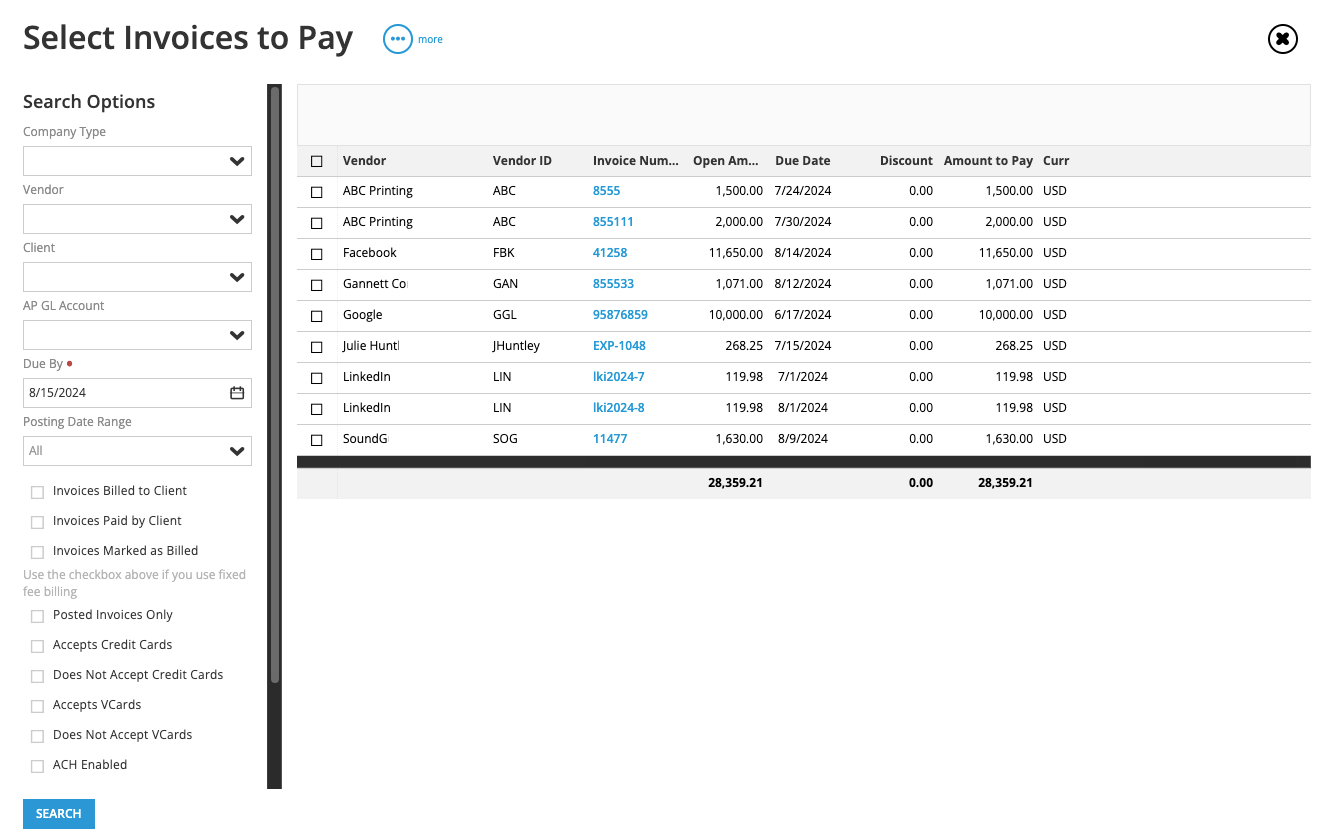
After selecting the right vendor, Workamajig automatically displays any associated open POs or WOs across all projects, so you don’t have to hunt through individual project files.
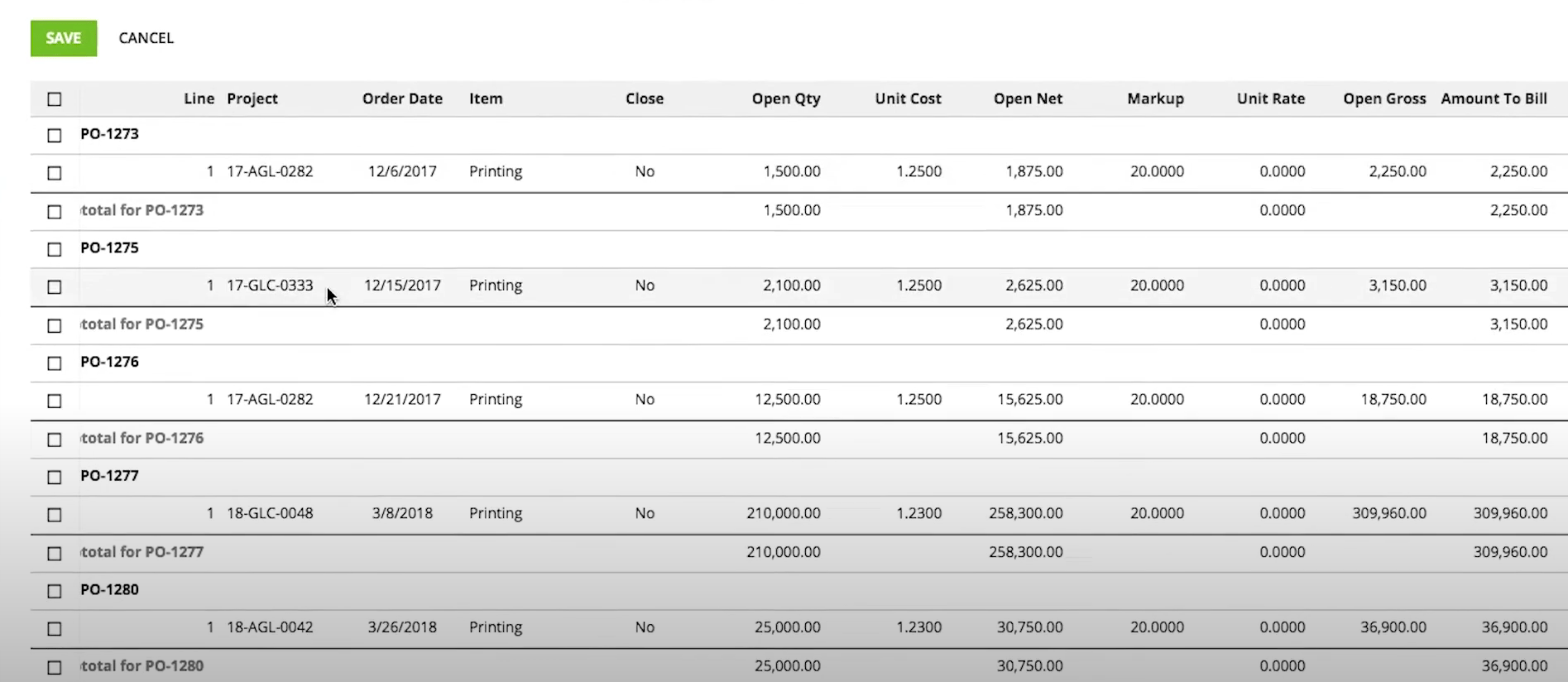
Then, you can match the invoice to one or more purchase orders, while Workamajig automatically updates the project’s financials in real-time — including expenses, budgets, and profitability.
Workamajig also includes handy tools to manage discrepancies when the invoice doesn’t perfectly match the original PO(s). For example, you can:
- Edit the numbers directly to match the invoice before the payment goes out.
- Leave the PO open if you’re expecting the amount to show up on a future invoice.
- Either pass the excess cost over to the client by adding it to the project's billable amount, or absorb it as a write-off.
Finally, once invoices are approved and finalized, you can pay vendors online thanks to our Edenred Pay and AvidXchange integrations. Workamajig also stores copies of these payments to maintain a clear record.
Multi-Entity Support
Workamajig offers extensive multi-entity accounting built to keep each legal entity's books airtight, compliant, and properly walled off from the others. Here's how it comes together:
- Each entity gets its own self-contained set of books. Our GL Companies feature lets you manage each legal entity separately by creating a “GL company” for each one — say, each regional office — with its own books and self-contained financials.
- Money can't cross entity lines by accident. Workamajig locks down which payments each entity is allowed to make and receive, so one company's funds can't inadvertently cover another's expenses. If you do want entities to be able to cover each other intentionally, you can configure that through intercompany mappings — defining the "due to" and "due from" accounts for AR, AP, and journal entries between a given pair of companies, all within whatever boundaries you set.
- Financial statements stay entity-specific. Every transaction posted to the GL is segmented by company, so trial balances, P&Ls, and balance sheets never blend across entities. Each GL company can even run on its own closing schedule, independent of the others.
- A shared chart of accounts keeps expansion simple. Rather than rebuilding your account structure every time you add an entity, GL accounts carry across all your companies by default — though individual accounts can still be locked to specific companies if you need that level of restriction. Bank accounts work the same way: a single account can be shared across companies via multi-company payment settings, while each company still keeps its own distinct check numbering.
- Access management is entity-specific, too. Since not every user should see every entity's financials, GL companies also serve as a permissions boundary — controlling not just who sees which books, but also which specific clients and vendors a given user can access.
Financial Reporting Dashboard
Workamajig features a robust financial reporting suite that pulls data from across the system, lets you allocate overhead to achieve accurate profitability insights, and enables you to uncover deeper intelligence through our AI MCP.
Our reporting library covers everything from day-to-day bookkeeping checks to forward-looking planning:
- Bookkeeping and reconciliation. A general ledger report for what's posted to each account, a trial balance to confirm debits and credits tie out, and a general journal that consolidates sales, cash receipts, purchases, and cash disbursements into one view.
- Cash visibility. A statement of cash flows built from the period-over-period shift in your balance sheet accounts, plus a cash projection tool that starts from your current bank balance and layers in expected client payments (by invoice due date) and vendor payments (by their due dates) to give you a forward-looking balance.
- Work-in-progress and budgets. A WIP analysis report broken out by project with aging, so you can see exactly how long costs have sat unbilled.
- Project reports. Get an overview of which projects are profitable and where margins are thin with our project recap analysis. Then, you can investigate which costs or overruns are specifically hurting margins by heading over to our detailed project budget analysis reports.
- Time and productivity reports. For tracking utilization, chargeability, productivity, and effort.
- Profit & loss reports. You can slice P&Ls by project, client, campaign, service, or company, and allocate overhead using different options (more on this below).
- Forecasting. Revenue forecast that pulls from your pipeline and delivery data (opportunities, project estimates, billing schedules, retainers, campaign budgets) and weights each item by its probability of closing, so speculative pipeline doesn't get counted the same as work you've already won.
- Operational and predictive intelligence. Connect your AI assistant (such as Claude) to Workamajig via our MCP server and leverage the full breadth of business data within Workamajig. Use AI to generate accurate forecasts, diagnose and investigate bottlenecks, and uncover actionable insights.
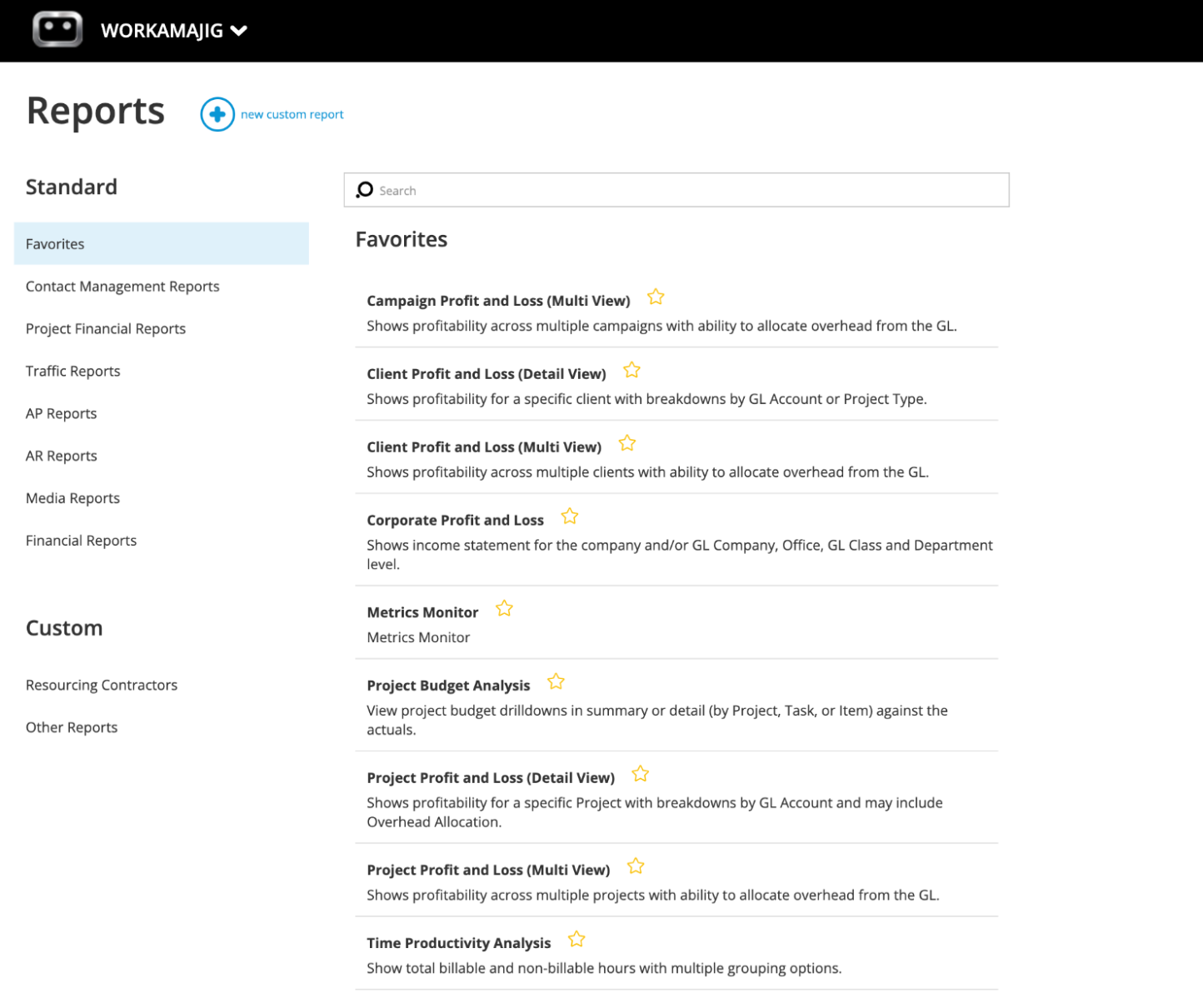
You can “star” the reports you regularly check and pin them to a Favorites dashboard, so the key numbers you look at every week are always just a click away.
Read more: Best Creative Project Management Tools with Financial Tracking
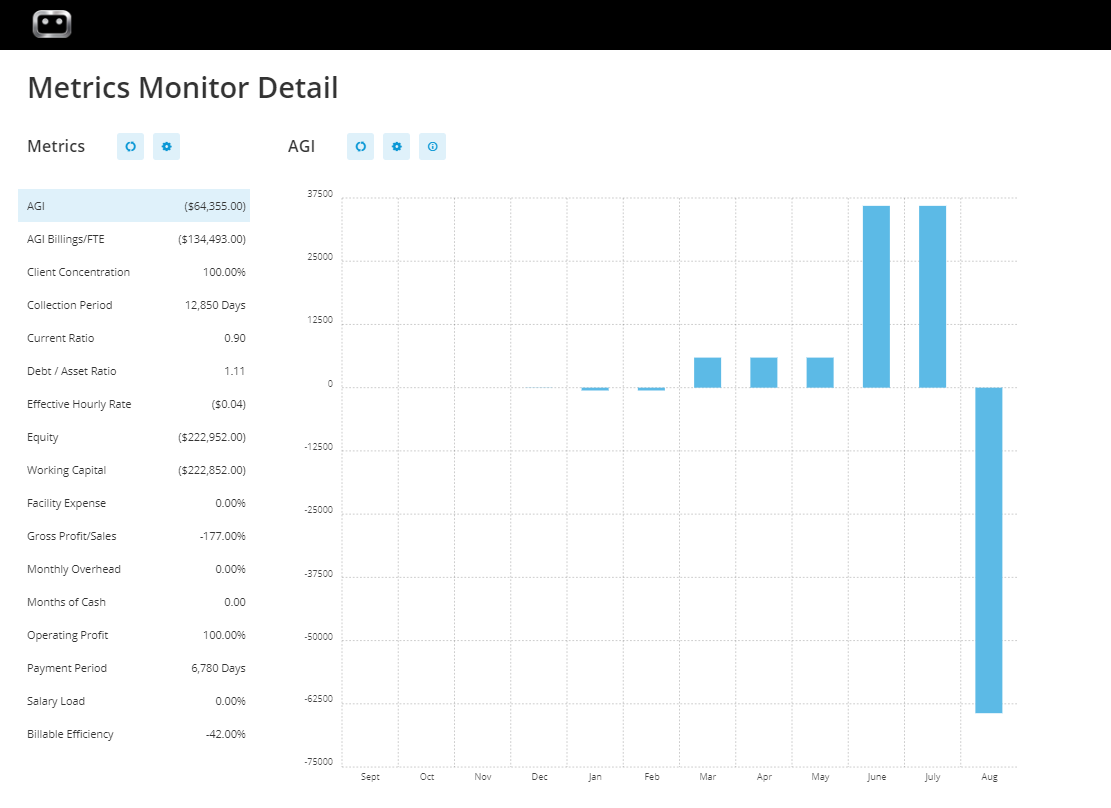
Our system also comes with a KeyMetrics Monitor to track KPIs and your business's financial health over time — including AGI, effective hourly rate, collection period, and months of cash on hand, and anything else that’s important to your business.
Overhead Allocation
P&Ls only tell half the story if they ignore overhead — rent, software, admin salaries, and everything else that keeps the agency running but doesn't get billed to any single client.
Workamajig ensures you always have an accurate picture of profitability by allowing you to allocate overhead when generating these reports. You can designate certain internal expenses as an "overhead pool" and then spread that pool across your billable clients and projects using whichever method fits how your agency actually runs:
- By labor hours. Overhead follows the proportion of total approved hours each client consumed. A client that eats up 30% of your team's time carries 30% of the overhead.
- By labor cost. The same logic, but weighted by labor dollars instead of raw hours, so a project staffed with senior talent carries more overhead than one staffed with juniors, even at equal hours.
- By total billing. Overhead follows revenue share instead of effort.
- None. Skip allocation entirely and look at direct profitability only.
There's no universally "correct" method here — what matters is picking one and sticking with it, since switching methods month to month makes margins impossible to compare over time.
Read more: Best Creative Project Management Tools with Financial Tracking
Workamajig Complete Agency Management Software
As a complete agency management system, Workamajig provides all the tools you need to manage all areas of your operations. In addition to all the features we’ve covered above, Workamajig also includes:
- A native agency CRM to manage your whole sales pipeline from lead capture to client intake. Our system includes dedicated tools to capture leads from various sources, develop opportunities, track engagements, generate estimates, and convert won opportunities into projects. The CRM also includes a reporting suite with various reports to evaluate sales performance — you can measure earned vs. lost opportunities, compare what different reps have brought in each quarter, and more.
- Client portals to manage ongoing relationships after intake. Clients can use their portals to request new work, access deliverables, receive status updates, view and pay invoices, join feedback discussions, and more. (And you can create an unlimited number of these at no extra cost.)
- A dedicated creative project management suite that fully replaces standalone systems like Monday, Asana, and ClickUp. It features project intake forms, templates, project planning tools, task management, real-time project monitoring (with support for various project management methodologies), project portfolio management, and reports to evaluate profitability and diagnose issues.
- Native time tracking. Workamajig lets employees track time in their natural workflows, using their preferred options — by entering time on task cards, automatically recording time as the work, submitting timesheets, or even pulling hours in from calendar events.
- Utilization and productivity reports. Workamajig's utilization reports give you detailed insight into where your team's time is going, how billable utilization stacks up, and how much each resource is contributing to the bottom line.
- User-friendly collaboration tools that enable all internal and external stakeholders to work together effectively. Most of these tools are readily available on task cards, including file sharing, commenting, internal proofing, and version history. Workamajig also includes project conversation threads and feedback controls (which you can customize to specify approvers and the number of rounds).
- A resource management module with a staff scheduling dashboard and capacity planning tools. Managers can use our central hub to monitor workloads, assign work to resources, track unassigned work, and ensure tasks are evenly distributed (so you don’t have some resources sitting idle while others are overworked).
![Workamajig: Staff Schedule and Scheduling [GIF]](https://www.workamajig.com/hs-fs/hubfs/Workamajig%20Staff%20Scheduling%20Dashboard%20%5BGIF%5D.gif?width=1920&height=930&name=Workamajig%20Staff%20Scheduling%20Dashboard%20%5BGIF%5D.gif)
Check out our complete system in action in the short demo below:
For a more detailed walkthrough of Workamajig, request a free demo.
Workamajig Packages & Pricing
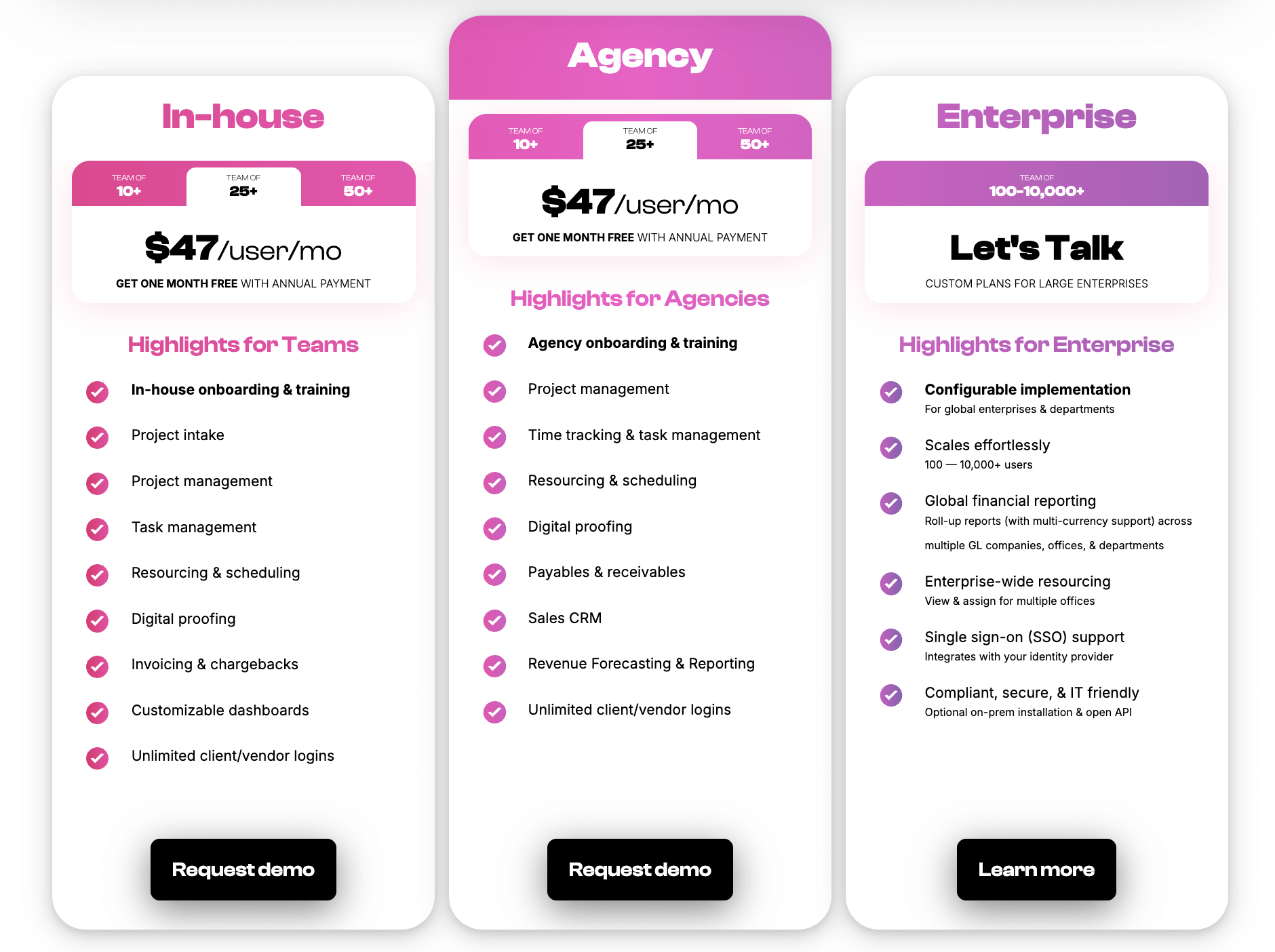
While many agency billing systems offer confusing plans with features locked behind different tiers (why do you have to pay more to unlock retainer management?!), Workamajig keeps things simple with straightforward plans.
Every Workamajig subscription includes access to our complete agency billing and management system, plus your own dedicated account manager who provides personalized onboarding, trains you on our system, and tailors Workamajig to your workflows.
Check out our packages below:
Read more: How Workamajig Solves Agencies' Quiet Profitability Problems
2. Advantage
.png?width=2000&height=878&name=Advantage%20Simpli.fi%20homepage%20(2024).png)
Advantage is a creative agency management system with built-in accounting, project management, resource planning, time tracking, client management, and financial reporting. Its agency billing toolkit is similar to Workamajig’s, with:
- Billing approval workflows and electronic billing worksheets. AEs or PMs can review the details on these worksheets, request changes, make notes, and even leave comments for the final invoice.
- Automated billing rules. Advantage’s Billing Rate Hierarchy lets you customize rates and billing rules and specify when they apply.
- Customized invoicing. You can create personalized invoice formats based on pre-defined criteria, such as divisions, products, offices, clients, and more — so they’re automatically generated during billing. The system also lets you automatically manage co-op billing and split invoices across multiple clients.
- Automated tax management. Through Advantage’s native tax hierarchy and integration with Avalara’s Avatax program.
- Support for all essential agency billing types. It covers fixed-fee, retainer, media, time-and-materials, and advance billing types.
Advantage’s native Simpli.fi integration is its biggest differentiator from other agency management systems, offering powerful media planning and buying tools to support creative workflows. But there are two things to keep in mind when considering the platform:
- It’s not particularly intuitive. Advantage’s various features are packed into separate modules, so navigating from screen to screen isn’t intuitive, making the platform confusing to learn.
- It’s on the pricier end. Advantage offers only custom quotes and primarily serves enterprise users.
Read more Advantage reviews here.
Notable Features
- Media accounting software
- Billing & invoicing
- Estimates
- Budget Monitoring — track expenses and labor costs against project budgets in real-time
- Financial reporting
- Revenue forecasting
- Project management
- Resource management
- Collaborative tools like proofing & reviews
- Native tools to track time
- Media planning & buying — including broadcast buying, digital buying & media reporting
- Risk analysis & burn rate tracking
- Reporting dashboard (to analyze project performance, financials, staff hours, etc.)
- Mobile app (for Android)
Pricing
Advantage doesn’t publicly list its pricing — they provide custom quotes upon request.
Read more: Best Advantage Software Alternatives for Creative Teams
3. Clients & Profits

Clients & Profits features the full works — all of the core modules that Advantage offers, plus a built-in CRM. And while it doesn’t offer Simpli.fi's suite of media tools, C&P includes its own toolkit, with media planning, estimating, ordering, pre-billing, reconciliation billing, billing goals, media analysis snapshots, and media-buying integrations (with Strata, SmartPlus, etc.).
So overall, it’s a super comprehensive creative agency billing and management system. Its billing tools include:
- Custom billing rates
- An upcharge feature that bills clients automatically when team members work on holidays or weekends
- One-click auto billing
- Support for various agency billing types, including media, retainer, multi-job, advance, and WIP
- Client invoices and client payments
- Client collection manager, which brings everything that clients owe you from unpaid invoices into a single view
- Internal billings to invoice other departments for in-house jobs without impacting financials
- Approval workflows for POs, APs, and ARs
Overall, users consistently praise C&P’s extensive feature set and note that it unifies project and financial data, simplifies their project billing workflow, and offers deeper insights into profitability. Creative agencies, in particular, love media planning tools, as they help them plan and manage all related costs.
C&P does have two main limitations to keep in mind:
- It’s mainly an on-prem solution (although it has a few “hybrid” aspects), so if you’re looking for something cloud-native, it’s not the best fit.
- Users say the UI/UX is pretty dated and unintuitive. You can see for yourself by taking the visual tour or viewing the online demo.
Find more Clients & Profits reviews here.
Notable Features
- Media & marketing agency accounting software
- Automatic billing & invoicing
- Vendor invoice management
- Financial reporting
- Integrations with bank and credit card accounts & media planning systems
- Project request forms & project planning
- Project management & monitoring — request forms & project planning tools, such as task management
- Resource management —team management with live scheduling & time tracking
- Collaborative feedback tools for project teams & clients
- Portfolio management
- Workflow automation
- Adobe XD plugin
Pricing
Read more: Clients & Profits Software: Reviews & Alternatives
4. e-Silent Partner

e-Silent Partner is the last agency management system on our list that includes native accounting software and pairs it with financial reporting, project management, collaboration, file sharing, time tracking, expense management, and CRM software. It also packs in robust business intelligence (BI) and analytics capabilities.
The system is specifically tailored to the way services firms bill for time, expenses, and outside costs, offering project controls and integrated financial reporting. On the billing side, it provides dedicated tools for:
- Supporting different billing methods, including time-based, fixed, retainer structures, and more.
- Setting up media billing parameters, such as media type and timing.
- Managing vendor invoices with options to enter, edit, void, and even process multiple invoices for a single PO.
- Track outstanding receivables and invoices by pulling up aging information.
- Generate invoices with customized formats (over 10 formats are provided by default).
- Apply payments and write-offs to multiple invoices.
- Combine production and media invoices from across different projects into a single invoice.
And more. The accounting software also features tools for revenue recognition, overhead allocation, and multi-currency, multi-company, and multi-office support.
The main thing to keep in mind with e-Silent Partner is that users say it’s not the friendliest solution from an adoption perspective: it’s not intuitive, has a steep learning curve, and the vendor doesn’t provide personalized, tailored onboarding or dedicated support. All of this can lead to low team adoption rates.
Check out more e-Silent Partner reviews here.
Features
- Project management
- CRM and client management
- Resource planning and utilization reports
- Team collaboration tools, like file sharing, commenting, and version history
- Time tracking
- Budget tracking
- Media management dashboard
- Integrations with Strata media buying software
- Accounting software
- Financial management
- Billing and invoicing
- Business intelligence reporting — including key metrics, monitors, and customizable reports
- Process automation
- Mobile app (for iOS and Android)
Pricing
e-Silent Partner shares custom quotes upon request.
Agency Management Software That Rely on Accounting Integrations
The systems below each have native agency billing modules, but they require integrations with third-party solutions such as QuickBooks, Xero, and NetSuite to fill in the remaining gaps and support the entire billing workflow. We cover their strengths and limitations below.
5. Kantata
Kantata is an enterprise-grade professional services automation (PSA) system with extensive billing and financial management features. In addition to its accounting tools, the full system includes project management, resource scheduling, team collaboration, and reporting dashboards.
Now, while Kantata doesn’t offer full accounting software, its agency billing and invoicing tools actually cover a good chunk of the workflow with features like:
- Multiple billing methods. Kantata handles time and materials, fixed-fee, milestone, and retainer billing, and even covers multiple billing types per client.
- Connected time and expense data. The system pulls approved time entries and expense submissions into the billing workflow, ensuring billable hours are automatically captured in invoicing.
- Approval workflows. These let you ensure that the right decision makers review invoices before they’re approved and sent to clients. Kantata also keeps an audit trail of what was approved or changed, and when.
- Revenue recognition tools. This handles recognition for fixed-fee and milestone-based work, ensuring leadership and auditors can rely on the reporting.
- Batch invoicing. Kantata alerts relevant team members when invoiceable items are ready to be billed. They can then generate invoices (with options to do so step-by-step or en masse) and email them with accompanying details.
- Customizable invoice templates. So you can create different invoices for different project types or customers, tailor them to local tax regulations, and translate them to multiple languages.
- Integrations with accounting systems. Kantata integrates bidirectionally with accounting tools such as QuickBooks, Xero, NetSuite, and Sage Intacct, covering AR/AP workflows where the system lacks native tools.
While users praise the breadth of Kantata’s billing and financial tools, many also highlight limitations in some of their functionality. For example, some reviews say multi-currency support is limited and several manual processes are involved in financial workflows. They also warn that the accounting integrations are weak.
And it’s worth reiterating here that Kantata is mostly geared towards enterprise users. The vendor requires a minimum purchase of 50 licenses (seats) per plan and only provides custom quotes upon request.
Find more Kantata reviews here.
Key Features
- Project planning tools, like project estimation and forecasting
- Project monitoring
- Automated project management insights to guide next steps and prevent overruns
- Portfolio management
- Resource scheduling
- Resource forecasting and capacity planning
- Resource management tools, such as skills inventory and vendor management, are used to source the best talent for projects.
- Time tracking
- Budget tracking
- Project accounting to track costs, monitor project burn, and set financial goals
- Automated invoicing
- Revenue forecasting
- Feedback surveys for project teams and clients to report on satisfaction and overall project success
- Team collaboration and feedback tools, like file sharing and commenting
- Business intelligence reports, with 60+ service-centric reports
- Integrations
Pricing
Kantata provides custom quotes upon request. Keep in mind their subscription plans require a minimum commitment of 50 user seats.
Read more: Best Kantata Alternatives for Agencies & Creatives
6. BigTime
BigTime is another PSA tool that closely matches Kantata in core functionality, though users praise its interface more often, highlighting that it’s intuitive and user-friendly. It packs in several agency billing tools, including automated invoicing, reminders, and online payments handling.
When it’s time to generate an invoice, BigTime automatically pulls in your approved time and expenses and applies the appropriate billing method (whether that’s time-and-materials, fixed-fee, milestone-based, or mixed). These invoices are then routed through your custom approval workflows, ensuring the right people have eyes on what’s being sent over to the client.
Clients can then view outstanding invoices in their secure portals, make payments (via ACH and CC), set up autopay for retainers, and save their payment methods. BigTime also sends them subtle reminders to help you get paid faster.
While BigTime’s accounting and financial tools extend to quoting, scope, time tracking, expense management, and BI reporting, it relies on integrations with third-party tools (such as QuickBooks, Xero, or Sage Intacct) to support many essential accounting workflows.
BigTime’s main drawback is that many of its core tools are sold separately. The standard plans offer enough to support projects and billing — with PM, invoicing, and expense management tools included — but resource planning, quoting, and data management capabilities are sold as separate modules. Many users express frustration with this setup, stating that they have to keep paying for add-ons as their needs evolve.
Check out more BigTime reviews here.
Key Features
- Scoping & quoting
- Invoicing & payments
- Time & expense tracking
- Resource planning
- Project management
- Portfolio management
- Reporting & real-time analytics
- BI reporting & data visualizations
- Customizable dashboards
- BigTime AI assistant
Pricing
BigTime’s packages are a bit hard to follow because the system is sold as separate modules.
The starter plan, called BigTime Essentials, is priced at $20/user/month and includes project management (BigTime Delivery), time tracking, invoicing, expense management, payments, and automatic reconciliation. It also integrates with QuickBooks.
BigTime also offers two upgraded plans, but doesn’t disclose the pricing for them.
- Advanced: Unlocks multi-currency expense management, custom invoice templates, and custom reporting.
- Premier: Comes with multi-level approvals, project budgeting, multi-currency invoicing, custom cost management, and custom rate management.
However, BigTime Quotes, Resource Management, and Data Hub are sold separately across all plans.
7. Ravetree
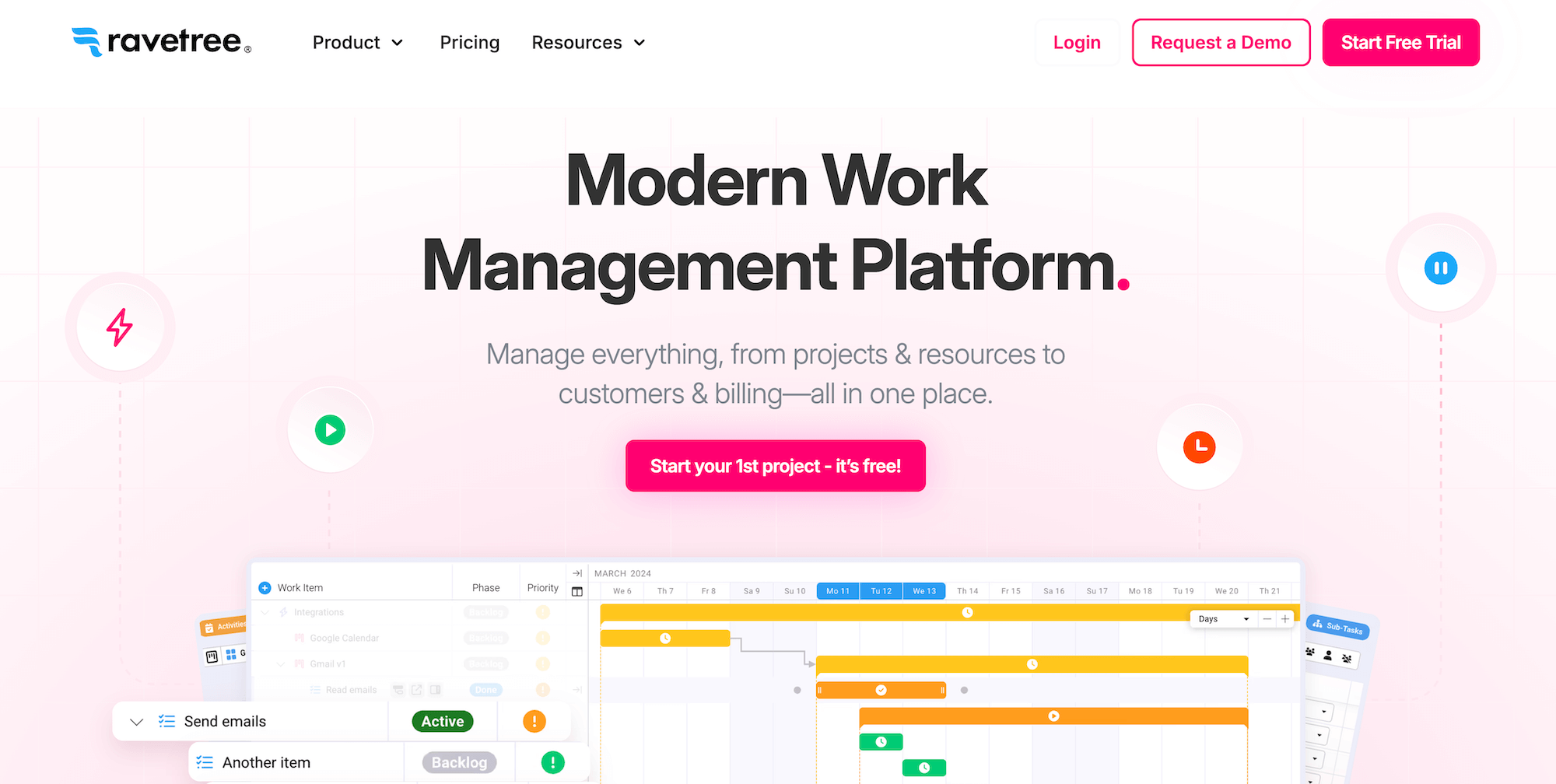
Ravetree is an all-in-one agency management system combining billing and invoicing, project management, resource management, time and expense tracking, CRM, file management, and reporting under one roof. It's one of the most feature-rich tools on our list, packing in everything you need to manage essential agency workflows, from project intake to invoice generation and profitability reporting.
Ravetree’s native tools cover all the main aspects of the billing workflow, offering support for different billing methods, customizable bill rates for projects or work roles, the choice to create client-specific rate cards, and automatic invoice generation using time logs, expenses, and service items. It also features advanced capabilities such as:
- Robust retainer management. Users can schedule auto-generated invoices and projects, and even auto-charge customers. The system also lets you roll over unused retainer amounts and customize retainer periods.
- Stripe integration. Teams can easily collect client payments online and set up auto-charging.
- Phase-based invoicing. Managers can split projects into different phases and invoice for each one as it is completed.
Ravetree generally receives positive reviews, with an average score of 4.5 across G2 and Capterra. However, users note that the platform has a steep learning curve, so getting comfortable with it can take time.
Check out more Ravetree reviews here.
Key Features
- Project templates & project request forms
- Project management
- Portfolio management
- Project budget tracking and forecasting
- Billing & invoicing
- Time & expense tracking
- Retainer management
- Resource planning
- CRM
- File management
Pricing
Ravetree offers its entire suite of tools — plus free onboarding, training, and ongoing support (live chat and video conference) — in a single subscription. Plans and pricing vary based on the length of your commitment:
- Monthly payment plan: $39/user/month
- Quarterly payment plan: $34/user/month
- Annual payment plan: $29/user/month
Read more: Best Ravetree Alternatives for Agencies & Creatives
8. Function Point
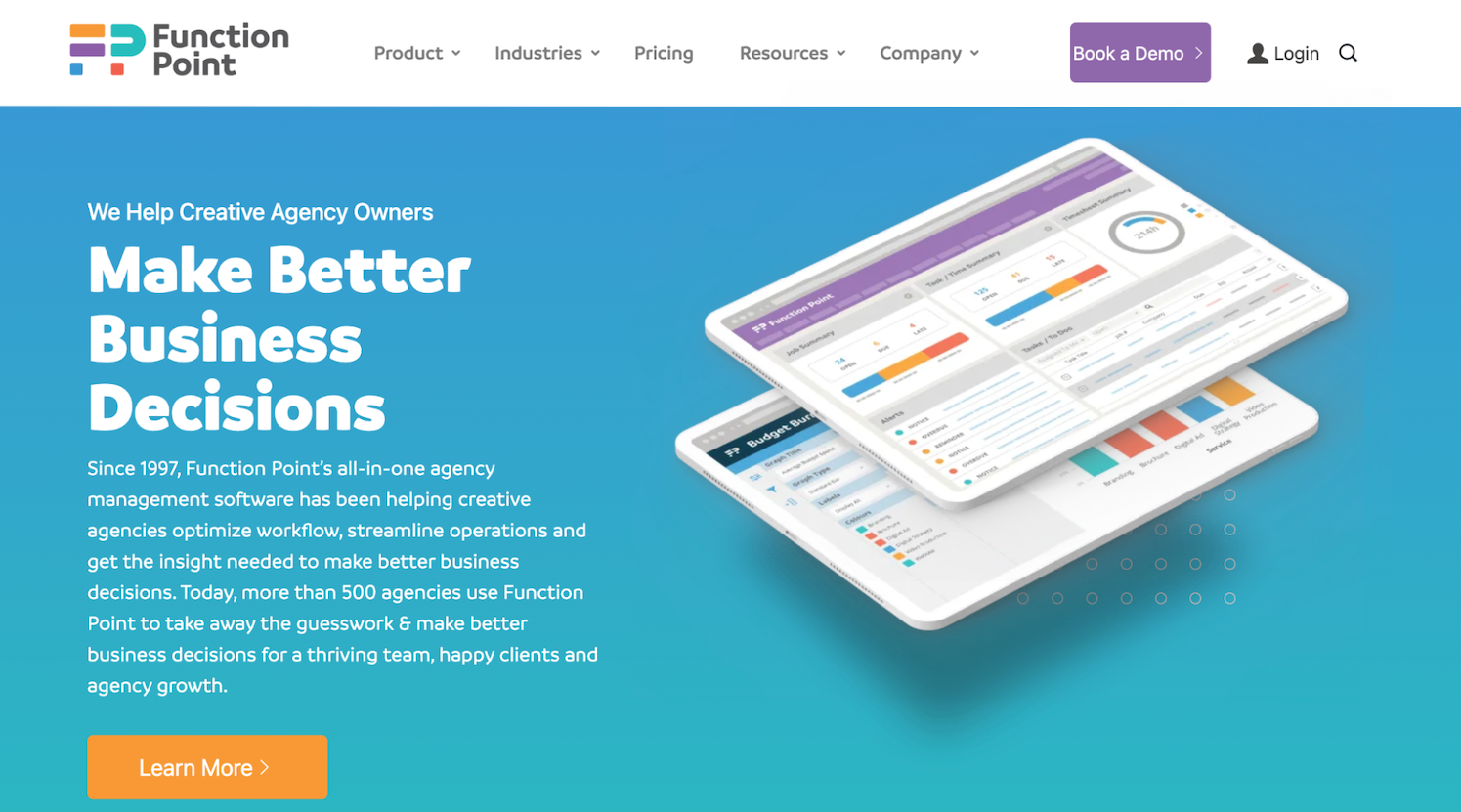
Function Point (FP) is a comprehensive creative agency management system that features native estimating, billing, invoicing, project management, resource planning, time tracking, expense management, CRM, client portals, financial management, and reporting tools. It's one of the more intuitive systems on our list, with many users praising its ease of use.
Users especially love Function Point’s invoicing tool, which reduces billing time and back-and-forths. The system supports fixed-fee, time-and-materials, and retainer billing (although some reviews note that this option isn’t entirely smooth).
Users can save time by creating multiple invoices (for different companies and projects) in one go — FP also features a “multi-job” option for invoicing a single client for multiple projects or jobs. Then, when a new invoice is generated, FP alerts the specified approver so they can review the details and mark the finalized versions as approved.
Function Point also offers dedicated tools for:
- Managing purchase orders. Agencies can generate a formal PO tied to a specific job and export it as a PDF to send directly to the supplier. POs stay linked to their associated job for record-keeping, and users can search across the system for any outstanding (unreceived) POs, which the system flags based on whether an invoice reference number has been logged against them yet.
- Recording deposit amounts. FP offers a “deposit invoices” feature to track pre-billed amounts and other unearned revenue, ensuring they’re recorded in a separate account (provided the invoices are synced with your accounting tool).
- Comparing billable and non-billable time. FP lets you segment the hours spent on client work to evaluate what’s actually billed and get a clearer understanding of profitability.
It’s worth noting that Function Point is one of the pricier systems in this category, especially if you purchase the plan that includes the QuickBooks integration.
Find more Function Point reviews here.
Key Features
- Client management tools, including estimates, proposals, change orders, revision tracking, and job request portals
- CRM and email integrations
- Project templates
- Project management dashboards for real-time visibility
- Project monitoring (choose Gantt charts or a Kanban board view)
- Team collaboration, including file sharing and commenting
- Resource management
- Time tracking
- Financial planning and management, including expense tracking
- Billing and invoicing
- Business intelligence reports, including in-depth profitability reports and custom reporting
- Integrations with accounting systems like QuickBooks and other business applications
Pricing
Function Point offers two straightforward packages that include its full agency management suite, but the higher tier — Optimize — also offers a QuickBooks integration and advanced BI tools. We recommend the Optimize plan to streamline your billing and accounting workflows.
- Standardize: $58/user/month.
- Optimize: $68/user/month.
Read more: Function Point Reviews & Alternatives
9. Productive
Productive is a PSA system that’s less feature-rich overall than the tools we’ve covered above, but it holds up pretty well on the agency billing side. The system combines billing, invoicing, project management, resource planning, time tracking, document management, and financial management. Many users praise its sleek, intuitive interface and robust invoicing tools.
Productive’s agency billing toolkit includes:
- Billing flexibility. Productive not only supports different billing methods — time and materials, expenses, and fixed fee — but also offers options for how clients are billed, including by budget percentage, by amount, or by un-invoiced hours.
- Batch invoicing. You can combine multiple projects and services to generate invoices simultaneously.
- Retainer invoicing. Schedule invoices for recurring budgets so you only have to review them before sending them off at the end of each period.
- Invoicing reports. Get a clean breakdown of amounts already invoiced, those pending invoicing, and overdue amounts.
- Multi-currency support. Easily create invoices, track expenses, and make payments in different currencies.
- e-invoicing. Productive generates invoices that follow the XRechnung format and the Peppol network. You can generate XML files and send invoices via an integrated Access Point to ensure compliance with requirements.
Productive can be a good choice for agencies that need simple project management, powerful agency billing, and document management all rolled into one. But user reviews highlight limitations with many other aspects of the system. For example, they say it’s prone to glitches from time to time, tracking time on sales efforts can be tricky, and the task management tool has some limitations.
Read more Productive reviews here.
Key Features
- Budget management dashboard
- Real-time profitability tracking & financial reporting dashboard
- Time tracking & timesheets
- Automated billing
- Project management
- Resource planning
- Sales CRM
- Documents (to create shared docs & collaborate with teammates)
- Open API (to integrate with outside systems)
- Mobile apps for iOS & Android
Pricing
Productive offers three standard plans and custom enterprise packages:
- Essential ($12/user/month): Includes tools to create and send invoices, apply tax per line item, issue credit notes, invoice against multiple budgets, and bulk-copy invoices — along with automated revenue recognition and expense tracking.
- Professional ($29/user/month): Adds the tools to manage ongoing billing relationships, including retainer management and retainer invoicing, automated payment reminders, rate cards (up to 10), and expense approvals. This is the minimum tier for most agencies, especially ones with retainers.
- Ultimate ($40/user/month): Adds deeper finance team controls, including overhead cost allocation, financial forecasting on budgets, manual revenue recognition for contracts that need more control than the automated default, unbranded/custom invoicing emails, purchase orders, month-end financial closing, and unlimited rate cards (30).
Companies with 50+ users are eligible for volume discounts on Professional and Ultimate plans.
Read more: Best Productive.io Alternatives for Agencies
10. Bonsai
Bonsai is the last tool on our list because it’s mainly geared toward freelancers, solo entrepreneurs, and small teams — and while that’s not a bad thing, the trade-off is that it sacrifices depth for breadth across its tool stack. So on the surface, you’ll see all the modules you need, but the platform lacks specific functionality across the board.
It does a pretty good job on the billing and invoicing side overall, with an automated invoicing tool, recurring billing (e.g., for managing retainer agreements), and support for both multi-currency and multi-tax rates. It also offers a proprietary solution for accepting client payments, called Bonsai Payments, although some users report delays in funds being deposited into their accounts. Alternatively, you can manage payments through its PayPal and Stripe integrations.
The limitations become a problem when your team grows, or you have to manage more complex workflows. For example, although the system’s bookkeeping tool automatically tracks processing fees as expenses, it doesn’t account for multiple bank accounts, check writing, payroll, and other functions. Users also say that different workflows — proposal-sending, contracting, and invoicing — aren’t naturally connected, so they don’t create a smooth experience for clients and lead to a lot of back-and-forth communication.
Check out more Bonsai reviews here.
Notable Features
- Contact and lead management
- Visual pipeline management
- Client intake
- Proposal tools and contract builders
- Client communication tools
- Project and task management
- Project budget tracking and forecasting
- Resource allocation
- Resource planning with capacity and margin tracking
- Time tracking
- Expense management
- Invoicing
- Meeting scheduling and calendar integrations
- Reporting
Pricing
Bonsai offers four standard packages with discounts for teams with 30+ users:
- Basic ($15/user/month): Includes time tracking, task management, CRM, and a service library. There's no invoicing, payment collection, or expense tracking, so we don’t recommend this tier at all.
- Essentials ($25/user/month): Unlocks core billing features, including unlimited invoices, online payment collection, retainer and subscription invoicing, scheduled invoice sending, multi-currency billing, and the ability to attach time entries and expenses directly to an invoice. It also features income tracking, expense tracking, a financial overview, and bank sync for expenses — plus proposals, contracts, and a client portal.
- Premium ($39/user/month): Adds profit and productivity reports, the ability to remove Bonsai's branding from client-facing invoices, and integrations with QuickBooks, Zapier, Calendly, and Google.
- Elite ($59/user/month, 3-user minimum): Adds the ability to apply markups to billed expenses, Xero integration, custom permissions, timesheet locking, and custom data import for migrating in from another system.
Read more: Bonsai Software Reviews & Alternatives: Buyer's Guide
Standalone Billing & Accounting Software
As we mentioned earlier, standalone tools don’t support the entire agency billing workflow on their own, so you have to integrate them with other systems. If you’re looking for a tool to complement your existing workflow or tech stack, here’s an overview of some popular options:
- TMetric: TMetric is a time-tracking tool built to turn logged hours directly into client invoices — once your team tracks time against a project, TMetric pulls those approved entries into an invoice with preset client rates already applied. It also handles expense tracking, allowing you to log costs against a project or team member and flag them as billable or non-billable alongside your tracked time.
It's priced for small teams (plans run roughly $5 to $9 per user/month), syncs with QuickBooks and Xero, and covers project budgeting in addition to time and expense tracking. The tradeoff is depth on the billing side: invoices are functional but not highly customizable, and there's no native handling for retainers, media billing, or multi-step approval workflows.
Read more TMetric reviews here.
- Ignition: Ignition covers the front half of the billing relationship — proposals, engagement letters, e-signatures, and payment collection — and connects that directly to invoicing and recurring billing once a client signs on. It integrates with Xero, QuickBooks Online, and HubSpot rather than offering native project or media billing tools. It's popular with accounting and professional services firms for submitting a signed proposal, and it includes AI-assisted pricing suggestions when building out a scope.
Pricing starts at $39 to $49 per month for solo users and scales into the hundreds for firms managing high client volume.
Read more Ignition reviews here.
- Zoho Invoice: Zoho Invoice is completely free (it only caps the number of invoices you can create per year) and includes customizable invoice templates, recurring billing, multi-currency support, expense tracking, time tracking, quotes/estimates, and a client self-service portal. However, it lacks agency-specific features such as retainer scheduling or media billing, so you'd need to switch to Zoho Books or a full-fledged agency management platform.
Read more Zoho Invoice reviews here.
- QuickBooks: QuickBooks Online is the most widely used small-business accounting platform, handling core general ledger, expense tracking, and invoicing. On the billing side specifically, it supports recurring invoices, automated payment reminders, and progress invoicing — splitting an estimate into multiple invoices tied to project milestones or the percentage of completion, which is useful for agencies billing project-based work in stages rather than as a lump sum. Batch invoicing — generating invoices for many clients from a single entry — and automated revenue recognition are reserved for the top-tier Advanced plan; the lower tiers require manual journal entries to handle deferred revenue.
Current plans range from roughly $35 to $38 per month (Simple Start) to $250 to $275 per month (Advanced), with user limits and features such as inventory tracking and project profitability reserved for higher tiers.
Read more QuickBooks reviews here.
Read more: Best QuickBooks Alternatives for Agencies & Creatives
- Xero: Xero covers similar ground to QuickBooks — invoicing, bank reconciliation, expense tracking, bulk transaction reconciliation, and reporting — but with unlimited users on every plan. The system also offers project-based billing (which includes tracking time, costs, and profitability) via the Xero Projects module (billed as a separate usage charge on top of the subscription), alongside multi-currency invoicing and payments and batch supplier payments. However, there's no native automated revenue recognition, so deferred revenue for retainers or advance billing must be tracked manually through liability accounts or handled via a third-party app from Xero's marketplace.
Current plans run from about $25/month (Early, capped at 20 invoices/5 bills per month) to $90/month (Established, which adds multi-currency and project tracking).
Read more: Xero Alternatives for Creative Agencies & Marketers
- NetSuite: NetSuite is a full ERP platform rather than a simple accounting tool, with multi-entity consolidation, complex revenue recognition, and financials that go beyond what simpler systems can handle. Its billing engine, SuiteBilling, is built for messy billing patterns such as recurring and subscription billing, usage-based/consumption billing (relevant for media spend), milestone billing, and mid-cycle contract changes — all tied to NetSuite's Advanced Revenue Management module for ASC 606/IFRS 15-compliant revenue recognition. NetSuite also offers a SuiteSuccess edition built specifically for advertising agencies, covering billing, revenue recognition, and WIP out of the box.
Pricing is custom and enterprise-oriented, with a base platform fee typically starting at around $1,000/month, plus per-user licensing.
Read more NetSuite reviews here.
Read more: Best NetSuite Alternatives for Agencies & Creative Teams
FAQs on Agency Billing Software
What’s the best billing software for marketing agencies?
The best billing software for marketing agencies is an all-in-one system that combines project and financial data to seamlessly support the entire billing workflow, including:
- Expense tracking — with tools to store receipts and manage all the usual marketing agency expenses, including media buys, vendor costs, freelancer fees, and anything out-of-pocket.
- Time tracking and resource management — to track project hours, manage billable utilization, and ensure billable hours are accurately captured in the final invoice.
- Support for different project billing methods — so you can conveniently manage all your different engagements without any complex workarounds. The main marketing agency billing types include retainer, fixed-fee, time-and-materials, and media.
- Client invoicing — with tools to ensure invoices are accurate, customize them, and choose how they’re handled (e.g., printed and sent to clients, written off, or voided).
- Invoice and transaction scheduling — so you can automate the repetitive aspects of specific agreements, like retainers.
- Multi-currency support — for when you have international vendors, customers, employees, or all three.
- Revenue recognition — to keep reporting clean so you can accurately plan cash flow, forecast revenue, and evaluate profitability.
- Online payments handling — to make things simple for all parties and ensure you get paid on time.
While you’ll come across many systems that handle part of these workflows, most rely on some kind of integrations to support everything.
That’s why the solutions for marketing agencies are agency management systems with native accounting software, like Workamajig, Advantage, and e-Silent Partner. These systems provide everything you need under one roof, reducing errors, headaches, and the time your whole team spends on monthly project billing.
How do the features of the top invoicing tools for creative agencies compare?
Instead of a tool-by-tool comparison, it’s helpful to compare the different categories of systems here:
- All-in-one agency management systems with native accounting — including Workamajig, Advantage, Clients & Profits, and e-Silent Partner. These support the full billing cycle (time/expense capture → billing worksheets → invoice generation → payments → revenue recognition → reconciliation) without leaning on a third-party accounting tool.
- Systems that integrate with third-party accounting — Kantata, BigTime, Ravetree, Function Point, and Productive. These cover project-to-invoice workflows well (approvals, batch invoicing, retainer scheduling) but rely on QuickBooks, Xero, Sage Intacct, or similar systems for core accounting functions such as AR/AP and revenue recognition.
Ravetree and Function Point are top choices here for invoicing flexibility and managing retainers, while Productive stands out for e-invoicing compliance (XRechnung/PEPPOL). Bonsai is a lightweight option built for freelancers and small teams, and its invoicing is solid (recurring billing, multi-currency, Bonsai Payments/PayPal/Stripe).
What’s the best agency billing software with client portals?
The best agency billing software with client portals includes the all-in-one systems we’ve reviewed above: Workamajig, Advantage, Clients & Profits, and e-Silent Partner. These comprehensive agency management software solutions combine project, resource, client, and financial management under one roof.
When it comes to billing specifically, a system like Workamajig lets you:
- Automatically pull time and expense data directly into our electronic billing worksheets when it’s time to bill.
- Seamlessly coordinate with internal decision-makers (PMs, AEs, etc.) to ensure all details are accurate before generating the client invoice.
- Share invoices with clients via dedicated portals.
- Simplify collection by allowing clients to conveniently make payments online via CC or ACH.
The runner-ups here are systems like Kantata, Scoro, Ravetree, and Bonsai. While these solutions don’t feature native accounting software like the four we referenced above, they do offer client portals, billing and invoicing, project management, and financial tools.
What are some affordable agency billing software solutions?
When you're comparing "affordable" options, there are a couple of things to keep in mind:
- First, the sticker price isn’t the right thing to look at. Some of the cheapest plans on the market include limited billing and invoicing tools, so you end up needing a mid-tier upgrade just to get the core features. For example, Productive’s Essentials plan starts at $12/user/month, but you have to pay for the Professional plan ($29/user/month) to unlock essential billing tools.
- Second, it’s worth considering the overall impact on your tech stack when evaluating costs. For example, a standalone system means you’re adding 1 more subscription to your overall setup. On the other hand, adding an agency management system with billing means you could replace project management, CRM, and accounting software, saving on overall costs even if the subscription price is higher than less robust alternatives.
Keeping the first point in mind, some of the most affordable agency billing software options are:
- Zoho Invoice — it’s permanently free with no paid subscription tier. The tool includes invoicing, multi-currency support, payment collection, automated reminders, time tracking, expense management, quotes/estimates, and a client portal. The only limit is an annual cap on the number of invoices you can create, which resets each year.
- Bonsai's Essentials plan ($25/user/month) — includes recurring billing, payment tracking, and multi-currency support. The tradeoff is that custom branding is gated to the $39/user/month Premium plan and up, so Starter-tier invoices go out with Bonsai branding.
- BigTime's Essentials plan($20/user/month) — includes basic invoicing, standard templates, online payments, and automated reminders — but client portals are limited to the $35/user/month Advanced tier, and multi-currency invoicing is locked behind the $45/user/month Premier tier.
- Ravetree($29 to $39/user/month depending on billing frequency) — Ravetree’s single subscription unlocks full platform access, including agency billing, retainer management, client-specific rate cards, and invoice generation from time/expenses.
If you’re looking to cut down on overall tech stack costs, then Workamajig offers the best value for money. Workamajig replaces project management, billing and invoicing, time tracking, CRM, and accounting software with a single, fully integrated system.
What agency billing software integrates with popular CRM systems?
The top choices for agency billing software with popular CRM integrations are:
- Workamajig — it integrates with all popular CRM systems via Zapier or API, including HubSpot, Salesforce, PipeDrive, and more.
- Kantata — it offers a Salesforce-native version (Kantata SX) that's built on the Salesforce Platform and embedded within Sales Cloud, connecting account data from sales through to delivery. Its standard version (Kantata OX) also includes a dedicated Salesforce connector that automates project creation from Salesforce Opportunities and provides Salesforce users with visibility into Kantata project data.
- BigTime — it includes a native HubSpot integration that maps HubSpot deal data directly to BigTime projects, enabling automated project creation and eliminating double data entry between sales and project teams. HubSpot deals automatically become BigTime projects once they hit a stage you specify.
- Ravetree — it comes with a native two-way HubSpot sync: creating a new account or contact in Ravetree also creates it in HubSpot as a company or contact, and the same happens in reverse, with updates handled seamlessly.
- Productive — it integrates natively with HubSpot on its Ultimate plan — you can sync HubSpot deals, companies, and contacts into Productive, map HubSpot pipeline stages to Productive's own sales pipeline, and even assign deal owners automatically.
- Function Point — it offers CRM connectivity via a Zapier-powered integration that connects HubSpot or Copper to Function Point with two-way automation, aimed at eliminating duplicate records between CRM and agency management data.
- Ignition — it connects to HubSpot CRM as one of its 20+ integrations, spanning workflow, CRM, communication, and finance tools.
Several platforms also include native CRM modules if you'd rather not integrate at all: Workamajig, Clients & Profits, e-Silent Partner, Ravetree, Productive, and Function Point all bundle CRM functionality directly.
Getting Started with Workamajig
Workamajig’s all-in-one agency management system goes beyond generating invoices, providing consistent visibility into profitability and cash position when you need it. Our platform is an end-to-end agency billing solution, supporting the entire workflow from capturing expenses, getting approvals, generating invoices, recognizing revenue, allocating overhead, and evaluating profitability.
For agencies tired of spreadsheets, manual journal entries, or juggling standalone billing and accounting systems (like QuickBooks) alongside their project management system, Workamajig offers a superior alternative: a system that understands how agencies bill and what their finance teams actually need to close the books.
Request your personalized demo of Workamajig today.
Read more: