

Kantata is a professional services automation (PSA) solution formed through the merger of Mavenlink and Kimble Applications. After the merger, Kantata continued to keep the two products separate: they’re now known as Kantata OX (formerly Mavenlink) and Kantata SX (formerly Kimble).
If you're not familiar with the PSA category, it's basically the operating system for service-based businesses — agencies, consultancies, IT firms, and the like. The idea is to handle everything involved in running a client project (resourcing, planning, time tracking, billing) in one place, rather than stitching together half a dozen tools. When done well, that means less time wasted on admin, fewer things slipping through the cracks, and a clearer picture of where your profits are coming from.
Both Kantata solutions fit the PSA mold, but there's one major difference between the two platforms: SX is built on Salesforce's architecture, while OX is a standalone system developed on its own open infrastructure.
This difference makes SX the better choice for organizations already embedded in Salesforce because it integrates seamlessly with other Salesforce cloud products (such as Sales Cloud and Revenue Cloud).
OX is generally the better fit for agencies that aren’t using Salesforce and don’t plan to. It still offers all the same powerful project delivery and resource planning capabilities as SX, but without that Salesforce connection.
Both platforms receive a lot of praise for their sophisticated resource optimization features, AI-powered forecasting, and extensive project lifecycle management tools.
However, they’re not always the best fit for agencies, especially those that need:
- To collaborate with clients throughout the project lifecycle. Kantata's collaboration tools are mainly geared towards supporting internal project teams — so they’re pretty limited on the client collaboration side. The platform doesn’t offer robust client management tools for feedback workflows, approval processes, or payment and invoice management.
- An agency CRM. Many agencies want a CRM that integrates seamlessly with their tech stack without compromising functionality. Kantata's products don’t really fulfill this need:
- OX lacks a native CRM and relies on third-party integrations to support these workflows.
- SX is native to Salesforce and includes its CRM capabilities, but Salesforce can be overkill and expensive for many agencies. And you have to pay for it separately.
- Simple resource planning without lots of admin work. Many reviewers say that Kantata's extensive resource management features are too complex for their needs. They also mention that the system creates a lot of duplicate work because Kantata separates allocated planning hours from scheduled execution hours (which can also lead to duplicate data entry and confusion). And project and resource plans aren’t integrated in Kantata, so making changes to one requires manually updating the other.
- Flexible financial management tools. Users say that Kantata's invoicing features lack flexibility, with limited currency support, manual processes, and weak integrations with accounting tools. In addition, the expense and invoicing workflows require excessive clicking and navigation, and teams struggle with permissions, reporting, and reconciling invoices, creating extra work during billing cycles.
Ultimately, while Kantata is pretty well-rounded for internal project delivery, it's not a true all-in-one agency management system. It prioritizes deep functionality in project and resource management, but lacks many key features needed to support other agency workflows. These same limitations apply to other Kantata competitors — BigTime, Runn, and Celoxis are all more delivery-focused.
True all-in-one agency management systems, on the other hand, include everything agencies need to operate. Beyond project and resource management, they also include CRM, time tracking, client management, collaboration, financial management, and agency reporting, all within a fully centralized platform.
Since most agencies need more than professional services automation alone, we’ve focused this guide on agency management platforms that simplify your tech stack and support all agency workflows.
We kick things off with our own system, Workamajig, and then cover other popular Kantata competitors, including Advantage, Function Point, Scoro, Ravetree, Rocketlane, Teamwork, and ManyRequests.
For a personalized walkthrough of Workamajig, request a demo with our team.
1. Workamajig
Workamajig is a complete agency management solution that brings all your people, processes, and finances together in one place.
We've been working with agencies for 30+ years, learning their processes, pain points, and where other software falls short — and used these insights to shape Workamajig. Every feature reflects how agencies and creatives actually work, from client intake to resource optimization and profitability evaluation.
Workamajig matches Kantata in core delivery workflows while offering a more comprehensive toolkit for managing all your other essential agency processes. Teams choose Workamajig over Kantata because our system offers:
- A native agency CRM. It supports the entire sales pipeline and streamlines client intake. Our CRM is fully integrated with Workamajig's other features, so (1) reps can reference project data for estimates, (2) won opportunities can be passed over to delivery teams, and (3) internal teams can connect project and financial insights to specific clients.
- Powerful client management tools. Workamajig lets you create dedicated portals for clients through which they can share feedback, track project status, respond to comments, access deliverables, and receive invoices. Our system treats clients as a natural part of the project workflow, with review and approvals baked in.
- Support for the entire creative workflow. Unlike universal agency management and PSA tools, Workamajig is specifically tailored to the creative workflow, with creative collaboration tools, media-buying integrations, tools for managing freelancers and production vendors, and fully integrated resource and project management solutions.
- Hassle-free resource planning with real-time insights. In Workamajig, data flows in real time across time tracking, project monitoring, and resource planning. That means everyone sees the same accurate data — estimates, allocations, actual hours, and labor costs without duplicate entries — no matter which module, dashboard, or report they’re viewing. A major advantage is that managers can spot bottlenecks early and correct course even on complex projects, helping prevent timeline slips and budget overruns.
- Stronger financial controls and real-time visibility. Workamajig features a native, GL-ready accounting software and extensive financial reporting tools. You can manage vendor invoices, the entire project billing workflow, expenses, reimbursements, and all AR and AP processes.
- Unified business data. Combining project, financial, and client data unlocks deeper insights that inform strategic decisions. For example, you can uncover unprofitable service lines and opportunities to boost your bottom line.
Another major difference between Workamajig and Kantata is the level of guided support you get with your plan.
Many Kantata users report that onboarding and training support fall short, noting that implementation guidance is limited and additional training comes at extra cost. As one user put it:
"Our assigned support expert was often non-responsive to simple requests and provided almost no real training on how to set up the system in a way that was tailored to our specific company requirements and billing structure."
Workamajig does things differently: we offer personalized onboarding and support across all plans. We pair you with a dedicated account manager who guides you through setup, configuration, and training. Your account manager stays involved after onboarding, with regular check-ins to help adjust workflows and settings as your agency's needs evolve.
After switching to Workamajig, agencies report a whole range of benefits: less time wasted on admin, smoother collaboration with all stakeholders, and a big-picture view of projects, services, and clients. You can read about our client's wins below:
- How Ten Adams Uses Workamajig to Drive Business Insights & Profitability
- Lavidge's Financial Success and Scalable Growth Fueled by Workamajig
- How 2 Fish Company, LLC Decreased Time Spent on Billing by 80%
Up next, we’ll take you over Workamajig's complete toolkit. You can also request a personalized demo for a more in-depth walkthrough.
Managing Client Relationships & Sales Pipeline
One of the main benefits of Workamajig's native agency CRM is the time and cost savings — you don’t have to pay for and manage a whole other system, like Salesforce or HubSpot.
But the value of our native CRM goes much deeper. Since it's fully integrated with the rest of Workamajig, your sales team gets a few perks that systems like Kantata miss out on:
- Reps can reference real project data — budgets, timelines, resource requirements — to build accurate client estimates.
- Won opportunities can be converted into projects or campaigns, and all sales conversations, files, and details automatically carry over to delivery teams.
- Pipeline data feeds into resource forecasting, so you can plan capacity based on what's actually coming down the line.
- Financial and project data are tied to each client record, which means you can track account-level profitability and make strategic decisions about which relationships are worth leaning into.
In the next few sections, we'll walk you through how our CRM handles leads, opportunities, and reporting.
Lead Capture & Management
Workamajig funnels all leads into a single centralized dashboard. The most common setup is to hook our CRM into your website's contact form so new inquiries are automatically saved as leads.
But you've got other options too:
- Connect Workamajig up to other systems via API or Zapier — so if you’re already using Salesforce or HubSpot, our system plays nicely with them.
- Upload lead lists from .csv files — useful for event attendee lists, pulling MQLs from other systems without integrations, or a batch of MQLs you've got from another source.
- Add leads manually — like when a rep wants to log someone they met at a networking event or were referred.
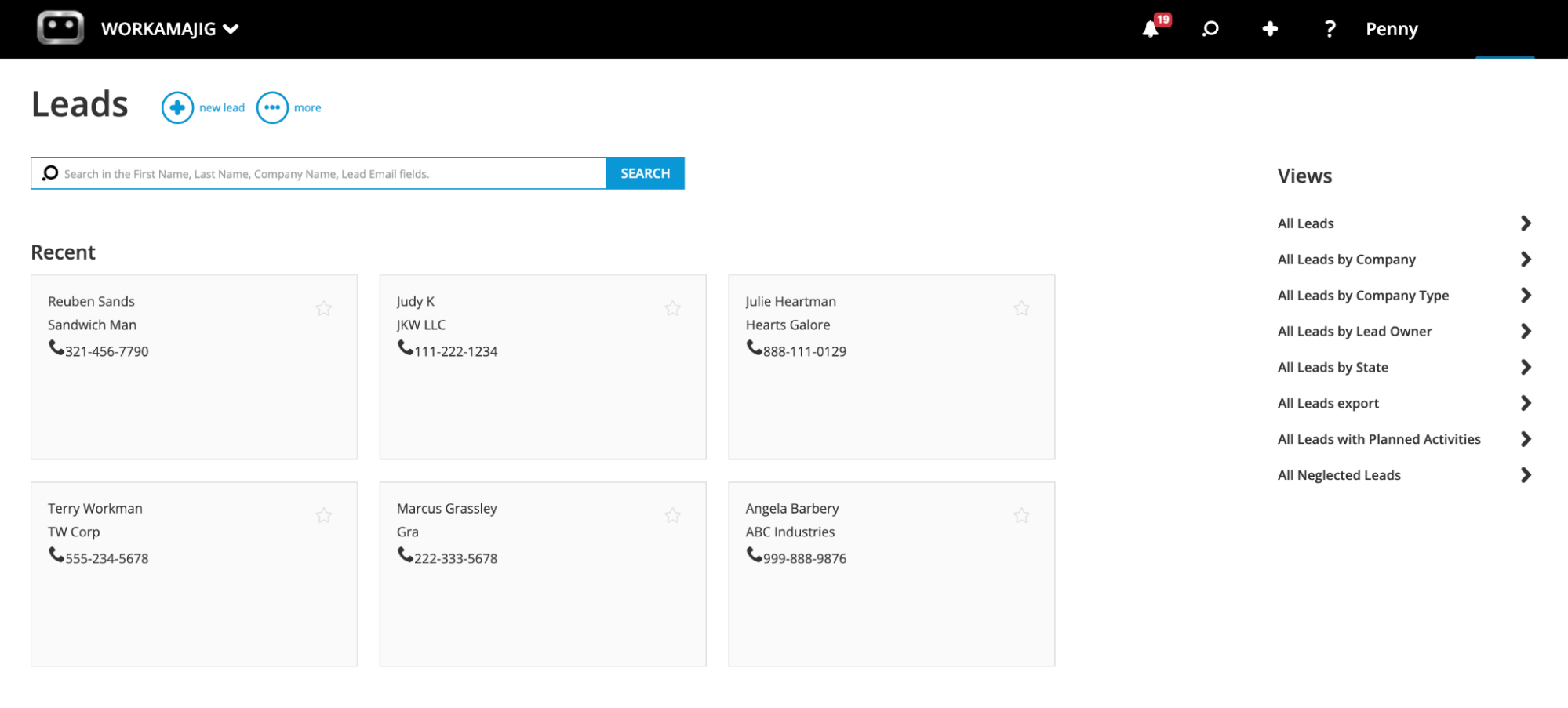
Once leads are in the system, reps can filter them by different Views (source, owner, status), navigate to the Neglected leads view to catch anyone who's gone cold, and log every touchpoint through our Conversations feature.
Conversations is one of the tools our sales teams love most. They can standardize their usual nurturing steps — sending content, booking a call, meeting at an event — and then log each interaction as a note on the lead card. Workamajig also automatically saves email threads, so reps don't have to copy things over manually.
Standardizing conversations is super useful for tracking lead engagement efforts, almost like a lead-scoring system.
Then, reps can convert their qualified leads into opportunities, which move all relevant details to the Opportunities dashboard.
Opportunities & Pipeline Management
Once a rep has qualified a lead, it takes just a few clicks to move it to the Opportunities dashboard — pushing it into the formal sales pipeline for further development.
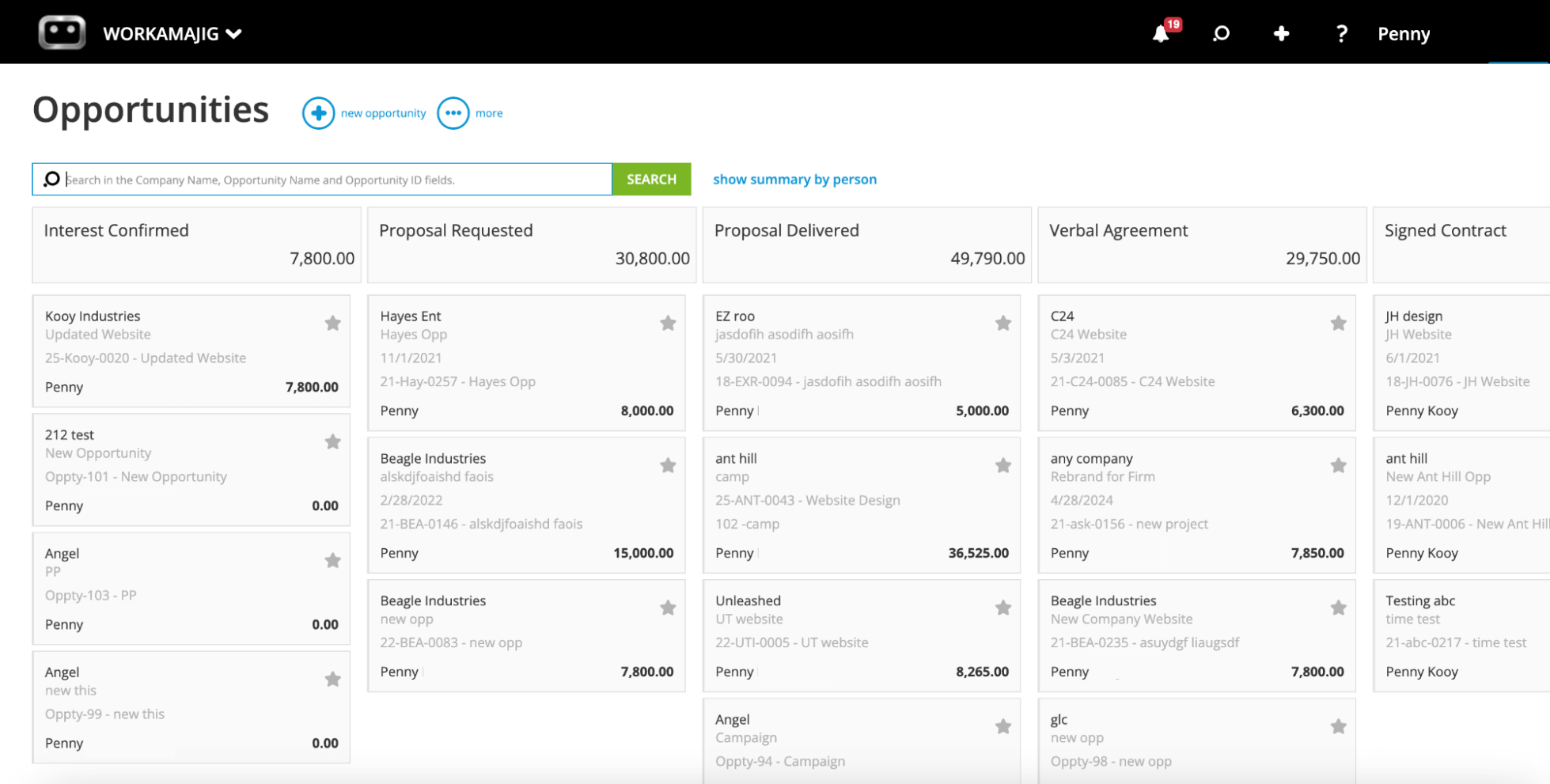
The dashboard shows the entire sales pipeline in a Kanban-style view, with each deal organized by stage. Managers can fully customize these stages — such as "Proposal Requested" and "Signed Contract" — to match their agency's workflows. They can also set stages, add context to opportunity cards, and assign opportunities to reps.
Then, reps can use the following tools to help develop their assigned opportunities:
- Automated estimating. Instead of guessing at timelines and budgets, reps can reference actual data from past projects and templates — how long similar work takes to complete, what it cost, which resources were involved — to share realistic estimates with potential clients.
- Opportunity Overviews. Reps can conveniently compare big-picture details, such as projected profitability, across opportunities. This helps them prioritize and focus their efforts on best-fit deals.
- Opportunity Cards. Reps can conveniently record the information they collect directly on these cards. They can fill in our standard fields or create new ones to track specific details. Our standard fields include close probability, projected revenue, and estimated costs, expected close dates, the expected number of months that work will be billed over, and the outcome (awarded, lost, or canceled)
As reps close deals, they can hand over won opportunities to the delivery team by converting them directly into projects or campaigns.
All of the data from Opportunity Cards feeds into Workamajig's sales reports and revenue forecasts. For example, closed-deal outcomes populate the win/loss analysis, while projected revenue rolls up by close date into the revenue forecast.
And because Workamajig ties everything together, pipeline data also feeds into resource demand forecasts — so your resource manager isn't caught off guard when three big projects close in the same month.
In Kantata, the pipeline would sit in your third-party CRM, while resource planning sits in the PSA, and the two don't really talk to each other.
CRM Reporting Suite
Workamajig's sales reporting suite turns all the data flowing through your CRM into insights your team can act on. With both out-of-the-box and custom reports, you can break down the types of leads coming in, identify which channels bring in the best opportunities, and spot what winning deals have in common (and what losing ones share) to understand team strengths and areas for improvement.
Some of our most-used sales reports include:
- Win/Loss Analysis — compare earned vs. lost deals across timeframes, segments, and deal types.
- Quarterly Performance Comparisons — benchmark current performance against prior quarters and annual goals.
- Sales Rep Activity Summaries — see where reps are spending their hours and how that maps to outcomes.
Teams can also build custom reports with our drag-and-drop report builder using CRM datasets (Company, Contact, Opportunity, Activity, etc.).
And because Workamajig's CRM sits alongside the rest of your agency data, you can build reports that blend sales info with project and financial data, like account-level profitability or revenue by service line.
Read more: Best Agency CRM Software: Reviews & How to Choose
Complete Delivery Suite: Manage Projects, Resources & Vendors
Workamajig's delivery suite is fully integrated from the ground up, so project and resource plans stay consistent: actual hours flow into both project monitoring and staff scheduling, assignments are tracked at the task level, and updates to one side of the system automatically update the other.
With this, you don’t face the kind of double work that Kantata introduces: there's no separate "allocated planning hours" vs. "scheduled execution hours" distinction to wrestle with or data siloes.
We'll walk through the full delivery suite in the sections below.
Project Intake Tools
Workamajig offers a few different ways to kick off new projects, depending on your workflows and where work is coming from:
- Convert a won deal from the CRM into a new project. As we covered above, when a rep closes a deal, they can turn the opportunity into a project or campaign with one click. All sales conversations, files, estimates, and context are automatically transferred over, so PMs don’t have to chase Sales.
- Project templates. For the recurring stuff, such as quarterly campaigns, website builds, rebrands, and product launches. Templates let you predefine tasks, subtasks, dependencies, resource allocations, budgets, and timelines. Workamajig doesn't cap the number of templates you can create, so you can set one up for each service line you offer.
- Project request forms. Useful for repeat clients and internal departments that regularly submit work requests. Clients can submit through their dedicated portal, and the details drop straight into Workamajig — no need for back-and-forth email chains.
Whichever path you choose, the project lands in Workamajig with all the context PMs need to start planning, saving internal teams from back-and-forths or having to re-enter information.
Read more: Best Project Intake Software for Creatives & Marketers
Project & Resource Planning Tools
Once a project is in the system, PMs can use our handy set of project and resource planning tools to finalize their plans and hand out work.
Our planning toolkit includes:
- Task management suite. PMs can add or edit project details, including tasks, subtasks, dependencies, time allocations, and milestones.
- Resource planning. Get everything you need to balance workloads and match the right people to the right jobs: a visual staff-scheduling dashboard, time-off tracking, workload balancing, skill-based assignment matching, conflict detection, and demand forecasting for upcoming projects.
- Vendor management. You can engage production vendors, suppliers, freelancers, and contractors right in Workamajig — whether you need an extra set of hands or materials like printouts. Our system lets you set up dedicated vendor portals, put out calls for quotes, review bids, and manage vendor communications. Workamajig automatically logs those exchanges and pulls vendor costs into the project estimate.
- Automated estimating tool. As PMs build out and finalize their plans, Workamajig's estimating engine tallies up projected costs in real time to create budgets and a final estimate. It factors in labor, overhead, outside vendor spend, contingency buffers, and any service fees, drawing on historical data from similar past projects plus current data (e.g., vendor costs). It'll also flag if the math starts pointing toward a margin problem, so managers can make adjustments before work kicks off.
The center of our resource planning toolkit is the staff scheduling dashboard. It's where managers go to balance workloads, finalize assignments, and forecast capacity for upcoming work — all from one screen.
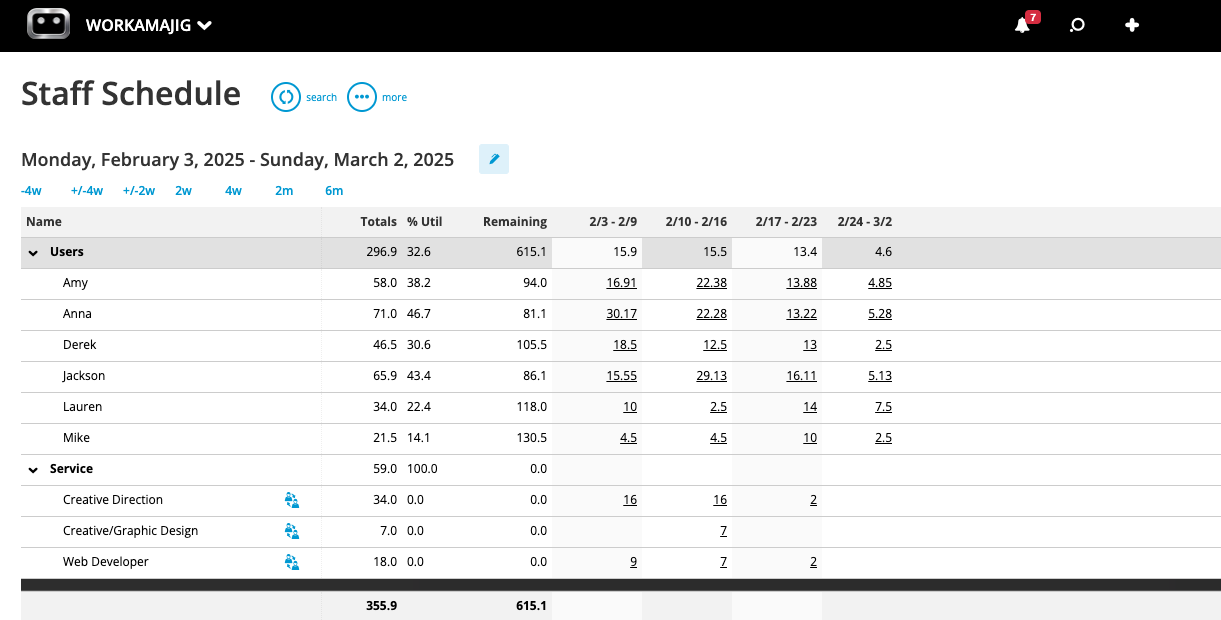
By default, the dashboard displays each team member's total allocated hours, current utilization percentage, and remaining available hours.
It also factors in any commitments that affect availability — company holidays show up as a purple column blocking out the entire team, individual vacation days appear as gold boxes when staff mark them on their calendars, and events pulled in via calendar sync (Google, Outlook, iCal) count toward each person's availability.
Managers can filter the dashboard view by service, office, department, project, client, or contractor status, and toggle between specified timeframes (such as daily or weekly) to zoom in or out as needed.
Then, they can toggle the view to display assignments alongside allocations. So instead of just seeing that a designer has 32 of 40 hours booked next week, you can drill down and see exactly which tasks and projects those hours are spread across.
When plans change or something comes up, managers can easily update schedules without leaving the dashboard view. For example:
- If a designer is overbooked at 50 hours while another teammate is at 22, managers can reassign some of the designer's tasks to the other teammate.
- If a strategist calls in sick and someone needs to cover their tasks, they can see which resources with the relevant skills are available on their assigned dates and update the schedule accordingly.
- If next week's allocations look light across the board, they can pull some activities forward. Our dashboard also displays any unassigned work below the roster, so managers can make sure everything's covered.
Read more: Project Resource Scheduling for Agencies & Creatives
Budget Tracking & Timeline Monitoring
After you kick off a project, Workamajig automatically tracks updated budgets and timelines by factoring in labor hours and expenses as they’re logged.
Our system offers dedicated tools for tracking and managing all your different types of expenses, including:
- Labor costs. Our time-tracking module stores everyone's hourly and service rates, so it can update project budgets as users log time.
- Charges from credit cards or spending accounts. You can pull these through our Plaid CC connector and even auto-sync charges so they update nightly.
- Vendor expenses. Manage print costs, contractor fees, freelancer invoices, etc., through our vendor invoice management module. You can attach copies of vendor invoices and reconcile them with purchase orders, work orders, and receipts.
- Media buys. Pull in media-buy expenses directly into Workamajig through our integrations with Strata/FreeWheel, Mediaocean, Bionic, and GaleForceMedia.
- Out-of-pocket expenses. Workamajig lets team members attach and store receipts, submit expense reports, and tag these costs to specific projects. So they can easily account for expenses like travel or unplanned material costs.
Every expense is tagged to a project, so it automatically feeds into budget tracking, project profitability, and financial reports.
Then, you can head over to our project monitoring dashboard — command central for all your active projects — to track each project's real-time progress, timelines, and budget burn. It brings all of this into a centralized, visually-friendly view:
![Workamajig dashboard: Projects and Project Status [GIF]](https://www.workamajig.com/hs-fs/hubfs/Workamajig%20-%20Projects%20and%20Project%20Status%20%5BGIF%5D.gif?width=1714&height=853&name=Workamajig%20-%20Projects%20and%20Project%20Status%20%5BGIF%5D.gif)
As shown above, the dashboard has two halves: detailed project data on the left, and a visual Gantt chart on the right.
The right side shows a Gantt view of your active projects, with each color (customizable) representing a different phase of work, and the black progress bars indicating how far along each project is.
You can switch between day, week, and month views to zoom in or out, and hover over any phase to see start/finish dates, duration, % complete, and which segment of the project it covers, without leaving the dashboard.
The left side outlines all active projects with a breakdown of each project's allocated hours, actual hours logged, current status, and % complete. Our system also uses color-coded health icons to show project status at a glance:
- Green means everything's on track.
- Yellow signals that the project is moving more slowly than expected, or costs are running higher than budgeted. Managers get a heads-up to intervene.
- Red indicates that the project is delayed or over budget.
When a project enters yellow territory, Workamajig has proactive risk alerts so PMs can step in before things escalate. Depending on the issue, they might take actions like:
- Bringing in extra hands on the project to meet a tight deadline.
- Pushing non-critical tasks further ahead to free up short-term capacity.
- Trimming budgeted hours on lower-priority work or moving some tasks to a lower-cost resource to curb rising costs.
- Looping in the client for a scope conversation.
Read more: Project Status Reporting Made Simple (with Templates & Tools)
Project & Client Collaboration Tools
Another key difference between Kantata and Workamajig is that our system is designed to keep clients engaged after the deal closes and throughout the project lifecycle.
You can continue managing client relationships post-deal close with our suite of dedicated tools — with feedback, approvals, and communication baked into the project workflow.
Our system includes client portals that you can create for each account — with no limits on how many — so clients can:
- Engage you for new work through project request forms.
- Track project status and progress in real time.
- Share feedback and respond to comments directly on deliverables.
- Access files and approve deliverables.
- View and pay invoices.
When a client needs to weigh in — they've been tagged in a discussion, a deliverable is ready, an invoice is waiting — Workamajig sends an automated email alert, so they know exactly when and where their input is needed.
In addition, our system provides tools for internal teams to collaborate, coordinate with freelancers, and serve clients.
First, every user gets a personalized Today Dashboard tailored to their roles and responsibilities. For example:
- Creatives (designers, writers, developers) see their current tasks, any recent conversations they're tagged in, how their hours are allocated, and everything coming due that week.
- Managers see all of that, plus admin items such as approvals pending, schedule warnings, flagged projects, and deliverables that need sign-off.
- Sales reps, billing roles, and accountants see all the latest items they need to attend to, like new leads to qualify, billing worksheets to review, and invoices to pay.
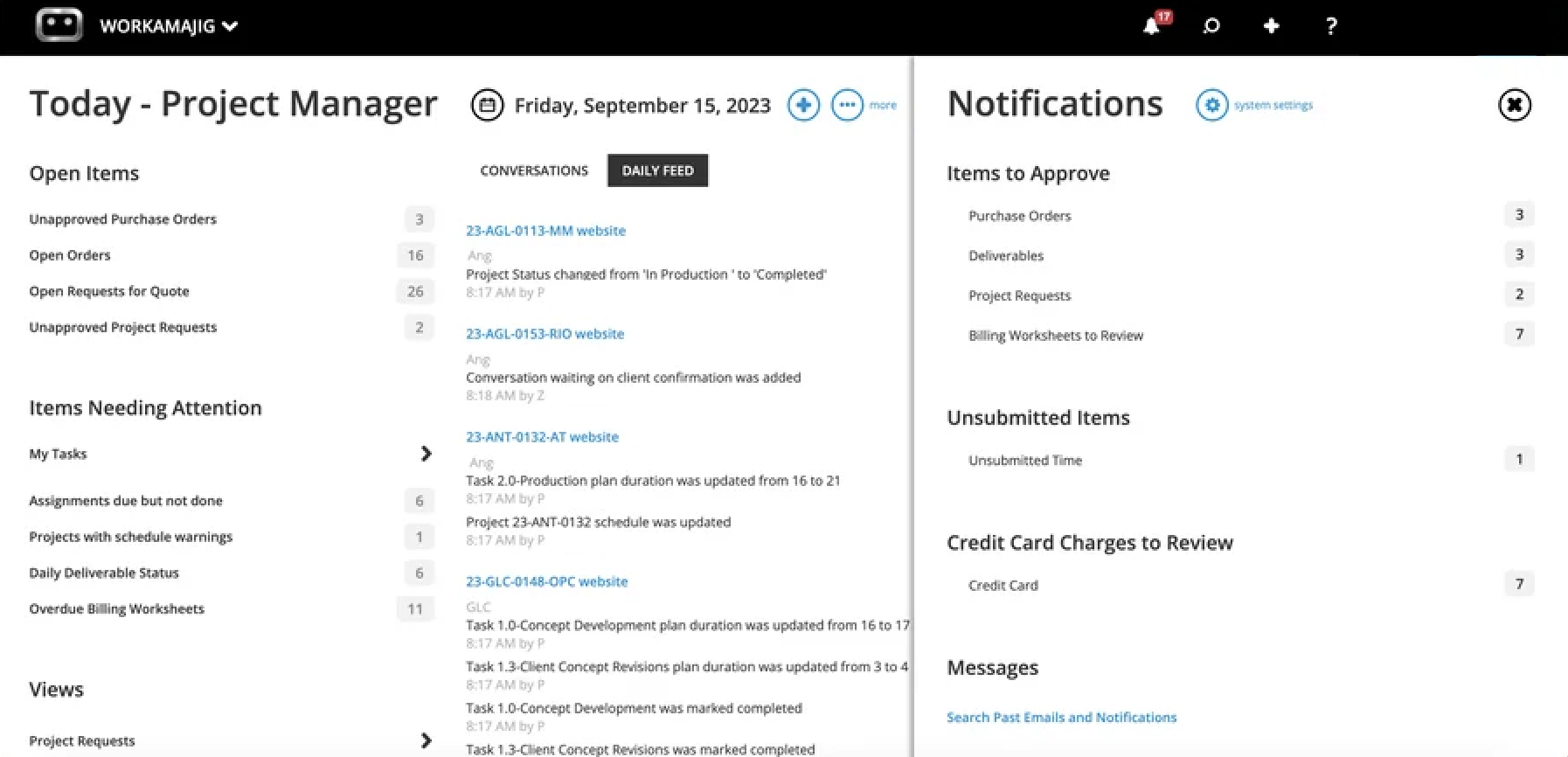
Then, every day collaboration takes place directly on task cards through our project collaboration toolkit:
- Project conversations. Internal teams, clients, and vendors can leave notes, share updates, and keep discussions organized. Conversations are fully customizable and tracked at the project level, so nothing gets buried in email or lost across tools.
- Commenting. Team members can drop comments directly on task cards and tag other stakeholders (internal or client-side) when they need a decision, feedback, or a quick review.
- File sharing. Workamajig supports all the file types creative teams actually use — images, video, audio, design files, documents, PDFs, HTML, and more. Users can share files within projects and campaigns, and access them from centralized file repositories.
- Internal proofing. Users can preview content, compare files side by side, and mark up annotations directly in Workamajig. Reviewers see the feedback in context, make their changes, and upload new versions.
- Version history. Creatives can easily see what changed between rounds and revert files to previous versions if needed.
- Feedback controls. Managers can limit the number of feedback rounds to keep revisions focused and avoid scope creep.
- User permissions. Setting custom roles and permissions for project stakeholders allows managers to control precisely what they can see and do.
Read more: 5 Types of Creative Collaboration Tools for All Agency Needs
Project Portfolio Management
Workamajig's portfolio feature is called Campaigns, and because it sits within a fully integrated system, it pulls together everything related to the work — projects, schedules, budgets, files, billing, and CRM history — into a single umbrella.
Whether you’re handling multiple deliverables for a single client, a quarterly retainer with phased work, or multi-touch paid campaigns to track total spend, Campaigns gives you one place to manage everything.
You can kick off a campaign the same way you'd start a project — convert an awarded opportunity from the CRM, fill in a campaign template, build one from scratch, or accept it through a campaign request form. From there, you link existing projects in or build new ones underneath.

Once projects are linked to a portfolio, their tasks, schedules, estimates, files, and specs feed into a central campaign dashboard (shown in the image above). From there, you can:
- Easily pull up important context. You can track cost burn with our burn chart, view recent activities in the shared daily feed, navigate to custom fields, access files, start conversations, and more.
- Define things at the campaign level, including deliverables, conversations, a file repository, etc., so they apply to every project inside it.
- Navigate to the campaign scheduling view (as shown below) to manage the project's schedule. It displays all linked projects' details in a single Gantt-based interface, so you can edit tasks across the entire portfolio, drill into a specific project when needed, and see how each piece contributes to the bigger picture.
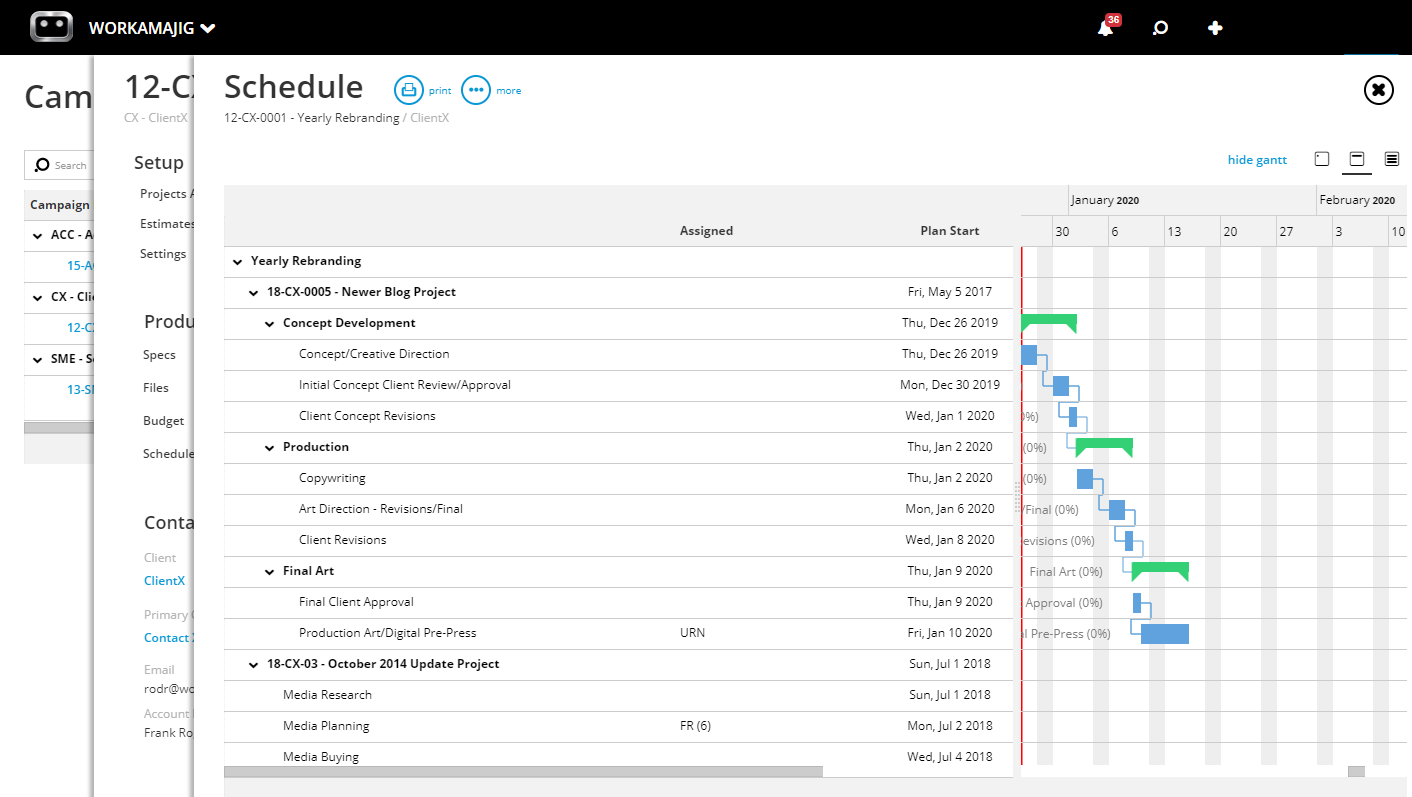
When you’re building out the campaign's budget, Workamajig gives you two options — but the best choice depends on how much detail you have and how you plan to manage reporting.
- Budgeting by project: The first option, which is generally more accurate, is budgeting by project. This option pulls in estimates from all linked projects to build a centralized campaign budget. So for it to work, you need accurate estimates for every project in the campaign — and you need to outline all the projects that will be included throughout the campaign.
- Budgeting by service: The second option, budgeting by service, is a good fallback when underlying projects haven't been fully scoped yet or when you don’t have enough details to build out accurate project-level estimates. Instead of building the budget bottom-up from project estimates, you commit hours at the service level across the campaign — say, 200 hours of design, 100 hours of copywriting, 60 hours of strategy. When you select this option, Workamajig displays all your agency's services alongside their rates in a single Labor Breakout view. From here, you can choose which services and hours to pull the estimates in from — and Workamajig takes care of the rest.
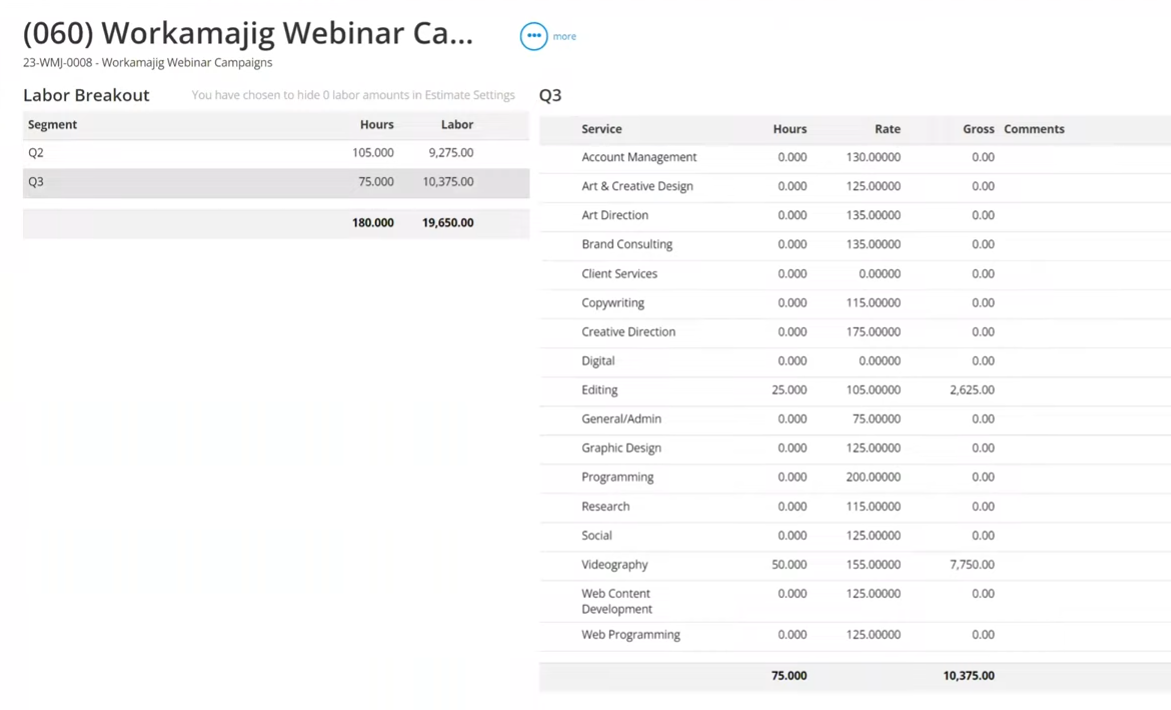
Whether you choose the first or second option, cost burn is tracked at the campaign level.
Read more: 15 Best Campaign Management Software for Agencies & Creatives
Project Reporting Suite
Our project reporting suite pulls in labor, expense, and project details to provide deeper insights into profitability and where money's being spent.
Project Recap Analysis
The Project Recap Analysis report ties together the three things that determine whether a project actually went well: labor cost, hours worked, and timeline.
For every task, it shows budgeted vs. actual labor dollars, budgeted vs. actual hours, and the baseline due date vs. actual completion date — with a variance column flagging how far over or under target each came.
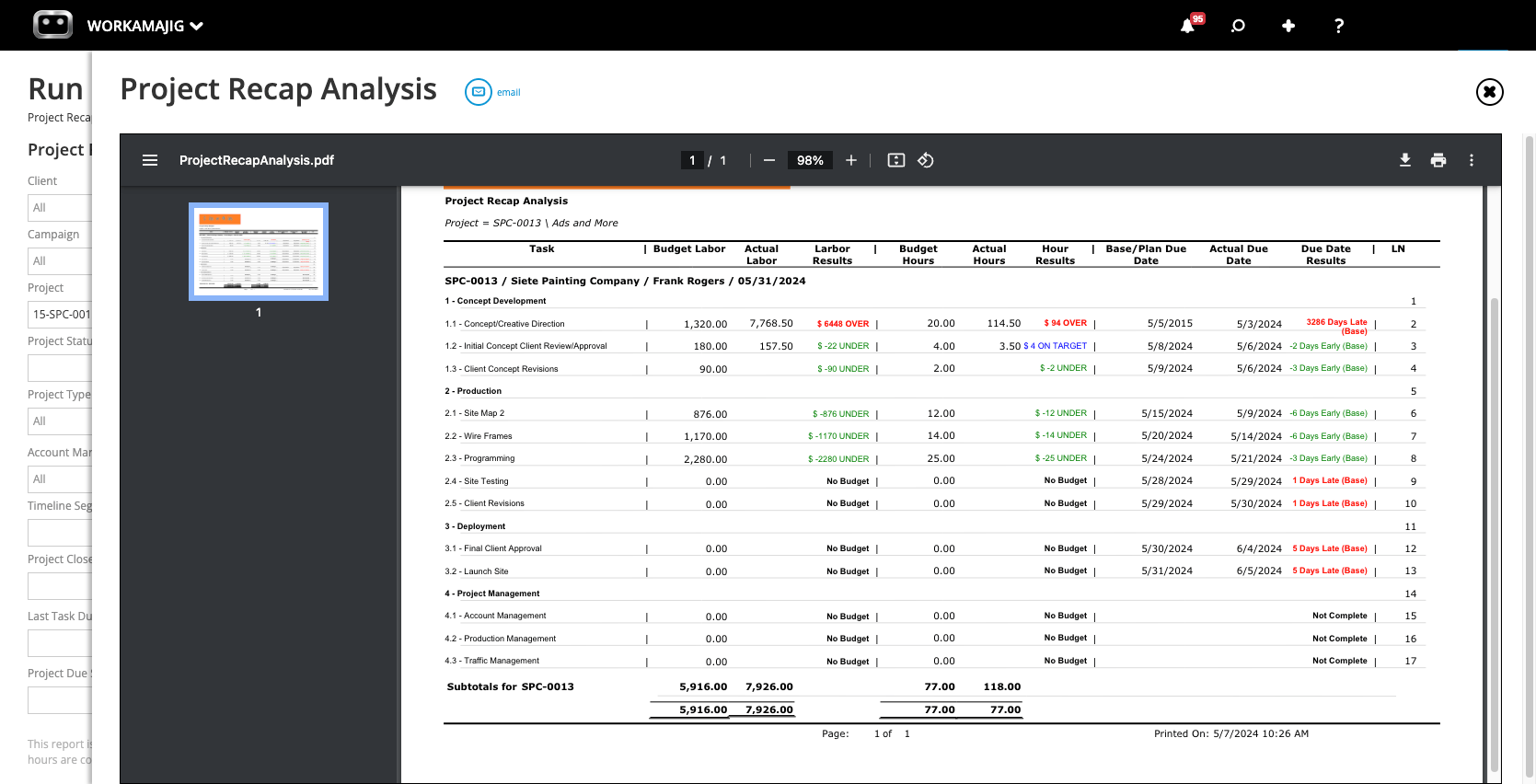
The report is organized by project phase, with task-level detail underneath and a subtotal row that rolls up the entire project. Variances are color-coded red for over budget, blue for on target, and green for under — so a quick scan tells you which tasks and phases hurt margins and what went better than planned.
Take the example in the screenshot. Concept Development ran significantly over budget — in both labor costs and hours — driven mainly by the Concept/Creative Direction task. Production, on the other hand, came in well under across the board, with every task finishing below its allocated hours.
By revealing where your estimates are off and on what kind of work, the report helps you improve future plans. In the example above, you’d investigate the root cause of each outcome: maybe you need to tighten the scope of the creative next time around.
Project Budget Analysis
The Project Budget Analysis report compares budgets against actuals across the different projects in your system, all in one place.
By default, it groups projects under the client they belong to — with collapsible client headers, subtotal rows that roll up each client's portfolio, and project-level rows underneath that managers can drill into for the full transaction history.
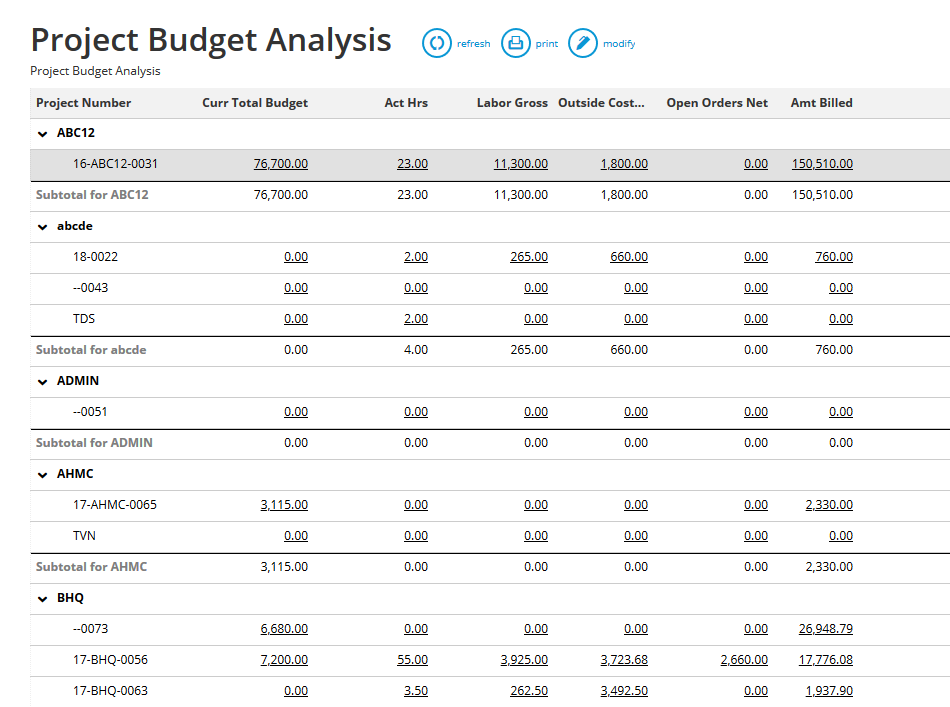
Click any underlined value — current budget, actual hours, labor gross, outside costs, open orders, amount billed — and the report drills straight to the underlying transactions, so you can trace a number back to the time entry, vendor invoice, or expense line that created it without leaving the report.
You can further narrow the data by date range, run it against a specific client or project type, or — most conveniently — flip on the "Project Has Budget Warning" filter, which pulls up only projects where actuals have crossed 80% of the budget.
Custom layouts let you choose which columns appear and how gross profit, labor net, and other figures get calculated, and you can save your settings for later use.
Project & Campaign P&Ls
While Workamajig features your standard corporate profit and loss (P&L) reports, our system also includes project, campaign, client, and service P&L reports so you can get into the finer details of where you’re making or losing money.
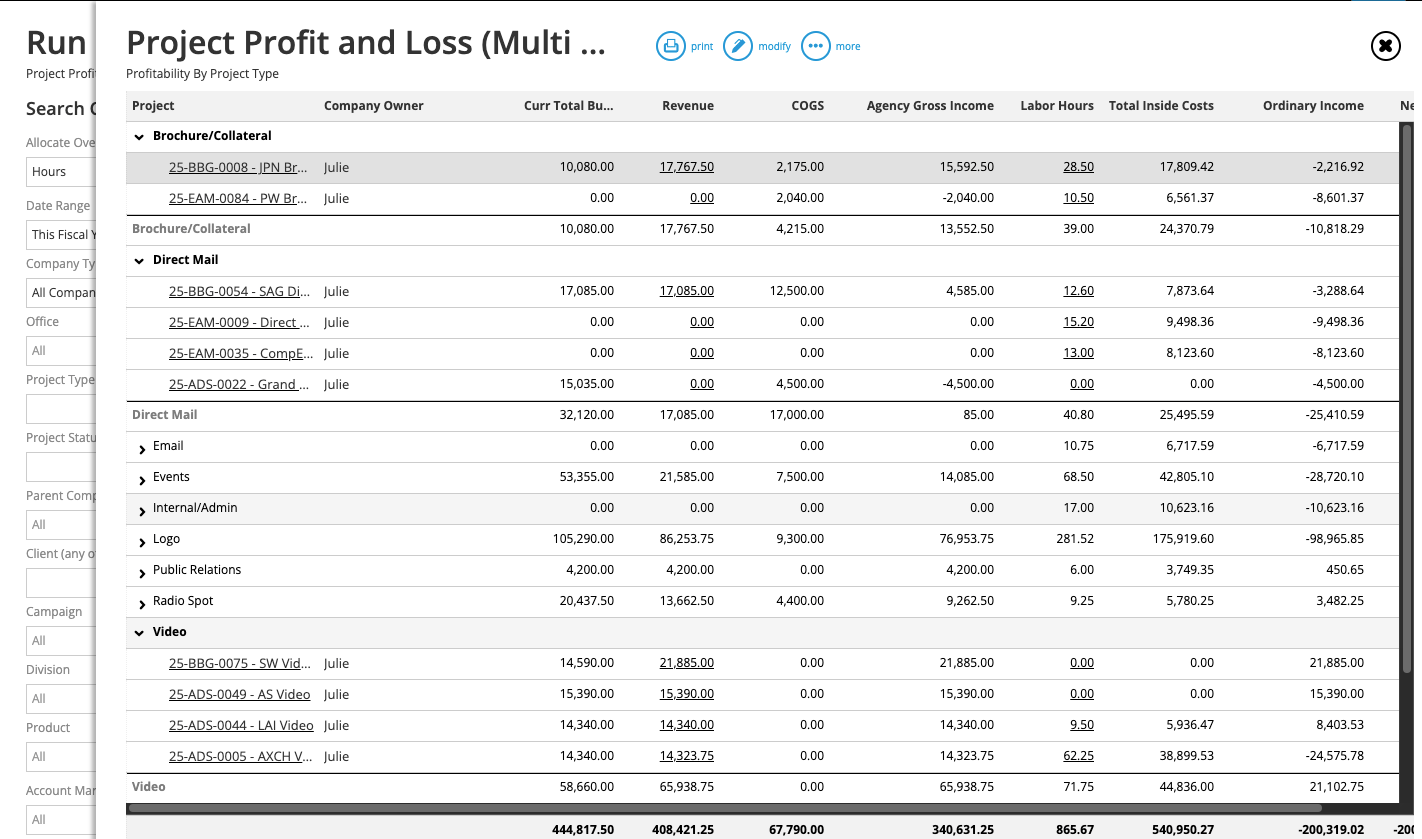
Our project P&L reports calculate profit differently from the Budget Analysis reports. While the latter calculates labor directly from staff hours, our P&L reports account for overhead allocated based on the actual hours utilized for the project.
Project P&Ls are available in three formats:
- Detailed views — for digging into one project at a time. The report breaks down profitability by GL account, so you can trace exactly where the money went. For example, a project might come in on budget on paper but still land thin on margin because vendor spend ran higher than planned.
- Multi-views (as shown in the screenshot above) — for comparing profitability across many projects in a single screen and allocating overhead from the GL across them. Group results by project type, client, or account manager to spot which kinds of work are carrying their weight and which aren't.
- Campaign P&L (multi-view) — for evaluating profitability at the portfolio level. It rolls up revenue, COGS, agency gross income, labor costs, and other expenses across all projects tied to a single campaign, using posted GL transactions and applying an overhead allocation from your general ledger (via one of three methods: labor hours, labor cost, or total billing).
Read more: 10 Actionable, Practical Tips to Increase Agency Profits (+ FAQs)
Time Tracking & Productivity Reports
Time tracking is one of those things most teams resist, but it's non-negotiable if you want to accurately track profitability, productivity, and how your team actually spends their days.
Workamajig is built to make time tracking as painless as possible, so it doesn't feel like a second job. Team members have a few different ways to log hours right from task cards:
- Track time the old-fashioned way through timesheets.
- Record time accurately using our timers. Users can start, stop, and pause these as they take breaks.
- Add meeting hours by syncing their work calendar with Workamajig.
![Workamajig - Today - Creatives - Tasks - New Time Entry for Projects [GIF]](https://www.workamajig.com/hs-fs/hubfs/Workamajig%20-%20Today%20-%20Creatives%20-%20Tasks%20-%20New%20Time%20Entry%20for%20Projects%20%5BGIF%5D.gif?width=650&height=690&name=Workamajig%20-%20Today%20-%20Creatives%20-%20Tasks%20-%20New%20Time%20Entry%20for%20Projects%20%5BGIF%5D.gif)
As team members enter time in Workamajig, their actual hours are recorded in our centralized timesheets. Managers can then review these and choose how to treat those hours: whether to approve them, mark them up or down, or write them off, etc.
For example, one thing that often varies is how agencies treat the hours sales reps spend on developing an opportunity and closing the deal. Depending on factors such as the profit margin, managers may either write those hours off or include them in the new project's budget.
After managers approve the finalized hours, the actuals flow through our system:
- Logged hours are compared against task allocations on the project monitoring dashboard, and the project timeline is updated accordingly.
- Those hours get matched to each person's hourly rate so the project's budget stays current in real time.
- They also roll back into the staff scheduling dashboard to keep capacity and availability numbers up to date.
- And they feed our Agency Insights reports, which surface how the team is spending their time across projects, services, and clients.
Below, we'll cover how you can get deeper insights into your team's productivity and contribution to your bottom line through our most-used time and productivity reports.
Read more: Top Project Management Tools with Time Tracking
Time Productivity Analysis
Workamajig's Time Productivity Analysis report breaks down each resource's hours and financial contribution side by side. For every team member, you can see:
- Their total logged hours.
- Billable vs. non-billable hours (with each shown as a percentage of their total)
- The gross revenue generated during those hours
- The cost of their time
- The resulting margin in dollars and as a percentage
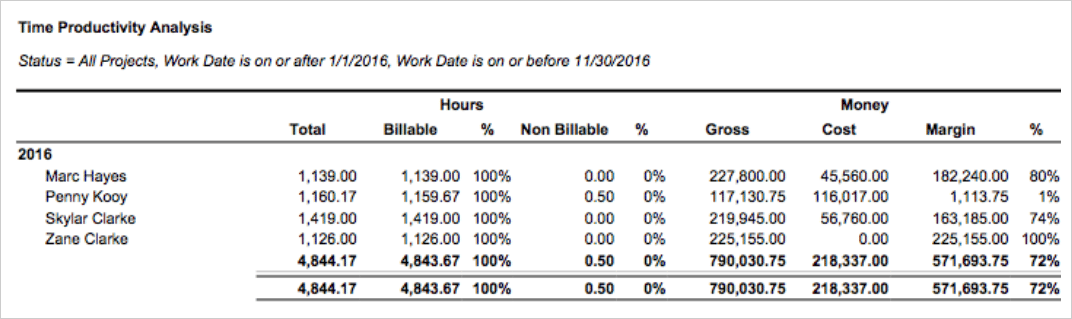
This report is especially useful to agencies and other service providers because it tracks each resource's contribution to your bottom line.
Take the example in the image above: All names here are billing at 100%, but Marc Hayes generated $227,800 in revenue against $45,560 in cost (an 80% margin), while, on the other hand, Penny Kooy's margin is only 1%, meaning her time is being sold at almost cost.
That's the kind of insight that can drive strategic decisions: rate adjustments, scope changes, or deciding which projects to assign a resource to next.
Chargeability Summary
Chargeability is generally a more reliable metric than billable utilization for measuring a resource's contribution to your bottom line.
That's because it only measures the percentage of billable hours that are actually chargeable to a client — instead of work that doesn’t actually get charged (e.g., redoes or write-offs).
But the tricky part is that chargeability is more difficult to measure, because you can’t exactly predict which discrepancies will occur beforehand. You can, however, get a good sense of things by measuring it periodically (e.g., each quarter) to average out errors and get a reasonable estimate of your agency's chargeability relative to billing hours.
That's where Workamajig's Chargeable Utilization report comes in. As shown below, it displays an overview of your team's chargeability for any specified period, so you can easily calculate and compare the metric over time.
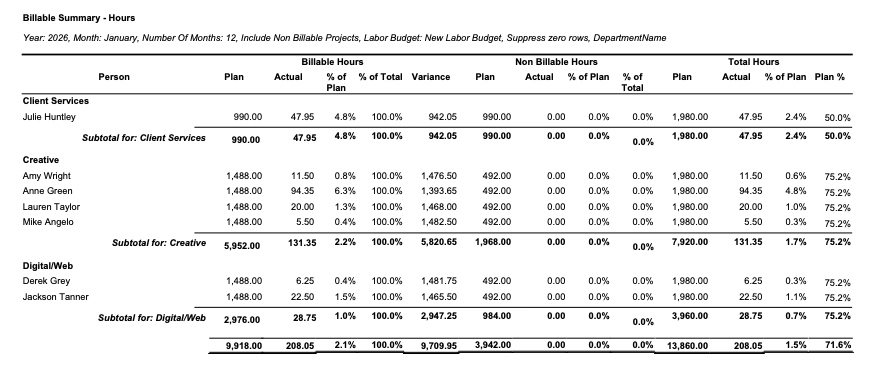
The report breaks down your chargeable and non-chargeable hours for each role, as a percentage of your total hours. It also lays out how you performed vs. your original plan.
Agency Insights
Agency Insights is Workamajig's organization-wide reporting dashboard. It pulls together hourly data across the entire agency — every project, service, client, and employee — and lets you slice and dice it to evaluate productivity from different perspectives.
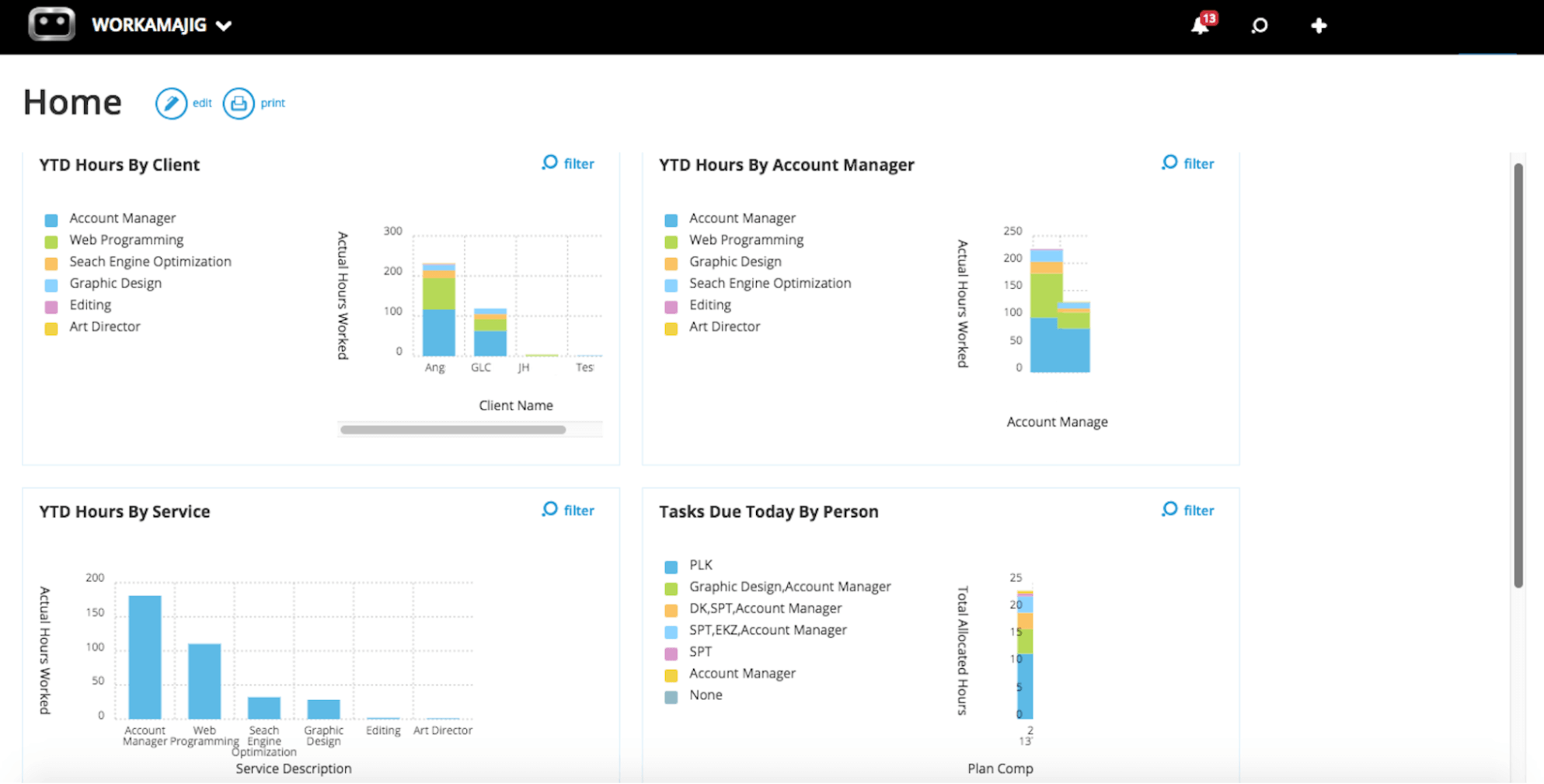
For example, you can:
- View total hours by project, service, client, campaign, department, or individual.
- Stack billable hours against non-billable ones, across any dimension, to gauge utilization.
- Flag services that are eating disproportionate team hours and squeezing margins.
- See which clients are soaking up the most internal time — useful for retainer or scope conversations.
- Trace which services your most profitable hours come from, so you know where to double down.
Accounting Software & Financial Reporting
Kantata covers project accounting, native billing, project budgets, expense capture, and project-level financial reporting. But everything beyond that — the general ledger, AP workflows, GL-side AR (postings, aging, collections), multi-entity consolidations, and the full client invoicing close — runs in a third-party accounting system connected to Kantata via an integration.
That works, but it splits the financial picture across two systems: month-end close becomes a reconciliation between them, custom fields and workflows have to be mapped on both sides, and the full agency P&L can only be as current as the latest sync.
Workamajig replaces that whole setup with a native, GL-ready accounting software built specifically for creative agencies, fully replacing systems like QuickBooks, Xero, and NetSuite.
It handles the full financial management stack, including all AR and AP processes, without any bolt-on integrations. So vendor write-offs don't need to be reconciled against a separate AP system, and the month-end close stops being a reconciliation project.
Our accounting module supports:
- Project billing. Our system supports all traditional agency billing methods, including fixed-fee, time-and-materials, retainers, advance, prebilling, WIP, and media billing. When you generate a billing worksheet, Workamajig automatically applies the relevant billing method.
- Mass billing. Generate individual invoices for each project from a single master worksheet, or roll multiple projects into a single invoice.
- Multi-currency and multi-entity accounting. For agencies doing business internationally, we’ve got you covered with exchange-rate tracking and foreign transaction handling built in.
- Online payment collection. Clients can pay online by credit card or ACH through our integrations with Payflow Pro or Authorize.net.
- Vendor invoicing. Add vendor invoices to the system and match them with POs. You can then pay vendors online thanks to our integrations with Edenred Pay (formerly CSI) and AvidXchange (formerly FastPay).
- Deep financial reporting. Including GL reports, cash projections, revenue forecasts, profitability broken down by project, client, or service, and more.
Up next, we’ll cover:
- Workamajig's personalized Today pages for accounting and billing roles — they can use these to manage all their workflows in one place.
- How Workamajig makes the client invoicing process quick and simple.
- Our vendor invoice management module.
- Workamajig's extensive financial reporting suite.
Today - Accounting & Billing pages
Workamajig features two Today dashboards, purpose-built for the people who run your agency's financials: accounting and billing users.
They make it easy to manage every routine accounting and billing action from a single, centralized view.
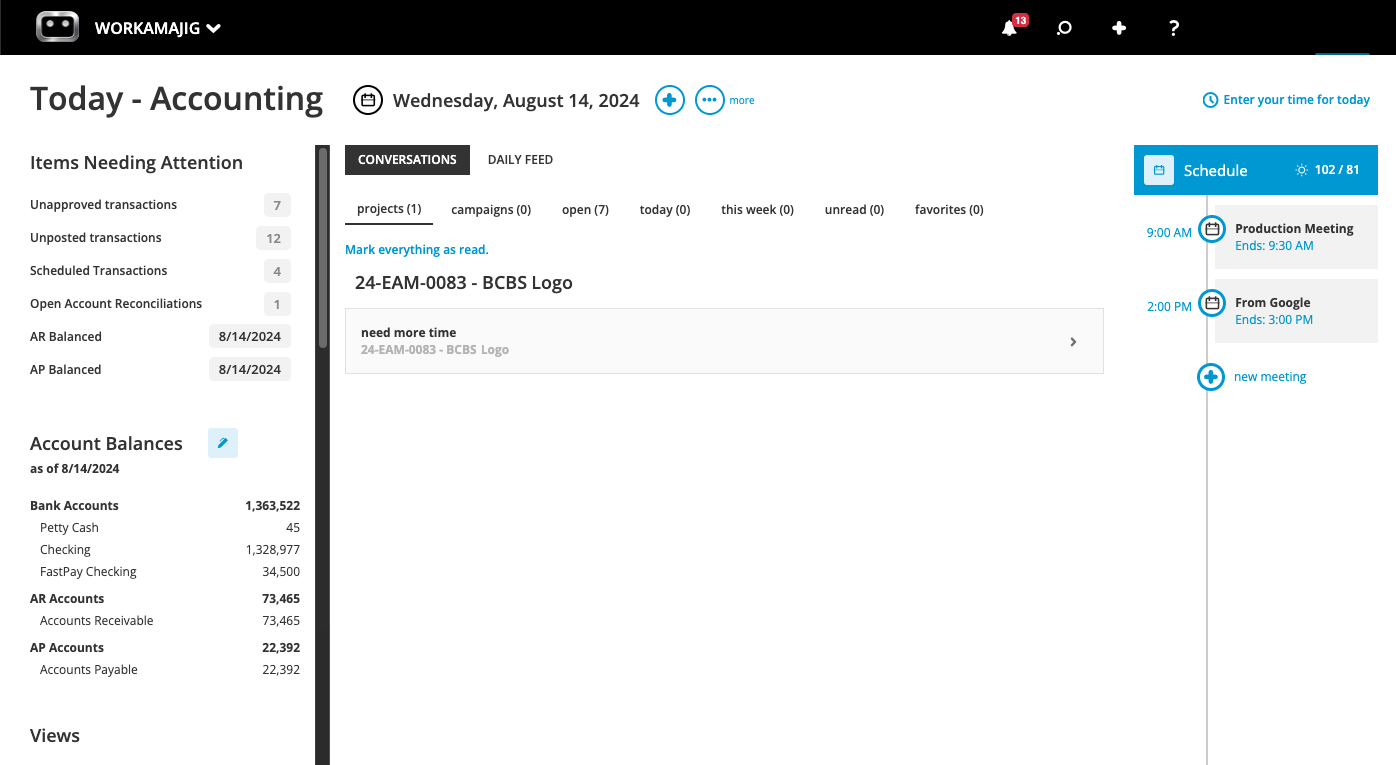
The Today - Accounting dashboard brings together everything an accounting role needs to manage the books. From this screen, users can:
- See Items Needing Attention — unposted journal entries, open account reconciliations, unapproved transactions, and other items that need a sign-off or review.
- Review account balances by category — bank accounts, credit cards, AR, AP, and so on — with a date selector to see balances as of any point in time, not just today.
- Navigate to listing screens for client invoices, vendor invoices, receipts, payments, journal entries, and transactions through the Views section, with all your custom filters saved (e.g., open client invoices, unpaid vendor invoices).
- Track conversations and the daily feed for any accounting-related activity that has happened on the selected date.
Clicking the + icon opens a handy quick-action menu that lets users perform routine tasks such as submitting a new journal entry, generating a client invoice, uploading a vendor invoice, making a payment, logging a credit card charge, or even entering time.
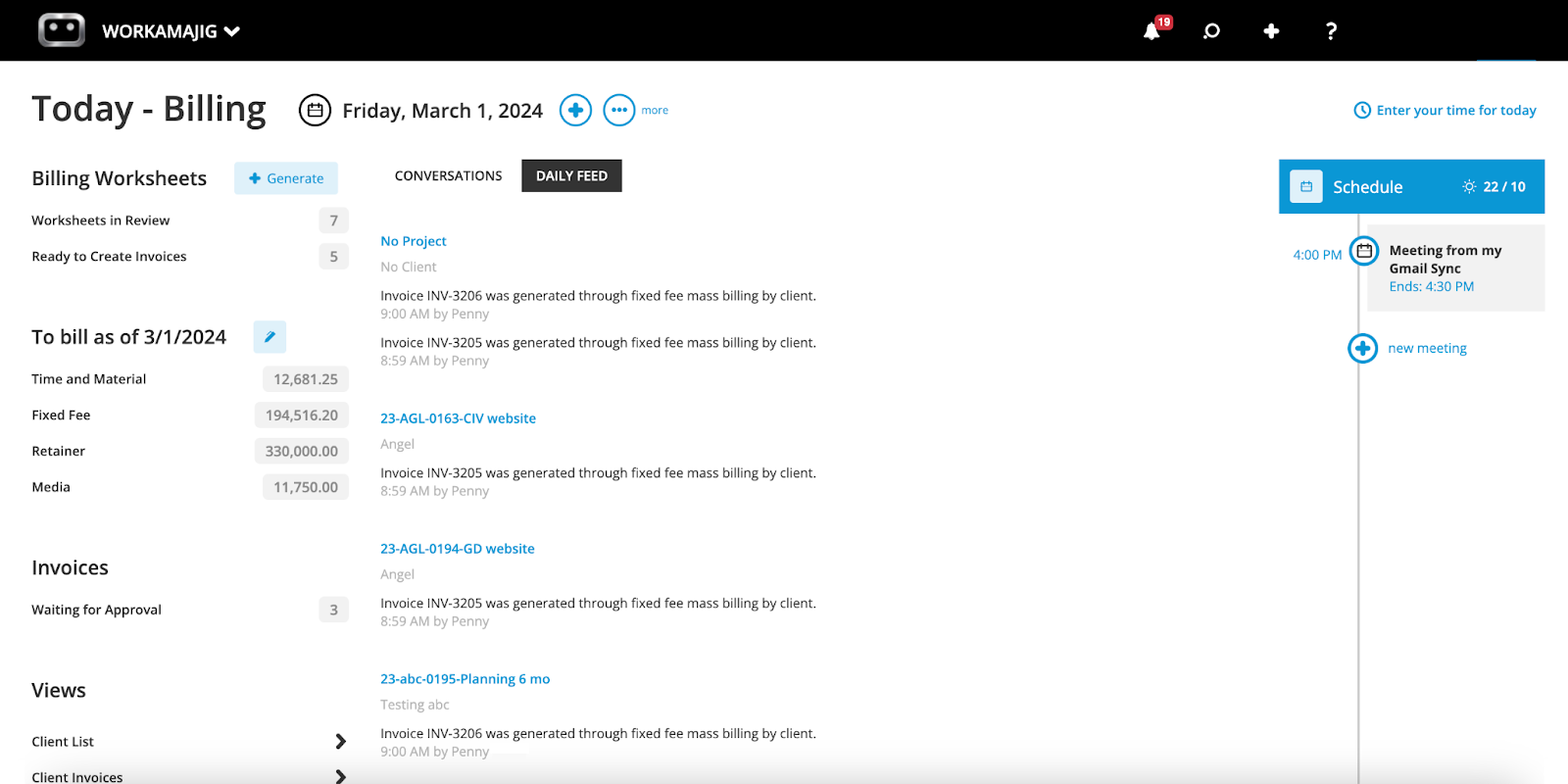
The Today - Billing dashboard is built for the same kind of one-screen efficiency, but it's more niche and tailored to billing-specific workflows. From here, billing teams can:
- Manage billing worksheets — see what's currently in review (waiting on PM/AE approval), what's awaiting final accounting approval, and what's ready to convert to a final invoice.
- Pull up projects ready to bill — sorted by billing method (time & materials, fixed fee, retainer, media, fixed-fee campaigns). Workamajig automatically scans for billable items and surfaces them here as they become available.
- Track client invoices in flight — invoices waiting to be submitted, waiting for approval, queued to be printed or emailed, and on a billing schedule.
- Adjust the "to-bill as of" date to see what's available to bill at any chosen point — useful for cutoff scenarios at month-end or quarter-end.
Just like the accounting dashboard, the + icon lets billers take quick actions: generate a new billing worksheet, advance-bill a project, store a receipt, or enter time directly.
Project Billing & Client Invoicing
The heart of Workamajig's billing workflow is our electronic billing worksheets. They're designed to catch issues before they become client-facing invoices by looping in the PM or account exec for review.
This approach reduces headaches that come with traditional invoicing workflows and disconnected systems: double-entry issues, reconciliation challenges, and back-and-forth between the billing team and the PM or AE to ensure all line items are accounted for.
Here's how our recommended approach works:
- A billing user generates a worksheet — either built from project transactions or as a percentage of the budget. They can create this right from their Today - Billing or Today - Accounting dashboard.
- Since Workamajig already captures time and expenses at the project level, the worksheet is populated with the right line items — billable hours, expenses, transactions, prior billings — no manual work required.
- The billing worksheet is routed automatically to the approver (usually a PM or AE), who reviews it, marks items up or down, writes off anything that shouldn't go to the client, transfers costs as needed, and sends it back.
- The approved worksheet lands back with billing, who generates the final invoice and sends it out.
Clients can then view invoices from their dedicated portal and pay them via credit card or ACH.
Read more: Best Creative Project Management Software with Invoicing
Vendor Invoice Management
Workamajig runs the full vendor invoicing workflow: teams can file purchase orders, receipts, work orders, and copies of vendor invoices in one place.
When someone enters an invoice and specifies the vendor, Workamajig automatically surfaces any POs or work orders linked to that vendor. From there, users can:
- Pick which POs the invoice should be applied to — and Workamajig updates the project's expenses, budget, and profitability behind the scenes.
- Tweak amounts directly in the system so the invoice lines up cleanly for payment.
- Choose how to manage discrepancies. When an invoice comes in over or under the PO, they can route the excess to the project's bill or write it off so it's not passed along to the client.
- Issue payment through our Edenred Pay (formerly CSI) or AvidXchange (formerly FastPay) integrations once everything's finalized.
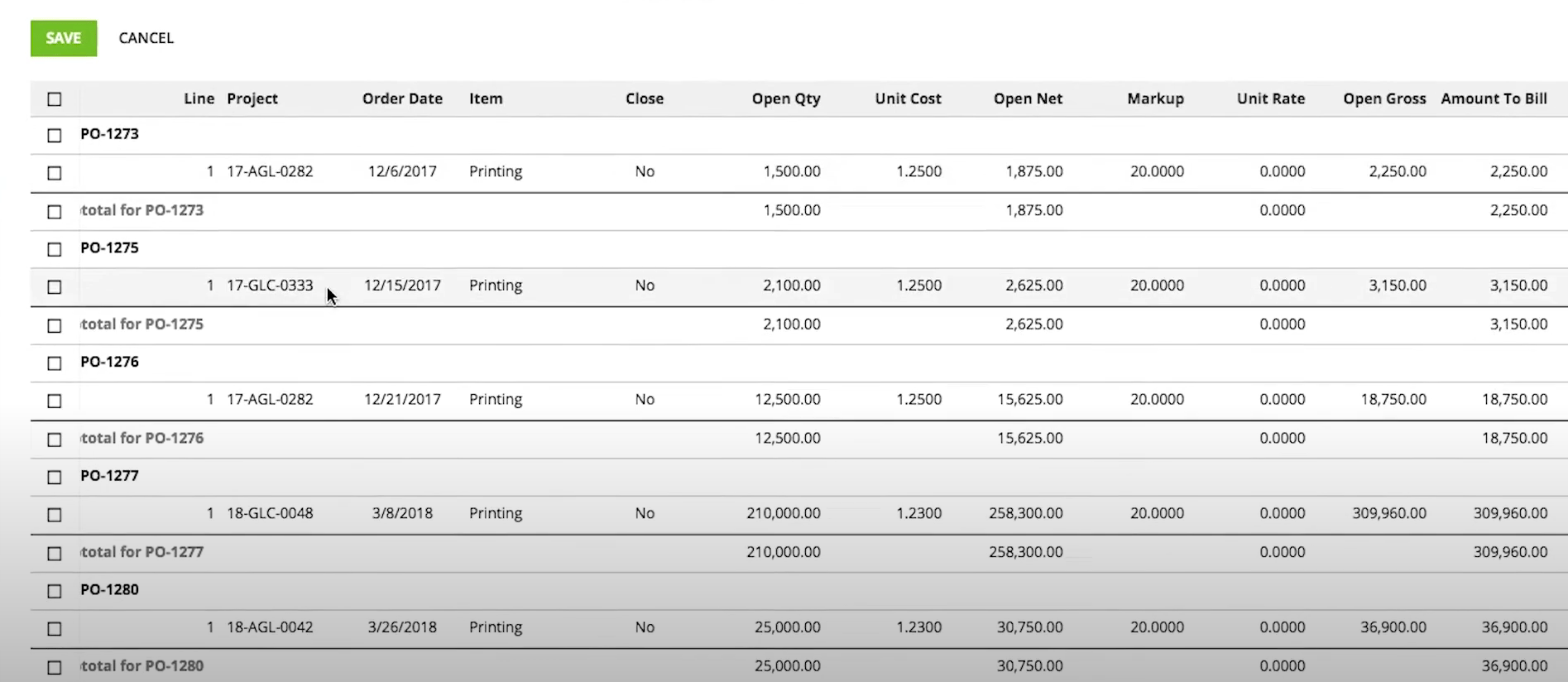
An added benefit of storing quotes, POs, and final invoices all in one place is that you can also evaluate vendor reliability. For example, if you’ve got vendors who consistently send invoices higher than their quotes, it's worth investigating further and potentially switching to a more reliable vendor.
Financial Reporting
Workamajig's financial reporting goes deeper than Kantata's because everything that affects your bottom line lives in the same system.
Our reporting suite pulls from every corner of the system — time entries, expenses, project plans, and CRM data — to give you a true picture of how your agency is performing.
You can choose from dozens of out-of-the-box reports or build custom ones with our drag-and-drop builder — blending project, financial, and client data for more strategic insights.
In addition to our various P&L reports, some of our most-used financial reports include:
- General Ledger (GL) reports — keep tabs on GL activity and cash flow with fully GAAP-compliant reporting.
- Cash projections and revenue forecasts — forecast how your scheduled work and pipeline deals will affect cash and profit over the coming periods.
- Billable summary reports — compare billable vs. non-billable hours by resource, team, department, service, etc.
- Key metrics monitor — track whichever numbers matter most to your agency, with custom thresholds and alerts.
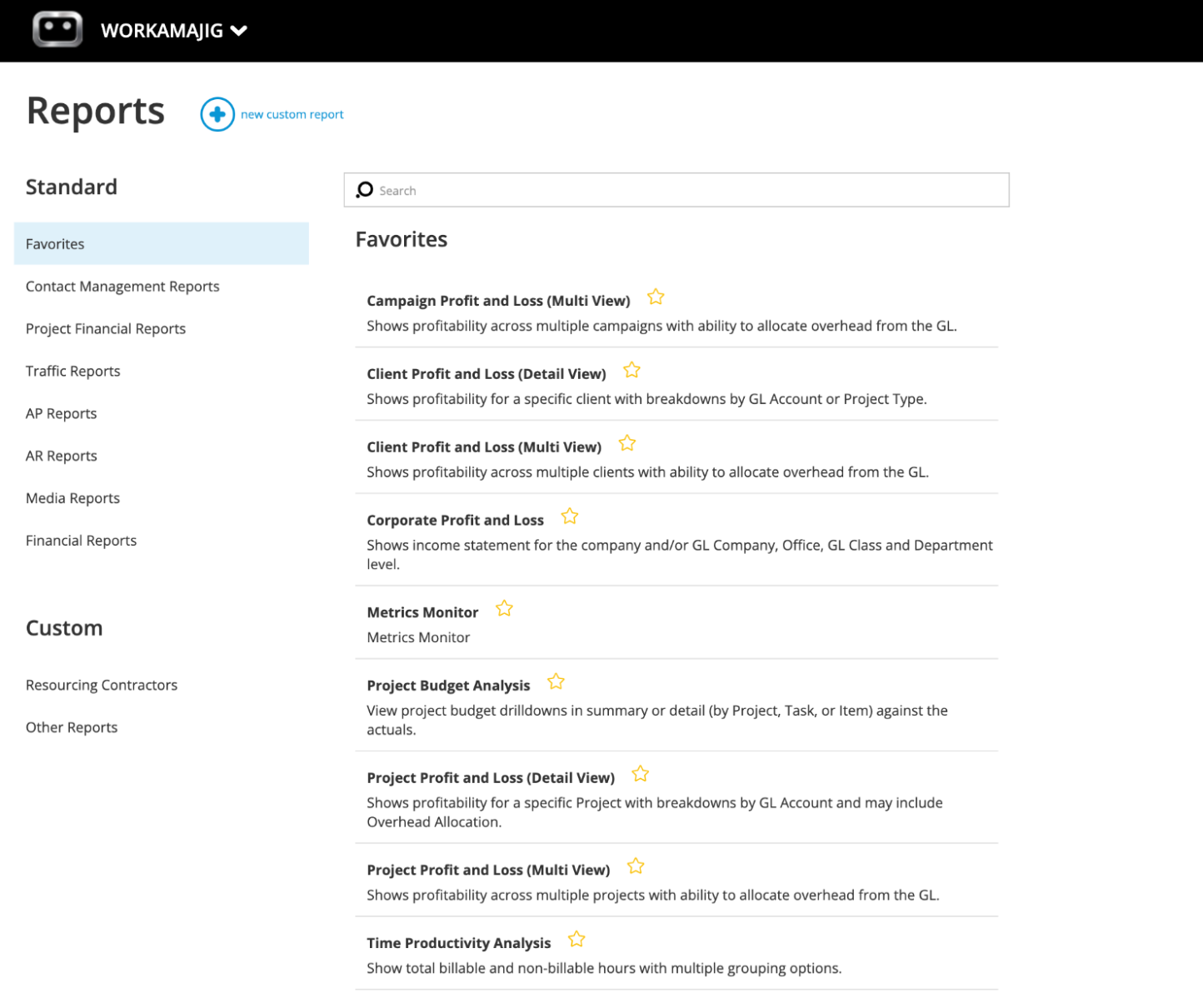
You can save your most-used reports as favorites and easily access them from your personalized dashboard.
Workamajig Packages & Getting Started
Workamajig has packages tailored to agencies and creative teams. Every plan comes with:
- All Workamajig features. We don’t lock essential features behind tiered plans or sell them separately as add-ons.
- A dedicated account manager who guides onboarding, configures the system to your workflows, and stays on as your ongoing point of contact.
- Personalized training for your team.
- Ongoing support with regular check-ins as your agency evolves.
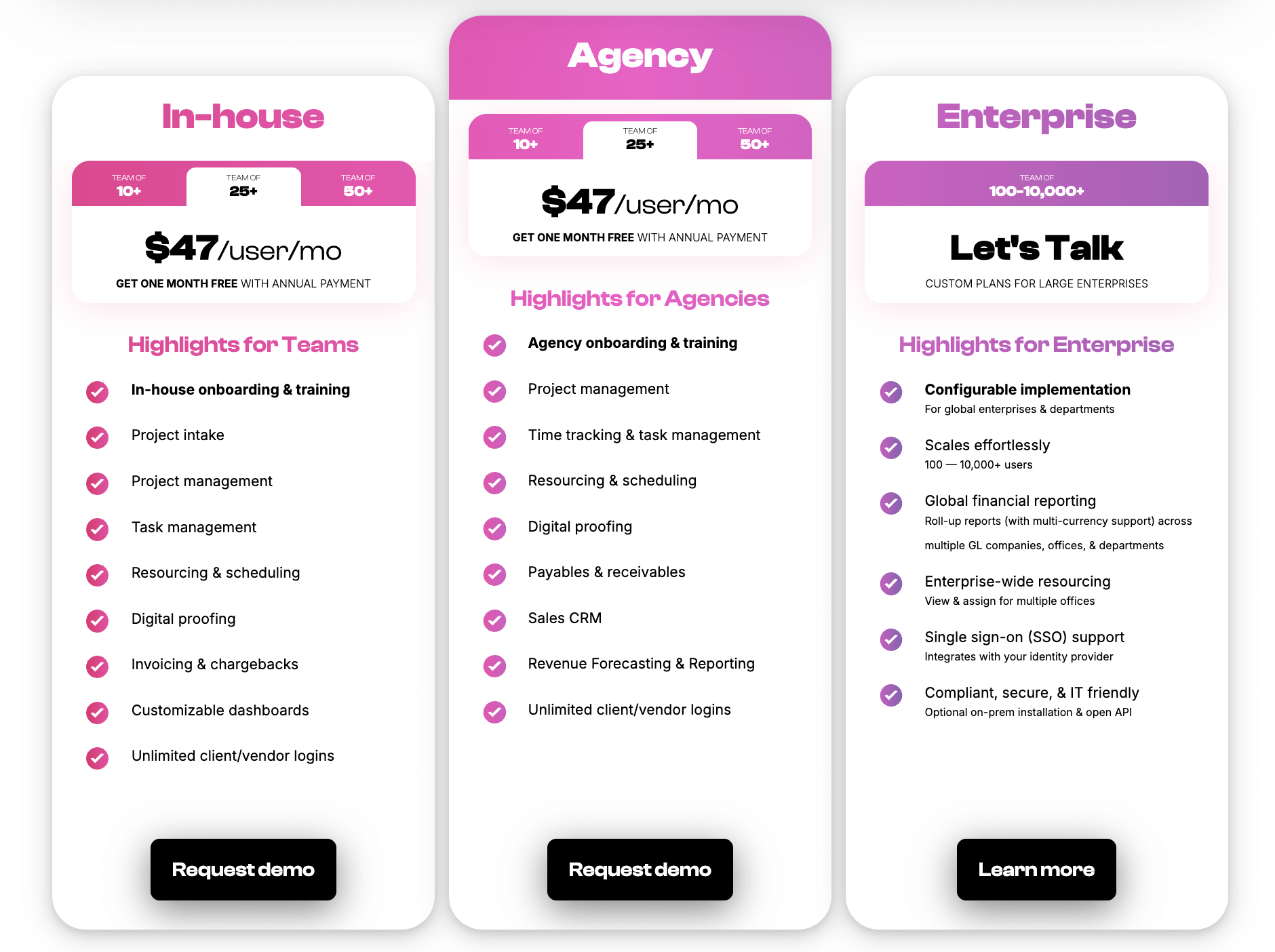
Pricing is based on team size. Check out our plans below:
Want to see Workamajig in action? Request a personalized demo with our team.
2. Advantage
.png?width=2000&height=878&name=Advantage%20Simpli.fi%20homepage%20(2024).png)
Advantage offers a similar breadth of features as Workamajig — it's strong on the client management side and packs in project management, resource planning, time tracking, CRM, and media accounting software into a fully integrated system.
Like Kantata, Advantage is more geared towards enterprises. It offers only custom packages (pricing available on request) and includes advanced governance (permissions management, workflow controls, etc.) and reporting tools for enterprise-level needs. Advantage also supports both cloud-based use and on-prem deployment.
The platform's main differentiator is its native media-buying suite via Simpli.fi. Advertising, marketing, media, and PR agencies appreciate the convenience of planning and executing media buys, as well as invoicing for them, in the same system they use to manage day-to-day workflows.
One gripe that many users have with Advantage concerns its interface, which they describe as dated and unintuitive. The system splits functionality across multiple interfaces, offering more control over user access, but that setup comes with navigation headaches that add to Advantage's already steep learning curve.
Find more Advantage software reviews here.
Features
- Project management features
- Task management
- Project tracking (budgets, timelines)
- Resource management
- Collaborative tools like proofing and reviews
- Time tracking
- Media planning and buying, including broadcast buying, digital buying, and media reporting
- Risk analysis and burn rate tracking
- Media accounting software
- Billing and invoicing
- Estimates
- Budget Monitoring
- Financial reporting
- Revenue forecasting
- CRM
- Client management
- Reporting dashboard (to analyze project performance, financials, staff hours, etc.)
- Mobile app for Android
Pricing
Advantage doesn’t offer standardized packages: interested buyers have to contact them directly for a quote.
Read more:
- Best Advantage Software Alternatives for Creative Teams
- From Advantage to Workamajig: Why 5Points Creative Made the Switch
3. Function Point
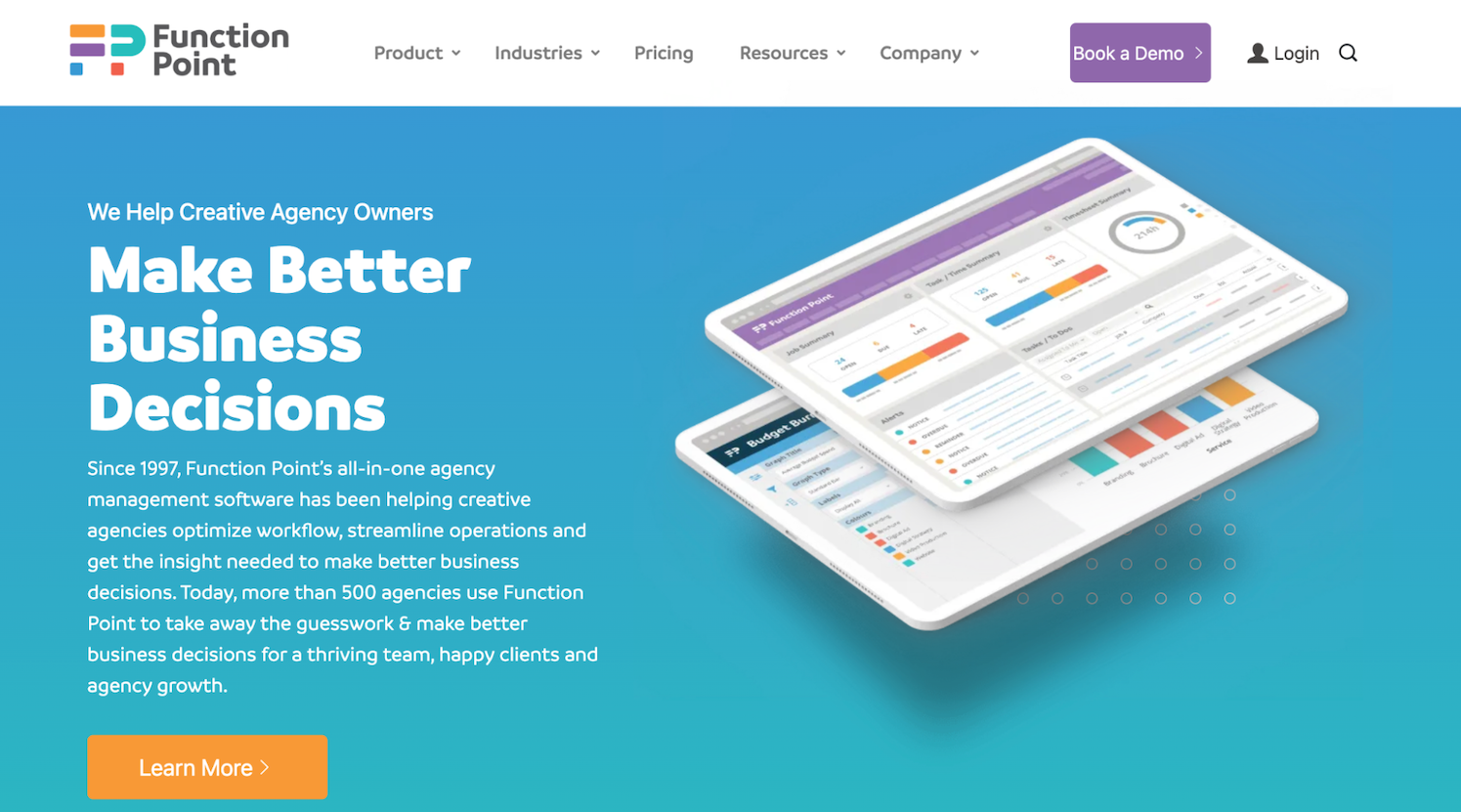
Function Point was founded 30 years ago in Vancouver and remains a popular choice for Canadian-based agencies that want local support, although the vendor now serves over 500 agencies worldwide.
Unlike Advantage or Kantata, FP focuses on small- to medium-sized agencies, offering simple packages that include all essential features and transparent pricing. But that doesn’t mean its toolset misses any marks — the full system combines project, resource, client, and financial management in one place. And while it lacks a native accounting solution, FP seamlessly integrates with QuickBooks Online.
A big reason users love FP is that it keeps data flowing seamlessly across its modules. So you can reference project data when building client estimates, track actuals vs. estimates in real-time, and make sense of all your business data with business reporting tools.
Many users also praise the depth of Function Point's business intelligence reporting. Beyond standard project reports, FP gives you customizable reports for projected vs. actual margin, staff efficiency, project profitability, and workforce planning — all pulled from the unified data set across modules.
Read more Function Point reviews here.
Features
- Client management tools, including estimates, proposals, change orders, revision tracking, and job request portals
- CRM and email integrations
- Project templates
- Project management dashboards
- Project monitoring (choose Gantt charts or a Kanban board view)
- Team collaboration, including file sharing and commenting
- Resource management
- Time tracking
- Financial management, including expense tracking
- Billing and invoicing
- Business intelligence reports, including profitability reports and custom reporting
- Integrations with accounting systems like QuickBooks and other business applications
Pricing
Function Point offers two plans that both include all core platform features. The higher tier also includes a QuickBooks Online integration, which is essential to support accounting workflows, and advanced business intelligence tools (such as data visualization and custom saved reports).
- Standardize: $58/user/month.
- Optimize: $68/user/month.
Read more: Function Point Reviews & Alternatives
4. Scoro
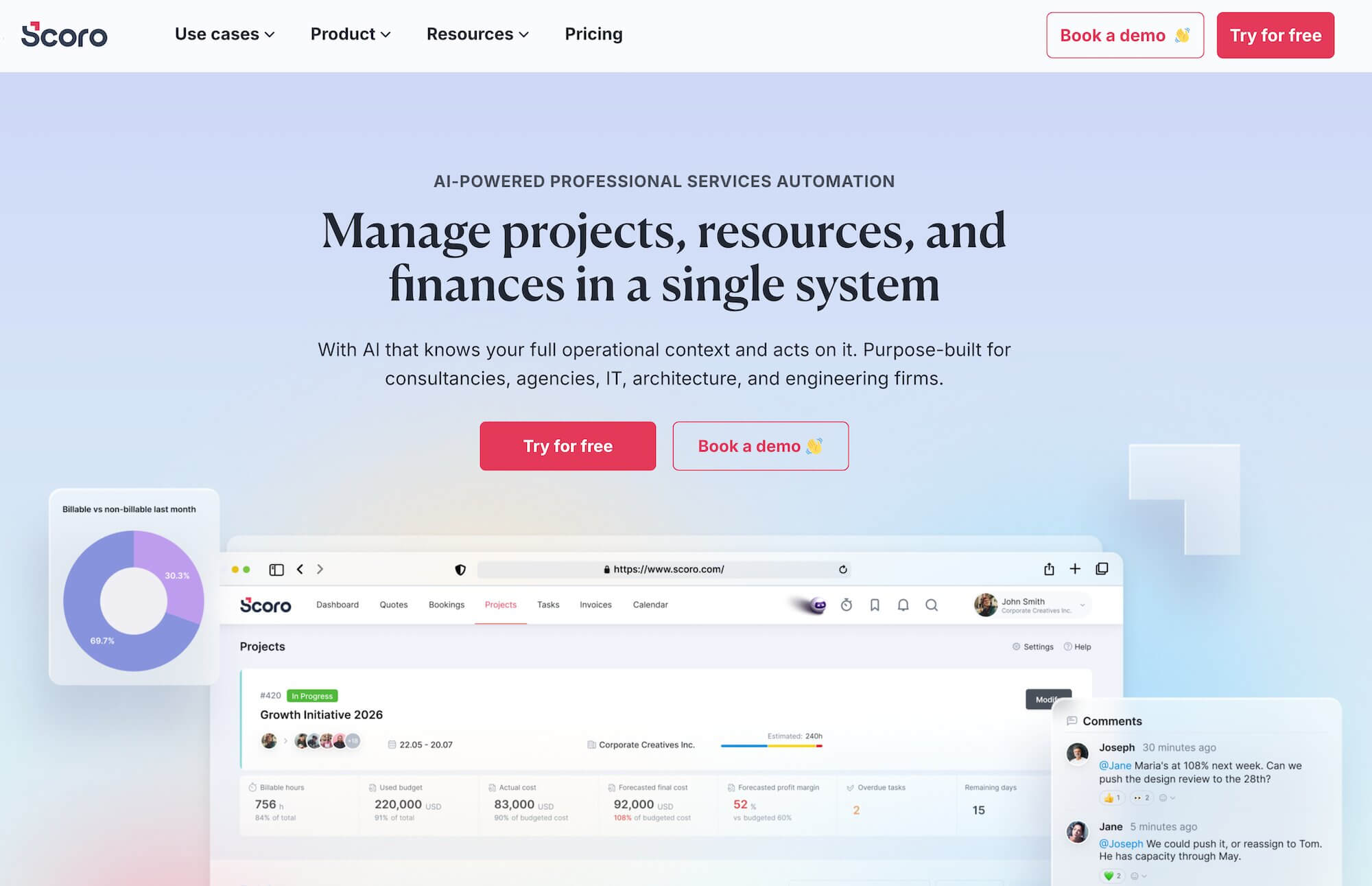
Scoro is a work management system that serves a wide range of service businesses, including agencies, consultancies, IT firms, architecture firms, and other professional services firms. It's a well-rounded, robust platform with a modern, intuitive interface.
There are two main reasons to consider Scoro over Kantata:
- Integrated CRM workflows. Scoro makes it easy to manage client relationships and collaboration right from your work hub. It also notably supports bidirectional sync with HubSpot (so that changes in either system update the other), whereas Kantata's is one-way.
- Unified reporting. Data from Scoro's various native modules feeds directly into real-time dashboards out of the box, offering deeper insights into revenue, profitability, productivity, and pipeline value.
However, unlike some of the other tools on our list, Scoro's packages aren’t straightforward, with essential features locked behind different tiers:
- Only the highest standard package unlocks Scoro's complete work management suite. Lower tiers miss out on most resource management features, revenue forecasting, and deeper analytics.
- Custom enterprise packages are the only ones that feature tailored onboarding — the more affordable plans leave things up to you, with self-onboarding and tutorials as the main support options.
Check out more Scoro reviews here.
Features
- Project management software
- Resource scheduling and capacity planning
- Time tracking
- Collaboration tools
- Quoting & budgeting tools
- Invoicing
- Cost management
- Retainers
- Sales CRM
- Reporting
Pricing
Scoro offers three standard packages and custom enterprise plans:
- Core ($23.90/user/month): Includes basic project management, time tracking, invoicing, and CRM access.
- Growth ($38.90/user/month): This tier unlocks project budget tracking, margin and markup visibility, labor cost tracking, utilization reports, and more CRM and invoicing capabilities.
- Performance ($59.90/user/month): This plan meets the needs of most agencies. It unlocks full resource planning with capacity heatmaps, revenue forecasting, advanced financial reports, role-based pricing, price lists, and deeper project cost analysis.
- Enterprise (custom pricing): These packages are best for large teams with complex operations. They include everything in the Performance plan, plus advanced approval workflows, company-wide budgets, WIP reports, multi-account reporting, SSO, and enterprise-grade security and provisioning
All standard packages come with a 14-day free trial (no credit card required):
Read more: Best Scoro Alternatives for Agencies
5. Ravetree
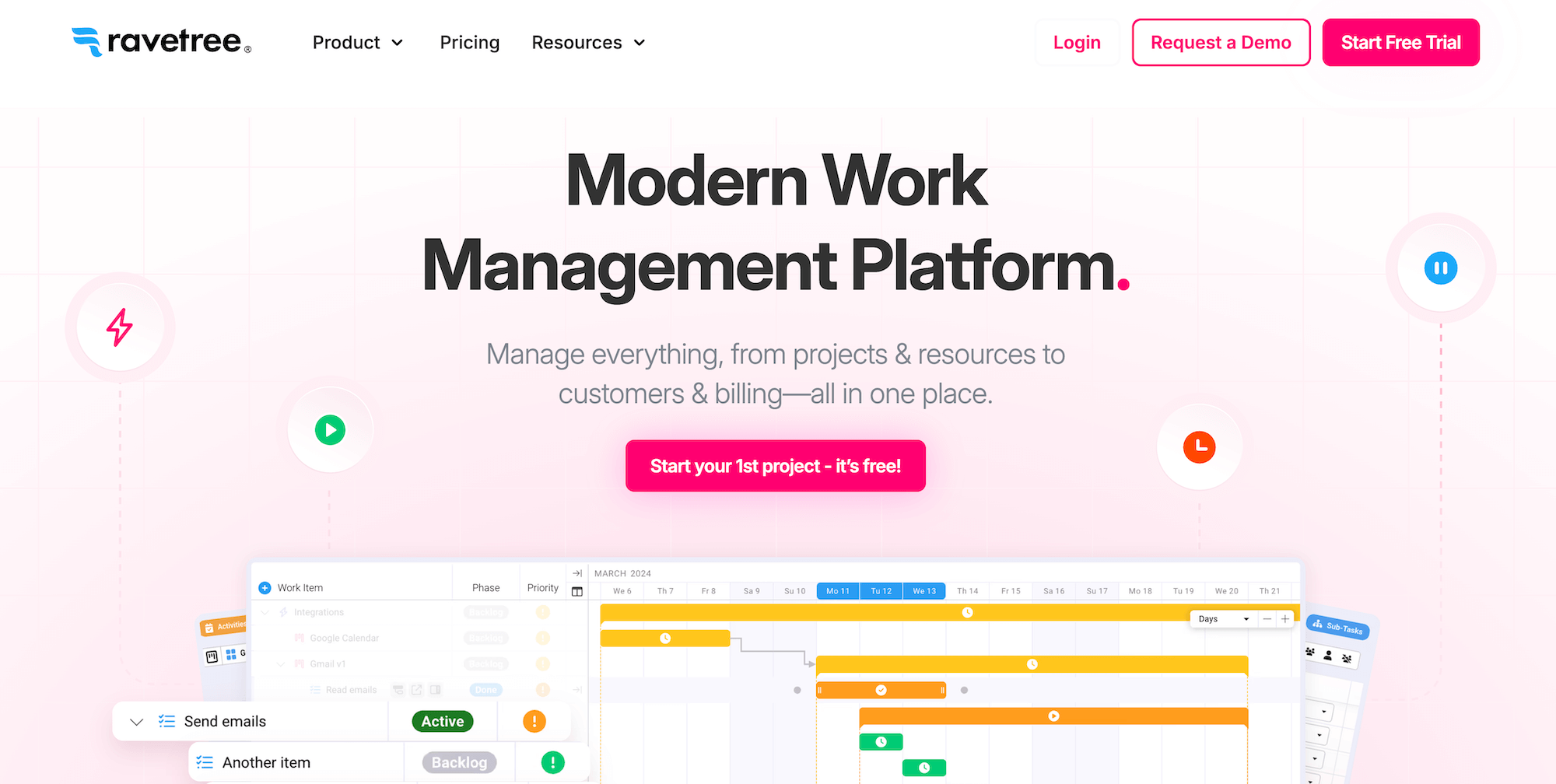
Ravetree's offering is similar to Scoro's — its end-to-end system includes project management, CRM, invoicing and estimating, resource planning, time tracking, budget and expense tracking, client portals, file management, and portfolios. It also offers some handy features less common in this segment, such as time-off management, multi-tiered file approvals, and text-message notifications.
Ravetree's robust agency CRM is one of its standout features: it fully integrates with your projects, tasks, files, and billing, ensuring data flows seamlessly through the system and allowing reps to reference project information when making estimates. The CRM includes:
- Contact and account management. You can create an unlimited number of contacts and organize customers, prospects, vendors, and other contacts into different segments. Ravetree also lets you create custom rate cards for each account.
- Deal management. Sales teams can create custom sales pipelines and automatically convert won deals into projects via project templates.
- Activity tracking and reminders. Easily track interactions at key touchpoints and set up automated reminders for key events.
Another thing that's really nice about Ravetree is the simplicity of its plans. You don’t have to do any mental gymnastics because it's only got one plan that includes everything: pricing varies depending on whether you pay monthly, quarterly, or annually, though. Ravetree also provides free onboarding and ongoing customer support (through live chat and video conferencing).
Common drawbacks of Ravetree include:
- Limited reporting capabilities. The platform offers project reporting, but doesn’t go into extensive sales, financial, and agency reporting.
- General reliability and performance. Many users report small glitches and bugs in Ravetree that occasionally affect their workflow, including unexpected data duplication, file upload issues, and crashes during routine tasks.
Find more Ravetree reviews here.
Features
- Project templates & project request forms
- Project management
- Portfolio management
- Project budget tracking and forecasting
- Billing & invoicing
- Time & expense tracking
- Retainer management
- Resource planning
- CRM
- File management
Pricing
Ravetree keeps pricing simple — every plan includes the entire platform plus free onboarding, training, and ongoing support (live chat and video conference). You only choose how often you want to be billed:
- Monthly: $39/user/month
- Quarterly: $34/user/month
- Annually: $29/user/month
All plans include Ravetree, which also offers a free trial so you can take it for a test ride before committing to it long term.
Read more: Best Ravetree Alternatives for Agencies & Creatives
6. Rocketlane
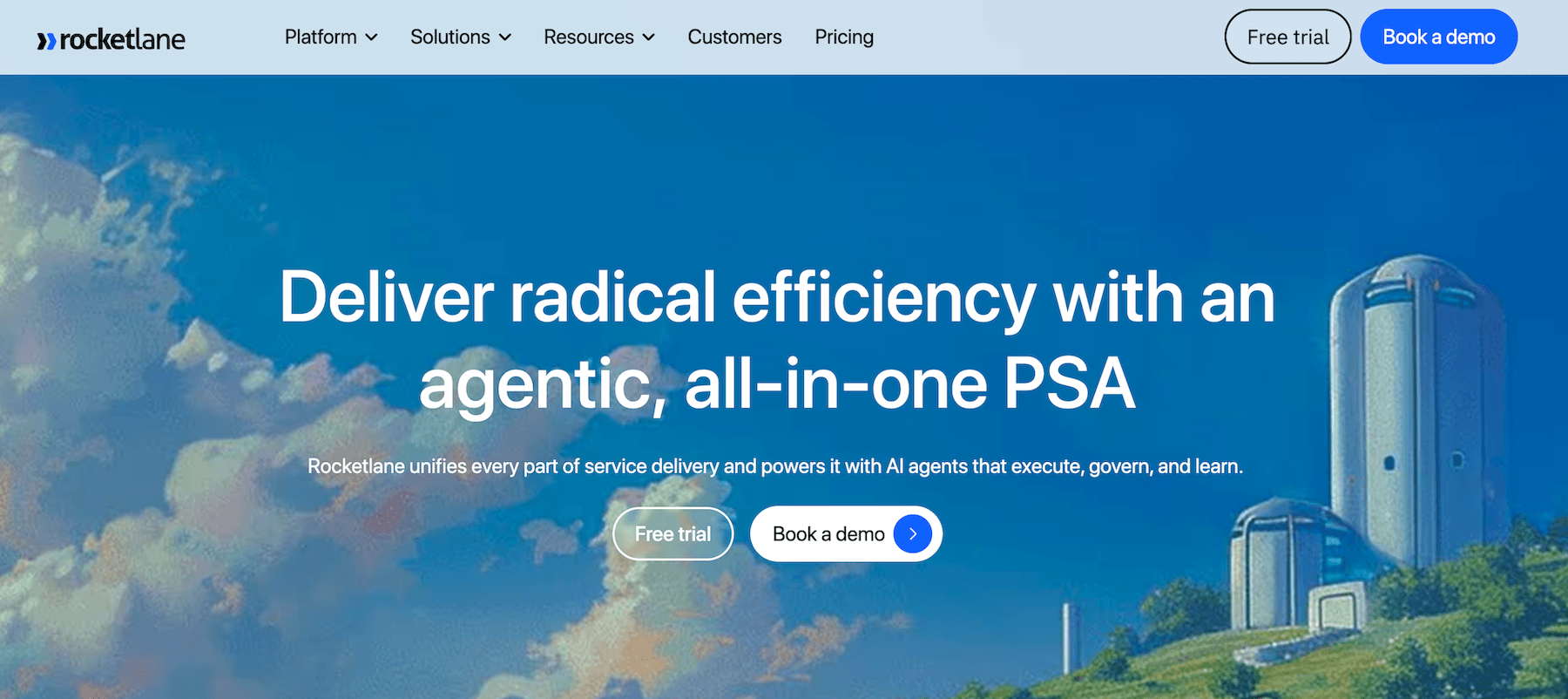
Rocketlane is another PSA platform like Kantata, except it also offers powerful client management capabilities that make the entire delivery process more collaborative. You can create branded portals for each client and tailor their whole experience from onboarding to post-delivery. This lets clients access deliverables, track real-time project progress and status updates, submit new requests, share feedback, and even reach out for help via chat. (However, unlike the tools we’ve discussed so far, Rocketlane lacks a native CRM.)
Rocketlane's full suite of tools includes project management, resource planning, time tracking, financial management, client management, and extensive business analytics and reporting. Its reporting suite, called Business IQ, consolidates project, financial, utilization, and customer data into a single dashboard and includes prebuilt reports on portfolio profitability, team utilization, project pacing, and operational insights. Notably, CSAT tracking is baked directly into the reporting layer, so client sentiment is measured at project milestones.
One thing to be wary of with Rocketlane is that many reviewers complain about the onboarding and implementation experience. They say it's generic and limited, far from the kind of personalized experience that some other Kantata alternatives offer.
Read more Rocketlane reviews here.
Features
- Project management for professional services teams
- Task management
- AI-powered project automation (auto-generates project plans from CRM data, SOWs, emails, and calls)
- Project monitoring with health indicators
- A native project-scoped spreadsheet tool (called Sheets) for tracking structured data inside the project
- Resource management and capacity planning
- Time tracking with calendar integrations
- Branded customer portals with white-labeling
- Document collaboration
- Forms and surveys
- Reporting dashboards
- Workflow automation
- Integrations with Salesforce, HubSpot, Slack, Jira, Zapier, Google Meet, Microsoft Teams, Zoom, and more
Pricing
Rocketlane offers four plans with a five-seat minimum:
- Essential($19/user/month): Includes core project management views (Gantt, Kanban, list), time tracking, a branded customer portal, and basic automation.
- Standard ($49/user/month): Adds Jira and Slack integrations, partner collaboration, and more advanced templates and automation.
- Premium($69/user/month). Adds Nitro AI features, deeper resource and financial management, and Salesforce and HubSpot integrations.
- Enterprise ($99/user/month): Adds SSO, custom reports, unlimited automation, multi-currency support, Snowflake integration, and AI agents (documentation, migration, workforce).
7. Teamwork
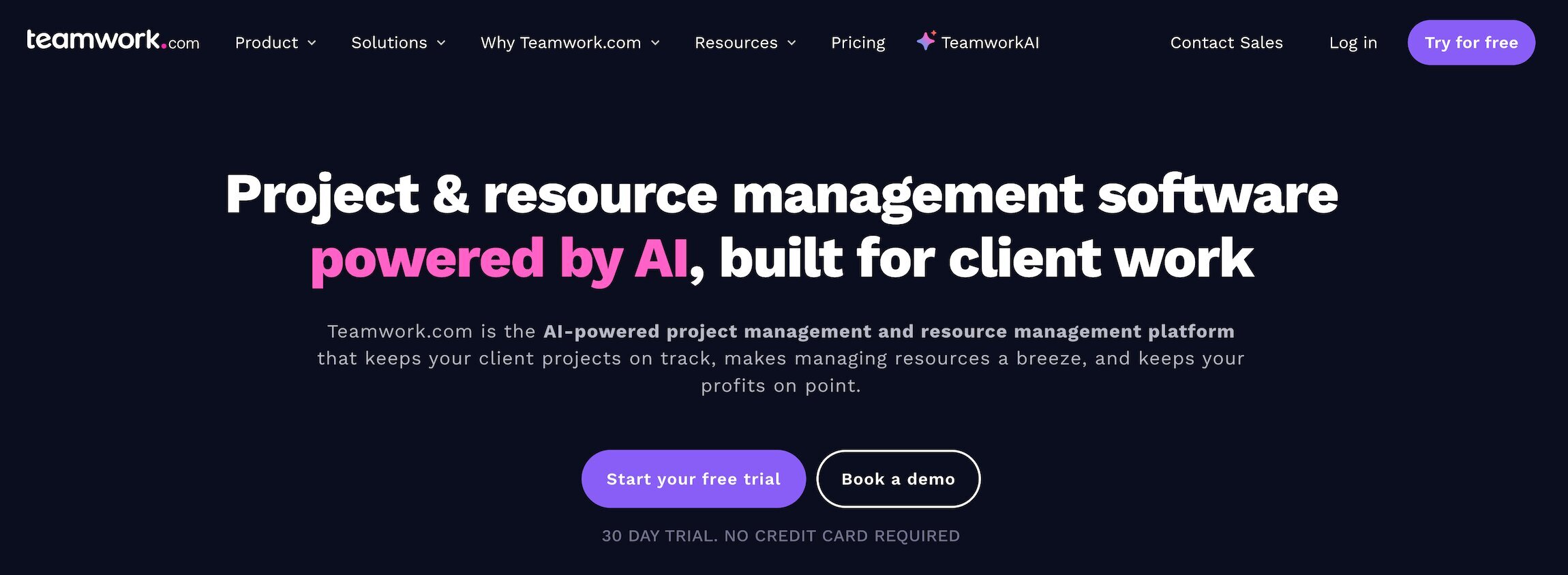
Teamwork sits between all-in-one systems like Workamajig and delivery-focused solutions like Kantata: it's mainly a project management tool, but it engages clients throughout the project lifecycle via integrated client management tools.
It's a lightweight alternative to Kantata, popular for its ease of use, user-friendly interface, and relatively straightforward implementation. The main reason to consider Teamwork over Kantata is if you want a simpler PM system that treats clients as part of the project workflow.
However, it, too, lacks native accounting software and a CRM, and instead relies on third-party integrations to support these workflows. That's why we consider Teamwork to be more of an “app-based” agency project management system.
On the integrations side, Teamwork keeps things lean and focuses more on small- to medium-sized agencies and teams:
- Its main accounting integrations are with QuickBooks Online, Xero, and NetSuite (one-way sync of time-tracking data), while Kantata also supports Sage Intacct, Microsoft Dynamics 365 Finance, and a deeper NetSuite integration.
- It integrates with both HubSpot CRM and Salesforce CRM, although its Salesforce integration isn’t nearly as deep as Kantata's. The main use case is to push opportunities from Salesforce to Teamwork projects.
But price-wise, it's important to look beyond its entry-level plans. They seem affordable at a glance, but many essential features are locked behind the highest-tier plans, and you’d also have to pay for a CRM and accounting software separately. So in the long run, Teamwork isn’t the best choice if you’re looking to reduce your tech budget.
Check out more Teamwork reviews here.
Features
- Project intake forms and project planning
- Project management
- Project monitoring
- Resource and workload management
- Time tracking
- Internal proofing and collaborative tools
- Workflow automation tools
- Client management
- Expense management
- Budget tracking
- Invoicing
- Reporting
- Integrations and API
- Mobile apps (for iOS & Android)
Pricing
Teamwork offers five plans:
- Free ($0/user/month): For teams of up to 5 users running up to 5 projects, with task, list, board, Gantt, and table views, time logging, and 100 automations per month.
- Basics ($13.99/user/month): Includes project health and planned vs. actual reporting, AI comment summaries, intake request capture, and 5,000 automations per month.
- Accelerate ($34.99/user/month): Adds active project planning, AI-powered capacity and utilization views, time budgets and retainer management, smart intake routing, HubSpot and QuickBooks integrations, and 20,000 automations per month.
- Optimize (custom pricing): Unlocks Teamwork's complete agency management suite, including tentative project modeling, AI-powered smart-assign and profitability forecasting, financial and multi-currency budgets, revenue and cost insights, quotes, CRM-pipeline-to-projects, Salesforce and NetSuite integrations, and 100,000 automations per month.
- Enterprise (custom pricing): For larger service businesses with advanced security, governance, and support needs. Adds SSO, advanced security policies, a dedicated success manager, priority support, and expert implementation services.
All standard plans come with a free 30-day trial.
Read more: Best Teamwork Alternatives for Creatives & Agencies
8. ManyRequests
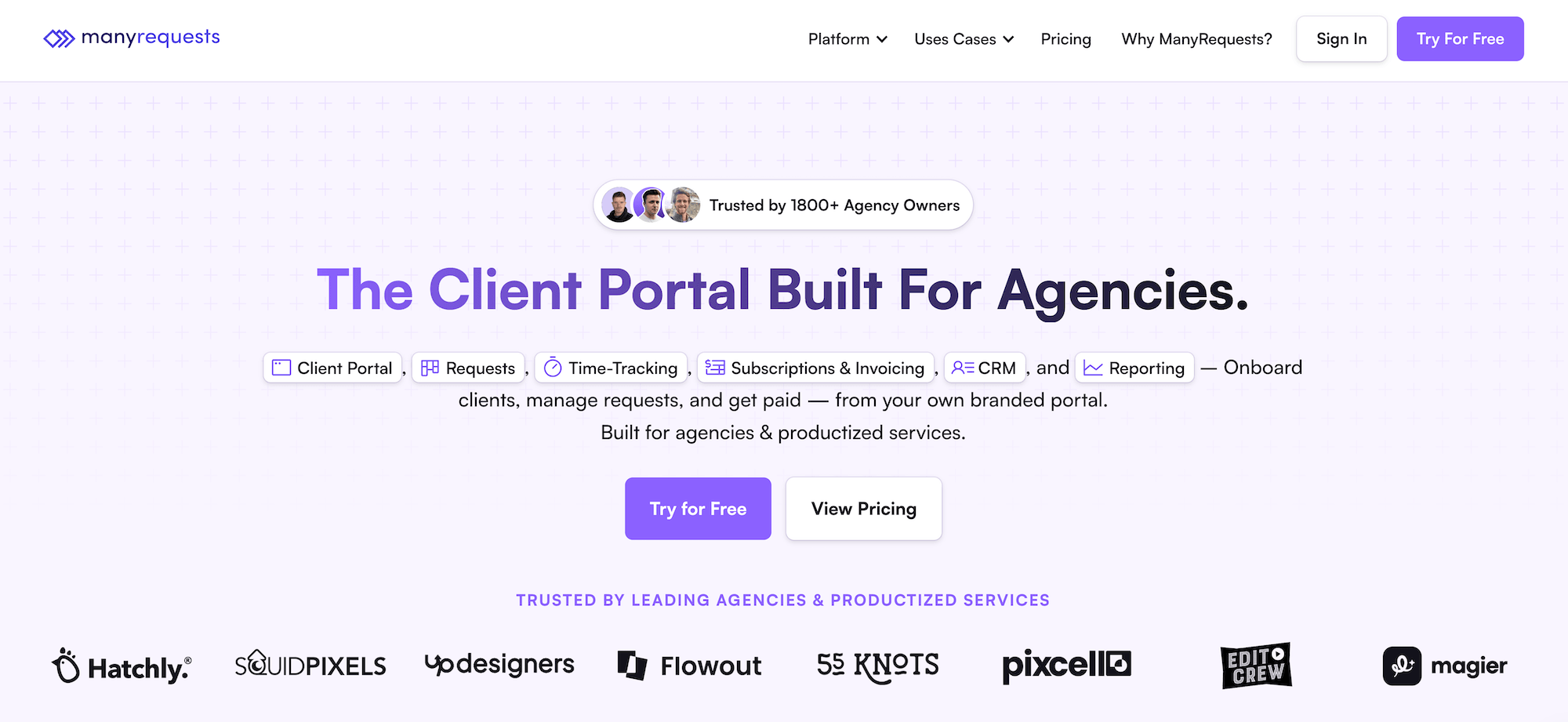
ManyRequests positions itself as a lightweight Kantata alternative that's much easier to implement and features a simple, intuitive interface. The platform combines project management with client portals, time tracking, billing, retainer management, and reporting features.
With ManyRequests’ client portals, you can onboard clients, productize your services (so clients can subscribe to them), automatically process invoices, and collect payments. Clients can message you, submit work requests, and access files through their dedicated, branded portals.
On the delivery side, ManyRequests is pretty limited compared to Kantata and the more robust tools on our list. It lacks task dependencies, expense tracking, and budget tracking, and the reports are fairly basic.
The platform also claims to offer an agency CRM, but it's actually a client management toolkit. You can create client profiles (with projects, services, billing, etc.), track activity, and manage billing, but you can’t add leads, manage opportunities, visualize the pipeline, or anything of the sort.
Overall, ManyRequests can be a nice choice for small teams and agencies searching for a simple PM tool with client portals. But for its price, other competitors generally offer better value for money.
Find more ManyRequests reviews here.
Features
- Time tracking
- Team time management via timesheets
- Project management
- Native CRM
- Branded client portals
- Billing & Invoicing
- Credit-based billing
- Stripe integration for accepting payments
Pricing
ManyRequests prices per workspace, with each plan including one seat by default and extra team seats billed separately:
- Core ($59/month): Includes the client portal, time tracking, requests, billing, CRM, reporting, unlimited clients, custom domain, design and video proofing, Zapier integration, and 1TB of storage. 1 seat included; extra seats are $20/month each.
- Pro ($99/month): For agencies that want the full feature set. Unlocks white-labelling, workload management, capacity reporting, client health tracking, migration help, priority support, 2TB of storage, Slack integration, customizable email notifications, and webhooks. 1 seat included; extra seats are $30/month each.
- Enterprise (starts at $1,000/month): Adds API access, a branded mobile app, concierge onboarding, a dedicated account manager, and custom per-seat pricing.
A 14-day free trial is available with no credit card required, and free migration support is included on all plans.
Getting Started with Workamajig
Workamajig’s all-in-one agency management system matches Kantata's delivery capabilities while offering stronger client management, deeper financial controls, unified reporting, and complete support for all of your agency's essential operations.
See first-hand how Workamajig can bring your people, processes, and finances together by requesting a free, personalized demo.
Related reads: