

Basecamp is a popular project management solution for smaller creative teams and agencies juggling simple projects with straightforward workflows. It centralizes most things teams need for day-to-day project work — including to-do lists, group chats, file sharing, calendars, and message boards — into one easy-to-use workspace. It’s intuitive, user-friendly, and affordable, and many teams find the transition to Basecamp smooth.
But the thing is: Basecamp keeps everything pretty basic — on purpose — so teams that are tackling bigger, more complex projects often find it doesn’t fully support their workflows. It lacks several advanced features found in more specialized project management tools, such as true Gantt charts, task dependencies, subtasks, resource management, project analytics, budget tracking, and workflow automation.
That’s why so many creatives using Basecamp eventually “outgrow” the system and start looking at alternatives like Workamajig, Advantage, Function Point, Ravetree, Productive, or Scoro, which offer advanced tools to manage complex projects, workflows, resources, and finances.
So we compiled this guide with the best Basecamp alternatives designed for creative workflows. We start with our solution, Workamajig, and also cover 10 other systems so you can compare the top options to find the best fit.
At the end, we’ll briefly cover some other popular project management systems like ClickUp, Asana, and Monday. But they aren’t our absolute top recommendations for creatives because they’re more “universal” PM systems that work for a variety of industries and team types — they aren’t specialized or specifically built for creatives.
To learn more about Workamajig, keep reading or request a free demo with our team.
1. Workamajig
All-in-one project, resource, & financial management hub for agencies
Workamajig is a top Basecamp alternative because it fills in its feature gaps and provides a more robust solution for managing all aspects of creative work. Our system expands on Basecamp’s basics with:
- A full sales CRM to track leads, develop opportunities, and convert closed deals into projects with all the details intact.
- Detailed project planning tools, including core features that Basecamp lacks, such as task dependencies, subtasks, time allocations, and automated estimating.
- A project collaboration suite designed specifically for creative teams, with tools to engage all internal and external stakeholders, streamline communication, manage revisions, track how feedback shapes deliverables, and keep scope creep in check.
- Resource management and staff scheduling dashboards, designed to help you make the best use of creative team members. These tools help managers prevent overbooking, balance assignments, and match jobs to skill sets.
- Budgeting and automated estimating tools to build project budgets (incorporating all project costs), calculate overhead and contingencies, and track profitability through the project lifecycle.
- A complete GL accounting system designed specifically for creative teams. Our system lets you manage all types of expenses (media buys, materials, production vendors, etc.), tag them to specific projects, build invoices, and manage online payments. It supports all accounting processes to make reconciliation easy for finance and offers granular insights into where your department budget is going.
- Strong client and vendor management, including support for assigning work to contractors and generating purchase orders — a must-have for agencies outsourcing work and managing media buys. Unlike Basecamp, Workamajig lets you add unlimited external users (clients, vendors) at no extra cost, keeping everyone in the loop.
- Native time tracking that’s built right into task cards, so team members can log hours where they work and tie them back to specific assigned project activities. That means teams can compare actuals to estimates, spot bottlenecks by monitoring timelines and effort, and evaluate productivity from different perspectives.
- Customizable project monitoring dashboards with Gantt charts and Kanban boards that give you real-time visibility on project health across your entire portfolio. Our system also flags at-risk projects with proactive warnings — so when a project starts to spiral due to an endless loop of revisions or shifting requirements, you can step in early.
- Portfolio management to bring multiple projects under one umbrella, streamlining budget tracking, schedule management, billing, and collaboration across related work.
Managing creative work comes with unique challenges. You have multiple stakeholders working on the same deliverables, rounds and rounds of feedback and revisions, and scope changes that can slip in mid-project. Knowing exactly what a finished outcome will look like — and how much time it’ll take to get there — is often anyone’s guess.
When a tool can't keep up with how creative teams operate, people start working around it — time tracking gets abandoned, feedback scatters across different systems, and scope creep gets ahead of PMs before they can rein it in.
We built Workamajig as an answer to this chaos. It keeps everything in one place, tailored to how your team actually works, so the details of how things get done don't slip through the cracks.
And because all our modules are built to work together, data flows between them in real time, giving your team full visibility into the creative work they're involved in so they can work toward the same goals. Seamlessly. Without data silos, side messages, or details getting lost in communication.
Simply put, Workamajig operates at a completely different level than Basecamp. It’s what creative teams graduate to when they’ve outgrown basic project management and need a platform that can handle the complexity of their work.
And our solution goes beyond a software subscription — all Workamajig teams are paired with a dedicated account manager for one-on-one guidance. Our account managers configure Workamajig for your specific projects and workflows, walk you through the system to make sure your teams know exactly how to use each module, and are available to provide support any time you need us. They’re your partner for everything Workamajig.
In the following sections, we’ll review our platform’s core features. For a more in-depth walkthrough after reading, request a free demo.
Project Management Module
Our project management module supports intake, planning, real-time project monitoring, and seamless team collaboration. Let’s take a look.
New Project Intake
In Basecamp, you have to add new projects and input all of their details manually. Workamajig provides three straightforward ways to automate intake, ensuring you have all the necessary details to kick off new projects without having to chase account managers. You can:
- Convert earned opportunities from Workamajig CRM (more on that later) to new projects — our system saves all details from sales conversations, so project managers can pick up where sales teams leave off.
- Design intake forms for all of your most popular projects and services and make them available in user portals, so others can easily submit new requests. You can even set routing rules so requests reach the right people for approval.
- Kick off projects with templates — you can also create templates for your most commonly requested work. Predefine workflows, tasks, timelines, estimates, and resources so project managers can see the standard approach, make the adjustments they need, and get rolling.
Read more: Best Project Intake Software for Creatives & Marketers
Project Planning Tools
After new projects come in, you can use our extensive task management toolkit to modify and finalize project plans. Unlike Basecamp, our toolkit goes beyond basic tasks, dates, and time allocations — you can edit and add finer project details like subtasks, dependencies, milestones, and resource requirements.
In addition to our task management suite, Workamajig assists project planning with:
- Resource management and capacity planning. Our complete toolkit includes a visual staff-scheduling dashboard, time-off tracking, workload balancing, skill-based task matching, scheduling-conflict detection, and demand forecasting for upcoming projects.
- Vendor management. You can pull in all vendor costs (freelance costs, printing expenses, media buys, etc.) as you build project plans, so you can incorporate those in estimates and get an accurate picture of the whole project.
- Automated estimating. This tool automatically calculates costs as you build plans (create tasks, assign resources, factor in outside expenses) and incorporates overhead and contingencies, making it easy for managers to share accurate, profit-saving estimates with clients.
Read more: 5 Steps to Creative Project Planning
Time & Expense Tracking
One of the great things about Workamajig is that you can conveniently track expenses and labor hours directly within project workflows.
This is especially valuable for agencies and creative teams because their projects and people are where most of the money goes. So tracking costs in real-time as projects progress helps them protect their profit margins and keep their financials accurate.
Time tracking
We know how hard it is to get the whole team on board with time tracking, which is why we’ve made it a natural part of each person’s workflow in Workamajig. Team members can easily log their time directly on task cards, with the option to either automatically record hours using our timers or by doing a direct time entry from task card to time sheet.
We also offer calendar integrations (with all popular systems, GCal, iCal, Outlook) so users can also add meeting or other project-related event hours. Workamajig automatically pulls in all calendar events; all users need to do is confirm that they attended the scheduled meeting for Workamajig to capture their time spent in that meeting.
![Workamajig - Today - Creatives - Tasks - New Time Entry for Projects [GIF]](https://www.workamajig.com/hs-fs/hubfs/Workamajig%20-%20Today%20-%20Creatives%20-%20Tasks%20-%20New%20Time%20Entry%20for%20Projects%20%5BGIF%5D.gif?width=650&height=690&name=Workamajig%20-%20Today%20-%20Creatives%20-%20Tasks%20-%20New%20Time%20Entry%20for%20Projects%20%5BGIF%5D.gif)
All logged hours feed into our:
- Centralized timesheets. Managers can then edit and approve entries, choose which to bill, and contextualize employees’ tracked hours. Timesheets serve as the final check before time is billed or reported, and you can configure them so that only certain people — or only specific projects — can have time charged to them. This means managers can control who can log hours for what, depending on how each project is set up.
- Project monitoring dashboard. Each project’s budget and timeline are updated to reflect the actual hours and labor costs, ensuring PMs always have real-time insights.
- Resource planning module. Actual hours flow into the staff scheduling dashboard, ensuring managers have up-to-date insights into everyone’s availability and bandwidth.
- Time and productivity reports. Our various reports offer insights into things like billable utilization, where employees spend their time, who’s most and least productive, and which accounts require the most effort.
- Profitability reports. Our profitability reports include labor breakdowns comparing actuals to estimates for tasks and services.
Expense tracking
A big drawback of Basecamp (and many other “universal” project management tools) is that they don’t handle non-labor expense tracking well. You often have to rely on workarounds such as setting up custom fields with numerical values and adding formulas to track expenses against budgets.
In Workamajig, expense tracking is baked into the project workflow, thanks to our fully integrated accounting system. Our system offers several handy tools to manage all your non-labor expenses, including:
- Our Plaid CC connector. Pull charges from credit card into Workamajig or auto-sync them so they update nightly.
- Vendor invoice management. Manage expenses from production vendors, freelancers, and other contractors in one place. You can attach copies of vendor invoices and reconcile them with purchase orders, work orders, and receipts.
- Media buying integrations. Track expenses from media buys in Workamajig through our integrations with Strata/FreeWheel, Mediaocean, Bionic, and GaleForceMedia.
- Receipt management and expense reporting. Team members can tag their out-of-pocket expenses, like travel or material purchases, to specific projects by attaching and storing receipts in our system. They can also submit expense reports for approval through Workamajig.
Project Monitoring
Now here is where Workamajig really shines in comparison to Basecamp — advanced, customizable project monitoring that displays a snapshot of all active projects in one screen with proactive risk alerts so you can keep everything on track. Check it out below:
![Workamajig dashboard: Projects and Project Status [GIF]](https://www.workamajig.com/hs-fs/hubfs/Workamajig%20-%20Projects%20and%20Project%20Status%20%5BGIF%5D.gif?width=1714&height=853&name=Workamajig%20-%20Projects%20and%20Project%20Status%20%5BGIF%5D.gif)
As shown in the image, the dashboard includes:
- Gantt charts (on the right-hand side) that show the status of all active projects with a view spanning multiple months. Hovering over any phase displays its start/finish dates, duration, % complete, and which segment of the project it covers. You can also color-code projects and phases within Gantt charts to visually track progress at a glance.
- Detailed status breakdowns (on the left-hand side) that show budget and timeline health, the current status, allocated hours per project, the total number of hours your team has spent on each project, and the % complete.
- Color-coded risk alerts that tell you when projects are nearing thresholds and have the potential to veer off course. Green means projects are on plan, yellow signals they’re at risk of overruns, and red means they’ve already exceeded budgets or timelines.
You can customize this dashboard to suit your preferences and projects: choose your preferred methodology and project view (Agile, Waterfall, or hybrid), and filter projects using a variety of preset and custom fields.
Workamajig’s risk alerts and visually friendly monitoring dashboard are key to managing more successful, profitable projects — nothing slips through the cracks, and managers can spot and address issues before they snowball into real problems.
Even more convenient? You can provide both internal and external users with access to check project status. Your teams can see the projects they’re involved in and where they stand. External users can view the progress of requested work, all without back-and-forth messaging to project managers.
Read more: 8 Tips for Managing a Project Budget (+ Budgeting Methods)
Team Collaboration
A lot of teams like Basecamp for its simple collaboration tools, and Workamajig isn’t missing any marks here. Our platform rivals basic task lists with comprehensive role-based Today dashboards for every user — managers, accountants, and all project team members — that outline exactly what to work on each day and show what’s ahead for the rest of the week.
Then, we have every tool project stakeholders (internal and external) need to work through feedback, iterations, and approvals productively.
First, our Today dashboards bring each user’s tasks, recent activities, and conversations into a unified view. For example, in a regular project, a team member would see a page like the “Today – Creatives” dashboard shown below.
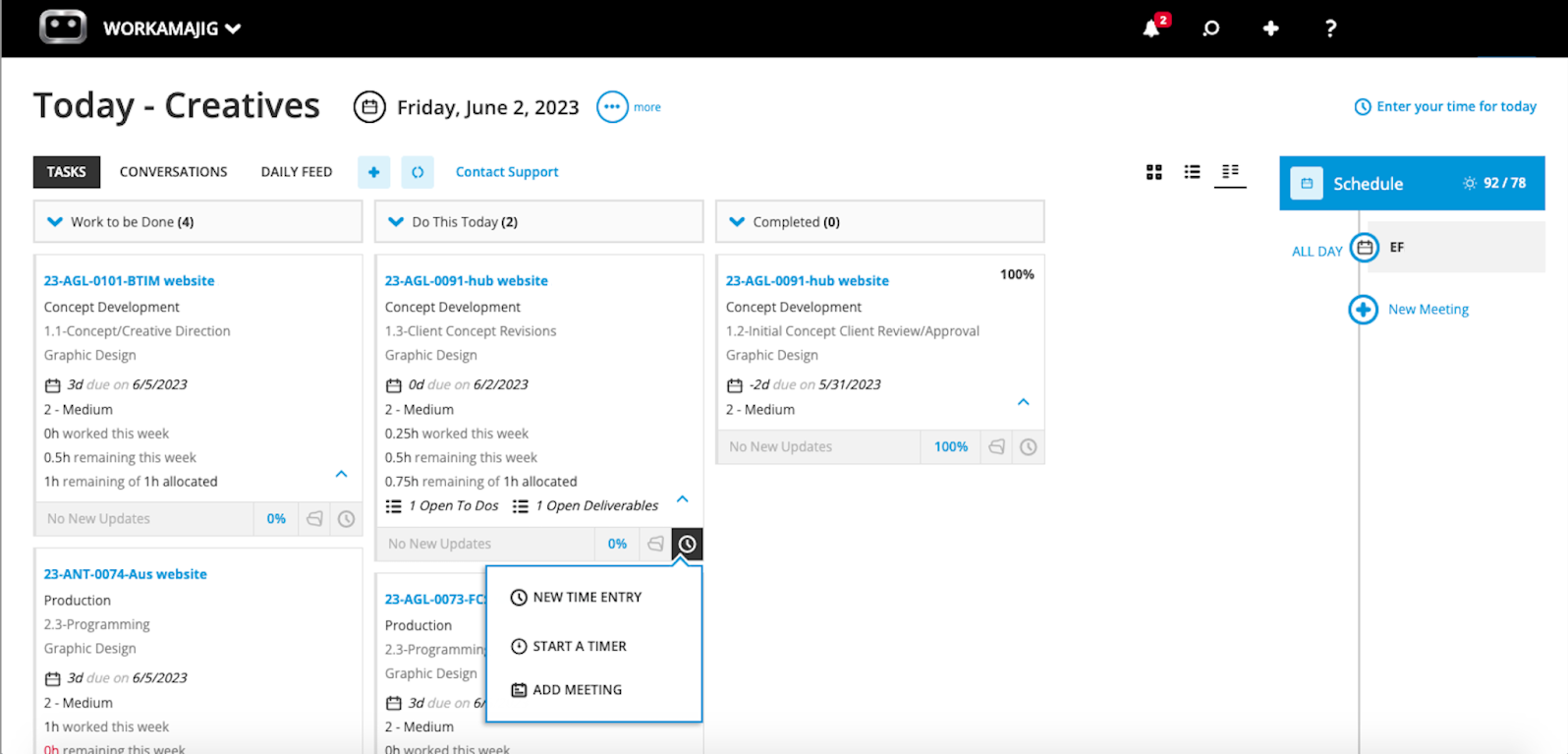
Here, they can see a snapshot of all their tasks, categorized by status and urgency, such as “client concept revisions” due today. Each card also displays the task’s finer details, including remaining time, open items, allocations, and due dates.
From here, creative users can also:
- Mark tasks as complete
- Submit deliverables
- Enter time on task cards
- Start new conversations
- See their meetings for the day and schedule new ones
These dashboards also save managers and team leads from the headache of chasing people for progress updates. Each team member can view exactly what they need to work on, how much time to spend on each task, what’s in the backlog, and when to get things done.
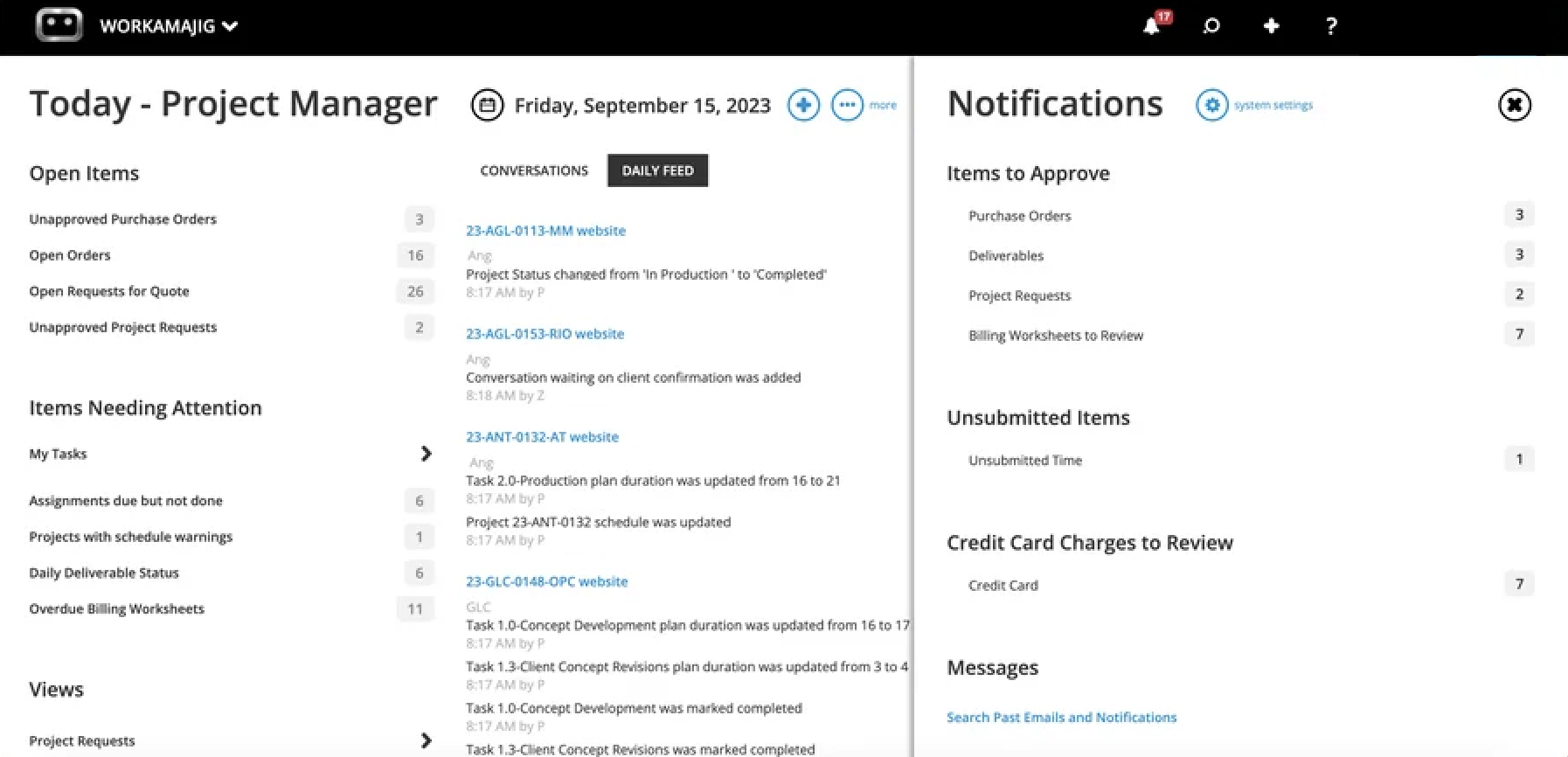
Managers' Today dashboards include a lot more detail to reflect their broader responsibilities. For example, PMs can see:
- Open items, such as unapproved purchase orders.
- Anything that requires their approval, such as billing worksheets in review, project requests, and project deliverables.
- Items needing their attention, which include their personal tasks and any alerts specific to the projects they’re managing. For example, projects that experienced overruns and overdue assignments show up here.
Then, all internal and external project stakeholders can use our project collaboration toolkit to complete tasks and keep projects moving — which includes:
- Project conversations. Internal teams, clients, and vendors can leave notes, share updates, and keep discussions organized. Conversations are fully customizable and tracked at the project level, so nothing gets buried in email or lost across tools.
- Commenting. Team members can drop comments directly on task cards and tag the right people when they need input, a decision, or a quick review, keeping feedback tied to the work it relates to.
- File sharing. You can set up file repositories at the project or campaign level, giving everyone access to what they need in one place. Workamajig supports all the file types creative teams actually use — images, video, audio, design files, documents, PDFs, HTML, and more.
- Internal proofing. Users can preview content, compare files side by side, and mark up annotations directly in Workamajig. Reviewers see the feedback in context, make their changes, and upload new versions.
- Version history. Creatives can easily see what changed between rounds.
- Feedback controls. Managers can limit the number of feedback rounds to keep revisions focused and avoid endless loops and scope creep.
When inviting outside users (freelancers, clients, etc.) to collaborate on projects, managers can also set roles and permissions to control precisely what they can see and do, so you don’t have clients or contractors going rogue.
Client Management Tools
Rather than shoehorning clients into your internal project structure, Workamajig can give each client their own dedicated portal — at no extra cost and with no user limits.
From there, clients can:
- Submit work requests. You can standardize intake with the customizable project request forms we mentioned earlier.
- Track project progress across all their active projects.
- Share feedback and communicate with your team. They can participate in project conversations, respond to comments, and start their own threads.
- View invoices and pay them online.
- Access files and final deliverables.
Project Portfolio Management
While Basecamp has Mission Control and the Hilltop View for high-level project and task tracking, it lacks a true project portfolios feature: one that brings multiple projects under a single umbrella to centralize how project teams manage schedules, track budgets, generate reports, and collaborate.
Portfolios are super convenient (and often essential) for teams with complex projects and growing operations. For example:
- Agencies that handle multiple projects per client can organize each client’s projects under a single umbrella.
- In-house teams can save time on admin work and streamline reporting by linking related projects. For example, in-house marketing teams can consolidate all their paid campaigns into a single portfolio to track overall marketing spend in one place.
While many advanced Basecamp alternatives offer portfolio management, several lock this feature behind their highest-tier plans. We’ve kept things more accessible in Workamajig: our portfolios feature, called “Campaigns,” is included across all our packages.
You can set up campaigns using intake tools similar to the project ones: through campaign templates, intake forms, or by converting an opportunity in the CRM to a campaign. Alternatively, you can build one out from scratch and link multiple projects together.
Workamajig then pulls in all the relevant information from across the linked projects — tasks, schedules, estimates, shared files, expenses, and more — so you can easily manage schedules, track deliverables, budgets, and timelines, and streamline reporting.
Once your campaign is set up, everything rolls into a centralized campaign dashboard where you can see recent conversations, daily activity, custom fields, and all deliverables.
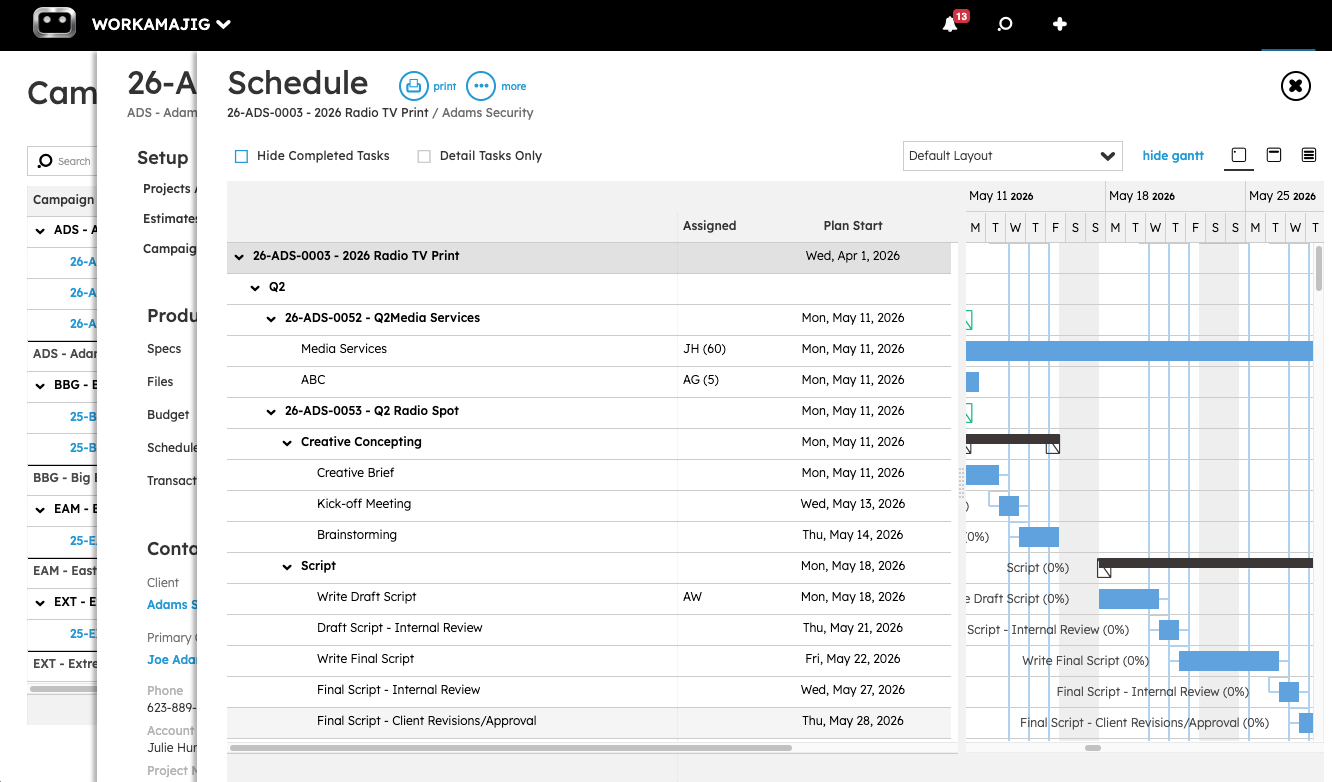
The scheduling view, which you can navigate to from the campaign dashboard, is where things get really practical. It pulls all tasks from your linked projects into a single visual interface, so you can edit tasks across the entire portfolio, zoom in on a specific project when needed, and track how each project fits into the bigger campaign timeline with a simple Gantt chart.
Budgeting Your Portfolio’s Budget
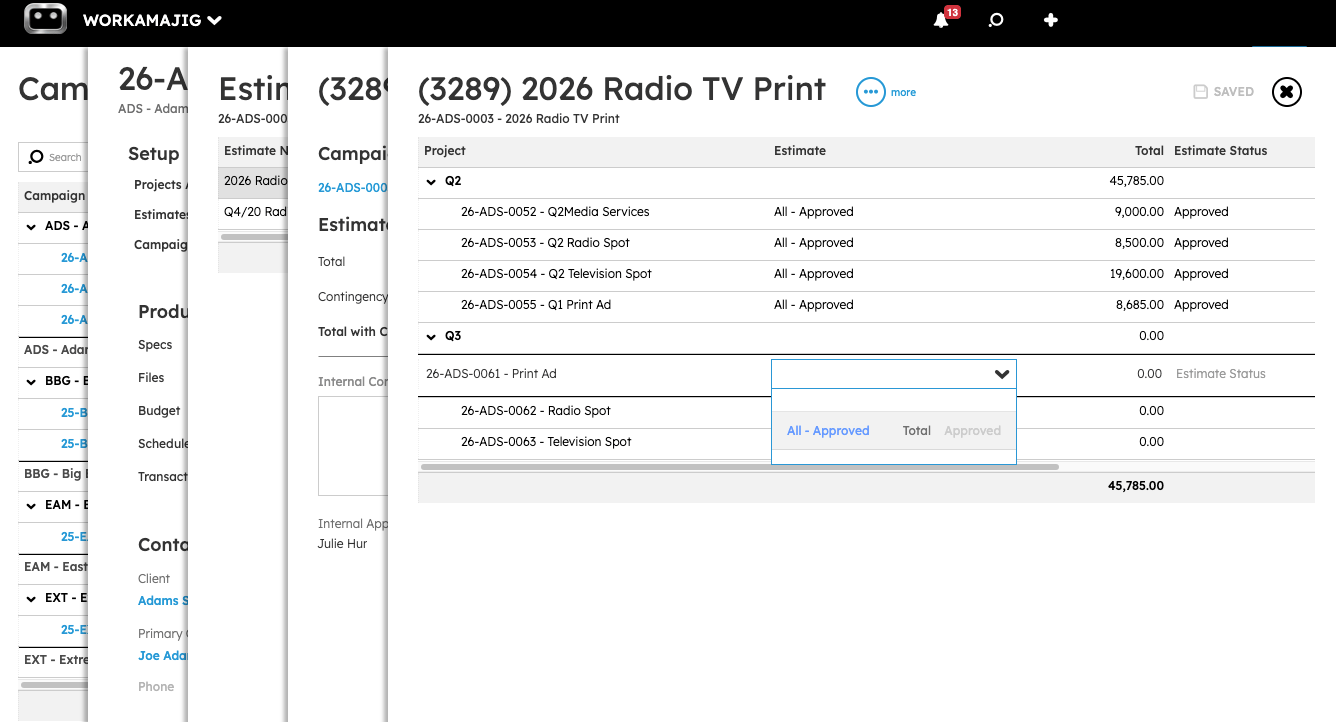
Workamajig gives you two ways to build out your campaign budget, depending on how far along your planning is.
- Option A: Roll up from project budgets. If you've already got solid estimates and finalized plans for each project in the campaign, Workamajig can consolidate those budgets into a centralized view.
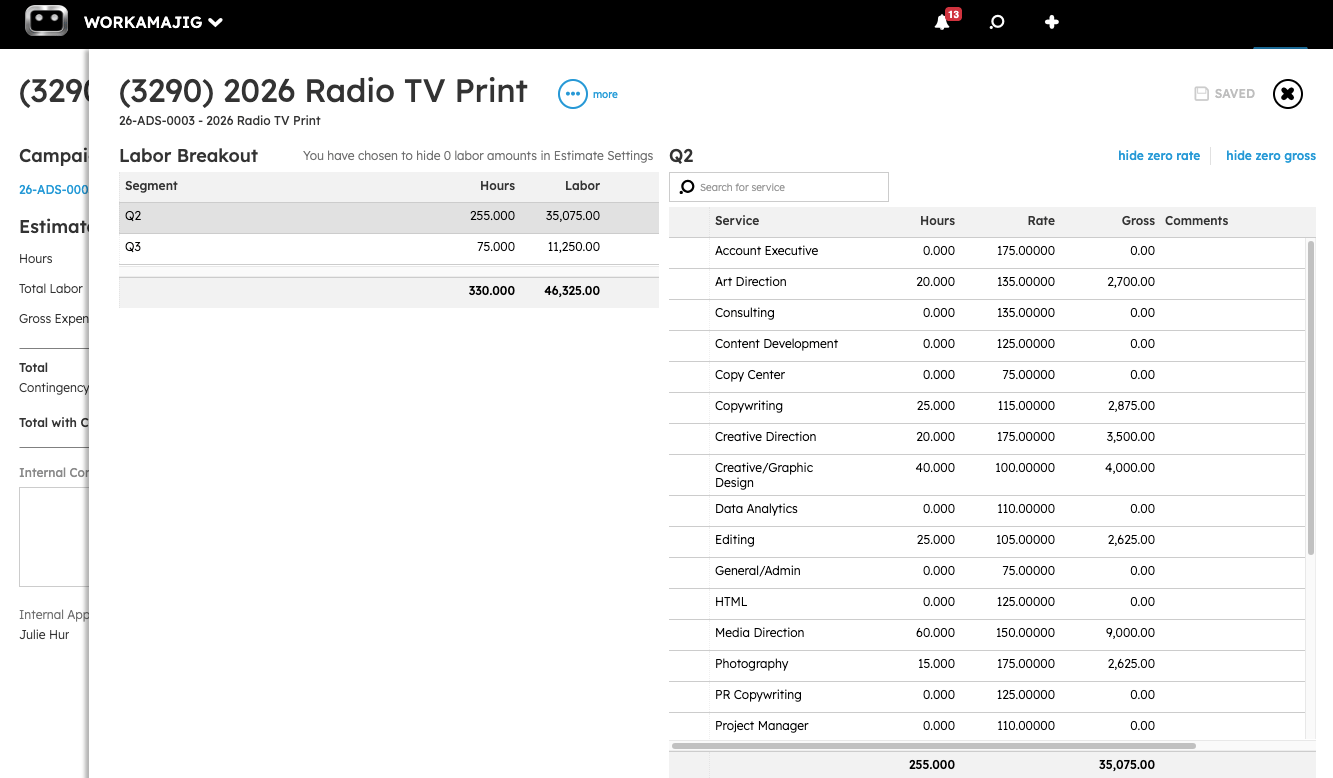
- Option B: Build an independent campaign budget by service. This one's handy when you haven't nailed down every project yet — or your estimates aren't fully baked. Instead of waiting, you can allocate hours by service type (say, 100 hours of copywriting, 80 of art direction, 120 of web design) and let Workamajig calculate the labor costs based on your average hourly rates. When you choose this option, Workamajig pulls up all your agency's services and their rates in a single view (as shown below), so you can select which ones to include in the estimate.
Project Reporting Suite
As we mentioned earlier, all the actual costs for labor and non-labor expenses flow into Workamajig’s reporting suite.
Our system then enables PMs to compare actuals to estimates after project wrap-up, so they can evaluate profitability and performance, and zero in on any issues (e.g., unexpected expenses that contributed to budget overruns or inefficient service lines).
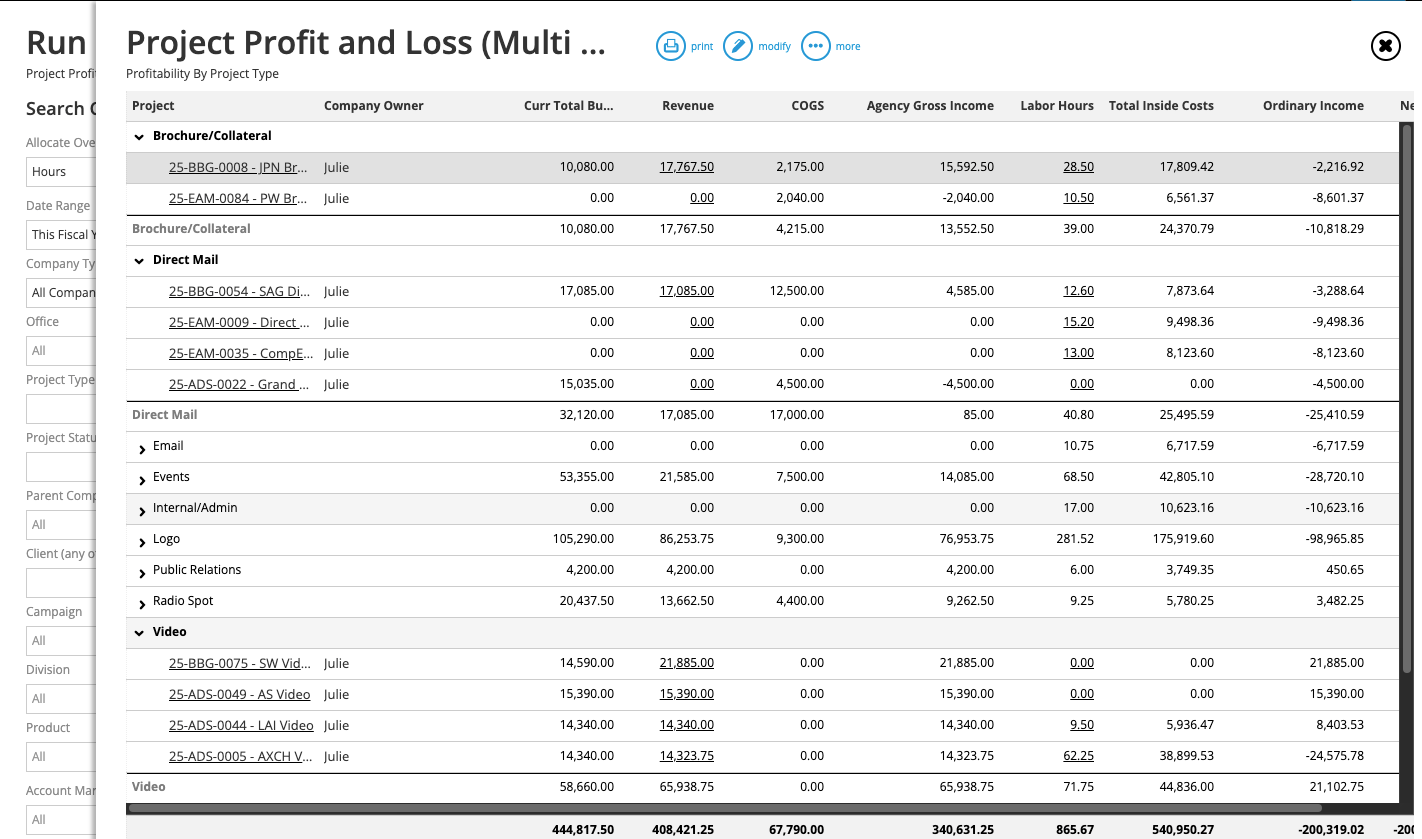
Our most popular project reports include:
- Project Recap Analysis. It lays out how actual labor hours, costs, and deadlines compare with initial estimates, highlighting where work exceeded or fell short of expectations.
- Project Budget Analysis. It details how the budgets compare to actual spending across multiple projects. Managers can view each project’s complete transaction history, pull up details about specific transactions, and filter by date range.
- Project Profit & Loss (P&L). These reports are available in two formats:
- Multi-view —offers a snapshot of the profitability of multiple projects and allows managers to spread overhead costs from the general ledger across them.
- Detailed views —offers comprehensive profitability insights for a select project, with breakdowns by general ledger account, so managers can see where money is being spent.
- Campaign P&L (multi-view). This report shows profitability across all projects within a campaign, pulling from posted GL transactions to break down revenue, cost of goods sold, agency gross income, labor costs, and expenses — with overhead automatically allocated from the general ledger based on labor hours, labor cost, or total bill.
Resource Management Module
Workamajig’s resource management module provides clear, simple ways to keep track of staff schedules and optimize utilization.
For starters, our advanced staff scheduling dashboard gives you a bird’s-eye view of all team members’ schedules, providing a breakdown of:
- Staff members
- Total scheduled hours
- Percentage of time utilized
- Total remaining hours left to schedule
- Availability — project team members can share when they’re out of office or unavailable, which prevents managers from accidentally assigning staff members to work during those periods
- Unassigned services — so you can catch anything leftover and make sure it’s covered
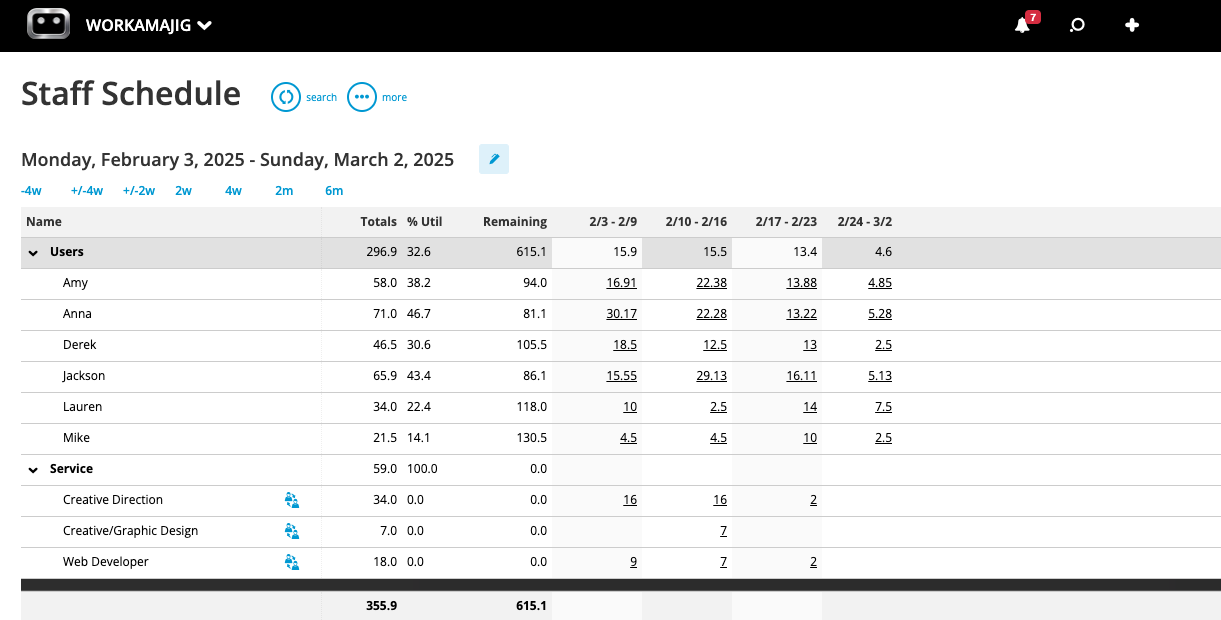
You can also toggle the dashboard to display assignments alongside allocations, so you can compare the workload of different resources. Then, you can shift assignments to ensure nobody is bogged down or underutilized. For example, if someone's overloaded while a colleague with the same skill set has bandwidth, you can reassign work directly from the dashboard.
This makes it easy to visualize everyone’s workload, adjust assignments to balance hours among available team members, and ensure you’re utilizing talent as effectively as possible.
Read more: Project Resource Scheduling for Creatives
Team Productivity Reports
Then, to round out our resource management module, we provide comprehensive time and productivity reports.
Our hourly reports let managers analyze time spent over a variety of categories (by project, client, department, time period, and more), compare utilization vs. realization, and easily identify the projects, services, or clients that require the most resources.
Workamajig’s Time Productivity Analysis report links resource utilization rates to profitability, so you can track each resource’s contribution to your bottom line and see if they’re bringing in more than they cost (or not).
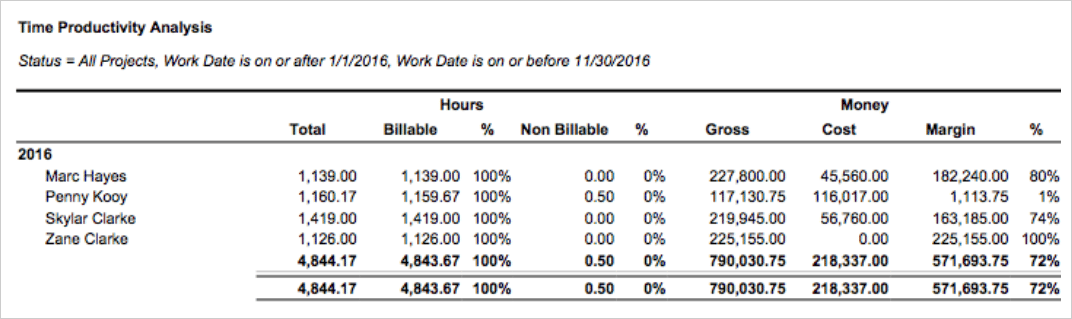
As shown in the image above, the report provides a breakdown of each resource’s utilization and realization rate (the percentage of recorded billable hours) side by side and links these rates to their costs and generated revenue.
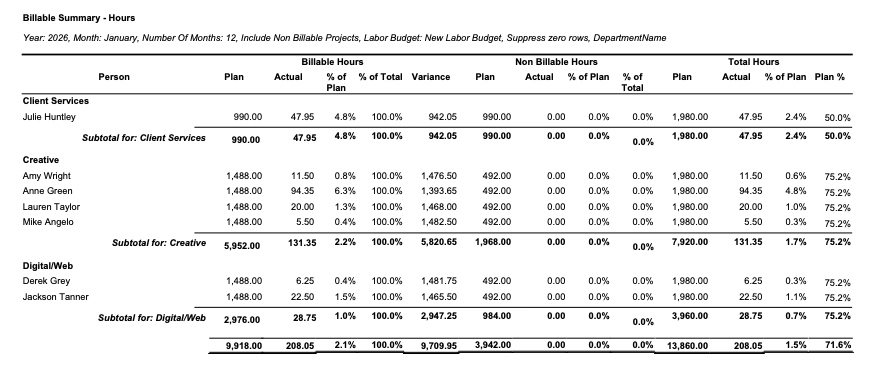
Then, the Chargeable Utilization report measures the percentage of billable hours that are actually chargeable to a client.
This is different from raw billable utilization because you’ll rarely charge the client for 100% of the billable work that your team does — since inefficiencies, reworks, and unplanned bottlenecks can eat into billable time.
Evaluating chargeable utilization can be difficult because you can’t predict discrepancies in advance — like whether you’ll need to write something off or redo work. That’s why your best bet is to keep measuring the metric periodically — e.g., each quarter — to get a reasonable estimate of your agency’s chargeability compared to billing hours.
So this report is a big help here, as it lets you view an accurate snapshot of your team’s chargeability for any specified period.
The report breaks down your chargeable and non-chargeable hours for each role, as a percentage of your total hours. It also lays out how you performed vs. your original plan.
Read more: 10 Steps to Optimize Resources in Agency Project Management
Workamajig Accounting & Financial Management Module
So far, we’ve focused on how Workamajig compares to Basecamp on the project side — but where Workamajig offers more benefits than Basecamp (or any other system on this list) is in financial management.
We remain completely unmatched here because we go beyond budget tracking and billing with a complete GL accounting system built right in — so you can manage finances in the same system you use to manage projects and resources.
Our accounting system supports all standard accounting processes and is fully compliant with GAAP, GDPR, and HMRC so it can replace standalone tools like Xero, QuickBooks, and NetSuite. We’ve also optimized it for creative projects and workflows, with specialized features such as work-in-progress (WIP) billing and retainer management that aren't available in generic accounting tools.
In addition, our complete accounting toolkit includes:
- Chart of Accounts. Organize and categorize all financial transactions with a fully configurable chart of accounts. Map revenue, expenses, assets, and liabilities to match your agency's reporting structure, so your books stay clean and auditable without relying on an external accounting system.
- Project billing. Manage the entire billing workflow with collaborative billing worksheets that consolidate costs — no more chasing down information from other teams. Workamajig supports fixed-fee, time-and-materials, retainer, advance, prebilling, WIP, and media billing methods.
- Mass billing. Generate separate invoices per project, or combine multiple projects into a single invoice.
- Online payments. Collect client payments in a variety of ways, including through CC via our Payflow Pro or Authorize.net integrations. You can also pay vendors online through our integrations with AvidXchange and Edenred Pay.
- Multi-currency and multi-entity accounting. Track foreign currency exchange rates, process foreign transactions, and manage financial records for multiple entities.
- Expense reporting and reimbursement management. Earlier, we mentioned how team members can submit expense reports (including from mobile) and tag out-of-pocket charges. Managers can also review and approve these reports in Workamajig for reimbursements.
Next up, we’ll cover our project billing workflow and financial reporting suite.
Project Billing and Client Invoicing
When it’s time to bill clients for a project, Workamajig makes the entire process seamless for everyone involved: billing users, decision-makers, and the end client.
As the billing cycle nears, billing users can head to their personalized Today page to generate an electronic billing sheet based on either the project’s budget or transactions. The worksheet comes prefilled with all the project’s information, including expenses, transactions, and prior billing.
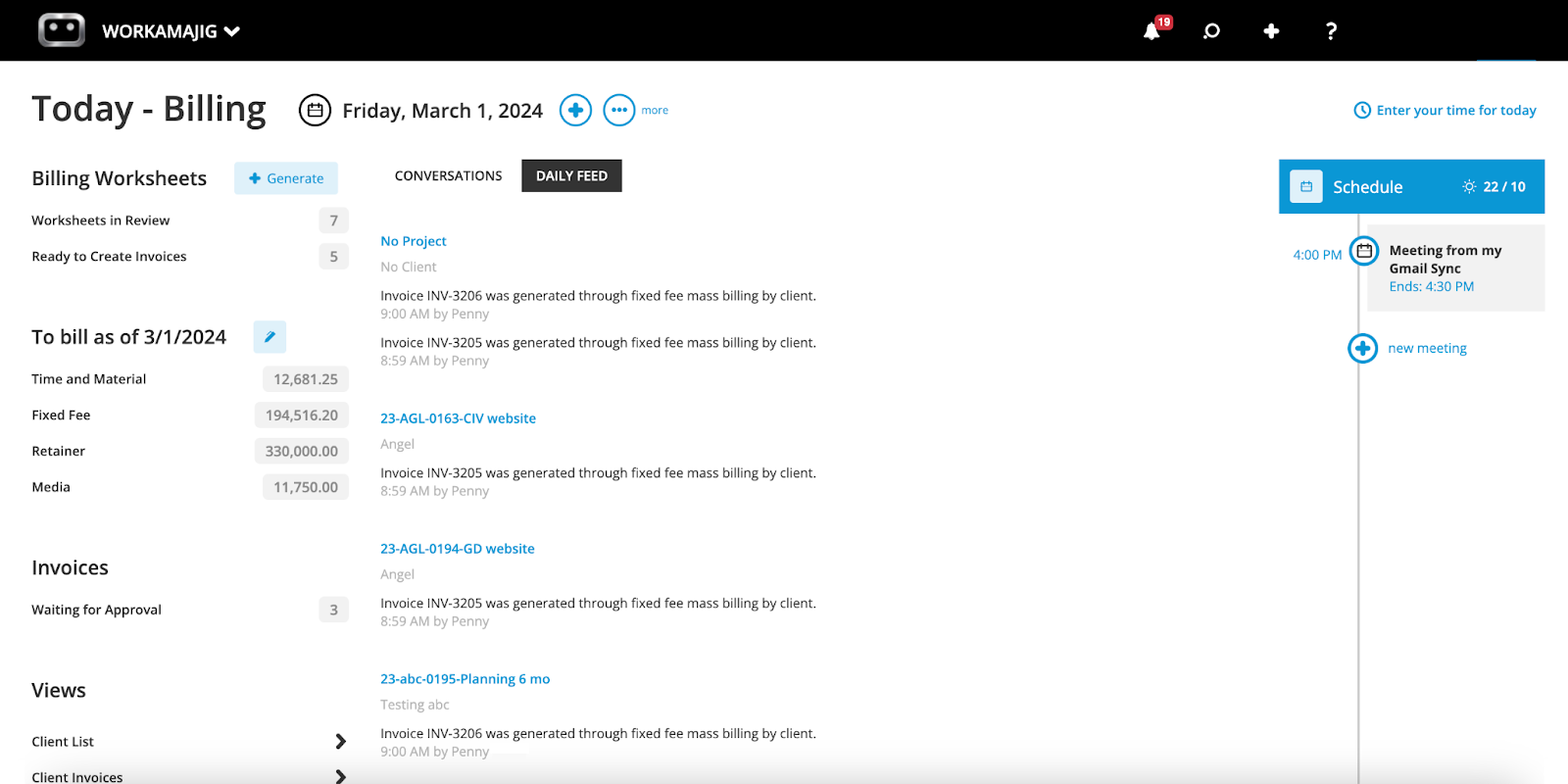
Workamajig automatically routes the billing worksheet to the relevant decision-maker, usually an account executive or PM. They can finalize all the specifics — seeing if there’s anything they want to edit out, transfer, mark up, or write off — so the final invoice can be generated correctly.
After finalizing the worksheet, they can submit it for approval, which automatically routes it back to the billing user. The user can then generate a final invoice, send it over to clients, and request payment.
The billing workflow we described above is popular amongst agencies because it reduces the headaches that come from chasing decision-makers for details or generating and regenerating invoices to update details — and it helps them get things right the first time.
That said, our system can support pretty much any traditional billing workflow. So if your team prefers to do things differently, Workamajig’s got you covered.
Read more: 5 Best Media Accounting Software
Financial Reporting Suite
Speaking of improving accuracy in financial reporting, our system also covers you there. Workamajig includes a variety of preset reports — plus custom reporting tools — to analyze profitability and financial health in various ways.
Some of our most popular reports include:
- Profit & loss reports (across multiple categories — by project, campaign, client, etc.)
- General Ledger (GL) reports
- Cash projections
- Revenue forecasting
- Project budget drill-downs
- Billable summary reports
- Hourly realization rates
- Key metrics monitors
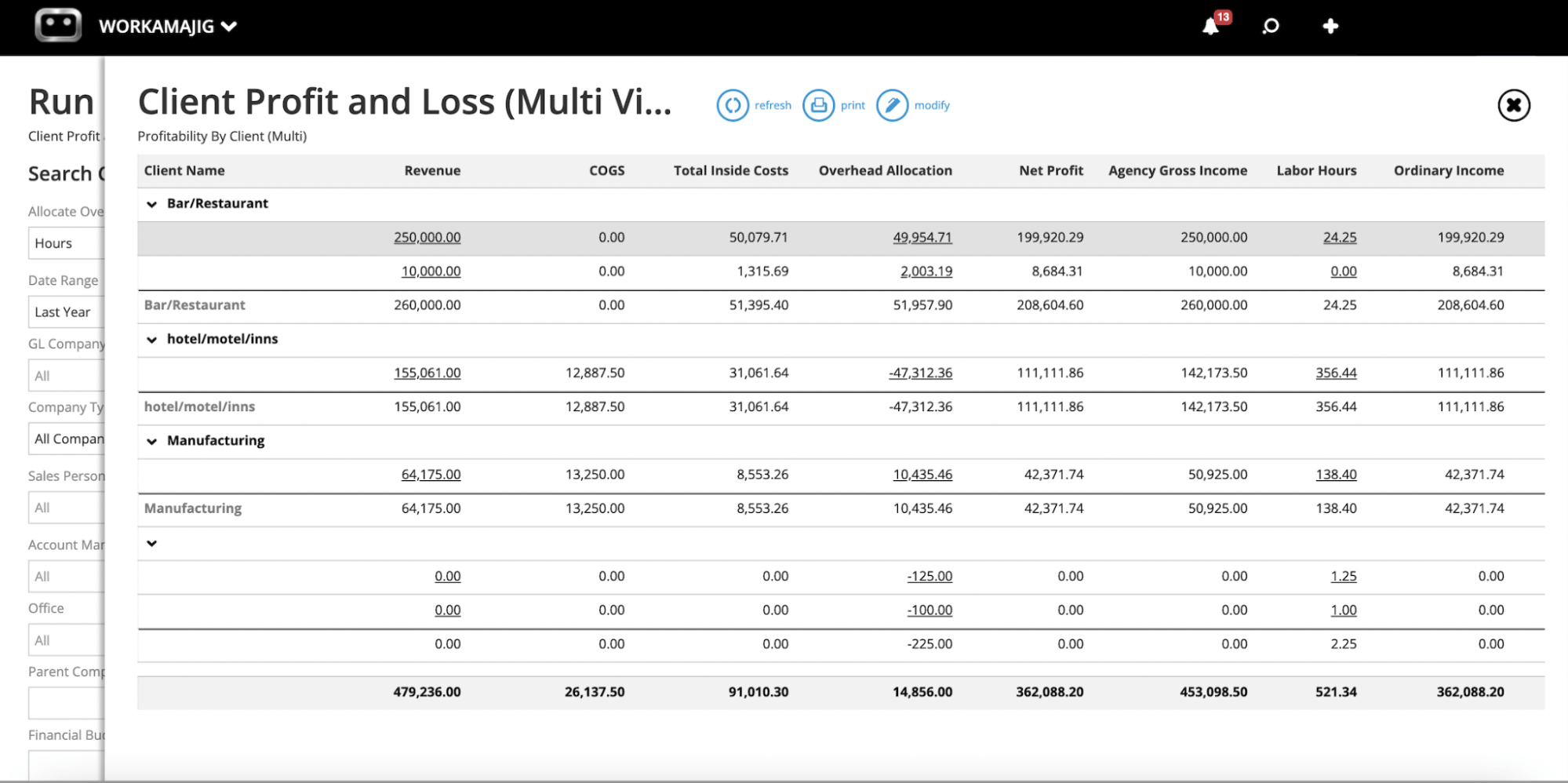
You can configure reports with filters and custom fields to hone in on the data most relevant to your projects and initiatives.
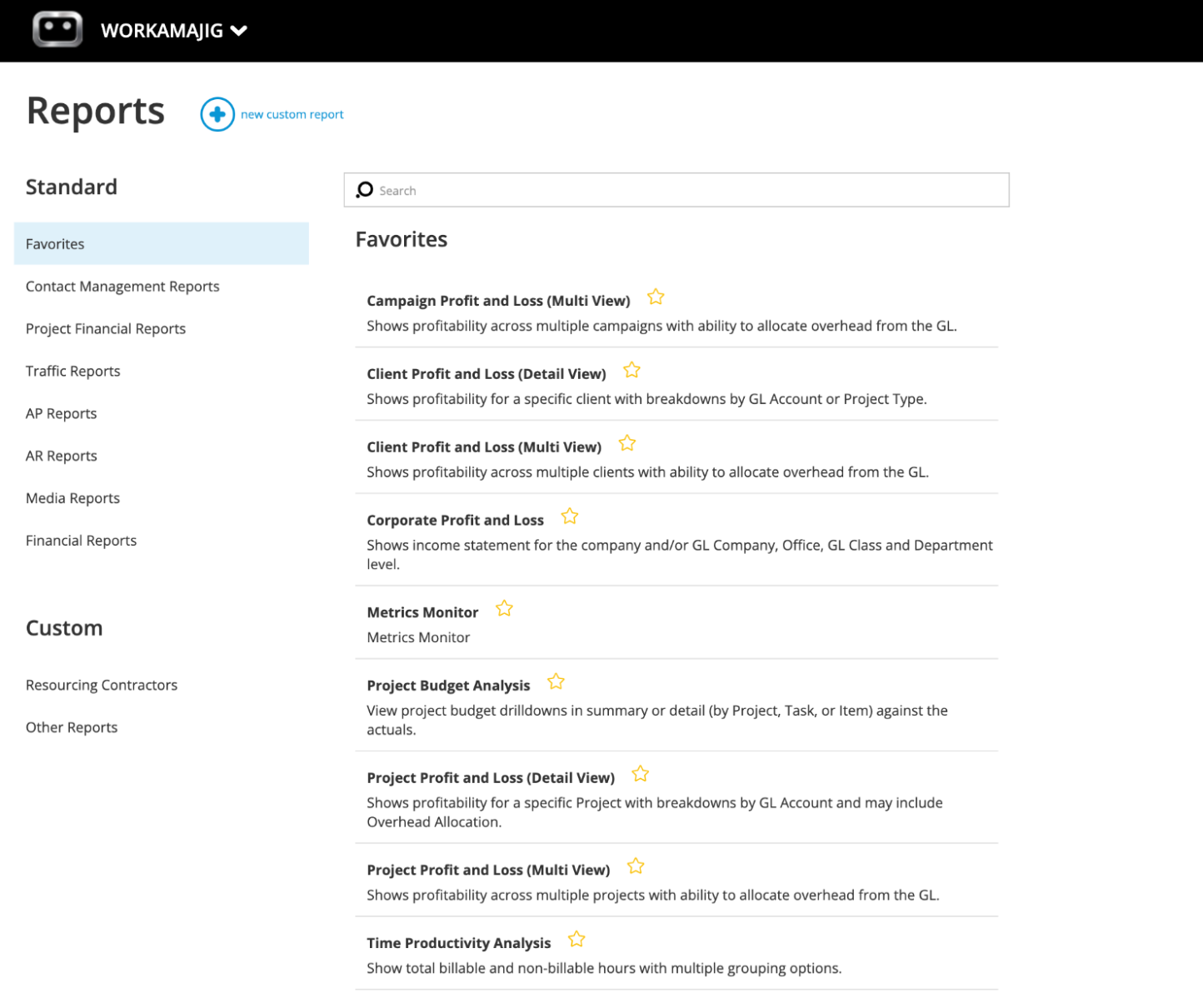
You can also “Star” your favorite reports to create a personalized dashboard and easily navigate to the data you’re interested in:
Read more: Best Creative Project Management Tools with Financial Tracking
Workamajig Agency CRM
In addition to a complete accounting system, Workamajig also packs in a native CRM to manage your sales pipeline and new client intake.
Here’s how it works:
- Sales teams can pull leads into our CRM from different sources — including (i) their website’s contact form directly, (ii) from their existing CRM via integrations, and (iii) through other sources by importing .csv files (e.g., attendee or email lists).
- New leads automatically populate in the Leads dashboard, where sales teams can vet them further.
- After qualification, sales teams can convert leads to new opportunities — these appear in the Opportunities dashboard (our system also saves client and company details in your contact books).
- The Opportunities dashboard features customizable Kanban boards that allow you to drag and drop opportunities through each stage. You can configure this dashboard to match your typical sales process and workflows, as in our preview below.
- Reps can develop opportunities using automated estimating, resource forecasting, and conversation-tracking tools.
- After winning opportunities, reps can convert them to new projects or campaigns, so they automatically appear in the Projects or Campaigns dashboards. Our system transfers all details and attachments from sales conversations, so project managers have the full context to plan work.
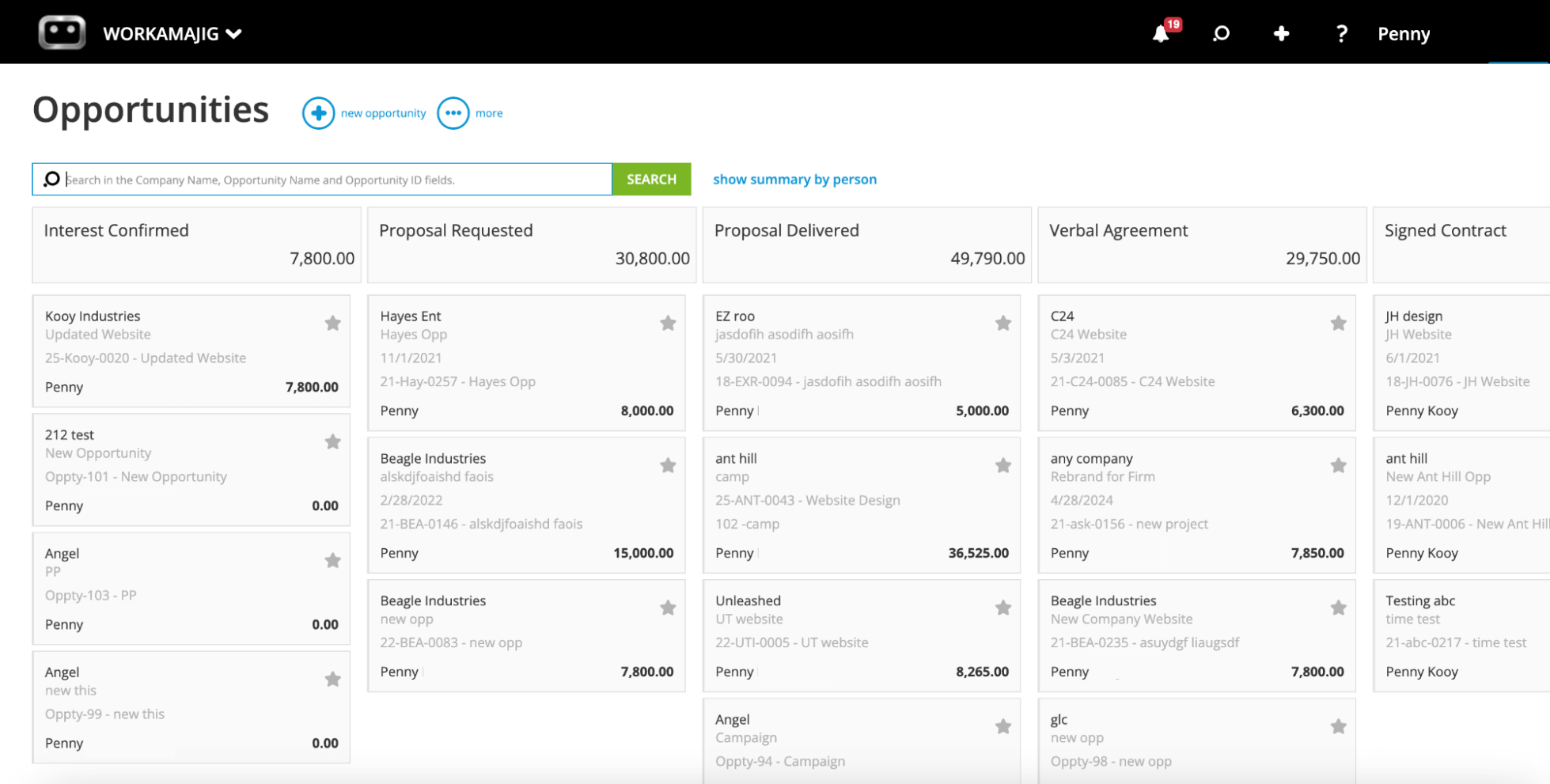
We also provide a variety of sales reports so you can compare earned vs. lost leads, measure your close rates, see how individual reps perform, and review performance over various time frames. These reports come out of the box ready to use, but you can also create and save custom reports.
Read more: Best Agency CRM Software: Reviews & How to Choose
Why Teams Love Workamajig: Hear From Our Customers
After switching to Workamajig’s all-in-one system, agencies and in-house creatives alike report accurate budget tracking, streamlined workflows, smoother collaboration with all stakeholders, and deeper business insights that inform strategic decisions.
“I would say the biggest thing I found useful was being able to track our projects and how we are doing on labor, costs, and budget — something which we really didn’t have insight into before. The amount of data that is available in one place and available to multiple people in the company who need that information is the thing that I find most exciting about Workamajig.”
– Dawn Peters, Controller at Parallel Path, Colorado, a digital marketing agency that helps health, wellness, and lifestyle brands.
Watch this clip to hear more about Parallel Path’s experience with Workamajig.
“With the click of a button, I now know exactly how profitable a client or project is. We used to have all these different systems that forced us to spend tons of time — hundreds of hours — manually merging data and plugging it into spreadsheets to figure it out.
Workamajig is saving us tons of hours. Our twice-a-month billing cycle used to take multiple people a combined 20 hours of work. This last cycle, it took four hours; not because we don’t have as many clients, but because we’re getting more efficient.”
– Scott Millen, Managing Partner and Creative Principal at 2Fish Company, LLC, an award-winning creative marketing agency.
Read the full case study to learn how 2Fish Company reduced its time spent on billing by 80%.
“The most important thing that Workamajig has done for us is give us visibility into division, clients, and projects. Without visibility, you cannot grow, you cannot monitor, and there’s nothing you can do to improve. Workamajig has been able to scale with us through acquisitions, through down times, through everything over the last 20 years.”
– Sandra Torre, Executive Vice President and CFO at The Lavidge Company, a Phoenix-based advertising agency that specializes in health care, education, and PR.
“Workamajig provides us, as well as the client, with a listing of how we’re doing. If we have a $5,000 a month retainer, how much did we spend on the $5000 - did we spend $4000 or $7500? Workamajig very easily represents that.”
– Rick Crosby, Controller.
Learn how Workamajig fuels financial success and scalable growth for the company.
Packages & Pricing
We provide tailored solutions for both agencies and in-house creative teams. Choose the package that suits your team, then select your plan based on team size.
Pricing is per user, as shown here:
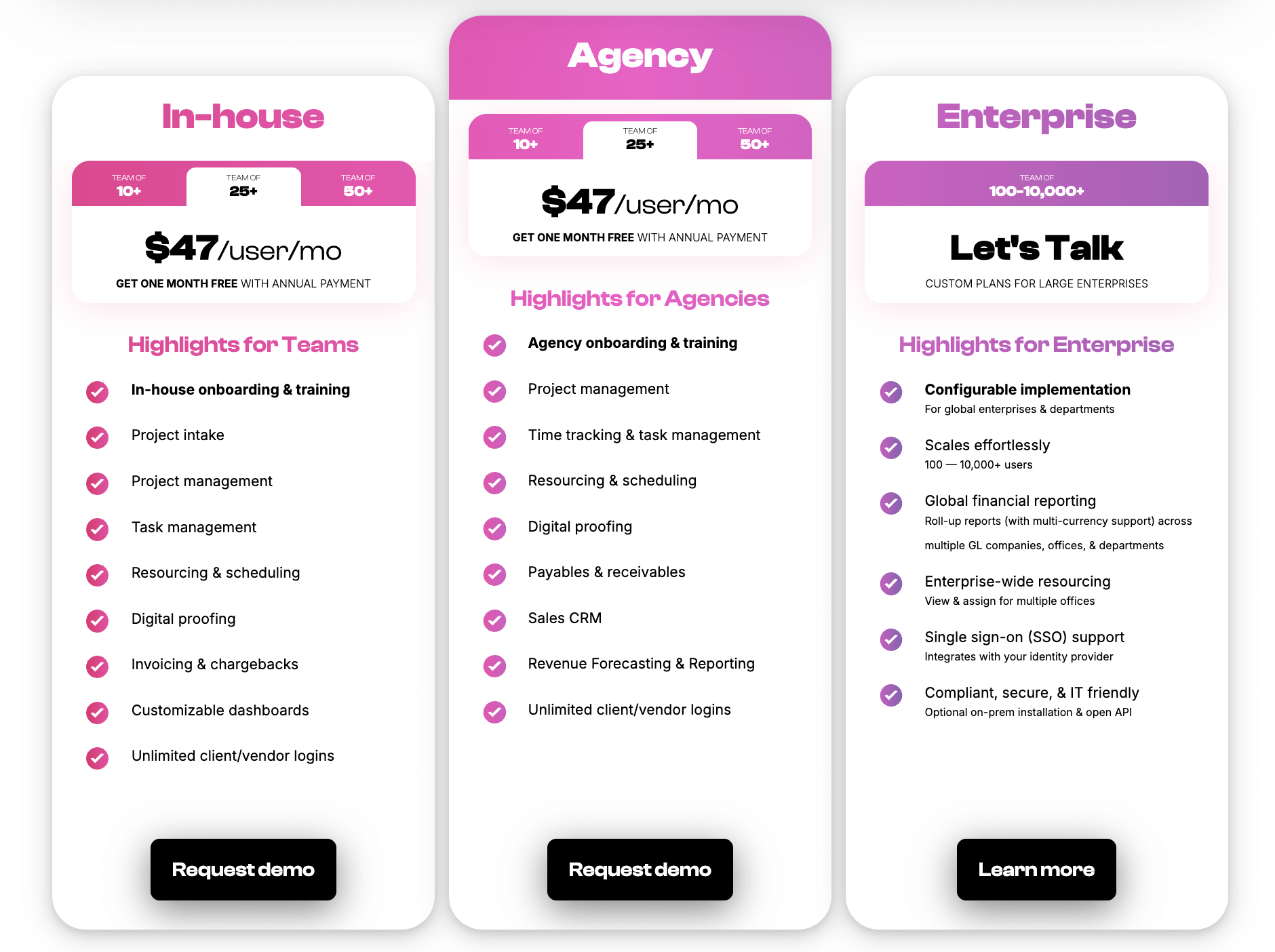
We also provide custom enterprise packages to support even the largest organizations. Please contact us to learn more about packages with 100+ users.
Your Workamajig subscription includes:
- Full platform access.
- Free onboarding and training.
- A dedicated account manager plus ongoing support
Want to see more? Request a free demo to see how Workamajig works for you.
2. Advantage
.png?width=2000&height=878&name=Advantage%20Simpli.fi%20homepage%20(2024).png)
Like Workamajig, Advantage is another Basecamp alternative that offers native project management, resource planning, time tracking, CRM, and accounting software under one roof. It’s also specifically designed to support the entire creative workflow and offers powerful financial controls.
Users praise Advantage’s media accounting software, specifically highlighting its budget tracking and financial reporting. They also appreciate Advantage’s native media buying tools (which are available thanks to its complete integration with Simpli.fi). Media and advertising agencies can plan, execute, and invoice for media buys right inside the system.
However, unlike Workamajig, Advantage is primarily focused on enterprises rather than smaller teams, which is why you won’t find any standard plans on the vendor’s website (they only do custom quotes upon request).
Find more Advantage software reviews here.
Features
- Project management features
- Task management
- Project tracking (budgets, timelines)
- Resource management
- Collaborative tools like proofing and reviews
- Time tracking
- Media planning and buying, including broadcast buying, digital buying, and media reporting
- Risk analysis and burn rate tracking
- Media accounting software
- Billing and invoicing
- Estimates
- Budget Monitoring
- Financial reporting
- Revenue forecasting
- CRM
- Client management
- Reporting dashboard (to analyze project performance, financials, staff hours, etc.)
- Mobile app for Android
Pricing
Contact Advantage for a custom quote. Pricing is typically tailored to enterprises.
Read more: Best Advantage Software Alternatives for Creative Teams
3. Function Point
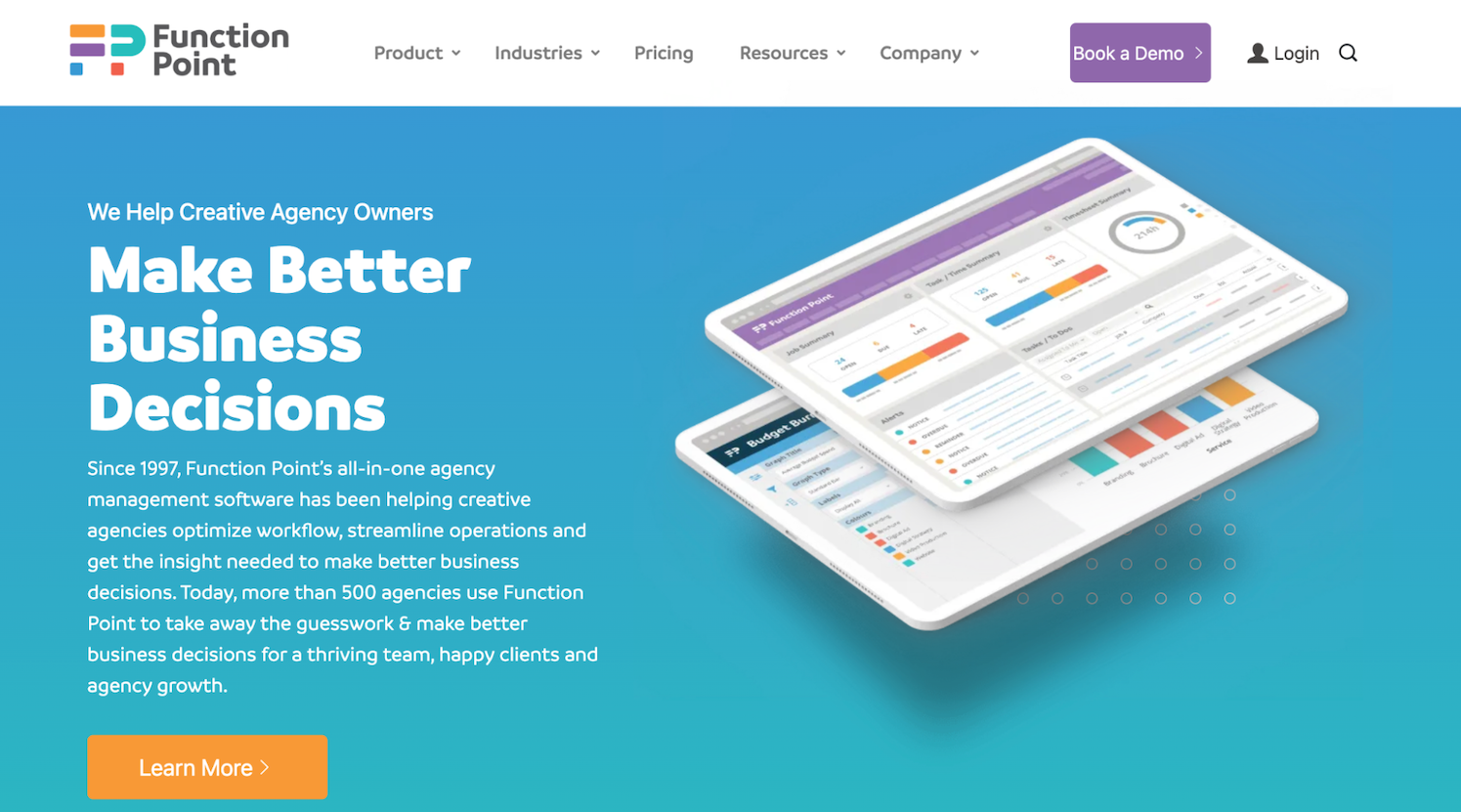
Function Point is a reliable Basecamp alternative for teams that want more robust functionality without the complexity of a system like Advantage. It works for teams of all sizes, but is best suited for the small and mid-size teams moving away from Basecamp. FP brings together project, resource, client, and financial management into a fully integrated system with a user-friendly interface.
Function Point’s centralized project management dashboard lets teams easily track the status, timeline, and budget of all active projects, and access plans, files, briefs, resources, and more. Teams can tie project plans to resources and time tracking, eliminating double entry and ensuring budgets and timelines display real-time insights.
Users particularly love FP’s extensive financial management and business reporting tools. With these features, they can:
- Track project expenses in real-time. Teams can use FP to track expenses such as print orders, image purchases, and raw materials, and fold them into their overhead at project wrap.
- Generate invoices in batches by conveniently pulling in everything they need from across the system.
- Track billability so PMs can ensure each resource contributes to the bottom line.
- Analyze client profitability, staff efficiency, resources, and sales pipeline using over two dozen out-of-the-box reports.
However, Function Point lacks a native accounting system and instead integrates with QuickBooks Online to support core accounting workflows.
Read more Function Point reviews here.
Features
- Client management tools, including estimates, proposals, change orders, revision tracking, and job request portals
- CRM and email integrations
- Project templates
- Project management dashboards
- Project monitoring (choose Gantt charts or a Kanban board view)
- Team collaboration, including file sharing and commenting
- Resource management
- Time tracking
- Financial management, including expense tracking
- Billing and invoicing
- Business intelligence reports that can be generated as CSV or PDF outputs
- Integrations with accounting systems like QuickBooks and other business applications
Pricing
Function Point offers two plans that, like Workamajig, include all essential features:
- Standardize ($58/user/month): The base subscription featuring all core modules, including project management, resource planning, CRM, time tracking, financials, and agency reporting.
- Optimize ($68/user/month): Adds QuickBooks Online integration and advanced BI tools, including data visualization and custom saved reports, for agencies that need deeper financial reporting or want to sync with their existing accounting setup.
Read more: Function Point Reviews & Alternatives
4. Ravetree
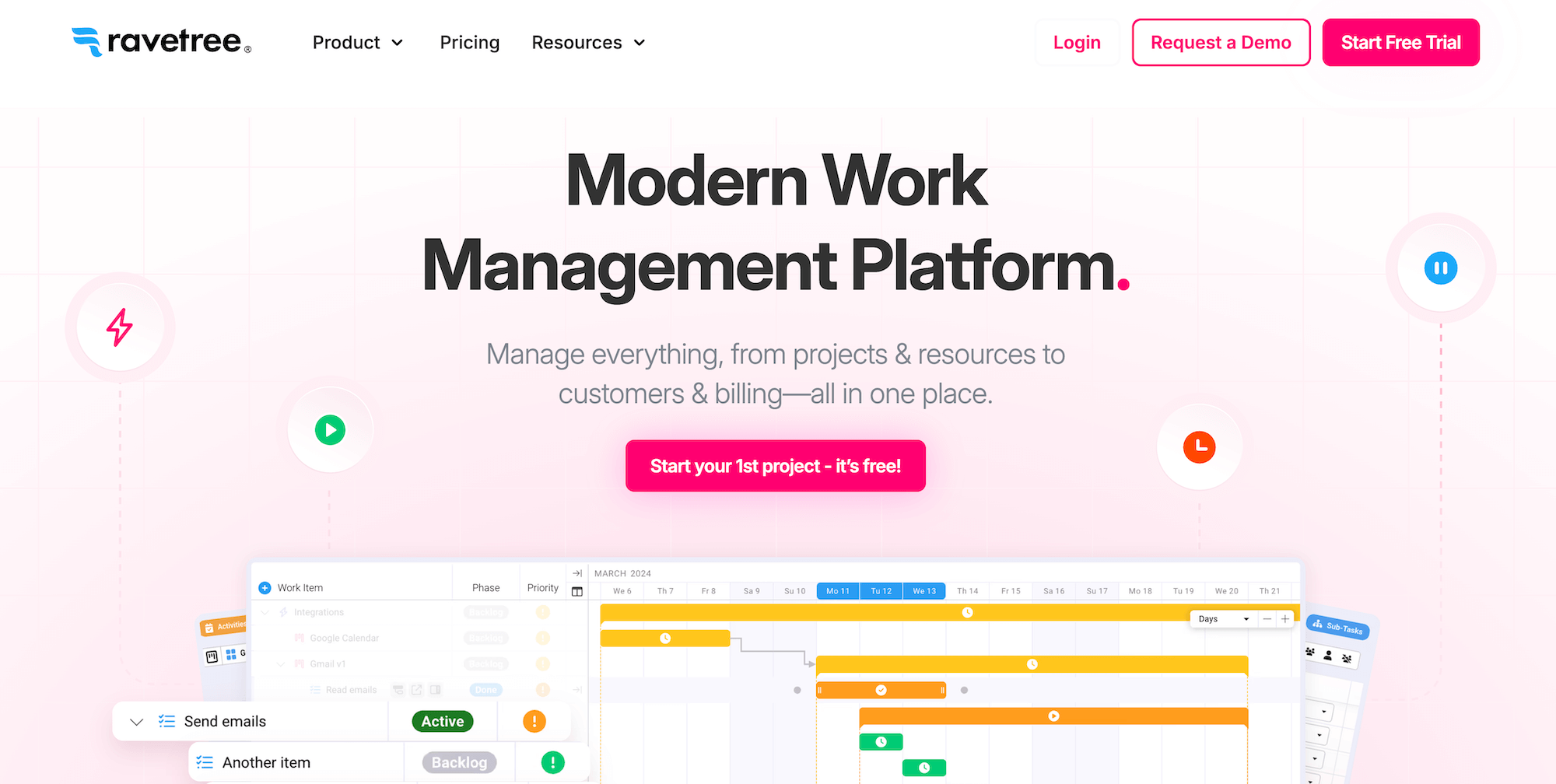
Ravetree is a comprehensive project management platform built for teams and agencies, offering an advanced toolset for managing workflows, resources, finances, and client collaboration within a unified solution.
Users moving away from Basecamp like Ravetree for its:
- Robust project management features that support several project management methodologies (Agile, Waterfall, Kanban, Scrum), customizable Gantt charts, repeating tasks, and dependency management.
- Strong budget management tools and financial reporting, with reviewers highlighting the ability to set budgets for each project phase and roll them up to the project level, measure profitability at different levels, compare actuals vs. estimated, and accurately forecast future revenue.
- Flexible automation and customization options to define project workflows, add multi-step approvals, and automatically assign new tasks to the right team members.
Users say Ravetree is not as user-friendly or intuitive as Basecamp, but it offers pretty solid customer support to help users get onboarded without any blips.
Check out more Ravetree reviews here.
Features
- Project management module — including customizable request forms, templates, project calendars, advanced task management (with subtasks and dependencies), daily checklists, budget tracking, and portfolio management
- Resource planning and utilization tracking
- Time tracking
- Collaboration features — file sharing, document management, approvals, versioning, and Teams (where you can organize employees into groups and create custom workflows and Kanban boards, then plan sprints)
- Financial management tools like expense tracking
- Advanced billing tools — estimating, invoicing, vendor invoice management, and retainer management
- CRM
- Client portals
- Integrations with Google, Outlook, and QuickBooks
Pricing
Ravetree’s pricing plans are super straightforward. Instead of divvying features across packages, they include everything in one plan and let you choose how you want to pay:
- Monthly: $39/user/month
- Quarterly: $34/user/month
- Yearly: $29/user/month
Ravetree offers free onboarding, training, and support, and the platform supports unlimited projects.
Read more: Best Ravetree Alternatives for Agencies & Creatives
5. Productive.io
Productive.io is another popular option for teams moving away from Basecamp because it offers an all-in-one platform with tools to support the entire agency workflow — from sales and client intake, to resource planning, project monitoring, time tracking, budgeting, and invoicing.
Users appreciate Productive for its:
- Comprehensive financial management tools, including real-time budget tracking, phase-based costing, and profitability analysis.
- Advanced resource planning that accounts for capacity, availability, and utilization to help teams improve scheduling, balance workloads, and optimize usage.
- Sales CRM that seamlessly converts earned deals into projects and keeps track of all client communications.
The potential downfall with Productive is poor usability. While the platform has a modern look and feel, users say it takes time to learn its features and get comfortable with the software. Then, even after you’re trained, you can still get hit with occasional bugs and software hiccups that can disrupt project workflows and lead to delays.
Find more Productive.io reviews here.
Features
- Project intake and sales CRM
- Project management
- Resource management
- Time tracking and timesheets
- Documents (to create shared docs and enable team collaboration)
- Financial management
- Billing and invoicing
- Budget and expense management
- Real-time profitability tracking
- Reporting
- Integrations with QuickBooks, Xero, Sage, SAP, Justworks, ADP, Slack, HubSpot, Google, Microsoft, and Jira
- Open API
- Mobile app (for iOS & Android)
Pricing
Productive offers three packages and custom enterprise plans:
- Essential ($12/month/user): This provides access to basic versions of Productive’s key features.
- Professional ($29/month/user): The upgraded package provides access to more advanced versions of Productive’s core tools, including recurring budgets, advanced reporting (table pivoting, formula fields, multi-currency), rate cards, billable time and expense approvals, HRIS and accounting integrations (Xero, QuickBooks), advanced time off management, and up to 3 CRM pipelines.
- Ultimate ($40/user/month): This grants access to all of Productive’s features and integrations.
Read more: 8 Best Productive.io Alternatives for Agencies
6. Scoro
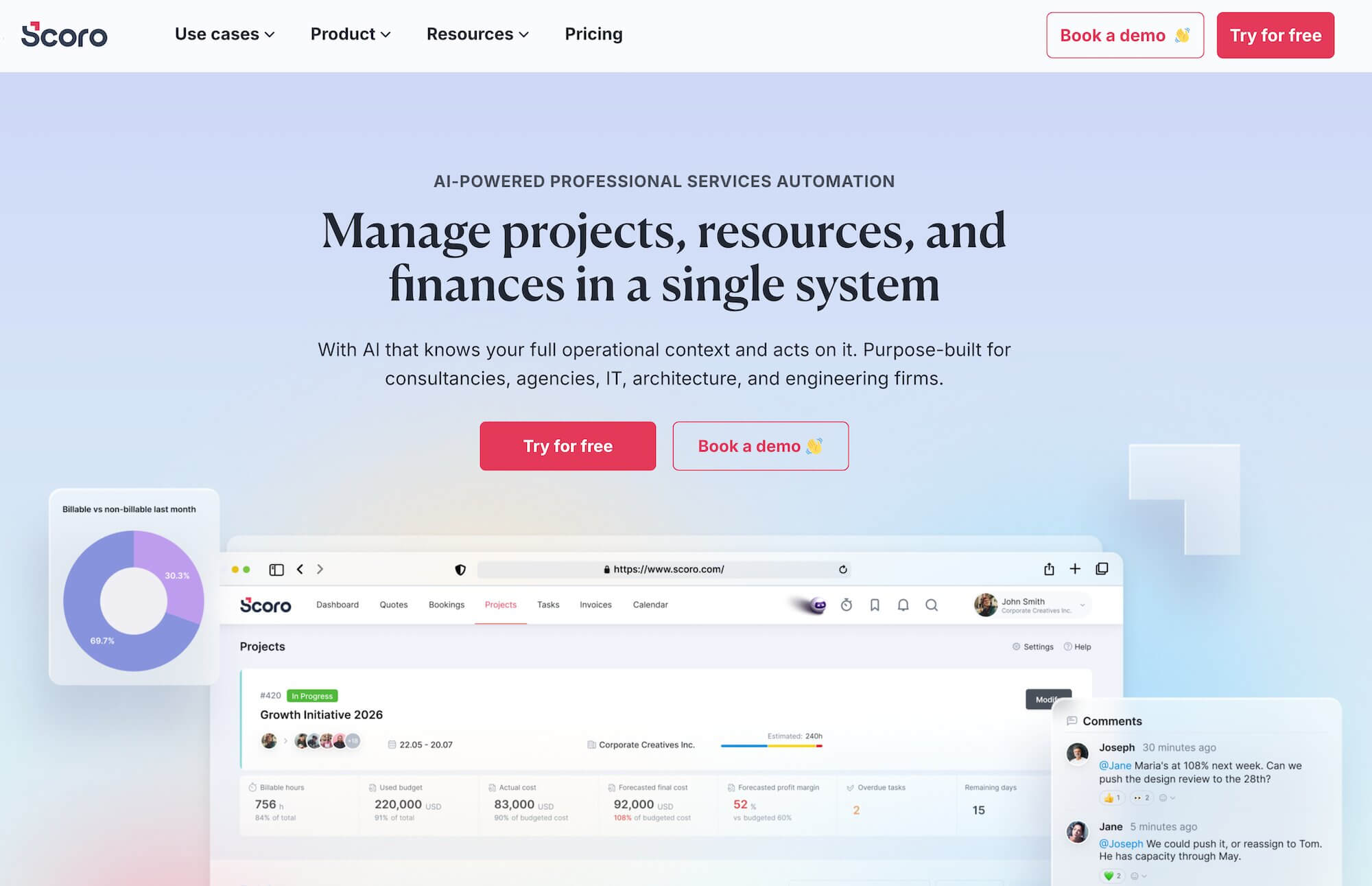
Scoro is another strong work management tool for teams wanting more than what Basecamp offers. It combines project management, resource scheduling, budgeting, and billing under one roof to unify and streamline agency workflows.
Users like Scoro for its robust project planning features, such as Gantt charts and task dependencies, as well as resource management tools that help teams balance workloads and track availability. Reviewers also mention Scoro’s advanced financial management functionalities, including budget monitoring and automated invoicing. And unlike Basecamp, Scoro also includes powerful reporting dashboards to help you learn more about project outcomes, resource utilization, and profitability.
While Scoro offers plenty of benefits for users leaving Basecamp, teams often have a few hang-ups when comparing Scoro to other alternatives.
For one, it’s one of the most expensive agency management tools available — but it’s not as comprehensive as competitors like Workamajig (e.g., it lacks certain critical features, such as project intake management), so it doesn’t offer the best value for money.
Some users also find its learning curve steep; agency-wide onboarding, especially with remote teams, can be challenging.
Features
- Project management
- Resource planning
- Time tracking
- Collaboration tools
- Quoting & budgeting tools
- Invoicing
- Cost management
- Retainers
- Sales CRM
- Reporting
Pricing
Scoro has four packages, all with a 5-seat minimum and a 14-day free trial (no credit card required):
- Core ($23.90/user/month): Includes projects, Gantt charts, task boards, calendars, quotes, invoices, bills, time tracking, CRM, dashboards, and detailed work reports. Not suitable for most agencies.
- Growth ($38.90/user/month): Adds automation, recurring invoices, project budget tracking, margin and markup visibility, labor cost tracking, utilization reports, and a sales pipeline.
- Performance ($59.90/user/month): Adds full resource planning with capacity heatmaps, revenue forecasting, advanced financial reports, role-based pricing, price lists, and deeper project cost analysis. This is Scoro’s recommended package for agencies.
- Enterprise (custom pricing): Everything in Performance, plus company-wide budgets, approval workflows, WIP reports, multi-account reporting, SSO, and enterprise-grade security and provisioning.
Read more: Best Scoro Alternatives for Agencies
7. Magnetic
Magnetic is a complete professional services automation (PSA) solution used by architects, engineering firms, agencies, consultancies, and various other professional services firms.
The full system features CRM and forecasting, project management, resource management, time tracking, billing and invoicing, financial management, and workflow automation tools. Choosing Magnetic over Basecamp means you can simplify your overall tech stack and shave additional subscription costs.
Users particularly love Magnetic’s:
- Seamless time tracking. Users can log their hours in various ways. They can enter time into sheets in one click, use timers, or auto-populate hours from their calendar events. The app also sends automated reminders to users with incomplete timesheets, and allows managers to set end-of-the-month locks to prevent late entries.
- Robust financial management tools. While Magnetic features all the essential financial tools, such as invoicing and profitability reporting, it also offers:
- Live revenue insights, so managers can see how revenue tracking across active clients and projects is working.
- Revenue forecasting tools that pull in live delivery and pipeline data. Managers can easily compare confirmed vs. projected revenue, catch issues early, and evaluate cash flow.
- WIP and unbilled revenue tracking. Managers can stay on top of project profitability by evaluating the true value of work in progress and unbilled hours.
- Extensive, personalized support. All standard Magnetic packages (excluding the free plan) feature a personalized demo, setup overview, and data prep support. Higher-tier packages also include dedicated training sessions.
While Magnetic’s a pretty robust system overall, it’s worth noting that several users say it’s not as customizable or flexible as they like. They mention challenges with tweaking it to their workflows or building out more customized reports.
Check out more Magnetic reviews here.
Features
- Project management with Gantt charts, Kanban boards, and task scheduling
- Collaboration tools — comments, mentions, file sharing, Ziflow proofing integration
- Resource management with capacity planning, workload views, and over/under-booking alerts
- Native time tracking with automated timesheets and approval workflows
- Finance management — budgeting, expense tracking, billing, invoicing, and real-time margin/profitability dashboards
- Over-servicing dashboards to track where teams exceed budgets at the client and project level
- CRM with sales pipeline and revenue forecasting
- Reporting and analytics dashboards
- Workflow automations
- Integrations with Xero, Pastel, and API access
Pricing
Magnetic offers a free plan and three paid tiers, with a 5-user minimum on paid plans:
- Solo (Free forever): For individuals managing basic projects. Limited features.
- Essentials ($10/user/month): Core project management, task scheduling, and time tracking for small businesses getting started.
- Pro ($22/user/month): Full financial control and margin tracking, including budgeting, invoicing, over-servicing dashboards, resource management, CRM, and advanced reporting.
- Enterprise (custom pricing): For larger organizations with custom security, branding, and workflow automation needs.
All plans include a 14-day free trial of Pro features (no cc required).
8. Teamwork
Now, Teamwork — and RoboHead below — are less comprehensive than the solutions above because they don’t include a CRM or tools to support sales and client intake processes. They may not be the best options for agency users, but they offer significant benefits for in-house teams leaving Basecamp.
Teamwork often appeals to creative teams seeking a Basecamp alternative because it offers advanced task management features, such as subtasks, dependencies, and Gantt charts, to help keep complex projects on track. It also has built-in time tracking and in-depth resource management tools so teams can improve resource allocations and optimize workloads when building (and adjusting) project plans.
In-house teams also like it for its:
- Workflow automation to reduce repetitive tasks and keep projects moving.
- Collaboration tools — with a simple chat feature, file sharing, and (free) client access.
- Extensive integrations to connect with the tools you use in day-to-day operations (like a CRM) and synchronize your tech stack.
However, Teamwork falls on the pricier side and can become quite expensive as you upgrade plans and add new users. (Teamwork is typically more cost-effective for small teams, while Basecamp pricing makes more sense for larger teams.) Reviewers also note that it's not the most user-friendly, saying the interface can feel cluttered, and performance issues like slow load times can cause headaches.
Find more Teamwork reviews here.
Features
- Project intake forms and project planning
- Project management
- Project monitoring
- Resource and workload management
- Time tracking
- Internal proofing and collaborative tools
- Workflow automation tools
- Client management
- Expense management
- Budget tracking
- Invoicing
- Reporting
- Integrations and API
- Mobile apps (for iOS & Android)
Pricing
Teamwork offers a free plan and three standard plans, and custom enterprise packages:
- Free (forever): Up to 5 users, 5 active projects, basic task management, time tracking, and limited access to Teamwork's AI assistant.
- Basics ($13.99/user/month): Features automations, intake forms, Gantt charts, task dependencies, time tracking, budgeting, and integrations with Slack and MS Teams — 3-user minimum.
- Accelerate ($29.99/user/month): Everything in Basics, plus invoicing, workload and capacity management, advanced budgeting, retainer management, more robust reporting dashboards, and expanded storage — 5-user minimum.
- Optimize (custom quote): Everything in Accelerate, plus unlimited retainer management, custom reports, resource scheduling, and advanced profitability reporting. Built for larger teams where margin visibility and utilization tracking matter.
- Enterprise (custom quote): Everything in Optimize, plus SSO, dedicated onboarding, enhanced API limits, priority support, and enterprise-grade security and compliance options.
All paid plans include unlimited client users and collaborators at no extra cost.
Read more: Best Teamwork Alternatives for Creatives & Agencies
9. RoboHead
RoboHead offers a nice upgrade from Basecamp as a feature-rich project management software. Its toolkit supports the complete project lifecycle with customizable intake forms, project planning tools like templates, task and dependency management, and team collaboration (for internal and external users).
Reviewers also like its:
- Robust resource management to monitor schedules, forecast workloads, and improve utilization.
- Adobe XD plugin to streamline creative approvals — this unique integration makes RoboHead a valuable choice for designers and marketers.
- Workflow automation tools to create custom triggers and actions within projects — such as updating project statuses or tagging others in for feedback — to reduce manual coordination.
- Native reporting to dig into the project and financial performance.
- Flexible integrations to connect with everyday tools.
However, RoboHead doesn’t excel in financial management; reporting can be limited or difficult to learn; and onboarding can be difficult, as users say that setting up integrations and learning RoboHead’s ropes present an initial challenge.
Read more RoboHead reviews here.
Features
- Project request forms
- Project planning with templates
- Task management
- Project management & monitoring
- Team management with staff scheduling
- Time tracking
- Collaborative tools to support feedback discussions & revisioning
- Portfolio management
- Workflow automation tools
- Financial reports
- Integrations
- Adobe XD plugin
Pricing
RoboHead offers custom quotes per customer.
Read more: Best RoboHead Alternatives for Creatives & Marketers
10. Plutio
Plutio positions itself as an all-in-one app for freelancers, solo entrepreneurs, consultants, and agencies. It’s an affordable Basecamp alternative for individuals and small teams looking to manage several aspects of their business in one place. Many users praise its ease of use and simple, intuitive interface.
As one user notes: “From project management and client communication to invoicing, proposals, scheduling, and time tracking — it really simplifies the chaos of juggling multiple apps. I've used the platform for years to manage projects, send proposals and invoices, and manage client subscriptions.”
Plutio packs in all of the following tools in a fully integrated system: CRM and client management, a complete project management suite (with extensive planning tools), time tracking, billing and invoicing (with multi-currency support), online payments, contractors and proposals, scheduling (with branded booking pages), a drag-and-drop form builder, and branded client portals.
However, despite its wide breadth of features, Plutio comes with a few noteworthy limitations:
- The system lacks resource management tools. So while teams can set labor rates, log hours, and track budget burn, managers can’t conveniently track each employee’s schedule and bandwidth and make adjustments.
- Many users express dissatisfaction with Plutio’s support. They mention slow response times and unsatisfactory resolutions.
- It doesn’t scale well. Several users say that despite Plutio’s claim to support teams of all sizes, the platform isn’t the best choice for larger enterprises. They mention clunky integrations, unresolved bugs for long periods, and limited customizations.
Check out more Plutio reviews here.
Features
- Project management with Kanban boards, list view, calendar view, and Gantt charts
- Task dependencies, recurring tasks, subtasks, priorities, and assignees
- Proposals and contracts — accepted proposals auto-create projects with scope, timelines, and payment terms
- Forms for intake and data collection
- Native time tracking linked to tasks
- Real-time budget tracking with margin visibility per project
- Invoicing and payments with automatic invoice generation from logged time
- CRM with client records and visual pipeline
- Branded client portals (custom domain, logo, colors) for status updates, file sharing, and payments
- Scheduling and booking
- Wikis for SOPs and documentation
- File storage and a native file uploader with built-in integrations for Dropbox, Google Drive, OneDrive, and more
Pricing
Plutio uses flat monthly pricing (not per-user), with every plan including access to the core toolkit: proposals, contracts, project management, time tracking, invoicing, CRM, scheduling, forms, and branded client portals. Plans differ mainly in the limits they offer:
- Core ($19/month): For freelancers and solopreneurs. Up to 9 active clients per month. All features are included, but no team collaboration is available.
- Pro ($49/month): Removes the client limit and adds team collaboration for up to 30 contributors. Advanced permissions included.
- Max ($199/month): Unlimited team members, white-label client portals with custom domain, single sign-on, and advanced reporting.
Plutio offers a 14-day free trial with full access to all features, no cc required.
11. FunctionFox
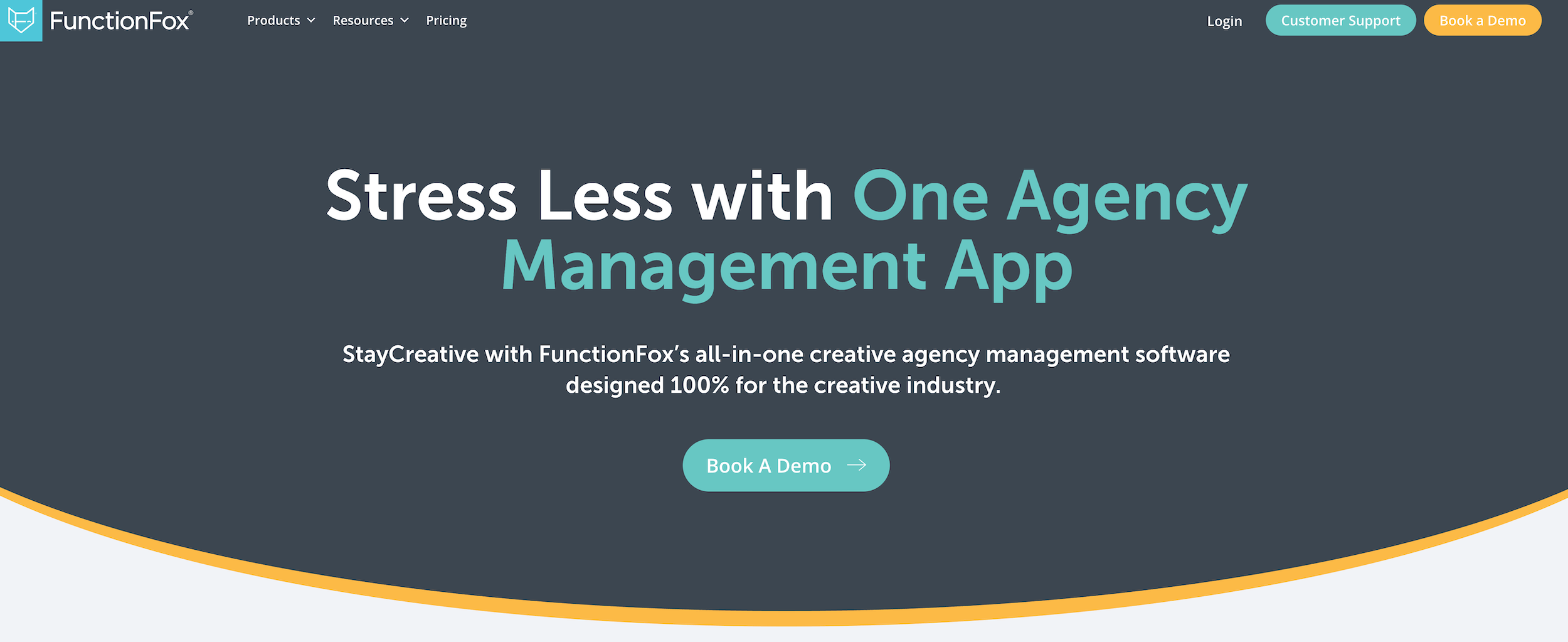
FunctionFox is an agency management system that offers project management, resource planning, retainer management, time and expense tracking, budget tracking, and billing tools. It notably lacks native CRM and accounting solutions, though, and the top-tier plan costs about the same (or more) as competitors that offer more features.
FunctionFox can be worth considering if you’re looking for a Basecamp alternative that integrates project and financial management. It supports unlimited clients and projects and includes handy tools to streamline agency workflows, such as retainer tracking, resource availability reports, and an executive dashboard that provides leadership with a quick visual snapshot of each project's financial status.
Budget tracking is woven into the project lifecycle. You define the budget when a project kicks off (whether hourly, fixed fee, or retainer-based). As the team logs time and submits expenses, those figures update against the budget automatically. You also get automated alerts when spending approaches set thresholds, and reporting tools that let you compare what you quoted against what was actually spent.
One thing that stands out from FunctionFox’s user reviews is their high praise for the vendor’s customer support team. They mention that the team is responsive and prioritizes quick resolutions.
Find more FunctionFox reviews here.
Features
- Project management
- Task management with to-do lists
- Time tracking with timers & timesheets
- Project estimates
- Budget tracking & monitoring
- Retainer tracking
- Resource scheduling
- Gantt charts & project schedules
- Internal communications blog
- Reporting & custom report builder
- Email alerts for project updates & new requests
- Custom job intake forms (for in-house teams)
Pricing
FunctionFox offers a free plan (with a limit of 3 active users and 2 active projects) and three paid plans:
- Classic ($12.75/user/month with a 3-user minimum): Basic project management, timesheets, estimate and budget tracking, retainer tracking, and comprehensive reports.
- Premier ($19.25/user/month with a 3-user minimum): Unlocks actionable to-do lists, Gantt charts and schedules, availability and traffic reports, board view, recurring actions, and an internal project blog.
- In-House ($44/user/month with a 5-user minimum): Adds custom job intake forms, advanced report builder, unlimited custom job fields, and email alerts for new requests.
All paid plans come with a free 30-day trial and 30-day money-back guarantee. They also include free customer support and onboarding, unlimited clients and projects, and 10 GB of file storage.
“Universal” Basecamp Alternatives
The above names are all of the most recommended options for agencies and creative teams because they include strong project, resource, and financial management tools that these users need to power their work.
However, you’ll also often see names like ClickUp, Monday.com, Zoho Projects, Asana, Jira, Trello, and SmartTask when comparing the best Basecamp alternatives because they’re all popular project management tools that serve a variety of industries and users.
We typically suggest agencies and creatives avoid these names as they lack the critical tools required for more advanced project and operational workflows. That said, if you’re interested in comparing more options, we provide a quick overview below of how each tool compares to Basecamp.
You can read more about these names in our 10 Top-Rated Project Management Tools guide.
Trello
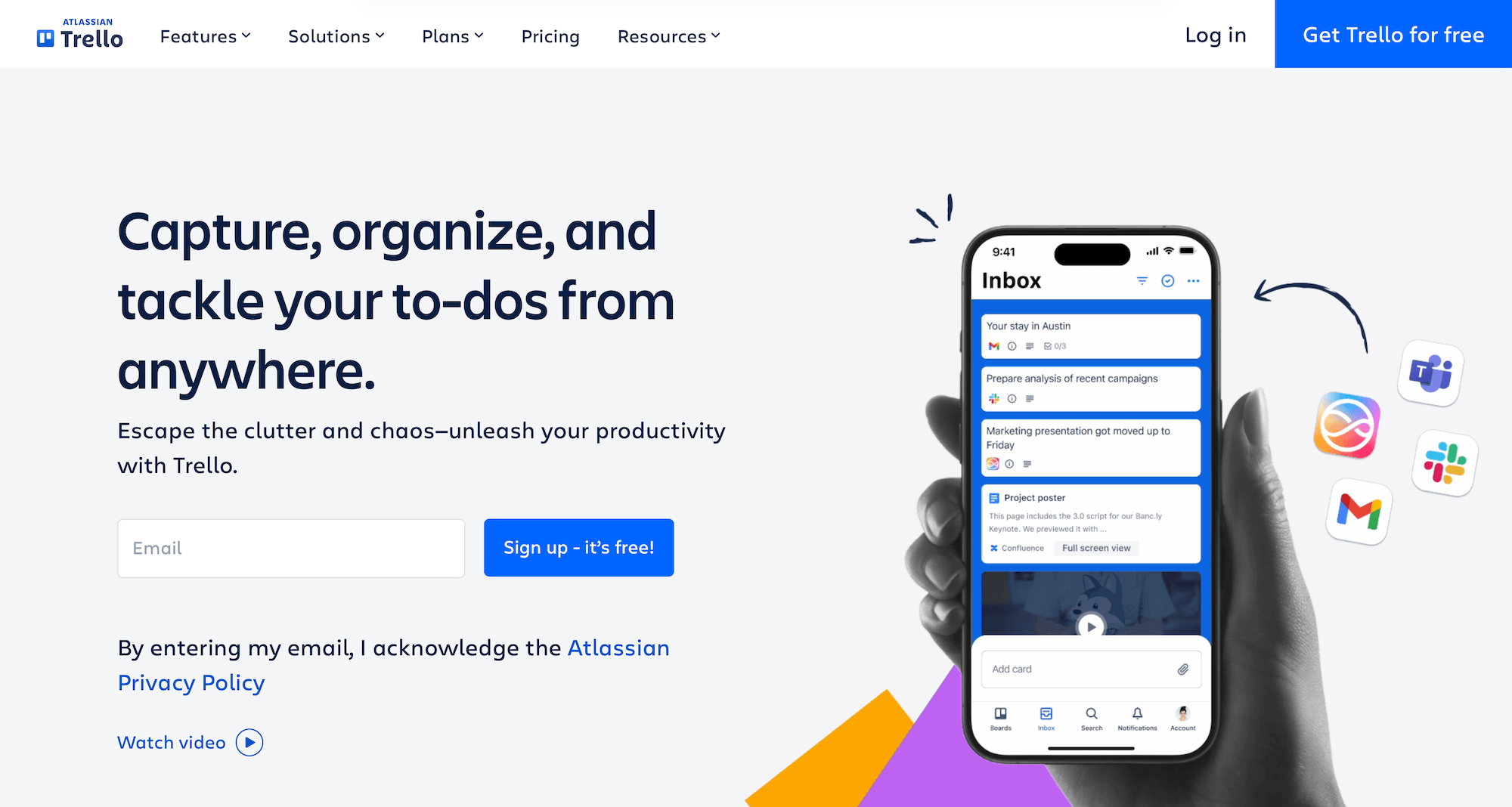
Like Basecamp, Trello is another simple project management tool that requires minimal setup and is really easy to adopt. The main difference is that Trello is super focused on visual task planning through its exclusive Kanban view, while Basecamp offers much more well-rounded communication features.
Trello’s entry-level plans are also more affordable for smaller teams and offer better value overall. However, Basecamp's flat-rate Pro Unlimited plan ($299/month for unlimited users) can flip things over: Trello’s Standard plan only remains the cheaper option if you have fewer than 60 users.
So it really depends on your team size and what sort of features you’re looking to get. Like Basecamp, Trello lacks advanced features such as task dependencies, time tracking, Gantt charts, or project budget tracking.
Asana
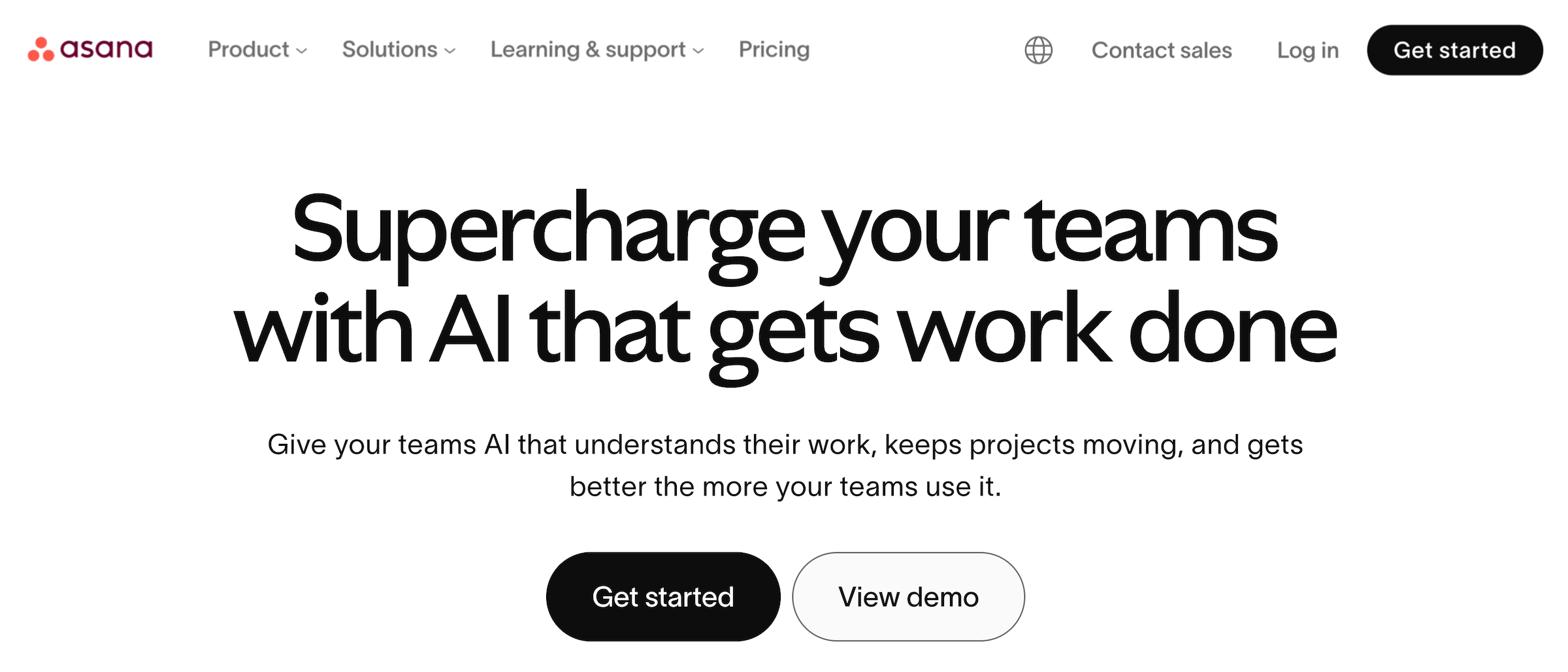
Asana is a popular Basecamp alternative that offers several tools to complement PM workflows under one roof, without being overly complicated to implement.
The full system includes project portfolio management, resource planning, time tracking, expense management, project budget tracking, and project reporting tools. It also includes workflow automation, unlimited subtask nesting, goals for strategic alignment, and a handy AI assistant that can generate project templates and suggest task assignments.
Asana’s super-thorough support options (which include a helpful community forum and on-demand training with video tutorials), extensive project templates, and highly visual interface are among the main reasons users love it.
However, its main drawback is the restrictive package structure: the resource planning tools are mostly locked behind top-tier plans, and users have to pay separately for time and expense tracking.
Read more: Best Asana Alternatives for Marketing Agencies & Creatives
Monday
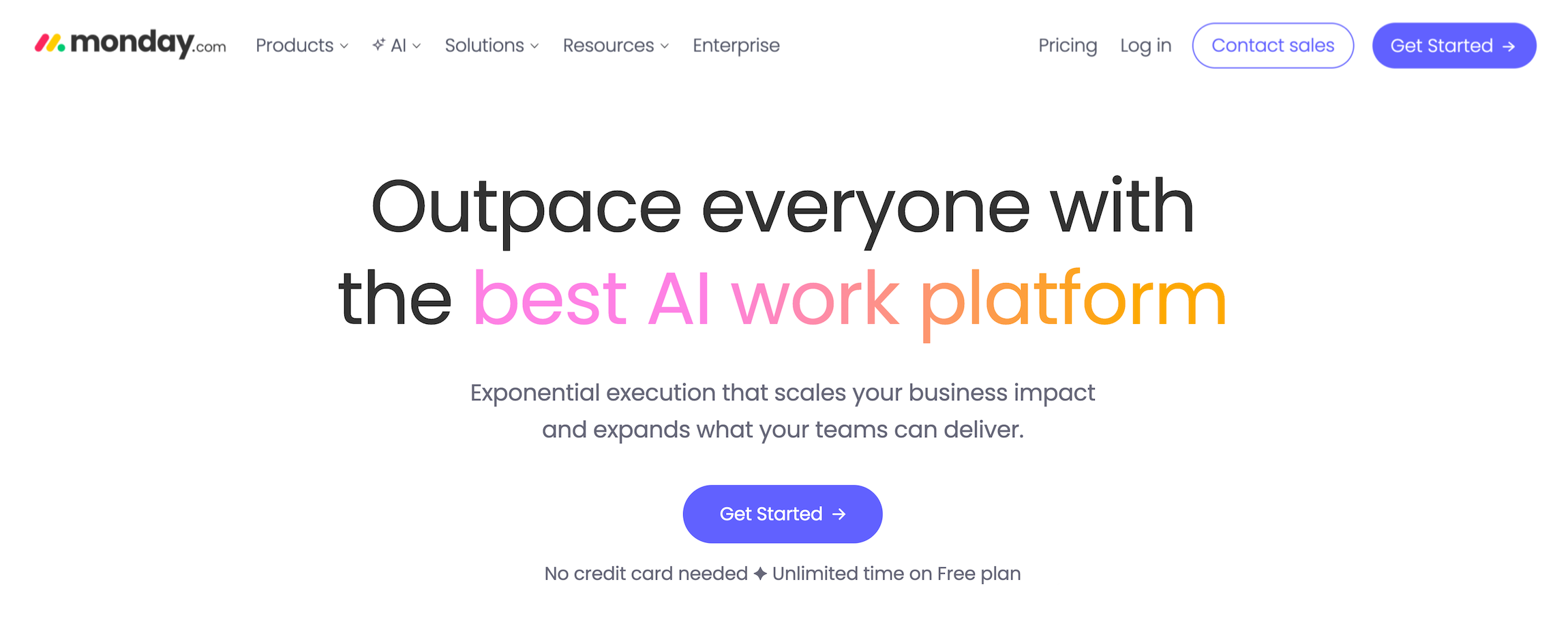
Monday’s project management solution, Work Management, offers more extensive PM features than Basecamp and includes financial management.
On the PM side, it features portfolio management, Kanban boards, Gantt charts, timelines, dashboards, task dependencies, 200+ integrations, and workflow automation.
On the financial side, Work Management has basic budget tracking through its numbers and formula columns — you can set project budgets, log costs against tasks, and build dashboard widgets to visualize spend versus budget.
Another reason to consider Monday is its seamless integrations with other Monday products, especially Monday CRM and Monday Campaigns (email automation). If you’re already using Monday’s other apps, this could be a simple addition to your tech stack.
Where Basecamp pulls ahead is in communication: message boards and real-time chat are native to every project, whereas Monday relies on Slack or Teams integrations for that. Monday also requires more setup time and has a noticeably steeper learning curve.
Read Monday Work Management reviews here.
Read more: Best Monday.com Alternatives for Agencies & Creatives
SmartTask
SmartTask is a lesser-known project management tool that packs in several handy tools: it combines task management, project tracking, time tracking, a built-in CRM, and team communication tools — video conferencing, VoIP calls, chat, and comments — into a single platform. Multiple reviewers compare it directly to Asana in terms of interface and functionality, noting the UI is very similar but at a fraction of the cost.
SmartTask covers the essentials and then some. It offers list, board (Kanban), calendar, and timeline (Gantt) views, task dependencies, subtasks, milestones, custom fields, portfolios for cross-project visibility, and automated check-ins. On the Business plan, you also get loads of other features that Basecamp’s project management suite lacks: workload views for resource management, advanced analytics, and financial features such as billable rate tracking.
However, SmartTask offers fewer third-party integrations than ClickUp, Monday, or Asana, and the mobile app has been flagged by reviewers for occasional bugs and instability. It's also a smaller company, which means less community content, fewer templates, and a thinner support ecosystem, though users consistently praise the support team's responsiveness.
ClickUp
ClickUp positions itself as the "everything app" for work, and the feature list backs that up. It packs in loads of native apps — including time tracking, a document builder, a Slack-like chat for teams, forms, and whiteboards (visual collaboration canvases) — and it supports integrations with over 1000 outside systems.
ClickUp offers more project views than any tool in this category — list, board (Kanban), Gantt, calendar, and timeline views — plus a deep hierarchy of Spaces, Folders, and Lists that lets teams organize work by department, client, or project type. You can also set project goals (measurable targets, such as numerical, percentage, currency, or true/false) and link them to tasks so progress updates automatically as work gets completed.
However, like Basecamp, it falls short on the financial side, lacking native budget and expense-tracking features (although some teams put together a patchwork solution using custom and formula fields).
Overall, ClickUp can be worth considering if you want a comprehensive work management system but don’t need extensive financial and client management. The main thing to keep in mind is that the platform comes with a steep learning curve: getting comfortable with its various tools and tailoring it to your use cases takes time. It’s definitely not ready out of the box.
Read more: Best ClickUp Alternatives for Agencies & the Creative Industry
Jira
While Jira has broadened its offerings over the years to support marketing, design, and operations teams, it’s still best known as project management software purpose-built for software development and engineering teams. It’s also more enterprise-y, with advanced governance, security, and reporting, but the trade-offs are a steep learning curve and pricey top-tier plans.
The platform is centered around issue tracking, sprint planning, and agile delivery. It supports Scrum and Kanban boards out of the box, with backlog management, sprint velocity tracking, burndown and burnup charts, epics, user stories, and customizable workflows that map to how development teams actually ship code.
It also integrates deeply with developer tools — Bitbucket, GitHub, GitLab, Confluence — so commits, pull requests, and documentation are linked directly to tickets.
How to Choose the Right Basecamp Alternative
When comparing Basecamp alternatives, the main factors to consider are:
- Internal delivery focused vs. collaborative project management. Systems like Asana, Monday, and ClickUp meet core PM needs, but they lack the robust vendor and client management tools needed to support agencies' and service providers’ workflows.
It’s also important to consider how the system treats workflows overall. For example, can you track the time spent winning an account, allocate it to the project budget, and then decide whether to write it off or include it in the final invoice? That’s a level of control that you’ll only find in all-in-one work management systems. - Integrated vs. app-based solutions. App-based systems like Teamwork, ClickUp, and Asana rely on integrations (both native and third-party) to support essential workflows, such as budgeting, accounting, and customer relationship management. This can work out well if you don’t want to rip and replace your existing tech stack, and just want a PM tool that works with, say, your QuickBooks and HubSpot set-ups.
But the integration route is both more expensive overall (because of all those subscriptions) and more of a headache. Users consistently complain about having to maintain these integrations over time and deal with glitches, duplicate work, and data transfer issues.
- Scalability. Make sure you vet each platform’s long-term potential, which mostly boils down to:
-
- Core capabilities — Can it handle increasingly complex operations and larger teams, etc.?
-
- How its packages are set up — For example, some systems lock advanced features behind expensive tiers or sell them separately as add-ons, so as your needs evolve and those features become essential, your costs increase significantly.
- Total costs. Directly comparing the subscription costs of different systems doesn’t reflect the true cost of adoption, because these tools can impact your tech budget differently. For example, all-in-one systems can replace several other tools, such as your PM, CRM, time-tracking, and accounting software. Meanwhile, some PM tools charge extra for add-ons and require you to upgrade your plan to unlock essential integrations (e.g., with accounting software). So it’s best to read the fine print and work out the overall impact on your tech stack’s costs.
- Set up and implementation. Prioritize systems that (1) provide support at every stage, from adoption all the way through to post-implementation, and (2) directly service your core workflows, so you don’t have to resort to workarounds or super complex customizations.
FAQs: Basecamp Alternatives
What has replaced Basecamp?
Basecamp remains a popular project management tool for small- to medium-sized businesses and teams, with thousands of users. However, growing teams may replace it with either:
- A more feature-rich, “universal” project management system, such as Asana, ClickUp, or Monday. These systems are worth considering if you want more extensive PM features (e.g., portfolio management, budget tracking) but don’t need a specialized system to support specific project types or other team workflows.
- A full agency and work management system, such as Workamajig, Advantage, Function Point, Ravetree, or Scoro. These systems pack in more value than universal PM systems because they support all essential agency workflows, including project, resource, client, and financial management.
What’s a free Basecamp alternative?
Trello and ClickUp are both popular Basecamp alternatives with generous free plans. Trello’s free tier is pretty balanced overall, featuring unlimited storage (with a per-file cap), unlimited Power-Ups (integrations/add-ons), and enough boards for a small team. The drawback is that it's Kanban-only with no docs or custom fields.
ClickUp’s free plan offers a much broader feature set (docs, multiple views, calendar, sprint management) and unlimited users, but storage is super limited at 100 MB total. Plus, features like Gantt charts and custom fields are capped at a set number of uses before you're prompted to upgrade.
What’s an open-source Basecamp alternative?
OpenProject is a popular and well-rounded open-source alternative to Basecamp. It covers project planning with Gantt charts, task management, meeting coordination, and time and cost tracking. You can run it on your own servers or use their hosted cloud option. EU-based teams, in particular, benefit since the cloud version keeps data within EU borders, in line with GDPR.
There are a couple of other options depending on your needs:
Focalboard, built by the Mattermost team, is a lighter open-source board tool that feels more like Trello or Notion — good if you just want simple Kanban without the overhead of a full project management suite. Taiga leans more toward agile software teams with built-in sprint and backlog management.
Which is better: Trello or Basecamp?
It depends on what you’re looking for. Trello is super popular among teams that mainly want a visual, Kanban-based project management tool. It supports hundreds of add-ons and integrations (Basecamp falls short here) and offers a generous free plan. Meanwhile, Basecamp is stronger on the communications side, and the Unlimited Pro plan is more cost-effective for larger teams.
Both Trello and Basecamp are pretty lightweight, though, lacking more advanced features like task dependencies, budget tracking, and resource planning tools. So teams may use Basecamp or Trello initially, but they often graduate to more robust solutions like ClickUp or Workamajig as they grow.
What is the Microsoft equivalent of Basecamp?
If you're in the Microsoft ecosystem, Planner is the closest thing to Basecamp. It gives you task boards, assignments, and progress tracking at a lighter price point, and it plugs directly into Teams, Outlook, and SharePoint — so you're not adding another tool to your stack. It lacks Basecamp's built-in message boards and communication features, but pairing Planner with Teams covers most of that ground.
Microsoft Project is a more heavy-duty solution that supports advanced project management needs. It features Gantt charts with task dependencies, critical path analysis, and resource allocation across portfolios. It also has a full budgeting and cost-tracking layer where you can set budget resources, enter pay rates, track actual costs against baselines, and monitor cost variances over time.
What features should I prioritize in Basecamp alternatives?
If you’re looking for an end-to-end project management system, prioritize the following features:
- Advanced project planning tools. These should include task management tools that support dependencies and task hierarchies, project estimating tools, and vendor management.
- Resource management tools. Look for a system that lets you assign tasks to resources, track capacity and assignments, manage and compare schedules, and evaluate resource utilization.
- Time and expense tracking. These tools are essential for accurately tracking budgets and evaluating profitability. Make sure the system features tools to track non-labor expenses.
- Real-time project monitoring with automated alerts. These let PMs visually track project progress and intervene proactively when necessary.
- Project collaboration tools. Prioritize systems that facilitate seamless collaboration with all stakeholders, including internal team members, freelancers, production vendors, and clients.
- Project reporting tools. Look for systems that offer deep insights into profitability and performance from different perspectives.
If you’re looking for an end-to-end system to manage all your operations in one place, then prioritize all the features above, plus native accounting, CRM, and financial management capabilities.
What’s the best Basecamp alternative for agencies?
The best Basecamp alternative for agencies lets you manage all agency operations in one place — including project, resource, client, and financial management.
Workamajig and Advantage are the most comprehensive: they feature native project management, resource planning, time tracking, expense tracking, CRM, client management, and accounting software under one roof. Then, you’ve got runner-ups like Function Point and Ravetree that offer the same core features minus accounting software.
Switching to an all-in-one agency management system simplifies your tech stack, reduces costs, streamlines operations, eliminates duplicate work, and unlocks data-backed insights to guide strategic decisions.
Getting Started with Workamajig
For agencies ready to upgrade from basic project management to complete operational oversight, Workamajig has got your back with an all-in-one work management system to support all of your agency’s moving pieces. See it for yourself by requesting a free, personalized demo.
Related reads: